

How to Ask for an Appointment in an Email That Gets a "Yes"
You wrote the email, hit send, and refreshed your inbox 14 times. Nothing. Here's the uncomfortable truth: 61% of decision makers actually prefer email over cold calls - so the channel isn't the problem. Your email is.
Recipients spend 5-7 seconds scanning a cold message before deciding to engage or delete, and 71% ignore emails that don't feel relevant to them. After sending thousands of outbound emails, we've found the ones that book meetings all share three traits: they're short, they're specific, and they make saying "yes" easier than saying "no." That's really all there is to it.
Stop obsessing over politeness. Start obsessing over clarity.
What 5.5 Million Emails Reveal About Subject Lines
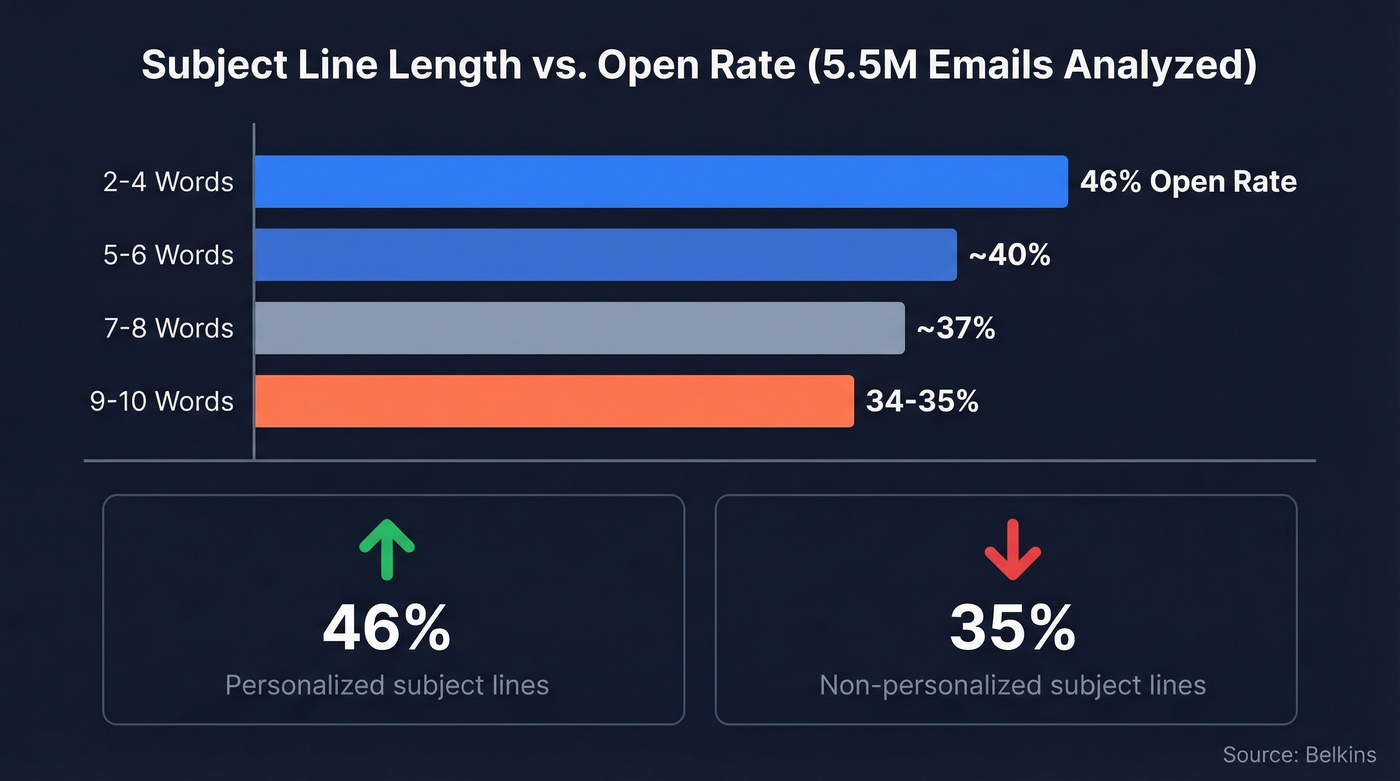
Your subject line is the entire email for most recipients. A Belkins study of 5.5 million emails found the sweet spot is 2-4 words, pulling a 46% open rate. Cross seven words and opens drop. Hit 9-10 words and you're down to 34-35%.
Personalization matters more than cleverness. Personalized subject lines hit 46% opens versus 35% without, and reply rates jumped from 3% to 7%. Question-based subjects were the top performer overall at 46% opens.
Here's what works for appointment request emails:
- "Quick question, {FirstName}" - short, personal, curiosity-driven
- "15 min this week?" - direct, low commitment
- "{Company} + {YourCompany}" - signals partnership, not pitch
- "Saw your {trigger} - thoughts?" - relevance-first
- "Time for a call?" - question format, under four words
Skip urgency words like "ASAP" or generic openers like "Hello, friend." Both drag open rates below 36%.
Anatomy of an Email That Books Meetings
Every appointment email that converts follows three principles: relevance, timing, and clarity. Miss any one and you're in the trash folder.
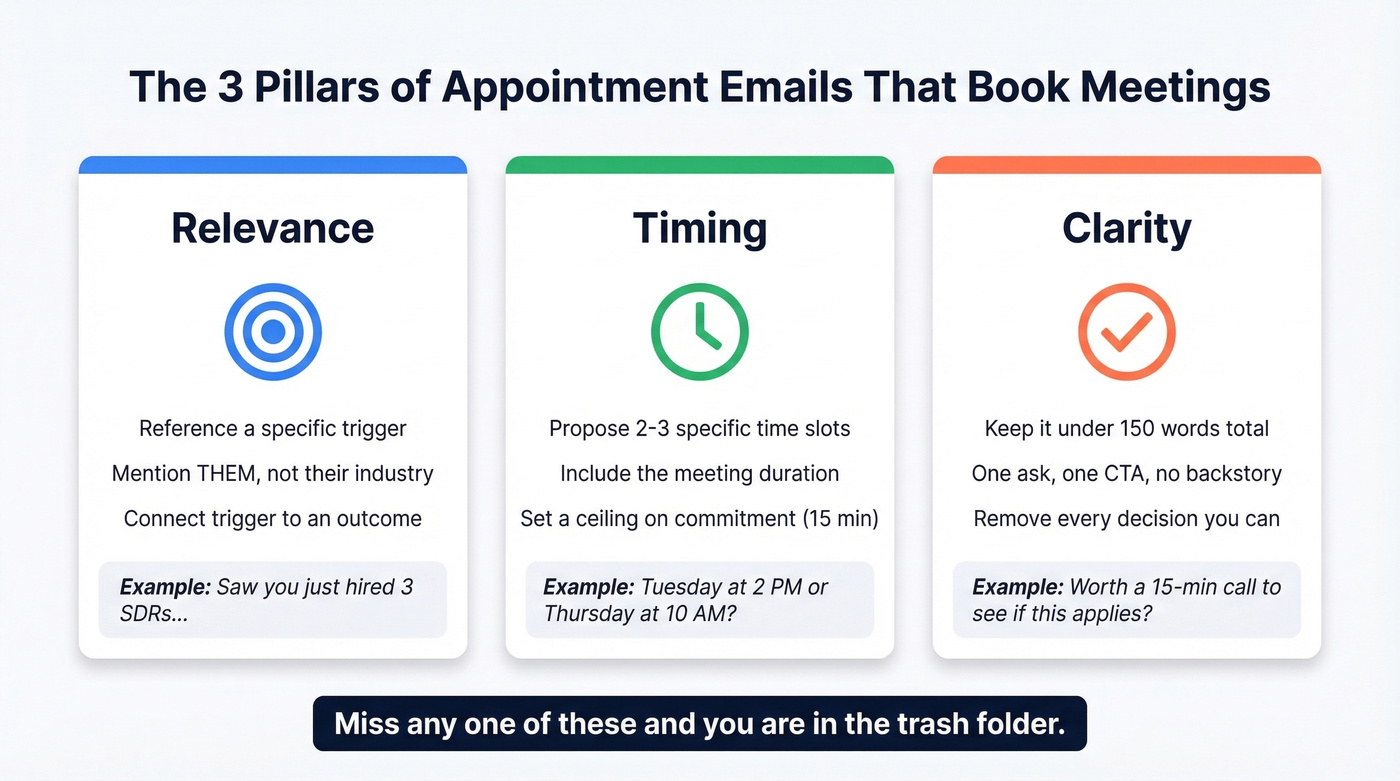
Relevance means the recipient immediately understands why you're emailing them specifically. Not their company. Not their industry. Them. Reference a trigger - a recent hire, a funding round, a product launch - and connect it to a specific outcome you can help with. (If you need a system for this, see sales triggers.)
Timing isn't about which day you send. It's about proposing a specific window. Don't write "let's find a time." Propose two or three specific slots a week out and ask which works best. Include the meeting duration - "15 minutes" reduces friction dramatically because it sets a ceiling on commitment. If you're testing send windows, use this best time to send cold emails breakdown.
Clarity means keeping the entire email under 150 words. State what you want, why it matters to them, and exactly what you're asking for. One ask. One CTA. No paragraphs of backstory. Every decision you remove from the recipient's plate - when to meet, how long, what it's about - reduces cognitive load and increases the chance they say yes. For more on structure, see email copywriting.
Appointment Email Templates You Can Steal
One note before the templates: Belkins found that recipients often skip bulleted lists in outreach. These templates use concise paragraphs instead.
Cold Outreach
Trigger-based openers prove you did your homework. A quantified benefit gives a reason to care, and two specific times eliminate the scheduling back-and-forth. If you've never written an appointment request email before, start here. You can also borrow more cold email sequence patterns.
Hi {FirstName},
I noticed {Company} just {trigger - e.g., opened a new office / hired 3 SDRs / launched a new product line}. When teams hit that stage, {specific pain point} usually becomes a bottleneck.
We helped {similar company} cut {metric} by {percentage} in {timeframe}. Worth a 15-minute call to see if that applies to you?
I'm open Tuesday at 2 PM or Thursday at 10 AM ET. Either work?
Warm Lead / Inbound Follow-Up
Hi {FirstName},
You {downloaded our guide / attended our webinar / visited our pricing page} last week - glad it caught your eye. Most teams exploring {topic} are trying to solve {core problem}.
I'd love 15 minutes to walk through how we approach it differently. Does Wednesday at 11 AM or Friday at 1 PM work for you?
This works because it references their action so it doesn't feel cold. Short value prop, two time options, done. If you want more variations, use these sales follow-up templates.
Formal / Client Template
Let's look at a before-and-after to show why specificity matters:
Before: "Hi Sarah, I'd like to schedule a meeting to discuss our partnership. Let me know when you're free."
After:
Dear {FirstName},
I'd like to schedule a 30-minute meeting to discuss {specific agenda - e.g., Q3 renewal terms / project scope for the integration}. I've prepared {deliverable} and want to walk through it together.
Would Monday the 14th at 9 AM or Wednesday the 16th at 2 PM suit your schedule?
The "before" version forces the recipient to figure out the topic, the duration, and the timing. The "after" version handles all three. That difference is why one gets a reply and the other sits unread.
Internal Meeting Request
Hey {FirstName},
Need 20 minutes to align on {topic} before the {deadline/event}. I've got context from {source} that'll make the decision easier.
Does tomorrow at 3 PM work? If not, I can grab time Thursday morning - just let me know which is better.
Direct, brief, gives context for urgency without being pushy. Two proposed times with a clear fallback.

The perfect appointment request email means nothing if it bounces. Prospeo gives you 98% verified emails across 300M+ professional profiles - so your carefully crafted meeting request actually reaches the decision-maker's inbox, not a dead address.
Stop perfecting emails that bounce. Start sending to verified addresses.
Should You Include a Scheduling Link?
Look, scheduling links can kill your reply rate. A practitioner on r/sales reported booking zero meetings when including a Calendly link versus "a couple" when proposing manual time slots. In our experience, scheduling links work after interest is established, not before. The link feels like you're making the recipient do the work - click through, find a time, fill out a form.
The rule is simple. Propose 2-3 specific times in your first email. Only share a scheduling link after they've expressed interest and you need to coordinate logistics. (If you're automating this, see automated cold email scheduling.)
For senior executives, consider emailing their assistant directly. It respects their scheduling protocol and often gets faster results than going through the exec's inbox.
The 3-5-7 Follow-Up Rule
Most people give up after one email. That's a mistake - and honestly, it's the single biggest reason we see outbound campaigns underperform. Only 2% of deals close on the first attempt. That jumps to 10% with four follow-ups, and up to 70% of responses come after the second or third email.
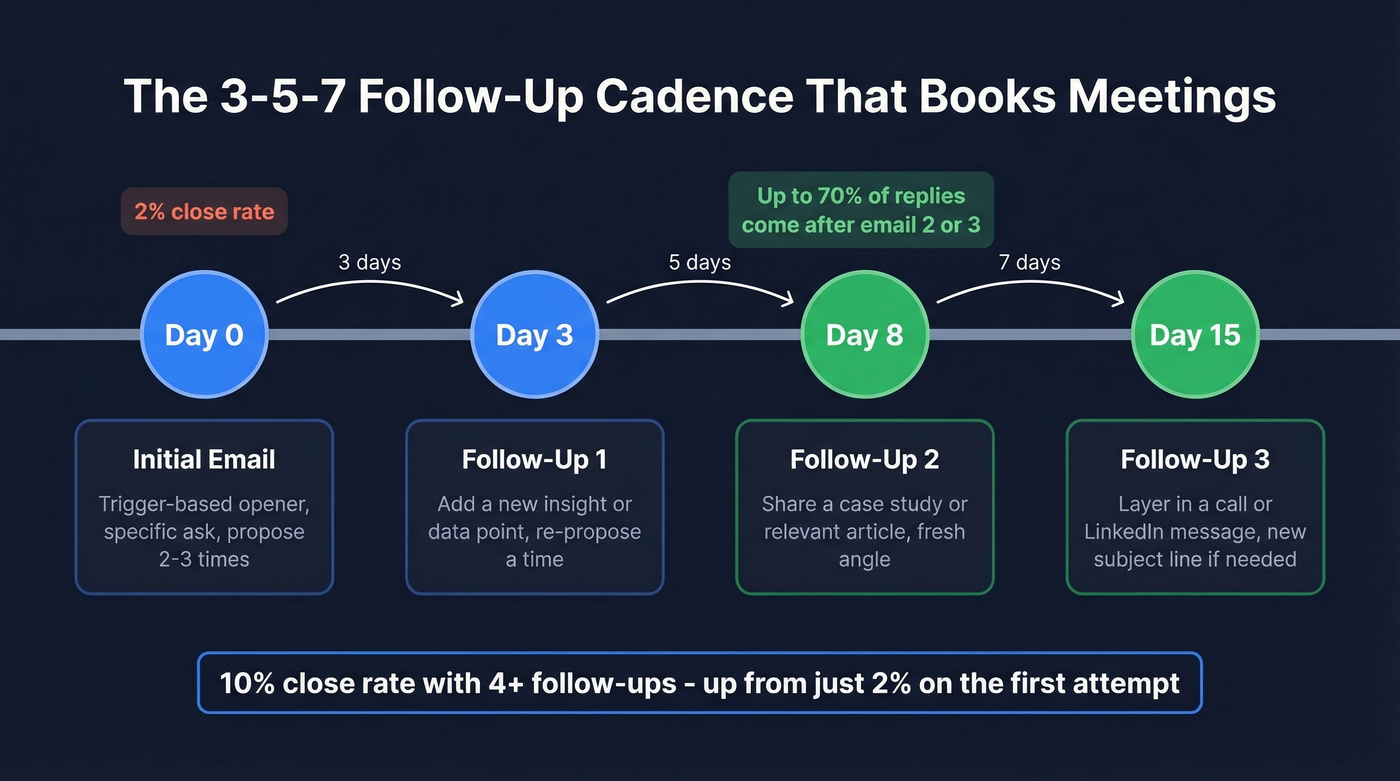
Use the 3-5-7 cadence: follow up after 3 business days, then 5 more days, then 7 more days. Each follow-up should add value - a relevant insight, a case study, a new angle - not just "checking in." When email alone isn't working, layer in a call or a message on a professional network. For deeper guidance, see when should you follow up on an email.
Here's a follow-up that works:
Hi {FirstName}, wanted to share this - {relevant article/data point} that connects to what I mentioned last week. Still happy to walk through how it applies to {Company}. Does next Tuesday at 10 AM work?
Stay in the same thread if your original email was recent and the context is clear. If it's been more than two weeks or you have a new angle, start a fresh email with a new subject line. If you need more options, use these cold email follow-up templates.
Mistakes That Kill Your Reply Rate
Typos and sloppy formatting. 48% of professionals judge typos in email more harshly than typos on Slack or Teams. Proofread. Then proofread again. (If you want help tightening CTAs, see email call to action.)
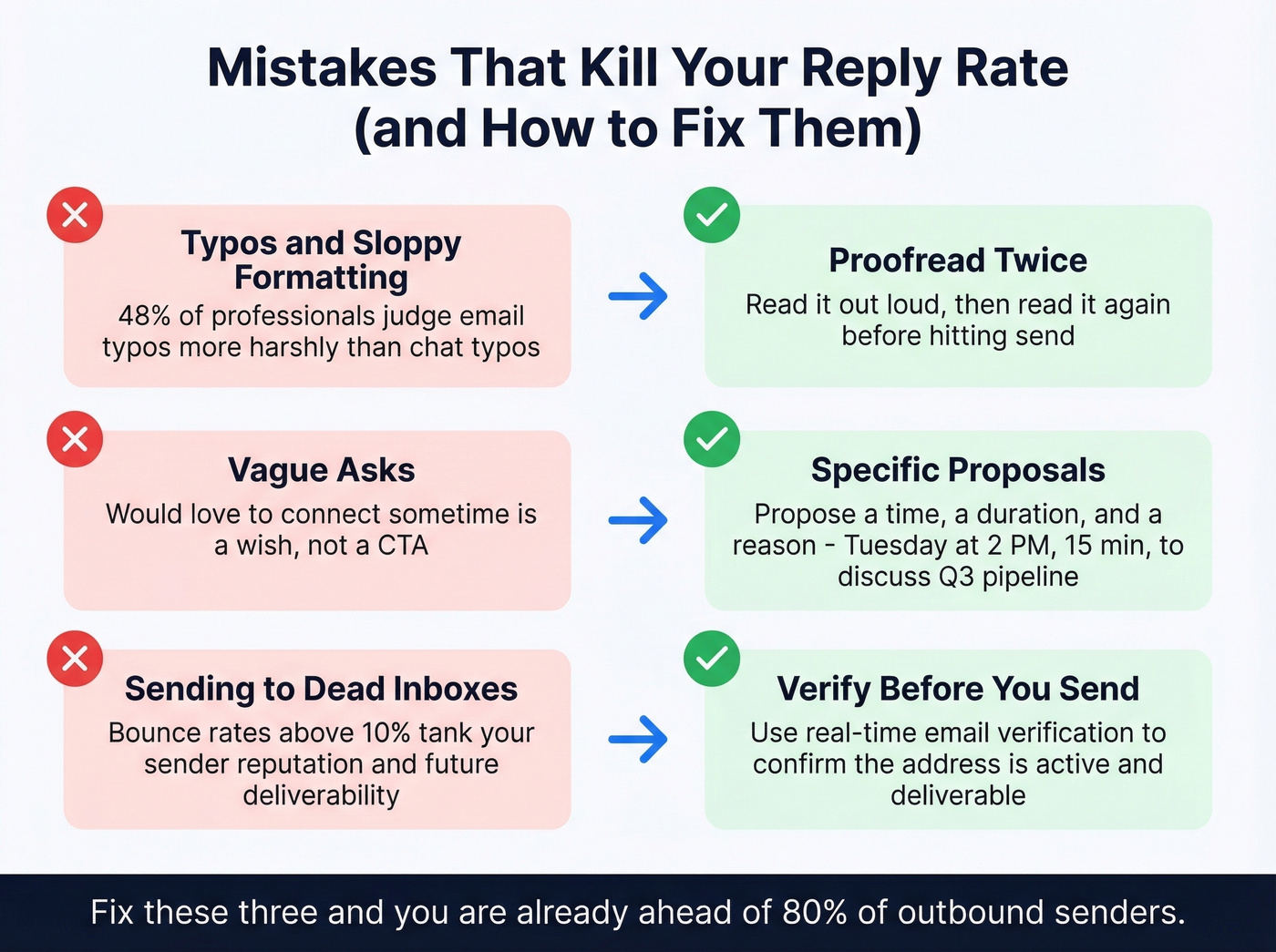
Vague asks. "Would love to connect sometime" isn't a CTA. It's a wish. Propose a specific time, a specific duration, and a specific reason.
Writing to a dead inbox. Your email was great. It just went to an address nobody checks anymore. We've seen bad data kill entire outbound campaigns - bounce rates above 10% tank your sender reputation and drag future deliverability down with it. Before you send any appointment email, verify the address is active. Prospeo's email finder checks addresses in real time with 98% accuracy, and the free tier covers 75 verifications per month. If you're troubleshooting bounces, start with email bounce rate and then improve sender reputation.
Trigger-based emails book more meetings - but you need real contact data to send them. Prospeo tracks job changes, funding rounds, and hiring signals across 300M+ profiles, then delivers verified emails at $0.01 each with a 7-day data refresh.
Find the trigger, find the email, book the meeting - all in one platform.
FAQ
How long should an appointment request email be?
Under 150 words. Recipients scan for 5-7 seconds, so lead with relevance, state your ask, and propose a specific time. Cut everything else.
How many follow-ups should I send?
Three follow-ups using the 3-5-7 cadence (3 days, then 5, then 7). Up to 70% of responses come after the second or third email, so quitting after one attempt leaves meetings on the table.
Should I use a scheduling link in my first email?
No. Propose 2-3 specific times instead. Scheduling links in a first touch add friction and reduce reply rates. Save the link for after someone's already said they're interested.