

How to Build Follow-Up Email Sequences That Actually Get Replies
Your SDR team sent 3,000 emails last month. Open rates looked decent - 28%, maybe 30%. Reply rate? Under 2%. Meetings booked? Eleven. And here's the uncomfortable truth across the industry: even teams hitting 5-10% reply rates only convert 0.5-2% into booked meetings. The gap between replies and revenue isn't about copy. It's about everything underneath it - the infrastructure nobody configured, the contact list nobody verified, and the linear sequence that treats every prospect the same regardless of behavior.
Most guides start with subject line tips. This one starts where the problems actually live: DNS records, data quality, and branching logic. Then we'll get to copy, because copy matters. It just matters less than the foundation it sits on.
What You Need Before Anything Else
Three things determine whether your sequence works or dies in spam:
- Infrastructure first. SPF, DKIM, DMARC configured on every sending domain. Separate domains for outbound. Two to four weeks of warmup before you send a single cold email.
- Clean data. Verify your contact list so bounce rates stay under 2%. Bad data tanks sender reputation faster than bad copy ever will. (If you need a deeper walkthrough, start with email address verification.)
- Sequence architecture. Three to seven touches over 14-21 days. Varied angles, interest-based CTAs, and branching logic that routes prospects based on what they actually do. For more patterns, see email sequence best practices.
Fix Your Infrastructure First
Nothing else matters if your emails land in spam. Before you write a single follow-up, get the technical foundation right. If you want the full setup checklist, use this cold email setup guide.
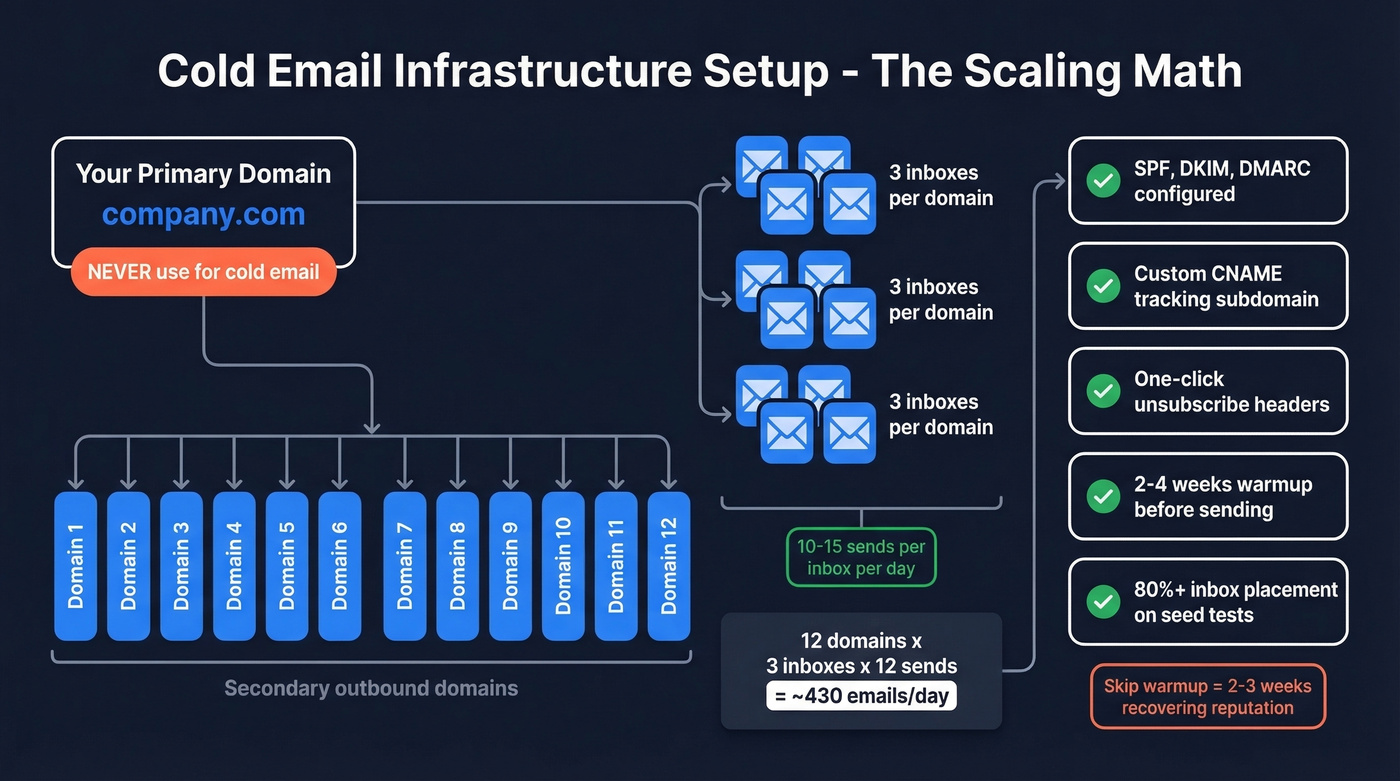
DNS authentication is non-negotiable. Google, Yahoo, and Microsoft have enforced bulk-sender requirements around SPF, DKIM, and DMARC since mid-2025, and enforcement has only tightened in 2026. If you haven't configured these for every sending domain, your emails are getting filtered. Add one-click unsubscribe headers per RFC 8058 while you're at it.
Never send cold email from your main business domain. Buy secondary domains - variations of your primary - dedicated to outbound. If one gets burned, your company's main domain stays clean. This is the single most common mistake we see teams make, and it's the most expensive to fix after the fact. (More detail: cold email domain setup.)
The scaling math matters. Run two to three inboxes per domain, sending 10-15 emails per day per inbox. One domain with three inboxes gets you 30-45 sends per day. To hit 400 emails daily, you need roughly 10-12 domains. That sounds like a lot, but it's the cost of doing outbound at scale without destroying deliverability. As one practitioner on r/coldemail put it: "Warmup isn't optional - it's the price of admission." If you're unsure about caps, follow email pacing and sending limits.
Warmup takes patience. New domains and inboxes need two to four weeks of warmup. Start at 5-10 emails per day, ramp gradually over four to six weeks, and keep warmup running even after you launch campaigns. In our experience, teams that skip warmup lose two to three weeks recovering their sender reputation - the exact time they thought they were saving. Test inbox placement before scaling. You want 80%+ inbox placement on seed tests before increasing volume.
One more detail people skip: set up a custom CNAME tracking subdomain. Shared tracking domains pool your reputation with everyone else using that service. A branded subdomain isolates yours.
Clean Your Data Before You Send
You can have perfect infrastructure, a brilliant sequence, and compelling copy - and still crater your sender reputation with a dirty list. Bounce rates above 2% trigger spam filters at every major provider. Above 5%, some providers start pausing your account entirely. If you're troubleshooting, start with email bounce reasons.
This isn't hypothetical. Meritt was running a 35% bounce rate before switching their data source. After cleaning up, they dropped under 4% and tripled their pipeline from $100K to $300K per week. Stack Optimize built an entire agency to $1M ARR by keeping client deliverability above 94% with bounce rates under 3% - zero domain flags across all clients.
Before activating any sequence, run your list through Prospeo's email verification. Every email goes through a 5-step verification process that includes catch-all handling, spam-trap removal, and honeypot filtering - delivering 98% accuracy with a 7-day data refresh cycle. It plugs natively into Instantly, Lemlist, Smartlead, and HubSpot, so verification fits directly into your existing workflow without manual exports.


Every bounced email in your sequence chips away at your sender reputation - the infrastructure you just spent weeks building. Prospeo's 5-step verification with catch-all handling and spam-trap removal keeps bounce rates under 2%, so your follow-ups actually land.
Don't burn your domains with bad data. Verify before you sequence.
Map Your Sequence Architecture
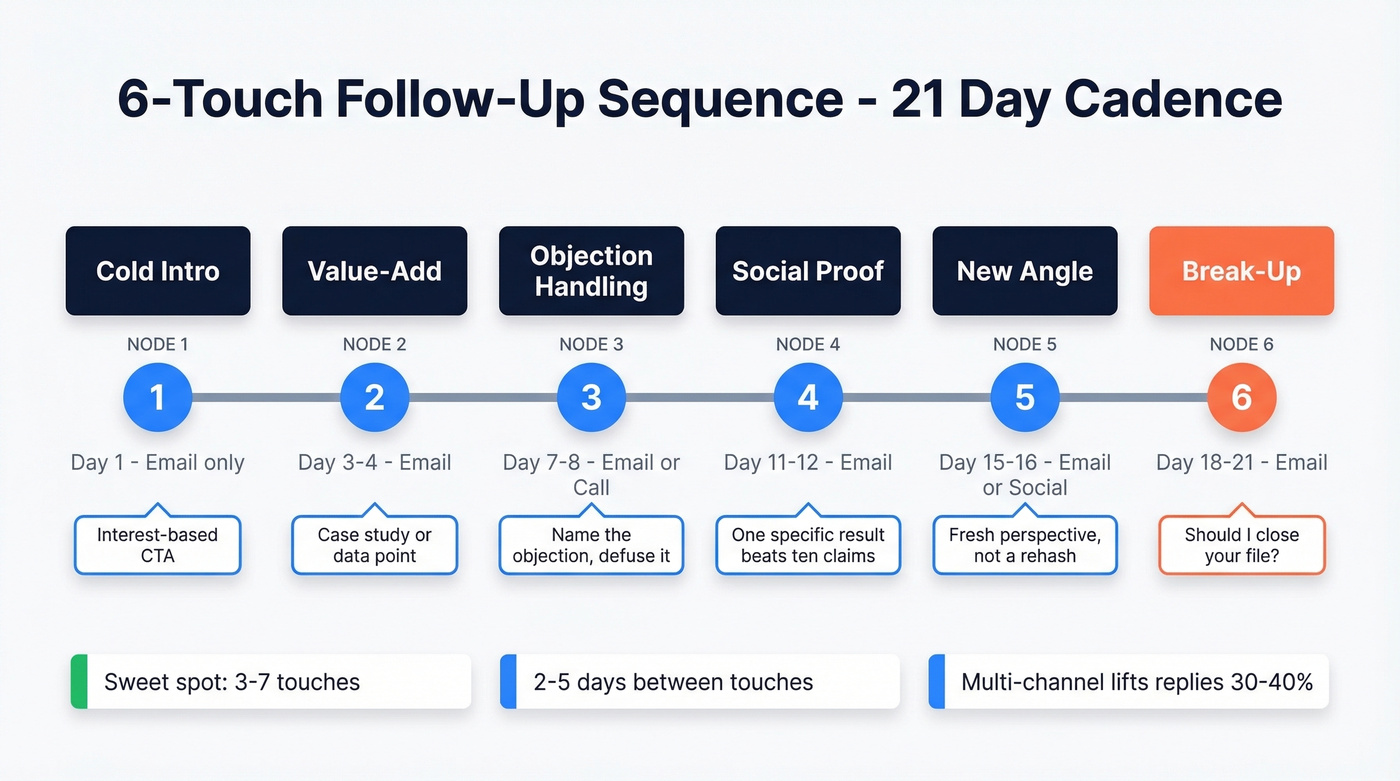
Most sequences fail because they're either too short or too long with no variation. The sweet spot for cold outbound is three to seven touches over 14-21 days, with two to five days between each touch. If you want more swipeable structures, use these email sequence examples.
Here's a useful heuristic from Outreach's sequence data: if your last step's reply rate is still above 3%, your sequence is too short. Add another touch.
| Touch | Purpose | Channel | Timing |
|---|---|---|---|
| 1 | Cold intro | Day 1 | |
| 2 | Value-add | Day 3-4 | |
| 3 | Objection handling | Email or call | Day 7-8 |
| 4 | Social proof | Day 11-12 | |
| 5 | New angle | Email or social | Day 15-16 |
| 6 | Break-up | Day 18-21 |
Don't limit yourself to email-only sequences. Multi-channel sequences combining email, phone, and social touches lift reply rates 30-40% versus single-channel outreach. Each touch should bring a different angle - never repeat the same message with "just following up" slapped on top.
Here's the thing: if your deal size sits below five figures, you probably don't need six touches. Three to four emails with one phone call will get you 80% of the results at half the operational complexity. Save the elaborate multi-channel orchestration for deals worth the effort.
Building a 6-touch sequence means nothing if you're emailing outdated contacts. Prospeo refreshes 300M+ profiles every 7 days - not every 6 weeks like competitors - so your follow-ups reach real people at current companies.
Start with fresh data and watch your reply rates climb.
Write Each Email in the Sequence
This is where most guides start. It shouldn't be - infrastructure and data quality come first. But once those are solid, copy is what separates a 3% reply rate from a 7% one. If you want more tested copy patterns, pull from these cold email examples.
The Cold Intro (Touch 1)
Subject: Quick question about [specific thing]
Hey [First Name],
Noticed [specific observation about their company]. We helped [similar company] [specific result] - figured it might be relevant for your team.
Open to hearing more?
[Your name]
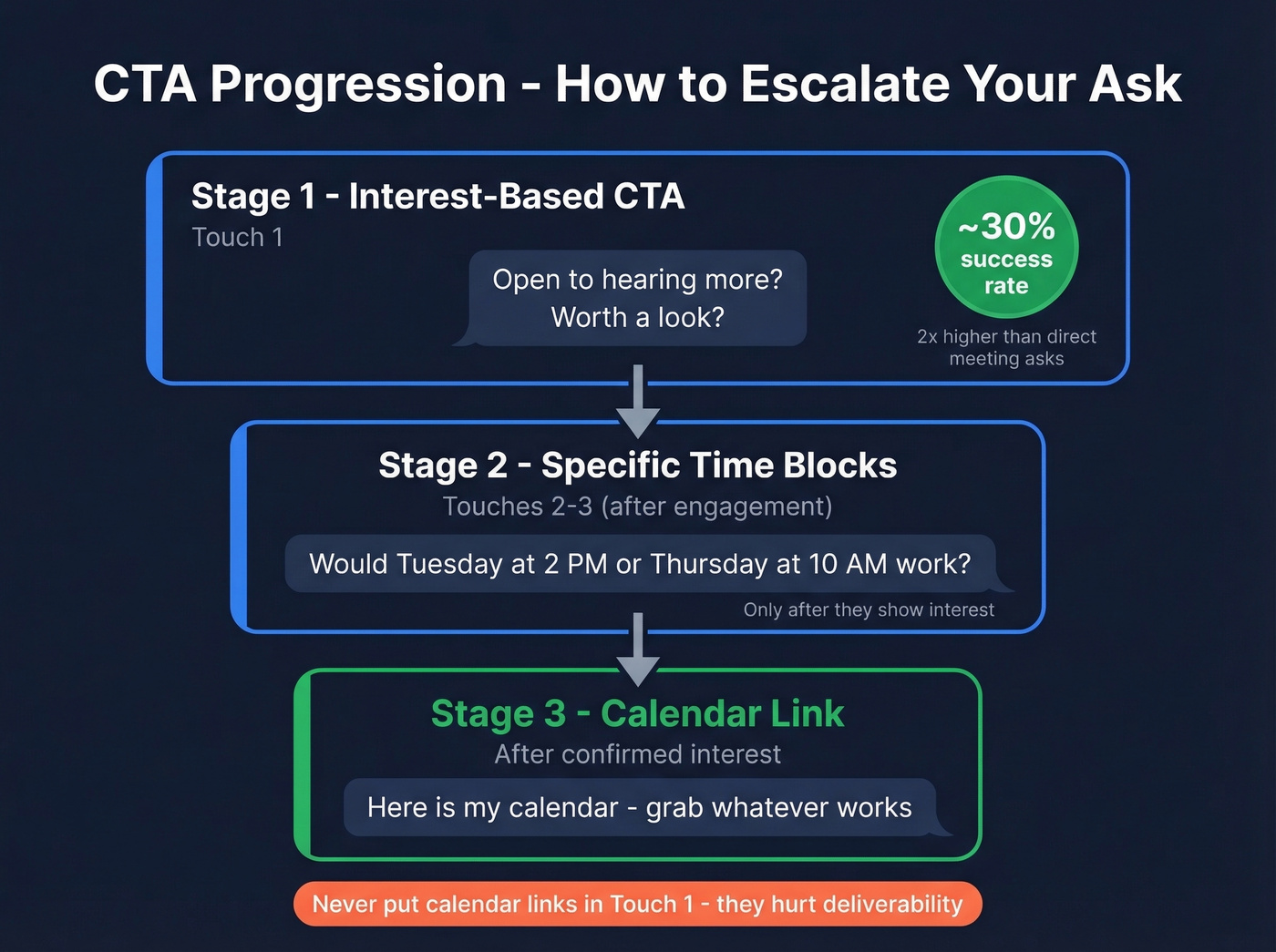
Keep it to three to five sentences. No links - calendar links and tracked URLs in your first cold email hurt deliverability. No signature images, no social links, no legal disclaimers. Clean text only. (More on structure: cold email format.)
Interest-based CTAs like "Open to learning more?" or "Worth a look?" hit roughly 30% success rates - about double what direct meeting asks achieve. You're lowering the commitment threshold. The meeting ask comes later.
Value-Add and Objection Handling (Touches 2-3)
Here's what to do versus what most reps actually do:
| Don't | Do |
|---|---|
| "Just checking in" | Share a relevant case study or data point |
| "Wanted to circle back" | Reference a specific challenge their company faces |
| "Did you see my last email?" | Address the most common objection head-on |
| Ask for a meeting immediately | Propose two specific time blocks after they show interest |
Touch 2 works best as a value-add - a relevant case study, an industry stat, or a resource that demonstrates expertise. Touch 3 should tackle the objection you know is sitting in their head. If you sell to mid-market SaaS companies, that objection is probably "we already have something for this" or "not a priority right now." Name it. Defuse it. Move on.
The CTA progression across your sequence should follow three stages. Start with an interest-based CTA like "Open to hearing more?" in Touch 1. Move to specific time blocks - "Would Tuesday at 2 PM or Thursday at 10 AM work?" - in Touches 2-3 after they engage. Only after they've confirmed interest should you drop a calendar link.
Social Proof (Touch 4)
One specific result beats ten vague claims. "We helped [company in their industry] cut [metric] by [number] in [timeframe]" is more compelling than "hundreds of companies trust us." We've tested this across dozens of campaigns - the more specific the proof point, the higher the reply rate. Two to three sentences is all you need.
The Break-Up Email (Final Touch)
The psychology here is simple: scarcity and closure. People respond when they think the conversation is ending.
Subject: Should I close your file?
Hey [First Name],
I've reached out a few times and haven't heard back - totally fine. I'll assume the timing isn't right and close out your file.
If anything changes, feel free to reach out. Happy to pick this up whenever it makes sense.
[Your name]
Casual tone, no guilt, no passive aggression. The "close your file" framing creates just enough urgency without being pushy. We've tested this framing against alternatives like "last chance" and "final follow-up" - the file-closing angle wins every time because it feels professional rather than desperate.
Add Branching Logic to Your Sequence
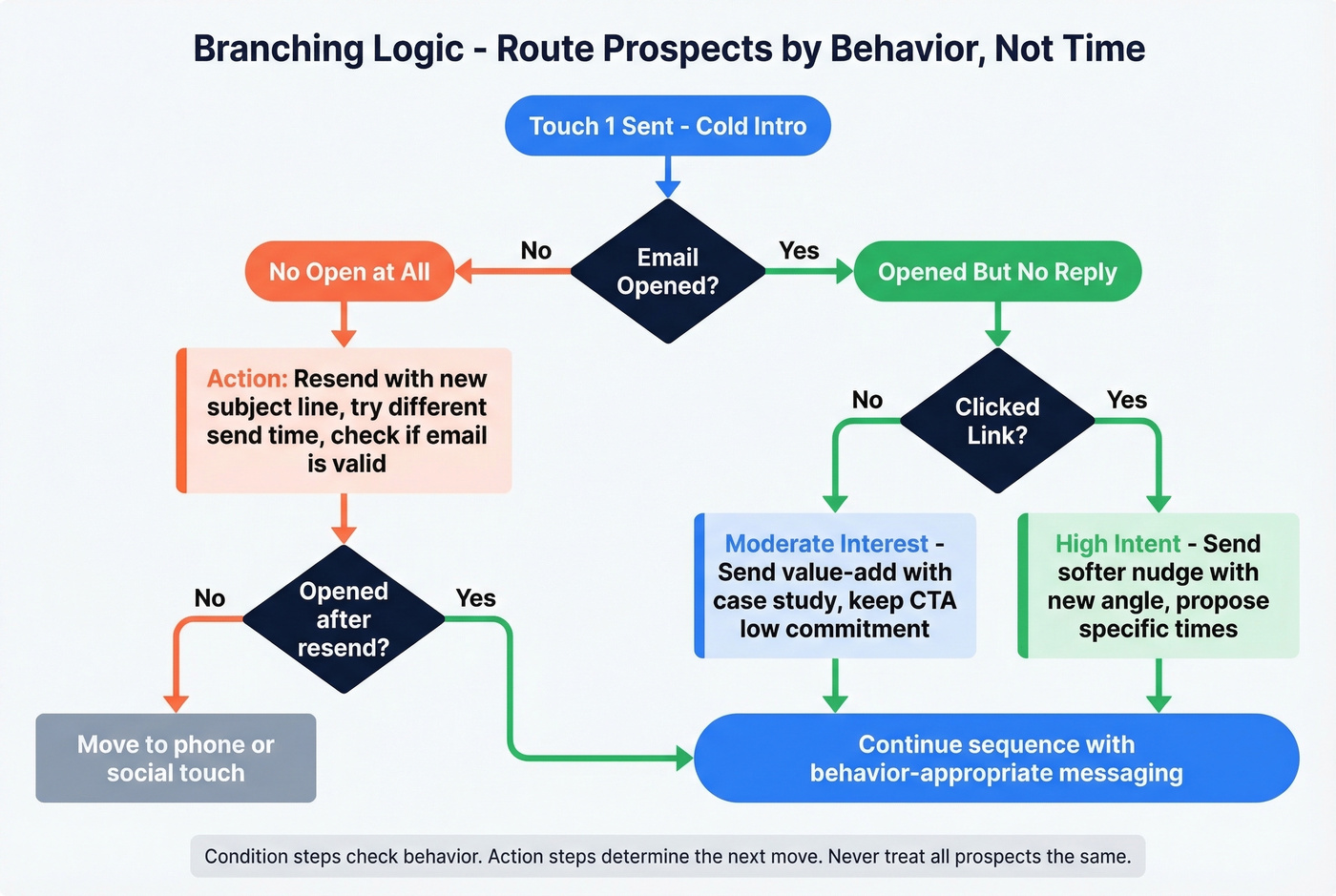
Linear sequences trigger steps by time. That's the problem. A prospect who opened every email but didn't reply needs a different touch than someone who never opened at all. Branching logic routes prospects based on what they actually do - and it's what separates a basic automated sequence from one that converts. If you're building this in tooling, compare outbound email automation tools.
Condition Steps vs. Action Steps
Think of your sequence as a decision tree. A condition step checks whether something happened: email opened, link clicked, connected on social. An action step determines what happens next based on the result. Step 4 branches into 4.1 (yes) and 4.2 (no), each leading to different follow-up paths.
Key Branches to Build
Opened but no reply. They're interested enough to read but not compelled enough to respond. Send a softer nudge with a completely new angle - don't repeat your original pitch.
No open at all. Your subject line failed, or you landed in spam. Change the subject line entirely. If it happens twice, switch channels - try a phone call or social touch.
Email bounced. Skip all remaining email steps for this contact. Route them to phone or social outreach. This is where clean data matters most - a high bounce rate means your branching logic is constantly routing people to fallback channels instead of the primary path, which defeats the purpose of building the sequence in the first place.
Connected on social. If a prospect accepts a connection request, shift to a DM-first path. The email sequence becomes supplementary rather than primary.
Branching eliminates what practitioners call "campaign sprawl" - the mess of duplicate campaigns and manual handoffs that happens when you try to handle exceptions outside the sequence. One well-designed sequence with branching replaces three or four linear ones.
Benchmarks: What Good Looks Like
Most benchmark articles mix methodologies and make everything look achievable. Here's what average versus top-performer actually looks like, based on Outreach's customer averages and practitioner-compiled data from r/b2b_sales - real campaign numbers, not vendor marketing. For a deeper breakdown, use these B2B cold email reply rates.
| Metric | Average | Top Performer |
|---|---|---|
| Open rate | 27-35% | 32%+ |
| Email reply rate | 2.9-6% | 7.3%+ |
| Positive reply rate | 2-4% | 4%+ |
| Meeting booking | 1-2% | 2.5%+ |
| Bounce rate | ~2.8% | <2% |
| Opt-out rate | ~1.1% | <1% |
One important distinction: email reply rate measures replies to emails only. Prospect reply rate measures replies across all channels. Outreach puts the target for prospect reply rate at 12%+. If you're running a multi-channel sequence, that's the number to aim for.
If your reply rate is below 2%, don't rewrite your copy first. Check your bounce rate and inbox placement. We've seen teams double reply rates just by cleaning their list and fixing DNS records - no copy changes at all.
Compliance You Can't Skip
Sending follow-up sequences without understanding compliance is like driving without insurance. You might be fine for a while, but the downside is catastrophic. If you're operating in the EU, read GDPR cold email B2B.
| Requirement | CAN-SPAM | GDPR | CCPA |
|---|---|---|---|
| Consent model | Opt-out | Legit interest / consent | Opt-out of sale/sharing |
| Max penalty | $53,088/email | 20M EUR or 4% revenue | $7,500/violation |
| Unsubscribe | Required, honor in 10 days | Required | Required |
| Physical address | Required | N/A | N/A |
| Data access rights | No | Yes | Yes |
The operational rules that matter for sequences: include an unsubscribe mechanism in every email, include your physical postal address for CAN-SPAM compliance, and honor opt-outs within 10 business days. Spam complaint rates above 0.1% hurt delivery; above 0.3%, providers start blocking you.
One risk worth flagging: regulators are increasingly scrutinizing AI-enriched data - job titles, intent signals, and behavioral data pulled from public profiles. If you're using enrichment tools, make sure your data sources have a lawful basis. When your audience spans multiple jurisdictions, segment by geography and apply the strictest standard.
Tools for Building Follow-Up Sequences
The right tool depends on your team size, budget, and whether you need enterprise workflows or just need to get emails out the door. If you're comparing platforms, start with email campaign software.
| Tool | Best For | Price Range | Key Feature |
|---|---|---|---|
| Outreach | Enterprise teams | ~$100-$200+/user/mo | Deepest branching logic and analytics |
| Salesloft | Enterprise teams | ~$100-$150+/user/mo | Multi-channel orchestration |
| Apollo | SMBs and startups | Free-$99/user/mo | Built-in database + sequencing |
| Lemlist | SMBs and startups | ~$59-$99/user/mo | Image/video personalization |
| Instantly | Agencies | ~$30-$97/mo | Multi-inbox rotation + warmup |
| Smartlead | Agencies | ~$39-$94/mo | Unlimited warmup accounts |
| HubSpot Sequences | HubSpot shops | ~$90/user/mo (Sales Hub Pro) | Auto-unenroll on reply/booking |
| Prospeo | Data quality layer | Free tier, ~$0.01/email | 98% email accuracy, 7-day refresh |
Enterprise Teams
Outreach and Salesloft are the category leaders. Deep branching logic, analytics, and multi-channel orchestration. The tradeoff is cost and implementation time - expect weeks of setup, not hours. Relay Network migrated off Salesloft in 2.5 weeks and reclaimed 80-90% of rep time previously spent switching tools, which gives you a sense of how much overhead these platforms can carry.
SMBs and Startups
Apollo offers a free tier with paid plans from ~$49-$99/user/month and bundles a contact database with sequencing. Lemlist runs ~$59-$99/user/month with strong image and video personalization features. Both get you running fast without enterprise overhead.
Agencies
Instantly and Smartlead are built for multi-client, high-volume sending. Multiple inboxes, domain rotation, and warmup tools baked in. If you're managing outbound for more than three clients, these are the only tools that make the math work - both support automated sequencing across dozens of client accounts simultaneously, something enterprise tools weren't designed to handle.
Skip HubSpot Sequences unless you're already deep in the HubSpot ecosystem. It requires Sales Hub or Service Hub Pro/Enterprise, auto-unenrolls contacts on reply or booking, and supports automated emails, manual email tasks, call tasks, and general tasks. Solid for HubSpot shops, but it's not a dedicated sequencing tool and won't compete with purpose-built platforms on flexibility.
FAQ
How many follow-ups should I send?
Three to seven for most cold outbound scenarios. Use the "last step reply rate" test: if your final step still gets above 3% replies, add another touch. Enterprise deals with longer sales cycles may warrant seven to ten touches over a longer window.
What's the best send time for follow-up emails?
Tuesday through Thursday, 8-10 AM in the recipient's time zone performs best on average. But timing matters far less than deliverability and relevance. A perfectly timed email that lands in spam is worthless.
What reply rate should I expect?
Average email reply rate is 2.9-6%. Top performers hit 7.3%+. Across all channels, target 12%+ prospect reply rate. If you're below 2%, check your data quality and deliverability before rewriting copy - those are almost always the bottleneck.
How do I keep follow-up sequences out of spam?
Authenticate your domains with SPF, DKIM, and DMARC. Warm up new inboxes for two to four weeks. Verify your contact list to keep bounces under 2%. Avoid links in your first cold email. A clean, verified list is the single biggest factor in inbox placement.
Should I automate follow-ups or send manually?
Automate. Manual follow-ups break down beyond a handful of prospects - reps forget touches, timing drifts, and branching logic is impossible by hand. Pair automation with dynamic fields and condition-based branching so each email still feels one-to-one at scale.