

Every Email Bounce Reason Explained (With SMTP Codes and Fixes)
You just sent 5,000 emails and 400 came back as bounces. Your dashboard says "soft bounce" for half, "hard bounce" for the rest, but won't tell you why. One Instantly user on Reddit was sending 2,500 emails a day, checking blocklists religiously, and still getting "message blocked" bounces they couldn't diagnose. Understanding email bounce reasons is the first step to fixing the problem - and the real issue is almost never your sending infrastructure. It's data quality.
Let's break down every reason messages bounce back, what the SMTP codes actually mean, and how to fix each one.
The Quick Version
- Hard bounces (5xx) = permanent. Remove the address immediately.
- Soft bounces (4xx) = temporary. Retry 3-5 times over 72 hours.
- If your bounce rate exceeds 5%, stop sending and clean your list.
- The #1 prevention tactic: verify your list before you send, not after.
Hard vs. Soft Bounces
The distinction maps to RFC 3463 enhanced status codes. Class 5 (permanent failure) means the address is dead, blocked, or unreachable - suppress it forever. Class 4 (persistent transient failure) means something temporary went wrong: full mailbox, busy server, greylisting. Retry these over 72 hours, then convert to a hard bounce if they keep failing.
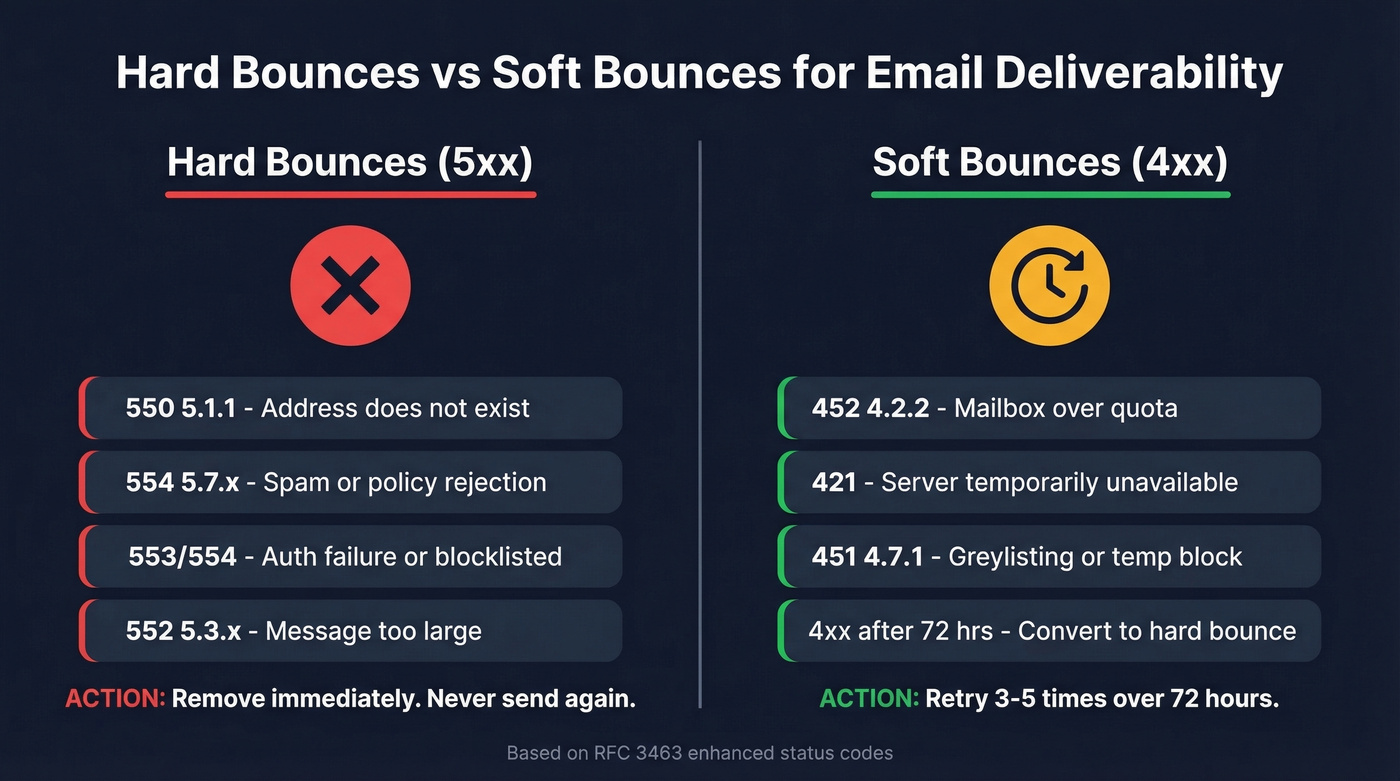
Mailchimp, for example, automatically cleans hard-bounced addresses from your audience and excludes them from future sends. Most ESPs do something similar, though the specifics vary.
Here's the thing that frustrates us: every ESP categorizes bounces differently, and many don't show you the raw SMTP code by default. When a message fails, the receiving server generates a non-delivery report (also called a bounce message or DSN) containing the SMTP code and a human-readable explanation - but your ESP may summarize or hide that detail entirely. The codes below tell you what's actually happening under the hood.
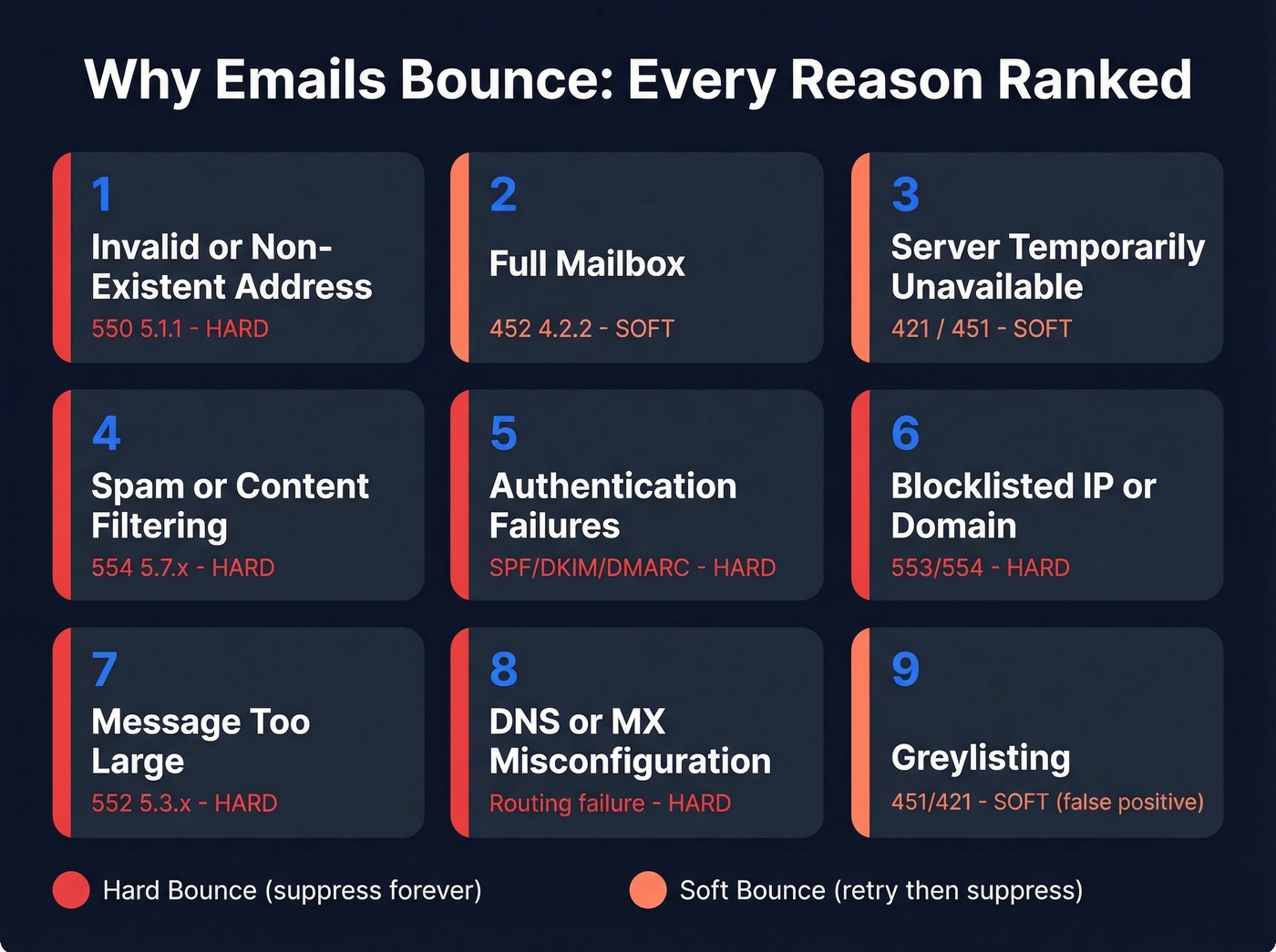
Why Emails Bounce: Every Reason Ranked
Invalid or Non-Existent Address
This is the big one. The mailbox doesn't exist - the person left the company, the address was mistyped, or it was fabricated from the start. SMTP code: 550 5.1.1. Gmail returns "The email account that you tried to reach does not exist." Microsoft/Outlook environments return a similar 550 5.1.x recipient error. Hard bounce. Remove immediately.
If you want to prevent this category entirely, use pre-send verification and suppression rules (see: email deliverability and how to check if an email will bounce).
Full Mailbox
The recipient's inbox hit its storage limit. Code: 452 4.2.2. Gmail phrases it as "over quota." Soft bounce - retry later, but if it persists across multiple sends, the mailbox is probably abandoned. Suppress after 3-5 failures.
Server Temporarily Unavailable
The receiving server is down or overloaded. Code: 421 (often paired with an enhanced 4.7.x code). Apple's servers sometimes return 451 4.7.1 Service unavailable - try again later during inbound load spikes - a quirk that trips up a lot of senders who mistake it for a permanent block. Soft bounce, retry later.
If this happens alongside throttling, check your email velocity and sending patterns.
Spam or Content Filtering
Your message triggered content filters or policy checks. A common pattern is 554 5.7.x (policy/security rejection). Yahoo uses 4xx codes like 421/451 for temporary deferrals and 5xx codes like 553/554 for permanent policy and authentication failures. Check the enhanced code's class digit to determine hard vs. soft.
If you're debugging content-based rejections, run a spam checker and tighten your email copywriting.
Authentication Failures (SPF/DKIM/DMARC)
Your domain authentication is misconfigured. Codes often show up as 553 or 554 when a provider treats it as a permanent policy failure. Yahoo requires bulk senders to authenticate with SPF and DKIM and have DMARC in place.
The edge case that catches everyone: forwarding breaks SPF, and signing with your ESP's default domain instead of your own breaks DKIM alignment. Fix both. DNS instability can also cause intermittent auth failures where SPF passes one hour and fails the next, which is maddening to debug because the problem appears random until you check your DNS propagation logs.
If you need a deeper walkthrough, see DMARC alignment and how to verify DKIM is working.
Blocklisted IP or Domain
Your sending IP or domain landed on a blocklist like Spamhaus. You'll typically see a 553 or 554 policy rejection with a reference URL pointing to the blocklist. Hard bounce - delist before sending anything else.
For remediation steps, use a dedicated Spamhaus blacklist removal process and then work on how to improve sender reputation.
Message Too Large
The email exceeds the recipient server's size limit. Code: 552 5.3.x. Gmail and Yahoo cap at 25 MB; Outlook at 20 MB. Resize attachments or use hosted links instead.
DNS or MX Misconfiguration
The recipient's domain has broken or missing MX records, so your server can't route the message. Usually a hard bounce, though sometimes temporary if the DNS issue is on the recipient's end and gets fixed within hours.
Greylisting
The receiving server deliberately rejects your first delivery attempt with a 451 or 421, expecting legitimate servers to retry. Spammers don't retry, so they get filtered out. Your MTA should handle this automatically - if it doesn't, you'll see false "bounces" that aren't real failures at all.
Sequence Step Mismatch
This one's underappreciated. A Reddit user reported 50%+ bounce rates only on step 3 of a sequence - the step that sent a new email thread instead of a reply. Same accounts, same list, but the new-thread message bounced while replies didn't. If you're seeing step-specific bounces, check whether that step opens a new thread.
This is also where better sequence management can prevent weird step-level deliverability issues.
Our take: Most bounce "emergencies" aren't about infrastructure at all. They're about sending to addresses that were never verified in the first place. Fix the data and bounce rates drop fast.

Most bounces trace back to one root cause: unverified data. Prospeo's 5-step verification - with catch-all handling, spam-trap removal, and honeypot filtering - delivers 98% email accuracy. Teams using Prospeo cut bounce rates from 35%+ down to under 4%.
Fix your bounce rate at the source, not after the damage is done.
SMTP Bounce Codes Cheat Sheet
Enhanced status codes follow the class.subject.detail structure from RFC 3463. X.1 = addressing, X.2 = mailbox, X.7 = security/policy.
| Code | Meaning | Type | Action |
|---|---|---|---|
| 550 5.1.1 | Address doesn't exist | Hard | Remove now |
| 452 4.2.2 | Mailbox over quota | Soft | Retry 72 hrs |
| 421 | Server unavailable | Soft | Retry later |
| 451 4.7.1 | Greylisting / temp block | Soft | Retry 3-5x |
| 554 5.7.x | Spam/policy rejection | Hard | Fix content/auth |
| 553 / 554 | Auth/policy failure (DMARC/DKIM) | Hard | Fix SPF/DKIM/DMARC |
| 553 / 554 | IP/domain blocklisted | Hard | Delist first |
| 552 5.3.x | Message too large | Hard | Reduce size |
What's a Normal Bounce Rate?
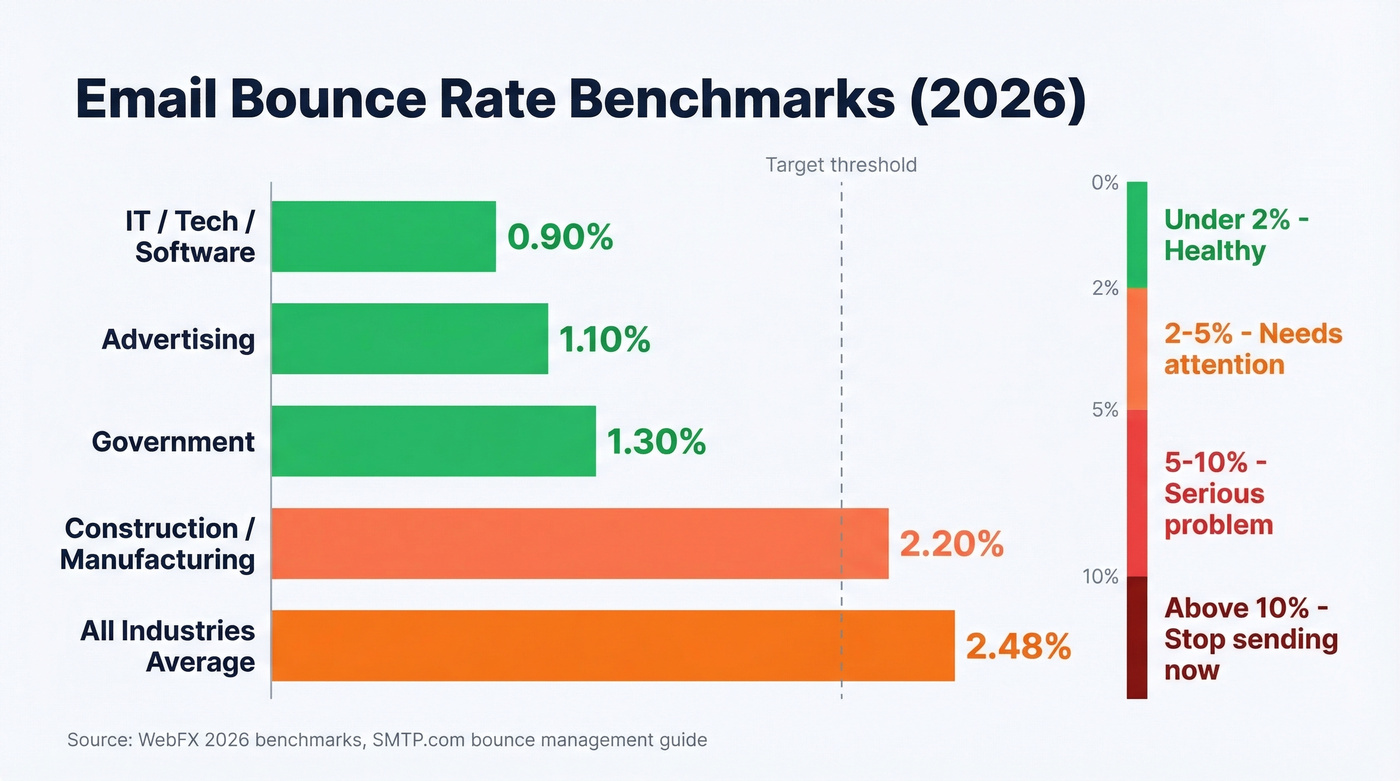
With roughly 392.5 billion emails sent daily in 2026, even small percentages represent massive volumes. Here's where different industries land:
| Industry | Avg Bounce Rate |
|---|---|
| IT/Tech/Software | 0.90% |
| Advertising | 1.10% |
| Government | 1.30% |
| Construction/Mfg | 2.20% |
| All industries | 2.48% |
Data from WebFX 2026 benchmarks.
Operational thresholds per SMTP.com's bounce management guide: under 2% is healthy, 2-5% needs attention, above 5% is serious, and above 10% means stop sending immediately. Every bad send makes the next good send less likely to arrive because ISPs track your reputation cumulatively.
For more context on targets and diagnostics, see our email bounce rate breakdown.
How to Fix and Prevent Bounces
Prevention beats remediation every time. We've seen teams spend weeks debugging infrastructure when the real problem was a two-year-old list they never cleaned. Work through this in order:
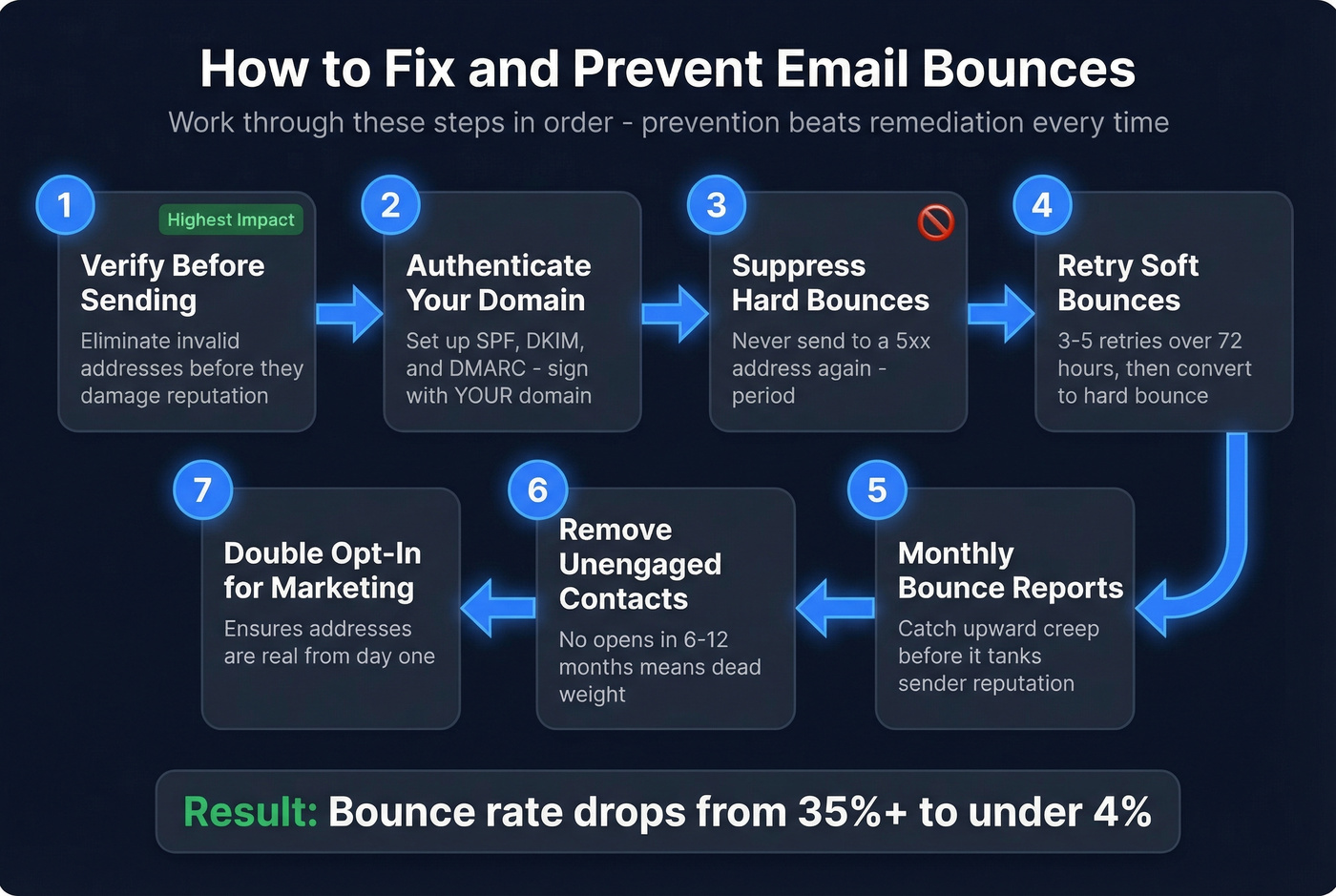
1. Verify your list before sending. This eliminates the #1 bounce cause - invalid addresses - before they damage your reputation. Prospeo's 5-step verification catches invalid addresses, flags catch-all domains, and removes spam traps and honeypots. Meritt dropped from 35% bounce rates to under 4% after switching to verified data; Snyk cut theirs from 35-40% to under 5% across 50 AEs.
2. Authenticate your domain. Set up SPF, DKIM, and DMARC. Sign with your domain, not your ESP's default. Make sure DKIM alignment is solid - it's your fallback when forwarding breaks SPF.
If you need examples, start with an SPF record.
3. Suppress hard bounces immediately. Never send to a 5xx address again. Period.
4. Retry soft bounces 3-5 times over 72 hours. Convert to hard bounce after repeated failures.
5. Run monthly bounce trend reports. Catch degradation before it tanks your sender reputation. If you're seeing a slow upward creep in bounce rates month over month, your data is aging faster than you're refreshing it.
6. Remove unengaged subscribers. Anyone who hasn't opened in 6-12 months is dead weight dragging down your engagement metrics and, by extension, your deliverability.
7. Use double opt-in for marketing lists. The simplest way to ensure addresses are real from day one. Skip this if you're running cold outbound - it doesn't apply there, and pre-send verification handles the same problem.

Every 550 5.1.1 you hit tanks your sender reputation and makes the next email harder to deliver. Prospeo refreshes 300M+ profiles every 7 days - not every 6 weeks like competitors - so you're never sending to addresses that went stale last month.
Stop suppressing bounces. Start preventing them at $0.01 per verified email.
FAQ
Do soft bounces hurt sender reputation?
Yes, if they persist. Repeated soft bounces signal poor list hygiene to mailbox providers. After 3-5 failed retries over 72 hours, convert the address to a hard bounce and suppress it permanently. Consistent soft-bounce rates above 5% will degrade your domain reputation over time.
What are the most common email bounce reasons?
Invalid addresses cause the majority of bounces, followed by full mailboxes and authentication failures (SPF/DKIM/DMARC). Pre-send verification eliminates the first category entirely. Proper domain authentication handles the third. Together, these fixes resolve roughly 80% of bounce issues.
Should I retry emails that get a 421 or 451 code?
Yes - these are temporary failures from greylisting, server load, or rate limiting. Retry 3-5 times over 72 hours. Most legitimate mail servers expect retries within 15-30 minutes. If the address keeps failing after multiple cycles, suppress it as a hard bounce.
What free tools can I use to verify emails before sending?
Prospeo offers 75 free email verifications per month with its 5-step verification process, including catch-all detection and spam-trap removal. Hunter offers 25 free searches per month, and NeverBounce has limited free credits. For teams running real outbound campaigns, even a small verification sample tells you whether your list quality is the bottleneck.
How do I read a non-delivery report?
A non-delivery report contains the SMTP status code, the enhanced status code, and a diagnostic message from the receiving server. Start with the three-digit code to determine hard (5xx) vs. soft (4xx), then read the enhanced code to pinpoint the specific issue - addressing (X.1), mailbox (X.2), or policy (X.7). The human-readable text usually includes the receiving server's specific reason, which is often more useful than the code itself.