

How to Choose Lead Management Software (Without Wasting $30K on the Wrong Tool)
Your sales manager just told you half the team tracks leads in a spreadsheet. The other half logs into the CRM you bought last year - mostly to check if deals closed, not to actually work leads. You're paying $2,000/month for an expensive address book.
That's the $30K mistake. Knowing how to choose lead management software starts with recognizing the root cause isn't laziness - it's a mismatch between what you bought and what your team needs. This is a workflow decision that determines whether reps adopt the tool or route around it.
Quick Verdict
- Simplicity: Pipedrive (starting at $14/user/month) - visual pipeline, minimal setup, reps actually use it.
- Free to start: HubSpot - genuinely useful free tier, but budget for Professional (starting around $90/user/month) when you need scoring.
- Before you pick any tool: Fix your data. 75% of B2B lead data is inaccurate - tools like Prospeo keep it clean with 98% email accuracy and a 7-day refresh cycle.
Responding to a lead within five minutes increases conversion chances by 900%. Your software choice directly affects how fast that happens.
What You're Actually Buying
The term "lead management software" is fuzzy. Zapier's team put it well - most teams need a suite of tools, not a single product. Understanding three layers helps you avoid buying the wrong thing.
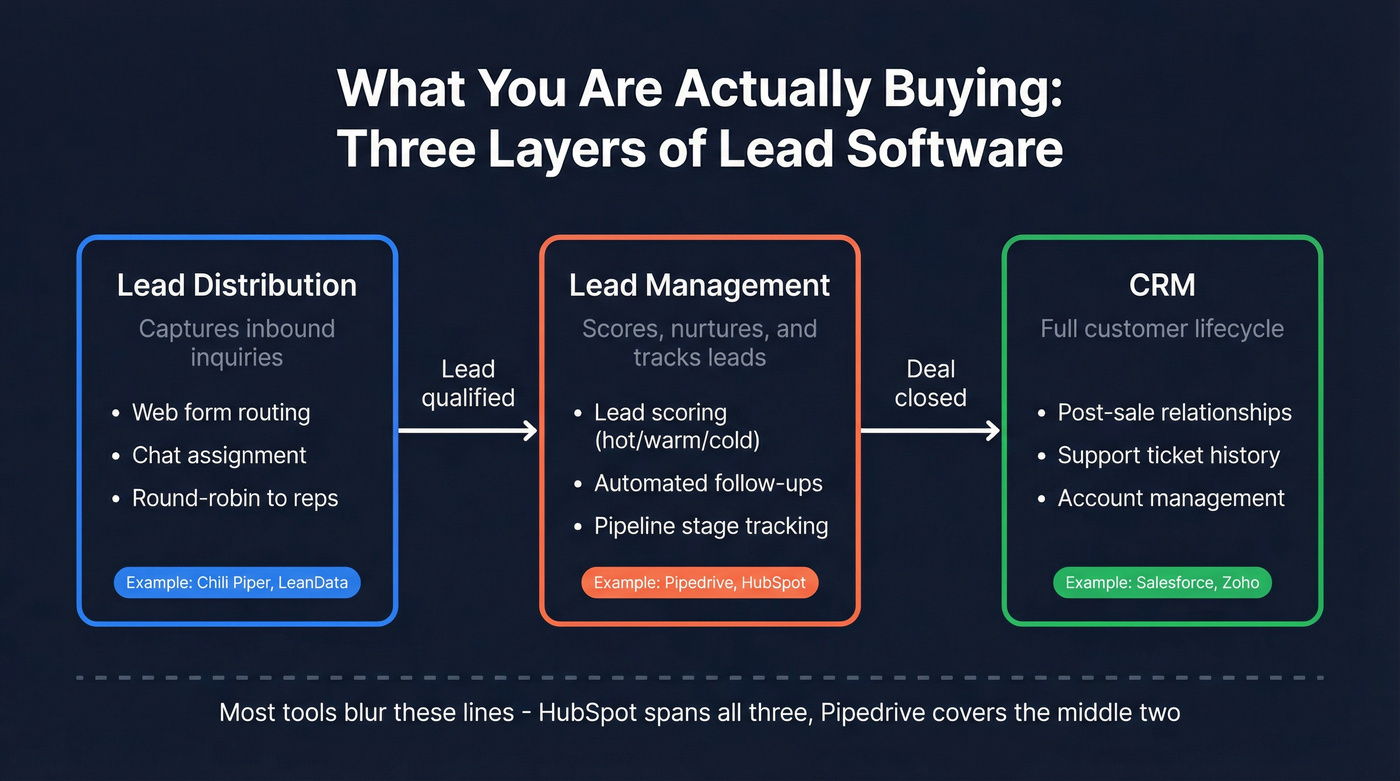
Lead distribution captures inbound inquiries and routes them to the right rep. Lead management scores, nurtures, and tracks leads through pipeline stages. CRM stores the full customer lifecycle - post-sale relationships, support, account history.
Most tools blur these lines. HubSpot spans lead capture, lead management, and CRM; Pipedrive is primarily a sales pipeline CRM that many teams use for lead management. If you're managing fewer than ~50 leads a month, a spreadsheet works fine. Past that, manual tracking breaks down fast - 78% of buyers choose the first company to respond, and you can't win that race with copy-paste workflows.
Six Non-Negotiable Features
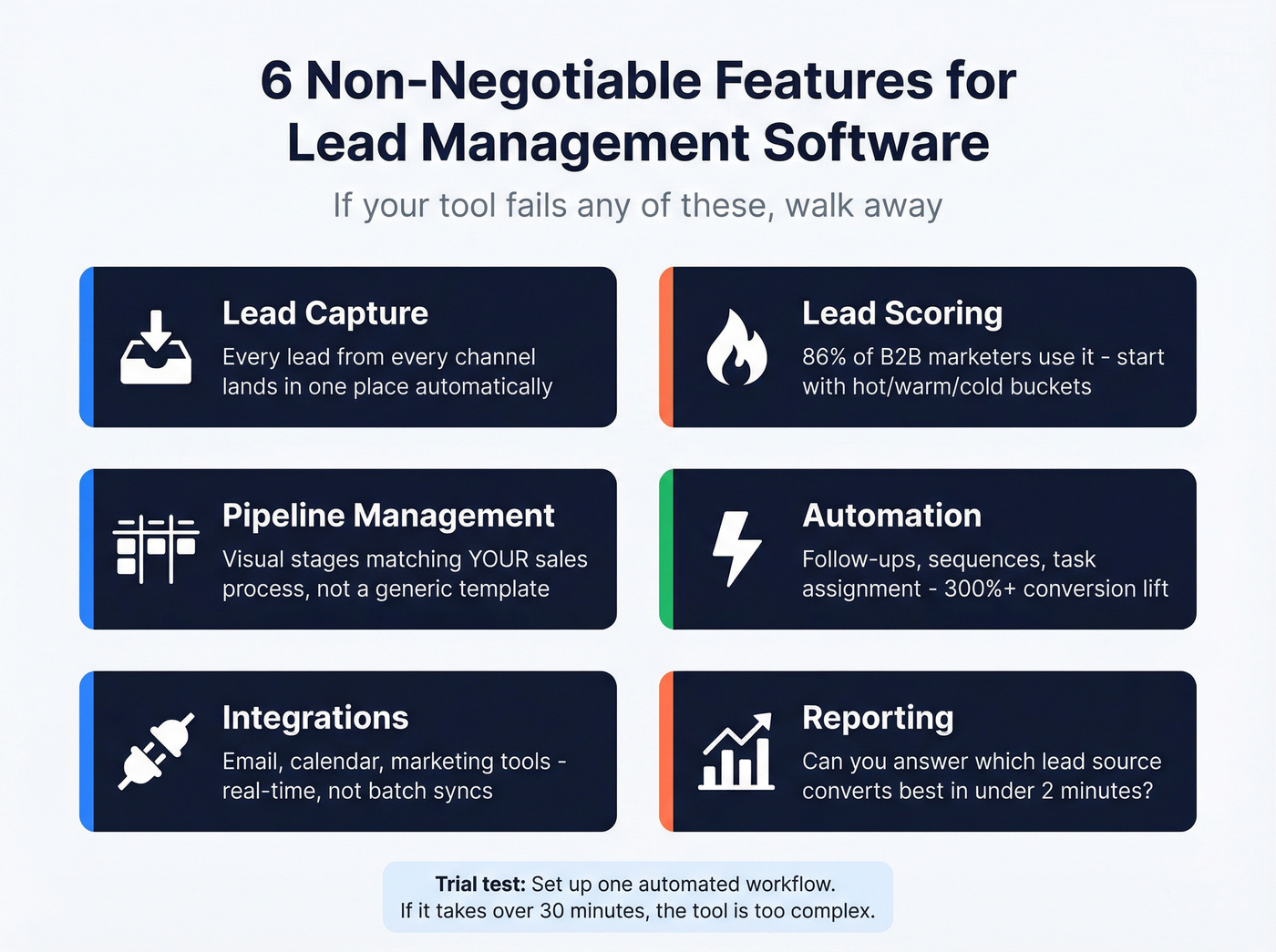
Every lead management tool markets a hundred features. Six actually matter.
Lead Capture and Centralization
Every lead - web form, email, chat, event - lands in one place automatically. During your trial, submit a test lead from each channel and confirm it appears without manual entry. If it doesn't, walk away.
Lead Scoring
86% of B2B marketers use lead scoring in demand gen. Start simple: 100+ = hot, 50-99 = warm, under 50 = cold. Create three scoring rules during your trial and verify they trigger correctly. If you need a deeper framework, use a lead scoring system to keep rules consistent across teams.
Pipeline Management
Visual stages matching your actual sales process, not a generic template. Test whether you can customize stages without calling support. If your stages are messy, fix the underlying sales pipeline challenges first.
Automation
Follow-up reminders, stage-based sequences, task assignment on status changes. The best systems increase lead conversion rates by 300%+. Test one automated workflow end-to-end during your trial - if it takes more than 30 minutes to set up a basic "move to stage X, send email Y" sequence, the tool's too complex for your team. If you're evaluating AI here, compare against AI CRM data entry automation.
Integrations
Email, calendar, marketing automation, and data enrichment tools need to connect natively. Check whether integrations are real-time or batch - a Zapier connection works for low volume but breaks at scale. If you're building a modern stack, start from a B2B sales stack blueprint.
Reporting
During your trial, pull one report answering: "Which lead source converts best?" If you can't get that answer in under two minutes, the reporting isn't good enough. A lightweight sales reporting dashboard spec helps you define what “good enough” means.
The Criterion Nobody Talks About
Every buying guide covers features, pricing, and integrations. Almost none address data quality - the single biggest predictor of whether your lead management platform actually works.
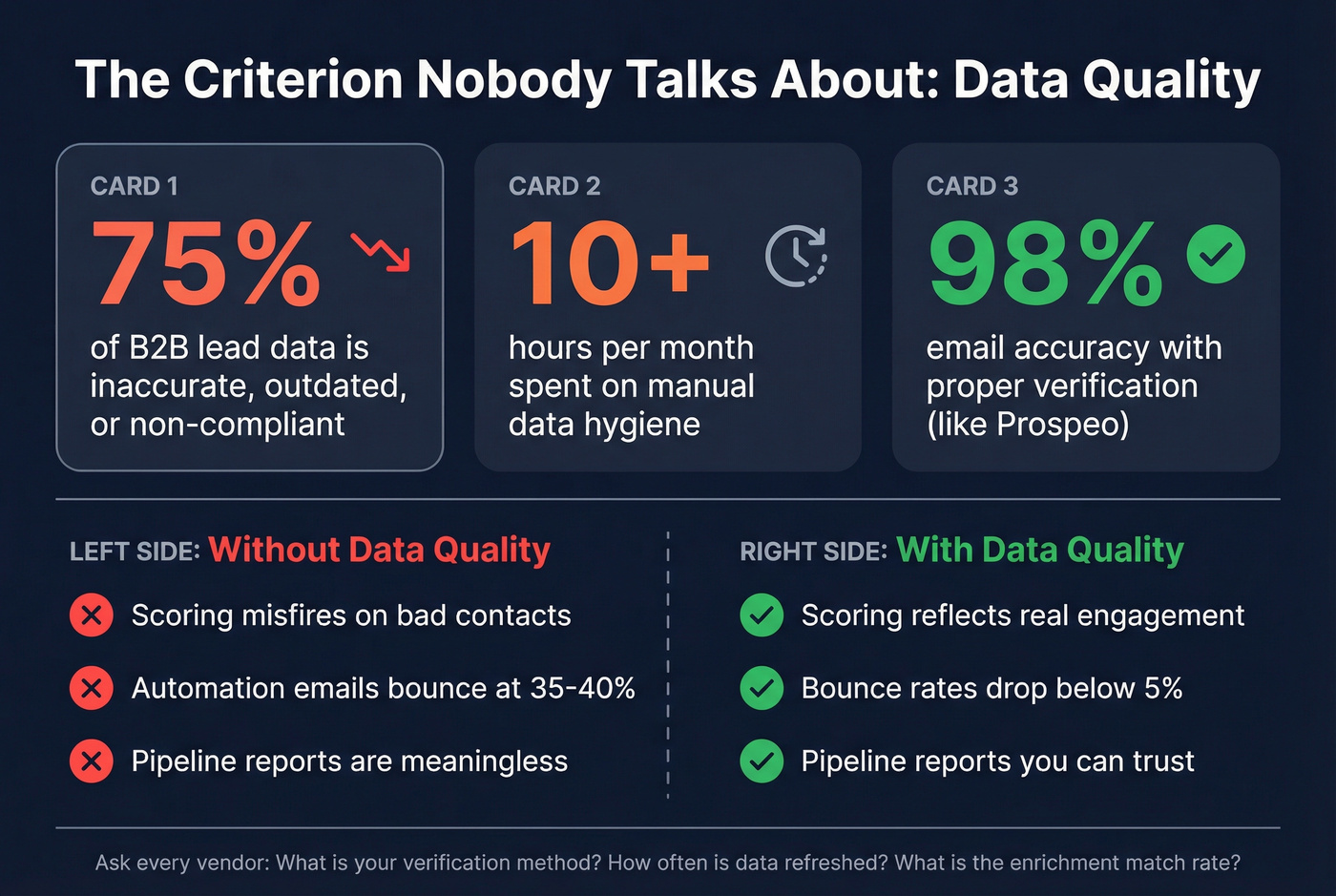
75% of B2B marketers report their lead data is inaccurate, outdated, or non-compliant. Organizations spend more than ten hours a month on data hygiene alone. That's not a minor inconvenience. It's a structural problem that makes your scoring unreliable, your automation misfire, and your pipeline reports meaningless.
In our experience, the teams that skip data quality evaluation end up with a beautifully configured CRM full of garbage contacts. When evaluating tools, ask three questions: What's the verification method? How often is data refreshed? What's the enrichment match rate? If you want a practical checklist, start with CRM hygiene and a simple data quality scorecard.
For context, Prospeo refreshes 300M+ professional profiles every 7 days compared to the 6-week industry average, with 98% email accuracy through a proprietary 5-step verification process. Snyk's team of 50 AEs saw bounce rates drop from 35-40% to under 5% after switching, with AE-sourced pipeline up 180%.

No lead management software can fix bad data. 75% of B2B lead databases are inaccurate - which means your scoring misfires, your automation emails bounce, and your pipeline reports lie. Prospeo's 5-step verification delivers 98% email accuracy with a 7-day refresh cycle, so every contact in your CRM is real.
Clean data in, clean pipeline out. Start with 75 free verified emails.
Why Most Teams Pick the Wrong Tool
Here's the thing: most teams buy a CRM when they actually need lead management. Then they wonder why reps hate the tool.
CRMs are designed for the full customer lifecycle. But sales reps consistently describe them as management reporting tools - a sentiment that shows up in nearly every Reddit thread about tool adoption. The consensus on r/sales is pretty clear: reps don't resist CRMs because they're lazy, they resist them because the tools weren't built for how they actually sell. If you're weighing platforms, a quick HubSpot vs Salesforce comparison can save hours of demos.
Use lead management alone if your team is under 20 reps, you lack a dedicated CRM admin, your sales cycle is under 60 days, and you're focused on converting new leads.
Add a full CRM when you need post-sale account management, customer success needs sales history visibility, or you're running complex multi-stakeholder deals.
The smart path: lead management first, CRM later. Most teams don't need Salesforce. They need a tool reps will actually open every morning.
The 10-Minute Vendor Scorecard
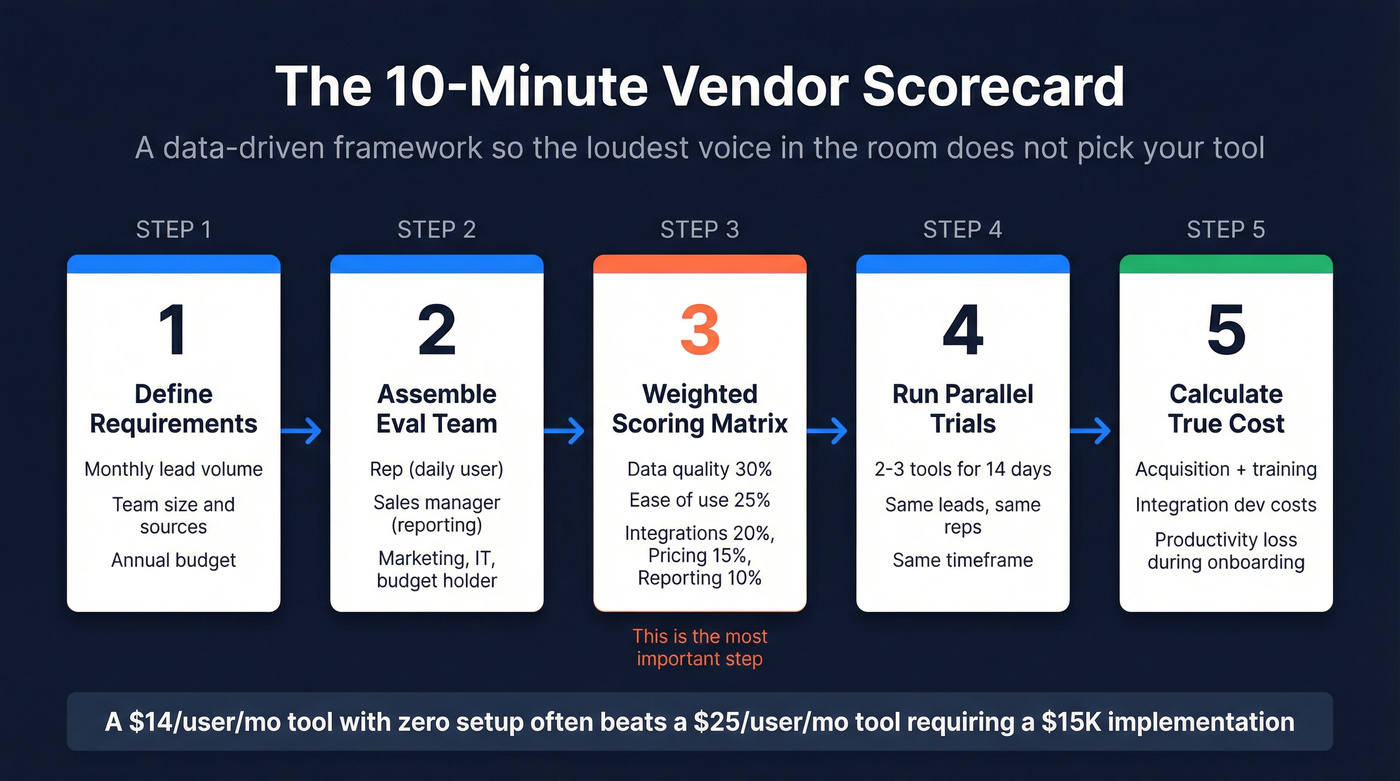
This framework is the single most useful thing in this article. It takes ten minutes and prevents the loudest voice in the room from picking the tool.
Step 1: Define Requirements
Write down four numbers: monthly lead volume, team size, number of lead sources, annual budget. A 5-rep team handling 200 leads/month has fundamentally different needs than a 50-rep org processing 5,000.
Step 2: Assemble Your Evaluation Team
You need a rep (daily user), sales manager (reporting), marketing (lead handoff), IT (security), and budget holder. The Spendflo framework recommends including anyone whose systems need to integrate.
Step 3: Build a Weighted Scoring Matrix
Pick 3-5 criteria. Weight by priority - data quality 30%, ease of use 25%, integrations 20%, pricing 15%, reporting 10%. Score each vendor 1-5, multiply score by weight. Look, this simple math is the difference between a data-driven decision and a demo-driven one.
Step 4: Run Parallel Trials
Run 2-3 trials simultaneously for 14 days. Same leads, same reps, same timeframe - that's the only way to get a fair comparison.
Step 5: Calculate Total Cost of Ownership
Include acquisition cost, training, integration development, and productivity loss during onboarding. Custom Salesforce integrations often run $5K-$50K+. A simple HubSpot-to-Slack workflow built by a consultant often costs $500-$2K. A $14/user/mo tool with zero setup often beats a $25/user/mo tool requiring a $15K implementation.
Pricing Reality Check
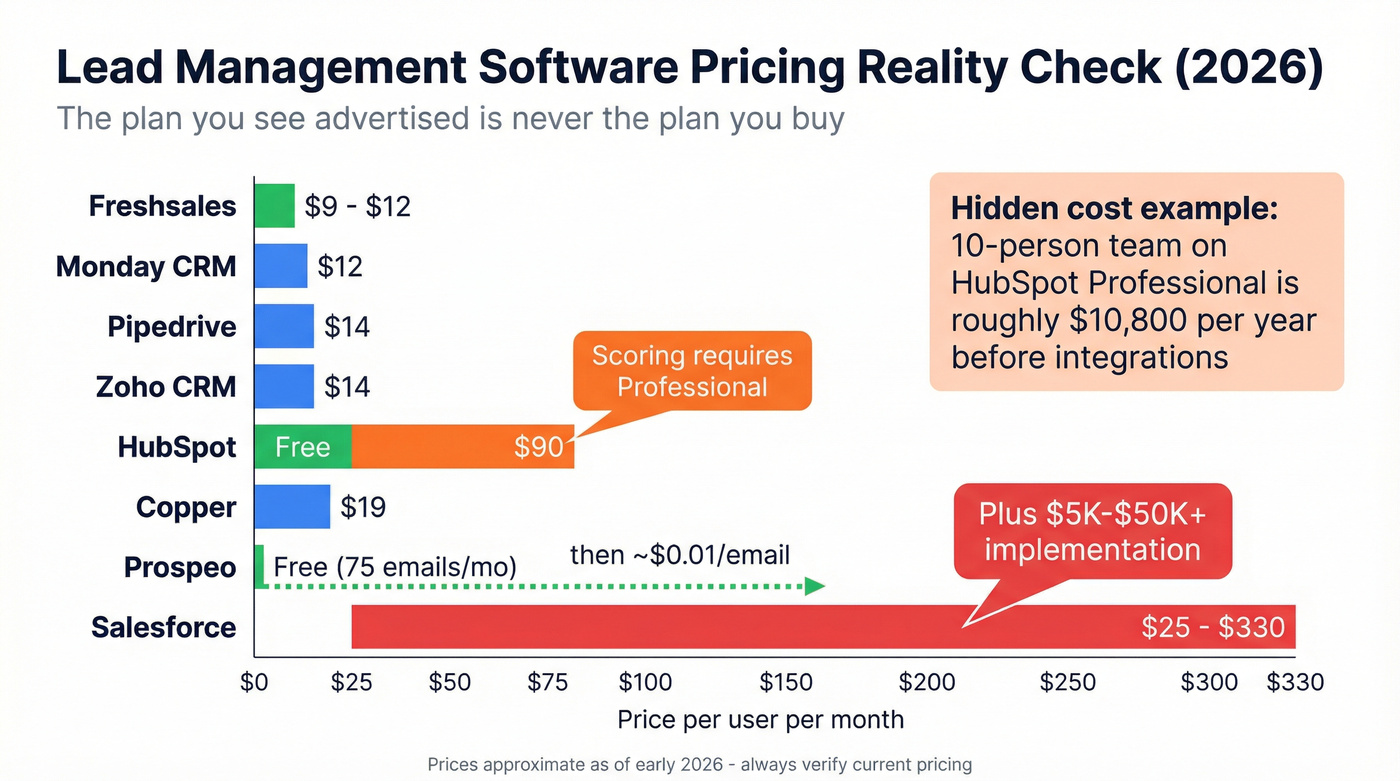
The plan you see advertised is never the plan you buy.
| Tool | Starting Price | Best For | Watch Out For |
|---|---|---|---|
| HubSpot | Free; paid from ~$15/user/mo | All-in-one start | Lead scoring requires Professional (~$90/user/mo) |
| Pipedrive | ~$14/user/mo | Sales-focused SMBs | Email/automation features need higher tiers |
| Freshsales | ~$9-$12/user/mo | Budget SMBs | Limited customization |
| Zoho CRM | ~$14/user/mo | Zoho ecosystem | Steep learning curve |
| Copper | ~$19/user/mo | Google Workspace | Limited outside Google |
| Monday CRM | ~$12/user/mo | Cross-functional | CRM still maturing |
| Salesforce | $25-$330/user/mo | Enterprise | Impl. $5K-$50K+ |
| Prospeo | Free (75 emails/mo); ~$0.01/email | Data quality layer | Enrichment focus - pair with a CRM |
Hidden costs blow budgets: a 10-person team on HubSpot Professional runs around $10,800/year before a single integration. Budget for the real number, not the landing page number.
Real talk: if your average deal size is under $15K, you probably don't need anything beyond Pipedrive plus a data enrichment layer. We've seen teams waste the most money buying Salesforce "to grow into" - then spending $20K on implementation for a 7-person sales team.
Top Picks by Use Case
Best for Simplicity - Pipedrive
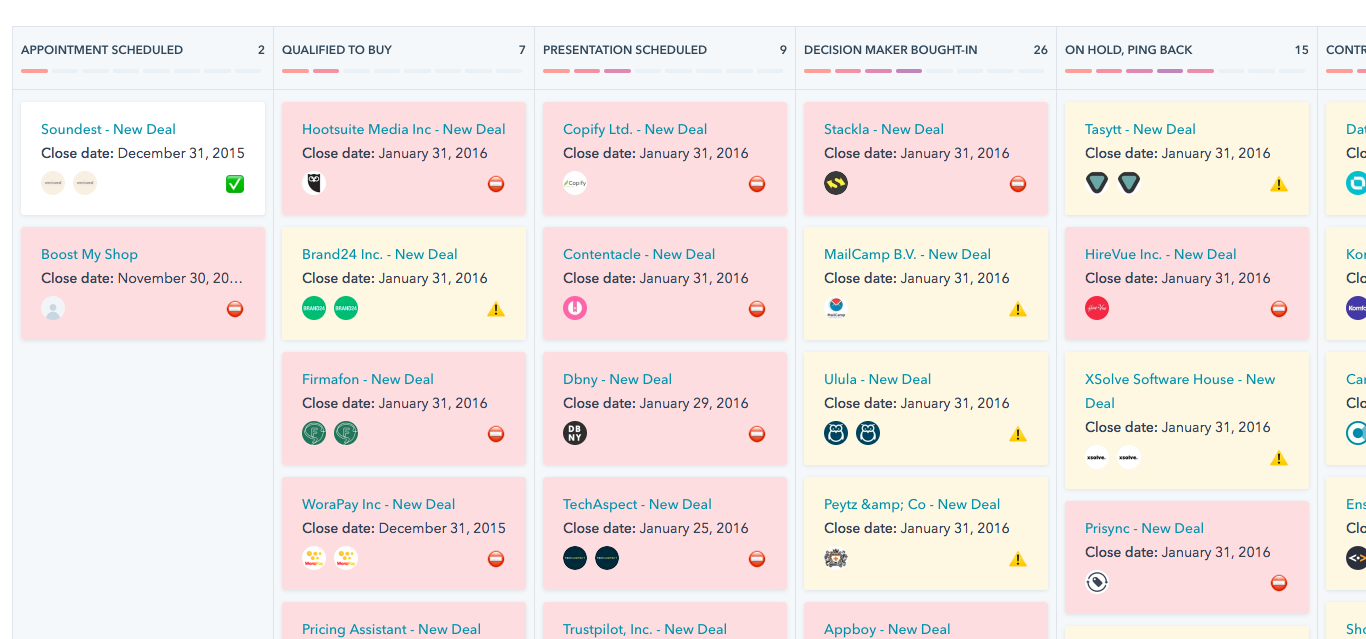
At ~$14/user/mo, Pipedrive is the lowest-friction option for sales-focused SMBs. The visual drag-and-drop pipeline is the reason reps actually use it - teams often go from signup to a live pipeline in a single day. Pair it with a dedicated email tool for nurture sequences. The trade-off is that Pipedrive's reporting and marketing features are thinner than HubSpot's, so if you need deep attribution analytics, you'll outgrow it.

Best Free Starting Point - HubSpot Sales Hub
Skip this if you need lead scoring on day one - that's locked behind Professional at around $90/user/mo, and the jump stings. But for teams that want to grow into a platform without migrating later, HubSpot's free CRM delivers real value: contact management, deal tracking, basic email tools, and meeting scheduling at $0. Teams commonly start free and scale up tiers over a couple of years without switching tools, which is the real selling point - avoiding a painful migration down the road.
Best Budget Option - Freshsales
Freshsales starts around $9-$12/user/mo with a free plan available, and it packs built-in phone and email - meaning fewer integrations to manage. Advanced AI scoring is available on higher tiers. Customization options thin out compared to HubSpot or Pipedrive, but for budget-conscious SMBs who want lead management without CRM complexity, it's hard to beat on price.
Best for Enterprise - Salesforce Sales Cloud
Used by 100,000+ companies globally, Salesforce is a platform decision, not a tool decision. The AppExchange ecosystem extends it to do almost anything - but "almost anything" requires dedicated admin resources, a 3-6 month implementation, and budget well beyond the $25/user/mo headline. Let's be honest: unless you have a full-time Salesforce admin, you're buying a Ferrari and driving it in first gear.
Best for Zoho Teams - Zoho CRM
Strong value at ~$14/user/mo if you're already using Zoho's suite. The learning curve is steeper than Pipedrive, but the payoff is tight cross-ecosystem integration with Zoho's marketing, support, and finance tools.
Others Worth Knowing
Copper (~$19/user/mo) is popular with Google Workspace teams thanks to native Gmail and Calendar integration. Limited if you aren't all-in on Google. Monday CRM (~$12/user/mo) brings project-management DNA to lead tracking - good for cross-functional visibility, though the CRM functionality is still maturing compared to purpose-built tools.

Snyk's 50 AEs dropped bounce rates from 35-40% to under 5% and grew AE-sourced pipeline 180% - not by switching CRMs, but by fixing the data feeding them. Prospeo enriches contacts with 50+ data points at a 92% match rate for roughly $0.01 per email. That's the foundation your lead management stack is missing.
Stop configuring workflows around garbage contacts. Enrich your CRM today.
FAQ
Lead management software vs. CRM?
Lead management focuses on converting prospects - capturing, scoring, and routing leads through a pipeline. A CRM manages the full customer lifecycle including post-sale relationships. Most teams under 20 reps should start with lead management and add a CRM once their customer base justifies the complexity.
How much should I budget?
For SMBs, expect $9-$15/user/month for core features. Mid-market teams needing automation and scoring should budget $50-$100/user/month. Enterprise deployments run $150-$330/user/month plus $5K-$50K+ in implementation. Always calculate total cost of ownership, not sticker price.
Do I need a separate data enrichment tool?
Almost certainly. 75% of B2B marketers report bad lead data, and no CRM fixes that on its own. A dedicated enrichment tool returning 50+ data points per contact with weekly refreshes is far more reliable than the manual hygiene most teams burn ten-plus hours on monthly.
Should I hire an agency or buy software?
If you have even a small sales team, owning the software gives you more pipeline control and costs less over time. Agencies make sense when you lack headcount to run campaigns in-house. Many companies start with an agency to validate their ICP, then bring the process in-house with their own tooling once they know what works.