

How to Create an Email Campaign That Gets Opened, Clicked, and Doesn't Land in Spam
You sent your first campaign to 5,000 subscribers and your bounce rate came back at 9%. Your ESP flagged your account. Half your emails landed in spam. The other half went to people who haven't opened anything from you in two years. That's not a campaign - that's a reputation fire.
Here's how to build one that actually works.
What You Need (Quick Version)
A successful email campaign requires five things: a clean, permission-based list, segmentation beyond "everyone," a subject line around 7 words, mobile-first design, and verified deliverability with SPF, DKIM, and DMARC configured plus a bounce rate under 2%.
If you only do one thing differently after reading this, verify your list before you hit send. Everything else is optimization. That one step is survival.
What Is an Email Campaign?
An email campaign is a single, intentional send to a defined audience segment - a promotion, a newsletter, a product launch, a re-engagement nudge. It's distinct from automated flows like welcome series and abandoned carts, which trigger based on behavior rather than a calendar. With 93% of people checking their inboxes at least once a day, the channel isn't dying. Lazy execution is.
Here's the thing most guides skip: campaigns aren't where the money is. Klaviyo's data across 183,000+ customers shows automated flows generate roughly 41% of total email revenue from just 5.3% of sends. Campaigns are still essential for announcements, time-sensitive offers, and relationship building, but they're one piece of a larger system. Think of campaigns as the megaphone and flows as the engine.
The four main campaign types map directly to goals: welcome campaigns drive onboarding, promotional campaigns drive revenue, newsletters drive retention, and re-engagement campaigns win back dormant subscribers.
10 Steps to Build a High-Converting Email Campaign
1. Define Your Goal
What you want determines what you send. No campaign should exist without a measurable objective.
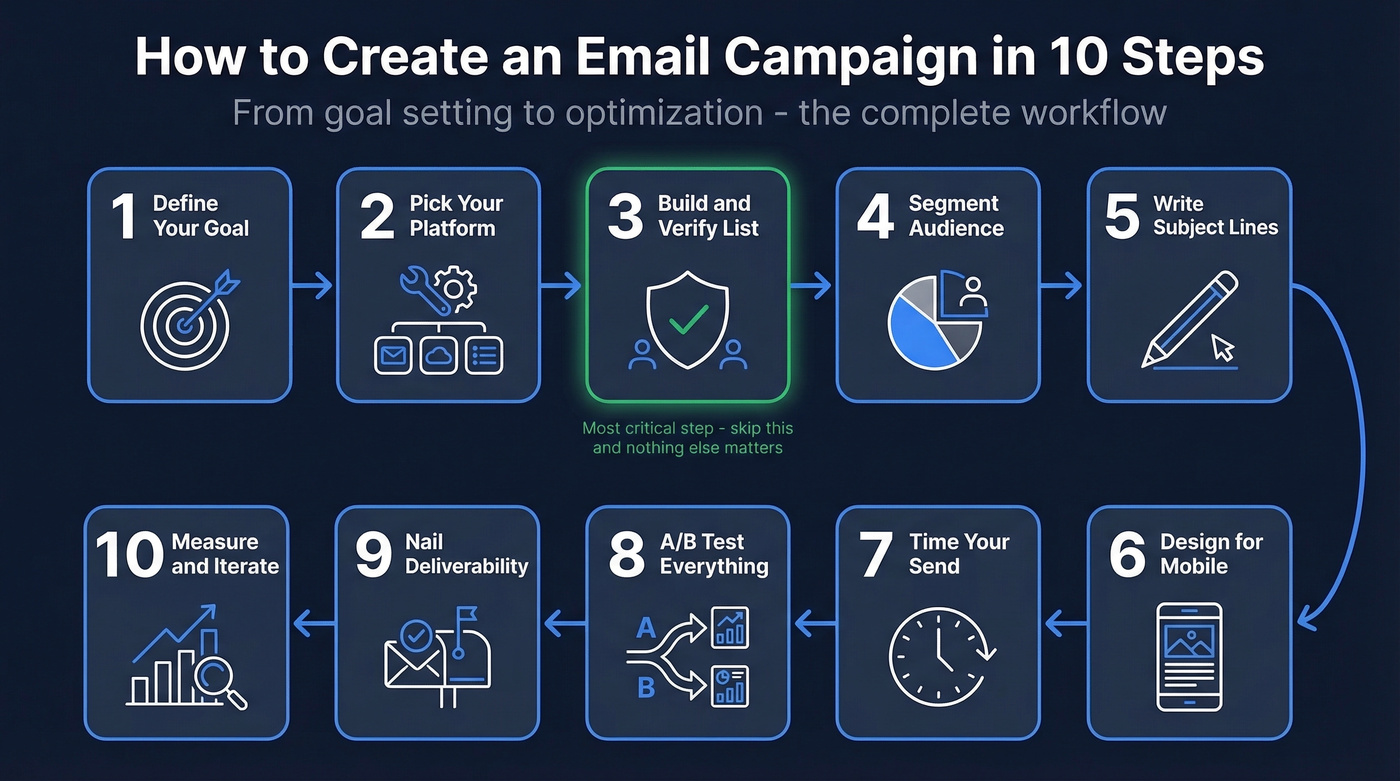
Use this mapping:
- Want signups activated? Welcome/onboarding sequence.
- Want revenue this week? Promotional campaign with a deadline.
- Want to stay top of mind? Newsletter with genuine value.
- Want to clean your list? Re-engagement campaign with a sunset clause.
Here's a concrete scenario: an ecommerce brand running a flash sale segments by purchase history. Past buyers get early access. Browsers get a FOMO angle. Dormant subscribers get a win-back offer tied to the sale. Same event, three emails, three different conversion rates.
Skip the campaign entirely if you can't answer "what does success look like?" in one sentence. "We should send something this month" isn't a goal.
2. Pick Your Email Platform
Your platform matters less than your list quality. A perfectly segmented, verified list on a free ESP will outperform a sloppy list on a $500/month platform every time.
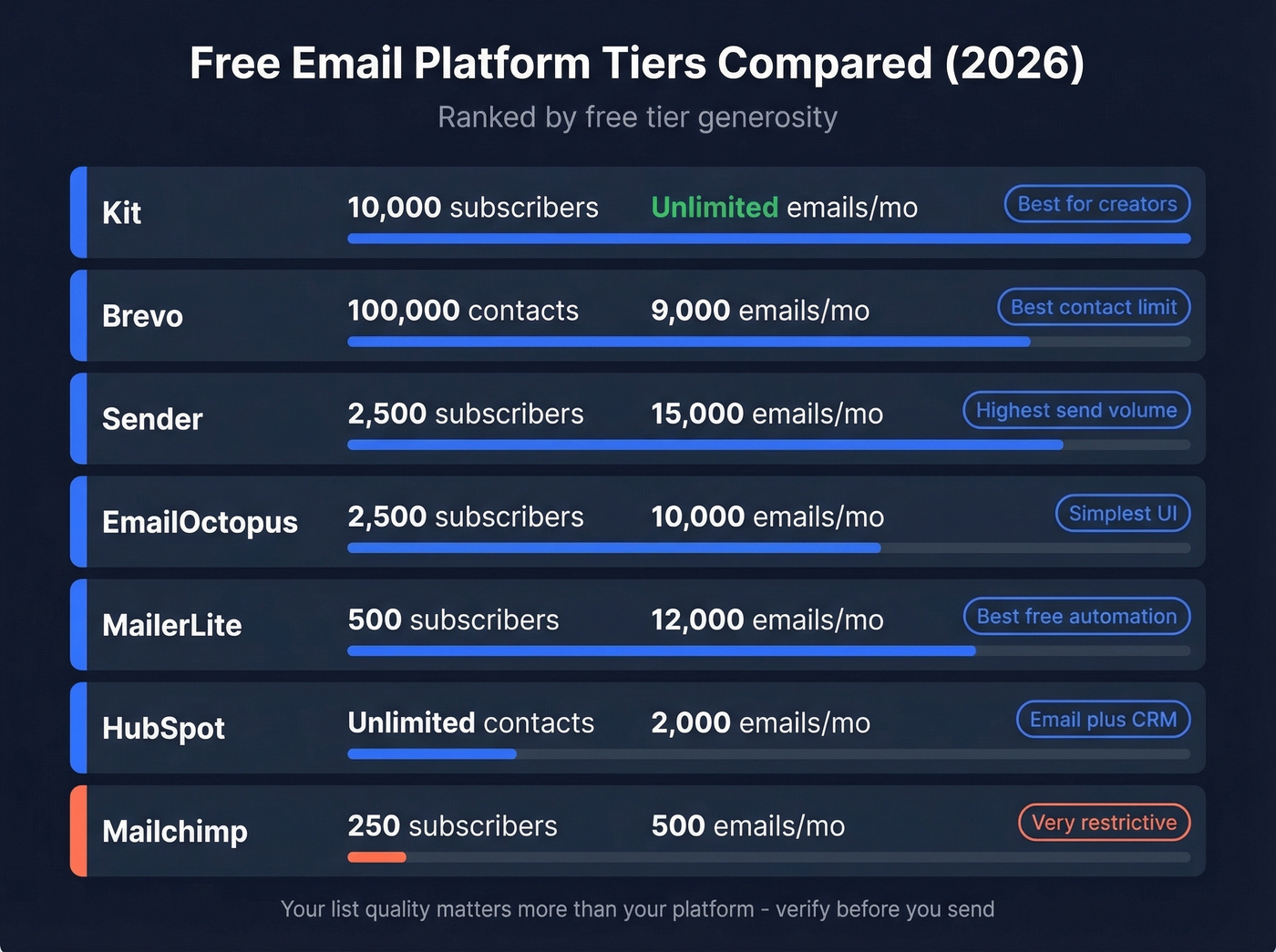
That said, you need a tool. Here's what's available at zero cost:
| Platform | Free Tier Limit | Emails/Month | Standout Feature |
|---|---|---|---|
| Kit | 10,000 subscribers | Unlimited | Creator-focused |
| Brevo | 100,000 contacts | 9,000 | Generous contact limit |
| Sender | 2,500 subscribers | 15,000 | High send volume |
| EmailOctopus | 2,500 subscribers | 10,000 | Simple UI |
| MailerLite | 500 subscribers | 12,000 | Best free automation |
| HubSpot | N/A | 2,000 | Email + CRM in one place |
| Mailchimp | 250 subscribers | 500 | Brand recognition |
Pick based on three things: your current list size, whether you need automation on day one, and which tool integrates with your existing stack. Kit's free tier is absurdly generous for creators. Brevo wins on contact limits. MailerLite has the best free automation builder. Mailchimp's free plan is so restrictive it's barely worth considering unless you're already locked in.
3. Build Your List (Then Verify It)
Permission-based only. Never buy lists.
The consensus across r/coldemail and every deliverability expert worth listening to is unanimous: purchased lists destroy sender reputation and can get your domain blacklisted. Mailtrap's analysis confirms that scraped lists also raise serious privacy-law issues under GDPR.
Build your list through lead magnets, content upgrades, gated resources, and signup forms with clear value propositions. A 1,000-person list with a 5% CTR generates more clicks than a 10,000-person list at 0.3%. Quality beats volume every time.
Now the step nobody talks about: verification. A bounce rate above 2% is an immediate red flag that pushes future emails to spam. Every list accumulates invalid addresses - people change jobs, abandon inboxes, typo their signups. Before every major send, run your list through an email verification tool. Prospeo's verification uses a 5-step process that catches invalid addresses, spam traps, and honeypots with 98% accuracy at roughly $0.01 per email. The free tier covers 75 verifications per month, enough to test the workflow before committing. We've seen teams cut their bounce rate from 8% to under 1% just by adding this single step.

4. Segment Your Audience
The #1 frustration practitioners flag on Reddit? Brands still blasting their entire list with the same message. Segmentation isn't advanced - it's baseline.
If you want a deeper playbook, start with intent based segmentation and build from there.
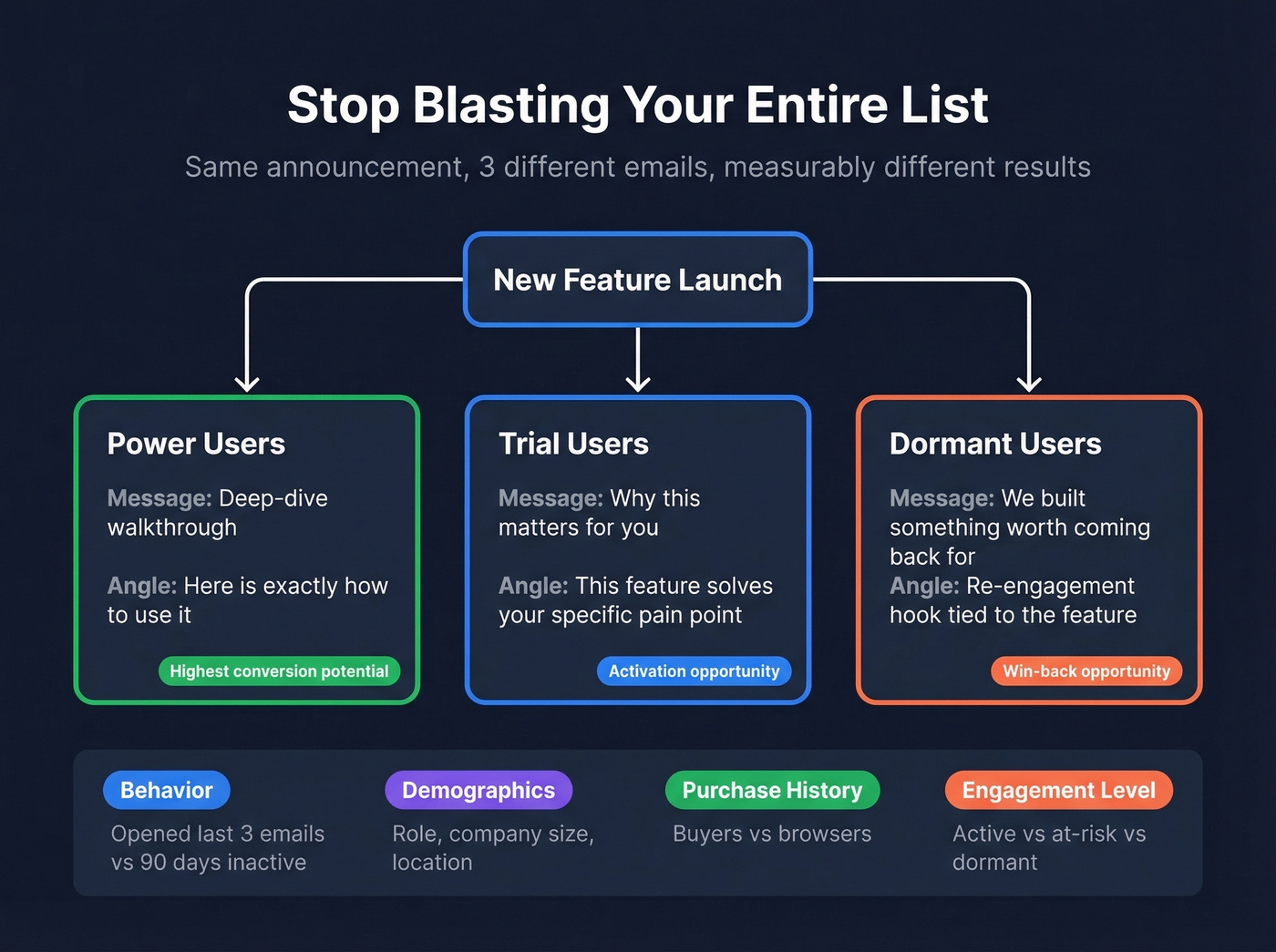
Start with these dimensions:
- Behavior: opened last 3 emails vs. hasn't opened in 90 days
- Demographics: role, company size, location
- Purchase history: buyers vs. browsers
- Engagement level: active vs. at-risk vs. dormant
Let's say you're launching a new feature. Your power users get a deep-dive walkthrough. Trial users get a "here's why this matters for you" angle. Dormant users get a re-engagement hook with the feature as the reason to come back. Same announcement, three different emails, measurably different results.
5. Write Subject Lines That Get Opened
Klaviyo's data shows subject lines averaging about 7 words drive open rates around 30%. Personalization - first name, company, recent behavior - lifts open rates 10-14%. Emojis can boost opens by up to 56% in Klaviyo's testing, though B2B finance executives and DTC shoppers respond very differently to a fire emoji.
If you need inspiration, pull from these email subject line examples and adapt them to your segments.
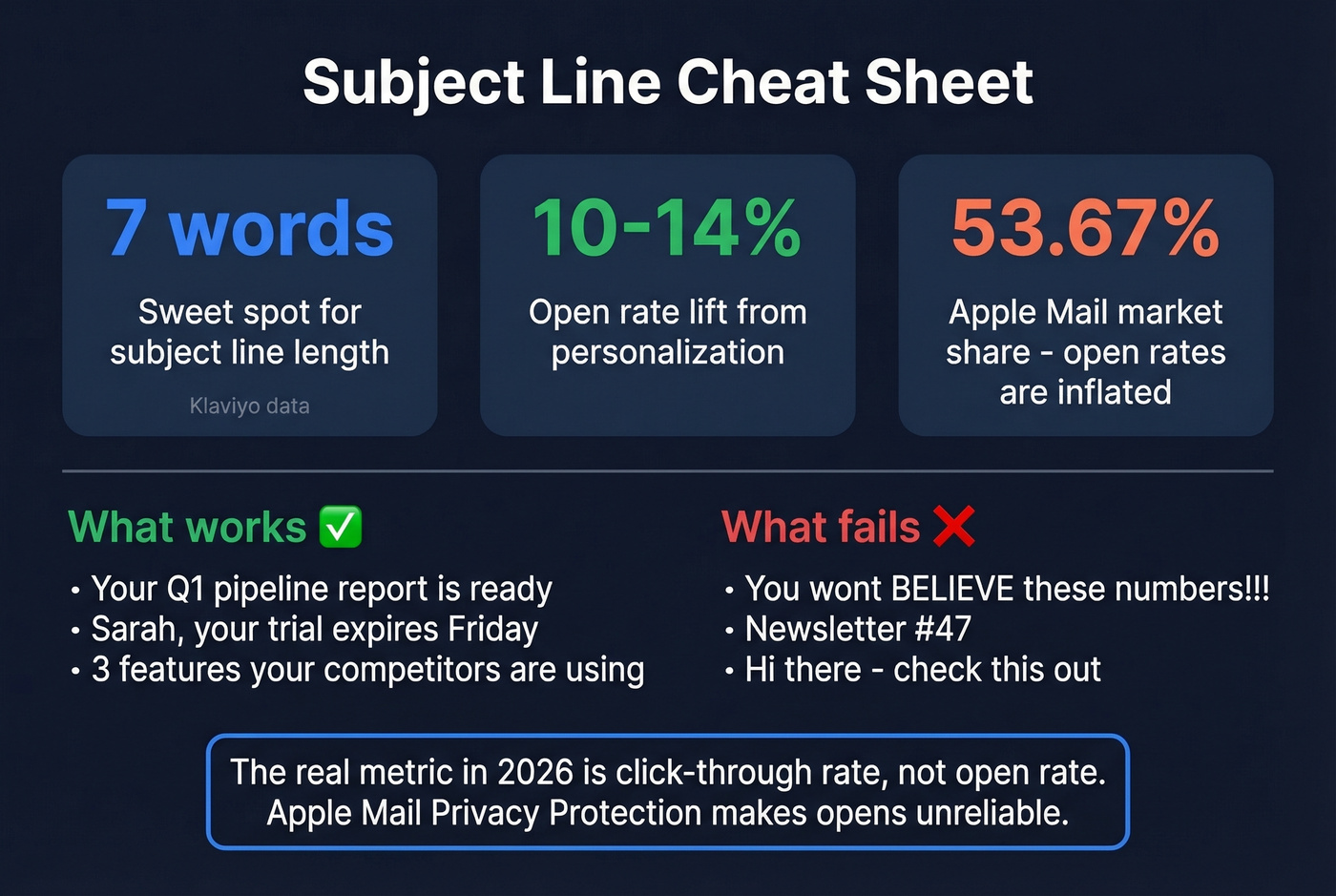
Here's the caveat that changes how you measure everything: Apple Mail holds 53.67% email client market share, and Mail Privacy Protection pre-fetches all emails, inflating open rates across the board. Click-through rate is the most reliable engagement metric you can trust in 2026. If your subject line drives opens but no clicks, it's clickbait, not a good subject line.
Keep subject lines specific, benefit-driven, and honest. "Your Q1 pipeline report is ready" beats "You won't BELIEVE these numbers!!!" every time.
6. Design for Mobile First
It's 2026 and brands are still sending emails that look broken on phones. Reddit threads flag this constantly, and they're right.
Your mobile-first checklist:
- Single primary CTA, not three competing buttons
- Tappable buttons with minimum 44x44px touch targets
- Visual hierarchy that works on a 375px-wide screen
- Dark mode tested - white text on transparent backgrounds disappears
- Alt text on every image for accessibility and image-blocking fallback
- Preheader text that complements the subject line, not repeats it
- Font size minimum 16px for body text
If your email requires pinching and zooming to read, you've already lost.
7. Time Your Send
A MailerLite study cited by Mailtrap found that Mondays and Tuesdays between 3-7 PM tend to have the highest open rates across most industries. That's a starting point, not a rule.
Your audience will differ. B2B decision-makers often engage early morning before meetings stack up. Ecommerce subscribers convert on weekends. The only way to know is to test. Use your ESP's send-time optimization if it has one, and account for time zones - a 3 PM send in New York hits San Francisco at noon and London at 8 PM.
If you're doing outbound too, compare this with the best time to send cold emails data.
8. A/B Test Everything
Most teams test once, declare a winner, and never test again. That's not testing - it's guessing with extra steps.
The framework that works: test one variable at a time. Subject line OR CTA OR send time, never all three simultaneously. You need a minimum of 1,000 recipients per variation; smaller samples produce noise, not signal. Run tests 3-7 days before calling a winner - Monday.com's testing framework recommends this window for statistical significance.
Priority order: subject line first (highest impact), then CTA, then send time, then design elements. Track impact through the funnel, not just opens. A subject line that wins on open rate but loses on click-through rate isn't actually winning.
For the math and definitions, use this click rate formula guide.
9. Nail Deliverability
Let's be clear about a distinction that trips people up: delivery means the mail server accepted your email. Deliverability means it actually reached the inbox instead of spam or promotions. Litmus reports that 70% of emails show at least one spam-related issue. That's not a fringe problem - it's the default state.
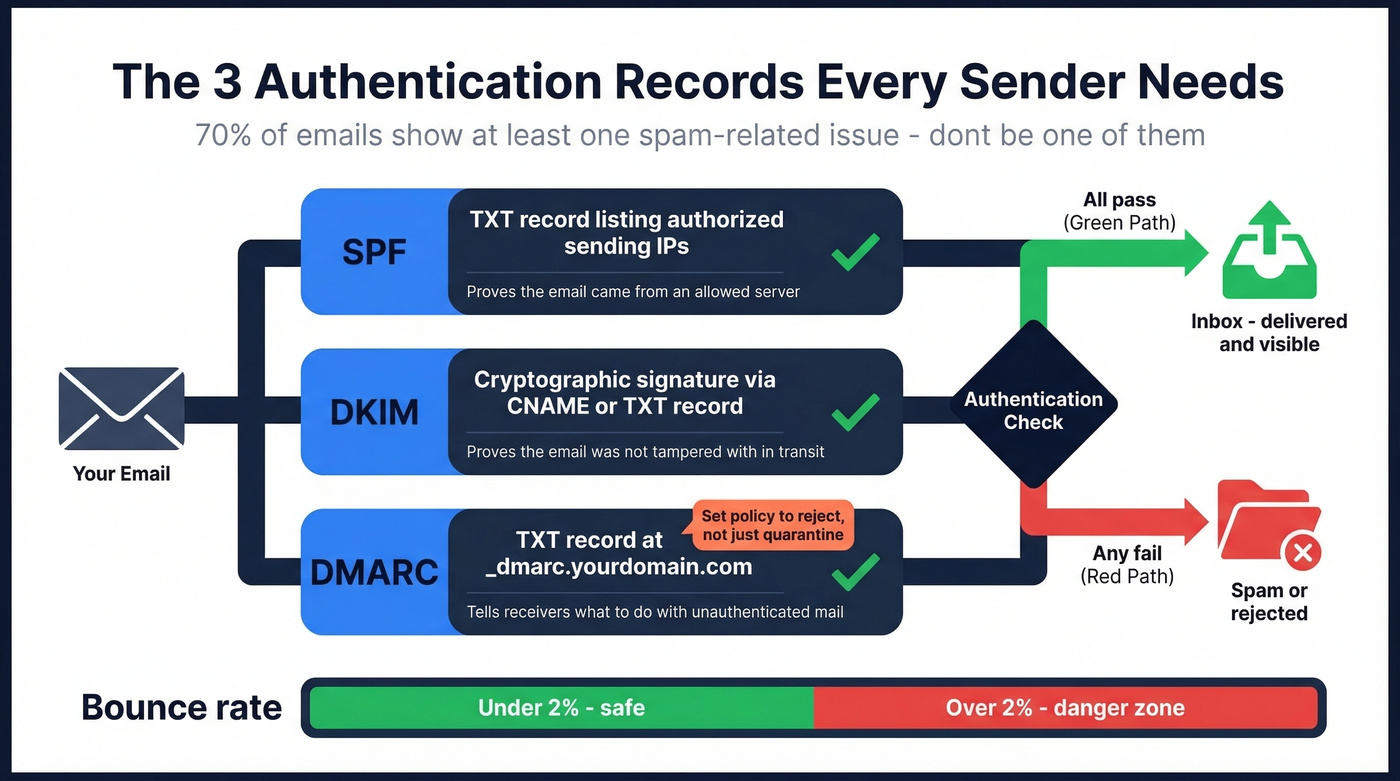
Three authentication records are non-negotiable:
SPF is a TXT record listing authorized sending IPs - your ESP generates the exact value. DKIM adds a cryptographic signature via a CNAME or TXT record that proves the email wasn't tampered with in transit. DMARC is a TXT record at _dmarc.yourdomain.com that tells receivers what to do with unauthenticated mail. Set your DMARC policy to reject, not just quarantine - it tells servers to flat-out refuse unauthenticated mail claiming to be from your domain.
If you want a full checklist, follow an email deliverability guide and validate your setup with how to verify DKIM is working.
The fact that most email guides don't mention SPF, DKIM, or DMARC tells you they were written by content marketers, not practitioners.
Beyond authentication, keep your bounce rate under 2%, monitor spam complaints, and don't send to unengaged subscribers for months on end. If inbox placement drops below 90%, investigate immediately. In our experience, the single biggest deliverability killer is skipping list verification - it's the one step that prevents everything else from unraveling.
10. Measure and Iterate
Here are the Mailchimp benchmarks based on billions of emails from campaigns with 1,000+ subscribers:
| Industry | Open Rate | Click Rate | Unsub Rate |
|---|---|---|---|
| All Users | 35.63% | 2.62% | 0.22% |
| Ecommerce | 29.81% | 1.74% | 0.19% |
| SaaS / Software | 31.95% | 2.45% | 0.21% |
| Non-Profits | 40.04% | 3.27% | 0.18% |
| Business & Finance | 31.35% | 2.78% | 0.15% |
| Education | 35.64% | 3.02% | 0.18% |
Remember the Apple MPP caveat: open rates are inflated across the board. Your real primary metric is click-through rate. Above 3%? You're outperforming most senders. Below 1.5%? Something's broken - your content, your segmentation, or your list quality. Promotional emails typically convert 1-5% of clickers, while newsletter-to-purchase paths sit closer to 0.5-2%.
Review performance after every send. Look for patterns across segments, not just aggregate numbers. Your engaged segment might have a 5% CTR while your full-list blasts sit at 1.2%. That's not an average problem - it's a segmentation opportunity.
If you're diagnosing list quality, start with email bounce rate benchmarks and fixes.

The article says it clearly: a bounce rate above 2% pushes your future emails to spam. Prospeo's 5-step verification catches invalid addresses, spam traps, and honeypots with 98% accuracy - at roughly $0.01 per email. Teams routinely cut bounce rates from 8% to under 1% by adding this single step before every send.
Stop torching your sender reputation. Verify before you send.
Campaigns vs. Automated Flows
Campaigns get all the attention, but flows do the heavy lifting.
Klaviyo's data tells the story: campaigns account for 94.7% of send volume, but flows generate roughly 41% of total email revenue from just 5.3% of sends, with a 13x higher placed-order rate and click rates of 5.58% versus 1.69%.
The takeaway isn't "stop sending campaigns." It's "build your flows first, then layer campaigns on top." Welcome series, abandoned cart, post-purchase, and win-back flows should be running before you worry about your monthly newsletter cadence. And audit your flows quarterly - "set it and forget it" automation goes stale fast.
If you want a framework for building sequences, use this personalized drip campaigns guide.
7 Mistakes That Kill Campaigns
1. Buying or scraping lists. You'll get blacklisted. Your sender reputation will tank. Under GDPR, you face fines up to EUR 20M or 4% of global turnover. There's no shortcut here.
2. Ignoring mobile. Broken layouts, tiny text, untappable CTAs. If it doesn't work on a phone, it doesn't work.
3. Over-mailing. Sending daily to your entire list creates fatigue, spikes unsubscribes, and triggers spam complaints. If you're consistently above ~0.3% unsub rate per send, you're pushing too hard.
4. No segmentation. The same message to everyone is a broadcast, not a campaign. Even basic engagement-based segmentation measurably improves results.
5. Unedited AI copy. Your subscribers can tell. AI-generated emails without human editing read as generic and impersonal. Use AI for drafts, not final sends.
6. Skipping authentication. No SPF, DKIM, or DMARC means mailbox providers have no reason to trust you. This is table stakes.
7. Never testing. If you're not A/B testing subject lines at minimum, you're flying blind. Every unsent test is a missed insight.
Look, here's a hot take: if your average deal size is under $15K and your list is under 5,000, you don't need a $300/month ESP. You need a clean list and a free tool with decent automation. Most teams overspend on platforms and underspend on data quality. Fix the data first.
Email Compliance in 2026
Compliance isn't optional. 47% of global email traffic is spam, and regulators are tightening enforcement.
| GDPR | CASL | CAN-SPAM | |
|---|---|---|---|
| Consent | Explicit opt-in | Opt-in (express/implied) | Opt-out |
| Max Penalty | EUR 20M / 4% turnover | $10M CAD | $50K per email |
| Private Action | Yes | Yes | No |
The US opt-out model under CAN-SPAM is the most permissive. If you're sending to anyone in the EU or Canada, you need explicit consent with proof. Both CASL and CAN-SPAM give you 10 business days to honor opt-out requests, but you should process unsubscribes immediately anyway - waiting the full window is technically legal and practically stupid.
Practical steps: maintain consent records, honor unsubscribes immediately, include a physical mailing address, and never use pre-checked opt-in boxes. If you're unsure whether a contact opted in, don't send.
From Single Send to End-to-End System
Knowing how to create an email campaign is only the first step. The real competitive advantage comes from connecting every stage: list building, verification, segmentation, sending, and post-send analysis. When each step feeds data back into the next, you stop treating campaigns as isolated blasts and start operating a self-improving system.
We've watched teams transform their results not by switching ESPs or rewriting copy, but by closing the loop between send performance and list hygiene. Every bounce, every unsubscribe, every spam complaint is a signal. The teams that act on those signals consistently outperform the ones chasing the next subject line hack.
If you're trying to protect inbox placement long-term, this is how to improve sender reputation systematically.
FAQ
How often should I send email campaigns?
One to two sends per week works for most audiences. If your unsubscribe rate spikes above ~0.3% per send, you're over-mailing. Let engagement data - not an arbitrary calendar - guide frequency.
What's a good click-through rate for email campaigns?
The all-industry benchmark is 2.62% per Mailchimp's data. Above 3% means you're outperforming most senders. Below 1.5% signals a problem with content, segmentation, or list quality. Prioritize CTR over open rate since Apple MPP inflates opens.
Do I need to verify my list before sending?
Yes. A bounce rate above 2% damages sender reputation and pushes future emails to spam. Tools like Prospeo verify addresses with 98% accuracy via a 5-step process. The free tier covers 75 emails per month - enough to test before scaling.
What's the difference between a campaign and an automated flow?
A campaign is a one-time send to a segment - promotions, newsletters, announcements. A flow triggers automatically based on user behavior. Flows generate about 41% of email revenue from just 5.3% of sends, making them the real revenue engine behind most programs.
What are the steps to create an email campaign?
Define your goal, pick an ESP, build and verify your list, segment your audience, write strong subject lines, design for mobile, time your send, A/B test, nail deliverability, and measure results. The full 10-step breakdown is above.
Building a segmented, permission-based list is step one. But even opt-in lists decay - people change jobs, abandon inboxes, and typo their signups. Prospeo refreshes data every 7 days (the industry average is 6 weeks) so your list stays clean between campaigns, not just on launch day.
Clean lists don't stay clean on their own. Prospeo keeps them that way.