

How to Email the Hiring Manager and Actually Get a Response
You submitted 150 applications last month. Six responses came back - four of them automated rejections. Meanwhile, someone with a worse resume landed an interview at your dream company because they sent a three-sentence email to the right person.
That's the game now.
Knowing how to email the hiring manager is the single most underused job search tactic in 2026. Roughly 75% of resumes get filtered out by applicant tracking systems before a human ever reads them. Internal recruitment teams are drowning in 300+ applications per role - one Reddit thread after another confirms this number, and it's only climbing. The ATS isn't broken. It's working exactly as designed, which means it's designed to ignore you.
Here's my hot take: the job seekers who refuse to do direct outreach because it "feels pushy" are the same ones refreshing their inbox for six weeks wondering why nobody called. Pushiness is sending the same template to 50 people. Initiative is sending one thoughtful email to the person who actually makes the hire.
The Strategy in Five Steps
- Apply through the ATS first. Always. This covers your bases.
- Find the hiring manager's email using an email finder tool or by guessing the company's format.
- Send a 3-5 sentence email referencing the specific role and one proof of your ability.
- Follow up once after 5-7 days. That's it - one follow-up.
- Track everything in a spreadsheet (or a lightweight CRM like Folk) so you don't double-email anyone.
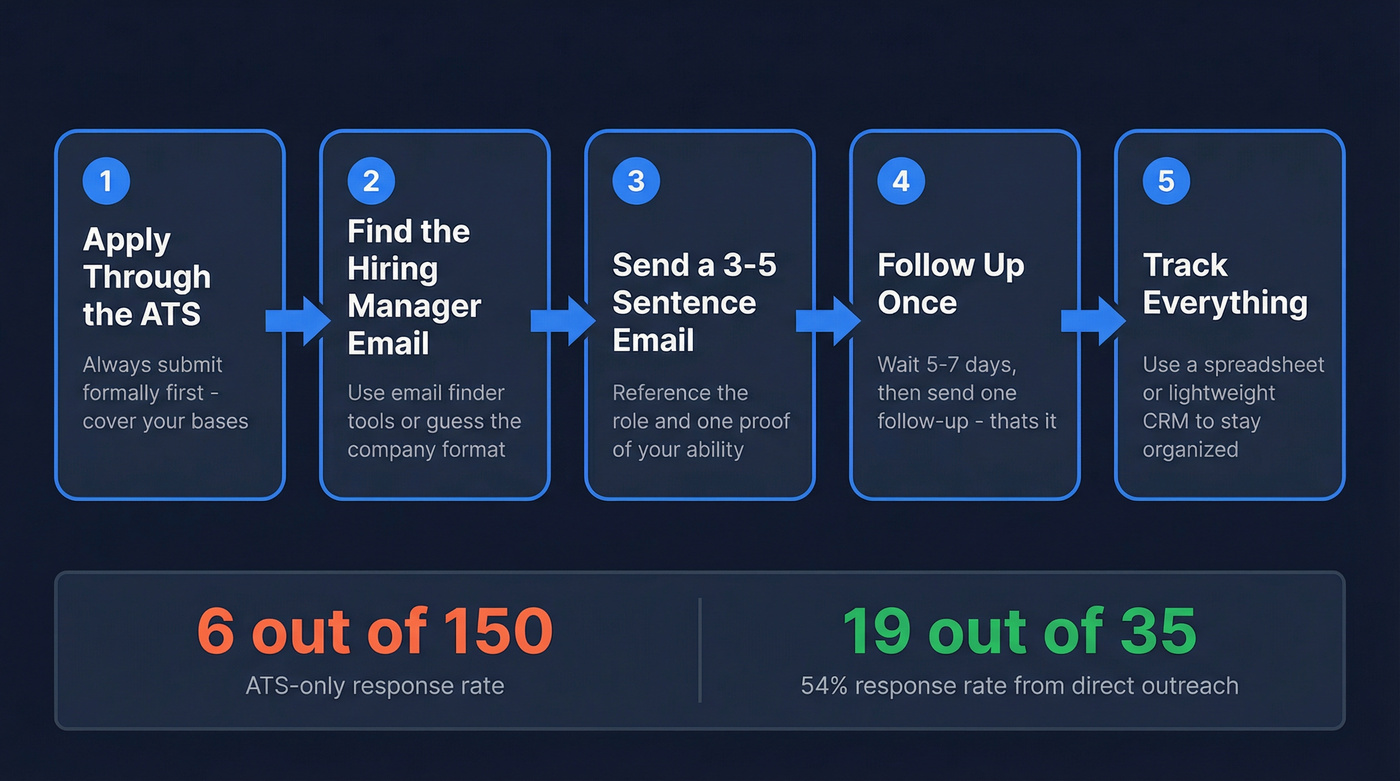
The numbers tell the story: one job seeker applied to 150 roles, got 6 responses through the ATS alone, then followed up directly with 35 hiring managers and heard back from 19 - a 54% response rate. Across multiple community threads, people targeting their top 20 positions and messaging hiring managers directly report 25-50% response rates vs. single digits from blind applications.
That's the difference between hoping and doing.
Why Contacting the Hiring Manager Directly Works
Job searching has become a sales process. You're not "applying" - you're prospecting. And like any sales process, reaching the decision-maker beats sending proposals into a generic inbox.

Matthieu Degeneve, a professional coach quoted in Welcome to the Jungle's analysis, puts it bluntly: "A good or bad hiring decision will have little to no effect on the HR team, but the manager will have to work alongside the new recruit on a daily basis." That's why the manager cares more than HR does.
Five reasons this works:
The manager has more skin in the game. HR fills a requisition. The manager fills a seat they'll sit next to for the next two years.
They speak your language. A hiring manager for a marketing role understands what "grew organic traffic 3x in 6 months" actually means. An HR screener might not.
They can bend the rules. I've seen this happen repeatedly - candidates who didn't check every box on paper but nailed the direct outreach and got hired anyway. Managers look beyond the job description when someone impresses them.
You become a person, not a file. When 300 applications come through the ATS, you're a row in a spreadsheet. When you reach out directly, you're a human who took initiative.
The numbers are clear. Personalized messages get 44% higher acceptance rates than generic ones, and cold emails with multiple personalization fields see reply rates up to 142% higher. That 54% response rate from direct follow-ups isn't a fluke.
Most people won't do this. That reluctance is your advantage.

You just read that sending to invalid addresses tanks your deliverability. Prospeo's 5-step email verification and 98% accuracy rate mean your outreach actually lands in the hiring manager's inbox - not their spam folder. 143M+ verified emails, starting at $0.01 each.
Find the hiring manager's real email in one click. No guessing required.
How to Find the Hiring Manager's Email Address
This is where most people stall. They know they should contact the hiring manager but have no idea how to find the address.
It's easier than you think.
Check Who Posted the Job
Start on LinkedIn. Don't just search the job title - search the company page, click "People," and filter by title. Look for department-specific roles: "engineering manager at [company]" or "head of marketing at [company]."
Better yet, check who actually posted or shared the job listing. People love announcing they're hiring. If someone at the company shared the role on their feed, that's likely the hiring manager or someone on the team - and that's your target.
A quick note on recruiter types: at large companies, you'll encounter retained recruiters (exclusive agency hires), contingency recruiters (competing agencies), and in-house talent acquisition. The hiring manager sits above all of them.
Guess the Email Format
Most companies use one of two formats: firstname.lastname@company.com or flastname@company.com. Once you know the person's name, try both.
You can also run Google searches to confirm the pattern:
"Jane Smith" "Acme Corp" emailfirstname.lastname@acmecorp.comsite:acmecorp.com @acmecorp.com
Worst case, it bounces. That's not a career-ending event.
Use an Email Finder Tool
Guessing works sometimes. Tools work almost always.
Hunter.io offers 50 free credits per month. Plug in a domain, and it'll show you the company's email pattern plus any publicly indexed addresses. That's often enough to confirm the format and find your person.
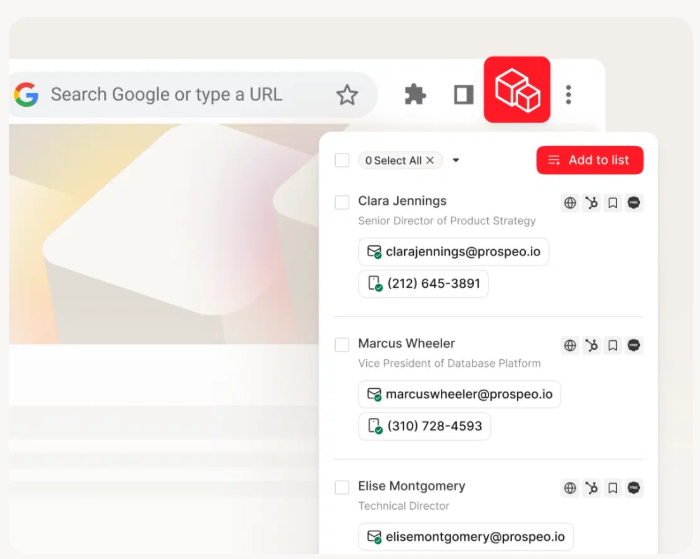
Verification matters more than people realize. Sending to invalid addresses doesn't just waste your time - it flags your email as potential spam. A few bounces and your follow-up emails start landing in junk folders for everyone, not just the bad addresses. (If you want the full workflow, start with how to verify an email address.)
Check the Job Posting Itself
This sounds obvious, but people skip it. Some postings include a direct email or a "send applications to" line buried in the description. Also check the company's Contact page - even a generic info@company.com reveals the email domain, which helps you guess the format for the hiring manager.
One note: email finder tools don't work reliably for government email addresses. For public sector roles, go through official channels.
How to Write the Email (With Templates)
You've found the email. Now don't blow it with a five-paragraph essay about your "passion for innovation."

Subject Line That Gets Opened
A third of recipients decide whether to open based on the subject line alone. Personalized subject lines get 50% higher open rates, and subject lines with numbers see open rates up to 113% higher. Keep yours under 60 characters. (If you need ideas, borrow from these reminder email subject lines.)
Formulas that work:
Quick question about [Role] at [Company][Your Name] - [Role Title] ApplicationFollowing up on [Role Title] - [Your Name]
Subject lines that get deleted:
- "Possible Job Opportunity?" - vague and passive
- "An inquiry" - tells the reader nothing
- "Hello!" - you're not their friend yet
Use the hiring manager's first name in the email. If you're unsure of their gender, skip gendered salutations entirely - "Hi Alex" works better than "Dear Mr./Ms. Smith" when you're guessing.
Template 1 - Post-Application Follow-Up (Safest Approach)
This is the bread-and-butter move. You've already applied through the ATS. Now you're putting a face to the file.
Subject: Quick question about [Role Title] at [Company]
Hi [First Name],
I recently applied for the [Role Title] position and wanted to introduce myself directly. In my current role at [Current Company], I [one specific, quantifiable achievement relevant to the role - e.g., "reduced customer churn by 18% by redesigning the onboarding flow"].
I'd love the chance to discuss how I could contribute to your team. Would you be open to a brief conversation this week?
Best, [Your Name]
That's 65 words. Under 100 is the sweet spot. You're referencing the specific role, proving one thing you can do, and making a low-pressure ask. The manager can read it in 15 seconds and decide whether to respond.
Template 2 - Cold Outreach (When You Haven't Applied Yet)
This works when you've found a role that isn't posted yet, or when you want to express interest before a formal application. Riskier, but it can land conversations that don't exist through normal channels.
Subject: Quick question about [Role] at [Company]
Hi [First Name],
I've been following [Company]'s work on [specific thing - product launch, campaign, initiative]. As someone who [relevant credential - e.g., "has spent 4 years scaling B2B content programs"], I'd love to explore whether there's a fit on your team.
Quick proof: I recently [one specific achievement - e.g., "built a content engine that drove 200K organic visits/month from zero"]. Happy to be pointed to whoever handles hiring if that's not you.
Thanks, [Your Name]
The "happy to be pointed to whoever handles hiring" line is crucial. It lowers the pressure and actually increases response rates because people are more willing to redirect than to commit.
One job seeker used this exact structure to reach out about a growth marketing role at Duolingo - they mentioned their 231-day streak and a TikTok campaign that hit 100K+ organic views. That's the level of specificity that gets responses.
Personalize each email individually. If you're not willing to write an original message for each person, you're not ready for direct outreach.
When to Send and When to Follow Up
Timing isn't everything, but it's something.

Best send time: 10-11 AM on a Tuesday. That's when hiring managers are in work mode but haven't hit the afternoon wall yet. Early morning (7-8 AM) or around lunch also works - your email sits at the top of the inbox when they check. (If you want to get nerdy about timing, see when should i send a follow up email.)
The follow-up cadence:
- Day 1: Submit your application through the ATS. Send your email to the hiring manager the same day or the next morning.
- Day 1-2: Send a LinkedIn connection request as a supplementary touchpoint. Keep the note brief - "Applied for [Role], would love to connect."
- Day 7: If no response, send one follow-up. Keep it under 150 words. Reference your original email: "Just bumping this up - still very interested in the [Role] position. Happy to chat whenever works."
- Day 14: One final, short message. If nothing comes back, move on.
Three total contacts maximum. That's the line between persistent and annoying.
Most replies come from the second message. People are busy. Your first email might've landed during a fire drill - the follow-up is where the magic happens, so don't skip it.
The average hiring process takes about 23 days from application to offer. If you haven't heard anything after two follow-ups and three weeks, the role has moved forward without you. Redirect your energy.
Mistakes That Get Your Email Deleted (or Worse)
Do this: Address the hiring manager by name.
Not that: "To Whom It May Concern." Nothing screams mass email louder.
Do this: Write in complete, professional sentences.
Not that: Text-speak, slang, or overly casual tone. "Hey! Saw ur job posting" isn't charming - it's disqualifying.
Do this: Compose your email in a separate document first, spell-check it, then paste it into your email client.
Not that: Type directly into Gmail and hit send. You will miss a typo. It will be in the hiring manager's name.
Do this: Reference a specific achievement that's different from your resume bullet points.
Not that: Copy-paste your resume summary into the email body. They can read your resume - give them something new.
Do this: Include a clean email signature with your name, title, and phone number.
Not that: A signature with inspirational quotes, five social media links, and a headshot.
Do this: Name your attachments properly. "Smith_Jane_Marketing_Manager_Resume.pdf" tells them exactly what they're opening.
Not that: "Resume_final_v3_FINAL.docx."
Do this: Send one personalized email to one hiring manager.
Not that: BCC five people at the same company. Mass-mailing is the actual trigger for getting blacklisted.
About that fear of being blacklisted: yes, one recruiter on Reddit said she "deletes apps when people follow up." But the overwhelming consensus from career coaches, hiring managers, and community data is that a single personalized follow-up won't get you disqualified. The people who get blacklisted send identical messages to every email address they can find at a company. (If you’re worried about deliverability, read up on domain reputation and how to avoid a blacklist alert.)
The Honest Truth - Not Every Hiring Manager Wants Your Email
Look, I'd be doing you a disservice if I didn't acknowledge this: opinions are genuinely split.
Some hiring managers love the initiative. Others see it as bypassing the process and get annoyed. LinkedIn connection requests get accepted about 10% of the time at large companies. Finding the right recruiter at an enterprise with 50+ talent acquisition people is nearly impossible.
Here's where this strategy works best: small-to-mid-sized companies. At a 200-person company, the engineering manager probably posted the job themselves and will actually read your email. At a 20,000-person enterprise, your email might land with someone three levels removed from the decision.
If you're applying internally, the same principles apply - but you have an advantage. You can find the hiring manager in Slack, Teams, or the company directory. A brief message referencing your current role and interest is enough.
Michael Robinson, a career coach with 10+ years of experience as both a hiring manager and corporate recruiter, puts it simply: unless the job posting specifically states not to email, you won't be disqualified for reaching out. The worst realistic outcome is being ignored - not blacklisted.
Calibrate your expectations. This isn't a cheat code. It's a strategy that meaningfully improves your odds when applied thoughtfully.
Tools to Find a Hiring Manager's Email Fast
You don't need to spend hours guessing email formats. These tools do the work in seconds so you can focus on writing a message that actually stands out.
| Tool | What It Does | Free Tier | Paid From | Best For |
|---|---|---|---|---|
| Prospeo | Verified email finder + extension | 75 emails/mo | ~$39/mo | Accuracy-first lookup |
| Hunter.io | Domain search + email pattern | 50 credits/mo | $34/mo (yearly) | Format discovery |
| Apollo | Email + profile database | Limited free | ~$49/mo | Research + email combo |
| Mailscoop.io | Name + company to email | Free | Free | Quick one-off lookups |
| RocketReach | Email + phone lookup | Limited free | ~$48/mo | Broad contact search |
Hunter.io's free plan gives you 50 credits per month with no time limit and no credit card required - enough for a focused job search. The Chrome extension and Google Sheets add-on are included. Paid plans start at $34/month billed yearly if you need more volume.
Prospeo's free tier includes 75 verified emails per month plus 100 Chrome extension credits - more generous than most alternatives and enough to cover a serious job search. The 98% email accuracy means you're not wasting sends on dead addresses, which matters when every bounced email chips away at your sender reputation. (More options here: free email finder tools and AI email address finder tools.)
Apollo's free tier is useful if you want to research the hiring manager's background before reaching out - it combines email data with professional profile information. Email accuracy is lower than dedicated verification tools, so verify separately before sending.
Mailscoop.io is dead simple: enter a first name, last name, and company URL, and it gives you a confidence-rated email. Free and works for quick one-off lookups.

Skip all of these for government email addresses (.gov, .mil). For public sector roles, go through official application channels.
Hunter gives you 50 free credits. Prospeo gives you 100 - plus 98% email accuracy vs. industry averages in the low 80s. With 300M+ professional profiles and a 7-day data refresh cycle, you're reaching the right person with a valid address, not bouncing into the void.
Stop refreshing your inbox. Start reaching decision-makers directly.
FAQ: Emailing the Hiring Manager
Should I email the hiring manager before or after applying?
After. Submit your application through the official channel first, then send a short follow-up email the same day or next morning. Your resume is already in the ATS, so the manager has context when they see your message.
What if I can't find the hiring manager's name?
Email the department head or the person who posted the listing. You can also call the company's main line and ask who manages hiring for that team. A slightly wrong contact is better than no contact - people forward emails more often than you'd think.
How long should my email to the hiring manager be?
100 words maximum - about 3-5 sentences. State the role, one relevant achievement, and a low-pressure ask. Anything longer reads like a cover letter and gets skipped.
Is it okay to email multiple people at the same company?
Email the hiring manager first. If no response after one follow-up, try the recruiter or a team member. Sequential outreach looks thoughtful; simultaneous mass-mailing looks desperate and can get you blacklisted.
What's a free tool to find a hiring manager's email?
Prospeo offers 75 free verified emails per month with 98% accuracy, and Hunter.io provides 50 free credits monthly. Both include Chrome extensions for quick lookups - enough for most active job searches without spending a dollar.