

How to Improve Email Deliverability: The Practitioner's Guide for 2026
Your SDR team sends 200 cold emails a day. Reply rates are tanking. You dig into the data and realize 30% of those messages never reached an inbox - they bounced, hit spam, or vanished into the void. The problem isn't your copy. It's your infrastructure and your data.
The ADW Framework: Authenticate, Data-Clean, Warm Up
If you only do three things, do these:
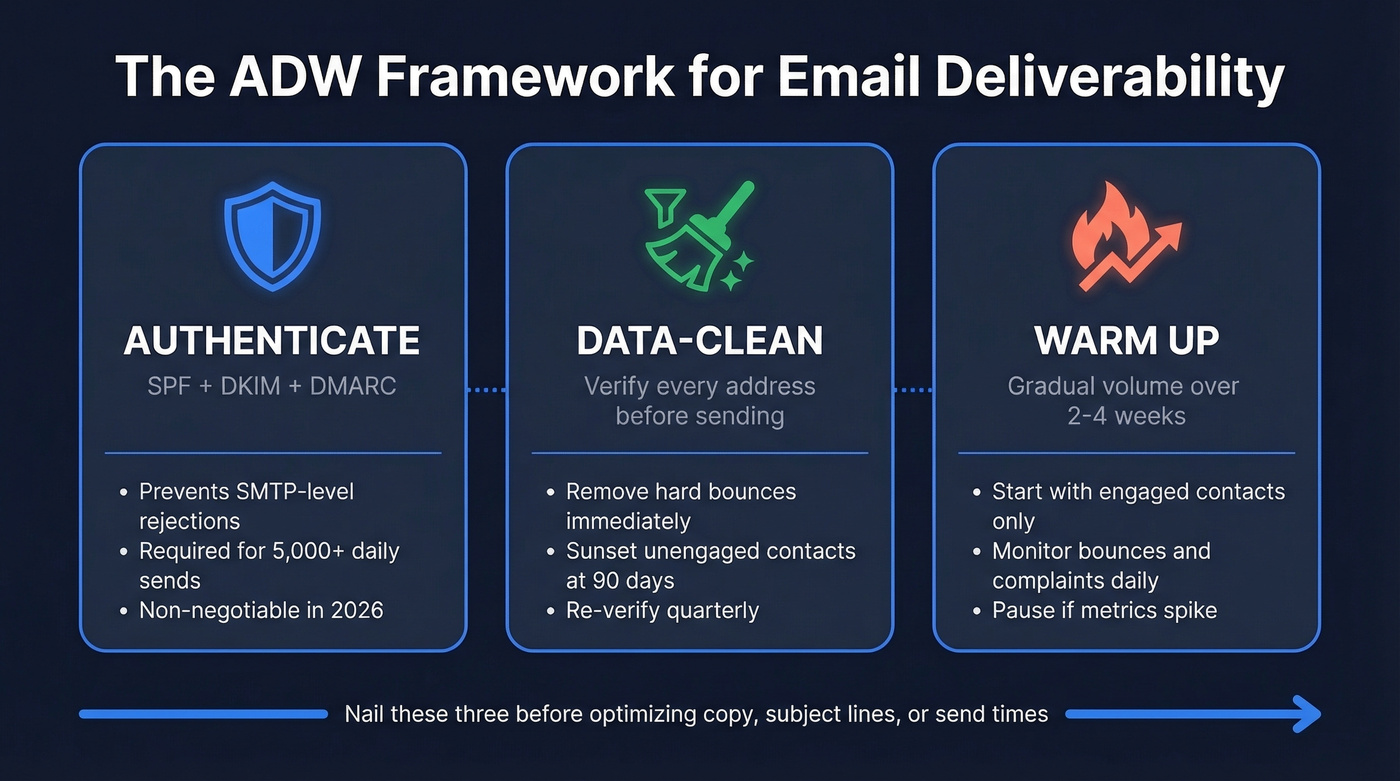
- Authenticate everything. SPF, DKIM, and DMARC aren't optional anymore. For bulk sending in 2026, missing authentication triggers SMTP-level rejections - not filtering. (If you need a deeper technical breakdown, see our email deliverability guide.)
- Data-clean relentlessly. Every email address should be verified before it enters your sending queue. Hard bounces damage your sender reputation fast, and you need to remove them immediately. (Benchmarks + fixes: email bounce rate.)
- Warm up properly. New domains and IPs need 2-4 weeks of gradual volume increases. Skip this and you'll get throttled, blocked, or suspended. (Tooling options: unlimited email warmup.)
Everything else - subject lines, send times, content optimization - is optimization on top of those three pillars. Nail these three and you'll boost inbox placement more than any copywriting tweak ever could.
What Deliverability Actually Means
There's a distinction most guides gloss over: delivery vs. deliverability. Delivery means the receiving server accepted your message. Deliverability means it landed in the inbox, not spam or promotions.
You can have 99% delivery and 60% deliverability. That gap is where pipeline goes to die.
Here's the thing most guides also conflate: cold email and marketing email are fundamentally different deliverability problems. Marketing email goes to opted-in subscribers with engagement history. Cold email goes to strangers with zero prior relationship. The rules, the tools, and the risk profiles are completely different - and advice that works for one often backfires for the other. (If you're building outbound systems, pair this with cold email marketing.)
The baseline: global inbox placement averages about 84% according to Validity's 2024 report. Roughly 1 in 6 emails never reach the inbox. ISPs typically take 30+ days to form a reputation judgment on a new domain, and you should expect performance volatility for the first 90-120 days. If your numbers are worse than 84% after that settling period, something structural is broken.
2026 Inbox Placement Benchmarks
Not all inbox providers treat your emails the same way:
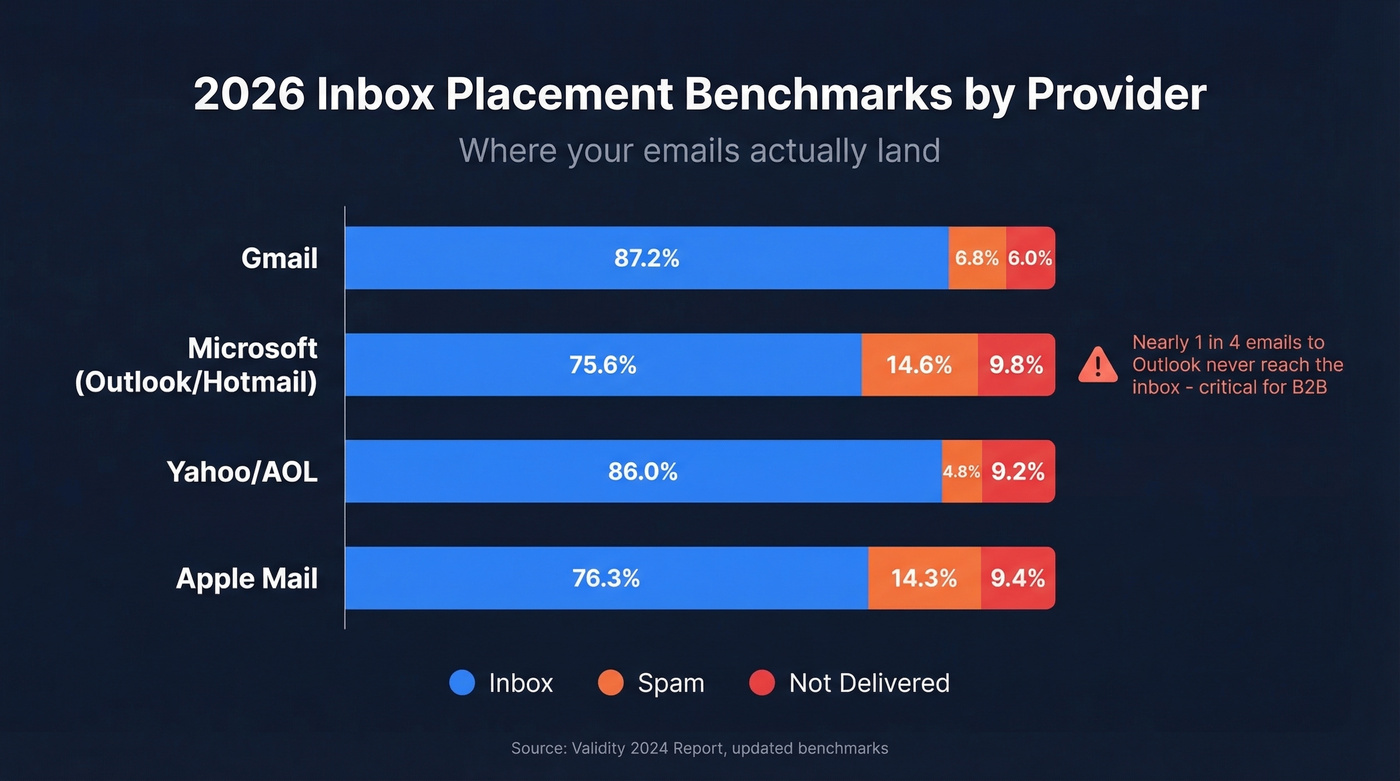
| Provider | Inbox Rate | Spam Rate | Not Delivered |
|---|---|---|---|
| Gmail | 87.2% | 6.8% | 6.0% |
| Microsoft | 75.6% | 14.6% | 9.8% |
| Yahoo/AOL | 86.0% | 4.8% | 9.2% |
| Apple Mail | 76.3% | 14.3% | 9.4% |
The Microsoft number should alarm you. Nearly 1 in 4 emails to Outlook and Hotmail addresses never reach the inbox. If your audience skews corporate - and most B2B audiences do - you need to work harder on authentication and reputation than someone targeting Gmail-heavy lists. (More on remediation: improve sender reputation.)
Gmail's inbox placement has actually declined, dropping from 89.8% in early 2024 to 87.2% by Q4. That's the direct result of stricter bulk sender enforcement and heavier engagement-based filtering.
The spam complaint risk ladder:
- 0.05%: Warning zone. You're on the radar.
- 0.1%: Pause sending and investigate.
- 0.3%: Gmail and Yahoo will throttle or reject your messages outright.
Bulk Sender Rules for 2026
Gmail, Yahoo, and Microsoft now enforce strict requirements for anyone sending more than 5,000 emails per day:
- SPF authentication on your sending domain
- DKIM signing with a valid key
- DMARC policy published (at minimum
p=none) - One-click unsubscribe via List-Unsubscribe header
- Spam complaint rate below 0.3%
- Valid PTR records for sending IPs
- RFC 5322-compliant message formatting
The enforcement timeline has been aggressive. Google started enforcing in February 2024, with the one-click unsubscribe deadline hitting June 2024. By late 2025, Gmail moved to strict SMTP-level rejections for non-compliant senders. Microsoft followed suit shortly after. In 2026, rejection is the default for non-compliant bulk sending.
Non-compliant messages aren't filtered anymore - they're rejected at the server level. Your email doesn't land in spam. It doesn't land anywhere. The receiving server says "no" before the message is even accepted. That's a fundamentally different problem than spam folder placement, and it means authentication is the single most important thing you can get right.
Authentication Setup That Actually Works
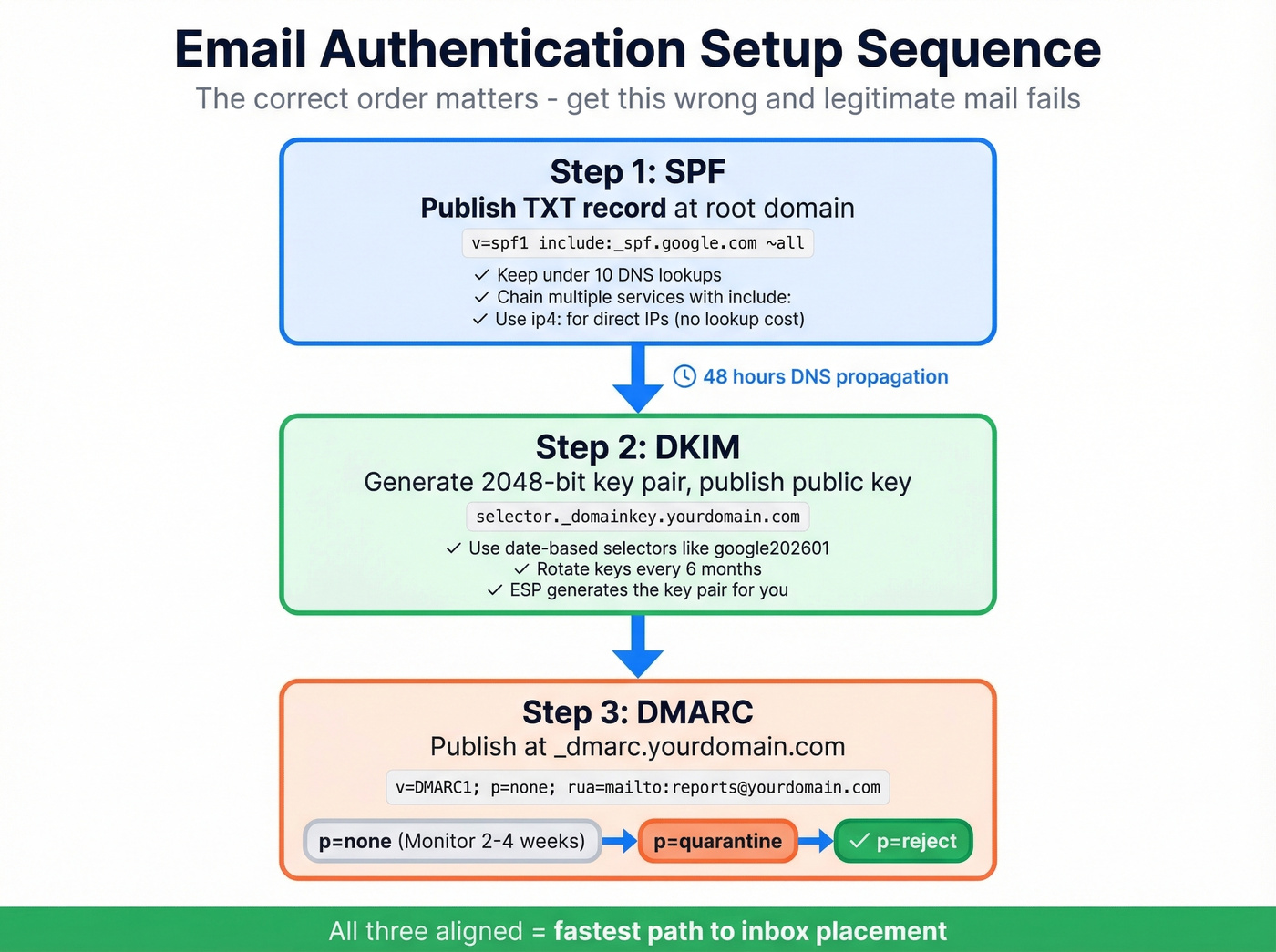
Every deliverability guide says "set up SPF, DKIM, and DMARC." Almost none of them show you what to actually paste into your DNS. Let's fix that.
SPF Setup
SPF tells receiving servers which IPs are authorized to send email on behalf of your domain. You publish a TXT record at your root domain.
For Google Workspace:
[v=spf1 include:_spf.google.com ~all](https://knowledge.workspace.google.com/admin/security/set-up-spf)
For Microsoft 365:
[v=spf1 include:spf.protection.outlook.com ~all](https://learn.microsoft.com/en-us/defender-office-365/email-authentication-spf-configure)
If you're sending through multiple services - say, Google Workspace for internal email, Mailgun for transactional, and Instantly for cold outreach - you chain them:
v=spf1 include:_spf.google.com include:mailgun.org ip4:198.51.100.0/24 ~all
Keep your SPF record under 10 DNS lookups. Every include: counts as a lookup, but ip4: and ip6: mechanisms don't. Exceeding the limit causes SPF to fail entirely. We've seen teams debug deliverability problems for weeks before realizing their SPF record had 12 includes. (More examples and syntax gotchas: SPF record examples.)
DKIM Setup
DKIM adds a cryptographic signature to your outgoing messages. The receiving server checks the signature against a public key published in your DNS.
The DNS record lives at selector._domainkey.yourdomain.com as a TXT record:
v=DKIM1; k=rsa; p=MIIBIjANBgkqhkiG9w0BAQEFAAOCAQ8AMIIBCgKCAQEA...
Use 2048-bit keys - Google explicitly recommends this, and 1024-bit keys are increasingly considered weak. Rotate your DKIM keys every six months. Use date-based selector names like google202601 so you can track which key is active and when it was created.
Your ESP or email provider generates the key pair. You publish the public key in DNS. The private key stays on the sending server and signs each outgoing message automatically. (If you want to validate the setup end-to-end, use this: how to verify DKIM is working.)
DMARC Setup
DMARC ties SPF and DKIM together and tells receiving servers what to do when authentication fails. Publish this TXT record at _dmarc.yourdomain.com:
v=DMARC1; p=none; rua=mailto:dmarc-reports@yourdomain.com
The rollout approach matters. Start at p=none - this monitors without taking action. Review your aggregate reports for 2-4 weeks to make sure legitimate sending sources pass authentication. Then escalate to p=quarantine (spam folder for failures), and finally p=reject (block failures entirely).
Important sequencing: configure SPF and DKIM first, wait 48 hours for DNS propagation, then publish your DMARC record. Publishing DMARC before your authentication is solid will cause legitimate mail to fail. (If you’re troubleshooting pass/fail edge cases, see DMARC alignment.)
Getting all three protocols aligned is the fastest way to increase inbox placement across every major provider.

You just read that hard bounces destroy sender reputation fast. The fix starts before you hit send. Prospeo verifies every email through a 5-step process - catch-all handling, spam-trap removal, honeypot filtering - delivering 98% accuracy. Teams switching from other providers cut bounce rates from 35%+ to under 4%.
Stop debugging deliverability. Start with data that doesn't bounce.
Warming Up New Domains and IPs
Warm-up is the process of gradually increasing send volume so ISPs build a positive reputation for your domain or IP. Skip it and you'll get throttled or suspended. No exceptions.
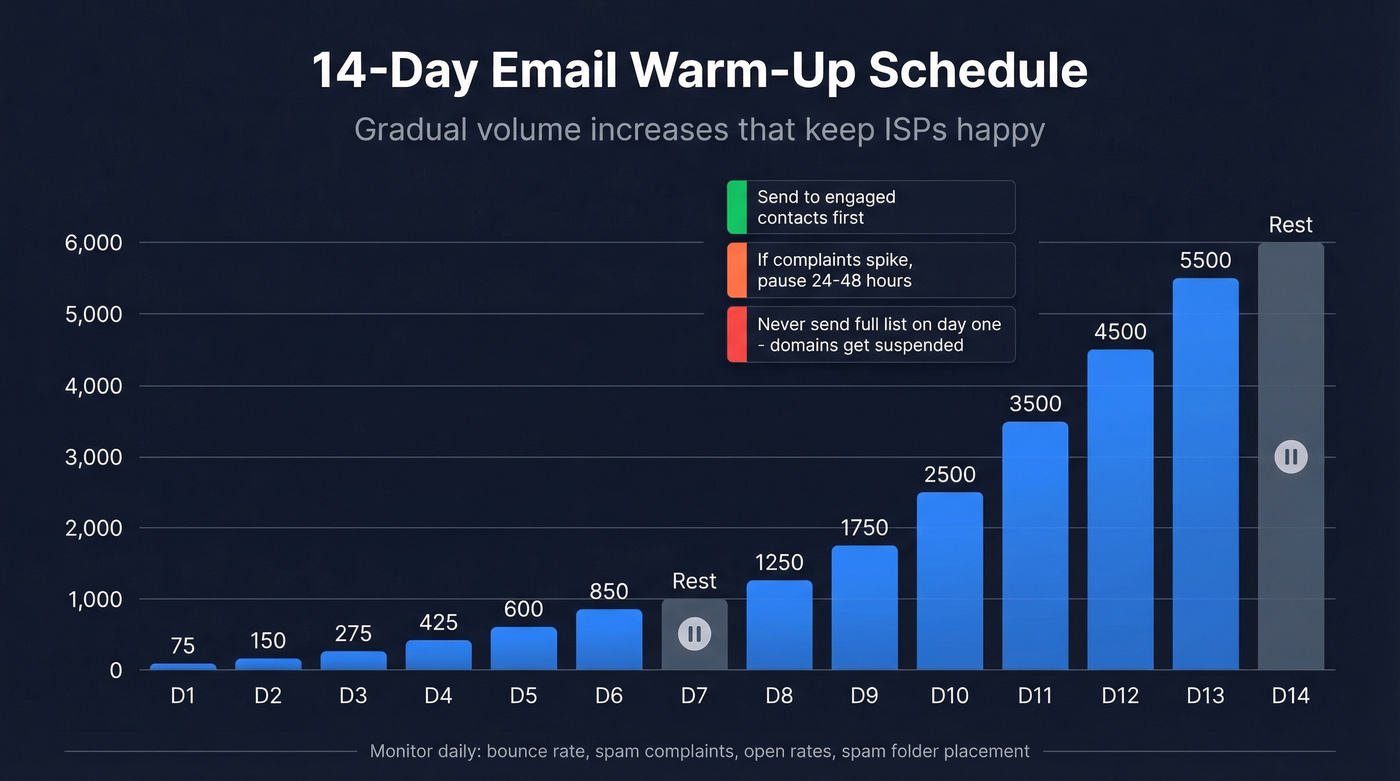
A concrete 14-day schedule:
| Day | Daily Volume |
|---|---|
| 1 | 50-100 |
| 2 | 100-200 |
| 3 | 200-350 |
| 4 | 350-500 |
| 5 | 500-700 |
| 6 | 700-1,000 |
| 7 | Rest or repeat |
| 8 | 1,000-1,500 |
| 9 | 1,500-2,000 |
| 10 | 2,000-3,000 |
| 11 | 3,000-4,000 |
| 12 | 4,000-5,000 |
| 13 | 5,000-6,000 |
| 14 | Rest or repeat |
Send to your most engaged contacts first during warm-up. These are people who've opened or replied to previous messages. Their positive engagement signals tell ISPs your domain is trustworthy. Avoid cold lists entirely during this phase.
Monitor four things daily: bounce rate, spam complaints, open rates, and spam folder placement. If complaints or bounces spike, pause for 24-48 hours before resuming at the previous day's volume. (For safe ramping limits, see email velocity.)
A marketing team we worked with migrated to a new ESP and sent to their full 80,000-person list on day one. Account suspended within hours. This happens constantly. The warm-up schedule isn't optional - it's the difference between a functioning email program and a dead domain.
Tools like MailReach and MailFlow automate warm-up by generating positive engagement signals. The consensus on r/coldemail is that both are solid for this purpose, though manual warm-up with real contacts works just as well if you have the patience.
List Hygiene: The Overlooked Deliverability Lever
Bad contact data is a deliverability killer, and it's the one thing most guides barely mention. They'll spend 2,000 words on subject line optimization and one paragraph on the fact that invalid addresses actively destroy your sender reputation.
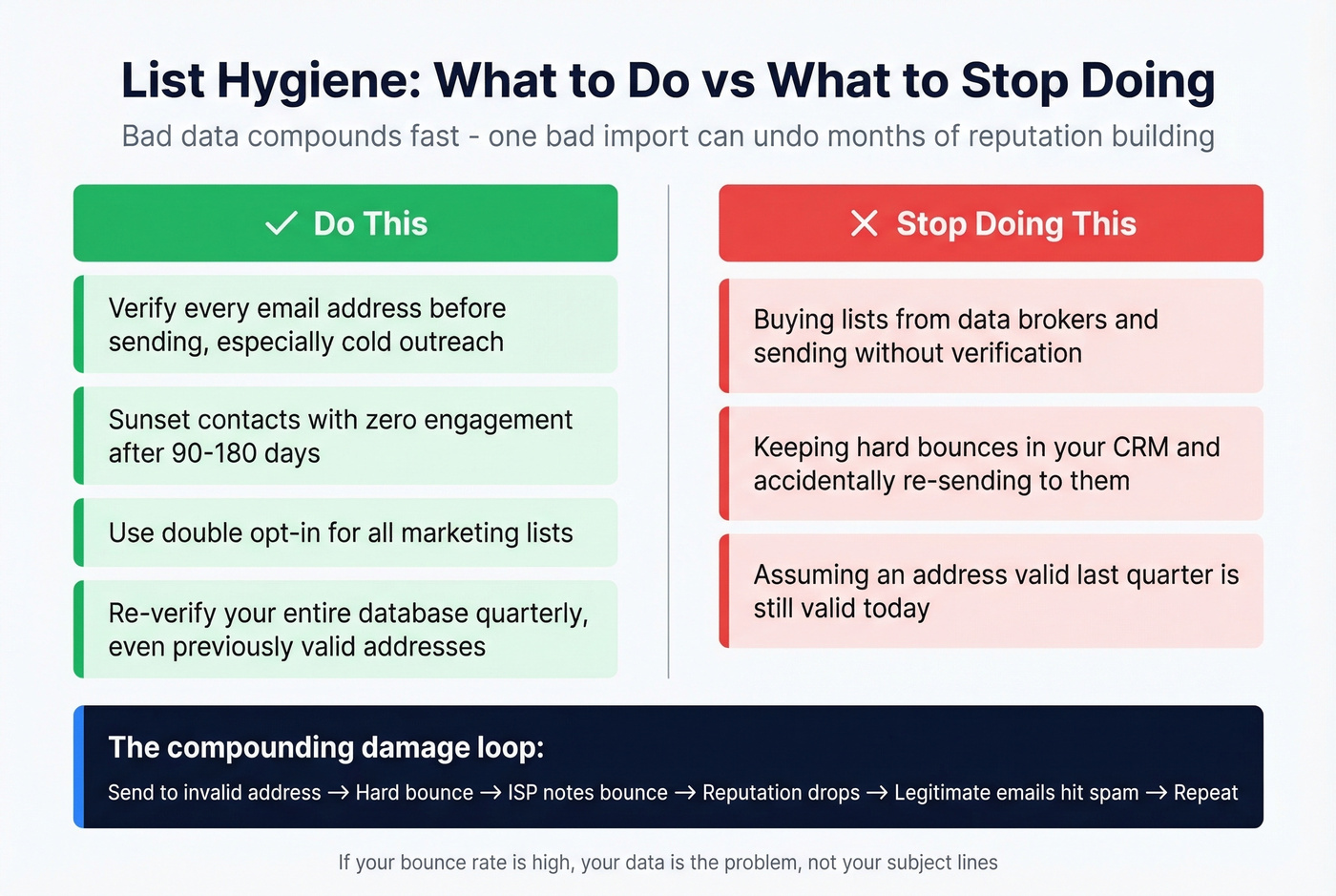
The damage compounds quickly. You send to an invalid address, it hard bounces, the ISP notes the bounce against your domain, and your reputation score drops. Do that enough times and your legitimate emails start landing in spam too. One bad list import can undo months of careful reputation building.
Do this:
- Verify every email address before sending - especially for cold outreach
- Implement a sunset policy: suppress contacts with zero engagement after 90-180 days
- Use double opt-in for marketing lists
- Re-verify your database quarterly, even for addresses that were valid six months ago
Stop doing this:
- Buying lists from data brokers and sending without verification (and if you’re unsure about the compliance side, read Is It Illegal to Buy Email Lists?)
- Keeping hard bounces in your CRM and accidentally re-sending to them
- Assuming that because an address was valid last quarter, it's still valid today
If your bounce rate is high, your data is the problem, not your subject lines. Cleaning your list is the most reliable way to protect sender reputation at scale.
Prospeo's 5-step verification catches invalid addresses, spam traps, and honeypots before they hit your sending queue - including catch-all domain handling, which most verification tools skip or charge extra for. Stack Optimize, an outbound agency running all client campaigns through Prospeo, maintains 94%+ deliverability and under 3% bounce rates across every client with zero domain flags.
Cold Email Deliverability
Cold email is deliverability on hard mode. You're emailing people who've never heard of you, from a domain they've never seen, with no engagement history to lean on. Every ISP signal starts at zero or negative.
If your deal sizes are modest - say, under $10K ACV - you probably don't need a sophisticated multi-tool deliverability stack. Nail the ADW Framework (authenticate, data-clean, warm up) and you'll outperform 90% of cold emailers who obsess over subject lines while sending to garbage lists. (If you want a step-by-step build, use a B2B cold email sequence.)
The non-negotiables for cold outreach:
Separate your domains. Never use your primary domain for cold email. Register multiple dedicated sending domains to protect your brand domain's reputation. If a cold domain gets burned, your main business email keeps working.
Cap your volume. Max 50 emails per day per inbox. During warm-up, keep it to 20 per day. Need more volume? Add more inboxes - don't increase per-inbox sends.
Go plain text. HTML templates with images, buttons, and tracking pixels scream "marketing email" to spam filters. Plain-text messages with minimal formatting perform better for cold outreach. Keep total email size under 100 KB and maintain at least a 60:40 text-to-image ratio if you must include any HTML.
Use custom tracking domains. Default tracking domains from your sending tool are shared across thousands of senders. Some of those senders are spammers. Set up your own. (Implementation details: tracking domain.)
Watch complaints, not opens. Open rates are unreliable thanks to Apple's Mail Privacy Protection and similar features. Focus on reply rates and bounce rates as your core health metrics. Pause sending if spam complaints hit 0.1%.
One thing worth flagging: if you're sending from Microsoft 365 to Gmail recipients, expect tougher filtering. The r/coldemail community consistently flags M365-to-Gmail deliverability as a pain point, especially for new domains. Google Workspace sending to Gmail tends to perform better, though Google has tightened its own rules significantly.
Cold email lives and dies on data quality. If 10% of your list bounces, your domain is cooked within a week. Verify every address before it enters your sending sequence - it's the single highest-ROI step you can take for cold outbound.
Deliverability Tools Worth Using
You don't need to spend thousands on deliverability tooling. Here's what actually earns its keep:
| Category | Tool | Price |
|---|---|---|
| Free Checks | Google Postmaster Tools | Free |
| Free Checks | Microsoft SNDS | Free |
| Free Checks | Mail-Tester | Free |
| Free Checks | Sender Score | Free |
| Testing | GlockApps | Free (2 credits), $59/mo |
| Monitoring | MXToolbox | Delivery Center $129/mo |
| Optimization | Everest (Validity) | From $29/mo |
| Optimization | InboxAlly | From $149/mo |
| Warm-up | MailReach | Paid plans |
| Verification | Prospeo | Free (75/mo), ~$0.01/ea |
| Verification | NeverBounce | ~$0.003-0.01/ea |
| Verification | ZeroBounce | ~$0.003-0.01/ea |
The $0 stack every sender should set up today: Google Postmaster Tools for domain and IP reputation monitoring, Microsoft SNDS for Outlook-specific reputation data, Mail-Tester for quick spam score checks (send an email to their generated address and get a detailed report), and MXToolbox for blacklist monitoring and DNS record validation. Sender Score grades sending IP reputation on a 0-100 scale. Total cost: $0.
If you're paying for one tool, make it GlockApps at $59/mo. It runs inbox placement tests across Gmail, Outlook, Yahoo, and others - showing you exactly where your emails land before you send to your real list. The free tier gives you 2 spam test credits, enough to spot-check but not for ongoing monitoring.
One caveat on inbox placement testing: seed lists behave like cold contacts with no engagement history, so your real-world deliverability to engaged subscribers will typically be higher than what seed tests show.
Quarterly Deliverability Audit Checklist
We run this audit every quarter across our own sending infrastructure and recommend you do the same. If you can't check every box, fix the gaps before optimizing anything else.
Authentication
- SPF record published with all sending sources, under 10 lookups
- DKIM signing active with 2048-bit keys, rotated within last 6 months
- DMARC policy at
p=quarantineorp=reject - Custom tracking domain configured
Data Quality
- All new addresses verified before first send
- Hard bounces removed from CRM within 24 hours
- Full database re-verified within last 90 days
- Sunset policy active: 90-180 day no-engagement suppression
Sending Practices
- Spam complaint rate below 0.05%
- Bounce rate under 2%
- Cold email on separate domain(s) from primary
- Per-inbox volume capped at 50/day (20/day during warm-up)
Monitoring
- Google Postmaster Tools active
- Microsoft SNDS active
- Blacklist monitoring in place
- Weekly review of bounce and complaint trends
Skip the subject line A/B tests until every box above is checked. We've seen teams spend months optimizing copy while their SPF record was broken. Fix the foundation first.
Authentication gets your emails accepted. Clean data keeps them landing in inboxes. Prospeo refreshes its 143M+ verified emails every 7 days - not the 6-week industry average - so you're never sending to stale addresses that trigger spam traps or inflate your complaint rate.
Every week your data ages, your inbox placement drops. Fix that.
FAQ
What's a good inbox placement rate?
Global average is 84%. Gmail leads at 87.2%, Microsoft trails at 75.6%. Consistently above 90% means you're outperforming most senders. Below 80%, something in your authentication, data quality, or sending patterns needs immediate attention.
How long does email warm-up take?
Plan for 2-4 weeks minimum. Start at 50-100 emails per day and ramp gradually. If bounce rates or spam complaints spike, pause for 24-48 hours before resuming at the previous day's volume. Rushing warm-up is the fastest way to burn a new domain.
Do I need a dedicated IP?
If you send more than 100,000 emails per month, a dedicated IP gives you full control over your sending reputation. Below that threshold, a shared IP from a reputable ESP is usually fine - and often better, since the shared pool benefits from aggregate positive signals.
How do I check if my domain is blacklisted?
Run your domain through MXToolbox's blacklist check - it scans 100+ lists in seconds. If you're listed, most blacklists have a delisting request process, but fix the root cause first (bad data, missing authentication) or you'll end up relisted within weeks.
What's the best free tool for email verification?
Prospeo's free tier includes 75 email verifications per month with the same 98% accuracy and 5-step verification as paid plans - including catch-all handling and spam-trap removal. NeverBounce and ZeroBounce also offer limited free credits, though they don't include catch-all verification at the free level.