

How to Prevent Email Bounces: A Practitioner's Playbook
You verified the list. Ten thousand contacts, 92% marked "valid," green lights across the board. Then the campaign fires and you're sitting at a 6% bounce rate, watching your sender reputation crater in real time. The verification tool didn't lie - it just couldn't handle catch-all domains, which made up most of your list.
Here's the thing: if you're trying to figure out how to prevent email bounces, the answer isn't a single tool. It's fixing the entire system - authentication, list hygiene, sending infrastructure, and verification that handles the hard cases. We've watched teams lose entire sending domains over a single campaign built on bad data. This guide covers how to stop that before it wrecks your deliverability.
Quick version:
- Set up SPF, DKIM, and DMARC - non-negotiable since Microsoft's mid-2025 rollout and Google's November 2025 enforcement.
- Verify every list before sending with a tool that handles catch-all domains, not just "valid/invalid" (see our AI email checker guide).
- If cold emailing: warm up your domain, cap volume at 50/day per inbox (use an email velocity framework), and suppress hard bounces immediately.
Why Bounces Are Worse in 2026
Google started enforcing stricter bulk sender requirements in late 2025, and Microsoft followed with similar rules mid-2025. If you're sending without proper authentication, you're not landing in spam - you're getting blocked outright.
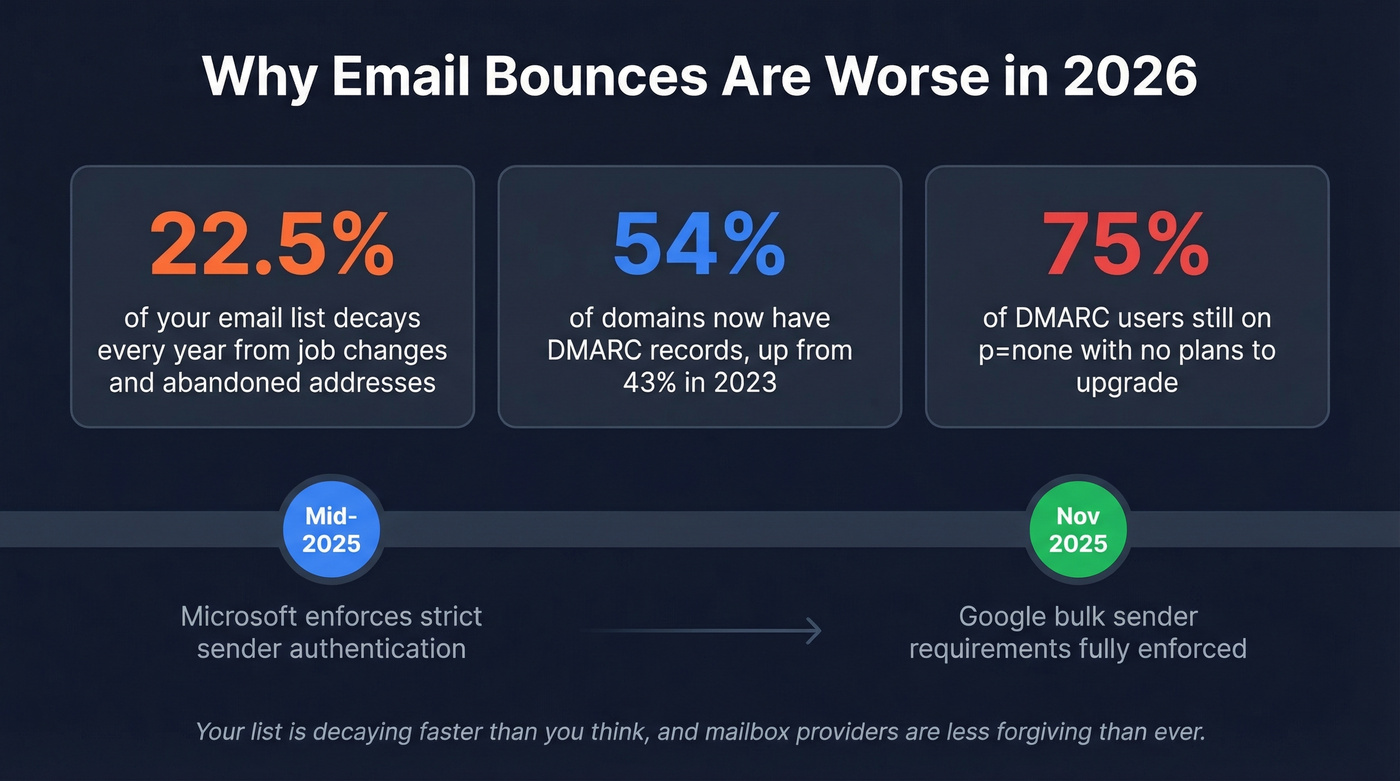
DMARC adoption climbed from under 43% in 2023 to roughly 54% in 2024, but the most common policy is still p=none (monitor-only), and 75% of those users have no plans to upgrade. Meanwhile, email databases lose about 22.5% of contacts annually to job changes and abandoned addresses. Your list is decaying faster than most teams realize, and mailbox providers are less forgiving than ever.
Most teams don't have a deliverability problem. They have a data quality problem dressed up as a deliverability problem. Fix the data first - authentication and infrastructure are just the guardrails (more in our email deliverability guide).
Hard vs. Soft Bounces
SMTP codes tell you exactly what happened and what to do next. Don't confuse email bounce rate with website bounce rate - completely different metric (for deeper benchmarks, see email bounce rate).
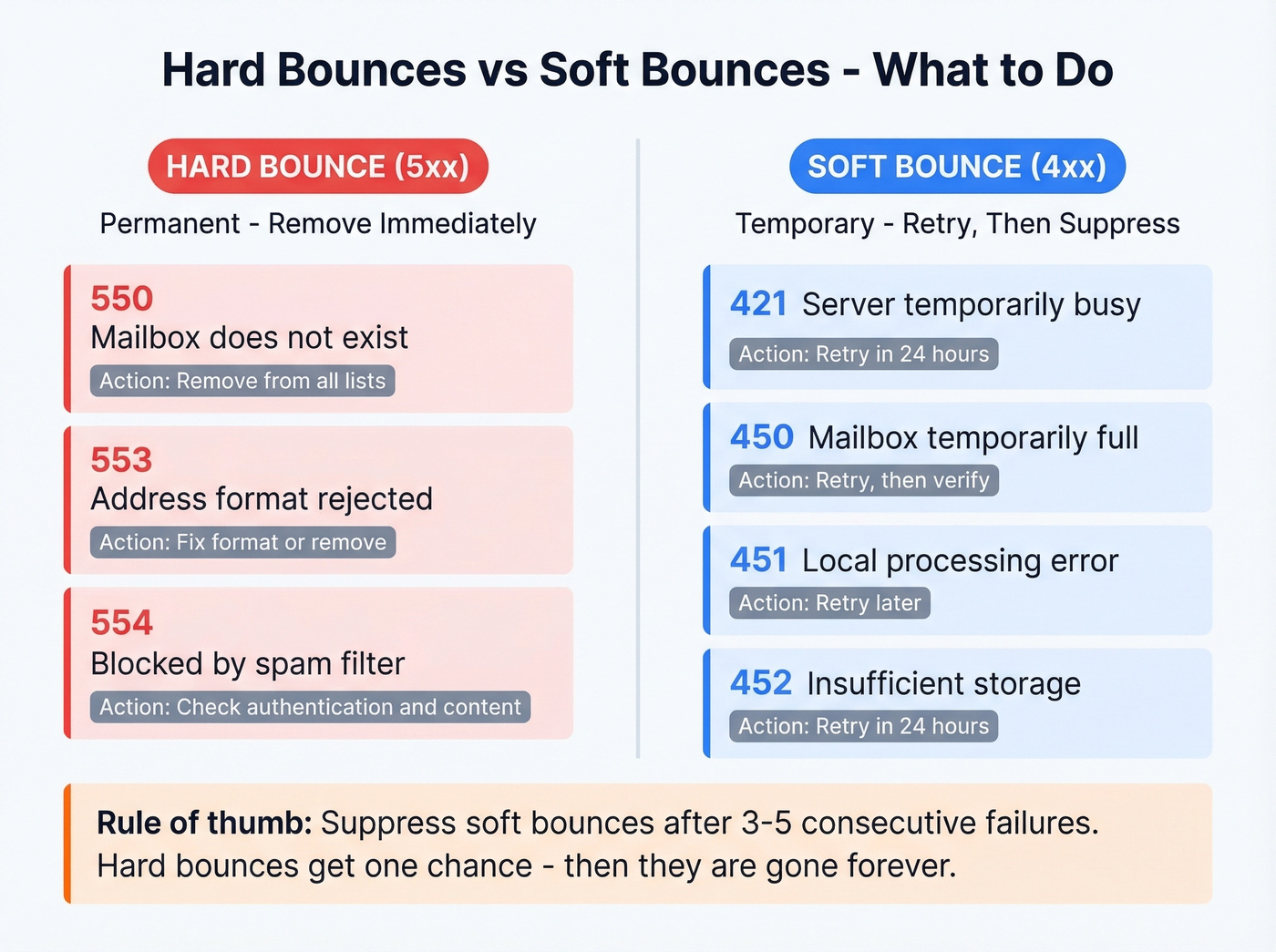
| SMTP Code | Type | Meaning | Action |
|---|---|---|---|
| 550 | Hard | Mailbox doesn't exist | Remove immediately |
| 553 | Hard | Address format rejected | Fix or remove |
| 554 | Hard | Blocked by spam filter | Check content/auth |
| 421 | Soft | Server temporarily busy | Retry later (~24 hrs) |
| 450 | Soft | Mailbox temporarily full | Retry, then verify |
| 451 | Soft | Local processing error | Retry later |
| 452 | Soft | Insufficient storage | Retry in 24 hrs |
Hard bounces (5xx) are permanent - remove these instantly. Soft bounces (4xx) are temporary, but if the same address soft-bounces across 3-5 consecutive sends, suppress it. Most ESPs also return enhanced status codes in X.Y.Z format like 5.1.1 for a bad destination mailbox, giving you more granular diagnostics.

Most verification tools choke on catch-all domains - the #1 cause of "valid but bounced" emails. Prospeo's 5-step verification includes catch-all handling, spam-trap removal, and honeypot filtering at ~$0.01/email. Snyk's 50-person sales team went from 35-40% bounce rates to under 5%.
Stop losing domains to data your verifier couldn't handle.
Email Bounce Prevention: The Complete System
Set Up Email Authentication
SPF, DKIM, and DMARC are table stakes. Without all three, Google and Microsoft will throttle or block you regardless of list quality.
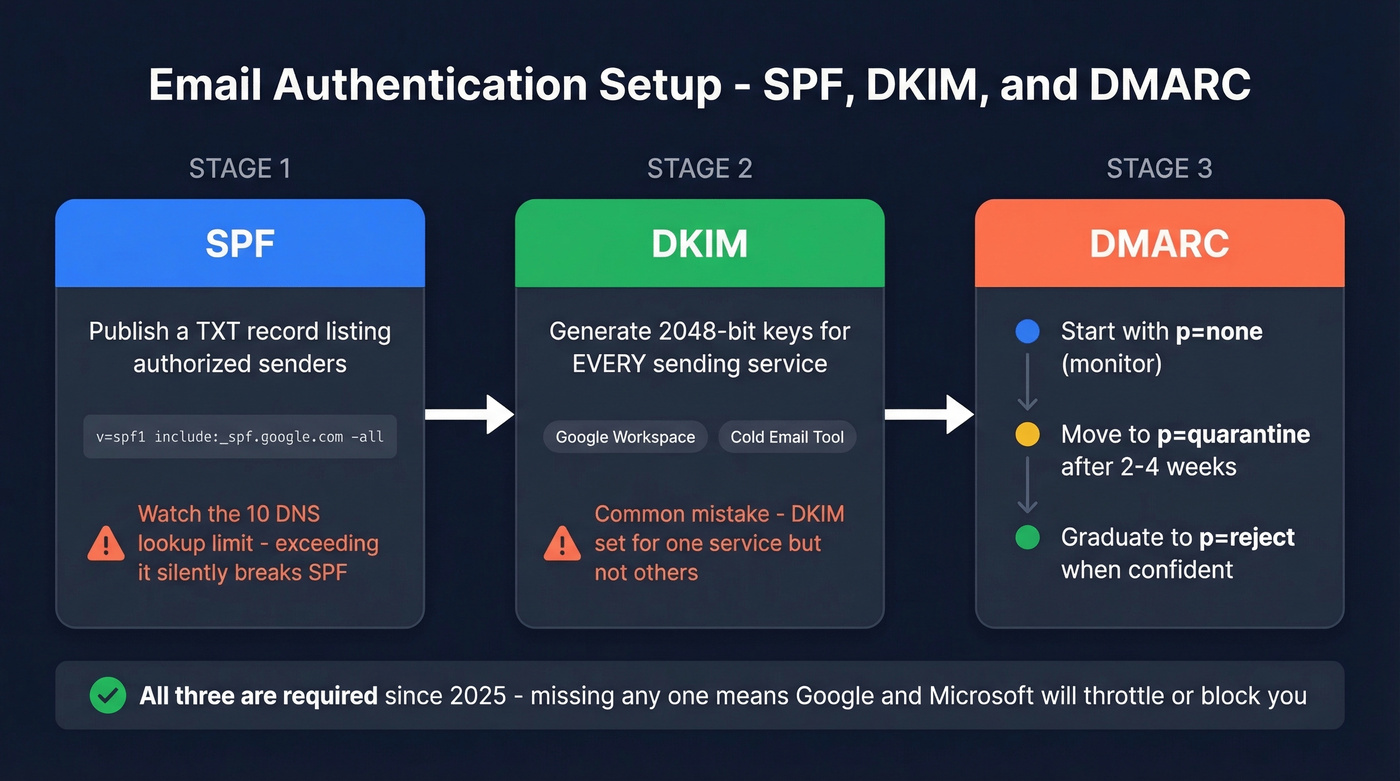
SPF: Publish a TXT record listing every service authorized to send on your behalf - format: v=spf1 include:_spf.google.com include:sendgrid.net -all. Use -all for production instead of ~all. Watch the 10 DNS lookup limit; exceeding it silently breaks SPF, and we've seen this trip up even experienced ops teams who add a new sending tool without checking (examples here: SPF record).
DKIM: Generate 2048-bit keys and configure them per sending service. A common mistake: DKIM set for Google Workspace but not for your cold email tool. Every service sending from your domain needs its own DKIM signature (use this checklist to verify DKIM is working).
DMARC: Roll out in stages:
- Start with
p=noneto monitor - Move to
p=quarantineafter 2-4 weeks of clean data - Graduate to
p=rejectonce you're confident
Use relaxed alignment (aspf=r, adkim=r) for cold email to avoid subdomain mismatch issues (more on DMARC alignment).
Verify Before You Send
Most verification tools don't work as well as they claim. A Hunter benchmark testing 15 verifiers against 3,000 real business emails found the top tool hit 70% accuracy - not the 99% you'll see on every vendor's landing page. Hunter's own tool topped their benchmark, so take the exact rankings with a grain of salt, but the overall accuracy range of 65-70% is telling (if you're comparing options, start with Hunter alternatives).
The biggest gap is catch-all domains. These accept mail to any address at the domain, so verification tools can't confirm whether a specific mailbox exists. One Reddit user reported 60-70% of their list flagged as catch-all, making paid leads essentially unusable with standard verifiers. In our testing, catch-all domains account for the majority of "valid but bounced" scenarios.
Prospeo handles this with a 5-step verification process that includes catch-all handling, spam-trap removal, and honeypot filtering - the exact scenarios where other tools return "unknown." At ~$0.01/email, it's competitively priced, and it's especially strong when your list is heavy on catch-alls. Snyk cut their bounce rate from 35-40% to under 5% after switching.
| Tool | Cost per 1K | Catch-All Handling |
|---|---|---|
| Prospeo | ~$10 | Yes (5-step) |
| ZeroBounce | ~$10 | Yes |
| NeverBounce | ~$8 | Yes |
| MillionVerifier | ~$3.70 | Yes |
MillionVerifier is the cheapest option on this list, but if you're dealing with a high percentage of catch-all domains, price per verification matters less than what happens with those tricky addresses. Skip MillionVerifier if catch-alls are your main problem and you need granular risk scoring.
Clean Your Lists Regularly
Verification before sending is step one. Ongoing hygiene is step two - and it's the backbone of any serious bounce prevention strategy.
Remove hard bounces immediately. Don't just flag them - suppress them across all lists. Deleting a bounced address means it can get re-imported next quarter when someone uploads a stale CSV, and we've seen this exact scenario tank a domain's reputation overnight. Maintain suppression lists permanently. Suppress soft bounces after 3-5 consecutive failures. Flag role-based addresses like info@, support@, and sales@ as higher-risk since they generate complaints at higher rates (if you suspect traps, use a spam trap removal process).
Use double opt-in for marketing lists to prevent invalid signups at the source. Re-verify your entire database quarterly - that 22.5% annual decay means roughly 5-6% of your list goes stale every 90 days. Pipedrive once deleted 83,000 inactive emails as part of list cleaning, which is a good reminder that even well-maintained databases rot.
Monitor Sender Reputation
Google Postmaster Tools shows your domain reputation, IP reputation, spam rate, and compliance status for Gmail traffic. Set it up and check it weekly (and keep a dedicated playbook for how to improve sender reputation).
Keep spam complaints under 0.1% - 0.3% is the absolute ceiling before you trigger restrictions. Bounce rate should stay under 2%; above 5% and you'll see immediate delivery throttling. Bulk senders also need one-click unsubscribe in promotional messages, with unsubscribes honored within two business days. If you aren't monitoring these numbers, you're flying blind.
Reducing Bounces in Cold Outreach
Cold email plays by stricter rules. Your domain has no relationship with recipients, so mailbox providers scrutinize everything harder.
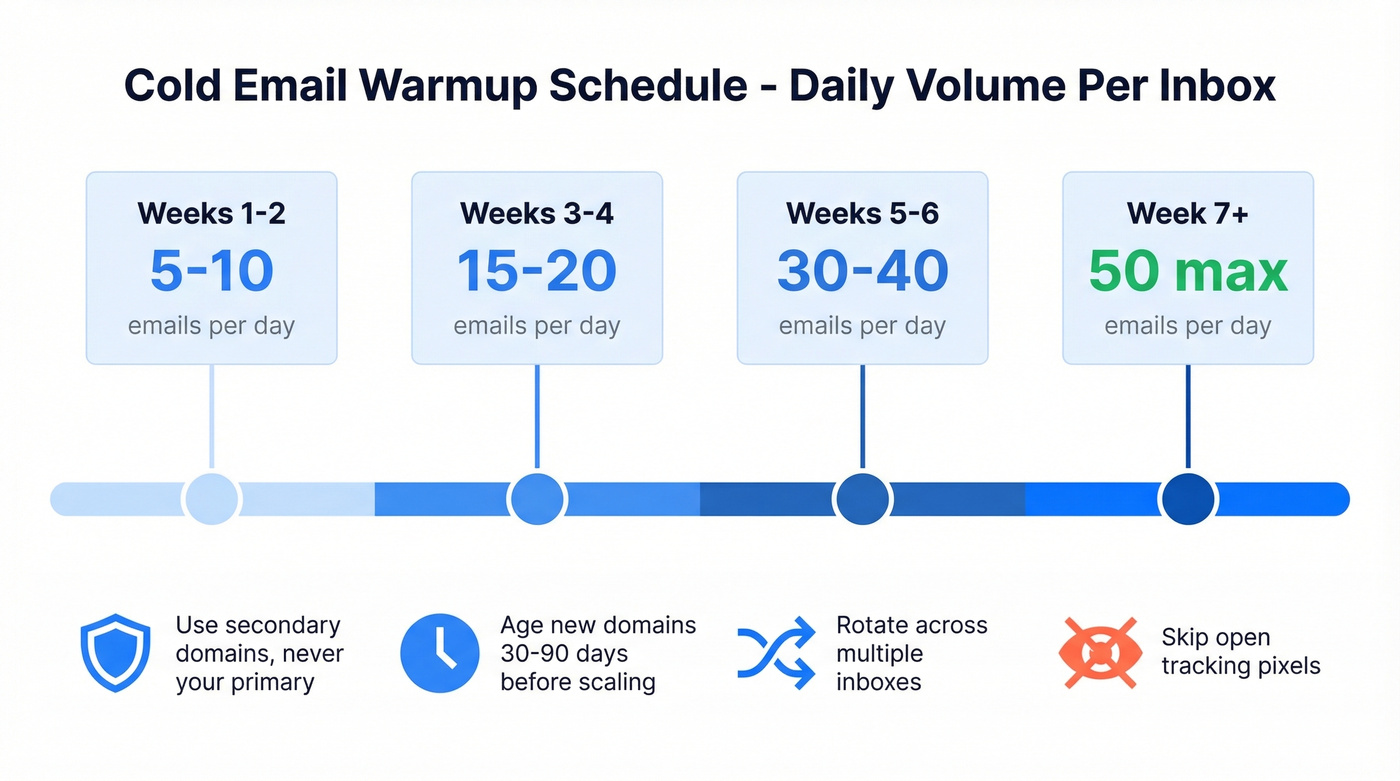
| Week | Daily Volume per Inbox |
|---|---|
| 1-2 | 5-10 emails |
| 3-4 | 15-20 emails |
| 5-6 | 30-40 emails |
| 7+ | Max 50 emails |
Use secondary domains for outreach - never your primary corporate domain. Let new domains age 30-90 days before scaling. Rotate across multiple inboxes to distribute volume and reduce flagging risk. Avoid open tracking pixels; they're a deliverability drag in cold email (details: email tracking pixel). Focus on reply rate instead.
Ensure CAN-SPAM compliance with an unsubscribe link and business address in every message. For teams targeting EU contacts, you'll need a GDPR-compliant lawful basis for processing.
Let's be honest about what we've seen work best: teams that start with verified data rather than verifying after the fact get dramatically better results. Prospeo's email finder delivers 98% accuracy with real-time verification built in, drawing from 143M+ verified emails refreshed on a 7-day cycle. That means you're working from a clean list from day one instead of cleaning up after a campaign goes sideways.

Your list loses 22.5% of contacts every year. Prospeo refreshes all 300M+ profiles every 7 days - not the 6-week industry average. That means the emails you pull today are verified against real-time data, not a snapshot from last month.
Fresh data prevents bounces before they happen. Start free with 75 verified emails.
What's a Normal Bounce Rate?
The overall average across industries is 2.48%. But averages hide a lot of variance - IT and tech companies run around 0.90%, financial services sit at 1.20%, and construction and manufacturing average 2.20%.
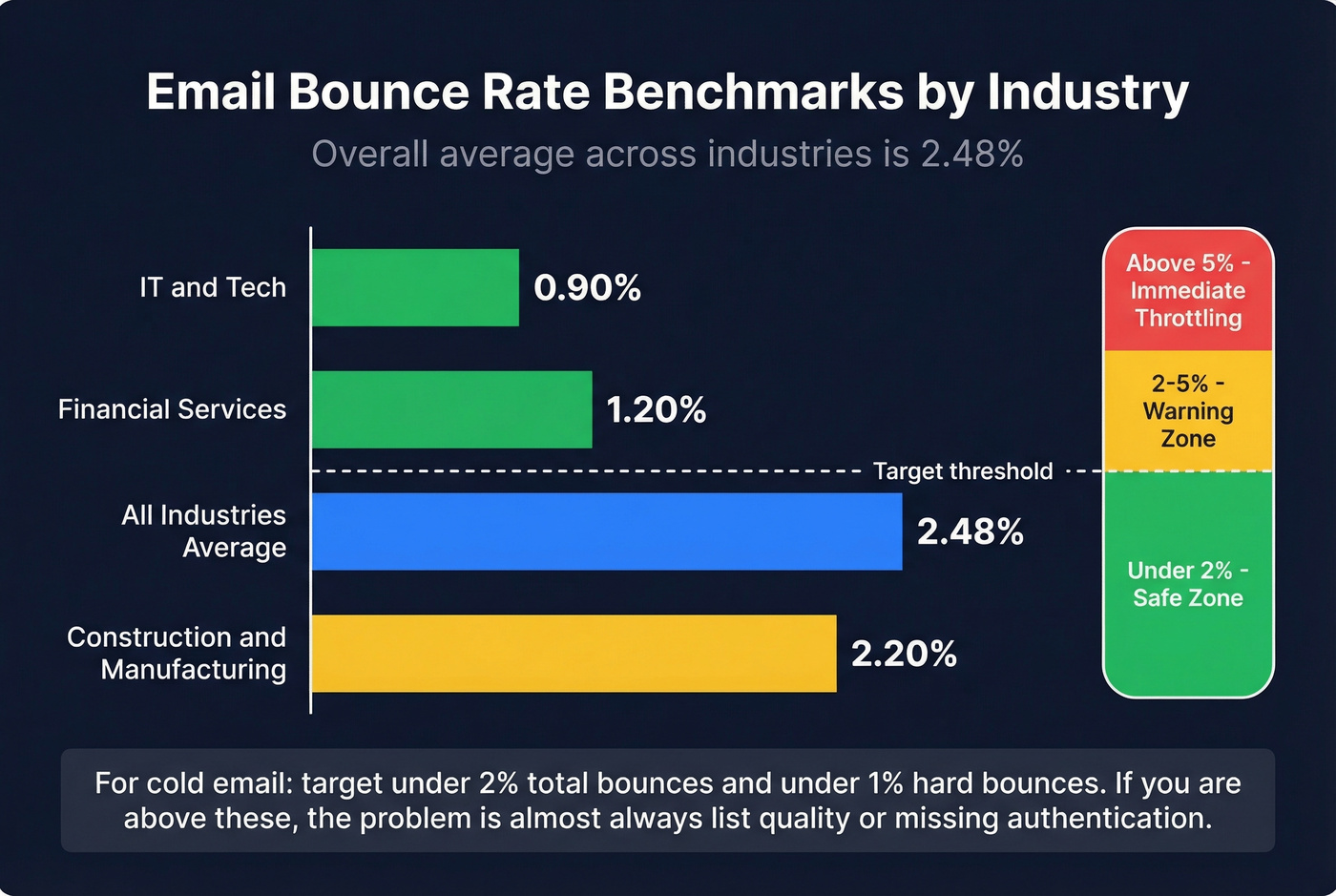
Under 2% is safe territory. Above 5% and most providers will throttle you immediately. For cold email, target under 2% total bounces and under 1% hard bounces. If you're consistently above those thresholds, the problem is almost always list quality or missing authentication - not your email content. We've never seen a team fix a 6%+ bounce rate by rewriting subject lines (if you want to test anyway, use these email subject line examples). It's always the data.
FAQ
What's the difference between a hard bounce and a soft bounce?
A hard bounce is permanent - the address doesn't exist or the domain is invalid (SMTP 5xx). A soft bounce is temporary - full mailbox, server down, or rate-limiting (SMTP 4xx). Remove hard bounces immediately; suppress soft bounces after 3-5 consecutive retries.
How often should I clean my email list?
Quarterly at minimum, since email databases lose ~22.5% of contacts annually. If you're running cold outreach at scale, re-verify before every major campaign to keep bounce rates under 2%.
Can email verification tools guarantee zero bounces?
No. Independent benchmarks show top tools hit around 70% accuracy on real business emails. Catch-all domains are the main gap. Prospeo's 5-step verification with catch-all handling and spam-trap removal gets closer - Snyk dropped from 35-40% to under 5% - but the realistic target is under 2%, not zero.
How do I stop bounces in cold outreach?
Start with verified data, warm up your domain over 6+ weeks, cap daily volume at 50 per inbox, and suppress hard bounces after every send. Use a secondary domain so bounces don't damage your primary sender reputation. The key is building the entire system - authentication, verification, and sending discipline - rather than relying on any single fix.