How to Request a Meeting with a Client - and Actually Get a Reply
The average professional receives 120+ emails a day. Your meeting request is competing with every single one of them. Knowing how to request a meeting with a client comes down to framing, timing, and ruthless brevity. Here's what works in 2026.
The Quick Version
- Short subject line - 2-4 words, personalized. Two-to-four-word subject lines can hit 46% opens, and personalization lifts that number from 35% to 46%.
- Lead with value, propose two specific times, keep the email under 125 words.
- Always follow up - 60% of replies come after the first follow-up.
Why Client Meeting Requests Get Ignored
It's rarely personal. Three failure modes explain almost every silence.
No clear value. "Let's connect" doesn't answer "what's in it for me?" If there's no reason to show up, there's no reply.
Too much friction. A wall of text, a calendar link they don't trust, or zero time options - every extra decision costs you a response. We've seen emails with three paragraphs of preamble before a single time slot gets mentioned. That's a delete.
Bad timing. Friday at 4pm, product launch week, quarter-end crunch. Inbox overload buries even good emails, and no amount of clever copywriting fixes that. (If you want a tighter timing playbook, see best time to send prospecting emails.)
The 5-Part Email Structure
Keep the total length between 50 and 125 words - two scrolls or fewer on mobile. If you want more frameworks like this, use this sales email structure breakdown.
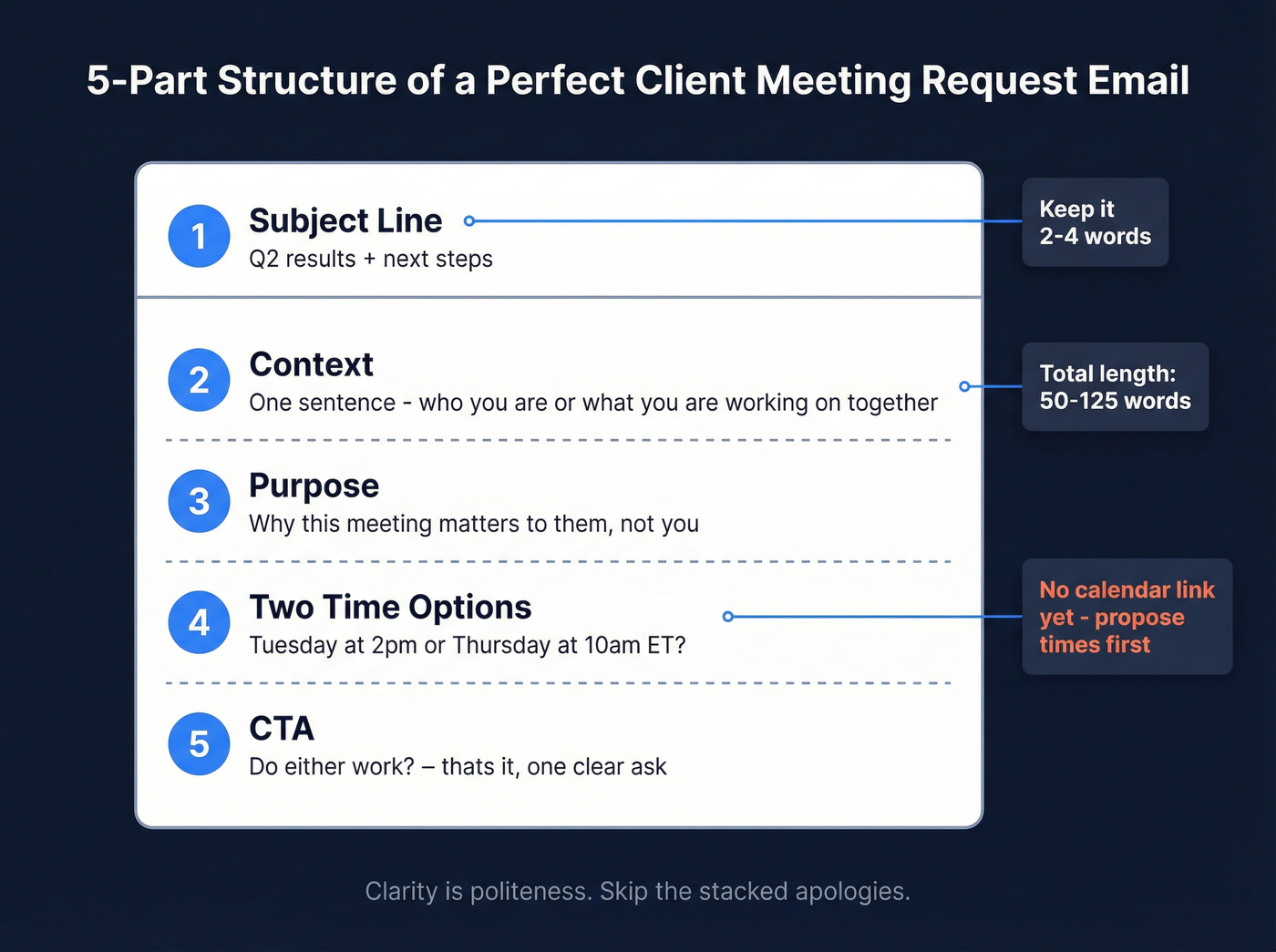
- Subject line - short, personalized, no fluff.
- Context - one sentence on who you are or what you're working on together.
- Purpose - why this meeting matters to them.
- Two specific time options - "Tuesday at 2pm or Thursday at 10am ET?" kills decision fatigue. Don't send a calendar link in the first email; propose times first, send the link after they reply.
- CTA - one clear ask. "Do either work?" is enough.
Here's the thing: politeness comes from clarity, not stacked apologies. "Would it be possible, if you have time, to perhaps consider..." is noise. "Can we do 20 minutes Tuesday?" is respectful and effective. (For more copy you can swipe, see these outreach email templates.)
Subject Lines That Get Opened
A Belkins study of 5.5 million emails gives us hard numbers. Personalized subject lines hit a 46% open rate versus 35% without - a 31% boost. Reply rates jumped from 3% to 7% with personalization, a 133% increase. If you're iterating on subject lines, pair this with how to increase email open rates for sales and words to avoid in email subject lines.
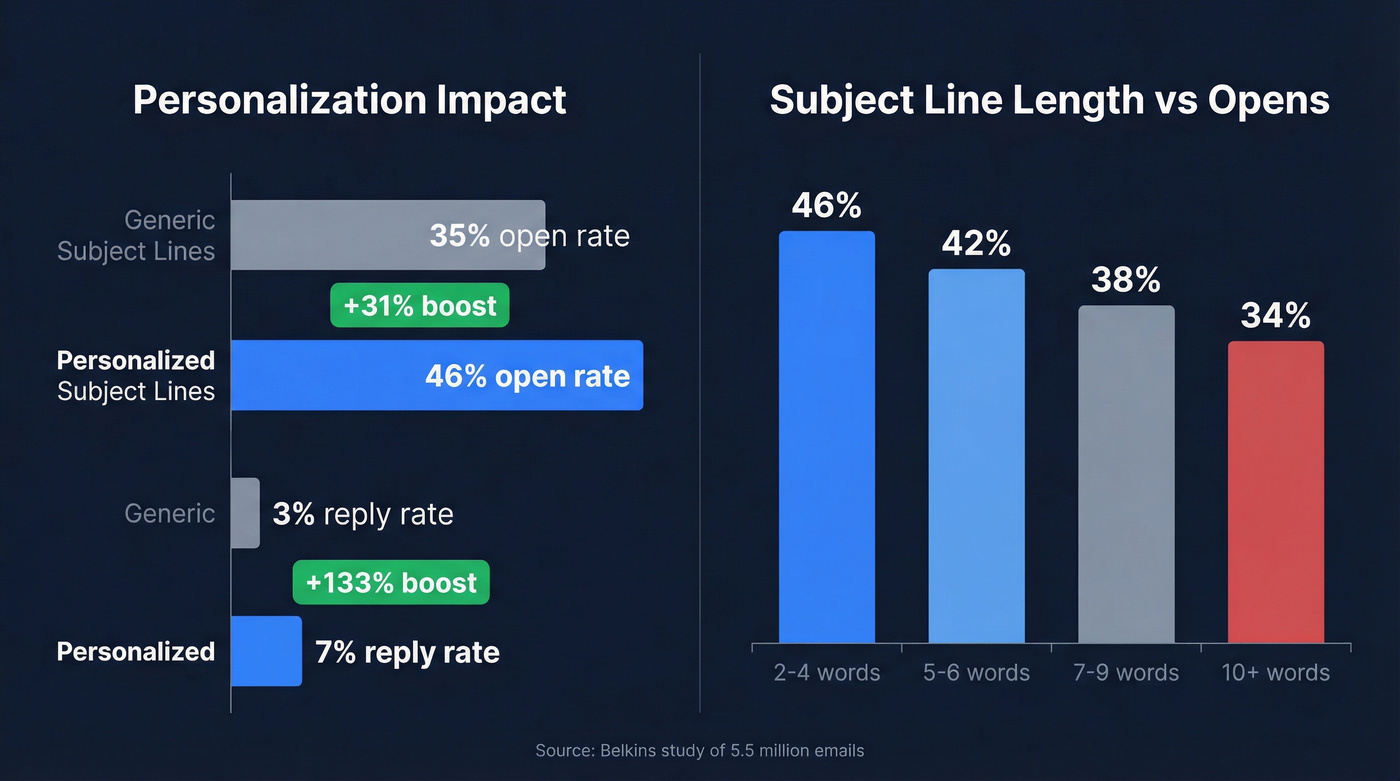
Length is the biggest lever most people miss. Two-to-four-word subject lines performed best at 46% opens. Cross 7 words and opens start dropping. At 10+ words, you're down to 34%.
For client meetings, try these:
- Q2 results + next steps
- Quick sync this week?
- [Project name] update
- Time for a check-in?
Short, specific, and clearly about them.

Great subject lines and tight copy mean nothing if your email bounces. Every meeting request sent to a bad address chips away at your domain reputation - and your reply rates. Prospeo verifies emails in real time with 98% accuracy, so every client meeting request actually reaches an inbox.
Stop losing meetings to bad email addresses. Verify before you send.
Meeting Request Templates That Work
QBR / Check-In Email
Your client doesn't want another meeting. They want proof the last one was worth it.
Subject: Q2 results + what's next
Hi [Name],
Since we kicked off in Q1, [specific metric] is up [X%]. I've got three ideas to build on that momentum heading into Q3.
Can we do 20 minutes next week? Tuesday at 2pm or Thursday at 10am ET work on my end.
[Your name]
Anchor to outcomes already delivered, then make the next meeting feel like a natural continuation. The QBR framing from Instantly's template library nails this approach. If you need more examples, these schedule meeting email examples are a solid swipe file.
New Account Manager Introduction
Here's the bad version first - then the fix.
Bad: "Hi, I'm your new account manager. I'd love to set up a time to chat and get to know your business better. Let me know when you're free!"
Good:
Subject: New AM - quick intro
Hi [Name],
I'm [Your name], taking over from [Previous AM] on your account. [Previous AM] briefed me on [specific project] - I want to make sure we don't lose momentum.
Could we grab 15 minutes this week? Wednesday at 11am or Friday at 2pm ET?
[Your name]
The difference: role and context upfront, a specific project reference, and two time slots. No guessing why a stranger is emailing.
Project Kickoff or Escalation
Subject: [Project] kickoff - 30 min this week
Hi [Name],
We're ready to kick off [project]. I'd like to align on timeline, deliverables, and your team's priorities before we start building.
Can we do 30 minutes Thursday at 1pm or Friday at 10am ET?
[Your name]
For escalations, tighten the tone: "Something came up on [project] that needs your input before we move forward. Can we talk tomorrow at 2pm?" Always specify duration and format - nobody wants to accept a mystery meeting.
Follow-Up Strategies That Book Meetings
60% of replies come after the first follow-up. If you're sending one email and waiting, you're leaving more than half your meetings on the table. For a deeper cadence blueprint, use this SDR follow-up strategy.
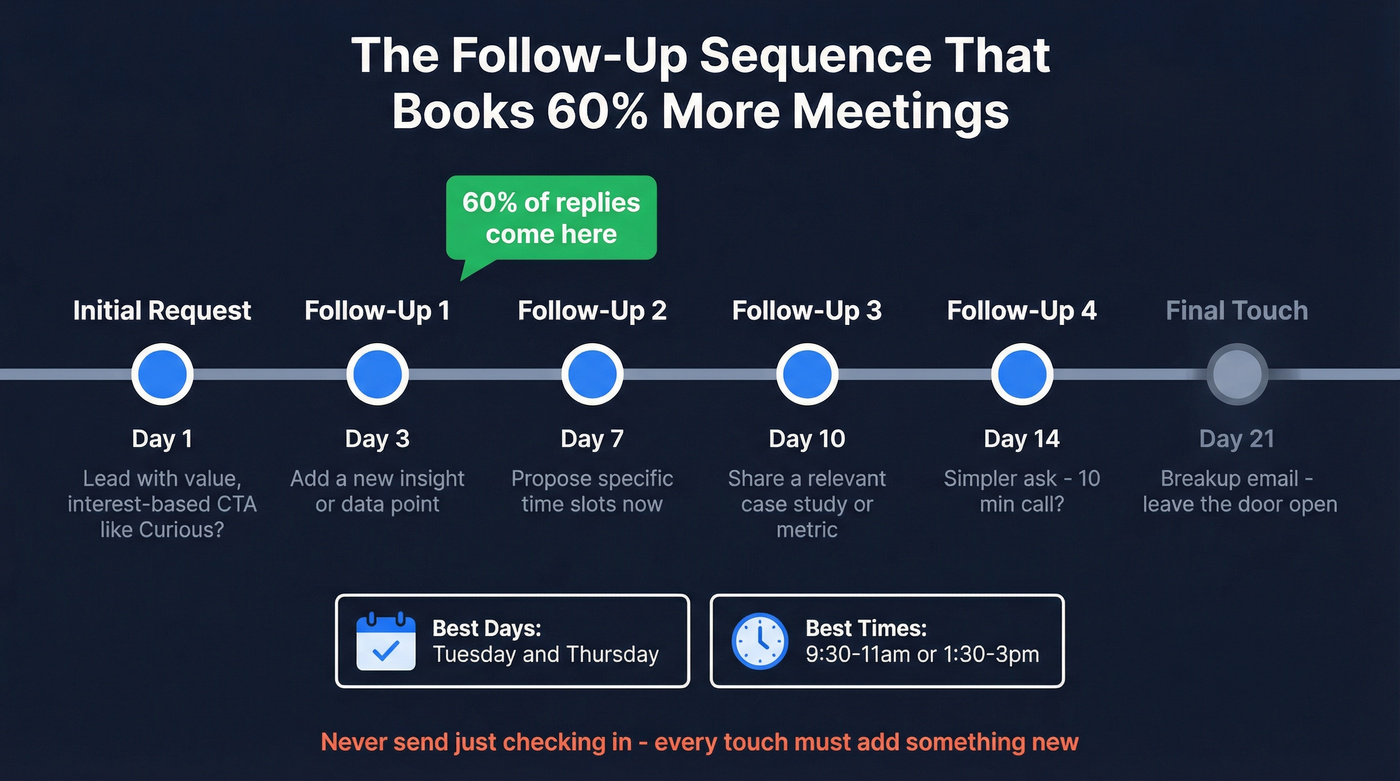
Skip the "just checking in" follow-up. Every touchpoint should add something new - a fresh insight, a relevant data point, or a simpler ask. If you want better language for those nudges, borrow from how to word a follow-up email after no response.
Subject: Re: [original subject]
Hi [Name], I know things get buried. Quick version: I've got [specific insight] relevant to [their goal]. Happy to cover it in 15 minutes - would next Tuesday or Wednesday work?
A high-performing follow-up sequence runs 4-7 touches over 14-21 days. Send on Tuesdays or Thursdays, mid-morning (9:30-11am) or post-lunch (1:30-3pm). These windows tend to perform best, though your mileage will vary by industry and time zone.
One thing we've noticed across our own outbound: interest-based CTAs like "Curious?" or "Open to exploring this?" outperform hard time-slot proposals in the first touch. Save the specific scheduling for the follow-up, when they've already shown a flicker of interest.
Deliverability: The Step Everyone Skips
None of this matters if your email bounces. A healthy bounce rate sits under 2%; anything above 5% risks your domain reputation. If you want the full checklist, start with this email deliverability checklist.
This matters most when you're reaching out to a new contact at an existing account - a new stakeholder, a replacement for someone who left. You don't always have a verified address, and guessing formats is unreliable. Prospeo verifies emails in real time with 98% accuracy, so you can confirm the address before you send. The free tier covers 75 emails per month with no contracts, which is enough to verify every new contact before your meeting requests go out. (If you're comparing tools, see email ID validators.)

Reaching a new stakeholder at an existing account? Don't guess their email format. Prospeo's email finder pulls verified addresses from 300M+ profiles - at $0.01 per email. The free tier gives you 75 verified emails a month, enough to confirm every new contact before your next meeting request goes out.
Find and verify any client's email in seconds - no guessing, no bouncing.
Tools to Cut the Back-and-Forth
If you're booking 5+ client meetings a week, a scheduling tool pays for itself in sanity alone. If you're building a full outreach stack, compare options in cold email marketing tools.
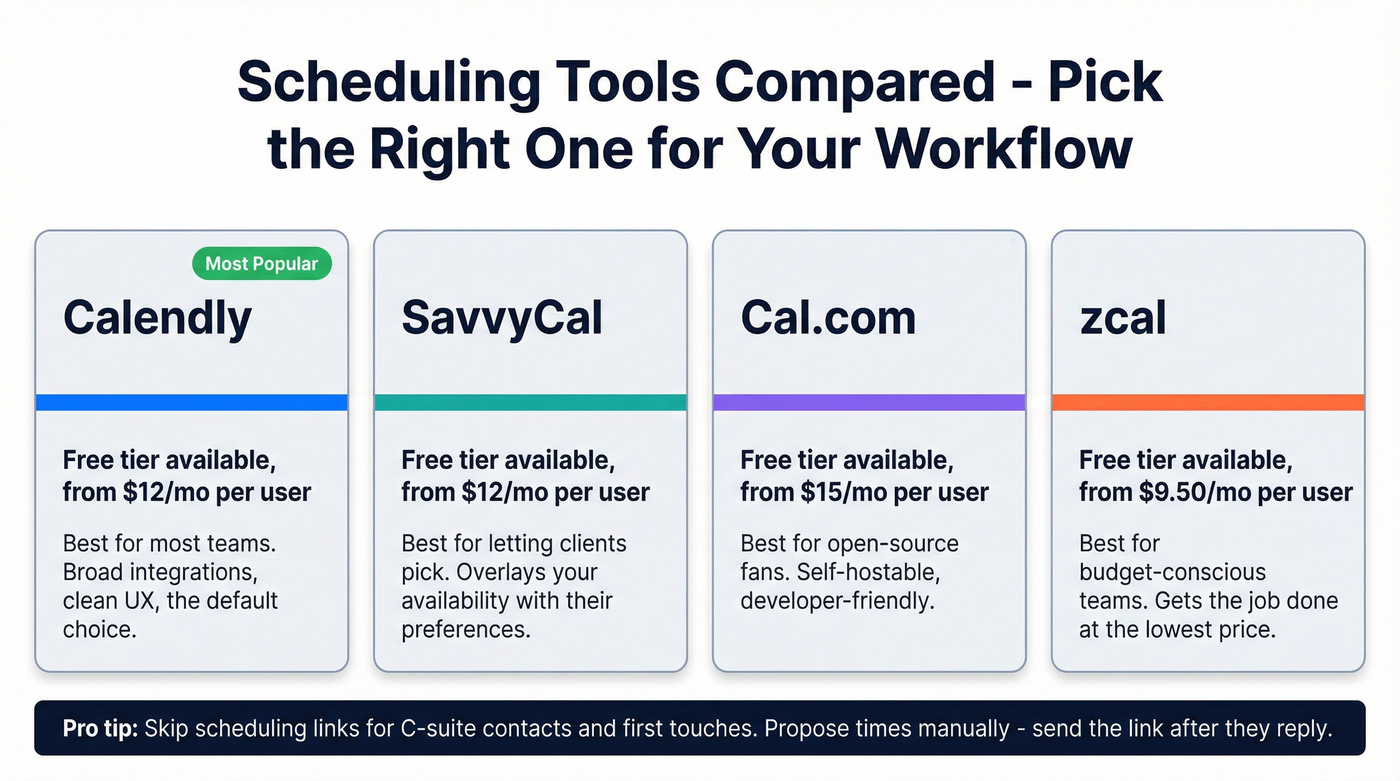
| Tool | Free Tier | Paid From | Best For |
|---|---|---|---|
| Calendly | Yes | $12/mo/user | Most teams |
| SavvyCal | Yes | $12/mo/user | Letting clients pick |
| Cal.com | Yes | $15/mo/user | Open-source fans |
| zcal | Yes | $9.50/mo/user | Budget-conscious |
Calendly is the default for a reason - broad integrations, clean UX. SavvyCal is worth a look if you want to overlay your availability with the client's preferences. For high-value clients, though, manual time proposals still feel more personal. In our experience, scheduling links work best after the second exchange, not the first. Skip them entirely for C-suite contacts who'll see a Calendly link as impersonal.
FAQ
What's the best way to request a meeting with a client over email?
Lead with value, propose two specific times, and keep the email under 125 words. Use a 2-4 word personalized subject line for the best open rates (46% vs 35% generic). One clear CTA - no calendar link until they reply.
Should I include a calendar link in my first meeting request?
No. Links in a first touch can hurt deliverability and add friction before someone has committed. Propose two concrete time slots instead. Send the scheduling link after they confirm interest.
How do I make sure my meeting request actually reaches the client?
Verify the email address before sending. A bounce rate above 5% damages your domain reputation, which tanks deliverability for every email you send after that - not just meeting requests. Tools like Prospeo's email finder handle real-time verification so you're not guessing.
How many follow-ups should I send after a meeting request?
Plan for 4-7 touches over 14-21 days. 60% of replies come after the first follow-up, so a single email leaves most meetings on the table. Each follow-up should add a new insight or data point - never just "checking in."