

How to Secure a Meeting on a Cold Call (Scripts + Benchmarks)
You can pay $15,000/year for a database and still not get a working number for the VP of Sales at a Series B company. Then leadership asks why "cold calling doesn't work."
It works. Your inputs are sabotaging the math.
If you're here to learn how to secure a meeting on a cold call, here's the answer: run a tight 7-minute flow (permission opener -> single trigger -> one question -> calendar-first ask), and fix connect rate so you get enough real conversations to make the math work.
Look, most "cold call coaching" is just script therapy for a data problem.
Below is the 7-minute call flow, an opener library, and the four objection branches that decide your meeting rate. Then we'll fix the hidden killer: connect rate. Because if you want to book meetings from cold calls, you need more at-bats and a cleaner close.
What you need (quick version)
- A permission-based opener (earn 20-30 seconds)
- A single trigger per account (job change, headcount growth, new tool, new initiative)
- One qualifying question you can ask in under 8 seconds
- A value hypothesis (one sentence: "teams like you struggle with X; we help with Y")
- A calendar-first close with a two-option meeting ask ("Tue 11:00 or Wed 2:00?")
- A lock-in system (invite hygiene + confirmation + reminders)
Fix priorities (in order): permission opener -> calendar-first close -> verified mobile data + weekly refresh.
Benchmarks: what "good" looks like (so you stop guessing)
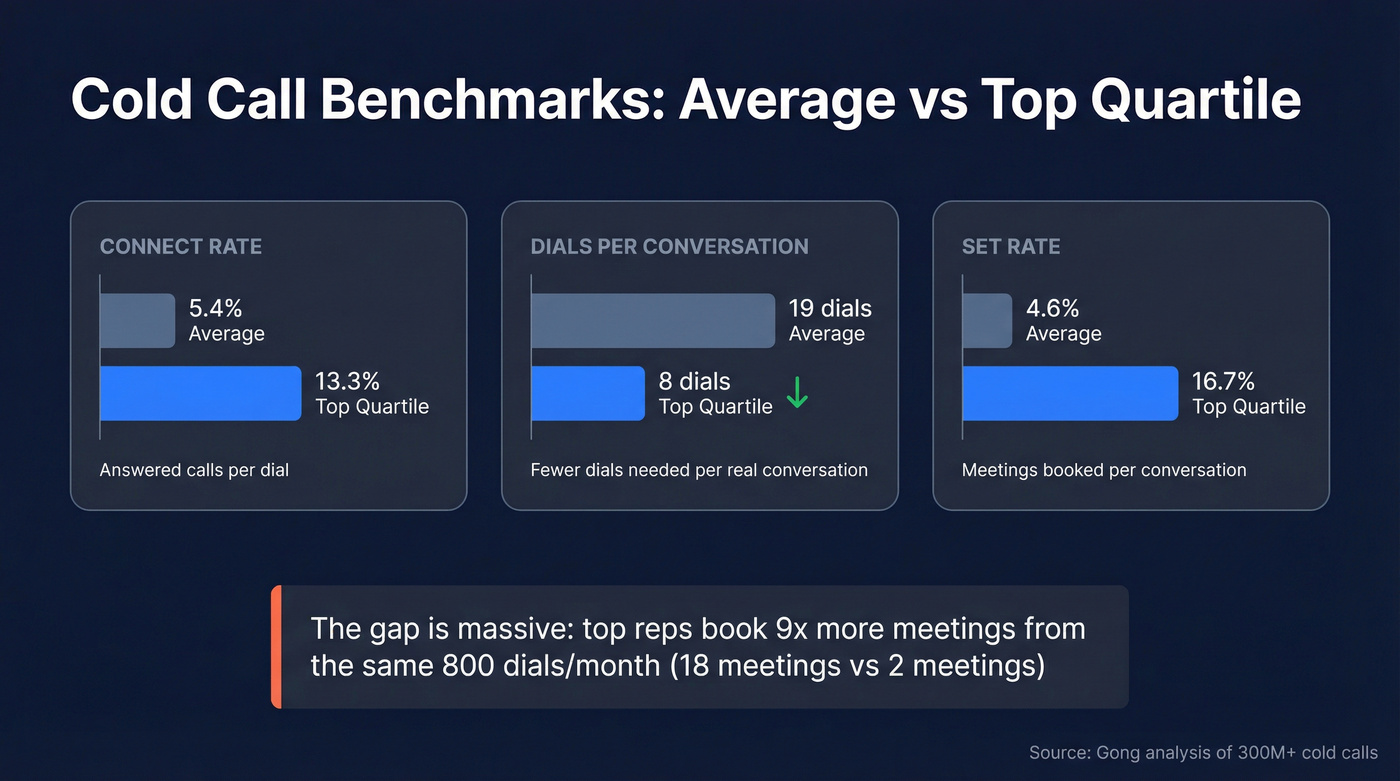
Gong analyzed 300M+ cold calls and the numbers are blunt: most teams aren't "bad at cold calling," they're operating at average conversion rates and expecting top-quartile outcomes.
Definitions (so you're comparing apples to apples):
- Connect = an answered call
- Conversation = meaningful talk time (Gong's framing)
- Set rate = meetings booked per conversation
Benchmarks that matter:
- Connect rate (answered / dials): 5.4% average vs 13.3% top quartile
- Dials per conversation: ~19 (average) vs ~8 (top quartile)
- Set rate (meetings / conversations): 4.6% average vs 16.7% top quartile
That set rate gap is the real killer. Doubling connect rate won't save you if your meeting ask is mushy and your objection handling is improv.
Calls also lift email. Gong found calling nearly doubles email reply rate: 3.44% vs 1.81%. So even "no answer" days still help your outbound motion.
Reference: Gong's 300M-call cold calling analysis.
The "800 dials/month" reality check (calculator)
800 dials/month
Average rep outcome: ~2 meetings/month
Top rep outcome: ~18 meetings/month
Forecast instead of hoping:
Meetings/month = Dials x Connect rate x Set rate Example (average): 800 x 0.054 x 0.046 ~= 2.0 Example (top quartile): 800 x 0.133 x 0.167 ~= 17.8
If you're doing 800 dials and booking 1 meeting, you don't need a new script. You need to find which lever is broken: connect rate (data + timing) or set rate (opener + ask + objections).
Diagnose your funnel in 60 seconds (scorecard + fixes)
Use this like a triage sheet. Don't "coach harder" until you know what's failing.

1) Connect rate
- <5%: your list is stale or you're calling the wrong numbers. Fix data freshness and direct dials before you rewrite scripts.
- 5-10%: workable. Improve timing + list segmentation.
- 10%+: you've earned the right to obsess over talk track.
2) Set rate (meetings per conversation)
- <5%: your opener/ask is weak or you're doing discovery on the cold call. Tighten to a trigger -> one question -> calendar ask.
- 5-10%: solid. Improve objection branches and meeting framing.
- 10%+: now you're playing with messaging and ICP precision.
3) No-show rate
25%: your "yes" isn't real. Fix invite hygiene + confirmation + reminders + a no-show rescue play.
- <15%: keep doing what you're doing and scale volume.
Hot take: if your average deal size is small, you don't need a perfect cold call. You need more live conversations and a clean meeting close.
Most teams over-engineer scripts while dialing dead numbers.

You just saw the math: moving connect rate from 5% to 10% can 9x your monthly meetings from the same 800 dials. Prospeo gives you 125M+ verified mobile numbers with a 30% pickup rate, refreshed every 7 days - not the 6-week-old data that turns 75 dials/day into wrong numbers.
Stop coaching reps through a data problem. Fix the inputs.
Why you're not booking meetings: the math is broken (connect rate + list quality)
Most teams try to coach their way out of a data problem. I've seen it firsthand: two SDR pods, same hours, same dialer, same script, same manager. The only difference was list quality. The pod with fresher mobile data booked 2-3x more meetings for a month straight, and the "coaching gap" magically disappeared.
A controlled phone data benchmark across nine providers showed accuracy ranging 63-91% and coverage ranging 26-92%. That variance is enormous, and it shows up directly as connect rate volatility. Full benchmark: https://coldcallbenchmarks.com/
Now do the ugly math.
If 25% of numbers are wrong and an SDR makes 300 dials/day, that's 75 wasted dials/day. In the benchmark's cost example, it works out to about $7,500/year per rep in wasted dial time/software minutes, before you even count the opportunity cost of lost conversations and the morale hit of hearing "wrong number" all day.
Data-quality ops that actually move connect rate (waterfall + re-enrichment triggers)
If you want a repeatable system (not a one-time list cleanup), run enrichment like a waterfall and refresh on triggers.

Waterfall enrichment (simple version):
- Start with company + role truth. Confirm the person is still in-seat and the company still fits your ICP (headcount, geo, tech, funding).
- Pull direct dials/mobiles next. Don't accept "HQ main line" as a win.
- Verify before you dial. Treat verification as a gate, not a nice-to-have.
- Write back outcomes. Every call outcome should improve the dataset (wrong number, gatekeeper-only, disconnected, do-not-call).
Re-enrichment triggers (refresh automatically):
- Job/title change
- Company headcount jump
- New tool detected / tool removed
- Funding / expansion / new location
- Any "wrong number / disconnected" disposition (refresh immediately)
- Age-based refresh: older than 30 days = suspect for mobile accuracy; older than 90 days = stale unless proven otherwise
Connect rate is an operations problem first. Fix the inputs, then coach the reps.
The fastest fix: raise connect rate without dialing more
If your connect rate's under 5%, fix data freshness before you rewrite scripts.
Prospeo ("The B2B data platform built for accuracy") is a clean example of what "fix the inputs" looks like: 300M+ professional profiles, 143M+ verified emails (98% accuracy), and 125M+ verified mobile numbers with a 30% pickup rate, refreshed every 7 days (industry average: 6 weeks). If you're prioritizing mobiles for cold calling, start here: https://prospeo.io/lead-mobile-finder
When you move connect rate from 5% to 8-10%, your whole funnel changes. Same dials. More conversations. More meeting asks. More meetings.
When to call in 2026 (and what timing advice to ignore)
Timing advice is full of zombie myths. The "call at 4-5 PM" thing keeps getting reposted because it sounds plausible, not because it's current.
Baseline to use right now: HubSpot's timing breakdown cites a 2025 survey (n=379). Until a 2026 update drops, treat that as the baseline and test against your own results.
Do this:
- Call Tuesday first.
- Call late morning (10 AM-12 PM).
- Use early afternoon (12 PM-3 PM) as your backup block.
- Batch your calling. Two focused 45-minute blocks beat sprinkling dials all day.
Skip this if you're trying to book meetings fast:
- Friday as a primary call day. It's consistently the weakest day in that dataset.
- The old "4-5 PM is best" myth. It's popular advice, not a modern baseline.
Reference: https://blog.hubspot.com/sales/best-time-to-make-a-sales-call
How to secure a meeting on a cold call: the 7-minute call flow (end-to-end)
This is the call flow we teach when the goal is simple: secure a meeting on a cold call without sounding like a robot. It's also the cleanest answer to "how do I book a meeting from a cold call?" without turning the call into a demo.

Hard rule: don't do full discovery on the cold call. Your job's to earn a calendar slot, not to run a 30-minute interrogation while they're walking into another meeting, sitting in a noisy airport, or trying to get to the next customer call.
0:00-0:20 - Permission-based opener (buy 20 seconds)
Pick one:
Option A (clean + direct): "Hey {{FirstName}}, it's {{You}} with {{Company}}. I know I'm calling you out of the blue - can I take 20 seconds to tell you why I called, and you can tell me if it's worth a meeting?"
Option B (pattern interrupt): "{{FirstName}}, you're not expecting my call. Do you want to hang up now, or give me 30 seconds and then decide?"
0:20-1:10 - Reason + trigger (why you, why now)
One sentence on why them, one sentence on why now.
"Reason I'm calling: I noticed you're hiring in {{Dept}} and your team size jumped recently. When that happens, {{peer companies}} usually run into {{specific problem}}."
Don't stack three triggers. One is enough.
1:10-1:40 - One qualifying question (keep it binary)
You're not interrogating them. You're sorting.
"Quick question - are you handling {{problem area}} in-house today, or is it owned by a vendor?"
Or:
"Are you already measuring {{metric}} weekly, or is it more ad hoc?"
1:40-2:30 - Value hypothesis (your "why meet" in one breath)
This isn't a pitch deck. It's a hypothesis.
"Based on what I'm seeing, I'm guessing you're trying to {{goal}} without {{common constraint}}. We help teams like {{peer}} do that by {{mechanism}} - usually we see {{outcome}} in the first 60-90 days."
Keep it believable. If you promise the moon, you'll get "send me an email" and a fake yes.
2:30-3:10 - The meeting ask (calendar-first, two options)
Ask like a professional who schedules meetings all day.
"I don't think we can do this justice on a cold call. Open to a quick 15 minutes next week? I've got Tuesday at 11:00 or Wednesday at 2:00 - which is less painful?"
3:10-5:30 - Objection handling (pick the right branch)
Don't freestyle. Use a small set of "if they say X, I say Y" scripts (below).
5:30-6:30 - Lock-in (reduce no-shows before they happen)
"Cool - I'll send a calendar invite. What's the best email for that?"
Then:
"Anything you want me to include so it's relevant? I'll tailor it to {{topic}}."
6:30-7:00 - Next-step recap (make it feel real)
"Perfect. We're set for {{Day}} at {{Time}}. I'll send a short agenda and a 2-minute prep note. If anything changes, just reply to the invite and I'll adjust."
Micro-branches you need (gatekeeper + wrong number)
These two outcomes happen constantly. Treat them like part of the flow, not "bad luck."
Wrong number script (get rerouted fast): "No worries - I might be off. Who owns {{problem area}} on your side?"
If they give a name: "Thanks. What's the best number to reach them directly?"
If they won't: "All good - what's the best way to route a quick message to the right person?"
Gatekeeper script (respectful + specific): "Hi {{Name}} - quick one. I'm trying to reach {{Prospect}} about {{one-line trigger}}. Is there a better time today to catch them for 30 seconds, or do they prefer email first?"
If blocked: "Understood. What's the best subject line so it doesn't get ignored?"
Your first line decides the call (opener library)
Most reps lose the call in the first 7 seconds by making the prospect do work: "Is this John?" "How are you?" "Did I catch you at a bad time?" It forces them into defense mode.
Small talk backfires for a simple reason: it forces politeness before relevance. Prospects feel the sales-call pattern, and their brain reaches for the fastest escape hatch.
Gong's opener analysis makes this painfully clear:
- "Did I catch you at a bad time?": 2.15% success rate (worst performer)
- Permission-based openers: 11.18%
- "Heard the name tossed around?": 11.24% (top performer)
- "How's your day going?": 7.6% (fine, but not elite)
Swipe file: openers that earn time
Tailored permission opener "Hey {{FirstName}}, it's {{You}} at {{Company}}. I know this is a cold call - can I take 20 seconds to tell you why I'm calling, then you can tell me if I'm way off?"
Familiarity opener ("heard the name tossed around?") "{{FirstName}}, quick one - have you heard the name {{Company}} tossed around at all?"
Practitioner-style "hang up now or 30 seconds" "Do you wanna hang up now, or let me have 30 seconds and then decide?"
"You're not expecting my call" "You're not expecting my call... do you have a moment? This'll be brief."
"2 minutes?" phrasing "Hey {{FirstName}}, it's {{You}} from {{Company}} - I saw you lead {{Function}} at {{CompanyName}}. Was hoping to introduce us if you've got 2 minutes?"
"Could I share why I'm specifically calling you?" "Could I take just a minute to share why I'm specifically calling you?"
Reference: https://www.vidyard.com/blog/better-cold-calling-guide/
Objection handling to secure the meeting (the 4 branches)
Objections aren't pushback. They're the prospect asking you to reduce risk: risk of wasting time, risk of being sold, risk of being trapped in a process.
Your job's to lower that risk and move back to the calendar. This is where meeting rates get made or destroyed.
| Objection | What it means | Say this (short) | Goal |
|---|---|---|---|
| "I'm busy." | "You interrupted me." | "20 seconds - then I'm gone." | Earn time |
| "Send me an email." | "No commitment." | "Sure - hold 15 min too?" | Email + hold |
| "Not interested." | "Reflex or mismatch." | "Timing or offer?" | Route |
| "We have a vendor." | "We're covered." | "Not rip/replace - compare?" | Compare/defer |
1) "I'm busy" - buy a micro-commitment, then ask one question
"Totally fair - I caught you cold. Can I level with you for 20 seconds to see if it even makes sense to follow up? If not, I'll let you go."
Then immediately go to your trigger + one qualifying question.
If they still shut it down: "No worries. Later today or tomorrow morning better for a quick call?"
2) "Send me an email" - comply, but don't accept the brush-off
"I'll definitely send something over. So we don't waste time with back-and-forth... if you like what you see, would you be opposed to throwing something tentative on for early next week? Monday or Tuesday - mornings or afternoons better?"
If they refuse to schedule, stop chasing and set a real next step:
"Fair. I'll send it in the next 10 minutes. If it's relevant, should I call you Thursday morning or Thursday afternoon?"
Operator stance: if they won't take a tentative hold, downgrade them to nurture. Don't chase. Your calendar's a qualification tool.
3) "Not interested" - acknowledge, then force clarity (timing vs offer)
"Totally get it. Out of curiosity - is it the timing, or is it the offer that doesn't feel right?"
Route based on answer:
- Timing: "Got it. Does this become a priority this quarter or later?"
- Offer: "Helpful. What are you focused on instead - cost, speed, or risk?"
If they say "both," propose a filter meeting:
"Then let's do this: 12 minutes. If it's not relevant, I'll close the loop and won't chase you."
4) "We already have a vendor" - don't fight the incumbent
"Makes sense. I'm not calling to rip-and-replace. Quick question - what do you like about them, and what do you wish was better?"
Then:
- If there's pain: "That's exactly why teams talk to us. Worth 15 minutes to compare approaches?"
- If they're happy: "Cool. When do you typically review this? I'll circle back then."
Lock in the meeting (and cut no-shows)
Most teams accept no-shows as normal. They're common because most meetings are booked with zero commitment beyond a polite "sure."
A 20-35% no-show rate is what you'll see in the wild. You cut it by making the meeting feel real and valuable immediately, and by confirming in the same channel they actually pay attention to.
SMS is the biggest lever when you have a legitimate business basis to contact the number and you include an opt-out. Texts get read fast; use them for confirmations and reminders, not for pitching. (If you want copy/paste compliant templates, see our sales text message playbook.)
Lock-in checklist (do this every time)
Calendar invite hygiene
- Title: "{{Outcome}} - {{Company}} x {{ProspectCompany}}"
- Description: 3 bullets: goal, agenda, prep
- Add conferencing link + your direct number
2-step confirmation (turn "yes" into a real commitment)
- Confirm the goal: "Before I send it - what would make this 15 minutes a win for you?"
- Confirm attendance: "If something comes up, will you reply to the invite so I can give the slot back?"
Immediate confirmation (same channel they gave you)
- Send invite within 2 minutes
- If texting: "Confirmed for {{Day}} {{Time}}. Reply STOP to opt out."
Reminders
- 24 hours before: "Still good for tomorrow at {{time}}?"
- 1 hour before: "On track for {{time}} - here's the link."
"What to prep" line
- "If you can bring {{one artifact}} (even rough), we'll make it actionable."
Templates you can copy/paste
Calendar invite description (tight):
- Goal: confirm whether {{use case}} is worth prioritizing this quarter
- Agenda: current process -> gaps -> what "good" looks like -> next steps
- Prep: bring {{metric}} or a quick screenshot of {{tool/workflow}}
24h reminder (email or text): "Hey {{FirstName}} - still good for tomorrow at {{time}}? Reply with your #1 question and I'll tailor the agenda."
1h reminder: "See you at {{time}}. Here's the link: {{link}}"
No-show rescue play (what to do at T+2 minutes)
Don't sit there staring at the screen. Run a tight rescue sequence and then move on.
At T+2 minutes (email + text if allowed):
- "Hey {{FirstName}} - I'm on. Want to do this now, or should we move it? I can do {{two options}}."
At T+7 minutes:
- "I'm going to drop so you get time back. If you still want to cover {{goal}}, grab a new slot here: {{link}}."
After 1 no-show: reschedule once. After 2 no-shows: stop. Put them into nurture and re-approach on a new trigger.
We've watched teams burn entire prime calling blocks chasing chronic no-shows. It's brutal, and it's optional.
Compliance that won't slow you down (recording + TCPA revocation ops)
Here's the operational compliance baseline most outbound teams need so reps don't improvise. (If you want the full checklist, see: Is Cold Calling Legal?)
One-page SOP (what reps say, what RevOps logs)
Rep responsibilities (live on the call):
- If recording: ask for consent in plain language.
- If they opt out / revoke: acknowledge once, stop, and tag it correctly.
- Never argue about consent. Never sell through an opt-out.
RevOps responsibilities (same day):
- Ensure DNC suppression propagates across CRM + dialer + sequencer.
- Keep an audit trail: timestamp, channel, reason, rep, and the exact message if written.
- Review a weekly report: opt-outs, complaints, and any "texted without opt-out" mistakes.
What gets logged (minimum viable):
- Contact ID + phone number
- Consent/opt-out status
- Timestamp + channel (call/SMS/email)
- Reason code (DNC request, wrong person, legal complaint, etc.)
- Notes (verbatim message if written)
Call recording: operational rules
- Federal baseline: under 18 U.S.C. § 2511, recording's generally allowed with one-party consent (one person on the call consents).
- Commonly treated as all-party consent states (see HubSpot/Justia for nuance): CA, CT, DE, FL, IL, MD, MA, MI, MT, NV, NH, PA, VT, WA.
- Cross-state calls: follow the most restrictive rule. If you're calling into an all-party state, run all-party consent.
- Area code isn't location. Don't assume a 415 number means California.
Practical script (works everywhere): "Quick heads up - I'm recording this call for note-taking. Are you okay with that?"
If they say no: "No problem - I'll turn it off."
References: https://knowledge.hubspot.com/calling/what-are-the-call-recording-laws https://www.justia.com/50-state-surveys/recording-phone-calls-and-conversations/
TCPA basics (what outbound teams actually need to know)
- TCPA regulates calls/texts to mobile numbers, especially when using autodialers (ATDS) or prerecorded/artificial voice.
- After Facebook v. Duguid (2021), ATDS is narrower: it generally needs a random/sequential number generator component.
- Enforcement pressure often shows up through DNC, prerecorded voice, and state mini-TCPA laws.
Operational takeaway: manual dials from a targeted list are the safer lane than blasting automated sequences to mobiles. Still: opt-outs have to be airtight.
Revocation of consent: treat every opt-out as real
- Revocation can happen by any reasonable means (not just "STOP").
- You need to comply within 10 business days.
- Treat "stop," "quit," "revoke," "opt out," "cancel," "unsubscribe," "end" as explicit revocation.
- The "stop-one = stop-all" scope was delayed to April 11, 2026.
Primary reference: https://docs.fcc.gov/public/attachments/DA-25-312A1.pdf
Implementation-friendly summary: https://www.americascreditunions.org/blogs/compliance/revocation-consent-rule-what-it-and-when-it-effective
Revocation ops checklist (so nobody improvises)
- CRM field: Do Not Call = true/false + timestamp + reason
- Dialer disposition: DNC / Opt-out (not "not interested")
- Shared inbox rule: any opt-out forwarded to RevOps
- Suppress numbers across dialer + sequencer within 10 business days
- One standard response: "Got it - I'll stop. Take care."
FAQ
What's a good cold call connect rate and meeting set rate?
Good is 5-10% connect and 5-10% meeting set rate per conversation; top teams hit 13.3% connect and 16.7% set rate. If connect's under 5%, fix data freshness and direct dials first. Scripts won't overcome dialing wrong or stale numbers.
What should I say when they ask, "Can you send me an email?"
Say yes, then ask for a tentative hold: "I'll send it - if it's relevant, are you opposed to a quick 15 minutes next week?" Offer two specific times and confirm the best email. If they won't hold time, set a callback window (for example, "Thursday morning or afternoon?").
How do I ask for a meeting without sounding pushy?
Ask as a time-saver, not a pitch: "15 minutes to see if this is even relevant - if not, we'll close the loop." Then give two options (like Tuesday 11:00 or Wednesday 2:00) and stop talking.
How do I reduce no-shows after someone agrees to meet?
Send the invite within 2 minutes, confirm what "a win" looks like, and run two reminders (24 hours and 1 hour). Teams that do this consistently keep no-shows closer to 15% instead of the 20-35% range you see when meetings are booked with a vague "sure."
What's a good way to build a higher-pickup call list fast?
Use verified mobile numbers and refresh records weekly, then re-enrich immediately after wrong-number dispositions. Prospeo's built for this: 125M+ verified mobile numbers with a 30% pickup rate and a 7-day refresh cycle, plus enrichment that returns contact data for 83% of leads.
The benchmark data is clear: phone accuracy ranges 63-91% across providers, and that gap costs $7,500/year per rep in wasted dials alone. Prospeo's 5-step verification and 7-day refresh cycle keep your direct dials live so reps spend time in conversations, not listening to disconnected tones.
Book more meetings without dialing more. Start with better numbers.
Summary: the simplest way to book the meeting
If you want to secure a meeting on a cold call, stop treating it like a mini-demo. Run the 7-minute flow (permission opener -> single trigger -> one question -> calendar-first close), handle objections with four pre-built branches, and lock the meeting with invite hygiene + confirmations.
Then fix the part nobody wants to own: connect rate. Better data and weekly refreshes create more real conversations, and more real conversations make every script work a lot better. (For a deeper benchmark + KPI breakdown, see our B2B cold calling guide and answer rate explainer.)