

Inbox Deliverability: What Actually Gets Your Emails to the Inbox in 2026
Your ESP says 95% delivered. Your sequences are pulling 2% reply rates. Something doesn't add up - and the gap between "delivered" and "actually in the inbox" is where most outbound programs quietly die.
Inbox deliverability is the metric that separates teams who book meetings from teams who wonder why nobody replies. Only 60% of emails reach the visible inbox. The other 40% land in spam, promotions, or vanish entirely. Let's fix that.
The Short Version
- Your ESP's "delivery rate" is lying. It counts spam-folder delivery as a win. Real visible inbox placement sits around 60% globally, and understanding the difference between email delivery and deliverability is the first step to fixing your outbound.
- Bad contact data - not authentication - is the #1 domain killer. Pre-built "verified" lists routinely bounce at 8-15%. Keep yours under 3% (see bounce rates).
- Three pillars move the needle: authentication (SPF/DKIM/DMARC), a proper warmup schedule, and ongoing monitoring via Google Postmaster Tools.
Everything below unpacks those three pillars with real numbers, implementation steps, and the tools worth paying for.
Inbox Placement vs Delivery Rate
These two metrics sound interchangeable. They aren't, and confusing them is how teams convince themselves everything's fine while half their emails rot in spam.
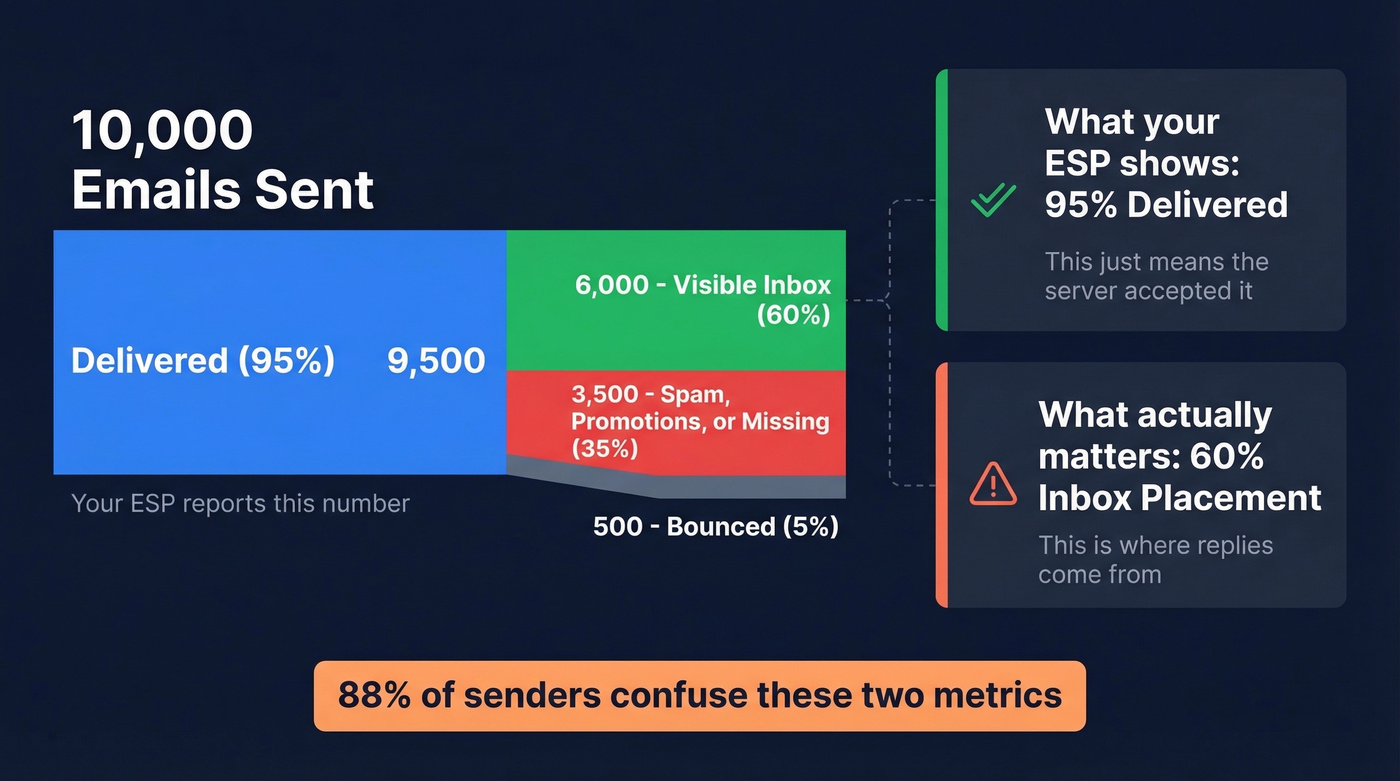
Delivery rate = (Emails delivered / Emails sent) x 100. "Delivered" just means the receiving server accepted the message. It didn't bounce. That's it. A 95% delivery rate is standard and tells you almost nothing useful.
Inbox placement rate = (Emails in inbox / Emails delivered) x 100. This is the metric that matters - how many of those "delivered" emails actually landed where someone will see them.
Here's the concrete version: you send 10,000 emails. Your ESP reports 95% delivery - 9,500 accepted. If only 60% of your sent emails reach the visible inbox, that's 6,000 inbox placements. The other 4,000? Spam folder, promotions tab, or silently dropped. That's why "95% delivered" can coexist with "60% visible inbox," and it's the single most misunderstood concept in outbound email.
88% of senders can't correctly define delivery rate. Most think it means inbox placement. It doesn't.
2026 Benchmarks for Inbox Placement
The most recent Unspam dataset - based on millions of email tests - puts the global split at 60% inbox / 36% spam / 4% blocked or missing. If you're beating 60%, you're above average. Hit 90%+ and you're in excellent shape. Litmus recommends investigating immediately any time placement drops below 90%.
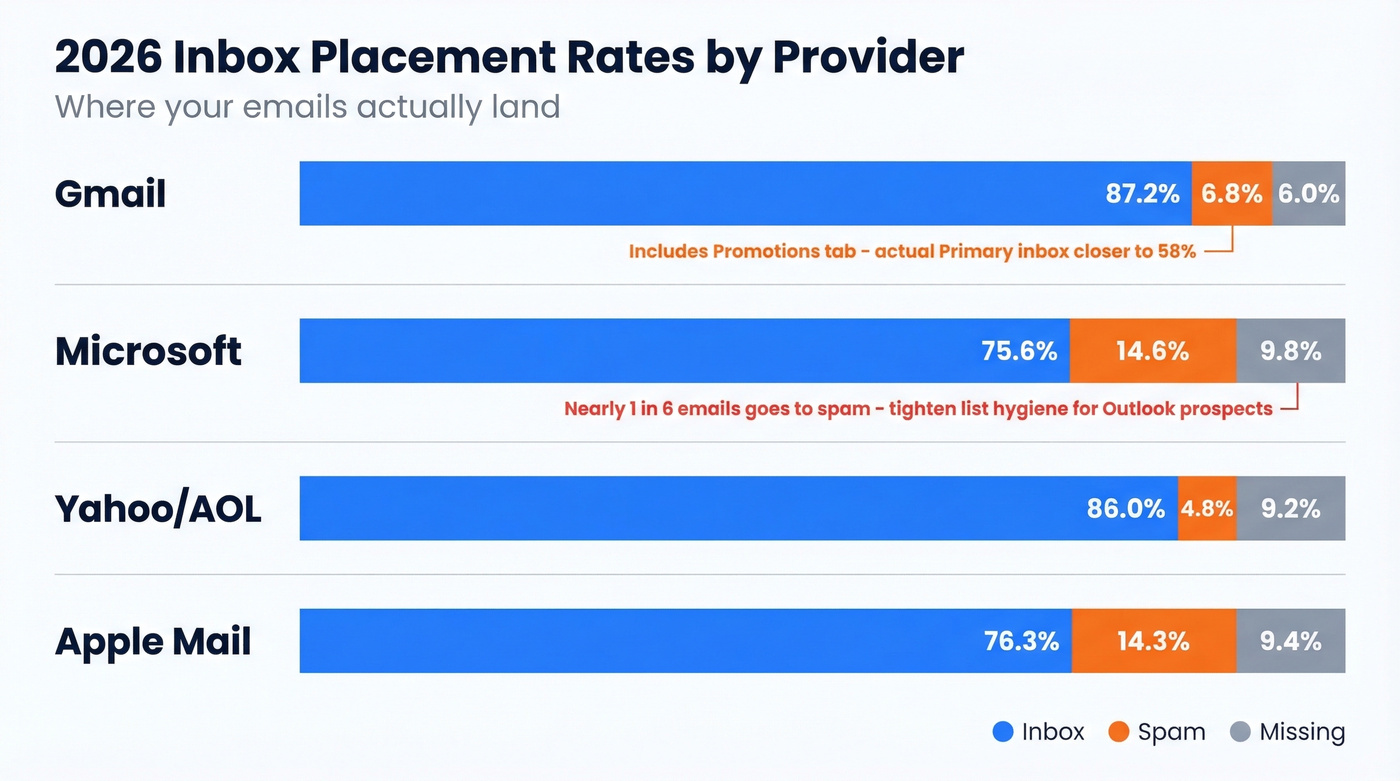
Not all mailbox providers treat your emails equally:
| Provider | Inbox | Spam | Missing |
|---|---|---|---|
| Gmail | 87.2% | 6.8% | 6.0% |
| Microsoft | 75.6% | 14.6% | 9.8% |
| Yahoo/AOL | 86.0% | 4.8% | 9.2% |
| Apple Mail | 76.3% | 14.3% | 9.4% |
Gmail shows the highest inbox delivery rate, but that 87.2% figure includes the Promotions tab. Actual Primary inbox placement is closer to 58%. Gmail placement also fluctuates across the year - it peaked at 87.5% in May and dropped to 63.5% by December, so plan for volatility when you're scheduling high-priority sends (see best time to send).
Microsoft shows the lowest inbox rate and the highest spam rate. Nearly 1 in 6 emails goes to spam. If your ICP skews toward enterprise prospects on Outlook, you need tighter list hygiene to compensate.
Industry matters too. Travel sits around 68% inbox placement, Retail at 62%, Software/Tech at 58%, Financial services at 57%. If you're in SaaS selling to finance teams on Outlook, the math gets brutal fast.
What Determines Inbox Placement
Think of inbox deliverability as a hierarchy, not a checklist. Data quality sits at the base. Sender reputation builds on top of it. Authentication is the structural layer. Content and engagement are the finishing touches - they matter, but only after the foundation is solid (more in our email deliverability guide).
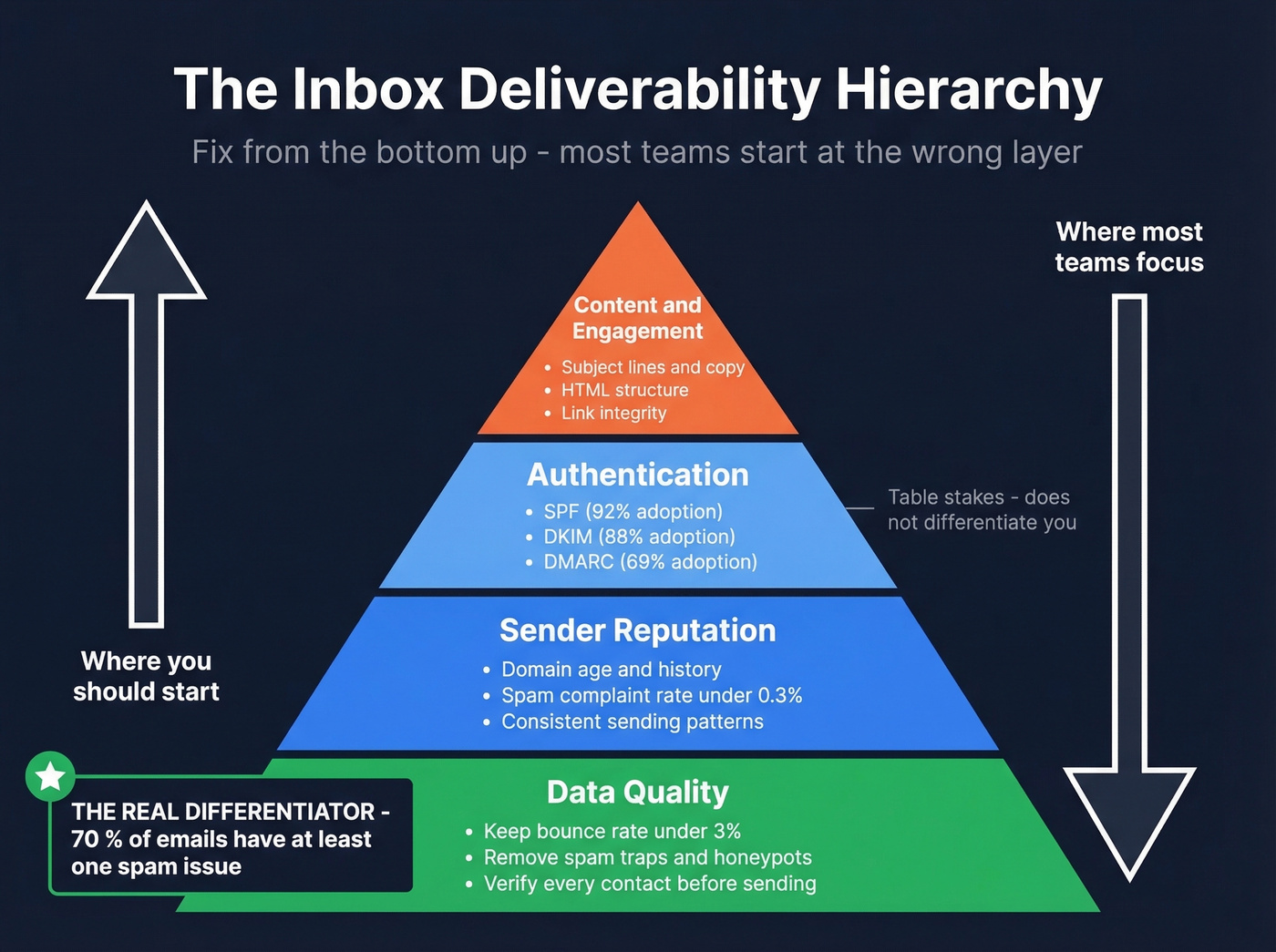
Most teams obsess over the wrong layer. They'll spend weeks tweaking subject lines while sending to a list that bounces at 12% (use proven cold email subject lines once your foundation is fixed).
Authentication is table stakes now: SPF adoption is at 92%, DKIM at 88%, DMARC at 69%. Having proper auth records doesn't differentiate you - it just keeps you from getting rejected outright. The real differentiator is data quality. 70% of emails show at least one spam-related issue, and bad addresses, spam traps, and honeypots in your list poison your sender reputation silently. By the time you notice, the damage is done (see spam trap removal).
Two overlooked factors that most guides skip entirely: HTML structure and link integrity. 74% of emails fail HTML best-practice checks, and poor structure makes you 18-25% more likely to land in spam. Meanwhile, 13% of emails contain broken or redirected links - an easy fix that 1 in 8 senders overlook. Run your templates through an HTML validator and click every link before launching a campaign. It takes five minutes.
Authentication Setup
SPF, DKIM, and DMARC aren't optional. They're the minimum.
SPF - Publish one (and only one) TXT record that includes every service sending on your behalf (see SPF record examples):
v=spf1 include:sendgrid.net include:_spf.google.com -all
The most common mistake? Duplicate SPF records. DNS allows only one. Two records means both fail.
DKIM - Enable it in your email provider (Google Workspace, Microsoft 365, etc.) and publish the TXT record at selector._domainkey.yourdomain.com. Use a 2048-bit key. If your provider defaults to 1024-bit, upgrade it (here’s how to verify DKIM is working).
DMARC - Start permissive, then tighten (read the DMARC alignment breakdown if you’re unsure):
v=DMARC1; p=none; rua=mailto:dmarc@yourdomain.com
Run p=none for 2-4 weeks while you review reports. Then move to p=quarantine, and eventually p=reject once you're confident all legitimate sending sources are aligned. Optional trust layers like MTA-STS, TLS-RPT, and BIMI provide additional signals but aren't prerequisites.
One thing most guides skip: only 14% of senders include a proper List-Unsubscribe header. Major inbox providers now require one-click unsubscribe for bulk senders. If you're not including it, you're handing ISPs an easy reason to filter you.

You just read that pre-built lists bounce at 8-15% and crater domains within 30 days. Prospeo's 5-step verification - with catch-all handling, spam-trap removal, and honeypot filtering - delivers 98% email accuracy. Teams using Prospeo consistently hold bounce rates under 3%, which is exactly where ISPs want you.
Stop gambling your sender reputation on unverified data.
Data Quality - The Real Killer
We've seen this pattern dozens of times: a team buys a "verified" list from a database provider, loads it into their sequencer, and watches their domain reputation crater within a month. Those pre-built lists routinely produce 8-15% bounce rates. At 15%, your domain is effectively dead within 30 days.
The r/coldemail consensus is clear - buying lists is the fastest way to burn a domain (and it can be illegal; see is it illegal to buy email lists). Running a verification waterfall with multiple steps keeps bounces under 3% and costs roughly $0.15/lead all-in, compared to $0.50-$1.00/lead from database providers handing you stale data.
Here's the thing: most domain burns blamed on "deliverability issues" are actually data quality issues. Teams will buy a warmup tool, set up DMARC, and do everything right on the infrastructure side - then load 10,000 unverified contacts and wonder why their domain got flagged. Fix the data first. Everything else is secondary.
This is where Prospeo fits into the stack. Its 5-step verification process handles the problems that single-pass verifiers miss: catch-all domain resolution, spam-trap removal, and honeypot filtering. The result is 98% email accuracy across 143M+ verified emails, refreshed on a 7-day cycle versus the six-week industry average. Stack Optimize built to $1M ARR running client campaigns through Prospeo with 94%+ deliverability, bounce rates under 3%, and zero domain flags across all clients. Meritt cut their bounce rate from 35% to under 4% and tripled pipeline from $100K to $300K/week.
Authentication gets you in the door. Data quality keeps you in the inbox. Prospeo refreshes all 300M+ profiles every 7 days - not the 6-week industry average - so the emails you send today aren't stale by next week. That's how Snyk cut bounce rates from 35-40% to under 5% across 50 AEs.
Weekly-fresh data is the deliverability edge your competitors don't have.
Email Warmup Playbook
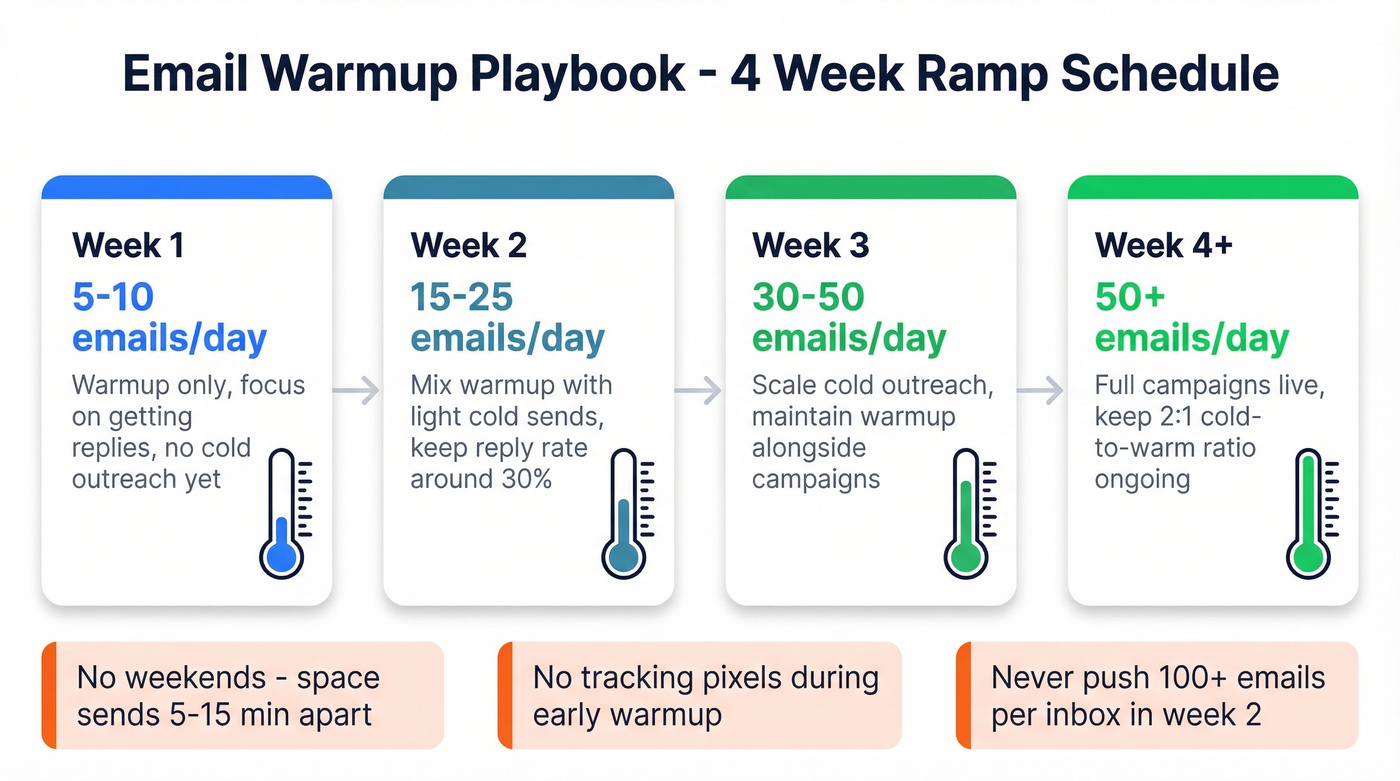
A fresh domain or inbox needs a ramp period before you send anything cold. Skip this and ISPs will flag you immediately (pair this with safe email velocity limits).
| Week | Daily Volume | Focus |
|---|---|---|
| Week 1 | 5-10 emails/day | Warmup only, replies |
| Week 2 | 15-25 emails/day | Mix warmup + light cold |
| Week 3 | 30-50 emails/day | Scale cold, maintain warm |
| Week 4+ | 50+ emails/day | Full campaigns, ongoing warm |
Start at 5 emails per day and add roughly 5 per day. Target a ~30% reply rate during warmup - warmup networks handle this for you. Avoid sending on weekends and space sends 5-15 minutes apart. Keep warmup running alongside live campaigns at a 2:1 cold-to-warm ratio, or 1:1 if you want extra safety.
Before you start warming, use an alternative domain for outreach to protect your primary. Make sure your SPF record includes all sending sources, DKIM is enabled with a 2048-bit key, and DMARC is set to p=none with a reporting address. Verify alignment with a DNS checker and test sends. Keep tracking pixels off during early warmup - they look unnatural at low volume (details on email tracking pixels).
Some warmup tools use artificial inboxes that ISPs are getting better at detecting. Instantly starts around $30/mo, Smartlead at $39/mo, and Warmy at $49/mo - all offer built-in warmup, but the quality of their warmup networks varies. Real inboxes with genuine engagement patterns beat synthetic ones every time.
20-50 emails per day per inbox is the safe operating range during early scaling. The teams on Reddit who burned domains "even with warmup" were almost always pushing 100+ emails per inbox per day in week two. Don't be that team.
Monitoring Your Sender Reputation
You can't fix what you can't see. Three free tools give you the visibility you need (plus a few more in our roundup of email reputation tools).
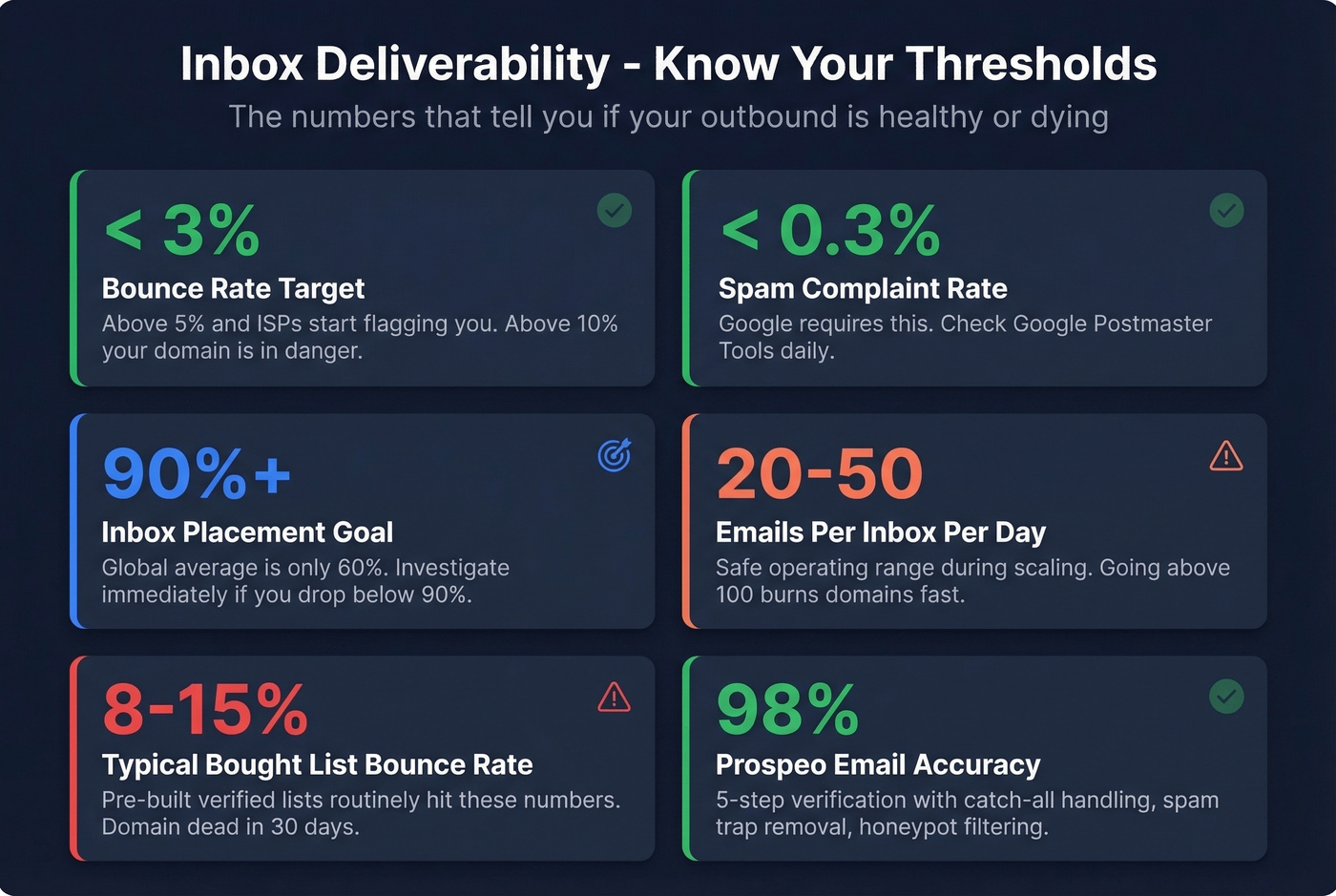
Google Postmaster Tools is the most important. Add your sending domain, verify with a TXT record, and you'll get deliverability dashboards and compliance signals. The Spam Rate dashboard shows what percentage of recipients manually reported your emails as spam. Keep this under 0.3%.
A few caveats worth knowing: GPT data updates with roughly a 24-hour delay. If you're sending fewer than 100-200 emails per day, Google won't show data at all. The spam rate only reflects manual user reports - it doesn't capture automatic spam filtering. You can have a 0.1% GPT spam rate while most of your mail is being auto-filtered to spam, which is why inbox placement testing tools like GlockApps exist.
Microsoft SNDS and Yahoo Sender Hub round out the picture. Both are free and give you ISP-specific reputation data. If your ICP is heavy on Outlook users, SNDS is non-negotiable.
What Works at Scale
We've seen the data from teams sending 500K+ emails over three months, and some of the conventional wisdom doesn't hold up.
Two-step sequences outperformed five-step by roughly 50%. Steps 3-5 mainly increased unsubscribes and complaints, which directly tanks your sender reputation and your inbox deliverability over time. Soft-ask CTAs offering a resource or case study generated ~3x the positive reply rate compared to asking for a meeting in the first email (see cold email follow-up templates).
Sequential outreach - email first, then follow up on a different channel after engagement - lifted positive replies by roughly 30%. Don't blast every channel simultaneously. Let the email open the door, then walk through it elsewhere.
Open rates are useless. Apple Mail Privacy Protection and bot opens inflate the numbers to the point of meaninglessness. One team reported an 85% open rate with less than 1% human engagement. Stop tracking opens. Track replies and positive responses instead. The relationship between genuine engagement and inbox placement is real - low engagement signals ISPs to filter you - but inflated open-rate numbers mask the problem entirely.
And the AI personalization hype? Heavy AI personalization produced a 1.9% reply rate versus 1.8% for simple relevance-based messaging - at 3x the cost per email. The marginal lift doesn't justify the expense. Spend that budget on better data instead.
Tools & Pricing
| Category | Tool | Starting Price |
|---|---|---|
| Monitoring | Google Postmaster | Free |
| Monitoring | Microsoft SNDS | Free |
| Monitoring | Yahoo Sender Hub | Free |
| Inbox Testing | GlockApps | From $85/mo |
| Inbox Testing | Mailtrap | Free; from $85/mo |
| Inbox Testing | MxToolbox | $129/mo |
| Data Verification | Prospeo | Free; ~$0.01/email |
| Data Verification | ZeroBounce | From $49/mo |
| Warmup | Instantly | From ~$30/mo |
| Warmup | Smartlead | From $39/mo |
| Warmup | Warmy | From ~$49/mo |
Skip MxToolbox unless you need its full monitoring suite. The free tools cover 80% of what most teams need for reputation tracking.
FAQ
What's a good inbox placement rate?
Aim for 90% or higher. The global average sits around 60%, so most senders have significant room to improve. If placement drops below 90%, audit bounce rates, spam complaints, and authentication alignment before sending another campaign.
What's the difference between delivery rate and deliverability?
Delivery rate measures whether the receiving server accepted your message - it includes spam-folder placements. Deliverability measures whether your email reached the actual inbox. A 95% delivery rate with 60% inbox placement means 35% of "delivered" emails are invisible to recipients.
Does SPF/DKIM/DMARC guarantee inbox placement?
No. Authentication prevents outright rejection but won't override spam filtering caused by bad data, poor engagement, or damaged sender reputation. Think of it as a prerequisite, not a solution.
How long does email warmup take?
Plan for 2-3 weeks minimum before launching live campaigns. Start at 5 emails per day, increase by roughly 5 per day, and maintain warmup sends alongside cold outreach indefinitely. Rushing past week two at 100+ emails/day is the most common cause of domain burns we see.
What's a cost-effective way to keep bounce rates low?
Use a multi-step verification waterfall before every send. Prospeo charges ~$0.01/email with 98% accuracy and a 7-day refresh cycle, compared to $0.50-$1.00/lead from database providers with stale records. Keep bounces under 3% to protect sender reputation.