

Kindly Reminder Email: Grammar Fix, Templates, and What Actually Works
"Kindly reminder" shows up in plenty of professional emails - and it's grammatically wrong. Whether you need the quick grammar fix or a kind reminder email template you can copy and send in 60 seconds, this page covers both. The real skill, though, is writing a reminder that gets a reply without sounding passive-aggressive.
The Short Version
- "Kindly reminder" is grammatically wrong. Use "kind reminder," "gentle reminder," or just "following up on..."
- The best reminder emails are under ~80 words. Tuesday and Wednesday tend to perform best, and you should reply in the same thread whenever possible rather than starting a new one.
- 42% of all email replies come from follow-ups - so yes, sending that reminder is absolutely worth it.
Is "Kindly Reminder" Correct?
No. "Kindly" is an adverb - it modifies verbs, not nouns. Saying "kindly reminder" is like saying "quickly reminder" or "softly reminder." The word needs a verb to attach to.
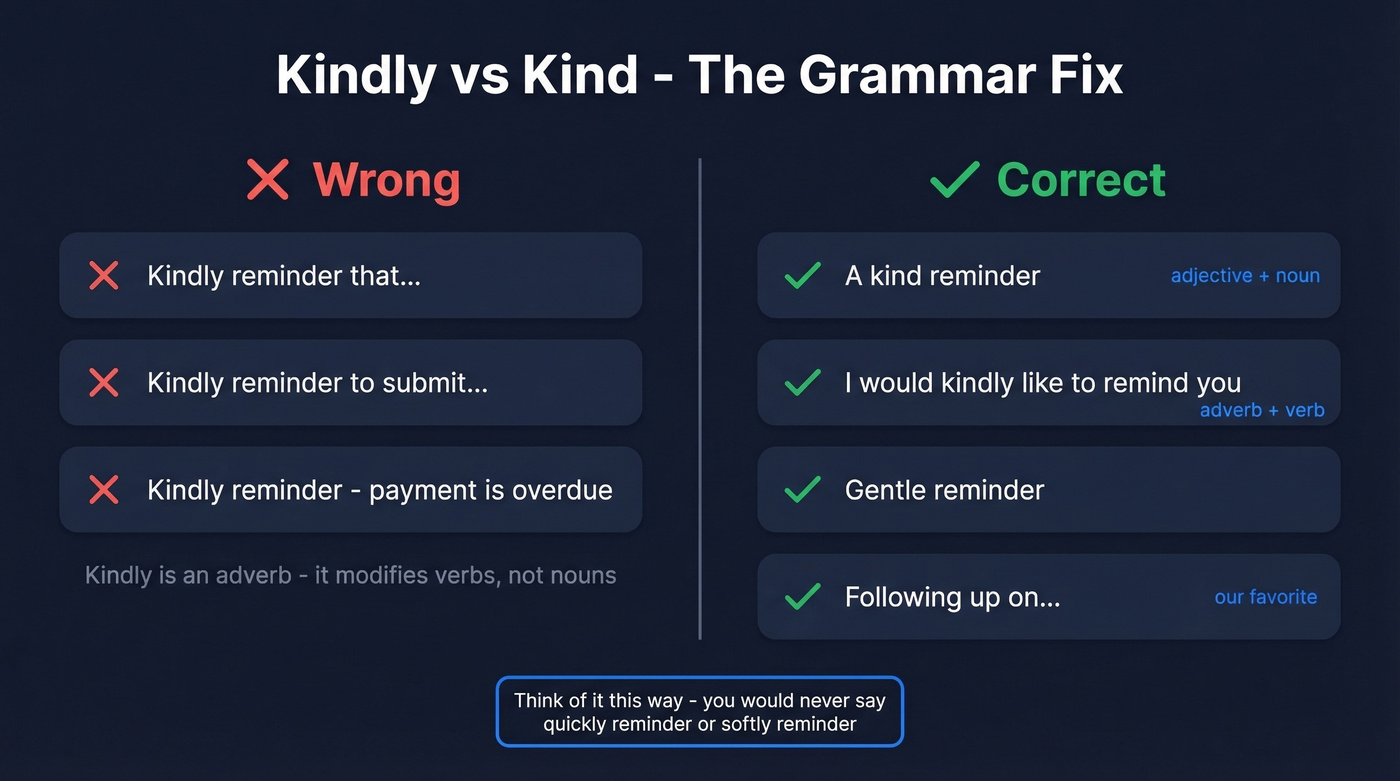
The correct options are straightforward:
- "A kind reminder" - adjective + noun. Grammatically clean.
- "I'd kindly like to remind you" - adverb + verb. Also correct.
- "Kindly reminder that..." - incorrect. Ludwig.guru's usage guide recommends rewriting this as "kindly remind you that" or "a kind reminder that."
If you want to skip the grammar minefield entirely, these alternatives all work and sound natural in professional email: "gentle reminder," "friendly reminder," "polite reminder," or - our preference - just "following up on..."
The grammar ruling: "Kindly" is an adverb. It modifies verbs, not nouns. "Kindly reminder" isn't standard English. Use "kind reminder" or restructure the sentence so "kindly" modifies a verb.
Why "Kindly Reminder" Persists
Here's the thing: "kindly reminder" isn't a sign of bad English. It's a regional politeness marker that's completely standard in South Asian, MENA, and much of international business English. In cultures where formality signals respect, "kindly" gets attached to everything - kindly do the needful, kindly revert, kindly reminder.
Email norms vary dramatically by region. North American business English leans toward brevity and first-name directness. MENA communication tends toward formal courtesy with relationship-building baked into every exchange. Japanese and Korean business email is hierarchy-aware and indirect. German email? Formal but blunt.
So if you're writing to a North American audience, swap "kindly reminder" for something more locally natural. If you're writing within a context where "kindly" is the norm, your recipients understand exactly what you mean. Language is about communication, not grammar pedantry.
Why "Gentle Reminder" Can Backfire
Let's talk about the phrase everyone defaults to instead: "gentle reminder". It sounds polite. It reads passive-aggressive.
There's a popular r/Showerthoughts thread that nails this: when someone labels an email a "friendly reminder," it somehow feels less friendly than a plain reminder. The label draws attention to the power dynamic. You're essentially saying, "I'm being nice about the fact that you dropped the ball."
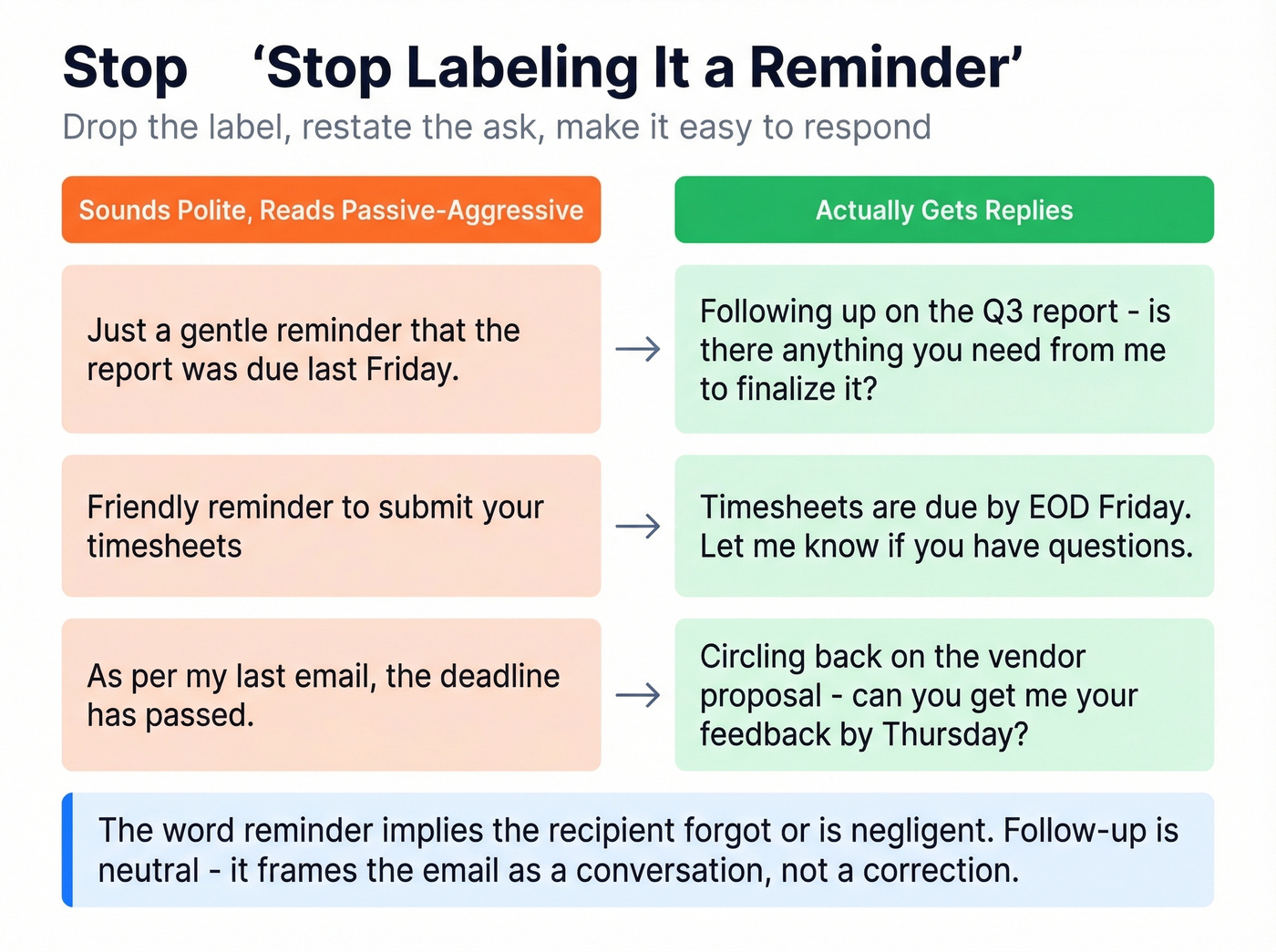
Stop calling it a "reminder" at all. "Reminder" implies the recipient forgot or is negligent. "Follow-up" is neutral - it frames the email as a continuation of a conversation, not a correction of someone's behavior.
Here's what that looks like in practice:
| ❌ Passive-aggressive | ✅ Actually effective |
|---|---|
| "Just a gentle reminder that the report was due last Friday." | "Following up on the Q3 report - is there anything you need from me to finalize it?" |
| "Friendly reminder to submit your timesheets 🙂" | "Timesheets are due by EOD Friday. Let me know if you have questions." |
| "As per my last email, the deadline has passed." | "Circling back on the vendor proposal - can you get me your feedback by Thursday?" |
| "Kindly reminder that payment is overdue." | "Invoice #4210 is 7 days past due. Can you confirm when payment will go out?" |
The pattern is simple: drop the label, restate the ask, and make it easy to respond.

42% of replies come from follow-ups - but only if your emails actually land. Bad data means your perfectly crafted reminder bounces before anyone reads it. Prospeo's 98% email accuracy and 7-day refresh cycle ensure every follow-up hits a real inbox.
Stop perfecting copy that bounces. Start with verified emails.
How to Write a Kind Reminder Email
Subject line: Reply in the same thread whenever possible. If you must start fresh, reference the original topic - "Q3 report - next steps?" beats "Following up." Keep it short and specific. Personalized subject lines are 26% more likely to be opened, so include the project name or deliverable rather than a vague "checking in." For more ideas, see these email subject lines.
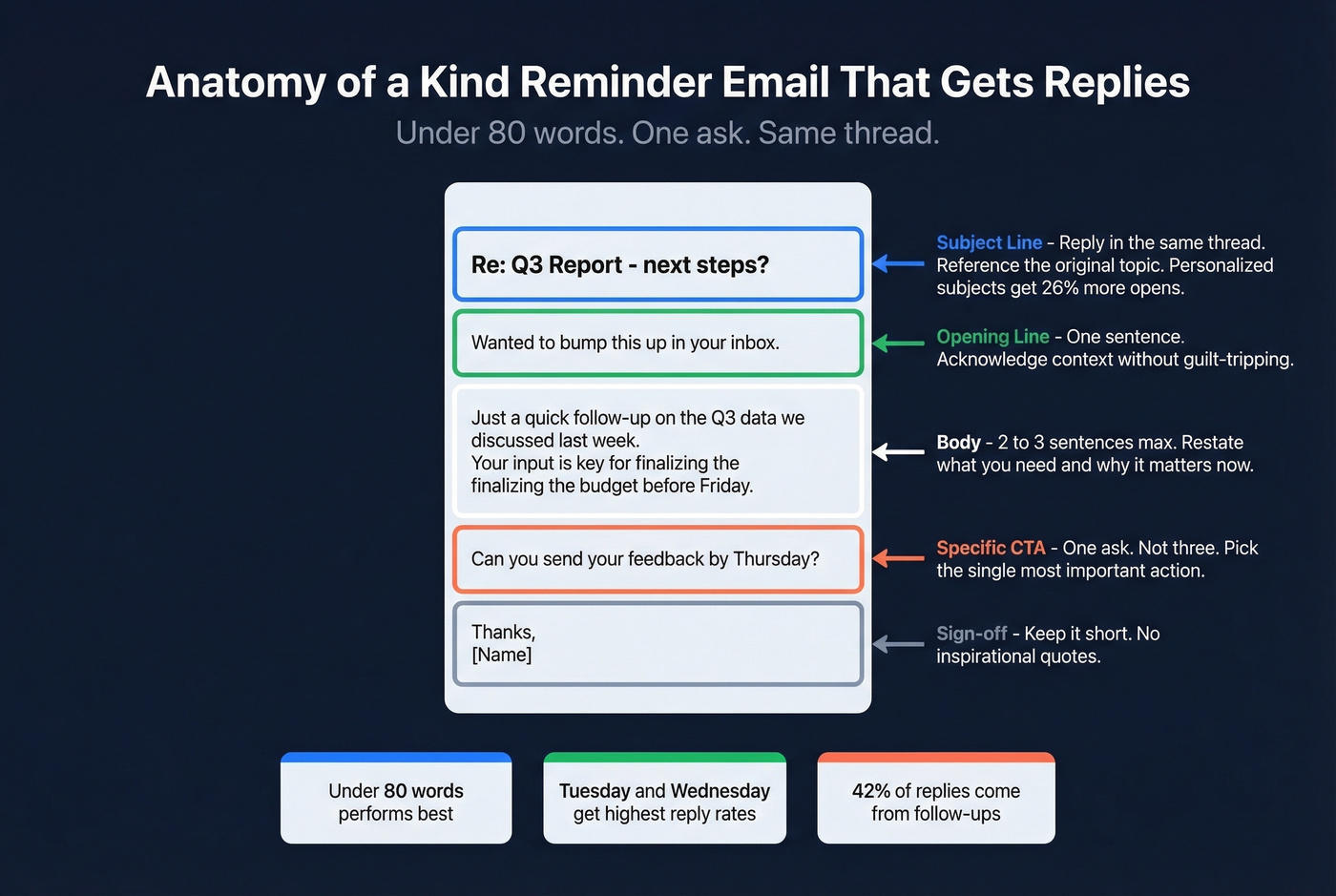
Opening line: One sentence. Acknowledge the context without guilt-tripping. "Wanted to bump this up in your inbox" works. "As per my last email" does not.
Context/body: Two to three sentences max. Restate what you need and why it matters now. Don't make them dig through the thread to figure out what you're asking.
Specific CTA: One ask. Not "let me know your thoughts and also when you're free and whether the budget is approved." Pick the single most important action and ask for that. (More examples: email call to action.)
Sign-off: Keep it short. "Thanks" or "Appreciate it" - not a three-line signature block with inspirational quotes.
2026 cold email benchmarks show that emails under ~80 words perform best. Tuesday and Wednesday show the highest reply rates, with Wednesday edging ahead. And whenever you can, reply in the same thread rather than starting a new email - threading preserves context and makes it dramatically easier for the recipient to respond. If you’re building a cadence, use these sales follow-up templates and this guide on when should i follow up on an email.
15 Polite Reminder Templates
Every template below follows the under-80-word rule. Copy, paste, adjust the brackets, send.
No Response Follow-Up
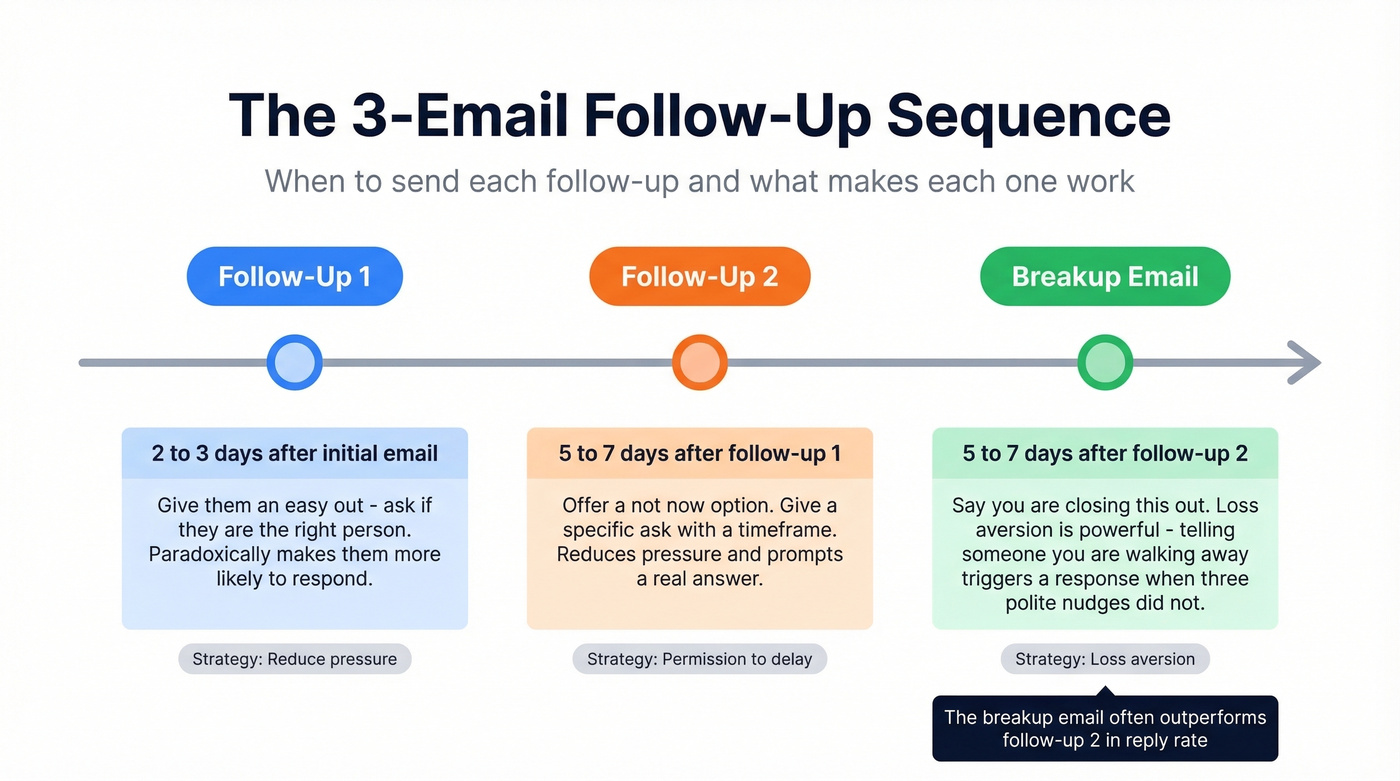
Template 1 - First follow-up (2-3 days after initial email)
Subject: Re: [Original subject line]
Hi [Name],
Wanted to bump this up - I know things get buried. Are you still the right person to talk to about [specific topic]? Happy to send over more context if that helps.
Best, [Your name]
Why this works: Giving them an easy out ("are you the right person?") paradoxically makes them more likely to respond.
Template 2 - Second follow-up (5-7 days later)
Subject: Re: [Original subject line]
Hi [Name],
Following up one more time on [specific topic]. I know timing might not be right - if so, just let me know and I'll check back in [timeframe].
If you do have 5 minutes this week, [specific ask - e.g., "I'd love your input on the vendor shortlist"].
Thanks, [Your name]
Why this works: Offering a "not now" option reduces pressure and often prompts a real answer.
Template 3 - Final follow-up / breakup email
Subject: Re: [Original subject line]
Hi [Name],
I'll assume the timing isn't right and close this out on my end. If [topic] becomes a priority later, I'm easy to find.
Thanks for your time either way.
[Your name]
Pro tip: In our experience, the breakup email outperforms the second follow-up more often than not. Loss aversion is powerful - telling someone you're walking away triggers a response when three polite nudges didn't. If you want a deeper playbook, see follow-up email to a busy person.
Meeting or Appointment Reminder
Template 4 - Pre-meeting confirmation (24 hours before)
Subject: Confirming tomorrow at [time]
Hi [Name],
Quick confirmation - we're still on for tomorrow at [time], [location/link]. I'll plan to cover [1-2 agenda items]. Let me know if anything's changed.
See you then, [Your name]
Why this works: It confirms without asking "are we still meeting?" which sounds uncertain. Stating the agenda adds value and reduces no-shows.
Template 5 - Rescheduling nudge
Subject: Can we move Thursday's call?
Hi [Name],
A conflict came up for [original time]. Would [alternative time] or [alternative time] work instead? Happy to adjust to your schedule.
Thanks, [Your name]
Common mistake here: Asking "when works for you?" without offering options. Two specific alternatives are always easier to respond to than an open-ended question. For scheduling language, see email wording to schedule a meeting.
Payment or Invoice Reminder
Template 6 - Friendly first reminder (1-3 days past due)
Subject: Invoice #[number] - quick heads up
Hi [Name],
Just a heads up that invoice #[number] for [amount] was due on [date]. Might have slipped through - happens to all of us. I've reattached it here for easy reference.
Let me know if you need anything from my end to process it.
Thanks, [Your name]
Why this works: "Happens to all of us" removes blame. Reattaching the invoice removes friction.
Template 7 - Firmer second reminder (7+ days past due)
Subject: Invoice #[number] - now [X] days overdue
Hi [Name],
Following up on invoice #[number] for [amount], originally due [date]. This is now [X] days past due. Can you confirm when payment will be processed? If there's an issue on your end, I'm happy to discuss.
I'll need to escalate this internally if we can't resolve it by [date].
Best, [Your name]
Why this works: The deadline creates urgency. "Escalate internally" signals consequences without making a direct threat.
Deadline Reminder
Template 8 - Upcoming deadline (3-5 days before)
Subject: [Deliverable] due [date] - anything you need?
Hi [Name],
Quick reminder that [deliverable] is due by [date]. If you need anything from my side to hit that deadline - files, approvals, context - let me know now and I'll prioritize it.
Thanks, [Your name]
Why this works: Offering help reframes the reminder as support, not surveillance.
Template 9 - Missed deadline (day after)
Subject: [Deliverable] - checking in
Hi [Name],
[Deliverable] was due yesterday. Is everything on track, or did something come up? Happy to adjust the timeline if needed - just want to make sure we're aligned on next steps.
Thanks, [Your name]
Why this works: "Did something come up?" assumes good intent. Firm without being accusatory.
Reminding Your Boss or Someone Senior
Template 10 - Gentle upward nudge
Emailing up the chain is where most people overthink it. The trick is framing urgency as your problem, not theirs.
Subject: Re: [Original topic]
Hi [Name],
Bumping this - I want to make sure I'm not holding anything up on my end. The [specific item] is ready to go once you've had a chance to review. No rush if you need more time, but wanted to flag it.
Thanks, [Your name]
Why this works: "I don't want to hold things up" puts the urgency on your side, not theirs.
Template 11 - "Making it easy" format
Subject: Re: [Original topic] - just needs your sign-off
Hi [Name],
I've attached the final version of [document] with the changes we discussed. If it looks good, a quick "approved" reply is all I need to move forward.
If you'd like changes, I've flagged the key sections on page [X].
Thanks, [Your name]
Pro tip: Reduce the effort required to respond and your reply rate jumps. All they need to do here is type one word.
Proposal, Feedback, Event RSVP, and Escalation
Template 12 - Proposal follow-up
Subject: Re: [Proposal name] - any questions?
Hi [Name],
Wanted to check in on the proposal I sent over on [date]. If you have questions or need me to walk through the pricing section, happy to jump on a quick call. Otherwise, just let me know where things stand.
Best, [Your name]
Why this works: Offering to explain pricing specifically shows you understand where deals stall.
Template 13 - Feedback request
Subject: Quick feedback on [deliverable]?
Hi [Name],
I'd love your take on [deliverable] before I finalize it. Even a two-line reply with what's working and what isn't would be incredibly helpful. I've highlighted the sections where your input matters most.
Thanks, [Your name]
Why this works: "Even a two-line reply" lowers the bar. People avoid feedback requests because they feel like homework.
Template 14 - Event RSVP
Subject: [Event name] on [date] - can we count you in?
Hi [Name],
Just confirming attendance for [event] on [date] at [location]. We're finalizing the headcount by [deadline]. A quick yes or no reply is all I need.
Hope to see you there, [Your name]
Why this works: Binary ask. Yes or no. No ambiguity, no essay required.
Template 15 - Escalation email
Subject: [Topic] - looping in [Manager name]
Hi [Name],
I've followed up a few times on [specific topic] and want to make sure this doesn't fall through the cracks. I'm copying [Manager name] so we can align on next steps together.
Can we get 15 minutes this week to resolve this? Here are two times that work: [option 1], [option 2].
Thanks, [Your name]
There's a Reddit thread on r/work where someone describes sending a 7th reminder before finally copying a VP. The lesson: escalation isn't rude - it's necessary. But always give the recipient one last chance to respond before you CC their manager.
Do Reminder Emails Actually Work?
Yes, but with a caveat: they work for getting a reply, not necessarily the right reply.
The Instantly 2026 benchmark report analyzed billions of email interactions and found that the average reply rate sits at 3.43%, with top performers exceeding 10%. The critical stat: 42% of all replies come from follow-up emails, not the initial send. If you're only sending one email and giving up, you're leaving nearly half your potential replies on the table. (Related: importance of follow-up in sales.)
But here's the nuance most template articles skip. A Sales.co dataset of 2M+ cold emails found a 2.09% overall reply rate, and only 14.1% of those replies were actually positive. Nearly 45% were auto-replies, and about 30% were negative. That puts the effective "interested reply rate" at roughly 0.64% across all contacts emailed.
Our take: If your average deal size is under $5k, you probably don't need a 7-touch email sequence. Two follow-ups and a channel switch will get you 80% of the value at 30% of the effort. The 4-7 touchpoint sweet spot that cold email benchmarks recommend is built for high-value outbound - not for chasing a colleague about a quarterly report. If you’re running outbound, this B2B cold email sequence guide is a better fit.
For warm contexts like colleagues, existing clients, and internal stakeholders, two to three follow-ups is the ceiling. After that, switch channels. Pick up the phone. Send a Slack message. Walk to their desk. Repeating the same action and expecting different results is the definition of a wasted cadence.
7 Mistakes That Kill Reminder Emails
1. Using "gentle/friendly/kindly reminder" when it reads as passive-aggressive. The label undermines the tone. Just follow up without announcing that you're being polite about it.
2. Vague CTA. "Just checking in" with no specific ask is the email equivalent of standing in someone's doorway and staring. Ask for something concrete: a date, a decision, a file. If you need alternatives, see how to say just checking in professionally.
3. Writing a novel. The data is clear - under ~80 words performs best. If your reminder email has three paragraphs, you've lost them. Cut everything that isn't the ask or the context needed to answer it.
4. Starting a new thread instead of replying in-thread. This forces the recipient to search for context. Reply to your original email so the full conversation is right there.
5. Stacking qualifiers. "Just a quick friendly gentle reminder" - every softener you add makes you sound less confident and more annoying. Pick one qualifier or, better yet, none.
6. Sending too many reminders without switching channels. After three email follow-ups with silence, email isn't the problem - the channel is. Call them. Walk over to their desk. Loop in someone else. For cold outreach, try a different platform entirely. We've seen teams send 8 follow-ups to the same dead inbox when a single phone call would have closed the deal.
7. Sending to bad email addresses. A perfectly written reminder means nothing if it bounces. If your bounce rate is above 4%, your follow-ups aren't just failing - they're actively hurting your sender reputation, which drags down deliverability for every other email you send. Run your list through an email verification tool before launching any sequence. Prospeo's free tier covers 75 verifications a month with 98% accuracy - enough to clean a small outreach list before you hit send. If you’re troubleshooting, start with email bounce rate and this email deliverability guide.
FAQ
Is it "kind reminder" or "kindly reminder"?
"Kind reminder" is correct. "Kindly" is an adverb that modifies verbs, not nouns, so "kindly reminder" isn't grammatically standard. Write "a kind reminder" (adjective + noun) or restructure with "kindly remind you" (adverb + verb). Most style guides recommend "kind reminder," "gentle reminder," or dropping the label entirely in favor of "following up."
How many follow-ups should I send?
Two to three for warm contacts - colleagues, clients, internal stakeholders. For cold outreach, 2026 benchmarks show 4-7 touchpoints before diminishing returns. After three unanswered emails, switch to a phone call, Slack message, or escalation through a different person.
What's the best day to send a reminder?
Tuesday and Wednesday between 10 AM and 1 PM in the recipient's time zone consistently show the highest reply rates. Wednesday often edges ahead. Skip Monday mornings (inbox overload) and Friday afternoons (mentally checked out).
How do I make sure my reminder actually reaches the inbox?
Verify the email address before sending. Bounces from outdated or incorrect addresses damage your sender reputation and reduce deliverability across your entire domain. Even a small list is worth cleaning - a 4%+ bounce rate can trigger spam filters that tank your sending score for months.
You just spent time crafting the perfect under-80-word reminder. Now make sure it reaches the right person. Prospeo gives you 143M+ verified emails across 300M+ profiles - at $0.01 per email, no contracts, no sales calls required.
Great reminder emails deserve real email addresses behind them.