

Lead Generation Forms: The Data-Backed Guide to More Conversions
Eight fields. Name, email, company, job title, phone, company size, budget, timeline, use case. A B2B SaaS team posted on r/UXDesign that their lead generation form was bleeding out at a 45% abandonment rate - prospects dropping off around field three or four. Sales wanted the data. Marketing wanted the conversions. Nobody was winning.
That tension - more fields for qualification vs. fewer fields for volume - is the central problem of every lead capture form. Most teams solve it wrong by compromising at five fields and calling it a day. There's a better approach, and it doesn't require picking a side.
Quick Version
- 3-5 fields for most B2B forms. Fewer is almost always better.
- Enrichment kills the field-count war. Capture an email, fill in company, title, phone, and 50+ data points automatically. (If you’re comparing vendors, start with data enrichment.)
- Multi-step beats single-step for complex forms - but only with a progress bar, data persistence, and logical clustering.
- Speed-to-lead matters more than button color. Teams offering instant scheduling convert 66.7% of qualified form fills into booked meetings.
- Test one variable at a time. 100-200 submissions per variant is enough to call most winners.
What Is a Lead Generation Form?
A lead generation form is any web form designed to capture prospect information in exchange for something - a demo, a download, a free trial, a quote. It's the conversion point where anonymous traffic becomes a named lead in your CRM. (If you’re standardizing your pipeline, see examples of a CRM.)
Not all lead capture forms serve the same purpose, and the design should match the intent:
- Contact forms - general inquiries, low commitment, usually name + email + message.
- Demo request forms - higher intent, typically 3-5 fields qualifying the prospect for a sales conversation. (If you’re tightening qualification, use a lead scoring model.)
- Lead magnet forms - ebook, whitepaper, or report behind an email gate. One to two fields is standard.
- Pop-up forms - email capture triggered by scroll depth, exit intent, or time on page. Single field.
- Quiz / interactive forms - multi-step, personalized experience that qualifies while engaging. Higher completion rates but more complex to build.
The form type dictates the field count, the design, and the follow-up workflow. A demo request form and a newsletter signup shouldn't look or behave the same way.
Benchmarks That Actually Map to Revenue
Let's be honest: most "form conversion rate" benchmarks are useless because they lump together newsletter signups and enterprise demo requests. Here are numbers worth paying attention to.
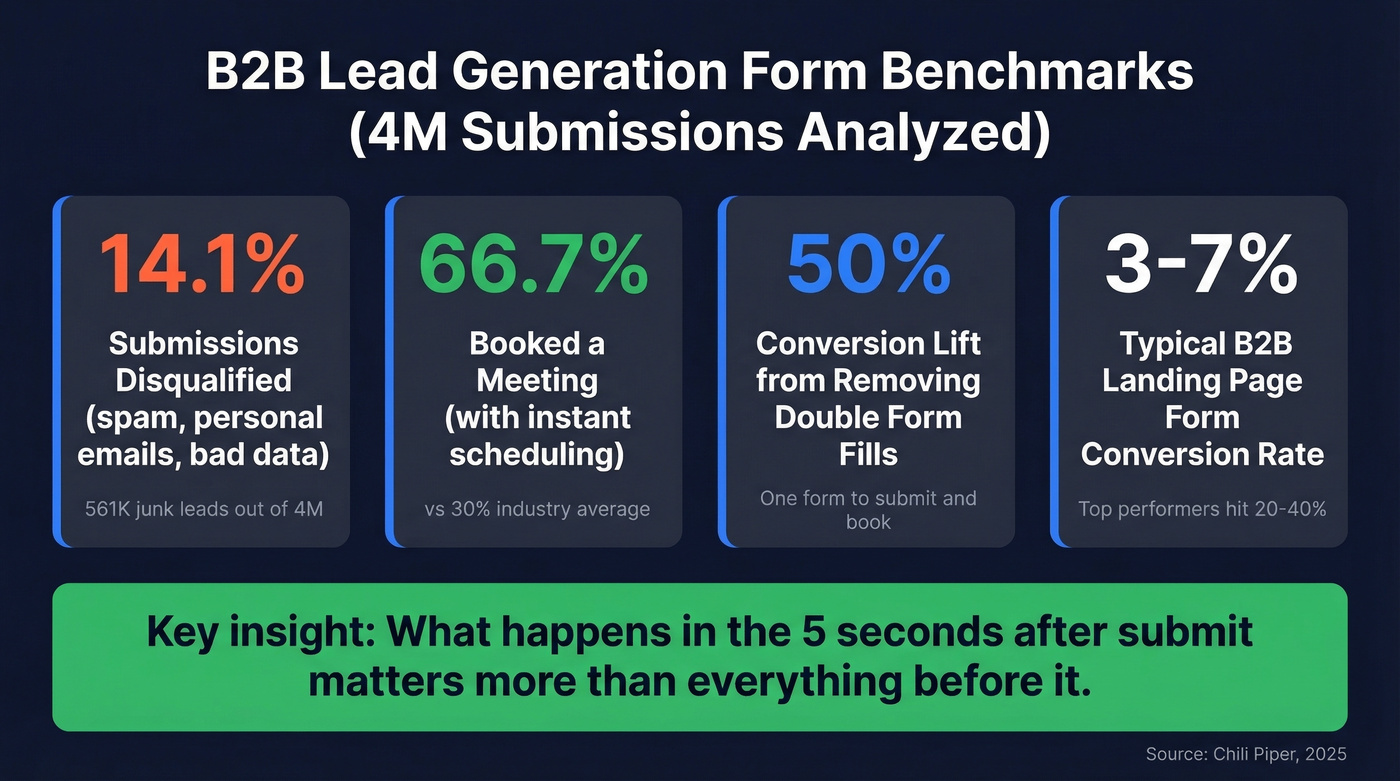
Chili Piper analyzed roughly 4 million form submissions across their B2B customer base. Of those, 14.1% were disqualified - spam, personal emails, or prospects failing basic criteria. That's 561,977 junk submissions, which means your "conversion rate" is probably inflated by garbage you'll never close. (To track this cleanly, align on lead status.)
Among qualified submissions, 66.7% booked a meeting when the form included instant scheduling - compared to roughly 30% as the industry average. Even scheduler load time matters: a 30-45 second calendar load causes measurable drop-off compared to a 3-4 second load. And double form fills - where a prospect submits info then fills a second form to book - are a major conversion killer. Removing the second form can increase conversion rates by 50%.
Here's the thing: what happens in the five seconds after someone hits "submit" matters more than most of the optimization you're doing before it. (If you want a broader KPI set, use lead generation metrics.)
On the design side, BrokerNotes redesigned their form from a traditional layout to an interactive, click-based UI and watched conversion jump from 11% to 46%. That's not a marginal A/B test win - it's a fundamentally different approach to form design.
For broader context, typical B2B landing page form conversion rates sit in the mid-single digits (3-7%). High-performing pages with strong offers and minimal friction reach 20-40%.
How Many Fields Is Too Many?
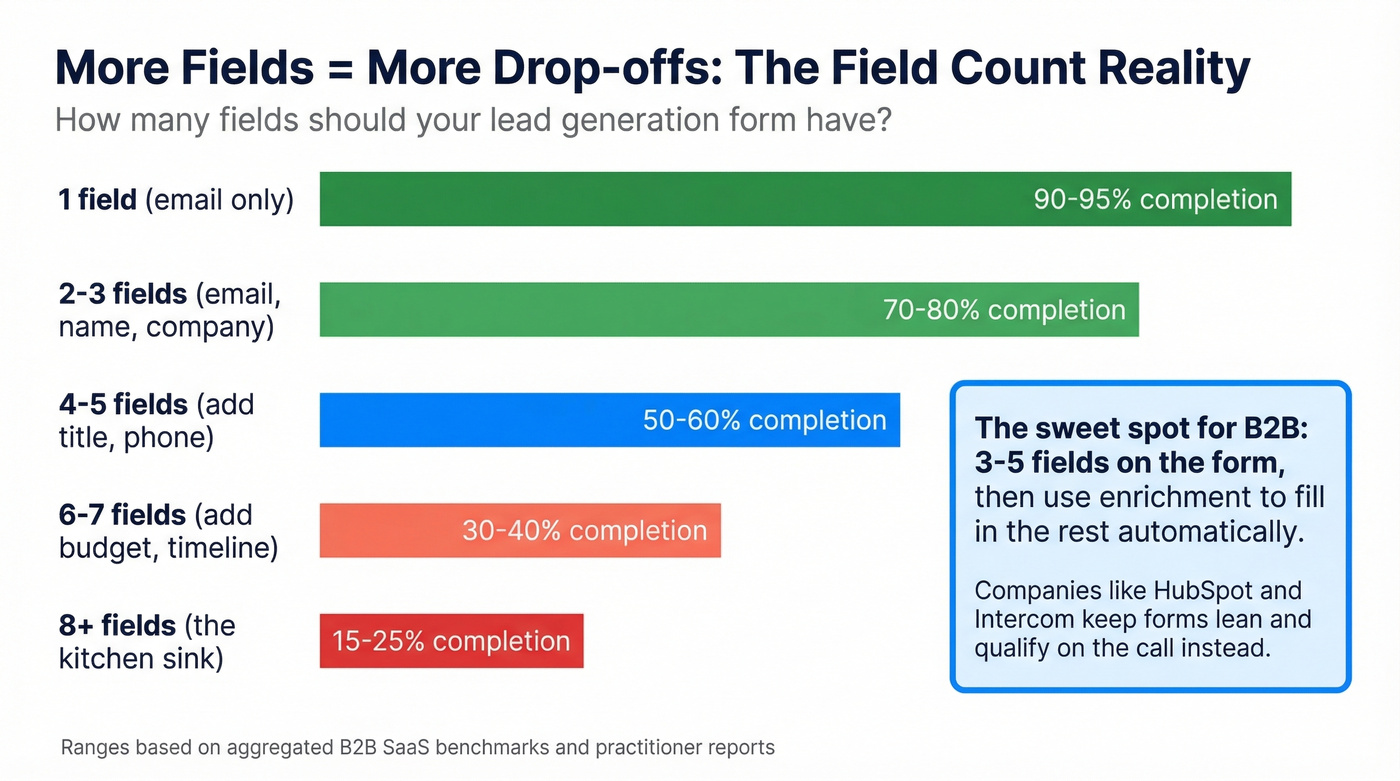
We've all been in that meeting. Sales wants eight fields because they don't want to waste time on unqualified calls. Marketing wants three because every additional field tanks completion rates. The compromise is usually five fields and a vague agreement to "revisit next quarter." (If you’re building a repeatable process, map it as a lead generation workflow.)
Compromising at five isn't a strategy. It's avoiding the real conversation.
That Reddit thread tells the story clearly - users were dropping at field three or four, right around where the form shifts from "identifying myself" to "doing your qualification work for you." HubSpot asks for name, email, and company size. Intercom keeps it similarly lean. These aren't companies that struggle with lead quality; they just qualify on the call instead of on the form.
The rule of thumb: three to five fields for most B2B forms. One to two if you're using enrichment to fill in the rest. Every field you add is a micro-decision you're asking a busy person to make, and busy people bail.
Multi-Step vs. Single-Step Forms
When Multi-Step Works
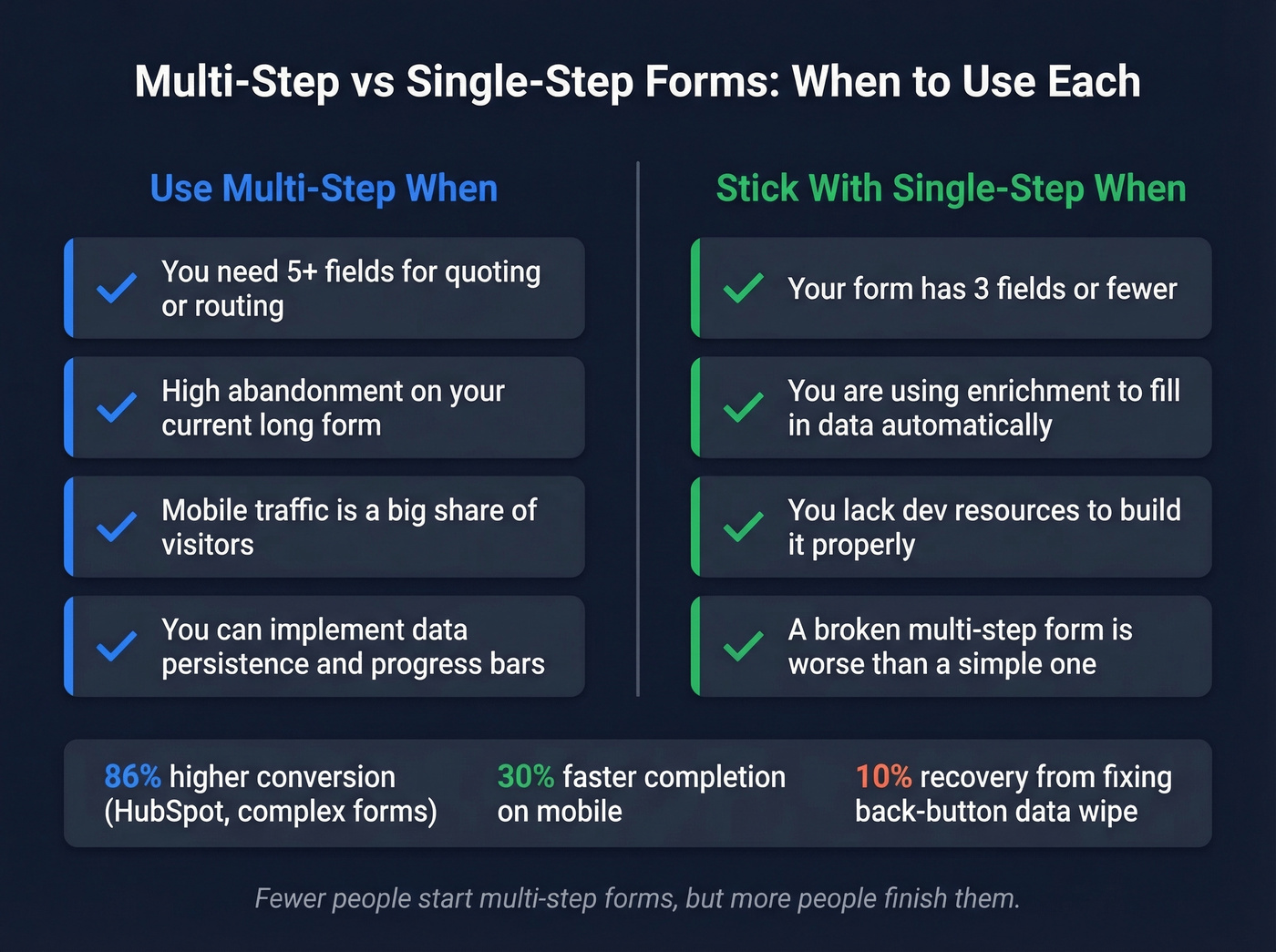
Multi-step forms earn their complexity in specific situations: when your form genuinely needs 5+ fields for complex quoting or multi-product routing, when you're seeing high abandonment on a long single-step form, or when mobile traffic makes up a significant share of your visitors. Practitioners on r/GrowthHacking report completion time dropping ~30% on mobile with multi-step, even with more screens.
When to Skip It
If your form has 3 fields or fewer, splitting that into steps adds friction without benefit. Same goes if you can't implement data persistence between steps, or if you don't have the dev resources to build it properly. A broken multi-step form is worse than a mediocre single-step one.
HubSpot cites 86% higher conversion rates for multi-step forms, though that comes from their own testing on complex forms, not a universal law. The real insight from practitioners is more nuanced: fewer people start multi-step forms, but more people finish them.
Implementation Checklist
If you go multi-step, get these right - otherwise it'll hurt more than help:
- Progress bar - always. Lemonade's multi-step form gets dinged for missing one, and it's a common UX critique.
- Data persistence - if a user clicks "back," their previous answers must still be there. Fixing a back-navigation data-wipe bug recovered up to 10% in conversion in one Zuko case study.
- Partial lead capture - save incomplete submissions. Even partial form data can fuel retargeting campaigns or follow-up sequences. (For what to send next, use sales follow-up templates.)
- Easy before hard - name and email first, budget and timeline last.
- Large tap targets on mobile - practitioners on r/b2bmarketing flag this as one of the highest-impact micro-UX changes.
One behavioral science note worth stealing: loss-aversion framing in your form copy ("Don't miss your free report") consistently outperforms neutral framing ("Get your free report"). Small copy change, measurable lift.

The article says 3-5 fields is ideal - but sales still needs company, title, phone, and budget. Prospeo's enrichment solves this: capture just an email, and we return 50+ data points at 98% accuracy with a 92% match rate. Your forms stay short. Your CRM stays full.
Kill the field-count war. Enrich every lead automatically.
Fewer Fields, More Data With Enrichment
The field-count debate assumes a tradeoff: either you ask for the data and lose conversions, or you skip the data and waste sales time on unqualified leads. Enrichment eliminates that tradeoff entirely. (For the underlying mechanics, see lead enrichment.)
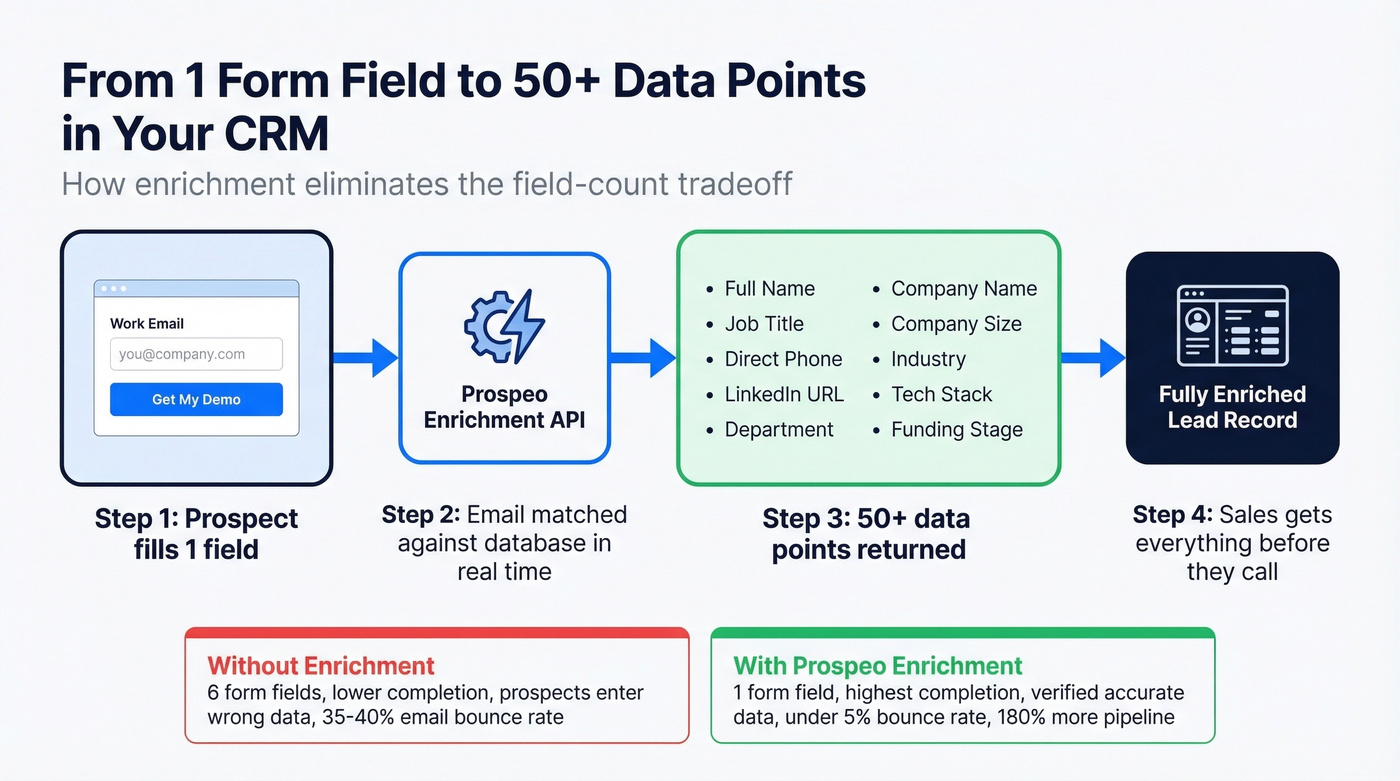
The workflow is straightforward. A prospect fills out your lead generation form - maybe just an email address, maybe email plus first name. Behind the scenes, an enrichment tool matches that email against a database of professional profiles and pushes the full picture to your CRM before the lead even hits a rep's queue. Company name, job title, direct phone number, headcount, tech stack, funding stage - all populated automatically.
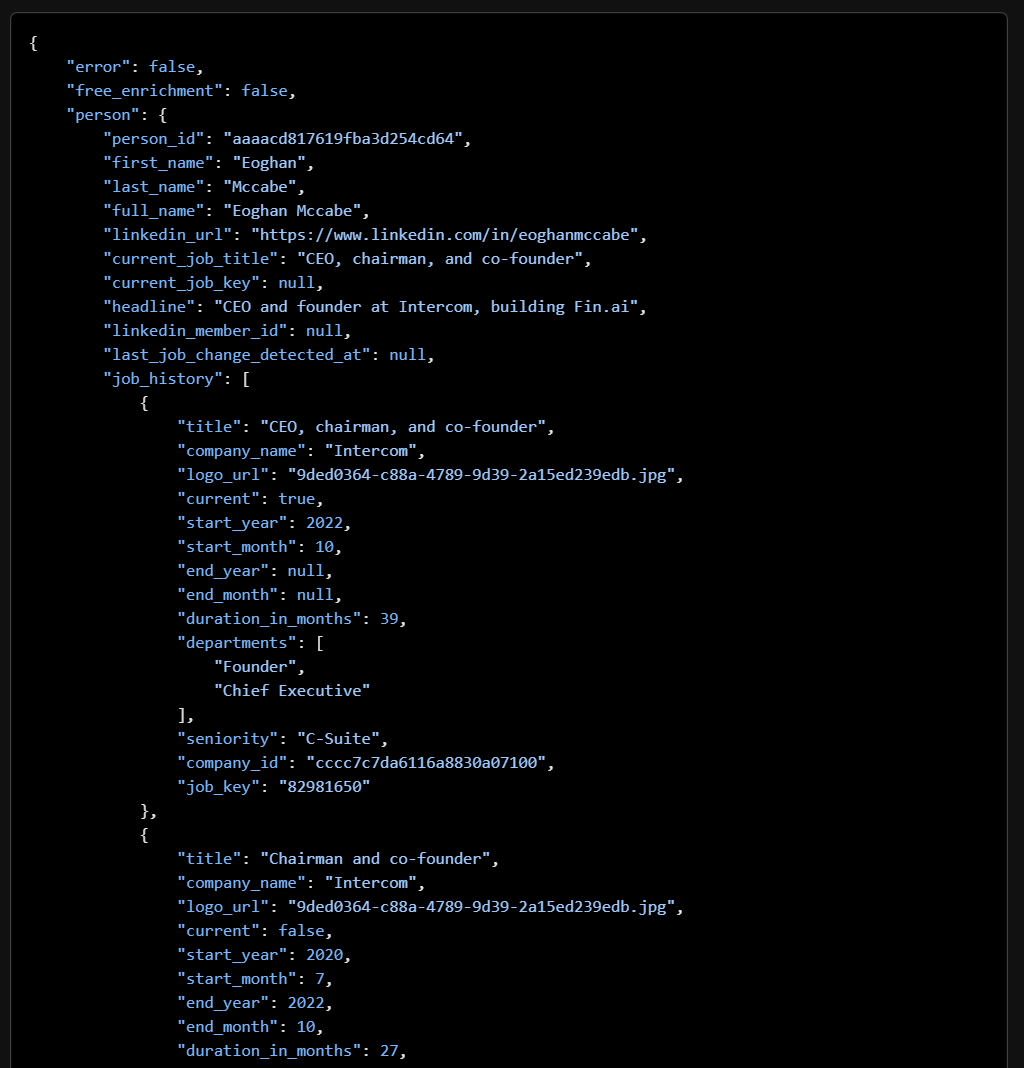
We've seen teams cut their form from six fields to one and actually improve lead quality - because enrichment fills in data that prospects often get wrong anyway. One of our customers, Snyk, had 50 AEs each spending 4-6 hours a week on prospecting with a 35-40% bounce rate. After switching to enriched data, bounce dropped under 5% and AE-sourced pipeline jumped 180%. That's the kind of difference accurate enrichment makes downstream. (If you’re building a repeatable outbound motion, use these sales prospecting techniques.)
Your marketing team gets a one-field form with sky-high completion rates. Your sales team gets a fully enriched lead record with direct dial, company size, and tech stack before they pick up the phone. The argument about field count just disappears.
Every field you add is a prospect who leaves. Prospeo lets you run a single-field form and still hand sales a fully qualified lead - verified email, direct dial, company size, tech stack, even buyer intent signals across 15,000 topics. At $0.01 per email, it's cheaper than the conversions you're losing.
One field on the form. Fifty data points in your CRM.
Lead Form Examples That Convert
BrokerNotes - Interactive UI, 11% to 46%. Instead of text inputs, BrokerNotes built a click-based interface where users select options visually. Clicks replace typing, conditional logic tailors follow-up questions, and the experience feels more like a product quiz than a form. The result was a 4x conversion lift.
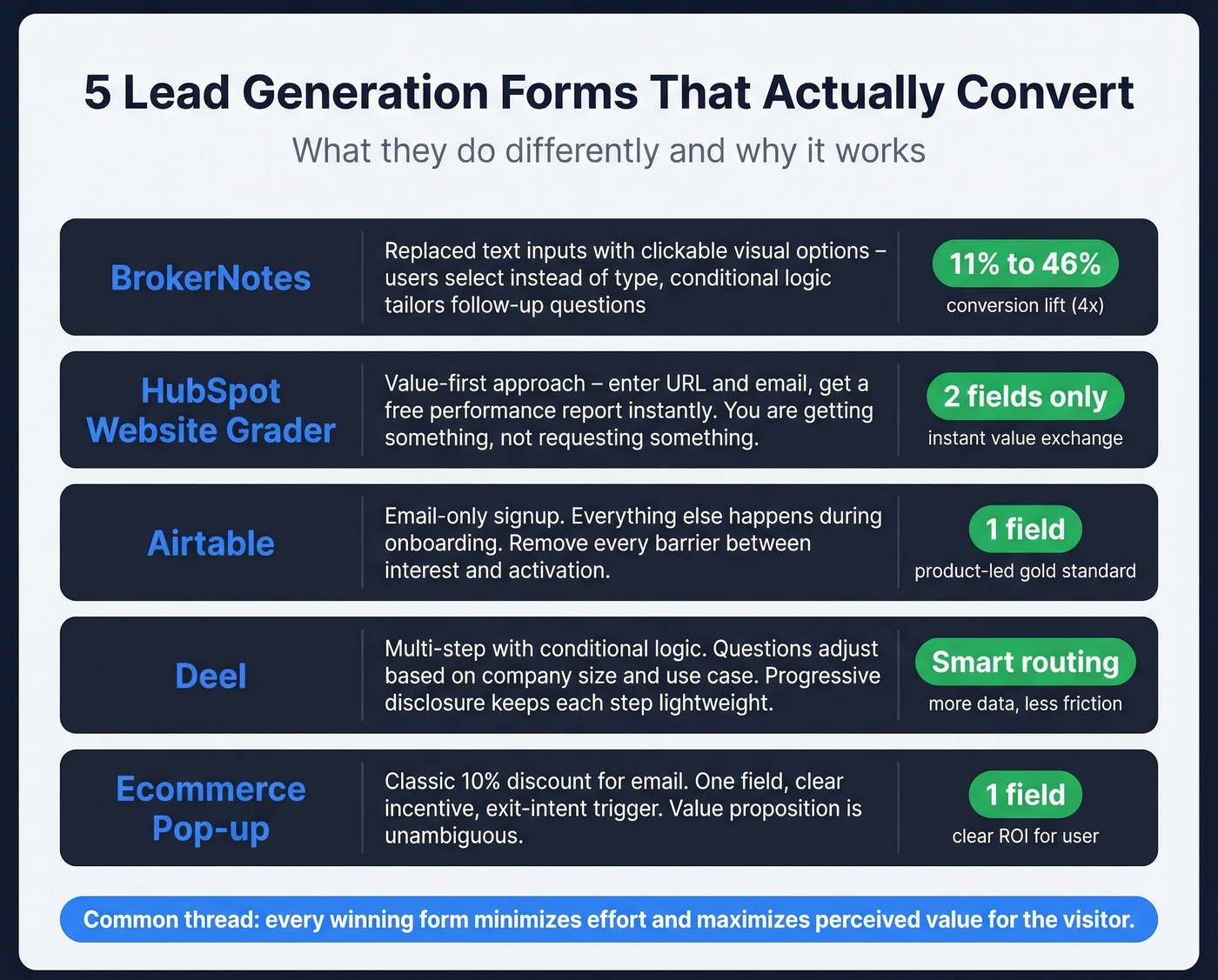
HubSpot Website Grader - Value first. You enter your URL and email, and HubSpot gives you a free performance report. Two fields, instant value. You're not "requesting" something - you're getting something.
Airtable - Email only. Everything starts with an email or Google sign-up. The rest happens during onboarding. For a product-led growth motion, this is the gold standard: remove every barrier between interest and activation.
Deel - Multi-step with conditional logic. Deel's demo request form breaks the process into steps, adjusting questions based on company size and use case. Progressive disclosure keeps each step feeling lightweight while collecting more data than a single-step form would.
Ecommerce pop-up with discount. The classic "10% off your first order" email capture. One field, clear incentive, exit-intent trigger. Not sophisticated, but it converts because the value proposition is unambiguous and the commitment is minimal.
GDPR, CCPA & TCPA Compliance
Compliance isn't optional, and getting it wrong is expensive.
GDPR (EU Residents)
The consent checkbox must be unchecked by default - pre-checked boxes violate GDPR. Explain the purpose clearly: "We'll use your information to contact you about [specific purpose]." Link to your privacy policy and allow withdrawal of consent at any time.
Template: "☐ I agree to [Company] storing and processing my personal data to respond to my inquiry. View our [Privacy Policy]."
CCPA (California Residents)
Disclose rights to access, delete, and opt out of sale/sharing of personal information. Include a "Do Not Sell My Personal Information" link.
Template: "By submitting, you agree to our [Privacy Policy]. California residents: you may request access to or deletion of your data. See our [Do Not Sell] page."
TCPA (US Phone Outreach)
If your form collects phone numbers and you plan automated outreach:
Template: "By providing my phone number, I consent to receive calls and texts, including by automated dialer, from [Company] at the number provided. Consent isn't required as a condition of purchase. [Privacy Policy] | [Terms]."
For more template language and edge cases, LeadCapture.io's consent templates are a solid implementation reference. Run everything past legal before going live.
How to Test Your Forms
A structured testing process doesn't need to be complex.
Isolate one variable. Field count, button copy, form placement, single-step vs. multi-step - pick one. Testing multiple changes simultaneously makes it impossible to attribute results.
Set your sample size. For most B2B forms, 100-200 submissions per variant is enough to see meaningful differences. Low-traffic pages need 2-4 weeks per test.
Track the right metrics. Form starts, completion rate, field-level drop-off, and - critically - downstream conversion. A form that converts 40% but produces unqualified leads isn't winning. Track through to meeting booked or opportunity created. (To connect the dots, track your sales conversion rate.)
Run the full cycle before calling it. Don't kill a test after three days of bad results. Let it run through a complete business cycle - typically one to two weeks for B2B. Roughly 65% of businesses using systematic A/B testing report 10%+ conversion improvements.
Best Tools for Lead Capture Forms
HubSpot Forms is the default for teams already on HubSpot CRM. The free tier gives you unlimited forms with native CRM sync, and conditional logic plus advanced targeting features are available on paid Marketing Hub tiers. For most teams starting out, the free tier does the job.
If your form needs to feel like a conversation rather than a spreadsheet, Typeform is the move. The one-question-at-a-time format drives higher completion rates on complex forms. Free tier available; paid plans start around $25+/user/month.
For teams that want to launch fast without custom design, Jotform offers 1,362 lead form templates with paid plans starting around $34/month. Unbounce pairs landing page building with forms and built-in A/B testing - best when the form and page need optimizing together, starting around $99-$199+/month. Zoho Forms integrates natively with Zoho CRM and supports multilingual forms in 50+ languages; free tier available, paid plans around $10+/month.
For enrichment, Prospeo turns a one-field form into a fully enriched lead record - 300M+ profiles, 98% email accuracy, 7-day data refresh. Free tier includes 75 emails/month. Clearbit is an established alternative with 389M+ records, but custom pricing typically starts at $1,000+/mo, putting it out of reach for most SMBs.
For post-submission routing, Chili Piper handles instant scheduling - the 66.7% form-to-meeting benchmark comes from this exact workflow. Plans start around $30+/user/month.
| Tool | Best For | Free Tier | Starting Price |
|---|---|---|---|
| HubSpot Forms | CRM-native forms | Yes | Free (paid tiers available) |
| Typeform | Interactive multi-step | Yes | ~$25+/mo/user |
| Jotform | Template variety | Yes | ~$34+/mo |
| Unbounce | Landing page + form | No | ~$99-$199+/mo |
| Zoho Forms | Zoho ecosystem | Yes | ~$10+/mo |
| Prospeo | Form enrichment | Yes (75 emails) | ~$39/mo |
| Clearbit | Enterprise enrichment | No | ~$1,000+/mo |
| Chili Piper | Instant scheduling | No | ~$30+/mo/user |
Look - if your average deal size is under $15k, you probably don't need eight fields on your demo form. You need one field and an enrichment tool. The teams obsessing over form layout are often solving the wrong problem. The real bottleneck is what happens after submission, not before it.
FAQ
What's a good form conversion rate?
Most B2B lead capture forms convert at 3-7%. High-performing forms with minimal fields and instant follow-up reach 20-40%. Form-to-meeting rate matters more: 66.7% is the benchmark when instant scheduling is included.
How many fields should a lead form have?
Three to five for most B2B forms. One to two if you use data enrichment to fill in the rest automatically, eliminating the need for extra fields.
Are multi-step forms better than single-step?
For forms with 5+ fields, yes - but only with a progress bar, data persistence, and logical clustering. For three fields or fewer, single-step wins because splitting adds unnecessary friction.
Do lead forms need GDPR consent checkboxes?
Yes, if you collect data from EU residents. The checkbox must be unchecked by default, explain the processing purpose, and link to your privacy policy. Pre-checked boxes violate GDPR.
How do I create a lead generation form that converts?
Start with the fewest fields possible - ideally just an email - and use enrichment to fill in the rest. Match the form type to the offer's intent, add a clear CTA with a specific value proposition, and route submissions to instant scheduling so prospects book while motivation is high.