

Lead Grading: The Practitioner's Guide to Grading Leads by Fit
It's Monday morning. Your SDR team opens the MQL queue and finds 47 new leads. Twenty-six are junk - students downloading ebooks, competitors poking around, companies with four employees and no budget. Meanwhile, the VP of Engineering at a 400-person SaaS company who booked a demo from a cold email sits at 12 points because she never opened your newsletter. Your scoring model gave an intern 89 points and buried the lead that closed $20K in three weeks.
That's not a scoring problem. That's a lead grading problem - or the absence of one.
The Short Version
Lead grading assigns letter grades (A through F) based on how well a lead matches your ideal customer profile. Company size, industry, job title, revenue, location. It's the fit filter that behavioral scoring can't replace. Start with five criteria, three routing thresholds, and clean data. Run it for 30 days, then calibrate.
What Is Lead Grading?
Lead grading evaluates leads on firmographic and demographic fit, not behavior. Instead of numeric points for page visits and email clicks, grading assigns letter grades - A+ through F - based on how closely a lead matches your ICP.
The clearest example comes from Salesforce Account Engagement (formerly Pardot), which runs a native letter-grade system alongside its numeric engagement score. Every prospect starts at D by default. You then configure grading rules that adjust the grade up or down by one-third, two-thirds, or a full letter depending on the weight you assign. A lead at a 500-person SaaS company in your target vertical with a VP title lands at A. A lead at a 10-person agency in an irrelevant industry drops to D- or F.
Grading measures who someone is, not what they've done. A perfect-fit lead who hasn't engaged yet still gets an A. A poor-fit lead who downloaded every whitepaper you've published still gets a D.
Lead Grading vs. Lead Scoring
These two systems solve different problems. Using one without the other is how you end up routing students to your closers.
| Dimension | Grading | Scoring |
|---|---|---|
| Measures | Fit (who they are) | Behavior (what they do) |
| Data type | Explicit / firmographic | Implicit / behavioral |
| Scale | Letter grades (A-F) | Numeric points (0-100) |
| Updates when | Data changes | Actions happen |
| Answers | "Should we sell to them?" | "Are they ready now?" |
Only 44% of organizations use lead scoring at all. The percentage using dedicated grading is even smaller. Most teams that do score leads rely entirely on behavioral signals and skip the fit layer completely.
Use both. Scoring and grading work as complementary systems: grading filters for fit, scoring prioritizes by intent. Together, they answer the only question that matters - is this a real buyer who's ready to talk? (If you need the scoring side, see our full lead scoring guide.)
The Grade x Score Quadrant
This is the framework that makes your qualification system actionable. Plot every lead on two axes:
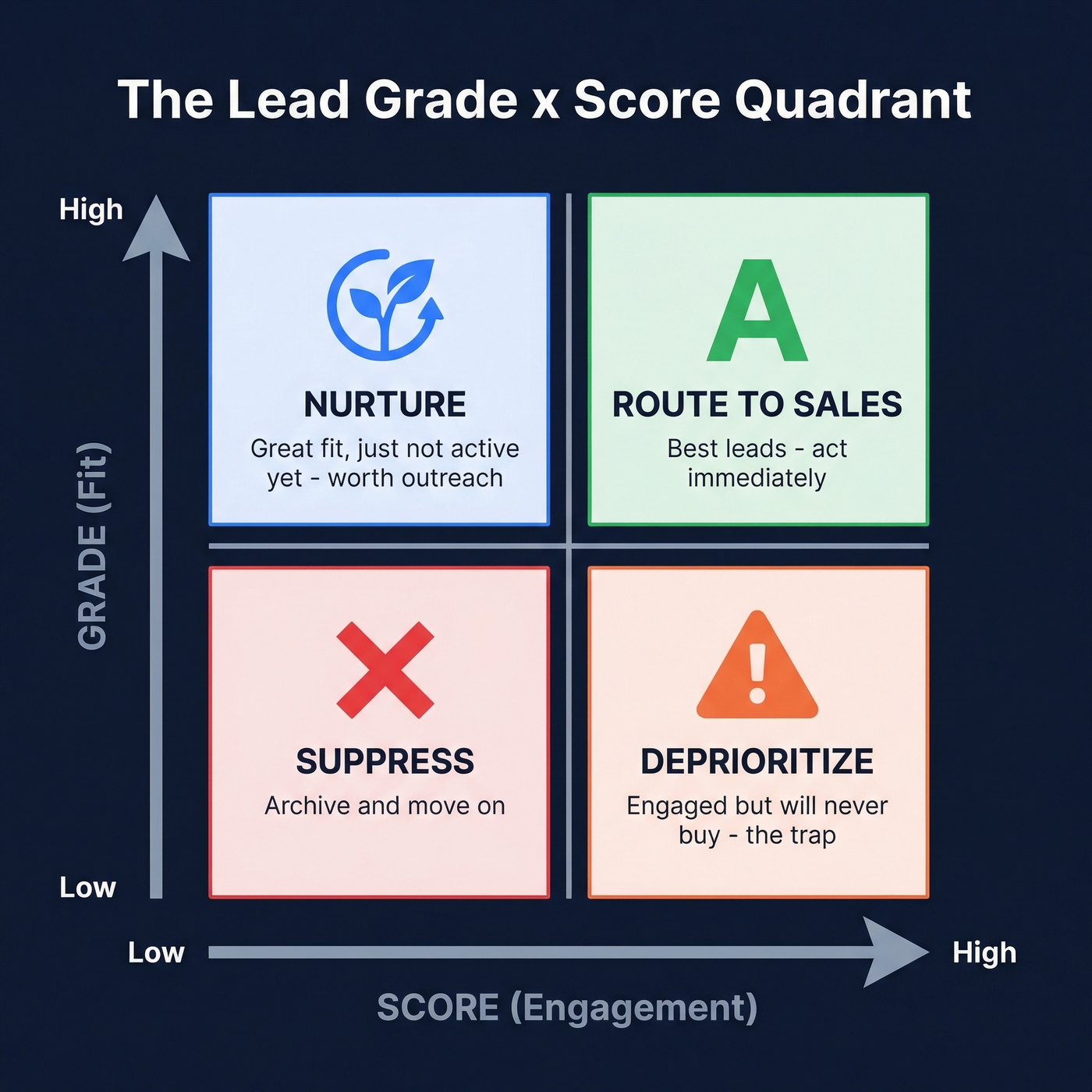
| High Score (Engaged) | Low Score (Quiet) | |
|---|---|---|
| High Grade (Fits ICP) | Route to sales immediately | Nurture - great fit, just not active yet |
| Low Grade (Poor Fit) | Deprioritize - curiosity doesn't equal buying intent | Suppress or archive |
High grade + high score is your money quadrant. High grade + low score is your nurture goldmine - these leads deserve outreach, not neglect. Low grade + high score is the trap that catches most teams: engaged leads who will never buy. Suppress them before they waste your pipeline.
Why Grading Matters
Companies using lead scoring report 138% ROI versus 78% without - and adding a grading layer eliminates the false positives that erode that ROI.
Here's the thing: the consensus on r/sales and r/salesops is that most scoring models are broken because they reward content consumption, not buying potential. One founder spent three weeks building a HubSpot scoring model only to discover his highest-scoring lead - 89 points - was a student researching for a class project. His biggest deal came from someone who scored 12 and never touched a marketing email. The model measured content consumption, not buying potential.
Grading fixes this by establishing a floor. A lead can score 100 on engagement, but if they're a five-person company in an industry you don't serve, they're still an F. Sales-marketing alignment improves because both teams agree on what a qualified lead looks like before arguing about what a qualified lead does.
If your average deal size is under $10K, you probably don't need a sophisticated scoring model at all. A simple A-F grading system with three routing rules will outperform a 50-variable scoring model that nobody trusts and nobody maintains.

You can't grade leads on company size, revenue, or tech stack if half your CRM records are missing those fields. Prospeo's enrichment fills every gap - 50+ data points per contact, 92% match rate, refreshed every 7 days.
Fix your data before you grade it. Start enriching for $0.01 per lead.
How to Build a Lead Grading Model
Six steps. A simple model you actually ship beats a sophisticated one that lives in a spreadsheet forever.

Step 1: Define Your ICP
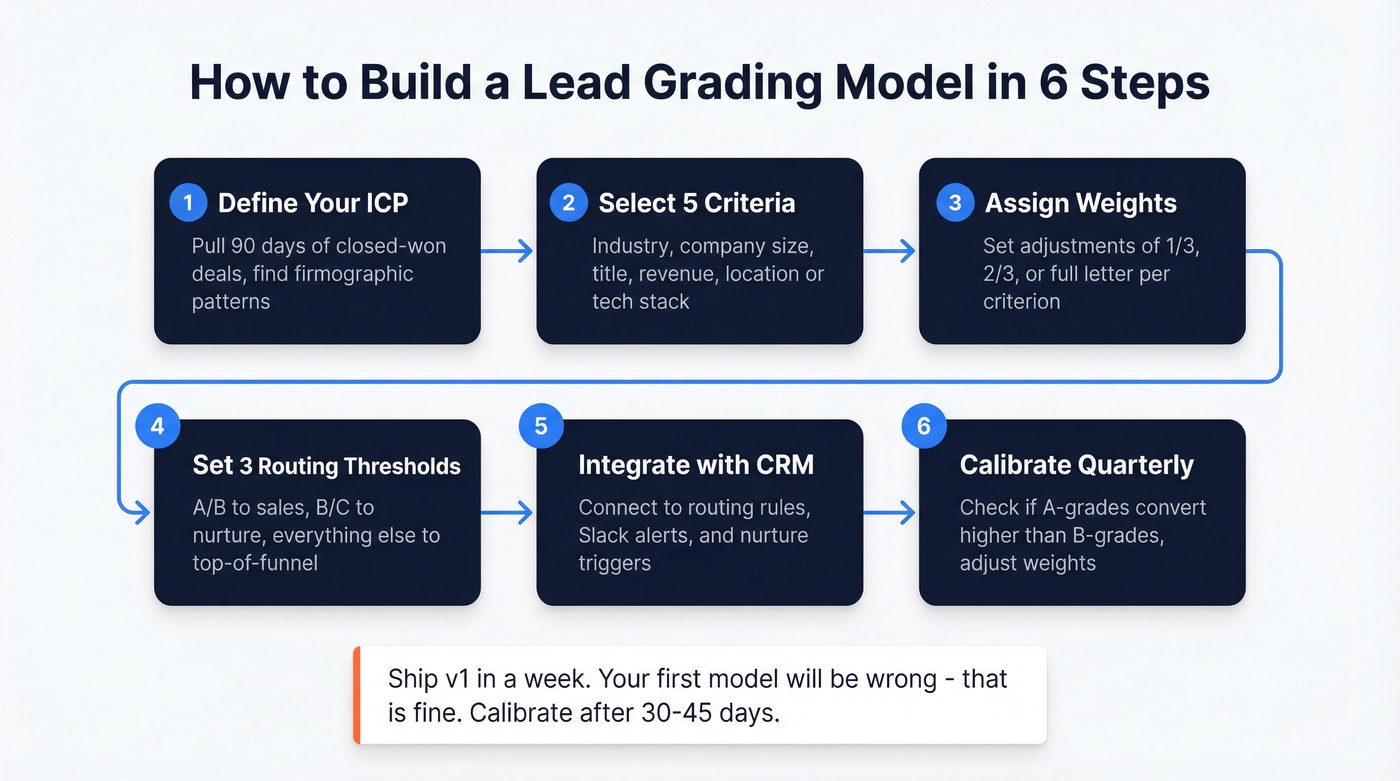
Pull your last 90 days of closed-won deals and look for firmographic patterns. Which industries show up most? What's the median company size? What titles are signing contracts?
Before you start grading, audit your CRM data. If your enrichment rate is below 80% - meaning one in five leads is missing critical firmographic fields - your grades will be unreliable from day one. You can't grade on company size if half your records don't have company size. A data enrichment tool like Prospeo fills those gaps, returning 50+ data points per contact on a 7-day refresh cycle.
Step 2: Select Five Grading Criteria
Keep it to five. More creates complexity without meaningful accuracy gains.
- Industry - are they in a vertical you serve?
- Company size (headcount) - do they match your sweet spot?
- Job title / seniority - are they a decision-maker or influencer?
- Revenue - can they afford your product?
- Location or tech stack - are they in a serviceable market or using compatible technology?
Advanced teams add a sixth: current solution status. Are they greenfield, using a competitor, or recently implemented? This changes your entire sales motion and is worth the added complexity once your base model is calibrated.
Step 3: Assign Weights
Not all criteria matter equally. Using the Salesforce Account Engagement model as a framework, you can set grade adjustments of one-third, two-thirds, or a full letter. Industry match might be worth a full letter upgrade. Location might only warrant a one-third adjustment.
Don't forget negative grading. Competitor domains, student email addresses (.edu), bounced emails, and companies below your minimum size threshold should trigger automatic downgrades - or outright disqualification. (If you want a deeper dive on fit attributes, start with firmographic filters and firmographic and technographic data.)
Step 4: Set Three Routing Thresholds
Keep routing simple:
- A/B grade + engagement score >25 - route to sales immediately with an alert
- B/C grade + score 10-24 - mid-funnel nurture sequence
- Everything else - top-of-funnel content, no sales touch
Add decay. Engagement scores should drop after 30 days of inactivity. And don't just count actions - look for clustered behavior. A lead who visits your pricing page three times in 48 hours signals far more intent than one who visited once a month ago. (More on this in our guide to identifying buying signals.)
Step 5: Integrate with Your CRM
Connect your grading output to lead routing rules, Slack/email alerts for hot leads, and nurture triggers for mid-funnel. The grade should be visible on the lead record so reps can see fit at a glance without clicking through to a dashboard. If you need a clean operational setup, use a defined lead status system so grade + status routing stays consistent.
The same grading logic extends to accounts and opportunities - grade the company, not just the contact.
Step 6: Calibrate Quarterly
Your first model will be wrong. That's fine.
Run v1 for 30-45 days, then pull your closed-won data and check whether A-grade leads actually convert at higher rates than B-grades. If they don't, your criteria or weights need adjustment. Quarterly recalibration based on closed-won trends keeps the model aligned with how your market is actually buying, not how you assumed they'd buy six months ago.
Lead Grading Rubric Template
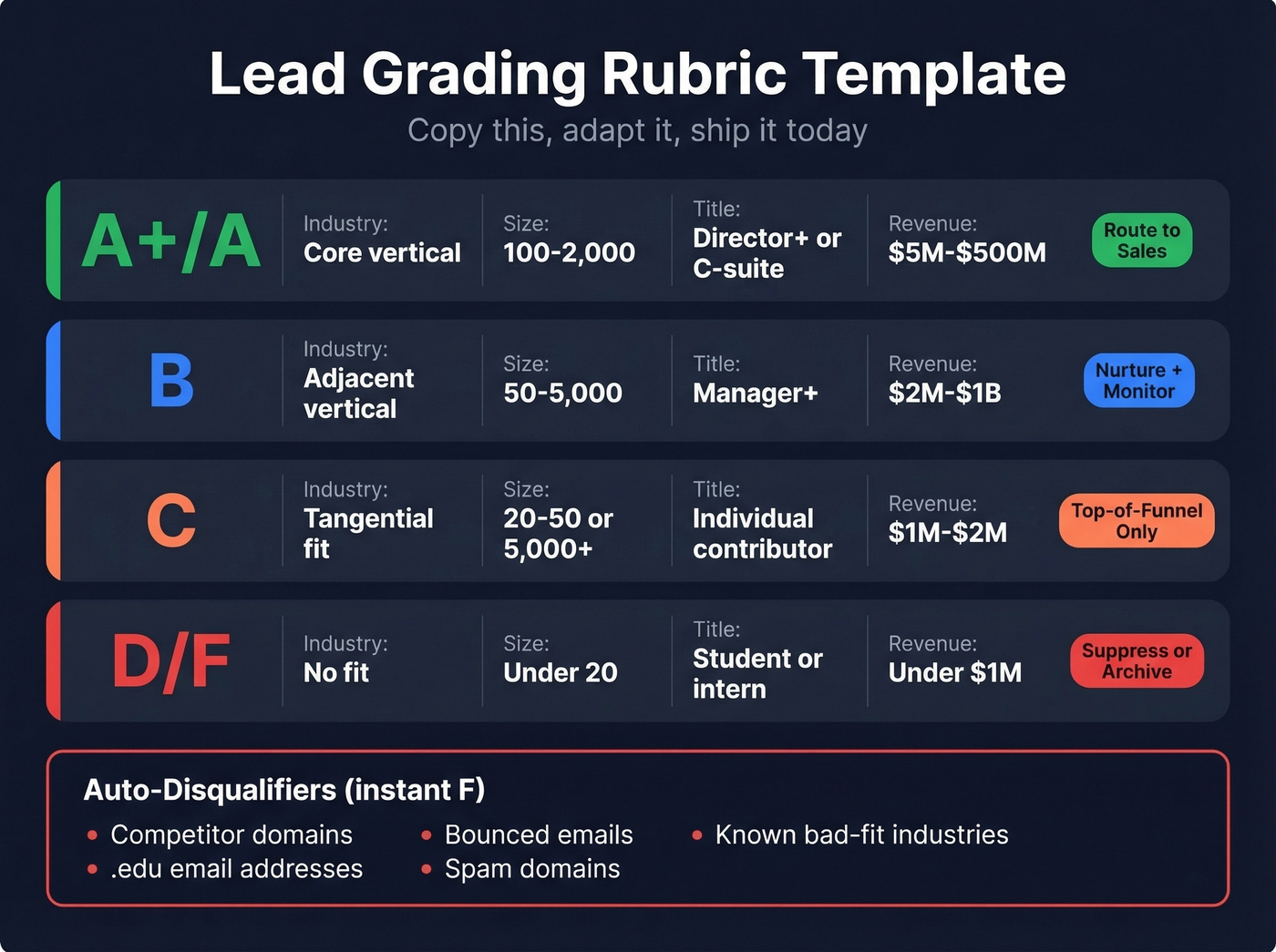
We've seen dozens of articles on this topic that skip the actual rubric. Here's one you can copy, adapt, and ship today.
| Grade | Industry Match | Company Size | Title / Seniority | Revenue |
|---|---|---|---|---|
| A+ | Core vertical | 200-2,000 | VP+ / C-suite | $10M-$500M |
| A | Core vertical | 100-2,000 | Director+ | $5M-$500M |
| B | Adjacent vertical | 50-5,000 | Manager+ | $2M-$1B |
| C | Tangential fit | 20-50 or 5,000+ | Individual contributor | $1M-$2M |
| D/F | No fit | <20 employees | Student / intern | <$1M |
Routing by grade: A/A+ in a Tier 1 geo using key tech goes to sales same day. B grades get nurture with sales monitoring. C grades get top-of-funnel content only. D/F gets suppressed or archived.
Disqualifiers (auto-F): competitor domains, .edu emails, companies below your minimum size, known bad-fit industries, bounced emails, and known spam domains. These skip the rubric entirely.
Common Mistakes
Five patterns we see repeatedly in our work with sales teams:
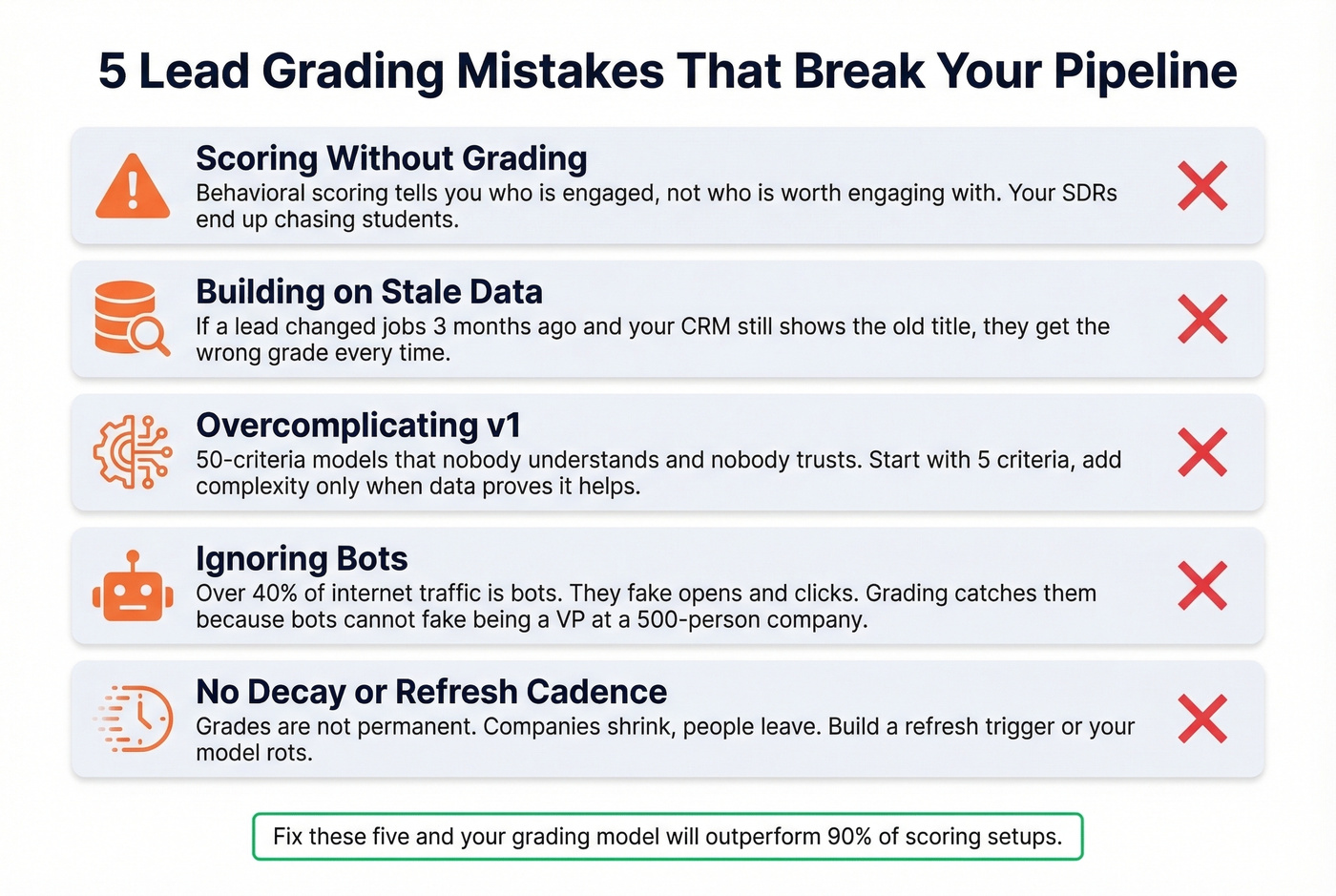
Scoring without grading. Behavioral scoring tells you who's engaged, not who's worth engaging with. Without a fit layer, your SDRs chase students and tire-kickers. This is the single most common failure mode.
Building on stale data. Your grading model is only as good as the firmographic data feeding it. If a lead changed jobs three months ago and your CRM still shows the old title, they'll get the wrong grade. Most providers refresh every six weeks. Prospeo's 7-day refresh cycle catches job changes and company updates before they corrupt your grades - but whatever enrichment tool you use, make sure it's refreshing faster than your calibration cycle.
Overcomplicating v1. We've seen teams build 50-criteria models that nobody understands and nobody trusts. Start with five criteria. Add complexity only when your quarterly calibration proves additional attributes actually predict conversion.
Ignoring bots. Over 40% of internet traffic is bots. They fake email opens, click links, and fill forms. Behavioral scoring can't distinguish a bot from a buyer - but grading can, because bots can't fake being a VP at a 500-person company with matching firmographics.
No decay or refresh cadence. Grades aren't permanent. Companies shrink, people leave, industries shift. Build a refresh trigger - re-enrich and re-grade at least quarterly.
AI and Predictive Grading
Machine learning takes grading from rules-based to pattern-based. Instead of manually defining "industry X + size Y = grade A," ML models ingest firmographic, behavioral, technographic, intent, and CRM history data to surface patterns humans miss. The result: conversion rates up to 75% higher compared to manual scoring alone.
Predictive models have a specific pitfall, though. CRMs don't preserve how a lead looked at the decision point - they store the latest state. This creates information leakage, where models train on "future" signals like continuously updated engagement data. The fix is time-aligned snapshots: capture the lead's attributes at the moment of scoring, not after the fact. (If you’re exploring this path, our B2B predictive analytics breakdown is a good next read.)
Let's be honest - AI scoring works best as prioritization support with human guardrails, not as autonomous truth. Pair AI scores with rules-based overrides, evaluate performance against sales acceptance and downstream revenue, and retrain every three to six months.
Best Tools for Lead Grading
| Tool | Grading Type | Pricing | Best For |
|---|---|---|---|
| Prospeo | Data enrichment layer | Free tier: 75 emails/month; ~$0.01/email | Accurate data for any grading model |
| Salesforce Account Engagement | Native A+-F letters | ~$1,250-$4,000/mo | Enterprise on Salesforce |
| HubSpot | Numeric scoring | $500/mo (Pro); $1,200/mo (Enterprise) | Mid-market |
| ActiveCampaign | Numeric scoring | $59/mo (Plus, 1K contacts) | SMBs |
Before you pick a scoring tool, get your data right. Prospeo isn't a scoring platform - it's the data quality foundation that makes grading accurate. 98% email accuracy, 83% enrichment match rate, 50+ data points per contact, and a 7-day refresh means your grading criteria actually have reliable data to evaluate. Pair it with whichever scoring platform fits your stack. (If you’re comparing vendors, start with data enrichment services.)
Salesforce Account Engagement is the only major platform with native letter-grade grading out of the box. HubSpot and ActiveCampaign offer numeric scoring that you can map to grade tiers manually, but it's an extra step. Skip ActiveCampaign if you're above 10K contacts - the per-contact pricing gets expensive fast.
The best grading model in the world fails on dirty data. Prospeo delivers 98% email accuracy, verified firmographics, and 30+ search filters - including headcount, revenue, industry, and tech stack - so every grade you assign is based on reality, not guesswork.
Build your ICP filters with data you can actually trust.
FAQ
What's the difference between lead grading and lead scoring?
Grading measures ICP fit using letter grades (A-F) on firmographic data like industry, company size, and title. Scoring measures engagement using numeric points for actions like page visits and email clicks. Use both together: grading filters for fit, scoring prioritizes by timing and intent.
How many criteria should a grading model have?
Start with five: industry, company size, title, revenue, and location or tech stack. Five criteria balance signal strength with operational simplicity. Add more only after quarterly calibration proves additional attributes predict conversion.
How often should you recalibrate lead grades?
Quarterly. Pull 90 days of closed-won data and verify A-grades convert at higher rates than B-grades. If they don't, adjust your criteria weights or thresholds. Markets shift - your model should shift with them.
Can you do lead grading without a marketing automation platform?
Yes. A spreadsheet with your rubric, a data enrichment source, and manual grade assignment works for teams processing fewer than 200 leads per month. It's tedious, but it's better than no grading at all. Once volume exceeds that, automate through your CRM or MAP.