

How to Build a Lead List That Actually Converts
Bad lead list generation costs more than you think - $3.1 trillion annually across the US economy, per IBM. You spend two weeks building a 5,000-contact list, load it into your sequencer, and watch 800 emails bounce on the first send. Your domain reputation tanks. Reply rates crater. The SDR team is back to square one.
B2B contact records decay roughly 30% per year. The list you built in January starts going stale by April. Getting this right means treating list building as a disciplined process, not a one-click export.
What Is Lead List Generation?
Lead list generation is the process of identifying, sourcing, and organizing contact data for people who match your ideal customer profile. It's distinct from broader "lead generation," which typically refers to inbound tactics - content, ads, landing pages, the standard funnel of awareness to CTA to capture form to lead magnet.
The outbound approach flips that model. Instead of waiting for prospects to find you, you proactively build a database of decision-makers, verify their contact information, and feed that data into sequences. The quality of that list determines everything downstream. A mediocre list with great copy still underperforms. A great list with decent copy wins.
7-Step Process for Building B2B Lead Lists
Define your ICP before touching any tool. Source account data first, contact data second - then verify every email before it hits your sequencer.
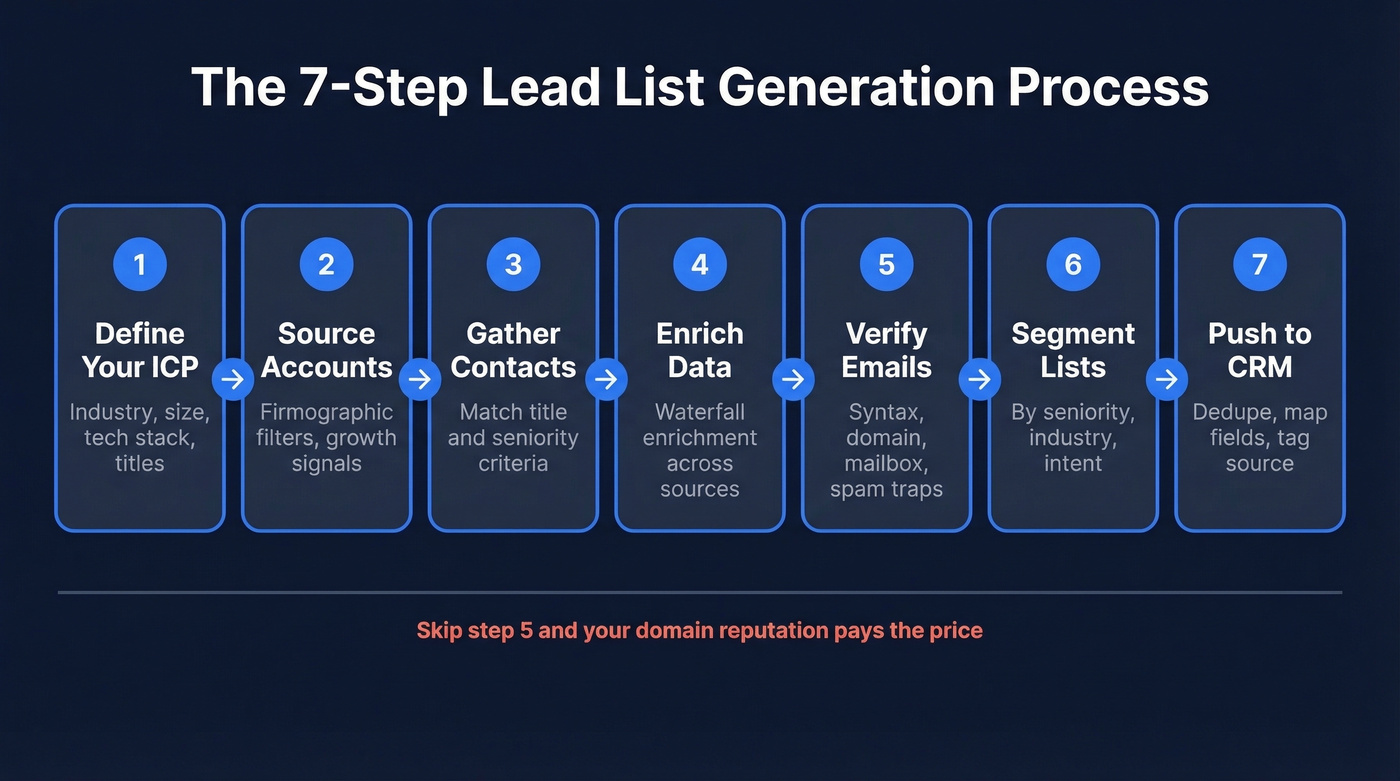
Workflow: ICP → account list → contact sourcing → enrichment → verification → segmentation → CRM push → sequence.
Step 1: Define Your ICP
Skip this step and everything else falls apart. Your ICP isn't "marketing leaders at mid-market SaaS companies." It's specific: VP/Director of Demand Gen, 50-500 employees, Series B-C, using HubSpot or Marketo, headquartered in North America, hiring for SDR roles.
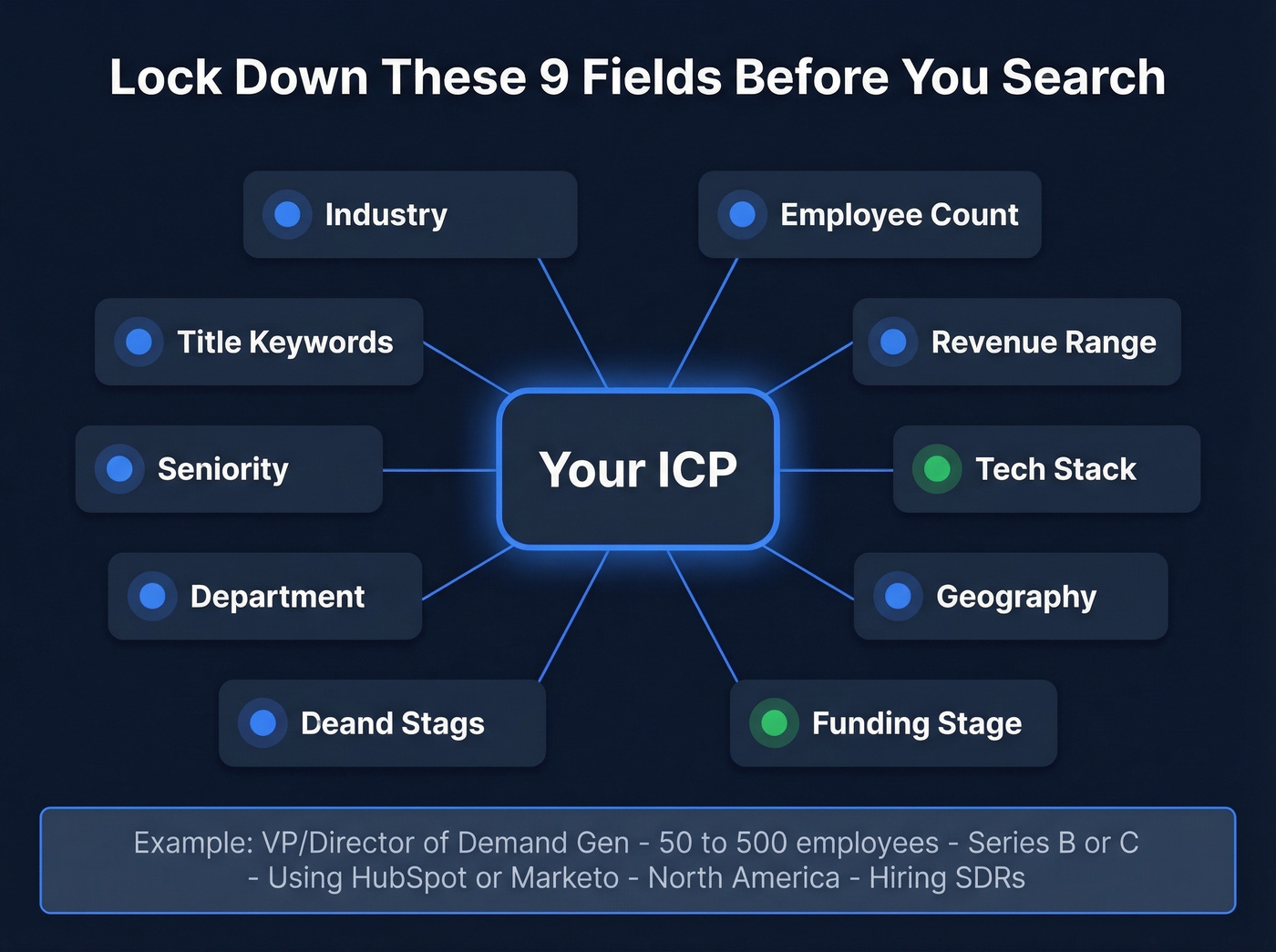
Lock down these fields before you search anything: industry, employee count, revenue range, tech stack, geography, funding stage, department, seniority, and title keywords. The tighter your ICP, the smaller your list - and that's the point. A 500-contact list with 90% ICP fit will outperform a 5,000-contact spray-and-pray export every time.
Step 2: Source Account Data
Start with companies, not people. Build your account list using firmographic filters: industry, headcount, revenue, location, tech stack, funding signals. Pull this from your CRM's existing closed-won accounts (look for patterns), or from sales prospecting databases that let you filter by these dimensions.
The "filter twice" approach works well here. First pass: broad firmographic filters to build a universe of target accounts. Second pass: narrow by growth signals - recent funding, job postings in your buyer's department, headcount growth over the past quarter. This two-layer filtering can dramatically improve your ICP fit compared to a single-pass export.
One warning: avoid browser extensions that scrape professional networks directly. Platforms actively detect and penalize automated activity, and a temporary or permanent account suspension isn't worth the shortcut.
Step 3: Gather Contact Data from Target Accounts
Once you've got your account list, you need the humans inside those companies. This is where most teams either overpay or get garbage data. Upload your account list to a data platform with strong filters - buyer intent, technographics, job changes, headcount growth, funding, department size - and pull verified contacts matching your title and seniority criteria.
Step 4: Enrich Missing Fields
No single database covers everything. Waterfall enrichment - running your list through multiple data sources sequentially - fills gaps that any individual tool misses. This data enrichment approach layers firmographic, technographic, and intent signals to create a complete picture of each prospect. Essential fields to enrich: verified business email, direct dial, seniority level, department, and company technographics.
The goal is a complete record for every contact: company name, domain, industry, employee count, plus contact name, title, verified email, phone, and seniority. Missing fields mean missed personalization opportunities and lower conversion downstream.
Step 5: Verify Every Email
"Sourced" doesn't mean "deliverable." Even data from reputable providers needs verification before it touches your sequencer. A 7.5% average bounce rate across cold email campaigns means most teams are sending to dead addresses - and ISPs punish that behavior fast.
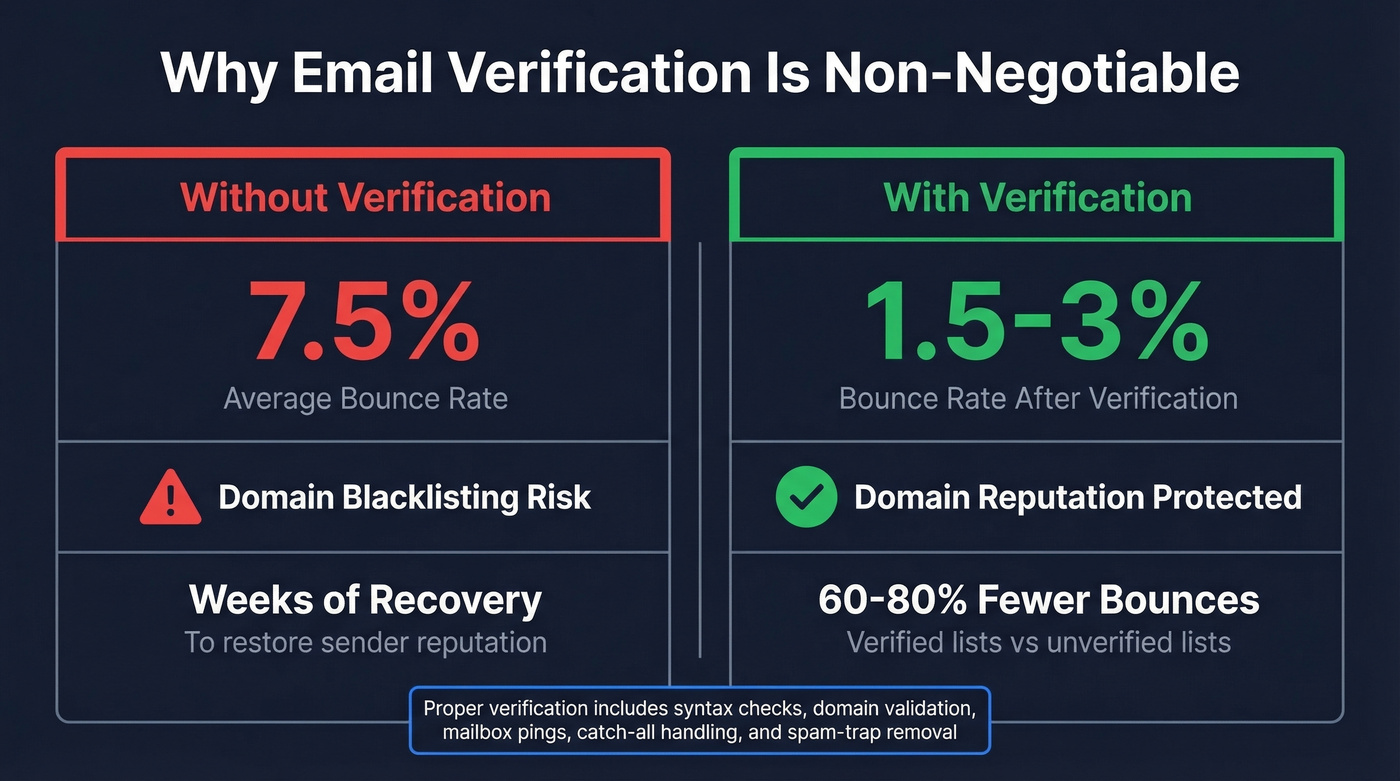
In our experience, teams that verify before sending see bounce rates drop by 60-80%. Proper verification includes syntax checks, domain validation, mailbox pings, catch-all handling, and spam-trap removal. Don't skip this to save time. A blacklisted domain costs you weeks of recovery.
Step 6: Segment Before You Send
Don't blast your entire list with the same message. 77% of marketing ROI comes from segmented, targeted, and triggered campaigns. That's not a marginal improvement - it's the difference between a campaign that generates pipeline and one that generates unsubscribes.
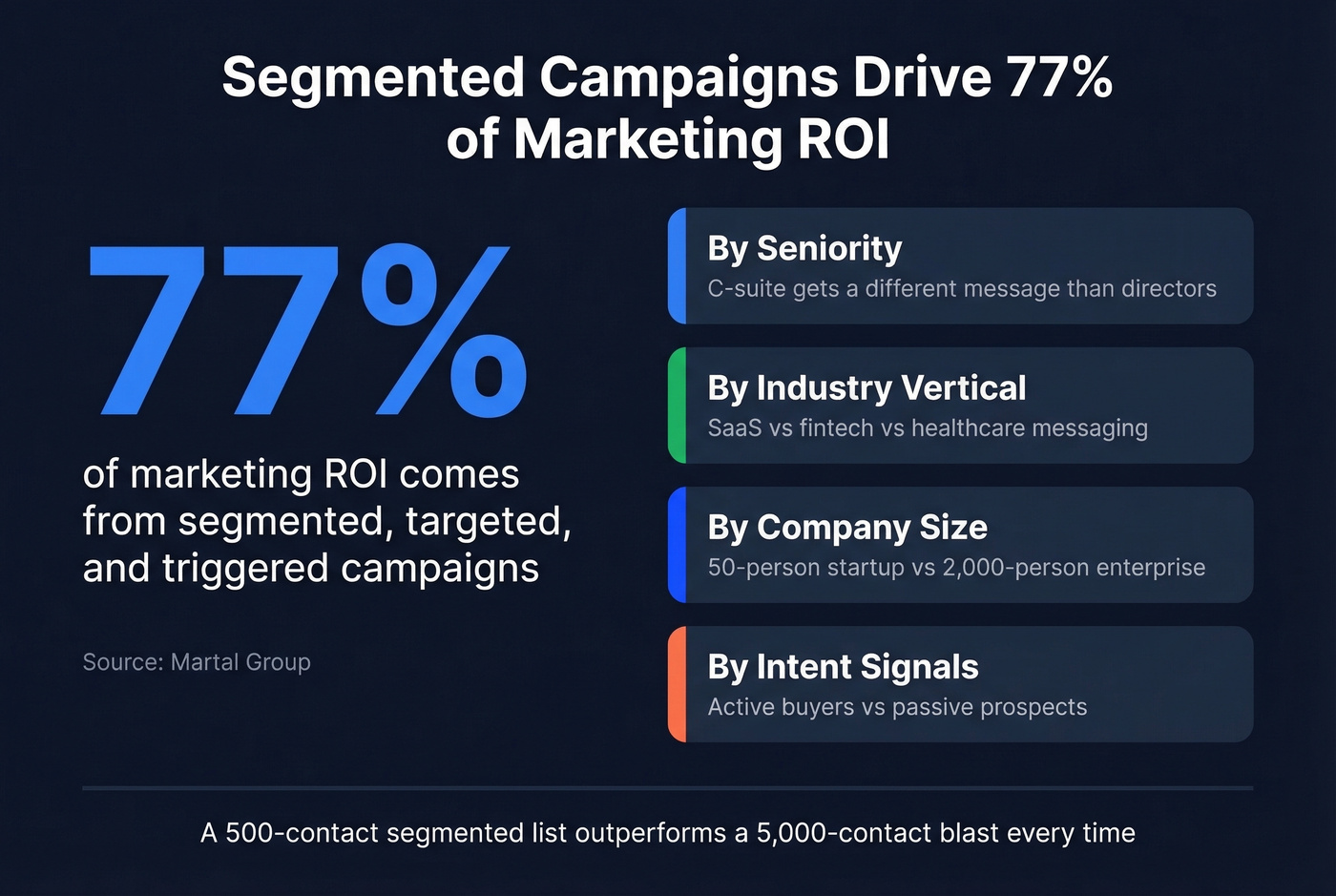
Segment by seniority (C-suite gets a different message than directors), by industry vertical, by company size, and by intent signals if you have them. A VP of Sales at a 50-person startup has completely different pain points than a CRO at a 2,000-person enterprise. Your messaging should reflect that. If you want a deeper framework, use intent based segmentation to prioritize in-market accounts.
Step 7: Push to CRM and Sequencer
Your verified, segmented list needs to land cleanly in your CRM and sequencer without creating duplicates or overwriting existing records. Map your fields before the first import. Set up deduplication rules. Tag the list source so you can measure performance by data provider later.
The stack most teams run: data platform → CRM (Salesforce or HubSpot) → sequencer (Instantly, Smartlead, Lemlist, or Outreach). Native integrations matter here - manual CSV exports between every step introduce errors and slow the whole process down. If you're standardizing this, follow a connect outreach tool to CRM setup so attribution and dedupe stay intact.
Best Tools for Lead List Generation
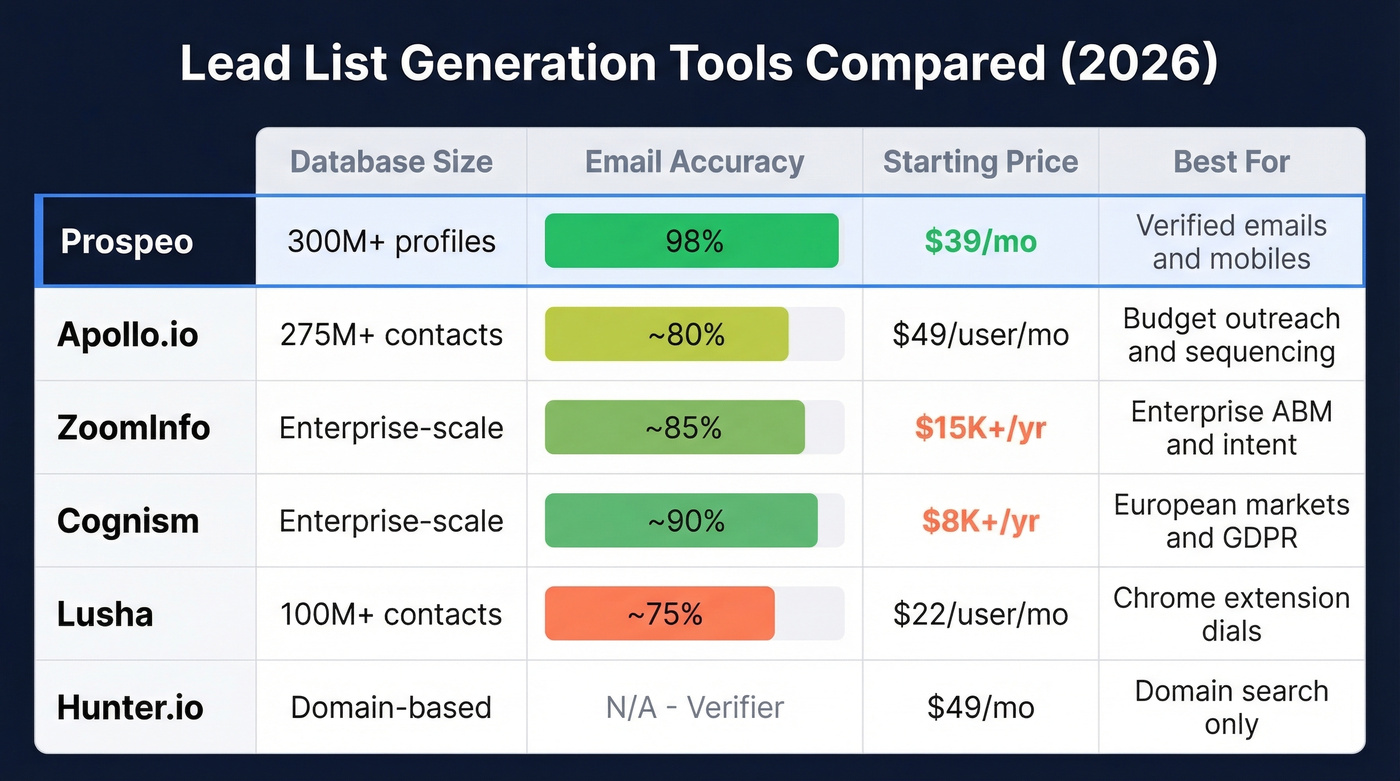
The sales intelligence market is projected to exceed $10 billion, which means you have plenty of options and plenty of ways to waste money. Here's what's worth evaluating in 2026.
| Tool | Database Size | Email Accuracy | Pricing | Best For |
|---|---|---|---|---|
| Prospeo | 300M+ profiles | 98% | From $39/mo (~$0.01/lead) | Verified emails + mobiles |
| Apollo.io | 275M+ contacts | ~80% | $49-119/user/mo | Budget outreach + sequencing |
| ZoomInfo | Enterprise-scale | ~85% | $15-40K/yr | Enterprise ABM + intent |
| Cognism | Enterprise-scale | ~90% | $8-15K/yr | European markets |
| Lusha | 100M+ contacts | ~75% | $22-$52/user/mo | Chrome extension dials |
| Hunter.io | Domain-based | Email finder + verifier | From $49/mo | Domain search only |
Prospeo
Prospeo covers 300M+ professional profiles, 143M+ verified emails, and 125M+ verified mobile numbers - all refreshed on a 7-day cycle. That refresh cadence matters more than raw database size when 30% of records decay annually. The 98% email accuracy comes from a proprietary 5-step verification process that includes catch-all handling, spam-trap removal, and honeypot filtering. Search filters cover buyer intent powered by Bombora across 15,000 topics, technographics, job changes, headcount growth, and funding. Native integrations push directly to Salesforce, HubSpot, Smartlead, Instantly, and Lemlist. Pricing starts free (75 emails + 100 Chrome extension credits/month), with paid plans from ~$39/mo and no annual contracts.

Apollo.io
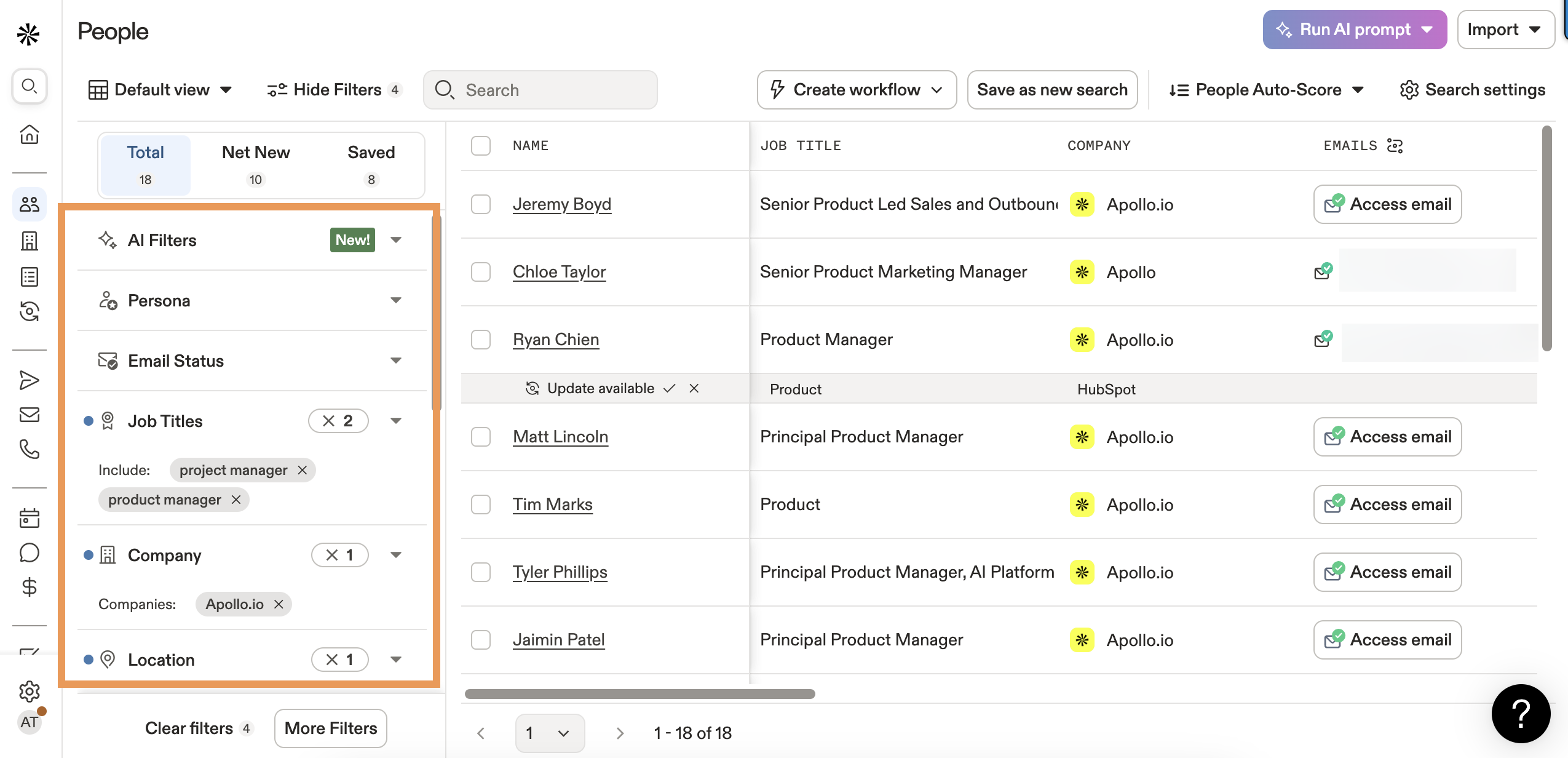
Apollo packs a database, sequencer, and dialer into one platform at a price point that makes sense for early-stage teams. 275M+ contacts, 73M+ companies, and 65+ search filters give you enough coverage for most North American outbound campaigns. The built-in email sequences and task management mean you don't need a separate Outreach or Salesloft license to get started.
The tradeoff is accuracy. Email accuracy runs around 80%, and one Reddit comparison pegs it closer to 65-70% on tougher segments. That means you're bouncing 1 in 5 emails without a separate verification step. If deliverability matters to you - and it should - pair Apollo with a dedicated verifier. Pricing: $49/user/mo (Basic), $79 (Professional), $119 (Organization). Free tier available with limited credits.
ZoomInfo
Here's the thing: ZoomInfo is still the most complete all-in-one platform for enterprise teams. But most teams don't need all-in-one, and they definitely don't need the price tag. A ZoomInfo Professional contract starts around $15,000/year for limited seats and credits, and the real cost climbs fast once you add modules. The consensus on r/sales is blunt: "insane for small teams." Email accuracy sits around 85% - solid but not best-in-class. If you're running ABM with intent data, org charts, and workflow automation across 50+ reps, ZoomInfo earns its keep. Everyone else should look elsewhere.
Cognism
Cognism is the right call if you're selling into the UK, DACH, or Nordics. Their GDPR-first approach means your compliance team won't lose sleep, and phone-verified mobiles (their "Diamond Data" program) help you connect with up to 87% of decision-makers on a list. Email accuracy runs ~90%. But if your entire market is North America, skip this one - you'll pay $8-15K/year for a database that's thinner stateside than Apollo's.
Lusha
Chrome extension play. Strong for grabbing direct dials and emails while browsing company websites or CRM records. 100M+ contacts, pricing from $22-$52/user/mo on annual billing. Credits burn fast - 5 credits per direct dial adds up quickly. Best as a supplement, not a primary database.
Hunter.io
Domain search and email verification specialist. Paste a company domain, get a list of associated email addresses with confidence scores. Starts at $49/mo. No phone data at all. Useful for verifying emails you've sourced elsewhere, but limited as a standalone list-building tool.

You just read why verification matters - 7.5% average bounce rates destroy domains. Prospeo's 5-step verification delivers 98% email accuracy with catch-all handling and spam-trap removal built in. 300M+ profiles, 30+ filters for ICP targeting, and a 7-day data refresh so your lists never go stale.
Build verified lead lists that actually convert - starting at $0.01 per email.
Every step in this process - ICP filtering, contact sourcing, enrichment, verification, CRM push - lives inside one platform. Prospeo gives you 30+ search filters, 92% enrichment match rates, and native integrations with Salesforce, HubSpot, Instantly, and Smartlead. No CSV juggling between tools.
Replace your entire lead list generation stack with one platform.
Quality Benchmarks for Your Lists
How do you know if your list is actually good? Benchmark it against these numbers.
Cold email performance in 2026: ~42% open rate, ~3% reply rate, ~1% meeting booking rate, ~7.5% bounce rate. If your bounce rate exceeds 5%, your list quality is the problem - not your copy. (If you need bounce codes and fixes, see email bounce rate.)
Inbox placement by ISP: Gmail delivers 87.2% to inbox, Outlook only 75.6%. That Outlook gap means roughly 1 in 4 of your emails to Microsoft-hosted domains never reaches the primary inbox. We've seen teams obsess over subject lines while ignoring that a quarter of their sends are landing in junk. Fix the data first. Use an email deliverability guide to diagnose placement issues before you scale volume.
What good verification looks like: Meritt, a Prospeo customer, dropped their bounce rate from 35% to under 4% after switching providers. That's the difference between a healthy sending domain and a blacklisted one.

Compliance Checklist for Outbound Lists
GDPR fines exceeded EUR 5.65 billion by early 2025, and enforcement continues to accelerate in 2026. Compliance isn't optional. It's a business risk that scales with your list size.
Data classification:
- 🟢 Green (safe for B2B outreach) - Work email, job title, company name, public professional URLs
- 🟡 Yellow (needs documented legitimate interest) - Personal email, mobile numbers, inferred attributes
- 🔴 Red (do not collect) - Health data, ethnicity, union membership, political affiliation, any sensitive category
GDPR requires a lawful basis (legitimate interest for B2B outreach) plus rights to access, correction, erasure, and objection. CCPA grants rights to know what's collected, opt out of sale/sharing, and request deletion. Both require clear privacy disclosures and honoring opt-out requests promptly.
Operational musts: one-click opt-out in every email, spam complaint rate below 0.3%, documented data source and legitimate interest basis, quarterly record purges, and Standard Contractual Clauses for EU sends from outside the EU. For a deeper legal breakdown, see is it illegal to buy email lists.
Red Flags When Choosing a Data Provider
Not all data providers deserve your budget. We've evaluated dozens over the years, and these warning signs show up again and again:
Vague sourcing. If a provider can't explain where their data comes from, it's probably scraped from questionable sources with no verification layer.
Unrealistic volume claims. "2 billion contacts" sounds impressive until you realize most of those records are unverified, outdated, or duplicated. Database size without accuracy metrics is meaningless.
No built-in verification. If the provider doesn't verify emails before delivery, you're paying for raw data and hoping for the best. That's not a data platform - it's a CSV dump. If you're comparing verifiers, start with Bouncer alternatives.
No compliance documentation. No DPA available? No GDPR or CCPA compliance statement? Walk away. The liability falls on you.
Stale refresh cycles. 30% of B2B leads go stale within 30 days. If your provider refreshes quarterly - or won't disclose their refresh cadence at all - you're building on a decaying foundation.
Let's be honest about why this matters beyond deliverability: 72% of B2B leads are never followed up on. Bad data is a big reason why. Reps don't trust the list, so they don't work the list. Investing in verified, fresh data isn't just a deliverability play - it's a rep productivity play.
FAQ
How many leads should I generate per week?
A typical SDR running 50-80 emails per day needs 250-400 fresh, verified contacts per week. Start with your meeting target and work backward: at a 1% booking rate, you need ~100 contacts per meeting. Scale your sourcing volume to match your sequence capacity.
Is buying a lead list legal?
Yes, in most B2B contexts under both GDPR and CCPA. GDPR requires a documented legitimate interest basis; CCPA requires honoring opt-out requests. Buying from a reputable provider that verifies sourcing and offers a DPA is legal. Buying a scraped list from an unvetted vendor is a compliance risk you don't want.
What's a good bounce rate for cold email?
Under 3% is excellent, under 5% is acceptable, and above 7% means you're actively damaging your sender reputation. The industry average sits around 7.5% - most teams are sending to lists that need better verification.
What's a good free tool for building a lead list?
Prospeo's free tier includes 75 verified emails and 100 Chrome extension credits per month with no credit card required. Apollo.io also offers a limited free plan. For email verification only, Hunter.io provides 25 free searches per month.
What's the difference between a lead list and a prospect list?
A lead list is a raw collection of contacts matching your ICP criteria. A prospect list is a qualified subset - leads that have been researched, scored, or enriched with intent signals indicating they're likely in-market. Every prospect list starts as a lead list; the difference is the filtering and enrichment layer you apply before outreach.