

The Outreach Tracker Guide: Build, Measure, and Scale Your Outreach in 2026
It's Tuesday morning. You open the spreadsheet. Half the statuses say "Emailed - waiting," but three of those contacts bounced last week. Another dozen show "Opened" - except Apple Mail Privacy Protection faked those opens, so you've got no idea who actually read anything. Two reps updated the same row with conflicting notes, and someone deleted the formula in column L.
Your outreach tracker isn't tracking anything. It's a graveyard of stale data dressed up as a pipeline.
The tracker itself isn't the problem. The structure is. Most teams either build one with too few columns to be useful or too many tabs to maintain. Let's fix that - from the spreadsheet template to the metrics that matter, to the tools worth paying for when the spreadsheet breaks.
What You Need (Quick Version)
Three paths depending on your team size and use case:
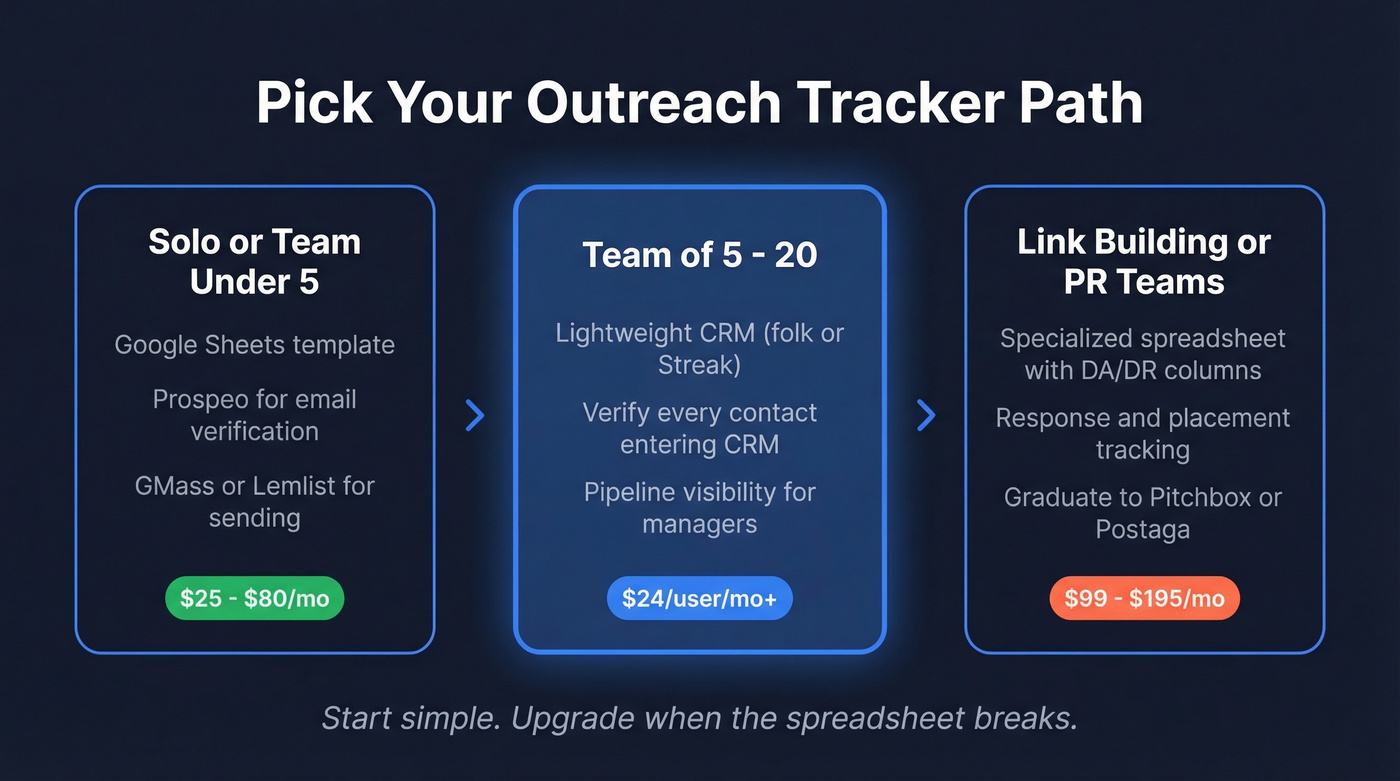
- Solo or team under 5: A Google Sheets template with the columns below, plus a verification tool like Prospeo for confirmed contacts before they hit the sheet, and GMass or Lemlist for sending. Total cost: around $25-$80/mo depending on your sender and whether you stay on free verification credits.
- Team of 5-20: A lightweight CRM like folk ($24/user/mo) or Streak (free tier) for pipeline visibility. Verify every contact entering the CRM so you're not building sequences on dead emails.
- Link-building or PR teams: A specialized spreadsheet with DA/DR columns and response tracking. When you're running outreach at agency scale, graduate to Pitchbox ($195/mo) or Postaga ($99/mo).
Pick your path, then read the section that matches.
What Is an Outreach Tracker?
An outreach tracker is the central hub where every prospect interaction lives - emails sent, calls made, replies received, follow-ups scheduled. It's the connective tissue between your contact data and your sequencing tool.
Sales reps use them. Link builders use them. PR teams, freelancers, agency founders - anyone running outbound at any scale needs one. Freelancers and copywriters share templates in communities like Skool, proof that even solo operators need a structured system. The format doesn't matter - spreadsheet, CRM, dedicated tool. What matters is that it's a single source of truth your whole team trusts.
Here's the distinction worth making: a passive log just records what happened. An active tracker tells you what to do next - who's overdue for a follow-up, which channel is converting, where your pipeline is leaking. If yours doesn't drive action, it's just a fancy contact list.
How to Build an Outreach Tracker in Google Sheets
A spreadsheet works perfectly until it doesn't. For solo reps and small teams, though, it's the fastest way to start - zero cost, infinite flexibility.
Essential Columns
At minimum, your sheet needs these fields:
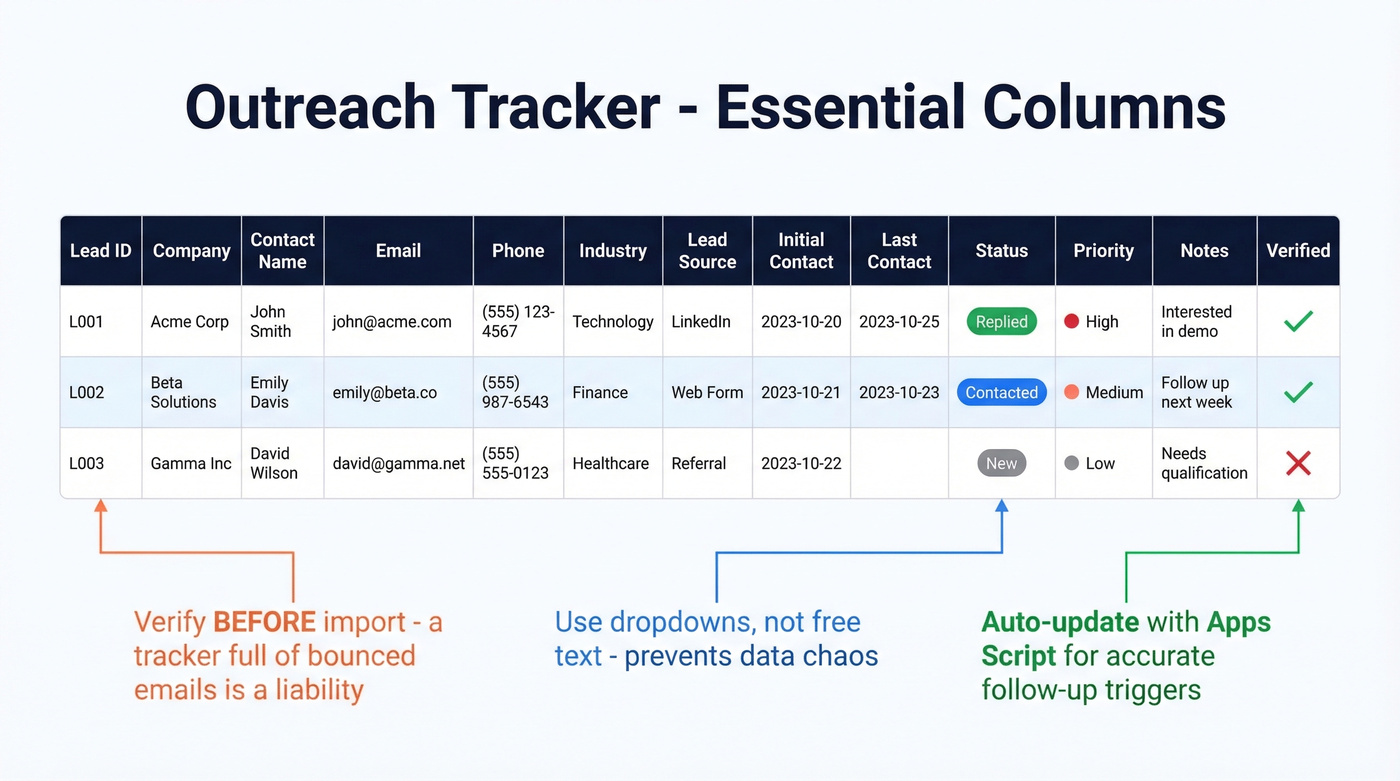
- Lead ID - a unique identifier so you can reference rows without ambiguity
- Company - the account name
- Contact Name - first and last
- Email - verified before import
- Phone - direct dial if you have it
- Industry - for segmentation and filtering
- Lead Source - where this contact came from: event, web form, purchased list, referral
- Date of Initial Contact - when you first reached out
- Last Contact Date - when you last touched this prospect
- Status - current stage: New, Contacted, Replied, Meeting Booked, Closed, Dead (see lead status best practices)
- Priority - High / Medium / Low
- Notes - freeform context for the next touchpoint
- Verified - Yes/No flag indicating whether the email has been verified
That last column matters more than most people think. Before populating contacts, run them through a verification tool so every row in your tracker reflects a real, reachable person. A tracker full of bounced emails isn't a tracker. It's a liability (and it can spike your email bounce rate).

Dropdowns and Data Validation
Free-text Status and Priority fields will destroy your data within a week. One rep types "contacted," another types "Contacted," a third types "emailed." Now your COUNTIFS formula returns three different counts for the same stage.
Use Google Sheets data validation to create dropdown menus for Status and Priority. Takes two minutes. Saves hours of cleanup later.
Formulas That Actually Work
Three formulas you'll use constantly:
Reply rate: =COUNTIFS(Status,"Replied")/COUNTA(Status) - gives you the percentage of contacts who've responded across your entire sheet. Filter by Lead Source or Industry for channel-specific rates.
Overdue follow-ups: Apply conditional formatting to the Last Contact Date column. If =TODAY()-[Last Contact Date] > 5, highlight the row red. You'll immediately see who's been sitting untouched for too long (and you can tighten this with sales follow-up templates).
Auto-calculated next follow-up: Use a SWITCH formula on the Status column to compute the next follow-up date automatically - 3 days after "Contacted," 7 days after "Replied," 14 days after "Meeting Booked." This eliminates the guesswork that causes reps to either follow up too aggressively or let prospects go cold:
=SWITCH(Status,"Contacted",[Last Contact Date]+3,"Replied",[Last Contact Date]+7,"Meeting Booked",[Last Contact Date]+14)
This single formula is the difference between a tracker that logs history and one that drives action.
Automation with Apps Script
Reps won't reliably update "Last Contact Date." They just won't. A simple Google Apps Script can auto-update a timestamp whenever a monitored column changes. This keeps your follow-up triggers accurate without relying on human discipline - which, in our experience, is the weakest link in any tracking system.
Outreach Metrics That Matter
Open rates are dead. Let's stop pretending otherwise.
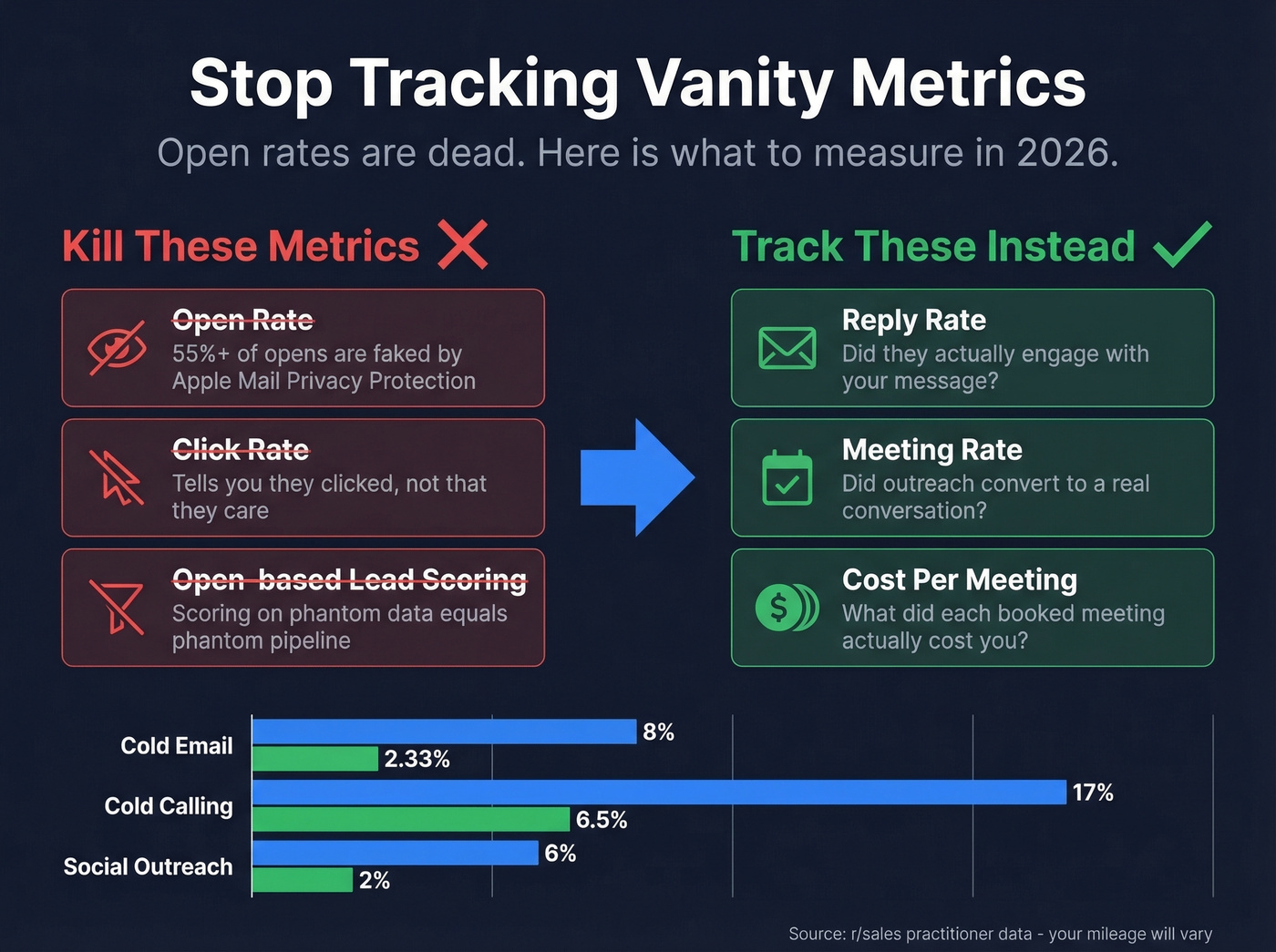
Apple Mail Privacy Protection affects over 55% of global email opens, pre-loading tracking pixels regardless of whether the recipient actually reads the message. One analysis estimates that up to 75% of reported opens in some segments are artificial. Forwarded emails also generate phantom opens attributed to entirely new recipients, further polluting your data. If you're making decisions based on open rates, you're making decisions based on noise.
Here's what to track instead:
| Old Metric | 2026 Replacement | Why |
|---|---|---|
| Open rate | Inbox placement | Did it arrive? |
| Click rate | Reply rate | Did they engage? |
| Open-based scoring | Meeting rate | Did it convert? |
The metrics that actually move pipeline are reply rate, meeting rate, waste rate - the percentage of prospects who ignored every touchpoint - and cost per meeting (tie this back to CAC if you want a full-funnel view). A practitioner on r/sales shared results that illustrate the spread across channels:
| Channel | Reply Rate | Meeting Rate |
|---|---|---|
| Cold email | 8% | 2.33% |
| Cold calling | 17% | 6.50% |
| Social outreach | 6% | 2.00% |
These are one team's results, not universal benchmarks. But the pattern holds: cold calling consistently outperforms email on reply-to-meeting conversion, while email scales more efficiently. Your tracking system should capture these numbers so you can find your own ratios.
Look, if your average deal size is under $10k, you probably don't need a multi-channel cadence at all. A well-targeted cold email sequence with verified contacts will outperform a sloppy omnichannel approach every time. Complexity isn't a strategy (see sales prospecting techniques for what to test first).

Your tracker flags a follow-up. You hit send. The email bounces. Now your status column is wrong, your sequence is broken, and your rep wasted a touchpoint. Prospeo's 98% email accuracy and 7-day data refresh mean every row in your tracker reflects a real, reachable person - not a stale record from six weeks ago.
Stop tracking bounces. Start tracking replies.
Use Your Tracker as a Channel-Testing Lab
The best outreach trackers don't just log activity - they run experiments. Here's a framework from a practitioner on r/sales that turns your spreadsheet into a testing engine:
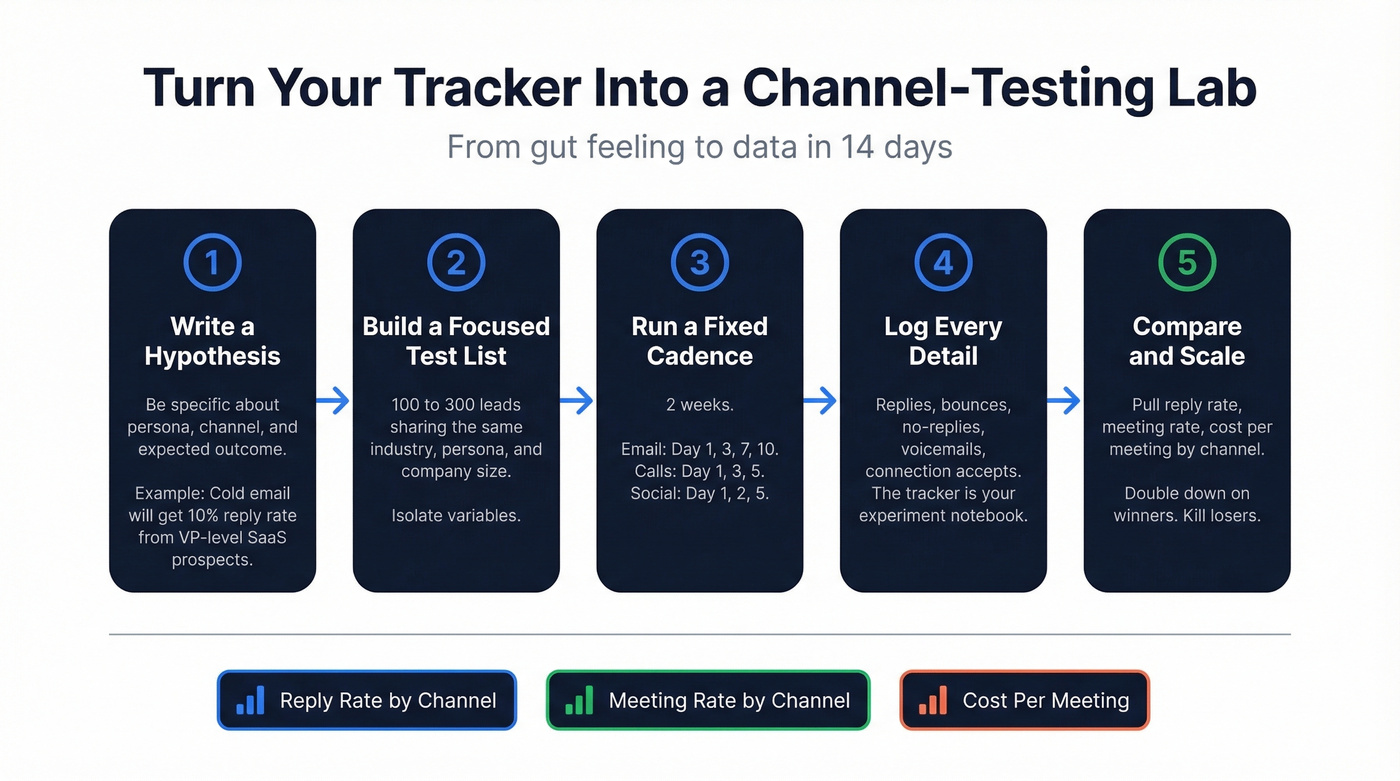
1. Write a hypothesis. "Cold email will get a 10% reply rate from VP-level SaaS prospects in the 50-200 employee range." Be specific about the persona, the channel, and the expected outcome.
2. Build a small, focused test list. 100-300 leads sharing the same industry, persona, and company size. This isolates variables so you're testing the channel, not the audience (use an ideal customer profile to keep cohorts clean).
3. Run a defined cadence over a fixed window. Two weeks is enough:
- Cold email: Day 1, Day 3, Day 7, Day 10 (break-up)
- Cold calling: Day 1, Day 3 (voicemail), Day 5
- Social outreach: Day 1 (connect), Day 2 (follow-up), Day 5 (reminder)
4. Log every single detail. Replies, no-replies, bounces, voicemails left, connection requests accepted. The tracker is the experiment notebook.
5. Compare and scale. After two weeks, pull reply rate, meeting rate, and cost per meeting by channel. Double down on what works. Kill what doesn't. A prospects-contacted report for each test cohort gives you the raw numbers to compare apples to apples before scaling the winning channel.
We've seen teams waste months "doing outreach" without ever isolating what's working. This framework turns gut feeling into data in 14 days.
When Spreadsheets Stop Working
Your Google Sheet will eventually hit a wall. Here are the signals:
- You're managing 20-40+ active deals and losing track of stages
- The spreadsheet has 5+ tabs and nobody knows which one is current
- More than 2 people need to update it simultaneously
- Follow-ups are slipping because "Last Contact Date" is never accurate
- There's no accountability - you can't see who did what and when
If you check three or more of those boxes, it's time to migrate to a lightweight CRM. The consensus on Reddit is that manual tracking in sheets becomes painful fast - especially for social outreach, where tracking who received a connection request, who accepted, and when to send the first message requires manually checking each profile (at that point, consider contact management software instead of patching the sheet).
Best Outreach Tracking Tools
Sales Outreach Tools
| Tool | Best For | Starting Price | Key Feature |
|---|---|---|---|
| folk | Lightweight CRM | $24/user/mo | Pipeline + contacts |
| Lemlist | Multi-step sequences | $32/user/mo | Sequences + personalization |
| GMass | Gmail power users | $25/mo | Mail merge + follow-ups |
| Streak | Gmail-native CRM | Free; ~$49/user/mo paid | Pipeline inside Gmail |
| Mixmax | Inbox productivity | Free; paid plans available | Sequences + scheduling |
| Yesware | Email tracking | Free; paid plans available | Opens/clicks + templates |
| HubSpot | Full CRM | Free CRM; paid plans available | Pipeline + reporting |
| Outreach.io | Enterprise teams | Enterprise pricing | Full-stack engagement |
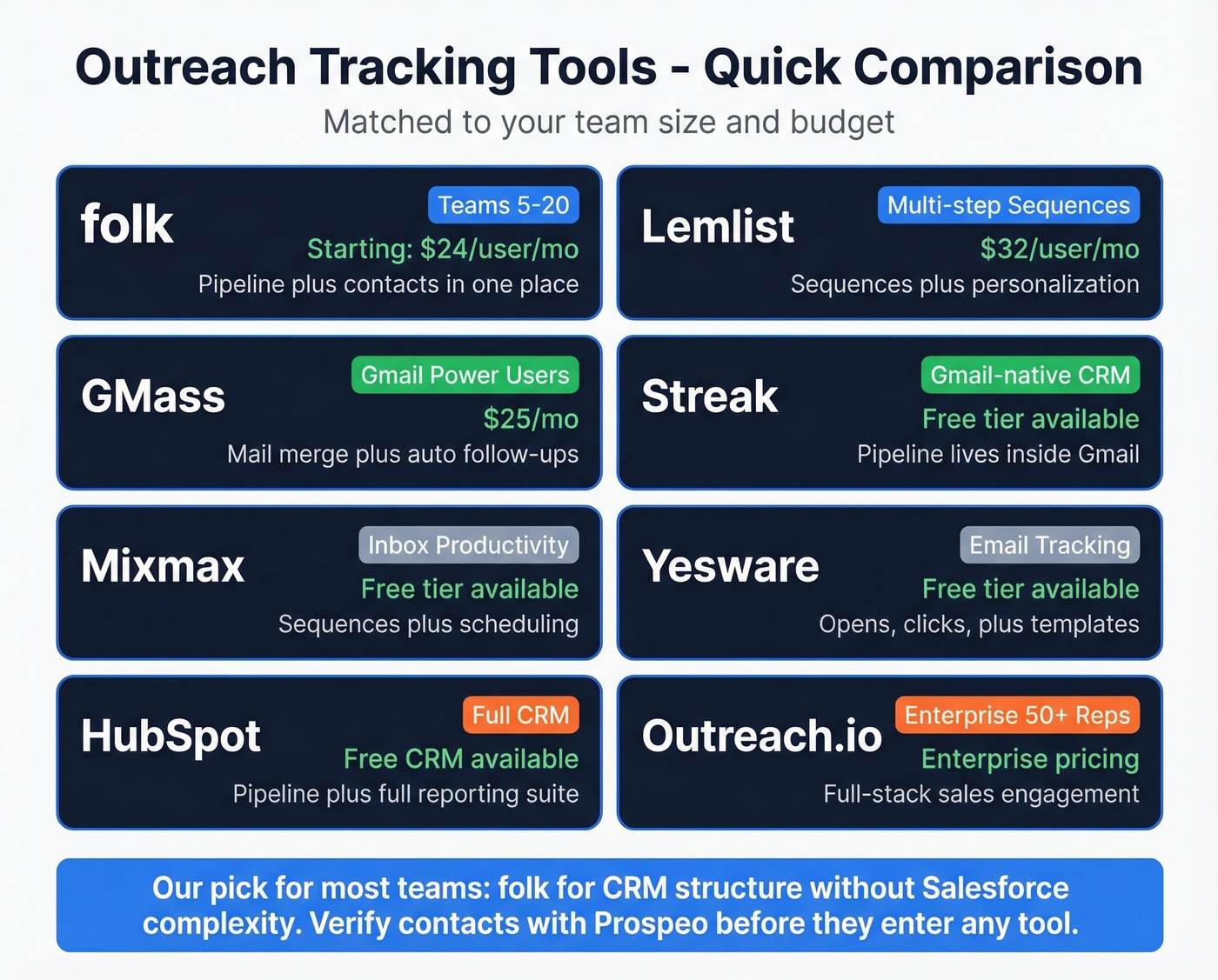
folk is the pick for teams of 5-20 who want CRM structure without Salesforce complexity. Pipeline views, contact management, and enough automation to replace the spreadsheet. At $24/user/mo, it's cheaper than most teams expect.
Lemlist earns its spot if you're running multi-step sequences. The $32/mo tier covers one sending email - most teams end up on the $79/mo plan for five mailboxes.
Outreach.io is enterprise-grade. If you're running 50+ reps with complex cadences and need manager-level reporting dashboards - including the ability to filter reports by roles and teams so leadership can see performance at every level - it's the standard. But it's overkill for teams under 20. Skip it.
For pure mail merge without CRM features, YAMM starts at $25/year - the cheapest option by far if all you need is personalized sends from Gmail. For inbox rotation and domain management, tools like ReachInbox and ManyReach show up in practitioner stacks for teams running multiple sending domains (make sure you’re also watching email deliverability as volume increases).
Link-Building and PR Tools
| Tool | Starting Price | Outreach Emails/mo | Best For |
|---|---|---|---|
| Postaga | $99/mo | Included | Budget link-building |
| Pitchbox | $195/mo (2 users) | 2,000 | Mid-scale agencies |
| Respona | $198/mo | Included | Content-driven outreach |
| Semrush | $139.95/mo (Pro) | Via Link Building Tool | SEO teams on Semrush |
Pitchbox and Respona sit at similar price points but serve different workflows. Pitchbox is built for volume - agencies running thousands of outreach emails monthly. Respona leans into content-driven campaigns where personalization matters more than scale. Postaga at $99/mo handles the basics without the agency overhead.
The Data Quality Layer
None of these tools fix bad data. One team - Meritt - saw bounce rates drop from 35% to under 4% after switching to verified contacts. That's the difference between a sequence that builds pipeline and one that burns your domain. Prospeo integrates natively with Lemlist, Instantly, HubSpot, and Salesforce, so you can verify and enrich contacts directly in the tools you already use (or compare options in data enrichment services).
Tracking Mistakes That Kill Results
1. Sending to unverified contacts. Every bounce damages your sender reputation. High bounce rates can land your domain on blocklists that take weeks to recover from. Verify your list before the first send. One bad batch can tank your domain reputation for months (here’s how to improve sender reputation).
2. Ignoring segmentation. Sending the same message to a VP of Engineering and a Marketing Director is lazy, and it shows. Your tracker should have enough columns to segment meaningfully by industry, lead source, and priority.
3. Sending once and giving up. One email rarely converts. Most cadences that work run 3-4+ touchpoints. If your tracker doesn't have a follow-up schedule built in, you're leaving meetings on the table (see when should i follow up on an email).
4. Tracking vanity metrics. Opens mean nothing. If your tracker dashboard highlights open rates, redesign it around reply rate and meetings booked.
5. Not reviewing performance by rep. When multiple reps share the same tracker, aggregate numbers hide individual performance gaps. Break down reply rates and meetings booked per rep so you can coach underperformers and replicate what top performers do differently.
6. Ignoring bounces and unsubscribes. Beyond deliverability damage, there's a compliance angle. GDPR and CAN-SPAM require honoring opt-outs. Your tracker needs an "Unsubscribed" status that permanently removes contacts from future sequences.
You built the formulas. You set the conditional formatting. But half your contacts came from a list that's three months old, and your reply rate is stuck at 2%. Prospeo gives you 300M+ verified profiles at ~$0.01/email - so the data feeding your outreach tracker actually converts into meetings, not red-highlighted overdue rows.
Clean data in, real pipeline out. That's the only formula that matters.
FAQ
What columns should an outreach tracker have?
At minimum: Lead ID, Company, Contact Name, Email, Phone, Industry, Lead Source, Date of Initial Contact, Last Contact Date, Status, Priority, Notes, and a Verified flag. The Verified column prevents you from sequencing unconfirmed addresses that damage sender reputation.
Is a spreadsheet or CRM better for tracking outreach?
Spreadsheets work for solo reps or teams under five managing fewer than 40 active deals. Beyond that threshold, version conflicts, missed follow-ups, and lack of accountability make a lightweight CRM like folk ($24/user/mo) or Streak worth the switch.
What outreach metrics should I track in 2026?
Reply rate, meeting rate, cost per meeting, and waste rate. Open rates aren't reliable - Apple Mail Privacy Protection inflates them by up to 75% in some segments. Focus on metrics reflecting actual human engagement, not pixel-triggered noise.
How do I verify contacts before adding them to my tracker?
Run every email through a verification tool before import. Prospeo's free tier includes 75 verified emails per month at 98% accuracy with a 7-day data refresh - enough for solo reps to validate a starter list. For larger volumes, paid credits cost roughly $0.01 per lead.