

Permission Based Opener Cold Call (2026): When It Works + What to Say
Most cold calls don't die because you picked the "wrong opener." They die because you had no real reason to call, you hit a stale number, or you reached the wrong person and tried to brute-force your way through it anyway.
Permission-based openers still work in 2026, but only when they earn the next 20-30 seconds with context.
Here's the hook: if you fix list quality and measure openers on connects (not dials), you'll stop arguing about scripts and start seeing predictable lift.
Permission isn't the point. Relevance is.
What you need (quick version)
Permission-based openers work when you lead with context (not "bad time?").
If you're starting from scratch, test these three first:
- Permission-with-context (default)
- Credibility-first (skip permission)
- Honest time-box pattern interrupt (when you're truly cold)
Measure by connects, not dials. Track: connect->30s, 30s->2min, 2min->meeting.
Fix list quality first. Wrong person + wrong number = a fake "opener problem."
What a permission-based opener is (and what it isn't)
A permission-based opener is a short request to continue after you give a reason you called. It's a micro-contract: you'll be direct, they'll give you a few seconds, and either of you can end it fast if it's irrelevant.
What it is:
- A clear ask for a tiny slice of time (10-30 seconds)
- A relevance cue (why you picked them, why now)
- A low-friction exit ("If it's not relevant, I'll hang up.")
What it isn't:
- A nervous apology
- A vague "can I have a minute?" with no context
- "Did I catch you at a bad time?"
"Bad time?" is the permission-opener lookalike that kills calls. It hands them an easy "yes" that ends the conversation, and it frames you as an interruption before you've earned attention.
What the data says about permission based opener cold call scripts (benchmarks you can use)
Gong published a widely cited benchmark on opener performance across 300M+ cold calls. Treat it as directional, not sacred, but it's still the cleanest "stop doing this" signal you'll find.
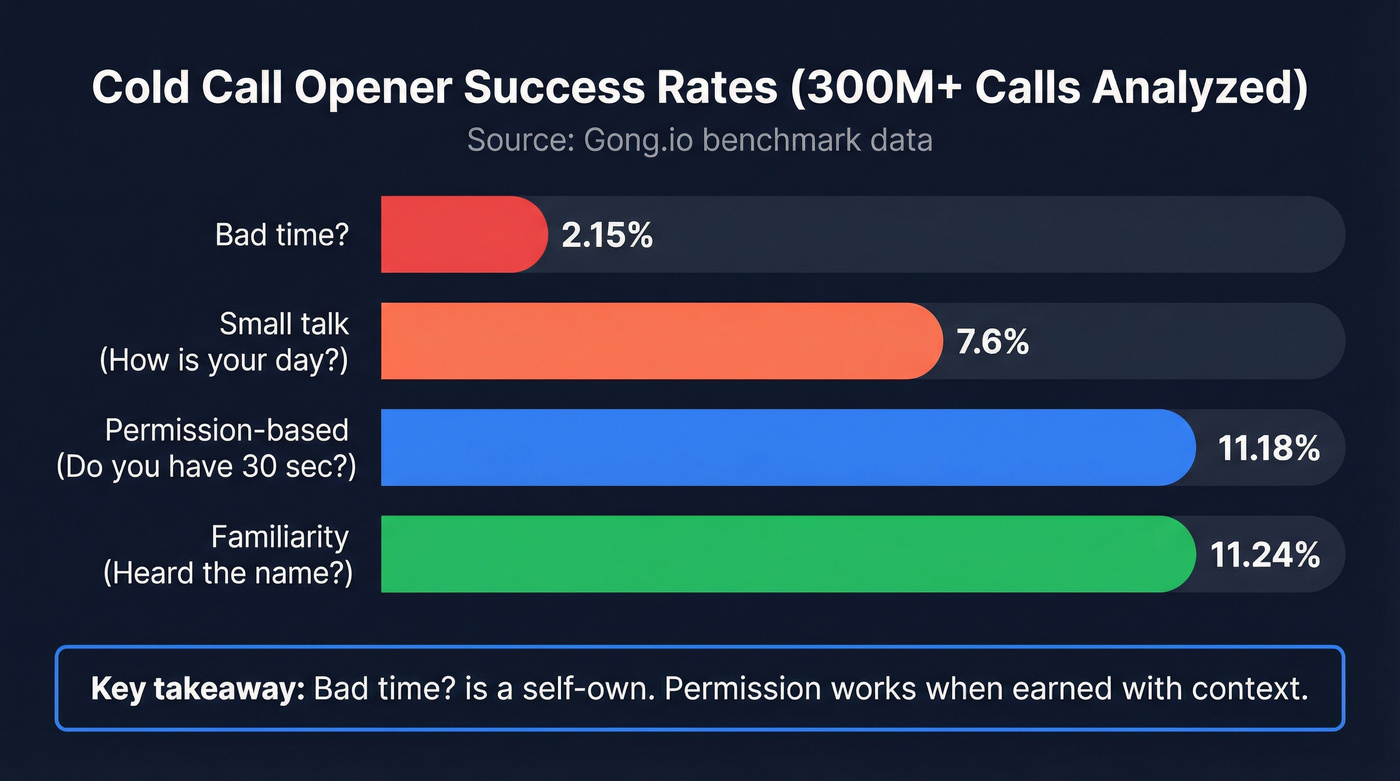
| Opener type | Example | Success rate |
|---|---|---|
| Bad time | "Bad time?" | 2.15% |
| Small talk | "How's your day?" | 7.6% |
| Permission-based | "Do you have 30 sec...?" | 11.18% |
| Familiarity | "Heard the name...?" | 11.24% |
What to do with this:
- Stop leading with "bad time?" It performs like a self-own because you're asking them to reject you.
- Permission works when it's earned. Context first, then a tight ask.
- Familiarity openers are a great Plan B. They create curiosity without begging.
Full benchmark: https://www.gong.io/blog/the-best-and-worst-cold-call-openers-backed-by-data-from-300m-calls
What top performers actually do (permission isn't mandatory - context is)
Nooks analyzed calls made on the Nooks platform and found the part most "permission opener" training ignores: 53% of top reps didn't use a permission-based opener at all. They went greeting -> credibility statements (related customers/expertise) and moved on.
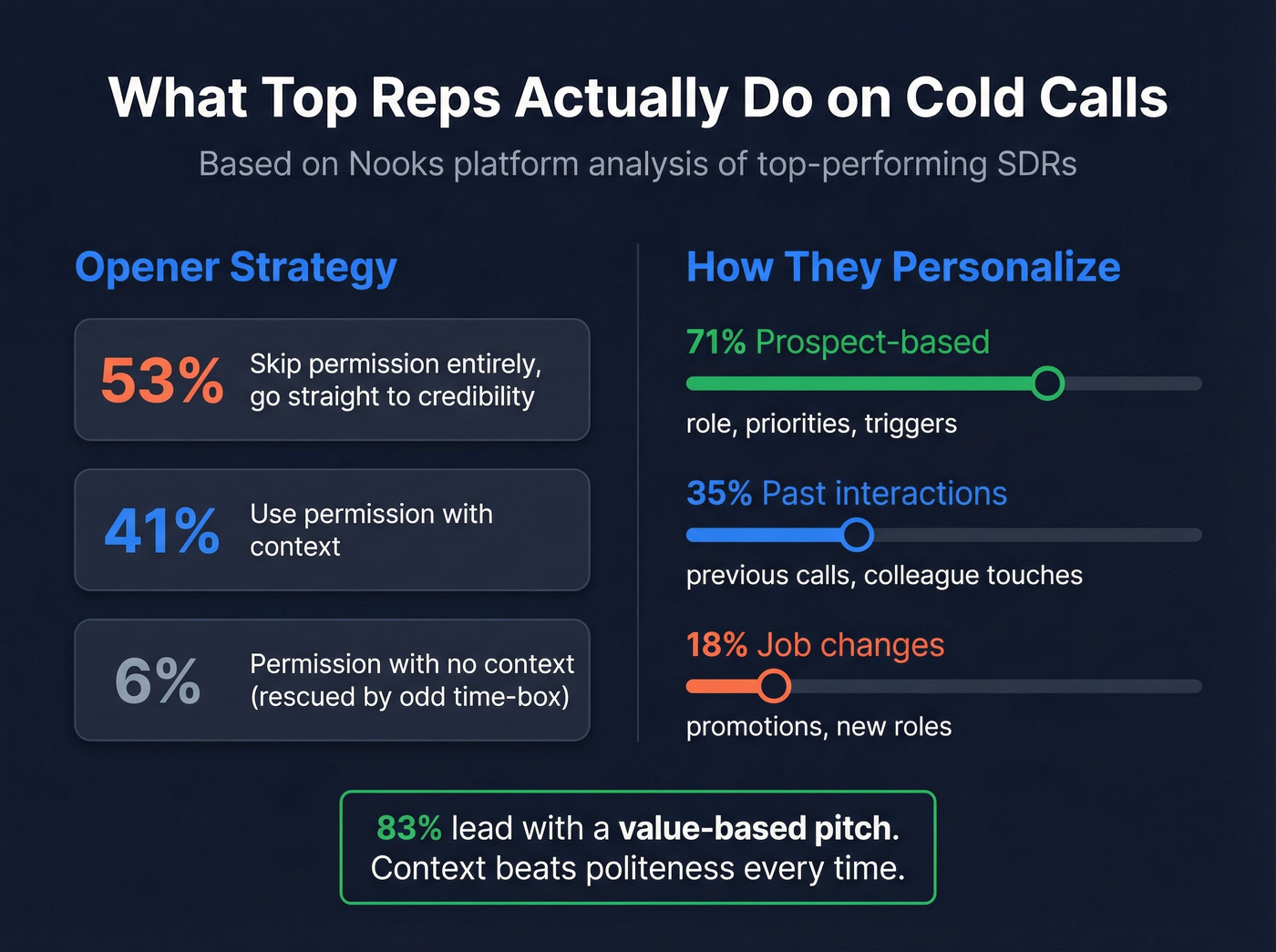
The rest broke down like this:
- 41% used permission with context
- ~6% used permission with basically no context (often rescued by an odd time-box like "23 seconds")
Their personalization breakdown is a gut check:
- 71% prospect-based personalization (role, priorities, triggers)
- 35% past interactions (previous calls, colleague touched them, content shared)
- 18% job changes (promotion, new role, new mandate)
Why it matters: Nooks defined "top reps" using the past 30 days and a conversation-to-meeting score (not vibes). And top reps don't ramble: 83% lead with a value-based pitch, and 16% earn meetings by offering expert or proprietary data.
I've watched teams drill "permission openers" for weeks and get worse because they removed the only thing that made the call relevant: the reason they dialed.
Look, if your opener sounds polite but empty, prospects hear "I have nothing for you."
The permission opener that consistently works: context -> own it -> ask
The best-performing permission opener is a three-beat rhythm. It's teachable, repeatable, and it doesn't require a "radio voice."
The framework (3 steps)
- Lead with context
- Own the cold call
- Ask permission to pitch (time-boxed)
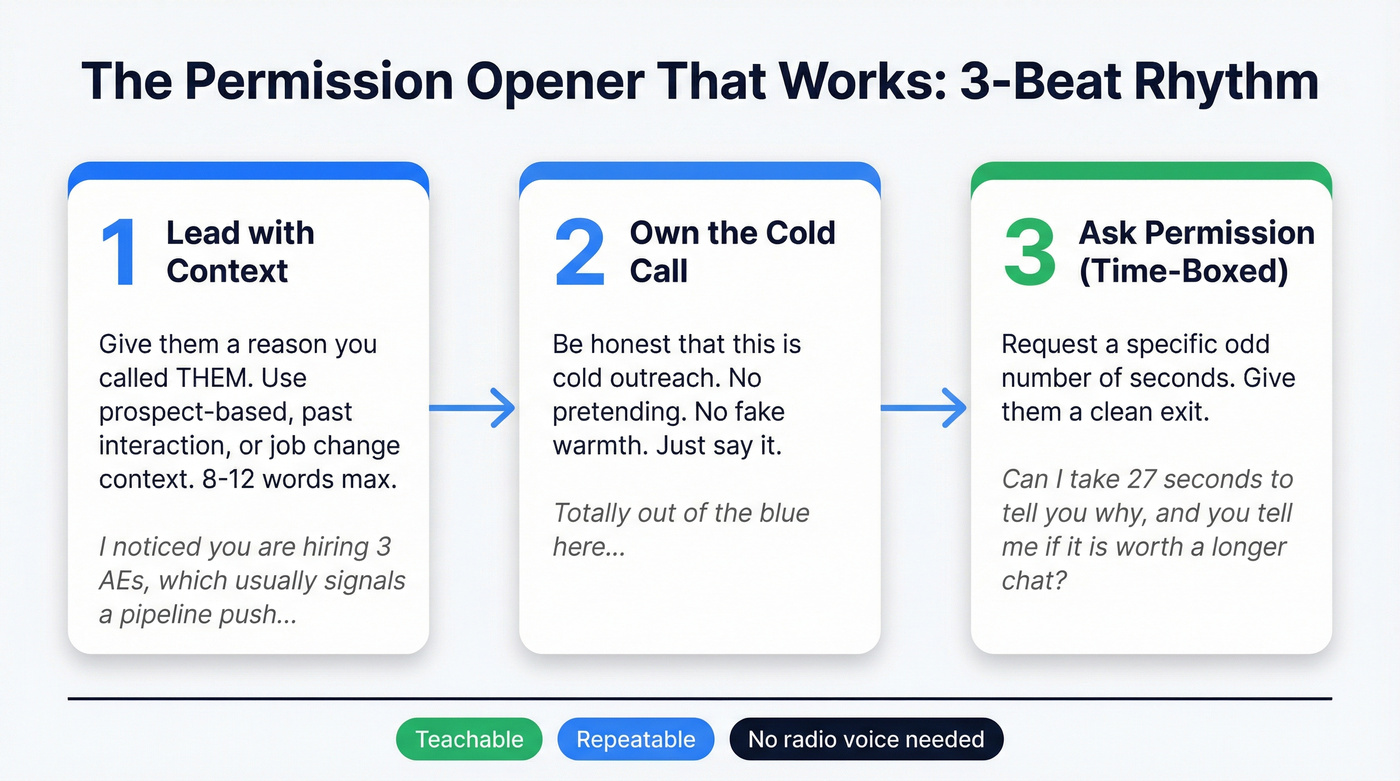
Fill-in-the-blank template
"Hey {Name}, it's {You} at {Company}. The reason I'm calling: {context in 8-12 words}. Totally out of the blue - can I take {odd number} seconds to tell you why I called, and you can tell me if it's worth a longer chat?"
Three context types (mapped to what top reps actually use)
1) Prospect-based context (most common)
- "I noticed you're leading {function} across {region/team size}..."
- "You're hiring {role} and that usually signals {initiative}..."
2) Past interaction context (highest impact)
- "You downloaded {asset} / your team attended {webinar}..."
- "We spoke with {colleague name/department} a few months back..."
3) Job change context (cleanest 'why now')
- "Congrats on the new role - when someone steps into {role}, {pain} usually shows up fast..."
Use / skip rules (so you don't force it)
Use this when:
- You have one real reason you picked them (trigger, role fit, intent, prior touch)
- You need to reduce hang-ups fast
- Your product needs 20-30 seconds to land the "why care"
Skip this when:
- You have strong credibility (logos, vertical proof, proprietary data) and can go straight to it
- You're so cold you can't name a single relevant context point
- Your market's saturated with "permission scripts" and everyone's allergic to them
One more rule: if you're guessing at context, don't say it. Prospects can smell "I skimmed your site" from a mile away.

You just read it: wrong person + wrong number = a fake opener problem. Prospeo gives you 125M+ verified mobile numbers with a 30% pickup rate and 98% email accuracy - refreshed every 7 days. Fix the list, then test the script.
Stop blaming your opener. Start dialing verified direct lines.
A decision tree: when a permission based opener cold call is the wrong tool
Permission-based openers are a tool, not a religion. Use them when they reduce friction. Drop them when they create it.
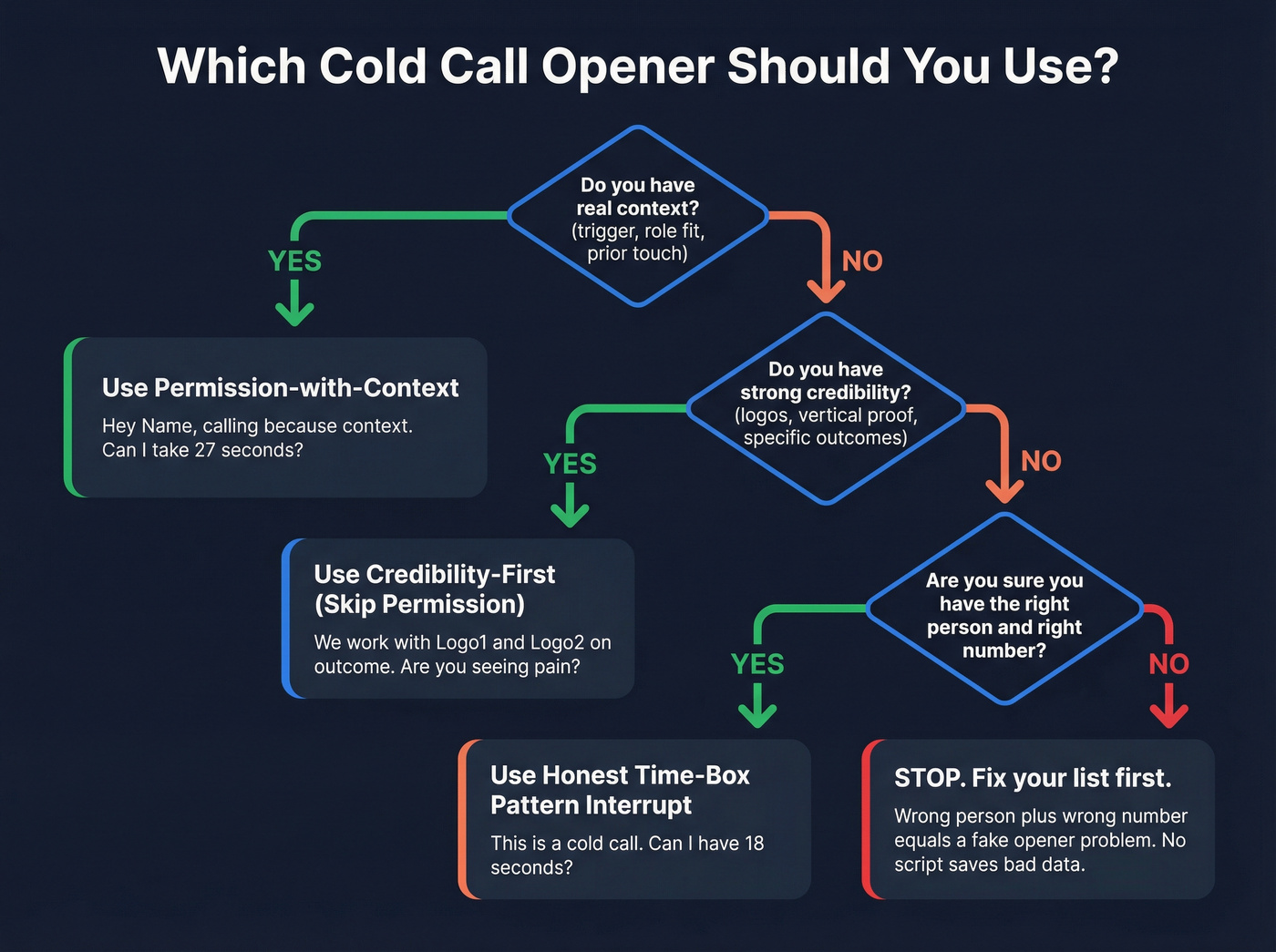
If you have real context (trigger, role fit, prior touch)... -> Use permission-with-context.
If you have strong credibility (logos, vertical proof, "we work with X")... -> Use credibility-first (often no permission).
If you're truly cold and prospects are fatigued... -> Use an honest time-box pattern interrupt.
If you're not sure you've got the right person or right number... -> Don't test openers yet. Fix your list, otherwise you'll "learn" that every opener fails.
Hot take: if your average deal is small and you're calling a broad persona, stop obsessing over the perfect opener and obsess over one tight problem statement + one question. That's what books meetings.
Scripts: talk tracks by scenario
Permission-with-context (default)
Variant A: direct line + odd time-box (23/27 seconds)
"Hi {Name}--{You} at {Company}. I'm calling because {context}. Totally cold here - can I take 27 seconds to tell you why I called, and you can tell me if it's relevant?"
Variant B: permission-with-context (no time-box)
"Hey {Name}, {You} at {Company}. I saw {context}. Mind if I tell you why I'm calling, and you can stop me if I'm off?"
Variant C: "seen my email?" multichannel bridge
"Hey {Name}, {You} at {Company}. I sent a quick note yesterday about {topic}--did you happen to see it? No worries if not. Can I take 20 seconds to give you the headline and you can tell me if it's worth forwarding?"
Credibility-first opener (no permission)
"Hi {Name}, {You} at {Company}. We work with {logo1} and {logo2} on {specific outcome}. The reason I'm calling: teams like yours run into {pain} when {trigger}. Are you seeing that this quarter?"
Use it when you can name a specific outcome without buzzwords. If you can't, don't fake it - go back to permission-with-context.
Honest time-box pattern interrupt (18 seconds)
"Hey {Name}--this is a cold call. Can I have 18 seconds to tell you why I called, and then you can decide if we keep going?"
If they say yes:
"Thanks. Calling because {one-line context}. We help {peer group} {outcome} by {mechanism}. Quick question - how are you handling {problem} today?"
This one's blunt. That's the point.
Gatekeeper versions (help-seeking + referral)
Help-seeking
"Hi - quick one. I'm trying to reach whoever owns {area} for {company}. Is that {Prospect Name}, or is there someone else I should speak with?"
Referral-style
"Hi - could you point me in the right direction? I was told {Prospect Name} is the person for {area}. Is that right, or is it handled by someone else?"
Objection micro-branches ("busy," "send email," "already using X")
"I'm busy."
"Totally fair. Give me 15 seconds for the reason I called - if it's not relevant, I'll hang up."
"Just send me an email."
"Happy to. So I don't send something generic - what's the best angle: {option A} or {option B}?" "Perfect. I'll send that and I'll follow up Thursday - fair?"
"We already use {Competitor}."
"Makes sense. Are you using it mainly for {use case 1} or {use case 2}?" "Got it. The reason people still talk to us is {differentiator tied to their answer}. Worth a 10-minute compare?"
The first 45 seconds talk track (timed, with branches)
Outbound Kitchen's breakdown is the right mental model: Opener (5s) -> Problem statement (30s) -> Conversation (1-8m) -> Close (30-60s).
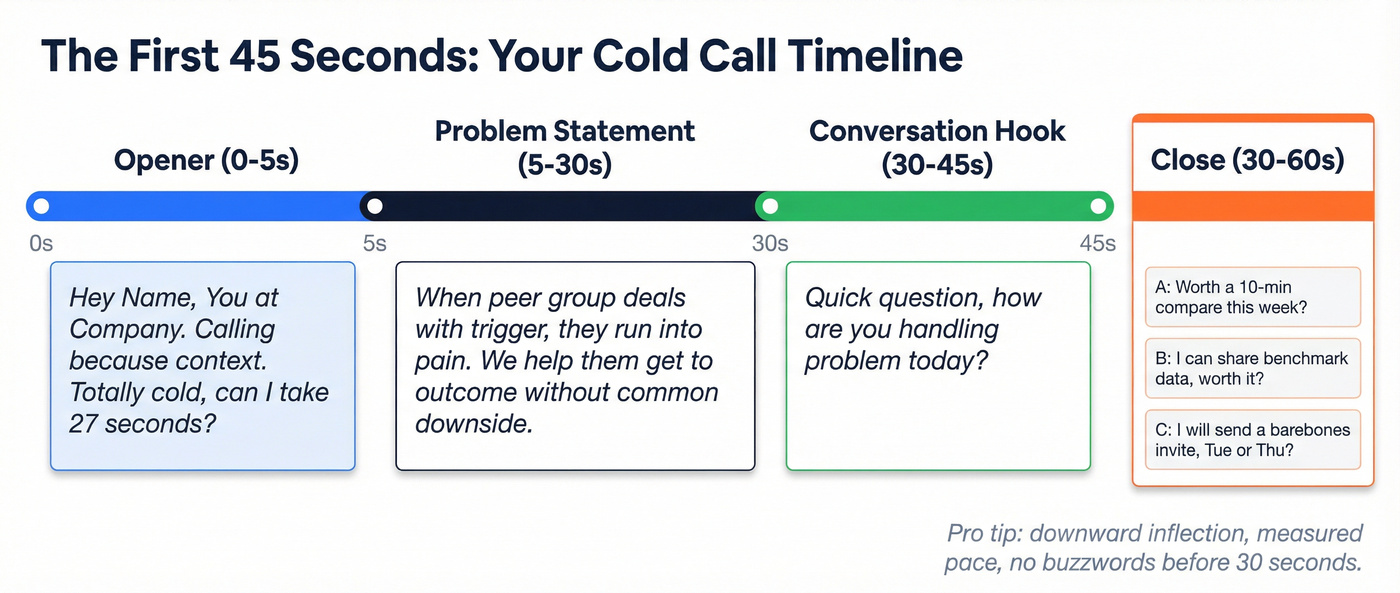
0-5 seconds (Opener)
"Hey {Name}, {You} at {Company}. Calling because {context}. Totally cold - can I take 27 seconds?"
5-30 seconds (Problem statement)
"When {peer group} is dealing with {trigger}, they usually run into {pain}. We help them get to {outcome} without {common downside}."
30-45 seconds (Conversation hook)
"Quick question - how are you handling {problem} today?"
Close (30-60 seconds) - pick one and commit
- Option A (simple): "Worth a 10-minute compare this week?"
- Option B (top-rep move): "If it helps, I can share benchmark data or bring our {expert} for 10 minutes - worth it?"
- Option C (fastest): "If you're open, I'll send a barebones invite now - what time is better, Tue or Thu?"
Coaching note: upward inflection and "bad time?" are a rough combo. Your tone makes you sound unsure, and the wording gives them an easy exit.
Delivery mechanics that stop the instant hang-up
Most hang-ups aren't about the words. They're about the sound.
Checklist:
- Downward inflection at the end of sentences (statements, not questions)
- Measured pace (slow down 10-15%)
- Short sentences (no stacked clauses)
- No buzzwords in the first 30 seconds
- No script voice (if it feels performed, it lands fake)
Bad vs better:
- Bad: "Do you have a quick minute?" Better: "Can I take 27 seconds?"
- Bad: "We're a leading platform that helps companies optimize..." Better: "We help {peer group} reduce {pain} when {trigger}."
Here's the thing: you can say a great script in a shaky, apologetic tone and it still loses.
Test it properly: a connects-based scorecard (and what to track)
Most opener tests are junk because they're built on dials. Dials include voicemails, wrong numbers, gatekeepers, and dead lines. Your opener never got a fair shot.
Test on connects.
The scorecard (connect-based)
| Metric | Definition | Winner |
|---|---|---|
| Connect->30s | Stayed 30s | Opener |
| 30s->2min | Real convo | Message |
| 2min->Meeting | Next step | Close |
| Hang-up rate | <5s hang | Delivery |
Minimum sample size (practical)
- Aim for 40-60 connects per variant
- Run variants in the same time blocks
- Keep the same list source and persona mix
- Don't change your pitch mid-test
Calls under 1 minute don't convert: under 1 minute = 0% conversion, 5-minute calls = 16% success, and 10+ minute calls = 30% success. Your opener's only job is to buy time, and your job is to keep the rest of the first minute tight enough that they don't regret giving it to you.
In our experience, the fastest way to "win" an opener test is to accidentally change your pitch mid-week and then celebrate the opener. Don't do that.
List hygiene: the missing variable (why your opener test is lying)
The hidden variable in opener performance is simple: are you reaching the right person on a working number? If not, your "opener test" is measuring list decay.
Here's a scenario I've seen too many times: a manager pulls a "fresh" list, reps grind for two hours, they get 20 connects, and half of those are wrong person, wrong company, personal lines, or a main switchboard that got mislabeled as a direct dial. Everyone walks away saying, "Permission openers don't work." No. The list doesn't work.
List hygiene workflow:
- Verify direct dials vs HQ lines (tag them)
- Remove duplicates
- Refresh titles and job changes
- Add a pre-call touch so your opener has context ("I sent a note yesterday...")
- Then run your connects-based opener test
This is where Prospeo shows up naturally: it's the B2B data platform built for accuracy, with 300M+ professional profiles, 143M+ verified emails at 98% accuracy, and 125M+ verified mobile numbers with a 30% pickup rate, refreshed every 7 days. If you're trying to learn what opener works, clean inputs aren't optional.
Permission opener inside a multichannel sequence (call -> email -> voicemail)
Cold calling works better when it's not alone. Gong Labs showed email reply rates jump from 1.81% to 3.44% when calling's included, even if you don't get a live connect. Voicemails lift replies from 2.73% to 5.87%.
A simple sequence:
| Touch | Goal | Line |
|---|---|---|
| Call #1 | Earn 30s | "27 seconds?" |
| Email #1 | Add context | "Tried you..." |
| Call #2 | Reference | "See my note?" |
| Voicemail | Trigger reply | "2 bullets" |
| Email #2 | Easy yes/no | "10-min compare?" |
Real talk: voicemails get almost no callbacks. The move isn't "leave better voicemails." It's "call for attention, then convert that attention in writing" with a fast follow-up that includes the one-line reason you called and a simple next step.
If you want to systematize this, build it as outreach sequences with clear rules for which channel gets used when.
Compliance basics (TCPA/DNC/recording consent)
High-level guardrails (US-centric):
- TCPA: Be careful with automated dialing, prerecorded messages, and texting, especially to mobile numbers. If you're using a dialer, make sure your workflow aligns with consent and dialing rules for the regions you call.
- DNC: Scrub against applicable Do Not Call lists where required, and honor internal do-not-contact requests immediately. If someone says "don't call me again," treat it as a system update, not a debate.
- Call recording consent: Recording rules vary. Some places are one-party consent, others are two-party/all-party consent. If you record, disclose early and follow your company policy consistently.
Disclaimer: This is general operational guidance, not legal advice. Talk to counsel about your dialing setup, territories, and recording practices.
For a deeper checklist, see Is Cold Calling Legal?.
FAQ
Is "Did I catch you at a bad time?" a permission-based opener?
No. It's a rejection invitation, not a permission opener. A real permission-based opener leads with context, owns that it's cold, then asks for a tiny time-box. The Gong benchmark puts "bad time?" at 2.15% success.
What's the best permission-based opener script for enterprise?
Use permission-with-context when you can name 1 trigger (initiative, hiring, tech change, or job change) and then ask for 20-30 seconds. For enterprise, polite doesn't win - relevance does, and you should get to a problem statement + question by the 30-second mark.
How many calls do I need to test an opener?
Test by connects, not dials: aim for 40-60 live connects per opener variant, and run them in the same time windows. If you can't get that sample, your "winner" is usually just list variance, not a better line.
How do I verify numbers/emails before I test openers?
Verify contacts before you run an opener test so you're not measuring wrong numbers and stale records. Prospeo verifies emails at 98% accuracy, includes 125M+ verified mobile numbers with a 30% pickup rate, and refreshes data every 7 days, which is fast enough to keep call lists from decaying mid-test.
The best permission opener needs real context - job changes, hiring signals, intent. Prospeo tracks 15,000 intent topics, job change alerts, and 30+ filters so every call starts with a reason to dial.
Turn "totally cold" into "I noticed you're hiring" - automatically.
Summary: when a permission based opener cold call actually wins
A permission based opener cold call wins when you earn it with real context, own that it's cold, and time-box the ask so the prospect feels in control.
Skip it when you've got strong credibility and can go straight to proof, or when you're so cold you're basically guessing.
And if results are bad, don't assume the line's broken. Validate list quality, measure by connects, and test against credibility-first and honest time-box openers in the same call blocks.
If you need a broader system beyond openers, pair this with a full outbound calling strategy, track answer rate, and clean up list decay with a B2B contact data decay workflow.