

Professional Email Guide: Address, Writing & Setup (2026)
The average worker receives 117 emails a day. That's 117 chances to look sharp, build trust, or quietly erode your reputation - one sloppy subject line at a time. Poor communication costs businesses $9,284 to $30,000+ per employee per year, and email is where most of that damage happens.
Here's the thing: "professional email" means three different things depending on who's asking. Some people need a better address. Some need to write better messages. Some need their emails to actually land in inboxes instead of bouncing into the void. This guide covers all three.
What You Need (Quick Version)
- Your address: Get a custom domain. firstname.lastname@yourcompany.com is the standard. Google Workspace at $7/mo is the default choice. Hostinger at ~$0.35/mo if you're bootstrapping hard.
- Your writing: Follow the 5 Cs - Clear, Concise, Correct, Complete, Courteous. Keep the body to 50-125 words. Anything longer and you need a meeting.
- Your deliverability: Verify every address before sending outreach. One bounced campaign can tank your domain reputation for weeks.
What Makes an Email Professional?
Email now reaches an estimated 4.73 billion users globally, with 376 billion messages sent daily. 72% of professionals prefer it as their primary work channel. It's not going anywhere.
And the cost of doing it poorly is staggering - Grammarly found that poor communication causes decreased productivity for 84% of teams, translating to thousands of dollars per employee in lost time and missed deals.
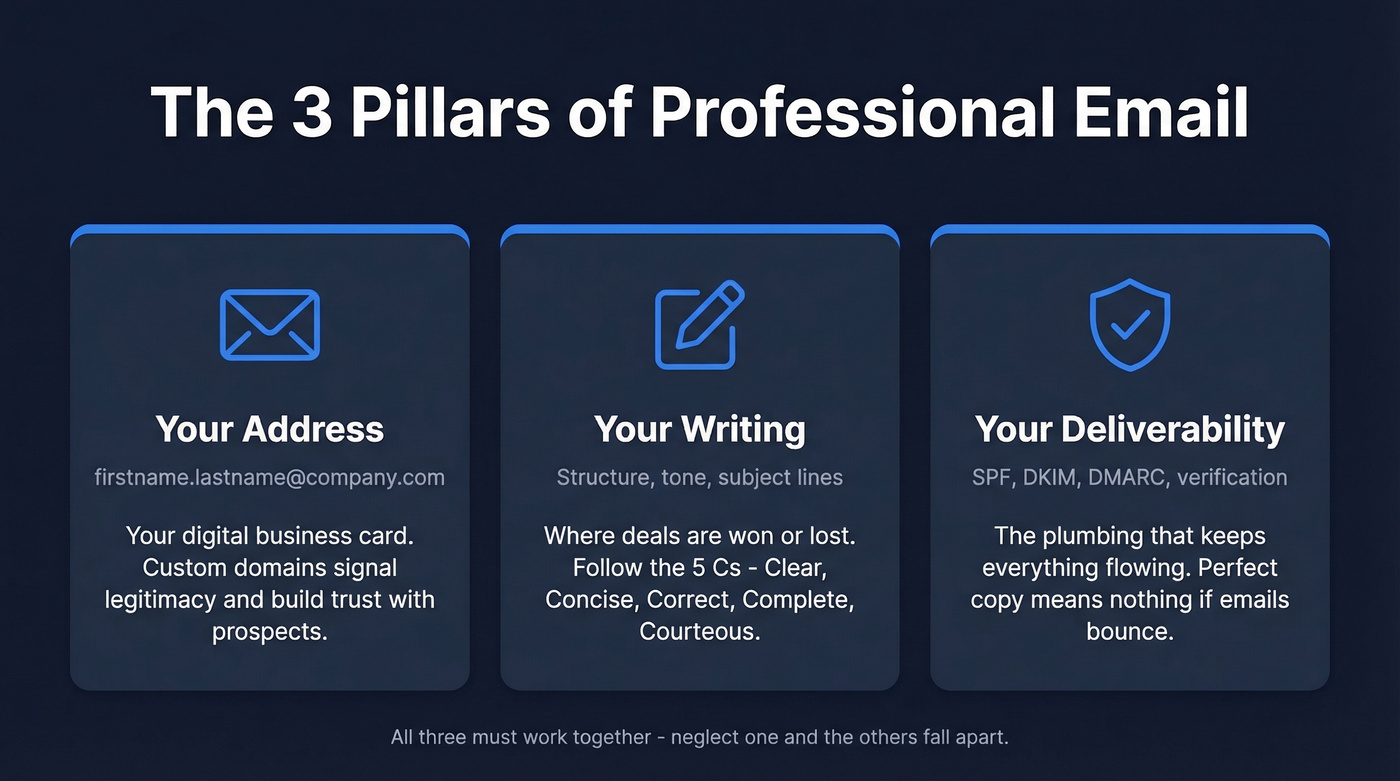
This isn't one thing. It's three pillars working together.
Pillar one: your address. The firstname.lastname@yourcompany.com piece. Your digital business card. A custom domain signals legitimacy. A @gmail.com address signals you haven't gotten around to the basics yet.
Pillar two: your writing. Structure, tone, subject lines, formatting. This is where most people lose deals, annoy colleagues, or get ignored entirely.
Pillar three: your deliverability. The most overlooked piece. You can have a perfect address and flawless copy, but if the recipient's email bounces or your domain reputation is trashed, none of it matters. SPF, DKIM, verification - the plumbing that keeps everything flowing. (If you want the deeper technical playbook, start with our email deliverability guide.)
How to Choose a Professional Email Address
Naming Formats That Work
Your email address format should be boring. Boring is professional.
- firstname.lastname@company.com - the gold standard
- firstinitial.lastname@company.com - good for common names
- lastname.firstinitial@company.com - less common but fine
- firstinitial.middleinitial.lastname@company.com - for when your name is already taken
Per Twilio's naming conventions guide, periods are the only acceptable separator. Underscores look dated. Hyphens look odd. Numbers scream "I was the 47th John Smith to sign up."
| Do This | Don't Do This |
|---|---|
| sarah.chen@company.com | sarahc87@company.com |
| j.martinez@company.com | coolsarah@company.com |
| chen.s@company.com | s_chen-work@company.com |
Keep it short. If your name is difficult to spell, use initials. The goal is something a prospect can type from memory after glancing at your business card.
Free Provider vs. Custom Domain
If you're a freelancer or solopreneur, Gmail is fine. It holds 75% of the US email market for a reason - it works, it's free, and everyone trusts it.
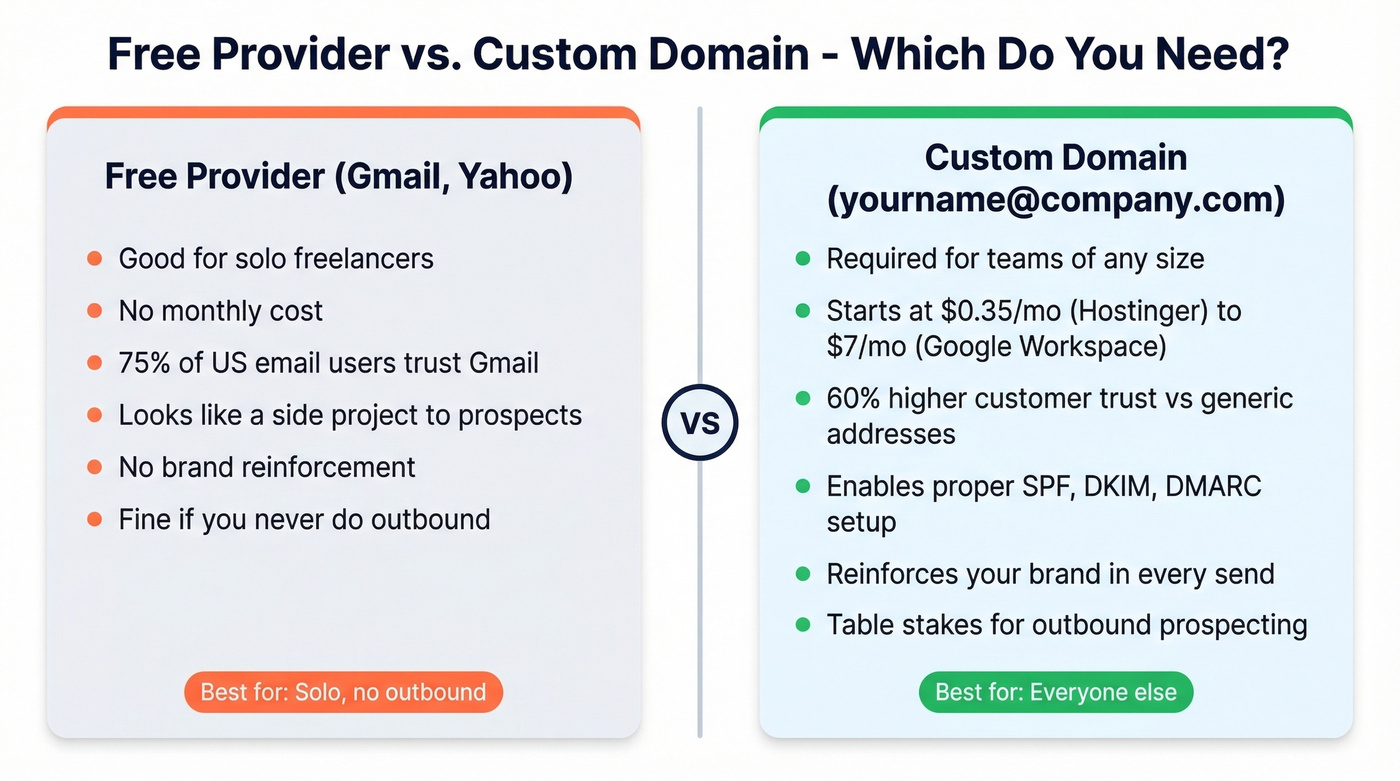
But the moment you have a team, or you're sending outbound to business prospects, a custom domain is table stakes. Brian Minick, COO of ZeroBounce, put it bluntly: using Gmail or Yahoo for business "doesn't look professional" and signals a "one-man shop." He's right. We've seen prospects ghost outreach from @gmail.com addresses that they'd have replied to from a branded domain.
The decision tree is simple. Solo and not doing outbound? Gmail. Everyone else? Custom domain.
Set Up a Custom Domain in 5 Steps
Step 1: Register your domain. Head to GoDaddy, Namecheap, or any reputable registrar. Expect $10-$50/year depending on the TLD. Stick with .com if you can get it.
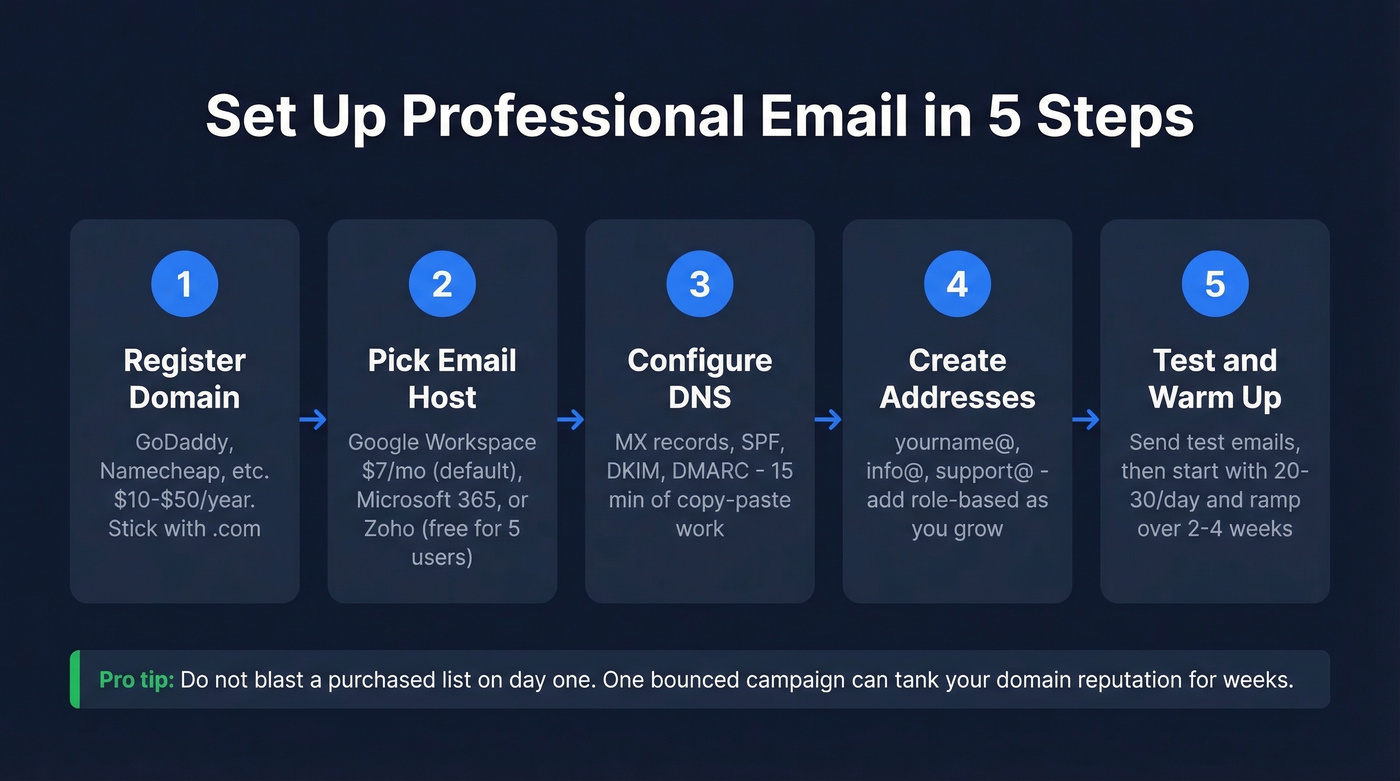
Step 2: Choose an email hosting provider. Google Workspace ($7/user/mo) is the default. Microsoft 365 (starting around $6-$22/user/mo) if you're in the Office ecosystem. Zoho Mail if you want free for up to 5 users.
Step 3: Configure your DNS records. It sounds technical, but it's 15 minutes of copy-paste work. Your hosting provider gives you the exact values. You need four records:
- MX records - tell the internet where to deliver your email
- SPF record - declares which servers can send on your behalf (use these SPF record examples if you get stuck)
- DKIM signing - cryptographically verifies your messages aren't forged (here’s how to verify DKIM is working)
- DMARC policy - tells receiving servers what to do with emails that fail SPF/DKIM (more on DMARC alignment)
Step 4: Create your addresses. Start with yourname@company.com, info@company.com, and support@company.com. Add role-based addresses as you grow.
Step 5: Test and warm up. Send test emails to Gmail, Outlook, and Yahoo to confirm delivery. Then warm up your domain gradually - don't blast a purchased list on day one. Start with 20-30 emails per day to engaged contacts and ramp up over 2-4 weeks. (If you’re scaling outbound, follow safe email velocity limits.) Custom domains correlate with roughly 60% higher customer trust compared to generic addresses, but only if your domain reputation stays clean.

You just spent time perfecting your domain, DNS records, and warm-up process. Don't waste it sending to dead addresses. Prospeo verifies 143M+ professional emails at 98% accuracy - so your polished outreach actually reaches real inboxes, not spam folders.
One bounced campaign kills weeks of domain warm-up. Verify first.
Best Business Email Providers Compared
| Provider | Price | Best For | Storage |
|---|---|---|---|
| Google Workspace | $7-$22/user/mo | Most businesses | 30GB-5TB |
| Microsoft 365 | ~$6-$22/user/mo | Office ecosystem | 50GB-unlimited |
| Hostinger | ~$0.35/mo (promo) | Bootstrapped teams | 10GB-50GB |
| Zoho Mail | Free (5 users) | Budget-conscious | 5GB-50GB/user |
| Proton Mail | Free / paid plans | Privacy-first teams | Varies by plan |
| GoDaddy | ~$3/user/mo | Domain + email bundle | Varies by plan |
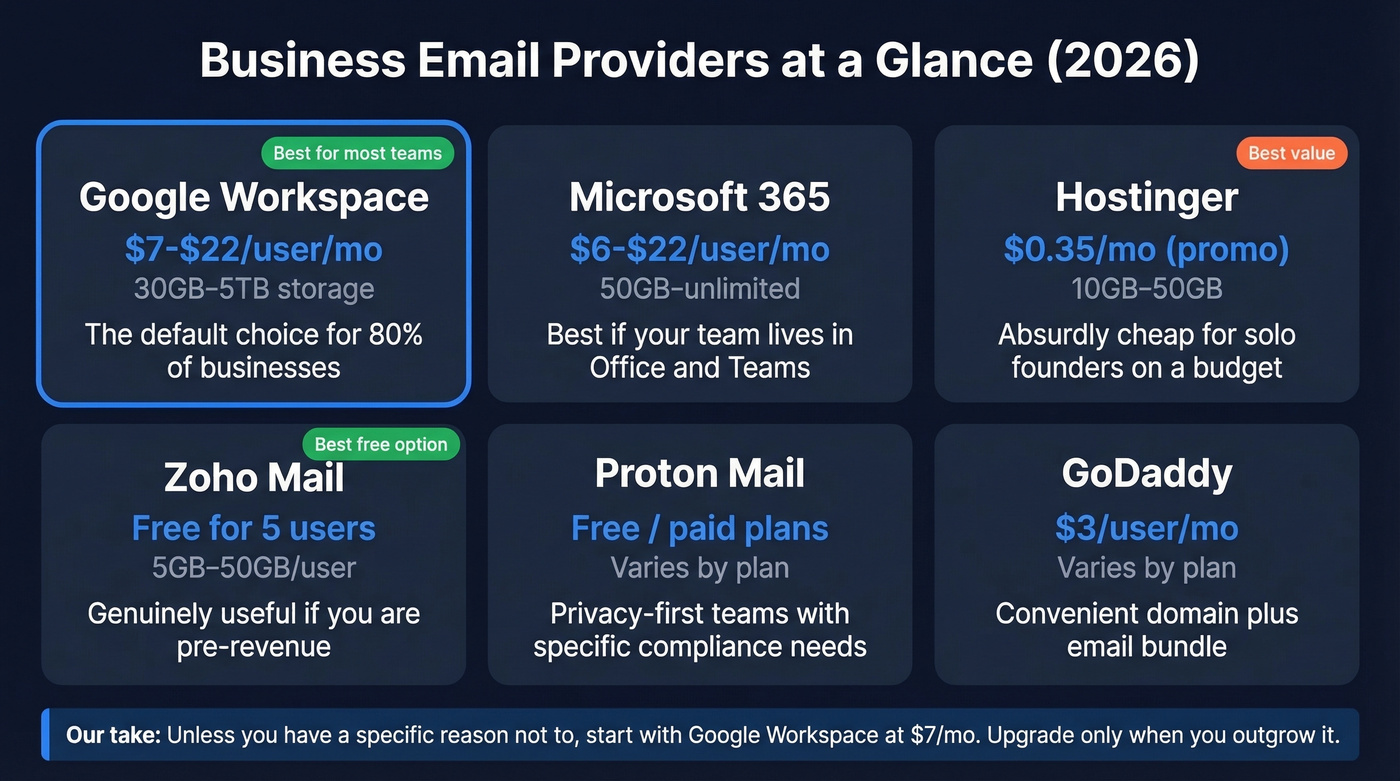
Google Workspace is the default for a reason. The $7/user/month Business Starter plan gives you 30GB of storage, custom email, and the core Google productivity apps. The $14 tier bumps storage to 2TB. For most teams under 50 people, the $7 plan is plenty.
Microsoft 365 makes sense if your team already lives in Word, Excel, and Teams. The email experience in Outlook is arguably better than Gmail for heavy inbox users, and the 50GB default mailbox is generous.
Hostinger deserves a mention for pure value. At ~$0.35/month on promotional pricing, it's absurdly cheap - though renewal rates climb. Fine for a solo founder who needs a branded address and nothing else.
Zoho Mail's free tier for up to 5 users is genuinely useful if you're pre-revenue and need custom email without spending a dollar. Paid plans run $3-$6/user/mo for more storage and features.
Let's be honest: most providers now bundle AI writing assistants, and they're fine for first drafts. But no AI tool will fix a bad subject line, a wrong recipient name, or a bounced address. The fundamentals in this guide matter more than any AI feature. (If you want help tightening copy, see our guide to email copywriting.)
Unless you have a specific privacy requirement pointing you to Proton, or you're already locked into Microsoft's ecosystem, Google Workspace is the answer for 80% of businesses. Skip the rest unless your situation demands it.
How to Write a Professional Email
The 5 Cs Framework
Every well-crafted message should pass five tests. The 5 Cs framework makes this concrete:
- Clear - one purpose per email. If you're asking for a meeting and sharing a report and requesting feedback, that's three emails.
- Concise - 50-125 words for the body. That's the sweet spot for response rates.
- Correct - grammar, names, facts. Getting someone's name wrong is an instant credibility killer.
- Complete - include everything the recipient needs to take action. Attach the file. Include the link. Propose specific times.
- Courteous - professional doesn't mean cold. A "hope your week's going well" is fine. A three-paragraph preamble before your ask is not.
Subject Lines That Get Opened
Your subject line is your email's first impression - and often its last. 47% of recipients decide whether to open based on the subject line alone, while 69% mark emails as spam based on the subject line alone. (If you want swipeable ideas, use these email subject line examples.)
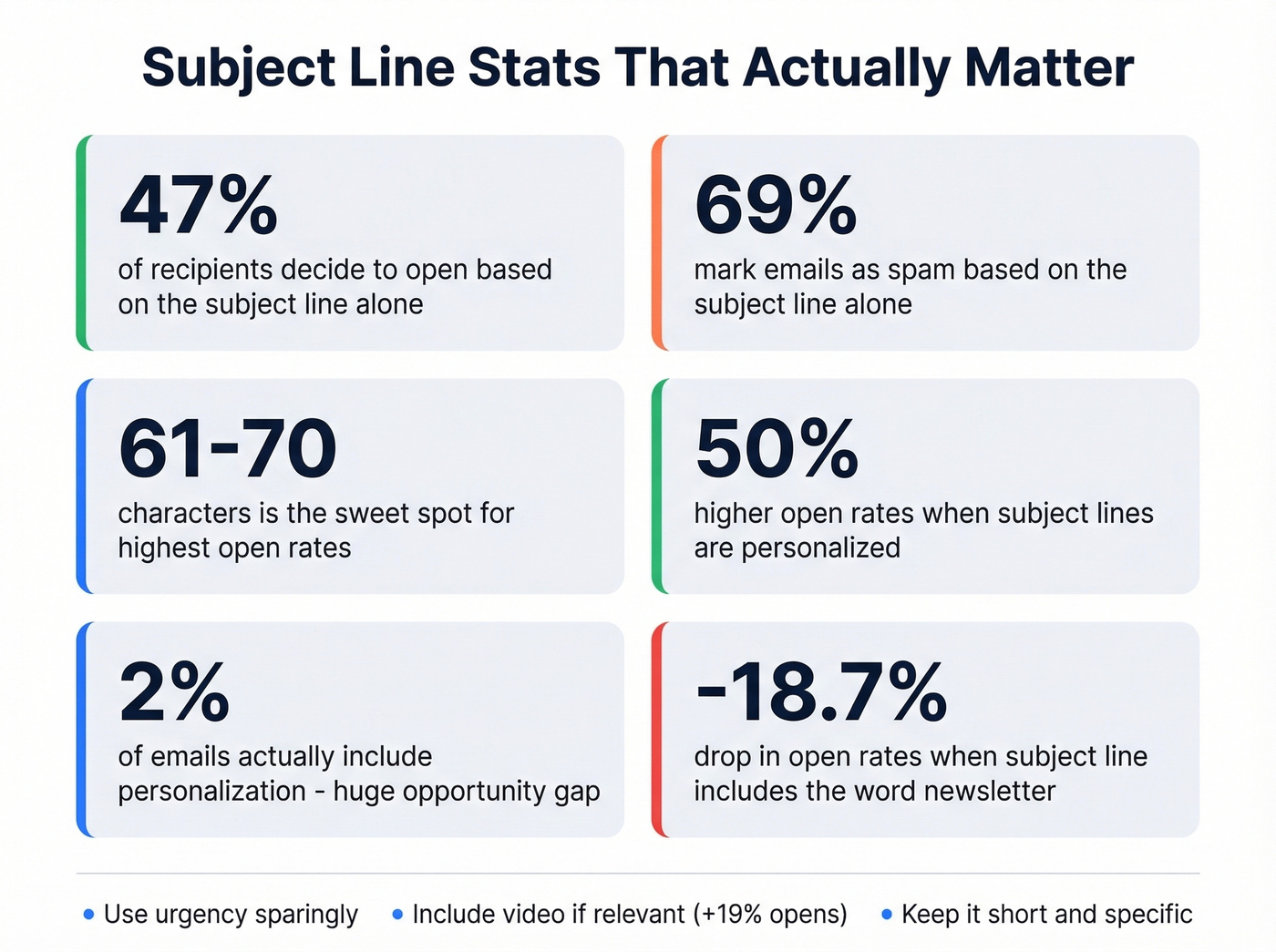
What the data says:
- Keep it to 61-70 characters - that range gets the highest open rates. Interestingly, 2-4 word subject lines also outperform longer alternatives in some datasets, suggesting brevity within that character range matters more than filling every character.
- Personalize it. Personalized subject lines deliver 50% higher open rates, yet only 2% of emails include personalization. That gap is enormous. (Here’s a full playbook on personalized outreach.)
- Include "video" if relevant - it drives 19% more opens and 65% more clicks.
- Avoid "newsletter" - it drops open rates by 18.7%.
- Use urgency sparingly. "Urgent" boosts opens by 22%, but overuse trains recipients to ignore you.
Formatting and Structure
Business correspondence follows block format: left-justified, single-spaced, with a blank line between paragraphs. No indentation. Keep paragraphs to 4-5 sentences max. Use plain text when possible - complex HTML breaks on screen readers and older email clients, and 64% of people check email on phones and tablets.
For greetings, mirror how the recipient signs their own emails. If they sign off as "Mike," don't address them as "Dear Mr. Thompson." "Hi [First Name]" works in almost every context.
For closings, ranked by formality:
- Sincerely - formal, safe for first contact with executives
- Best regards / Regards - the default
- Best - slightly warmer, good for ongoing relationships
- Thank you / Thanks - works when you're actually thanking them
Your signature should follow this order: name, title, organization, phone number, email. Skip the inspirational quotes. A five-line signature block that renders cleanly on mobile is worth more than a fancy HTML template that breaks on every other device.
For CC and BCC: CC people who need awareness but aren't the primary audience. BCC for mass sends to keep recipient lists confidential and prevent reply-all chaos.
Professional Email Templates
Each template stays within the 50-125 word body guideline. Copy, customize, send.
Cold Outreach to a Prospect
Subject: Quick question about [specific challenge]
Hi [Name],
I noticed [Company] recently [specific trigger - funding round, new hire, expansion]. Teams in your space typically run into [specific problem] around this stage.
We helped [similar company] solve that by [brief result]. Would 15 minutes make sense to explore whether we could do the same?
How's [specific day]?
Best, [Your name]
Introduction to a New Colleague
Subject: Welcome aboard - quick intro
Hi [Name],
Welcome to [Company]. I'm [Your Name], [your role]. We'll be working together on [project/area].
I've been here [timeframe] and focus on [brief scope]. If you have questions about [specific area], happy to help you get oriented.
Looking forward to it.
Best, [Your name]
Meeting Request
Subject: 30 min to discuss [topic]?
Hi [Name],
I'd like to set up 30 minutes to discuss [specific topic]. I have a few ideas on [brief context] and think your input would be valuable.
Would any of these work?
- [Day, Time]
- [Day, Time]
- [Day, Time]
Thanks, [Your name]
Follow-Up After No Response
Subject: Re: [original subject] - one more thought
Hi [Name],
I wanted to share [new resource or data point] relevant to [original topic]. [One sentence on why it matters to them.]
Still happy to connect if the timing works better now. If not, no pressure.
Best, [Your name]
Apology for a Mistake
Subject: My mistake on [specific issue] - here's the fix
Hi [Name],
I made an error on [specific thing]. That's on me. Here's what happened: [one sentence].
I've already [corrective action]. Going forward, [preventive measure] so this doesn't recur.
Appreciate your patience.
Best, [Your name]
Networking / Referral Request
Subject: Quick ask - [specific topic]
Hi [Name],
I've been following your work on [specific project]. I'm exploring [specific area] and think you'd have a valuable perspective.
Would you be open to a 15-minute call in the next two weeks? I'm specifically curious about [one focused question].
Either way, appreciate what you're putting out there.
Best, [Your name]
Professional doesn't mean robotic. Match the tone to your relationship with the recipient.
Common Mistakes to Avoid
Professionals spend 28% of their workweek on email. That's a lot of time to make avoidable mistakes. Here are the ones we see most often:
- Burying the ask in a wall of text. Your recipient is scanning, not reading. Put the action item in the first two sentences.
- Following up with zero new value. "Just checking in" is the laziest email in business. Add a new insight, resource, or angle every time. (If you need options, steal these sales follow-up templates.)
- Surface-level personalization. Dropping someone's job title into a template isn't personalization. Reference something specific - a recent post, a company announcement, a shared connection.
- Using cliched corporate wording. "Per my last email," "please advise," "as per the attached" - nobody reads these. Write like a human.
- Giving up after one email. Most deals take 5+ touches. One unanswered email isn't a rejection.
- Sending from a free email provider to business prospects. A @gmail.com address in a cold outreach sequence signals "not serious enough to set up a domain."
- Not checking email on mobile before sending. If your formatting breaks on a phone screen, your message breaks too.
Why Your Emails Bounce (and How to Fix It)
You've got the custom domain. You've written a sharp email. You hit send - and it bounces.
Bounced emails don't just waste your time. They actively destroy your domain reputation. Email service providers track your bounce rate, and once it crosses a threshold, your legitimate emails start landing in spam too. It's a downward spiral that can take weeks to recover from. I've watched teams torch a brand-new domain in a single afternoon because they skipped verification on a purchased list. (To benchmark and diagnose, see our guide to email bounce rate.)
The fix has two parts. First, configure your DNS records properly - SPF, DKIM, and DMARC are essential. These authenticate your domain and tell receiving servers you're legitimate.
Second, verify every address on your outreach list before you send. This is where most teams cut corners and pay for it later. Prospeo's real-time verification catches invalid addresses, handles catch-all domains, and removes spam traps and honeypots - the hidden landmines that wreck deliverability. The free tier gives you 75 verified emails per month, enough to test before committing.

One bounced campaign from your shiny new custom domain can undo weeks of reputation building. Verify first, send second. Always.
A branded email address builds trust. But finding the right professional email for your prospects is where deals start. Prospeo's Email Finder searches 300M+ profiles and returns only verified addresses - at roughly $0.01 per email, with no contracts.
Stop guessing email formats. Find verified professional emails in one click.
FAQ
Is Gmail professional enough for business?
For freelancers and solopreneurs, Gmail works fine - it's reliable and universally trusted. For a company with employees or anyone sending outbound prospecting emails, a custom domain is essential. It signals legitimacy and protects your sender reputation.
How much does a custom email address cost?
Domain registration runs $10-$50/year. Email hosting ranges from free (Zoho Mail, up to 5 users) to $7-$22/user/month for Google Workspace. A five-person team can get fully set up for around $420/year on Google Workspace's starter tier.
What's the best email address format?
firstname.lastname@yourcompany.com is the universal standard. Use periods as the only separator. Avoid numbers, nicknames, underscores, and symbols. If your name is common, use a first initial or middle initial variation.
How do I stop outreach emails from bouncing?
Verify every address before sending, configure SPF, DKIM, and DMARC records on your domain, and warm up gradually - start with 20-30 emails per day. The consensus on r/coldemail is that verification isn't optional anymore; it's the bare minimum before any outbound campaign. Tools like Prospeo catch invalid addresses, spam traps, and honeypots before they damage your sender score.