

30 Professional Email Templates That Actually Get Replies
392.5 billion emails are sent globally every day. The average professional receives about 120 of them and spends roughly 11 hours a week sorting through the pile. Most get skimmed, archived, or ignored.
The emails that get replies share three traits: they're short, they lead with the ask, and they respect the reader's time. Here are 30 ready-to-use professional email template examples across five categories - plus the data-backed principles that make them work.
The Only Rule That Matters
Stop obsessing over the perfect template. Lead with your ask and keep it short.
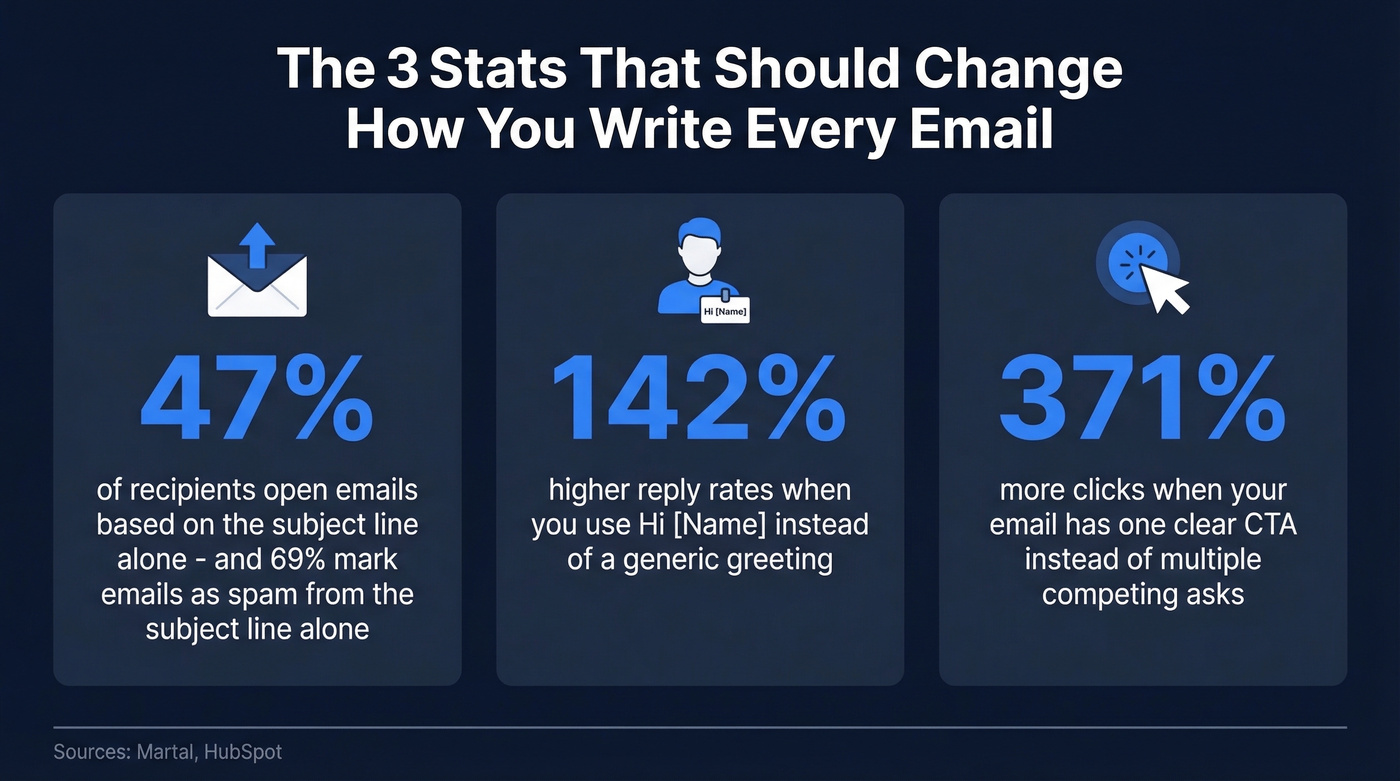
Emails over 150 words see a sharp drop in engagement. The sweet spot is 100-150 words. Three stats that should change how you write every email:
- 47% of recipients open based on the subject line alone. 69% mark emails as spam based on the subject line alone.
- "Hi [Name]" instead of a generic greeting can lift reply rates by up to 142%.
- Emails with a single clear CTA get 371% more clicks than those with multiple competing asks.
Jump to: Internal Comms · Professional Outreach · [Sales & Cold Email](#sales - cold-email) · Customer Service · [Career & Job Search](#career - job-search)
Anatomy of an Effective Email
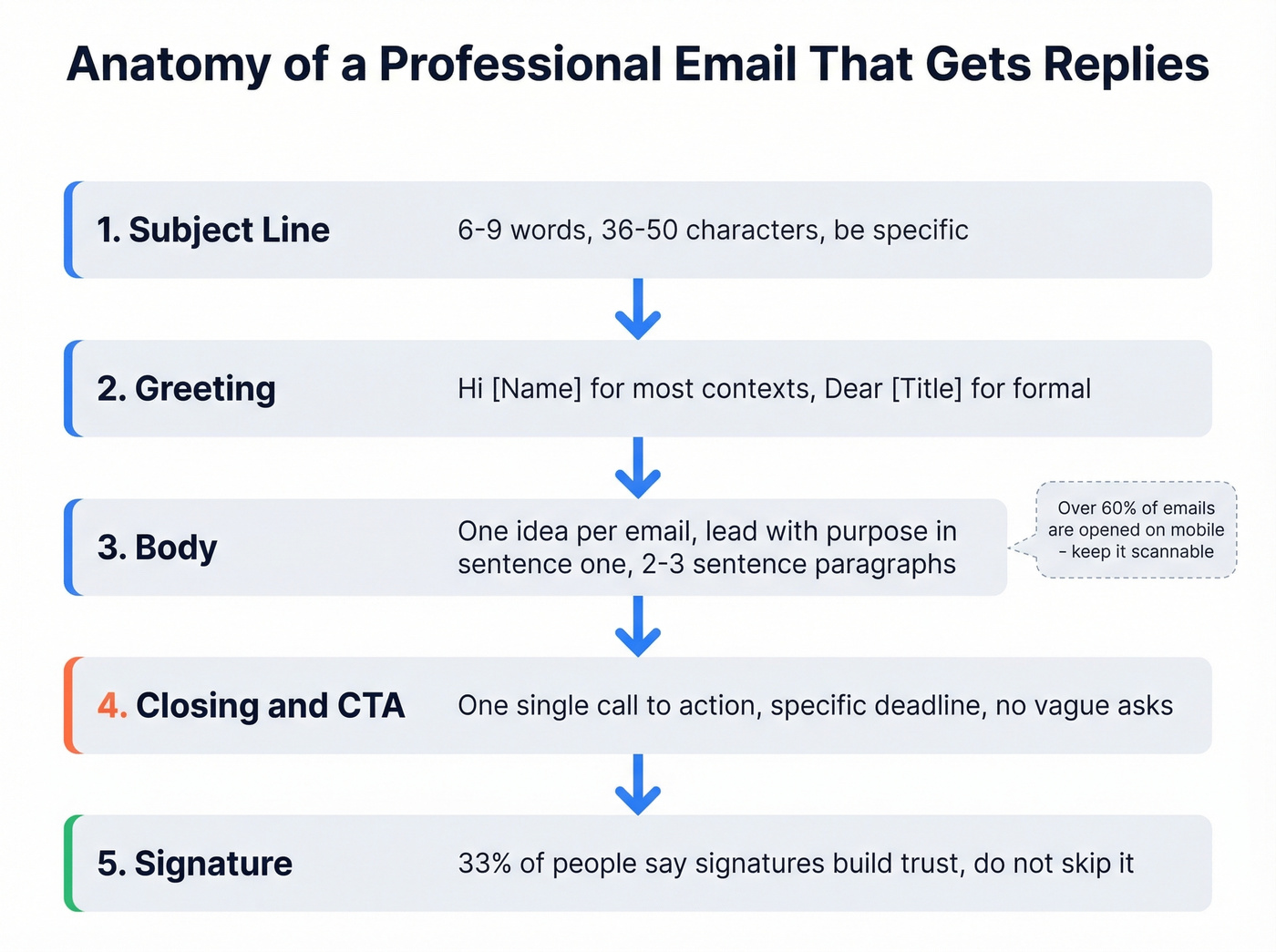
Every well-structured business email has five components. Understanding this anatomy is the first step in writing messages that consistently earn replies.
Subject Line
This is your headline. Keep it to 6-9 words (36-50 characters). Be specific. "Q3 budget approval - need your sign-off by Friday" beats "Quick question" every time. (If you want more formulas, see these subject line patterns.)
Greeting
"Hi [Name]" is the default for most professional contexts. When emailing internationally or upward in hierarchy, "Dear [Title] [Last Name]" is safer.
Body
One idea per email. Lead with the purpose in the first sentence - don't bury it under three paragraphs of context. Keep paragraphs to 2-3 sentences and use numbered lists when you have sequential steps or multiple requests, since they're easier to respond to point-by-point. Over 60% of emails are opened on mobile, so scannability matters.
Closing & CTA
One call-to-action. Not two, not three. "Can you review and approve by Thursday?" beats "Let me know your thoughts when you get a chance." (More examples: email call-to-action.)
Signature
33.1% of people say the email signature is a key factor in building trust. Don't skip it - and don't overdesign it.
30 Templates by Scenario
Every template below follows the rules: under 150 words, single CTA, purpose in the first sentence. Copy, paste, customize the bracketed fields, and send.
Internal Communication
These templates cover the messages you send most often - and the ones most likely to get buried if you're not concise.
Meeting Request Use when you need face time but want to respect someone's calendar. (If you're stuck on phrasing, use this email wording to schedule a meeting guide.)
Subject: 30-min sync on [project] - [day/time]?
Hi [Name],
I'd like to schedule 30 minutes to align on [specific topic]. I have availability [Day] at [Time] or [Day] at [Time] - do either work?
I'll send an agenda beforehand so we can keep it focused.
Thanks, [Your name]
Project Update
Subject: [Project name] update - week of [date]
Hi team,
Quick update on [project]:
- Completed: [milestone]
- In progress: [current task, expected completion]
- Blocked: [blocker - who can help]
No action needed unless you're tagged above.
Best, [Your name]
PTO Request
Subject: PTO request - [dates]
Hi [Manager],
I'd like to take PTO from [start date] through [end date]. [Name] has agreed to cover [key responsibility], and I'll have [deliverable] wrapped up before I leave.
Please let me know if you need anything else to approve.
Thanks, [Your name]
Team Announcement
Subject: [Announcement topic] - effective [date]
Hi everyone,
Starting [date], [describe change]. Here's what this means for you: [one sentence on impact].
Questions? Drop them in [Slack channel] or reply here by [date].
Thanks, [Your name]
Feedback Request Asking for feedback on a specific area gets you useful input instead of vague "looks good."
Subject: Quick feedback on [deliverable]?
Hi [Name],
I've attached [deliverable]. Could you review and share feedback by [date]? Specifically, I'd appreciate your take on [specific area].
A few bullet points is plenty - no formal write-up needed.
Thanks, [Your name]
Deadline Extension Request
Subject: [Project] - requesting extension to [new date]
Hi [Name],
I'm requesting an extension on [deliverable] from [original date] to [new date]. [One sentence explaining why].
The revised timeline won't impact [downstream milestone]. Happy to discuss.
Thanks, [Your name]
Professional Outreach
Outreach emails live or die on specificity. Generic "I'd love to pick your brain" messages get deleted. Reference something concrete about the person's work, and keep the ask small. (More tactics: personalized outreach.)
Cold Introduction
Subject: [Mutual connection] suggested I reach out
Hi [Name],
[Mutual connection] mentioned you're working on [specific initiative]. I lead [role] at [company], and we recently [relevant accomplishment].
Would you be open to a 15-minute call to [specific value]? Flexible on timing.
Best, [Your name]
Networking Follow-Up Delivering on something you promised in person builds immediate trust.
Subject: Great meeting you at [event]
Hi [Name],
Great connecting at [event] - enjoyed our conversation about [topic]. As promised, here's [resource/link].
Coffee or a quick call next week?
Best, [Your name]
Informational Interview Request
Subject: 15 minutes to learn about [their role/company]?
Hi [Name],
I'm exploring [career path] and your work at [company] on [specific project] caught my attention. Would you have 15 minutes for a quick call?
Completely understand if the timing doesn't work.
Best, [Your name]
Referral Request
Subject: Would you be comfortable making an intro to [person]?
Hi [Name],
I noticed you're connected with [person] at [company]. We're working on [brief context], and a conversation with them could be valuable.
Would you be comfortable making a quick intro? I've drafted a blurb you can forward if easier.
Thanks, [Your name]
Partnership Inquiry
Subject: Partnership idea - [your company] + [their company]
Hi [Name],
I lead [role] at [your company]. We serve [audience overlap], and I think there's a natural fit for [specific partnership type].
Would 20 minutes next week work to explore this?
Best, [Your name]
Event Follow-Up
Subject: Following up from [event name]
Hi [Name],
Thanks for the conversation at [event] about [topic]. I wanted to follow up on [specific point] - here's [resource or next step].
Let me know if [specific CTA] works on your end.
Best, [Your name]
Sales & Cold Email
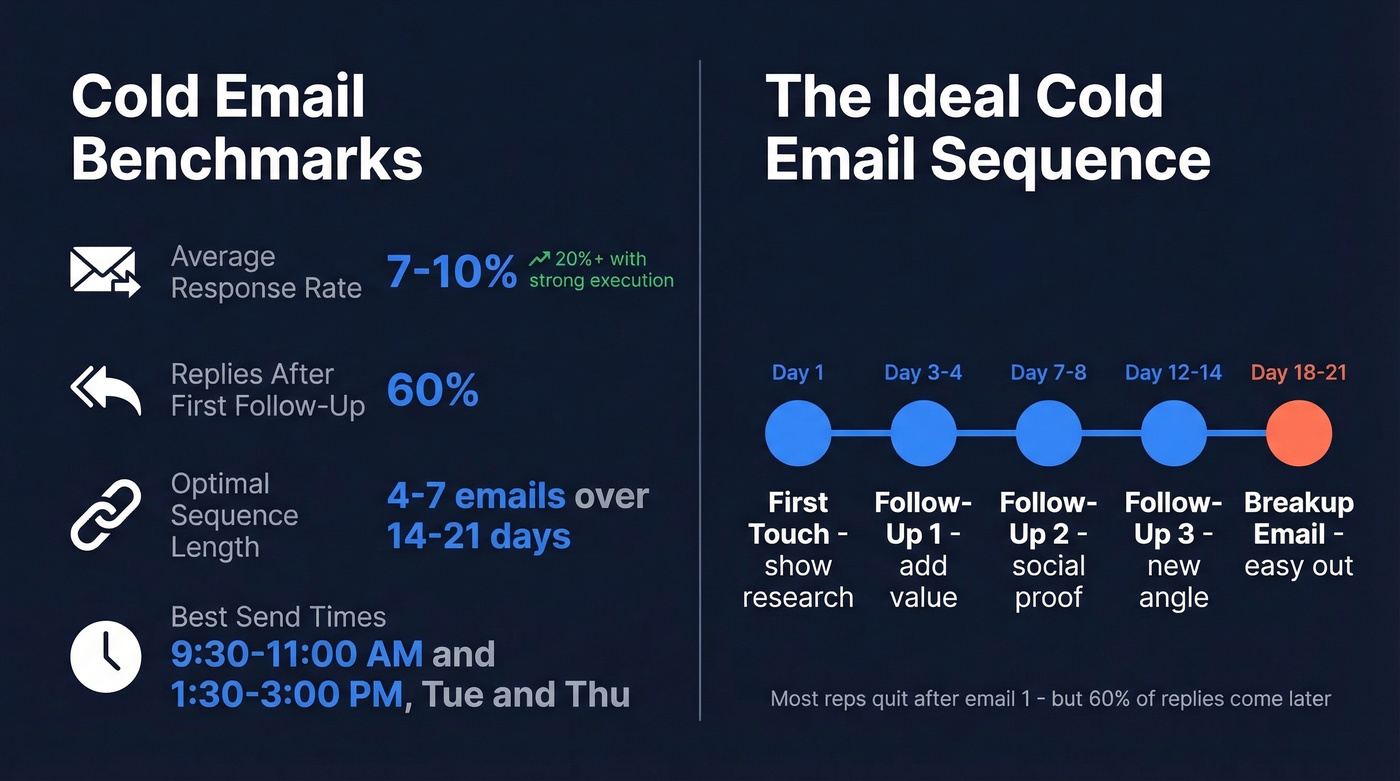
Here's the thing about cold email: the average response rate sits between 7% and 10%. Roughly 60% of replies come after the first follow-up, which means most reps quit too early. Cold emails should be even shorter than the 150-word general rule - aim for 50-125 words. (If you're building a sequence, start with this B2B cold email sequence framework.)
Cold email benchmarks:
- Response rate: 7-10% (20%+ with strong execution)
- 60% of replies come after the first follow-up
- Optimal sequence: 4-7 emails over 14-21 days
- Best send times: 9:30-11:00 AM and 1:30-3:00 PM, Tuesday and Thursday
Cold Outreach - First Touch The research reference in the first sentence proves you're not blasting a list.
Subject: [Specific pain point] at [their company]?
Hi [Name],
[One sentence showing research - reference a job posting, news, or initiative]. At [your company], we help [similar companies] [specific outcome with a number].
Would a 15-minute call this week make sense?
Best, [Your name]
Follow-Up #1 - Value-Add
Subject: Re: [original subject]
Hi [Name],
Following up on my note last [day]. Thought this might be useful - [link to case study or resource relevant to their problem].
Worth a quick conversation?
Best, [Your name]
Follow-Up #2 - Social Proof
Subject: How [similar company] solved [problem]
Hi [Name],
[Similar company] was dealing with [same pain point]. After [your solution], they [specific result - percentage, dollar amount, time saved].
Happy to share details in a 10-minute call. [Day] or [Day] work?
Best, [Your name]
Meeting Confirmation
Subject: Confirmed - [Day] at [Time]
Hi [Name],
Looking forward to our call on [Day] at [Time] [timezone]. Agenda:
- [Topic 1]
- [Topic 2]
- Next steps
[Meeting link]. See you then.
Best, [Your name]
Proposal Follow-Up
Subject: Thoughts on the proposal?
Hi [Name],
Checking in on the proposal I sent [date]. Happy to walk through questions or adjust scope.
Is there a good time this week for a quick call?
Best, [Your name]
Re-Engagement After Silence The "breakup email" works because it gives the recipient an easy out - and that often makes it easier for them to respond.
Subject: Should I close this out?
Hi [Name],
I haven't heard back, so I want to respect your time. If [problem you solve] isn't a priority right now, no worries - I'll close this thread.
If timing has just been off, happy to reconnect whenever it makes sense.
Best, [Your name]
Before sending any cold sequence, verify every address. A bounce rate above 5% tanks your domain reputation and kills deliverability for your entire team. (If you want the benchmarks and fixes, see email bounce rate and this email deliverability guide.) We've seen teams go from 35% bounce rates to under 4% just by running their lists through Prospeo's 5-step verification before hitting send - the free tier covers 75 verifications per month, which is enough to validate a small outbound campaign.

Customer Service
Customer service emails have a different job than outreach - they need to de-escalate, build trust, and make the next step obvious. Speed and empathy matter more than cleverness here.
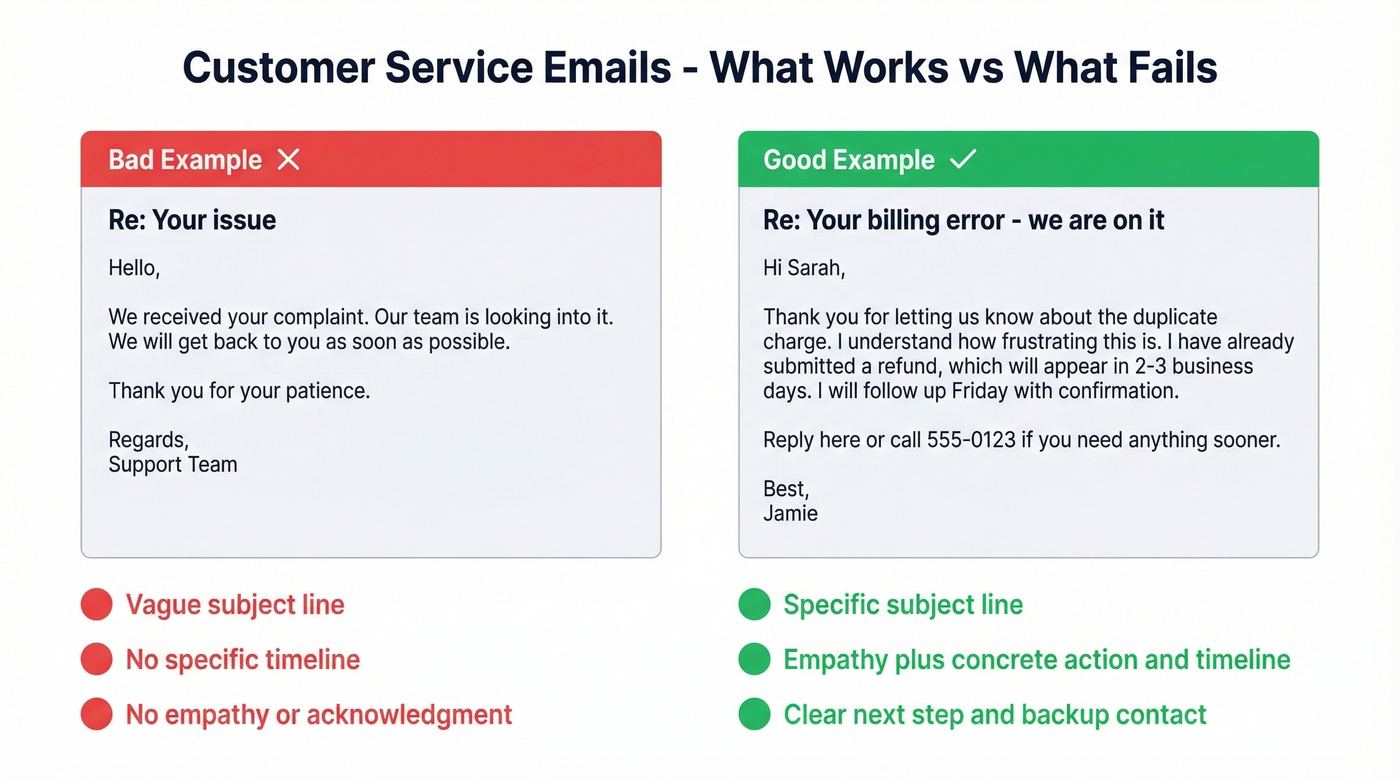
Complaint Response Acknowledging the frustration before jumping to the fix shows the customer they've been heard.
Subject: Re: [Original subject] - we're on it
Hi [Name],
Thank you for letting us know about [issue]. I understand how frustrating this is. Here's what we're doing: [specific action + timeline].
I'll follow up by [date] with an update. If you need anything before then, reply here or call [number].
Best, [Your name]
Onboarding Welcome
Subject: Welcome to [product] - here's your first step
Hi [Name],
Your account is live. Here's how to get started:
- [First step with link]
- [Second step]
- [Third step]
Hit any snags? [Support channel] is the fastest way to reach us.
Best, [Your name]
Review Request
Subject: How was your experience with [product]?
Hi [Name],
You've been using [product] for [timeframe], and I'd love to hear how it's going. A quick review on [platform] takes about 2 minutes: [link].
Thanks for being a customer.
Best, [Your name]
Payment Reminder
Subject: Invoice [#] - payment due [date]
Hi [Name],
Friendly reminder that invoice [#] for [amount] is due on [date]. You can pay via [payment method/link].
If already processed, please disregard.
Best, [Your name]
Service Update
Subject: [Product] update - what's changing on [date]
Hi [Name],
On [date], we're rolling out [change]. Here's what it means for you: [one sentence on impact]. No action needed on your end.
Full details: [link]. Questions? Reply to this email.
Best, [Your name]
Cancellation Acknowledgment
Subject: Your cancellation is confirmed
Hi [Name],
Your [product/plan] has been cancelled effective [date]. You'll retain access until then. If there's anything we could have done differently, I'd genuinely appreciate your feedback.
We'd love to have you back if your needs change.
Best, [Your name]
Career & Job Search
Career emails carry higher stakes than most - a sloppy resignation notice or a generic cover letter can follow you for years. These templates keep the tone polished without sounding stiff.
Cover Letter Email
Subject: Application - [Job title], [Company]
Hi [Hiring manager name],
I'm applying for the [job title] role. With [X years] in [relevant area] and experience [specific accomplishment], I'm confident I can contribute to [specific company goal].
Resume attached. Are you available for a brief call next week?
Best, [Your name]
Interview Thank-You Referencing a specific conversation topic proves you were engaged, not just going through the motions.
Subject: Thank you - [Job title] interview
Hi [Name],
Thank you for meeting today. I especially enjoyed discussing [specific topic] - it reinforced my excitement about the role.
I'm confident my experience in [relevant skill] would help the team [specific goal]. Looking forward to next steps.
Best, [Your name]
Recommendation Request For academic contexts - professors, advisors - use "Dear Professor [Last Name]" and attach your resume plus the opportunity description to reduce back-and-forth.
Subject: Would you write a recommendation for me?
Hi [Name],
I'm applying for [role/program] and would be grateful for a recommendation. You'd be a great reference given our work on [specific project].
The deadline is [date]. Happy to share key points if helpful.
Thank you, [Your name]
Resignation Notice
Subject: Resignation - [Your name], effective [date]
Hi [Manager],
I'm writing to formally resign from my position as [title], effective [last day]. I've valued my time at [company] and am grateful for [specific experience].
I'm committed to a smooth transition and happy to help train my replacement.
Thank you, [Your name]
Acceptance Confirmation
Subject: Offer accepted - [Job title]
Hi [Name],
I'm thrilled to accept the [job title] offer. The terms work for me, and I'm looking forward to starting on [date].
Let me know if there's anything I should prepare before my first day.
Best, [Your name]
Networking Introduction
Subject: Intro: [Person A] <> [Person B]
Hi [Person A] and [Person B],
I'd like to connect you two. [Person A] is [brief context]. [Person B] is [brief context]. I think you'd have a great conversation about [specific overlap].
I'll let you take it from here.
Best, [Your name]
Subject Lines That Get Opens
Your subject line is the gatekeeper. In cold email, personalized subject lines lift open rates by 22-36%. The sweet spot: 6-9 words, 36-50 characters.
Seven formulas that consistently perform, with the weak versions they replace:
| Weak Version | Formula | Strong Version |
|---|---|---|
| "Quick question" | Question | "Struggling with Q3 pipeline?" |
| "Some ideas" | Number | "3 ways to cut onboarding time" |
| "Following up" | Name + benefit | "[Name], quick win for your team" |
| "When you get a chance" | Urgency | "Budget approval needed by Friday" |
| "Interesting article" | Curiosity gap | "The metric your board actually cares about" |
| "Our results" | Social proof | "How [company] cut churn by 40%" |
| "Can we chat?" | Direct ask | "15 minutes to discuss [topic]?" |
Never use ALL CAPS - it's a spam trigger. Avoid exclamation marks in professional contexts. If the recipient can't tell what you want from the subject line, they won't open it. (Need more options? Browse these email subject line examples.)

A perfect professional email template means nothing if it bounces. Prospeo's 98% verified emails ensure your carefully crafted message actually reaches the inbox - not a dead address that tanks your domain reputation.
Stop perfecting emails that never get delivered.
Signatures That Build Trust
A good signature confirms who you are, makes it easy to reach you, and doesn't distract from the email itself.
The hierarchy that works: Name, Title, Company, Phone, Email, Website, Social (max 4 icons).
Stick to 2-3 colors, one font, 10-12pt size. If you include social links, pick the platforms where you're actually active - don't link a profile you haven't updated since 2022. A Calendly or booking link is useful for anyone in a client-facing role.
The biggest mistake? Signatures longer than the email itself. Keep it to 4-5 lines of text plus icons. No inspirational quotes, no legal disclaimers unless compliance requires them, and no banner images that break on mobile.
Cross-Cultural Email Etiquette
If you're emailing anyone outside your own country, the templates above need adjustment. 60% of email misunderstandings in global teams stem from tone interpretation, not language barriers. Your words are fine - your vibe is the problem.
American directness reads as abrupt in high-context cultures. In Japan, opening with a seasonal pleasantry before getting to business is customary - skipping it feels rude. In Germany and Switzerland, include explicit urgency markers like "Action Needed" or "Response Required by [Date]" in the subject line; vague timelines frustrate people in time-conscious cultures.
Date and time formats will trip you up:
| Region | Date Format | Time Format |
|---|---|---|
| US | MM/DD/YYYY | 12-hour (AM/PM) |
| Most of EU/LatAm | DD/MM/YYYY | 24-hour |
| China, Japan, Korea | YYYY/MM/DD | 24-hour |
Write "15 March 2026" instead of "3/15" to avoid ambiguity. For time, include the timezone: "2:00 PM EST / 19:00 CET."
Idioms to replace in international emails:
| Instead of... | Write... |
|---|---|
| Touch base | Schedule a check-in |
| Circle back | Follow up |
| Ballpark | Approximate estimate |
| Loop in | Include |
Most native English speakers don't realize how many idioms they use until they confuse a colleague in Sao Paulo or Seoul. When in doubt, choose clarity over personality.
AI Tools for Faster Writing
AI won't replace your judgment, but it saves you 20 minutes of staring at a blank screen. The key is matching the right tool to the right job. (If you're using AI for outreach, this AI for sales emails breakdown helps.)
For polishing and tone: Grammarly integrates into Gmail and Outlook, catches tone mismatches, and handles grammar without leaving your inbox. Free tier covers basics; Premium runs around $12/mo and adds tone detection and full-sentence rewrites. Most useful for non-native English speakers and anyone who writes emails three times longer than they need to be.
For full drafting: ChatGPT and Claude are the flexible options. Paste in context and get a solid first draft in seconds. The tradeoff is a copy-paste workflow - neither lives inside your inbox natively. Free tiers available, paid plans at $20/mo. One warning: AI defaults to corporate fluff. Always edit for brevity before sending.
For sales email coaching: Lavender scores your sales emails in real-time and tells you exactly what to fix. Purpose-built for SDRs and AEs running outbound. Free tier available; paid from around $29/mo. If you're sending more than 50 cold emails a week, Lavender pays for itself. Skip it if you're only doing internal comms - it's overkill for that use case.
For inbox-native drafting: Gemini in Gmail drafts and refines emails without leaving Workspace. Included with eligible Google Workspace plans, making it a low-friction option for Google-first teams. Decent for routine emails, needs editing for anything nuanced.
For power users: Superhuman combines a premium email client with AI - auto-drafts, instant replies, keyboard-shortcut speed. At around $30/mo it's a luxury, but power users swear by it.
| Tool | Best For | Pricing | Gmail/Outlook |
|---|---|---|---|
| Grammarly | Polishing & tone | Free / ~$12/mo | Both |
| ChatGPT / Claude | Full drafts | Free / $20/mo | Copy-paste |
| Lavender | Sales email scoring | Free / ~$29/mo | Both |
| Gemini | Inbox-native drafts | Included w/ Workspace | Gmail only |
| Superhuman | Speed + AI | ~$30/mo | Own client |
| Jasper | Marketing copy | From $69/user/mo | Standalone |
| Gmelius | Team inbox + AI | From $21/user/mo | Gmail |
Using Templates Without Sounding Robotic
A reusable professional email template saves time, but only if you customize it before hitting send. The biggest mistake people make is treating templates as finished emails rather than starting frameworks.
Let's be honest - we've all received an email where someone forgot to swap out the bracketed placeholder, and it immediately killed their credibility. Here's how to avoid being that person:
Swap every bracketed field with real details - names, dates, specific projects. Adjust the tone to match your relationship with the recipient; a message to a long-time client should sound different from one to a first-time prospect. Delete any sentence that doesn't apply to this specific situation, because shorter is always better. Then read the final version out loud. If it sounds like a form letter, rewrite the opening line.
For teams that send similar emails regularly, a shared library helps. Tools like HubSpot, Gmelius, or even a shared Google Doc keep everyone aligned on messaging and prevent reps from reinventing the wheel every Monday morning. (If follow-ups are the bottleneck, use these sales follow-up templates.)
Before You Hit Send
A quick checklist before every important email. Bookmark it or print it.
- Verify the recipient's email address. For cold outreach, one bounced email can flag your entire domain. Keep bounce rates under 2% for healthy deliverability; above 5% can seriously damage your domain reputation.
- Check your subject line. Is it 6-9 words? Does it tell the reader what's inside?
- Confirm a single CTA. If you're asking for two things, you're asking for nothing.
- Proofread for tone. Read it out loud. Does it sound like you, or like a robot wrote it?
- Check mobile rendering. Over 60% of emails are opened on mobile. If your formatting breaks on a phone, it doesn't matter how good the copy is.
- Remove filler phrases. "I just wanted to," "I hope this email finds you well," "Per my last email" - cut them all.
- Confirm attachments. If you mentioned an attachment, make sure it's actually attached.
- Review your signature. Is it current? Does the phone number work?
Look, if your deals average under $15k, you don't need a $20k/year sales engagement platform. You need clean templates, verified emails, and the discipline to follow up four times. In our experience, the templates above plus a verification tool will outperform most enterprise stacks at a fraction of the cost. We've watched teams triple their pipeline just by fixing their data hygiene and actually following up - no fancy software required.
Writing cold outreach? You need more than a template - you need the right contact. Prospeo gives you 300M+ professional profiles with 30+ filters so every personalized email hits a real decision-maker's inbox.
Find the person, then send the perfect email.
FAQ
What makes a good professional email template?
A specific subject line (6-9 words), a single clear ask in the first sentence, and a total length of 100-150 words. Templates that earn replies respect the reader's time and make responding easy - one CTA, not three. Emails with a single CTA get 371% more clicks than those with competing asks.
What's the best greeting for a professional email?
"Hi [Name]" works for the vast majority of business contexts and lifts reply rates by up to 142% compared to generic greetings. Use "Dear [Title] [Last Name]" for formal or international correspondence. Avoid "Hey" unless you've already established casual rapport.
How soon should I follow up on an unanswered email?
For urgent matters, 2-3 business days. For non-urgent emails, 5-10 business days. Don't follow up same-day unless it's genuinely time-sensitive. 60% of cold email replies come after the first follow-up, so a single unanswered message doesn't mean "no" - it usually means "busy."
How do I make sure my outreach emails don't bounce?
Verify every address before sending. Keep bounce rates under 2% for healthy deliverability, since anything above 5% can seriously damage your domain reputation. Prospeo's 5-step verification catches invalid addresses, spam traps, and honeypots with 98% accuracy, and the free tier covers 75 emails per month - enough to validate a small outbound campaign.