

The Only Prospecting List Template You'll Actually Use in 2026
You've downloaded a prospecting list template before. Probably three this quarter. Each one was a blank spreadsheet with six column headers and zero guidance on what to actually put in them. You opened it, stared at it, closed the tab.
The problem isn't the spreadsheet. It's that outbound teams need an average of 4.81 touches to get a single response - every bad row doesn't waste one email, it wastes five. You need a template with the right fields, a filled example, and a verification step that keeps your domain off blacklists.
What You Need (Quick Version)
- Grab the free template below - core contact fields, pipeline tracking, and intent fields with conditional formatting pre-built.
- Fill in at least one example row using the column guide. One real row beats a hundred empty headers.
- Verify every email before you outreach. Unverified lists are the single biggest reason outbound campaigns silently fail.
What a Prospecting List Actually Is
A prospecting list isn't a contact database and it isn't a lead list. A contact database is everyone you've ever collected. A lead list is people who raised their hand. A prospecting list is intentional outbound - a curated set of people you've decided to pursue because they match your ideal customer profile.
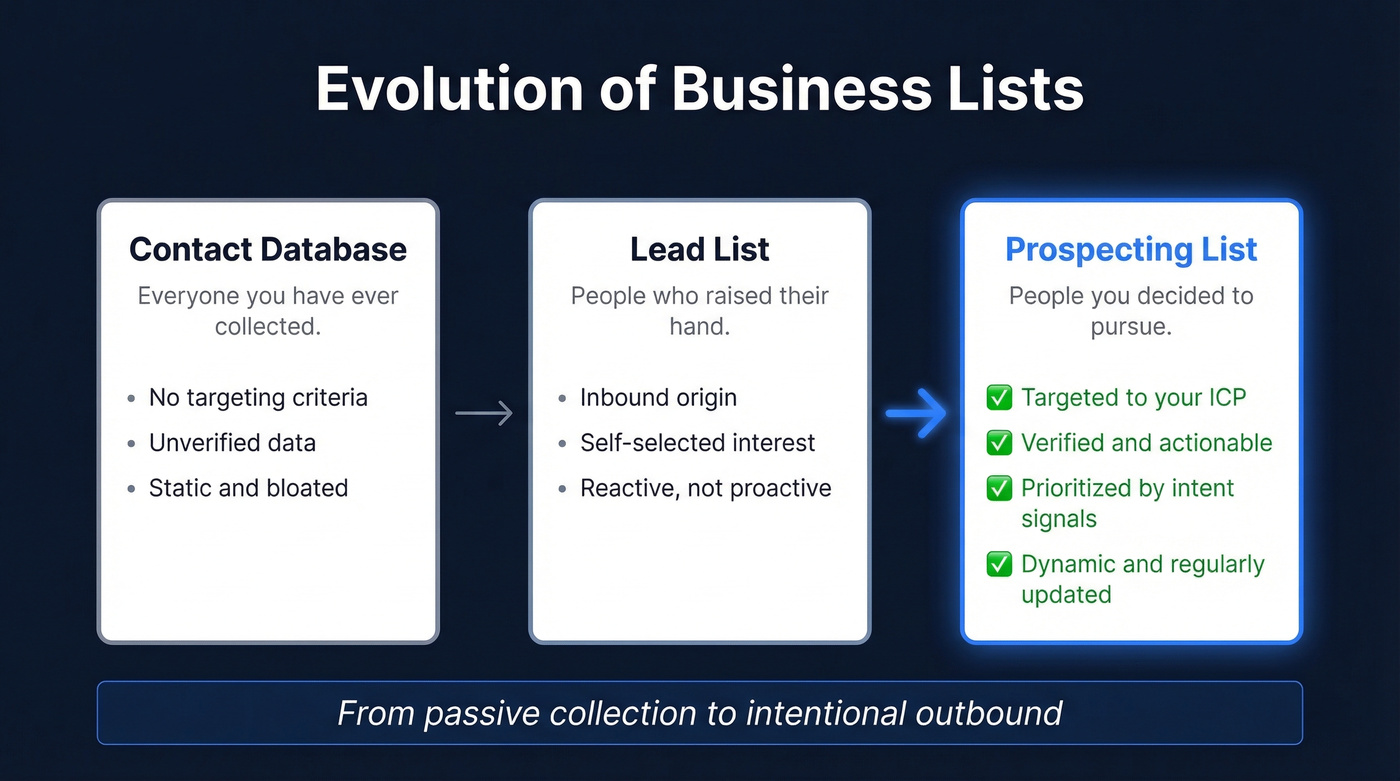
A strong list has four characteristics: targeted (built against your ICP, not scraped randomly), actionable (verified emails and direct dials), prioritized (ranked by intent or engagement signals), and dynamic (updated as people change jobs, companies raise funding, or buying signals shift). If your list isn't all four, it's just a spreadsheet with names in it.
The Cost of a Bad Sales List
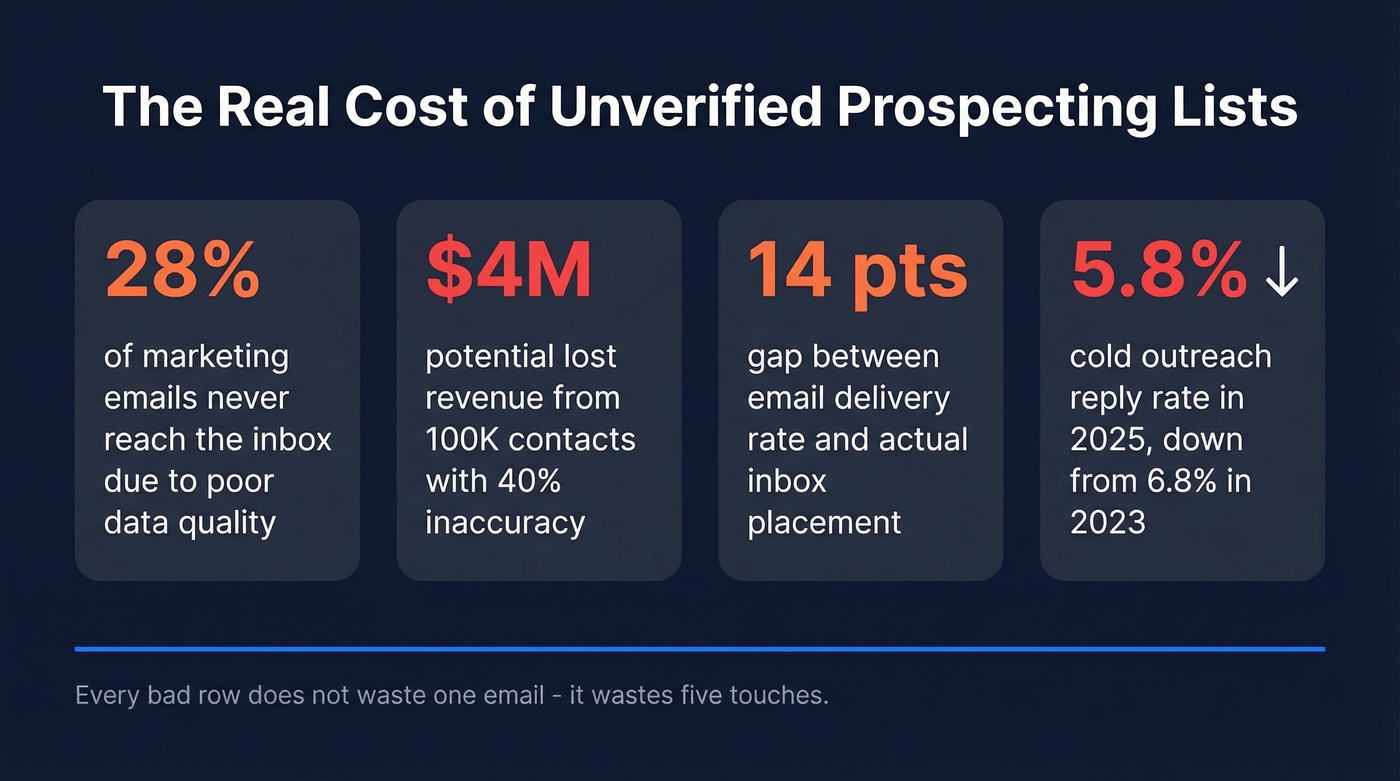
The 1-10-100 rule - a data quality principle dating to 1992 - puts it bluntly: $1 to verify a contact at entry, $10 to correct it later, $100 per contact when bad data flows into sequences, CRM records, and pipeline forecasts. Scale that to 100,000 contacts with 40% inaccuracy, and you're looking at up to $4M in lost revenue.

The practical damage is more immediate. 28% of marketing emails never reach the inbox due to poor data quality. There's a 14-point gap between delivery rate (98.16%) and actual inbox placement (84.3%) - your emails can "deliver" without ever being seen. Cold outreach reply rates dropped from 6.8% in 2023 to 5.8% by 2025, and the trend hasn't reversed. You can't afford to waste what little response you're getting on bounced or spam-filtered messages.
The Free Prospecting List Template
We built a template with everything below - three tiers of fields, conditional formatting for overdue follow-ups, data validation dropdowns, and a filled example row.
→ Open in Google Sheets | → Download as Excel

You just downloaded a template with the right fields. Now you need verified data to fill it. Prospeo gives you 300M+ profiles with 98% email accuracy, intent signals, tech stack data, and job change triggers - every field in this template, populated and verified in seconds.
Fill every column with data you can actually trust at $0.01 per email.
Field-by-Field Guide for Your Sales Prospect List
Core Fields (Contact + Company)
Non-negotiable. Every row needs these.
| Field | What to Put | Why It Matters |
|---|---|---|
| Full Name | First + last | Personalization basics |
| Job Title | Exact title | Relevance filtering |
| Work email | Primary outreach channel | |
| Phone | Direct dial | Multi-touch sequences |
| Company | Legal name | CRM deduplication |
| Industry | Standard category | Segment targeting |
| Company Size | Employee count | ICP qualification |
| Revenue | Annual (est.) | Deal sizing |
| HQ Location | City, state/country | Territory routing |
| Website | Company URL | Research shortcut |
Don't skip the company-level fields. A name and email without company context is useless for personalization - and 58% of teams personalize templates and scripts for each prospect. You can't personalize what you don't know.
Pipeline & Tracking Fields
This is where a prospecting spreadsheet becomes a working document instead of a static export.
The comments column is the one most templates leave out and the one reps actually need. After your third call with a prospect, you won't remember what they said in the first one - and as noCRM's research confirms, that context is what separates a productive follow-up from a generic one.
Use fields like Deal Stage, Lead Status, Last Contact Date, and Next Action (specific task + date) to prevent prospects from going cold. Win Probability lets you sort by likelihood and focus your energy. Assigned Rep creates accountability. And Comments - call notes, objections raised, personal details mentioned - preserves the institutional memory that makes multi-touch outreach actually work.
If you're building a repeatable follow-up system, pair this sheet with a set of sales follow-up templates so reps don't reinvent messaging every touch.
Intent Fields for 2026
Here's the thing: if your sales prospect list template looks the same as it did in 2018, you're bringing a knife to a gunfight. With 54% of teams now using AI for personalized outbound, your template needs to support signal-based, multi-touch outreach - not name-and-email blasts.
| Field | What to Put | Why It Matters |
|---|---|---|
| Recent Funding | Round + amount + date | Timing trigger |
| Key Hiring | Roles being hired | Growth/pain signal |
| Tech Stack | Relevant tools used | Competitive displacement |
| Preferred Channel | Email/phone/social | Respect preferences |
| Timezone | UTC offset or city | Send-time optimization |
| Job Change Trigger | New role < 90 days | Warm intro window |
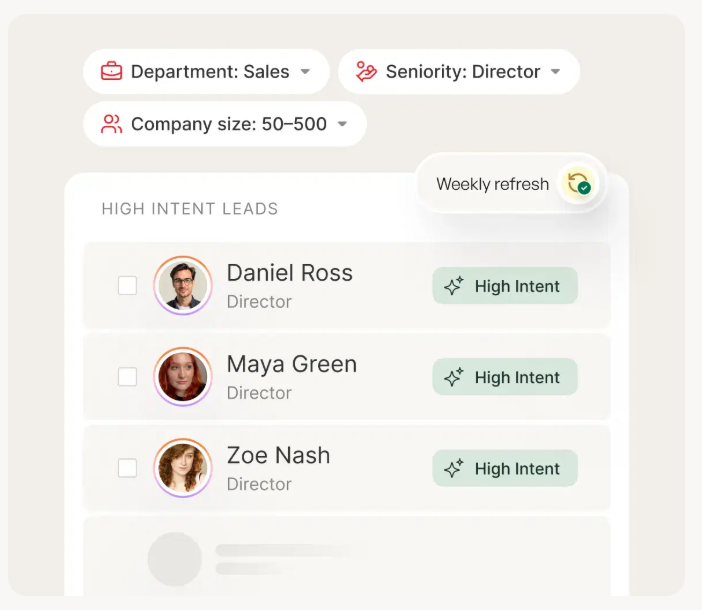
A prospect who just raised a Series B and is hiring three SDRs is a completely different pitch than someone at a flat-growth company with no open roles. Intent triggers like funding rounds, new job postings, and tech stack changes are what separate high-converting lists from spray-and-pray.
To operationalize these signals, use a simple lead scoring model so your list stays prioritized as it grows.
Spreadsheet Automation Tips
A few formulas and formatting rules turn a static sheet into something that actually nudges you to take action.
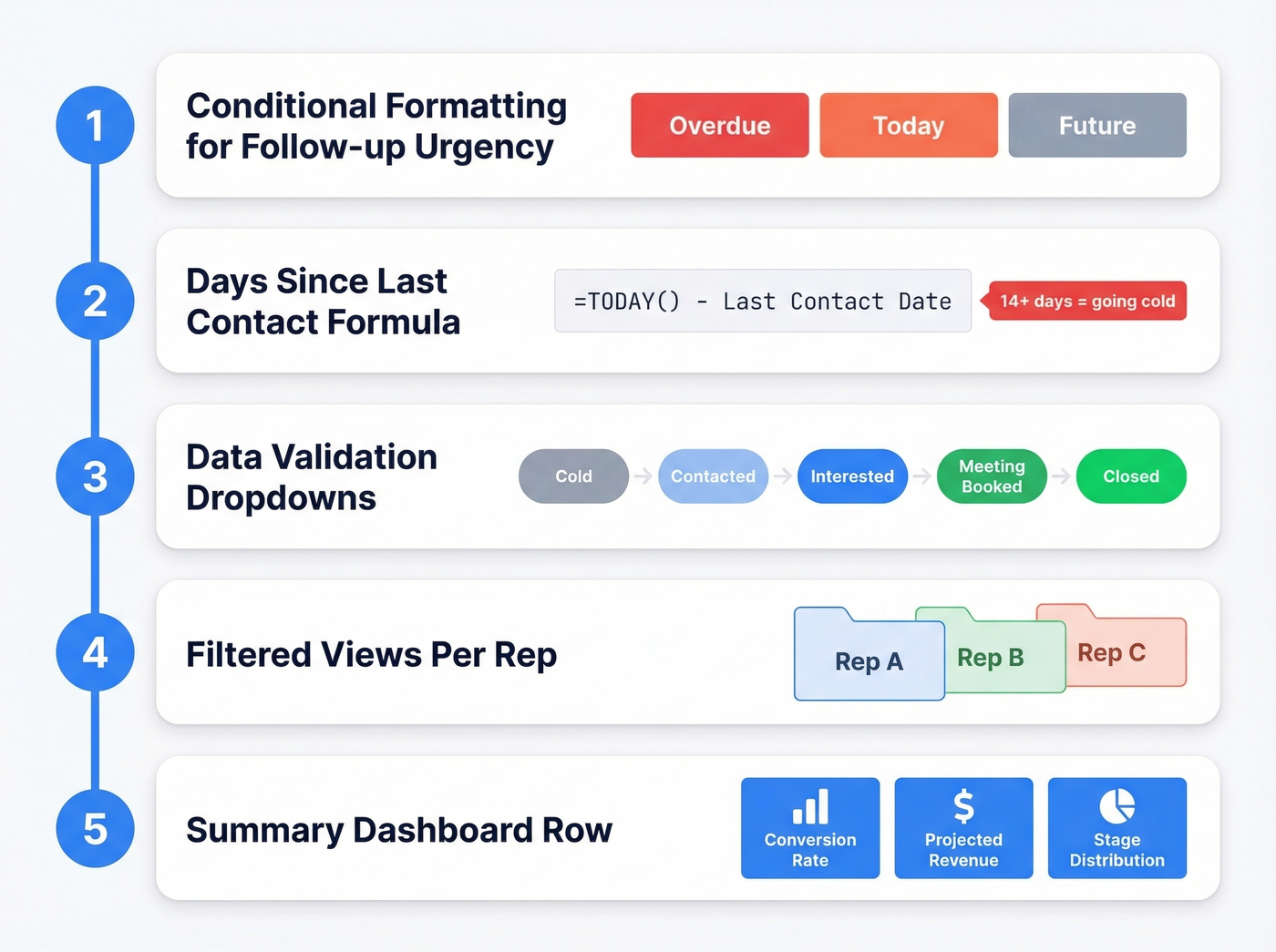
Conditional formatting for follow-up urgency. Set rules on your "Next Action" date column: red if the date is past, orange if today, grey if future. This is the single most useful automation in any prospecting spreadsheet - OnePage CRM's template uses this exact pattern, and we've found it catches more stale prospects than any CRM reminder.
Days-since-last-contact formula. In a helper column, use =TODAY() - [Last Contact Date]. Sort descending to find prospects going cold. Anything over 14 days without a touch is probably dead unless you re-engage.
Data validation dropdowns. For Deal Stage, create a dropdown (Cold → Contacted → Interested → Meeting Booked → Closed). This prevents free-text chaos and makes filtering work. For Lead Status, do the same - "New," "Working," "Nurture," "Disqualified." (If you want a clean taxonomy, use a standard lead status setup.)
Filtered views per rep. In Google Sheets, create saved filter views so each rep sees only their prospects while the master sheet stays intact.
Summary dashboard row. Add a row at the top with conversion formulas like =COUNTIF(Stage,"Meeting Booked")/COUNTA(Name) to track your list's health at a glance. Projected revenue, response rates, and stage distribution all belong here.
Five Mistakes That Kill Your List
Building once and never refreshing. Lists decay within weeks. People change jobs, companies get acquired, phone numbers go dead. A list you built in January is a different list by March.
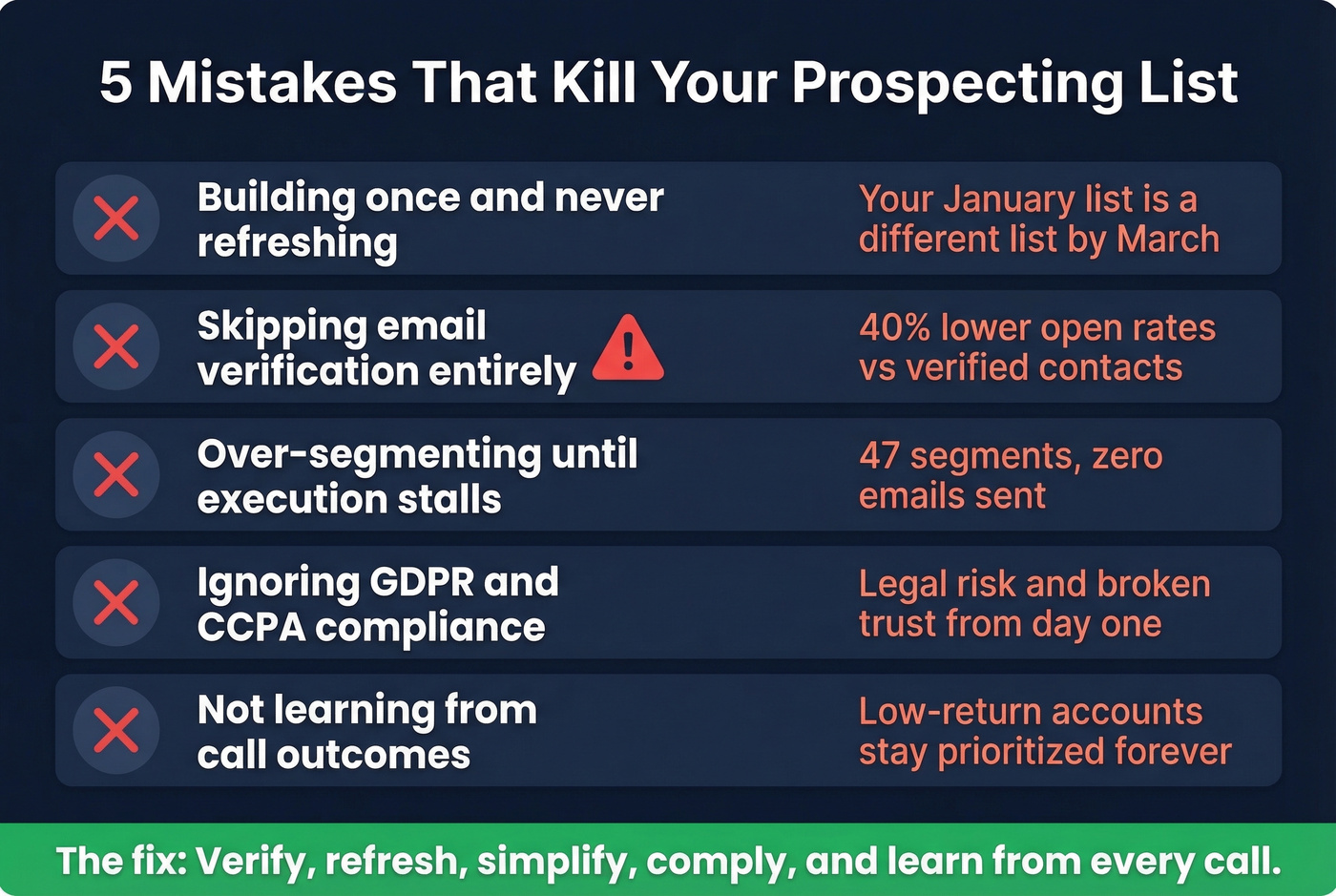
Skipping verification entirely. This is the most expensive mistake on the list. Every unverified email is a coin flip between a delivered message and a bounce that damages your sender reputation. Verified contact data can drive a 40% increase in email open rates - the gap between verified and unverified isn't marginal, it's massive.
If you're seeing bounces or spam placement, fix the root cause with an email deliverability guide and a process to improve sender reputation.
Over-segmenting until execution stalls. We've seen teams create 47 micro-segments with custom messaging for each one and send zero emails in a month. Start with 3-5 segments max. Momentum matters more than perfection.
Ignoring compliance. GDPR and CCPA aren't optional in 2026. If you're prospecting into the EU or California, build your list and outreach process to comply from day one: document your lawful basis where applicable, honor opt-outs, and keep your data handling clean. (If you're unsure where the line is, read Is It Illegal to Buy Email Lists?.)
Not learning from call outcomes. If you aren't capturing what happens on calls and feeding that back into your list, low-return accounts stay prioritized while high-potential ones get buried. The comments column exists for a reason - use it.
Verify Before You Outreach
This is the step every other prospect list guide skips, and it determines whether your outreach actually works.
Email ROI runs $36-$42 per $1 spent - but only if your emails land. With reply rates at historic lows, you need every message to reach an inbox, not a spam folder. Practitioners on r/salesdevelopment don't just verify once - they run lists through two verifiers minimum before launching sequences. That's not paranoia. That's experience.
Prospeo's email finder handles this well. Upload your CSV, and it runs every email through a 5-step verification process with catch-all handling, spam-trap removal, and honeypot filtering. You get contacts back enriched with 50+ data points - not just a pass/fail on the email address. The 98% email accuracy rate means you aren't burning your domain on bad data, and the free tier gives you 75 emails/month to verify your first real list without spending anything.
A beautifully organized spreadsheet full of unverified emails is just a well-formatted list of potential bounces. Verify first, outreach second. Always.
When to Graduate From Spreadsheets
At small scale, a prospecting list template in spreadsheet form works great. But the typical DIY stack on Reddit looks like this: Sales Navigator (~$99/mo) for targeting, an extraction tool like Phantombuster, enrichment through Apollo (~$49/mo), manual CSV export. That's $150+/mo before you even start verifying, and it breaks at higher volume when duplicate management becomes a nightmare and two reps email the same prospect on the same day.
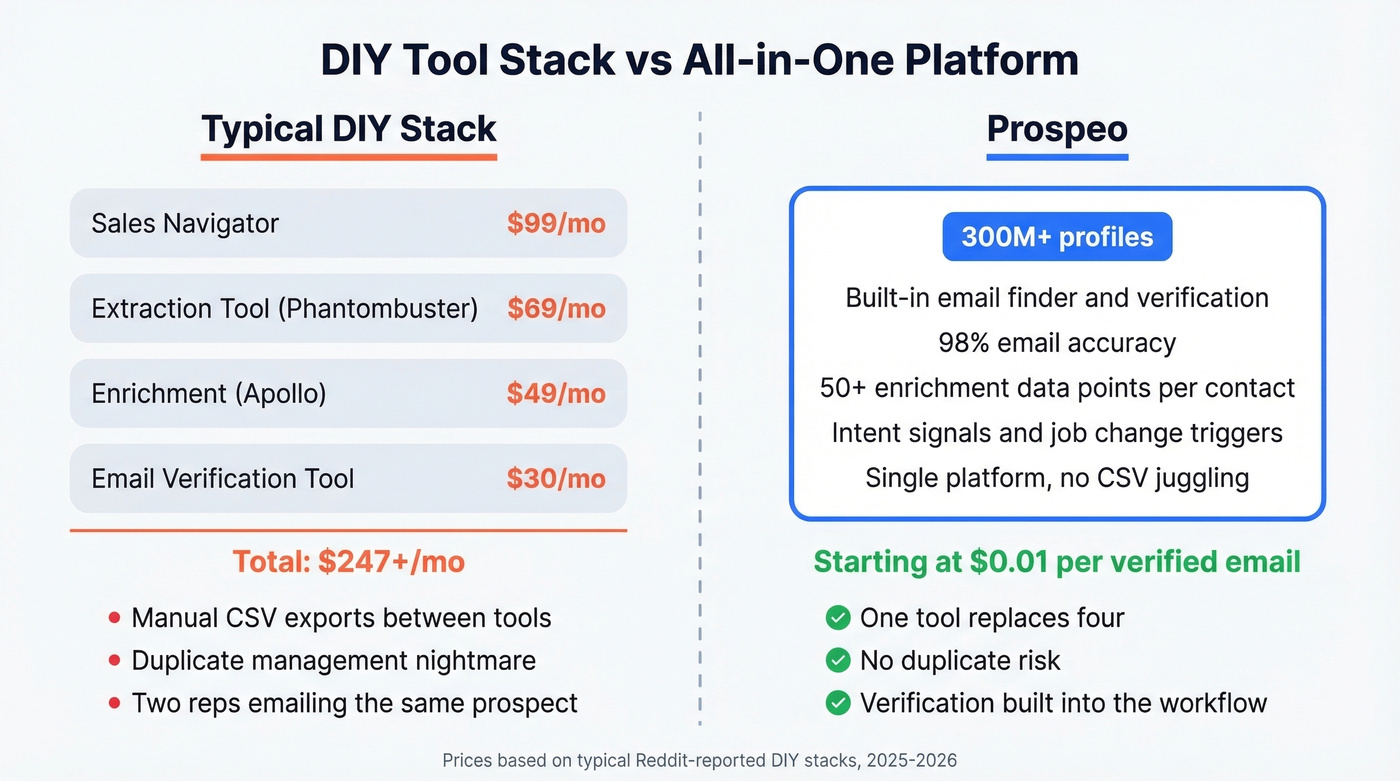
The graduation path isn't "buy a CRM." It's getting a data provider with built-in verification. Instead of stitching together 3-4 tools, a platform like Prospeo's database lets you search 300M+ profiles with 30+ filters - intent signals, technographics, headcount growth, funding - get verified contacts from the start, and export directly to your CRM or sequencer. That eliminates the extraction-enrichment-verification chain entirely. Data refreshes every 7 days versus the 6-week industry average, so the contacts you export today are still accurate next week.
If you're evaluating providers, compare options in our guide to the best sales prospecting databases and data enrichment services.
Skip this path if your list is under 50 prospects and you're a solo founder. The spreadsheet template above will serve you fine until volume forces the upgrade.
Bad data costs $100 per contact once it hits your sequences. Prospeo's 5-step verification and 7-day data refresh cycle mean every row in your prospecting list stays accurate - not just on day one, but week after week. Export directly to your spreadsheet or CRM with 50+ data points per contact.
Skip the manual research. Get a verified list in minutes, not hours.
FAQ
What is a prospecting list template?
A prospecting list template is a pre-built spreadsheet with the columns, formatting, and structure you need to organize outbound sales prospects. The best ones include pipeline tracking, intent signal fields, and verification status - so you're working a living document, not a static contact dump.
What fields should a sales prospect list include?
At minimum: name, job title, email, phone, company, industry, and company size. For 2026, add intent signals like recent funding and key hiring, plus tech stack, deal stage, and next action date. More context per row means better personalization and fewer wasted touches.
How often should I update my prospecting list?
Tier 1 target accounts need weekly refreshes. General pipeline prospects require a monthly pass at minimum. Job changes and funding rounds can make data stale within days, which is why automated refresh cycles matter once you're past the spreadsheet stage.
Can you share a prospect list example?
A strong prospect list example includes a filled row like: Jane Smith, VP of Sales, jane@acme.com, +1-555-0123, Acme Corp, SaaS, 200 employees, $15M ARR, Austin TX - plus pipeline fields (Stage: Cold, Next Action: Send intro email June 10) and intent signals (Series A closed May 2026, hiring 2 AEs). That single row gives you enough context for a personalized first touch.
Google Sheets or Excel for prospecting?
Google Sheets wins for most teams. It's free, collaborative, and makes sharing instant. Excel handles very large datasets better offline, but for a prospect list under 5,000 rows, real-time collaboration in Sheets is the clear advantage.