

Sales Email Automation: The 2026 Playbook
A RevOps lead we know launched a 10,000-email sequence last quarter. Beautiful copy, tight ICP, solid offer. The campaign bounced 19% on day one, tripped a spam filter on day two, and by day three the domain was flagged.
The problem wasn't the sequence. It was the data underneath it.
With roughly 392 billion emails sent daily (Mailjet's 2026 email trends report has the stat), inboxes are guarded, filters are jumpy, and "spray and pray" is basically a self-inflicted outage. Sales email automation in 2026 isn't about sending more. It's about sending smarter: verified contacts, authenticated domains, and sequences that earn replies instead of spam complaints.
And yes, automation should give reps their week back. Outreach has reported that teams spend only 29% of their time actually selling, and that modern automation can save about 4.5 hours per rep per week on research and follow-ups. That's real leverage (noun, not the verb) if you build the foundation first.
What you need (quick version)
You need two things: one tool to get verified contacts, and one tool to send sequences. Everything else is optional until you're already booking meetings.
- Solo / small team: Lemlist ($55/mo) + a free verification tier for 75 emails/month. Under $60/month total.
- SDR team (1-10 reps): Instantly ($30-37/mo) or Saleshandy ($25-36/mo) + a paid verification plan. Under $100/month per rep.
- Mid-market (10-50 reps): Salesloft or Outreach for sequencing + Prospeo for data quality. Budget $150-200/user/month all-in.
Your sending tool's only as good as your data. Pair any sequencer with a dedicated verification layer and you'll avoid the domain-reputation disasters that kill campaigns before they start.
What it is (and isn't)
Most guides lose the plot here. They lump cold outbound, marketing drip campaigns, and ecommerce transactional emails into one bucket. They're different disciplines with different tools, different compliance rules, and different success metrics.
Using Mailchimp or ActiveCampaign for cold outbound is like bringing a minivan to a Formula 1 race. They're built for opted-in subscribers, not cold prospects, so you'll hit sending limits, trigger abuse flags, and put your sending reputation at risk fast.
| Cold email automation | Marketing automation | Ecommerce automation | |
|---|---|---|---|
| Purpose | Book meetings with prospects | Nurture opted-in leads | Drive purchases |
| Audience | Never heard of you | Subscribed/downloaded | Bought or browsed |
| Tools | Instantly, Saleshandy, Lemlist | HubSpot, ActiveCampaign | Klaviyo, Mailchimp |
| Opt-in? | No (legitimate interest) | Yes | Yes |
| Typical safe volume | 10-15/inbox/day | Thousands per send | Triggered by behavior |
Most teams start with simple autoresponders and graduate to branching sequences, scoring, and triggers. If you're here for sales email automation, you almost certainly need the first column.
Let's build the infrastructure for it.
The math behind automated outbound
Before you pick tools, you need the numbers. They explain why "just send more" fails, and why inbox infrastructure matters more than yet another rewrite of your first line.
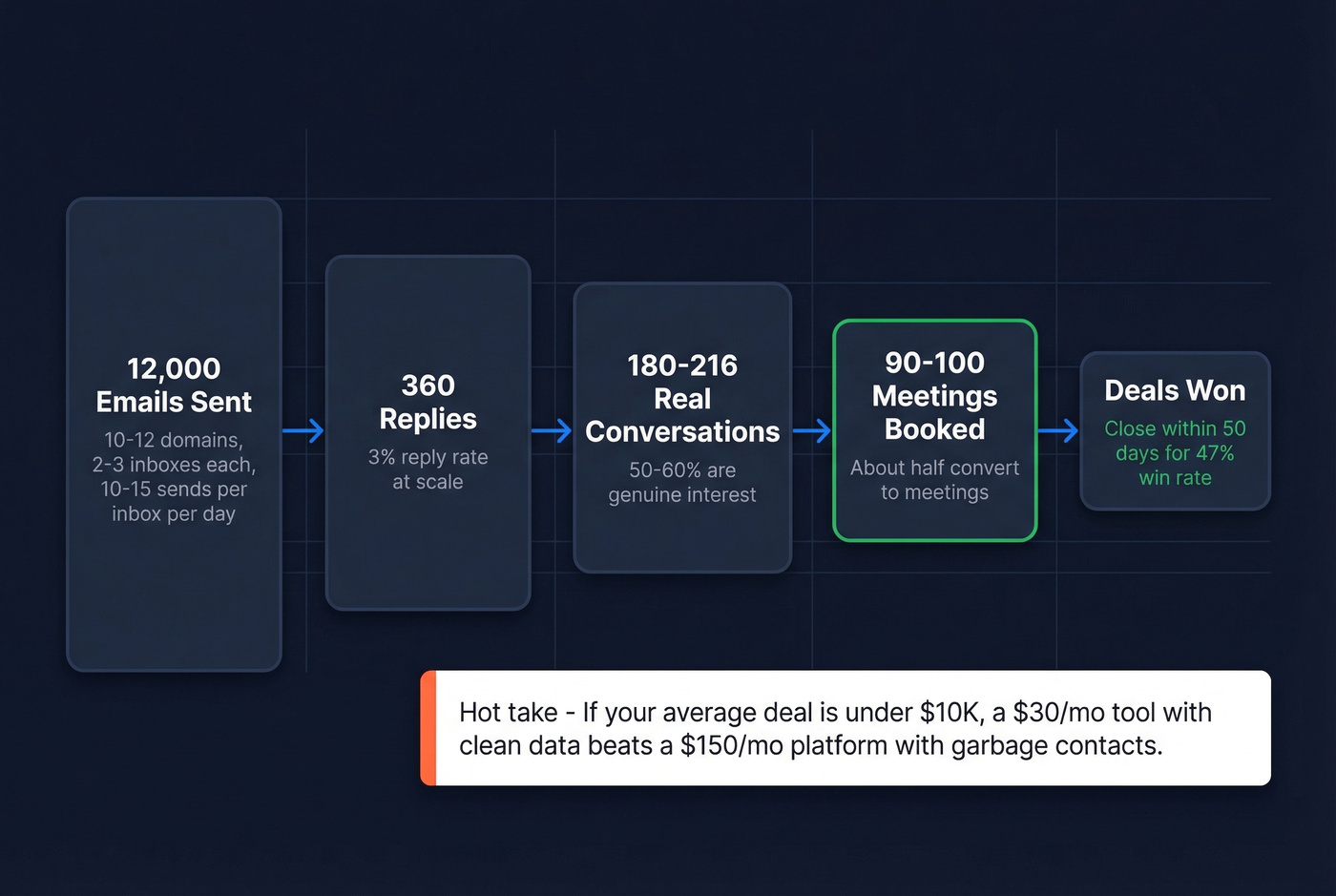
A single inbox should send 10-15 cold emails per day. That's the safe ceiling in 2026 for most teams that want consistent inbox placement (see email velocity). To reach 400 emails per day, you typically need 10-12 secondary domains with 2-3 inboxes each. That gets you to roughly 12,000 emails per month without doing anything reckless.
Now the part people forget: reply math is brutal, but it's predictable.
At a 3% reply rate (solid at scale), 12,000 sends yields 360 replies. If 50-60% are real conversations and about half of those convert to meetings, you're looking at 90-100 meetings per month from a system that's run well. That's why teams that stop "hand-following-up" and start sequencing correctly feel like they hired extra SDRs (more on sequence management).
Speed matters too. Outreach's analysis has shown opportunities closed within 50 days win at 47%, versus about 20% beyond that window. Automation compresses the timeline by removing dead time between touches, which is where deals quietly go to die.
Hot take: if your average deal size is under $10K, you probably don't need Salesloft or Outreach. A $30/month cold email tool with clean data will outperform a $150/month platform fed garbage contacts every single time.
Deliverability: the foundation that matters most
None of the math works if your emails land in spam. Deliverability is the unsexy part that separates teams booking meetings from teams burning domains, and the consensus on r/sales and cold email subreddits is pretty consistent: infrastructure is where most campaigns fail, not copy (use an email deliverability guide if you need a full checklist).
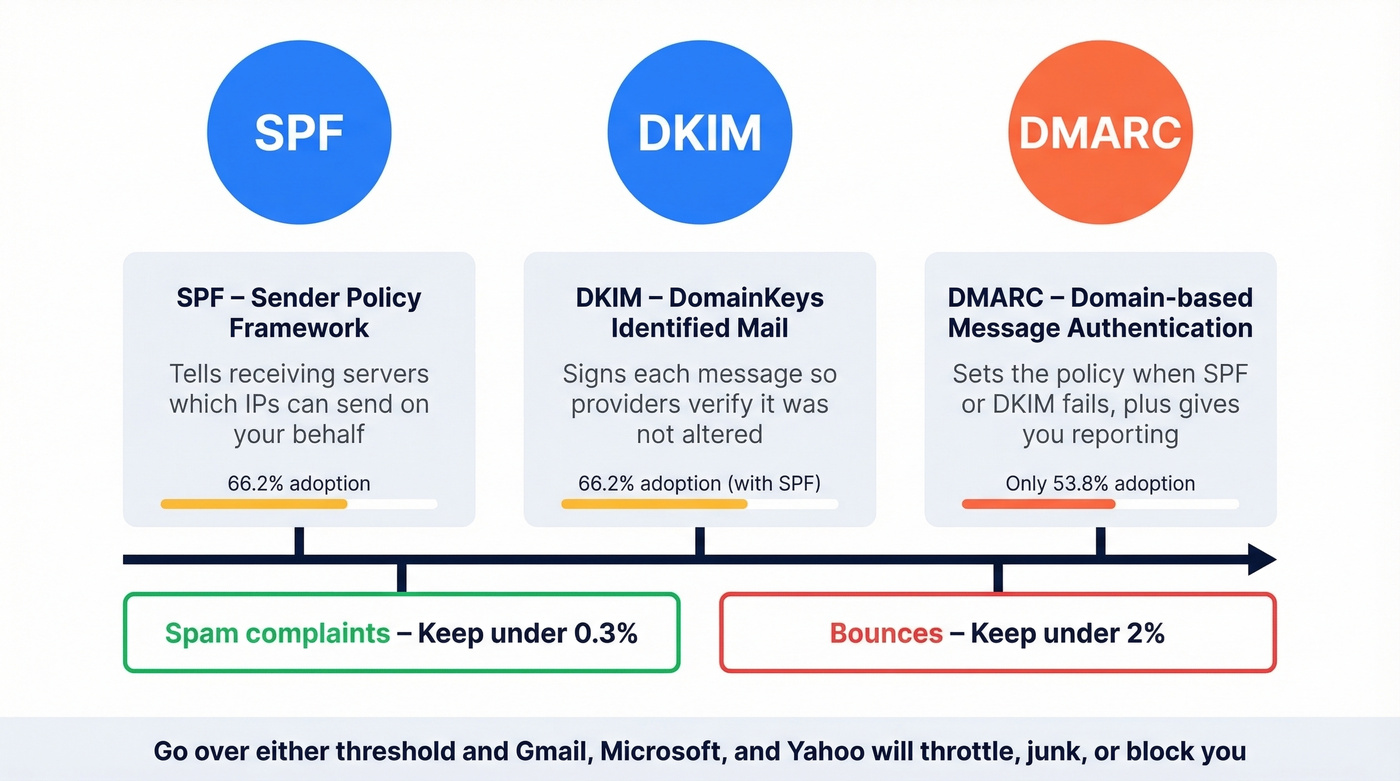
Authentication isn't optional. Every sending domain needs three records configured:
- SPF tells receiving servers which IPs are allowed to send on your behalf
- DKIM signs each message so providers can verify it wasn't altered
- DMARC sets the policy for what happens when SPF or DKIM fails, and gives you reporting
Mailjet's 2026 report puts adoption at 66.2% for SPF+DKIM, but only 53.8% for any DMARC policy. A lot of those DMARC setups are still p=none, which is basically "collect reports and hope." Move to enforcement (p=quarantine, then p=reject) once you're confident your sending sources are clean (see DMARC alignment).
Two operational thresholds we tell every team to memorize:
- Spam complaints: keep them under 0.3%
- Bounces: keep them under 2% (benchmarks + fixes: email bounce rate)
Go over either and Gmail, Microsoft, and Yahoo will throttle you, junk you, or block you. They don't care that your copy is "personalized."
Warmup protocol: start new inboxes at 5-10 emails per day and ramp over 4-6 weeks. Keep warmup running after you launch real campaigns (tool options: best unlimited email warmup tools). You're "done" warming up when seed tests show 80%+ inbox placement and your metrics stay stable.
Monitor it weekly with:
- Google Postmaster Tools
- Microsoft SNDS
One detail most guides skip: set up a custom tracking domain via CNAME (full setup: tracking domain). Shared tracking domains pool your reputation with everyone else on that platform. That's a bad bet.

You just read why bounces above 2% torch your domain reputation. Prospeo's 5-step verification - catch-all handling, spam-trap removal, honeypot filtering - delivers 98% email accuracy across 143M+ verified emails. At $0.01 per email, cleaning your list costs less than one bounced send costs your reputation.
Stop feeding bad data into good sequences. Verify before you send.
Data quality: the step everyone skips
Bad data is the fastest way to kill a cold email program. Not "bad subject lines." Not "wrong send time." Data.
A 5% bounce rate doesn't just waste sends. It tells inbox providers you don't maintain your lists, and they respond by routing everything to spam. We've watched teams go from healthy deliverability to blacklisted in a week after importing an unverified list. It's painful, and it's avoidable, and it's the kind of mistake that makes a RevOps person want to throw their laptop.
Purchased and scraped lists are the quickest path to that outcome. Skip them. If your boss is pushing for it, push back harder (and if you need ammo, see Is It Illegal to Buy Email Lists?).
The fix is boring and effective: verify every email address before it enters a sequence, and keep verifying as you scale. This is where a dedicated data layer earns its keep (options: data enrichment services).
Prospeo is built for this exact job. It runs a 5-step verification process with catch-all handling, spam-trap removal, and honeypot filtering, and it delivers 98% email accuracy across 143M+ verified emails with a 7-day refresh cycle. In our experience, that refresh cadence matters more than people expect, because job changes and domain changes are constant in the segments that do the most outbound.
A concrete scenario: you're launching a new outbound motion to IT leaders at 200-2,000 employee companies. You pull 8,000 contacts, enrich them, and push them into your sequencer. If even 4-5% are invalid, your first week is going to look like "random deliverability issues" and "sudden open-rate collapse," and you'll waste days debugging copy and sending times while the real issue is the list.
Clean list first. Then sequence.
How to build a sales email sequence
Multi-step sequences beat one-off emails because they create more chances to be seen, and they let you vary the angle without sounding like you're repeating yourself. In practice, we see well-structured sequences produce about 3x the replies of standalone sends, even when the copy isn't fancy (a deeper build guide: B2B cold email sequence).
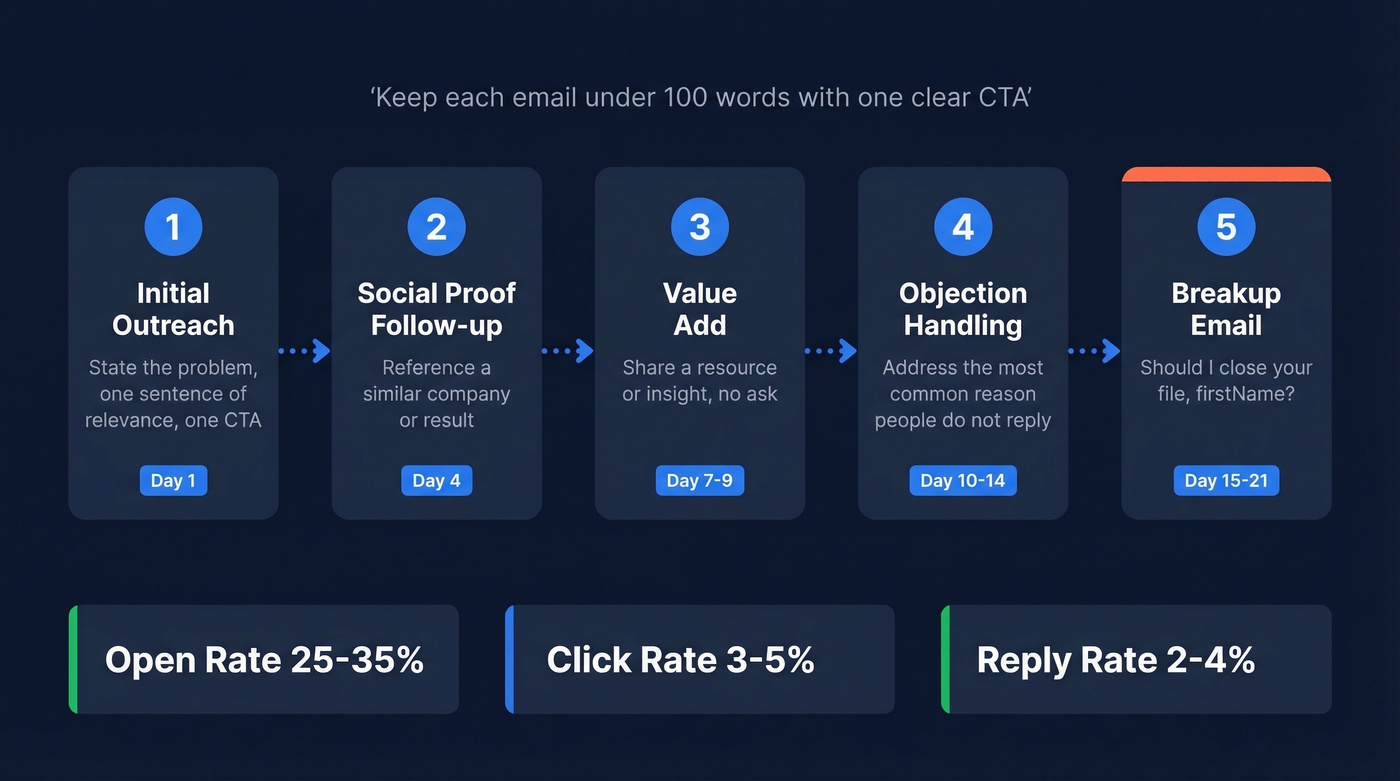
Here's a 5-email framework that works in most B2B categories:
- Initial outreach: state the problem you solve, one sentence of relevance, one CTA
- Social proof follow-up (3 days later): reference a similar company or result
- Value add (3-5 days later): share a resource or insight with no ask
- Objection handling (3-5 days later): address the most common reason people don't reply
- Breakup (5-7 days later): "Should I close your file, {{firstName}}?"
Keep each email under 100 words with one clear CTA. The moment you add two asks, reply rates drop. And don't hide the CTA behind three paragraphs of throat-clearing. Look, nobody's reading your cold email like it's a short story.
Timing still matters, but it's not magic. Tuesday through Thursday is a safe default, and 9am or 2pm in the prospect's timezone tends to perform well (data-backed timing: best time to send cold emails). Subject lines are worth testing on the first email, because small lifts compound across thousands of sends.
Benchmarks to calibrate against:
- Open rate: 25-35% is healthy (assuming tracking isn't blocked)
- Click rate: 3-5% is healthy when you include a link
- Reply rate: 2-4% at scale is solid in 2026
Anyone promising double-digit reply rates at scale is either working tiny samples, warm lists, or a niche where the offer is basically a referral.
Best tools for sales email automation in 2026
The gap between self-serve and enterprise pricing is huge, and it's not always tied to results. Enterprise tools buy you governance, reporting, permissions, and deep CRM workflows. Self-serve tools buy you speed and simplicity (more stack ideas: SDR tools).
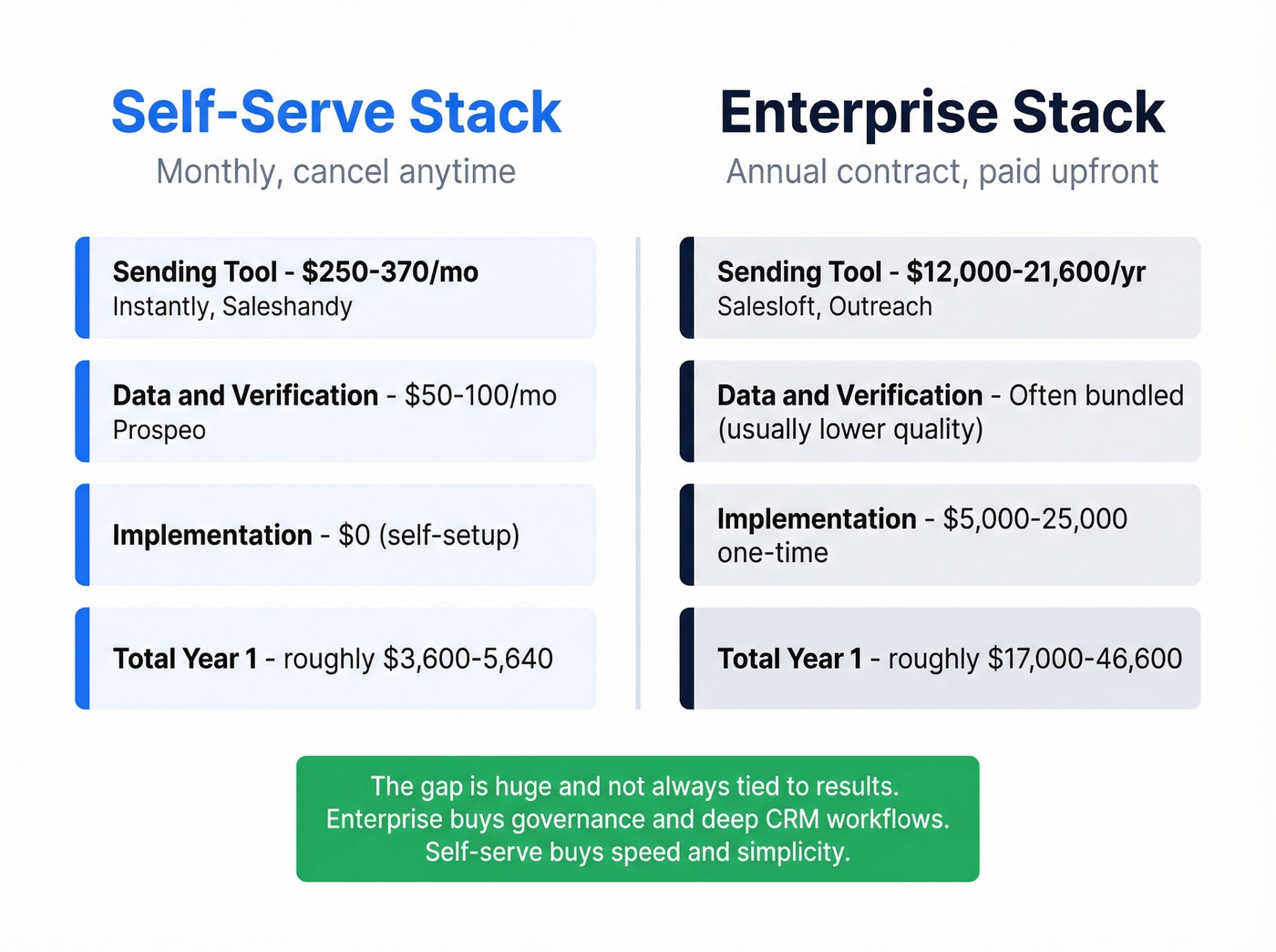
| Line item | 10-rep self-serve | 10-rep enterprise |
|---|---|---|
| Sending tool | $250-370/mo | $12,000-21,600/yr |
| Data/verification | ~$50-100/mo | Often bundled (usually lower quality) |
| Implementation | $0 | $5,000-25,000 |
| Contract | Monthly, cancel anytime | Annual, paid upfront |
Self-serve cold email tools
Instantly
Use this if you're scaling volume fast and want warmup handled automatically. Instantly's inbox rotation and unlimited warmup are built in from the $30/month tier, and it distributes sends across multiple accounts without you babysitting the setup.
Skip this if you need true multichannel sequences (calls and social touches) in one platform. Instantly is email-first, so you'll be stitching together a stack.
Pricing starts at $30-37/month depending on plan.
Saleshandy
Saleshandy is an agency favorite for a reason. Multi-account management is genuinely strong, and the tracking is detailed enough for managers who want to see what's happening without living in spreadsheets.
Plans range from $25-36/month at the starter level up to $209/month for high-volume sending. G2 sits around 4.6/5 across 700+ reviews, which is unusually consistent in this category.
Lemlist
Lemlist is the multichannel play: email plus other outreach steps in one workflow. Email Pro runs $55/month; Multichannel Expert is $79/month.
If you're purely email, you'll pay for channel features you won't use. If you want one workflow across touchpoints, it's a solid choice.
Other tools worth knowing
These are smaller mentions on purpose. They're useful, but they aren't the first tools we'd pick for most teams.
- Smartlead (~$39/mo): strong inbox rotation, popular with agencies running high volume
- Woodpecker (~$29/mo): clean UI, great for small teams that want simplicity
- Reply.io (~$59/mo): multichannel with AI writing assistance
- Mailshake (~$29/mo): straightforward cold email with a dialer add-on
- Quickmail (~$49/mo): built for deliverability-focused operators
- Hunter Campaigns/Sequences (~$49/mo): lightweight sequencing from a well-known email finder
Enterprise sales engagement
SalesLoft
Salesloft shines when you have managers, process, and a real need for visibility. Deep CRM integration, coaching workflows, and reporting are the reasons teams pay for it, not because it magically writes better emails.
The downside is price and contracting. Advanced tiers often land around $150-180/user/month, the dialer is typically an add-on, and you're usually looking at annual terms. And yes, it's still annoying that pricing isn't public in 2026. It wastes everyone's time.
Outreach
Outreach has one of the deepest workflow engines in the category. If you need branching logic, analytics, and governance across a large SDR org, it delivers.
The tradeoff is complexity and add-on creep. A lot of teams buy the core, then realize they need two or three modules to get what they thought they were buying on day one. Implementation can also be a real project, not a "set it up on Friday" task.
The data layer (don't skip it)
If your sequencer is the engine, your data layer is the fuel. Dirty fuel ruins engines.
Prospeo is a top pick here for teams that care about deliverability and list hygiene at scale: 300M+ professional profiles, 143M+ verified emails, 125M+ verified mobile numbers, and 98% email accuracy, refreshed every 7 days. It also plugs into the tools people actually use for outbound, including Instantly, Lemlist, Smartlead, Clay, Zapier, HubSpot, and Salesforce, so you can verify and enrich before a lead ever hits a sequence.
Apollo.io
Apollo bundles prospecting and sequencing into one platform, with a free tier and paid plans that commonly land in the ~$49-99/user/month range. It's convenient if you want one login for everything.
The tradeoff is accuracy. Teams that care about deliverability usually add a standalone verification layer anyway, because "good enough" data becomes "why are we suddenly bouncing?" the moment you scale.
AI in sales email automation
Sales automation has moved in waves: workflow automation, then predictive scoring, and now generative AI that drafts and classifies at scale. Outreach has shared that about 45% of teams now run a hybrid AI-SDR model where AI handles research and first-draft personalization while humans review and send (more tactics: AI cold email outreach).
The best use of AI isn't "write my whole email." It's "save me the 20 minutes of prep work per account."
A practical setup we see a lot: enrich a lead, summarize the company and role, generate two personalization angles, and drop those into a sequencer as optional snippets. Reps pick the best one, tweak it, and hit send. That keeps quality high without turning your outbound into a slot machine of weird phrasing.
Beyond drafting, the real win is event-driven triggers tied to funnel stages: fire a sequence when a prospect views pricing multiple times, trigger outreach when a contact changes jobs, route leads based on intent thresholds. That's where automation prints pipeline, because you're acting on timing, not hope.
Knowing when not to automate matters just as much. High-value enterprise deals, warm intros, and executive outreach should never feel templated. If you're emailing a C-suite buyer at a target account, write it yourself.
FAQ
Is cold email legal?
Yes. In the US, CAN-SPAM requires an opt-out mechanism, a physical mailing address, and honest subject lines. In the EU/UK, GDPR requires a legitimate interest basis for B2B outreach and clear identification. Neither bans cold email outright.
Include an unsubscribe link, honor opt-outs promptly, and keep your targeting tight.
How many cold emails can I send per day?
Per inbox, 10-15 per day is a safe ceiling for cold outreach. Scale by adding domains and inboxes, not by blasting from one account.
A setup of 10-12 domains with 2-3 inboxes each gets you to roughly 400 emails per day without tripping filters.
What's a good cold email reply rate?
At scale, 2-4% is solid in 2026. Double-digit reply rates almost always mean small sample sizes or warm lists.
Focus on reply quality. A 2% rate that books meetings beats a 6% rate that generates "not interested" all day.
What's a good free tool to verify emails before sending?
Prospeo gives you 75 verified emails per month on the free tier, with catch-all handling plus spam-trap and honeypot filtering. Hunter also has a free tier for limited searches, but it's not built to be your main verification layer once you're running real volume.
How do I keep emails out of spam?
Authenticate every domain with SPF, DKIM, and DMARC (move to p=reject once you're ready). Warm up new inboxes for 14-21 days minimum, with a 4-6 week ramp to full volume.
Verify every email address before sending to catch invalid addresses, spam traps, and honeypots. Keep spam complaints under 0.3% and bounces under 2%.
The math above shows 12,000 sends per month can produce 90-100 meetings - but only if your data holds. Teams using Prospeo cut bounce rates from 35%+ to under 4% and triple pipeline output. Data refreshed every 7 days means your contacts stay valid long after competitors' lists go stale.
Clean data is the difference between 100 meetings and a blacklisted domain.