

The Sales Email Format That Actually Gets Replies
You spent 20 minutes crafting the perfect cold email. You hit send to 200 prospects. 68 bounce. Another 40 land in spam. 12 people actually see it. Your sales email format was flawless - your data wasn't.
That's the gap most guides ignore, and it's why the average cold email reply rate sits at 3.43% while elite senders hit 10.7%+. You don't need 55 templates. You need one format that works and the discipline to personalize it every time. Template-heavy guides underperform because reps copy the words and ignore the structure - then wonder why nothing lands. Format is structure: how long, what goes where, what it looks like on a phone.
The Quick Version
Short on time? Here's the format top-performing cold emails follow:
- Subject line: 2-4 words, under 40 characters
- Body: Under 75 words, plain text, single CTA
- Paragraphs: 1-2 sentences each, 3-4 paragraphs max
- Signature: Name, title, phone, one link - nothing else
- Send window: Tuesday or Wednesday morning
- Prerequisite: Verified email addresses with a bounce rate under 5%
That last point isn't optional. Every formatting decision downstream is irrelevant if your emails never reach an inbox. Let's break down each piece.
Anatomy of a Cold Sales Email
Every outbound message has five structural components. HubSpot's framework nails the hierarchy: subject line, opening line, body copy, closing CTA, and professional signature. Think of it as a funnel - each layer earns the next click or scroll.
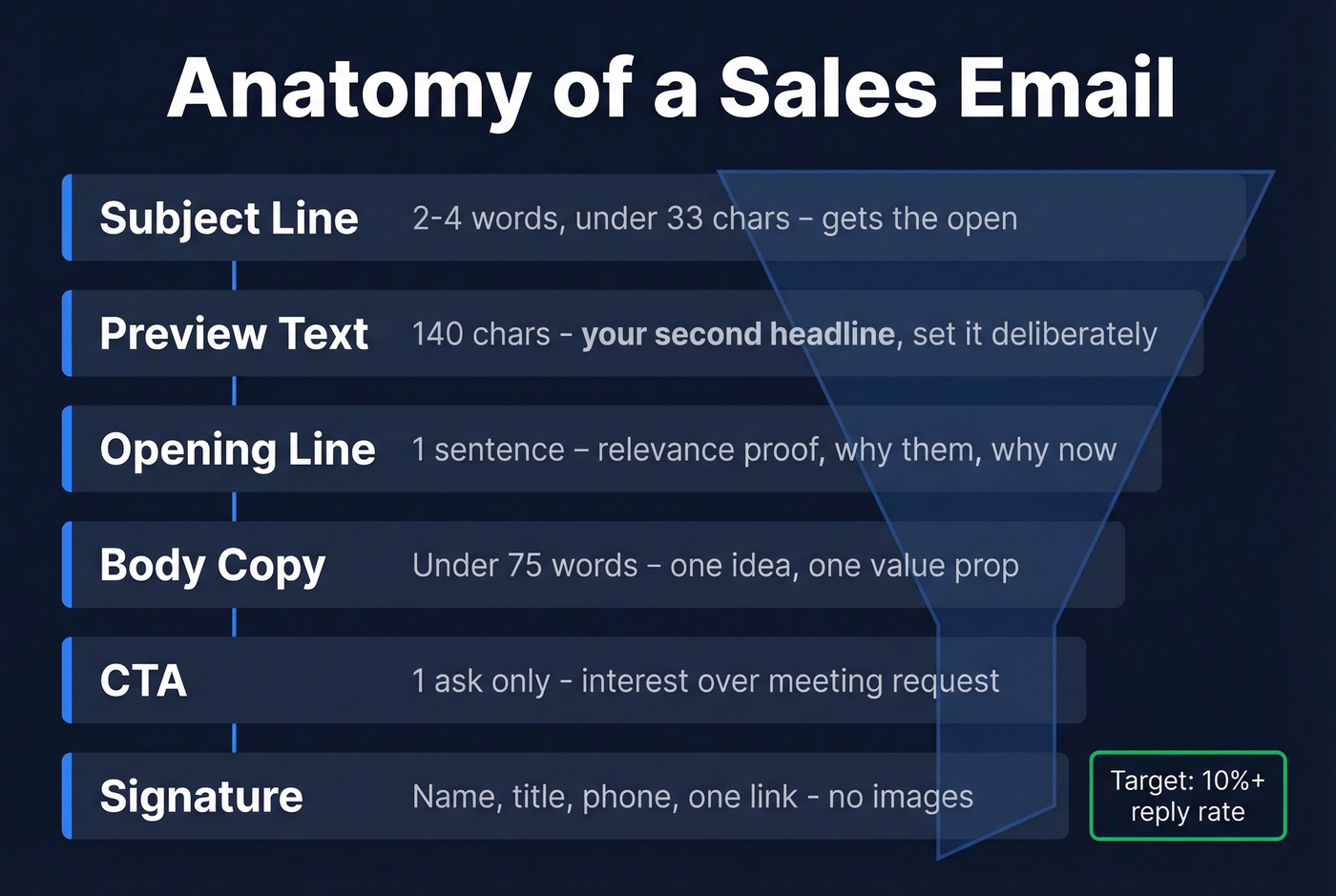
There's also a sixth element most reps overlook: preview text. That's the 140-character snippet beside or below the subject line in most email clients. If you don't set it deliberately, the client pulls from your first line - which might be "Hi [First Name]," followed by whitespace. Treat it as a second headline.
The subject line gets you the open. The opening line is your relevance proof: why you're emailing this person, right now. Body copy delivers one idea in under 75 words. The CTA closes with a single, low-friction ask. And the signature keeps it clean.
The structure isn't complicated. The discipline is.
Subject Line Rules
Your subject line has one job: get opened without triggering spam filters. The sweet spot is 2-4 words, and you need to design for the smallest screen in the room.
Here's what your recipients actually see:
| Email Client | Desktop Limit | Mobile Limit |
|---|---|---|
| Gmail | ~70 chars | ~40 chars |
| Outlook | 50-70 chars | ~40 chars |
| Yahoo | ~46 chars | ~35 chars |
| iPhone Mail | ~70 chars | 33-41 chars |
| Android | ~70 chars | 35-50 chars |
On an iPhone, subject lines typically truncate around 33-41 characters. "Quick question about your Q2 pipeline strategy" becomes "Quick question about your Q2 pipeli..." - which reads like every other generic pitch in the inbox.
Keep it under 33-35 characters and you're safe everywhere. Avoid spam triggers like "free," "limited time," "act now," "final," "reminder," "discount," and excessive capitalization. Lowercase subject lines that read like a colleague's email consistently outperform polished marketing copy. "your outbound stack" beats "Exclusive Offer: Boost Your Sales Pipeline Today" every time.
Test each change on 50-100 sends before drawing conclusions. A 30-50% open rate is your baseline target - anything below that means your subject lines need work, not your body copy. If you want more options, pull from proven email subject line examples and adapt them to your ICP.
How to Format the Email Body
Length
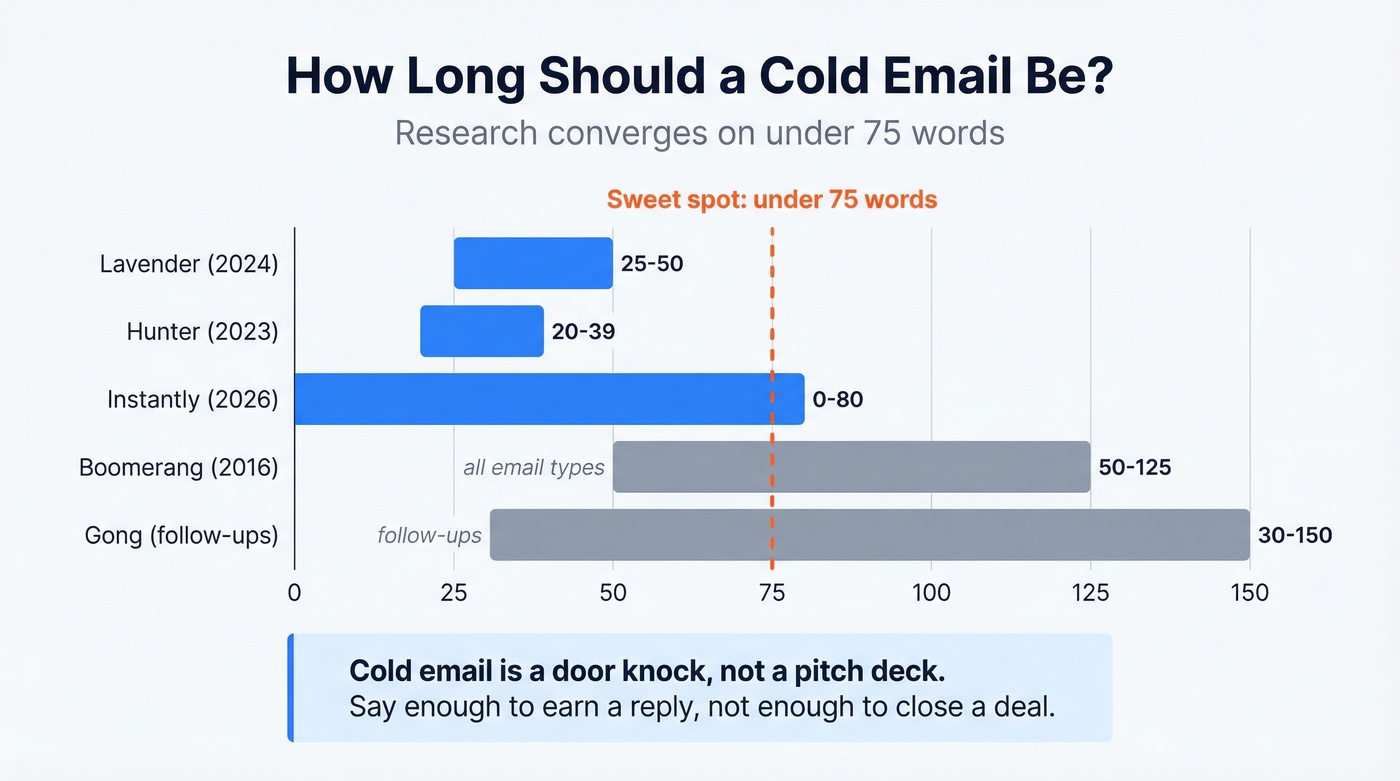
This is one of the most-studied questions in cold email, and the research converges clearly:
| Source | Context | Word Count | Year |
|---|---|---|---|
| Lavender | Cold email | 25-50 words | 2024 |
| Boomerang | All email | 50-125 words | 2016 |
| Hunter | Cold email | 20-39 words | 2023 |
| Instantly | Cold email | <80 words | 2026 |
| Gong | Follow-ups | 30-150 words | - |
Under 75 words for cold outreach, under 100 words always. The Instantly benchmark report analyzed billions of interactions and found that campaigns under 80 words outperformed longer ones. Lavender's cold-email-specific data pushes even shorter - 25-50 words for initial outreach.
Most reps write emails that are too long because they're trying to convince in one shot. Cold email isn't a pitch deck. It's a door knock. Say enough to earn a reply, not enough to close a deal. If you’re building a full sequence, use a structured B2B cold email sequence instead of cramming everything into email #1.
Mobile Formatting
61% of email opens happen on mobile devices. That stat should dictate every formatting decision you make.
Keep paragraphs to 1-2 sentences. Three to four paragraphs total. On a phone screen, a five-line paragraph looks like a wall of text - and walls of text get deleted, not read. Aim for lines under 60 characters wide so they don't wrap awkwardly on smaller screens. Control your preview text deliberately; most clients display roughly 140 characters, and you don't want that space wasted on "Hi [First Name]," followed by nothing.
CTA and Signature
One CTA, One Ask
Multiple CTAs kill reply rates. This is one of the most consistent findings across cold email research: one ask, one action, one decision for the reader. For more options, see these email call to action patterns that keep friction low.
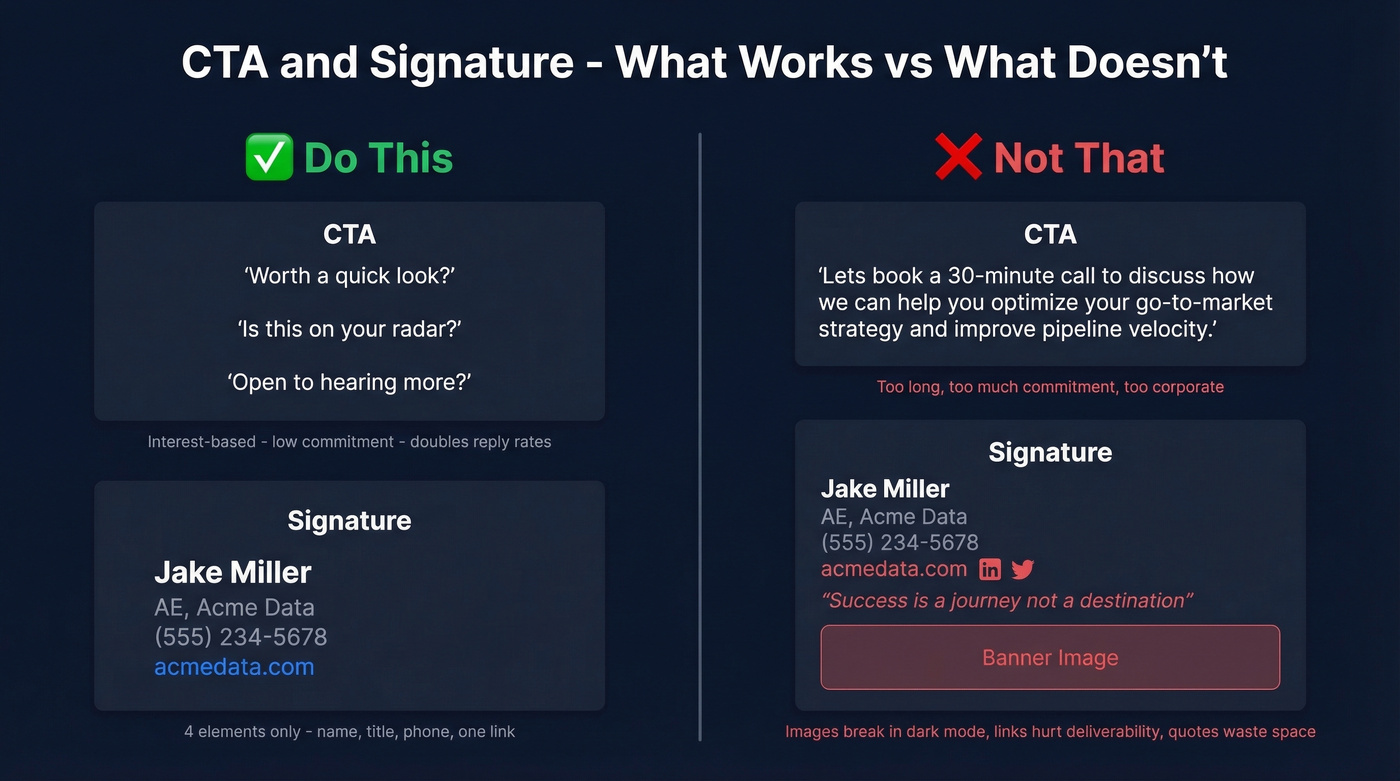
Gong's data adds a useful nuance - asking for interest outperforms asking for a meeting. "Worth exploring?" or "Does this resonate?" doubles success rates compared to "Can we book 15 minutes Tuesday?" The interest-based CTA lowers the commitment threshold. The meeting can come in the reply thread.
Do this: "Worth a quick look?" / "Is this on your radar?" / "Open to hearing more?"
Not that: "Let's book a 30-minute call to discuss how we can help you optimize your go-to-market strategy and improve pipeline velocity."
Signature That Doesn't Hurt Deliverability
Your signature should contain four things: name, title, phone number, and one link. That's it. No headshot images, no inspirational quotes, no banner ads, no social media icon rows. HubSpot's guidance is clear on this - keep signatures short and professional, include a phone number, include one profile link, and skip images entirely. Images render inconsistently across clients, which is the opposite of what you want in cold outreach. If you’re troubleshooting inboxing, start with an email deliverability guide before tweaking copy.

You just read it: 68 bounces out of 200 sends kills your cold email before format even matters. Prospeo's 98% email accuracy and 7-day data refresh keep your bounce rate under 4% - so every perfectly formatted email actually reaches an inbox.
Stop perfecting emails that bounce. Start sending to verified addresses.
Example: The Format in Action
Here's a complete cold email that follows every rule above, with annotations so you can see the structure at work:
Subject: your outbound stack (3 words, 19 chars)
Preview text: Saw you're scaling SDRs - quick thought (40 chars)
Opening: Hi Sarah, noticed Acme just posted three SDR roles - congrats on the growth. (1 sentence, relevance proof)
Body: Most teams scaling from 5 to 15 reps see bounce rates spike because their data can't keep up. We help outbound teams keep deliverability above 95% even as volume triples. (2 sentences, one value prop)
CTA: Worth a quick look? (4 words, interest-based)
Signature: Jake Miller AE, Acme Data (555) 234-5678 acmedata.com
Total body: 52 words. Three paragraphs. One link. Zero images. That's the format. Everything else is personalization. If you want more variations, use these emails that get responses as structure references (not copy-paste templates).
Plain Text vs HTML
Plain text wins for cold outreach. Full stop.
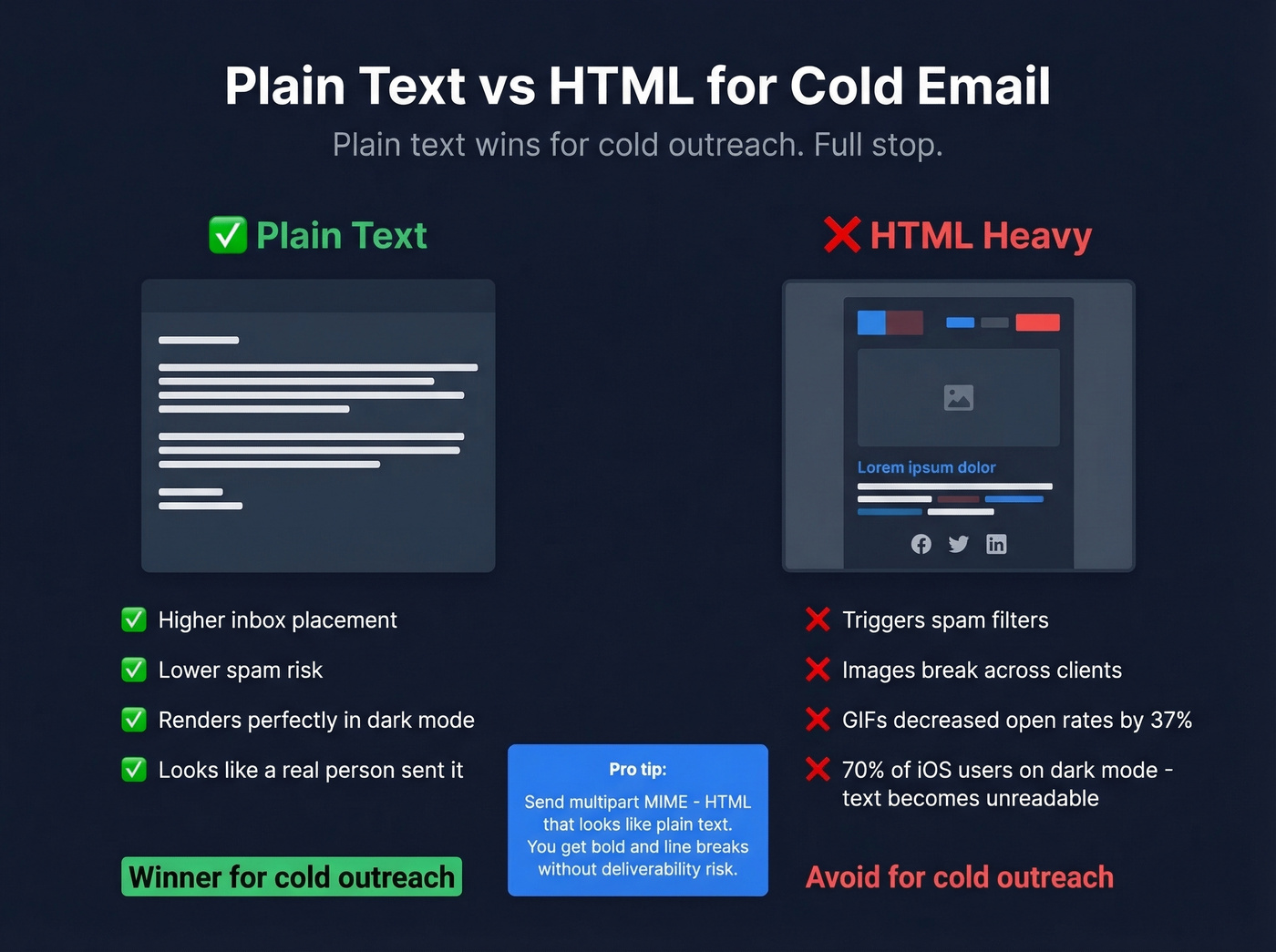
Plain text emails achieve higher inbox placement and lower spam risk than HTML-heavy designs. Complex HTML, embedded images, and multiple tracking pixels all raise red flags with spam filters. A high image-to-text ratio is one of the most common causes of false-positive spam classification. The emails that look like they came from a real person outperform designed templates every time. If you’re diagnosing issues, run a quick check with an email spam checker and fix the technical flags first.
Sendcheckit summarizes a HubSpot test where GIFs decreased open rates by 37%. And with 70% of iOS users running dark mode, your carefully designed HTML template might render with low-contrast text that's nearly unreadable.
Here's the thing: send multipart MIME emails. Your email includes both an HTML version and a plain text fallback. Design the HTML version to look like plain text - minimal formatting, no images, no colored backgrounds. This gives you basic formatting like bold and line breaks while maintaining deliverability and dark mode compatibility. If your cold email needs a designed HTML template to be compelling, the copy isn't strong enough. Fix the words, not the wrapper.
Follow-Up Sequence Structure
58% of replies come from the first email. That means 42% come from follow-ups - and those replies justify a disciplined sequence.
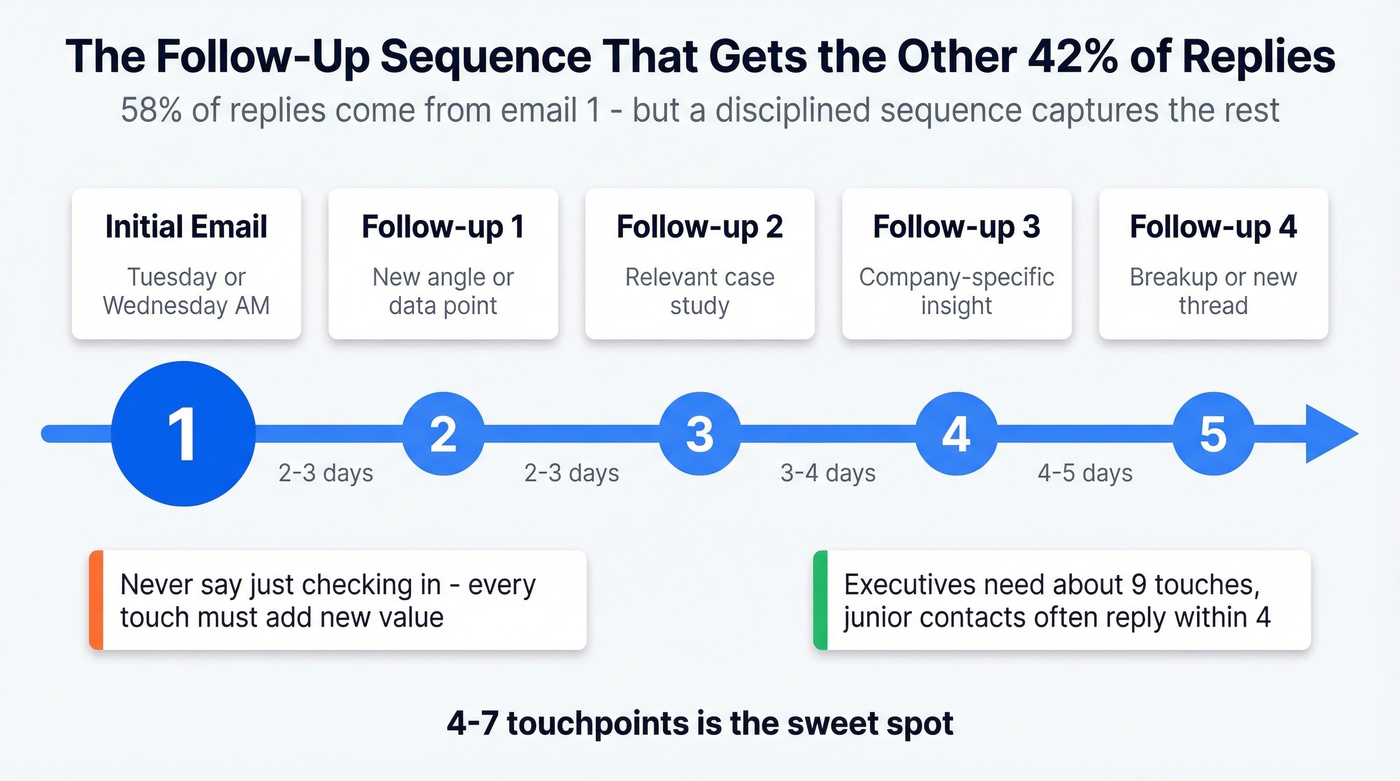
The sweet spot is 4-7 touchpoints. Under four and you're quitting before the conversation starts. Beyond seven and you're hitting diminishing returns unless each touch genuinely adds new value. Outreach's data breaks this down by seniority: the average prospect needs about 5 touches, executives require around 9, and junior contacts often respond within 4. If you need copy ideas, start from these sales follow-up templates and personalize with real triggers.
Tuesday and Wednesday produce the highest reply rates, with Wednesday edging ahead. Space your touches 2-3 days apart early in the sequence, then stretch to 4-5 days for later follow-ups.
"Just checking in" is the worst follow-up ever written. Every touch needs to deliver something new - a relevant case study, a data point about their company, a different angle on the problem. We've found that enriching contacts with 50+ data points (job title, company size, tech stack, recent funding) gives you enough personalization inputs to make each follow-up feel relevant instead of robotic. (If you’re doing this at scale, compare data enrichment services before you commit.)
Legal Requirements
CAN-SPAM applies to all commercial messages, including B2B cold outreach. The FTC's requirements are non-negotiable:
- Accurate headers: From, To, and Reply-To must identify the real sender
- Non-deceptive subject lines: The subject must reflect the email's content
- Ad identification: The message must be identifiable as an advertisement
- Physical address: A valid postal address must be included
- Opt-out mechanism: Clear, conspicuous, and easy to use
- 10-day honor window: Opt-out requests must be processed within 10 business days
The penalty is up to $53,088 per email in violation. Per email, not per campaign.
If you're emailing prospects in the EU, GDPR adds a stricter layer. Where CAN-SPAM operates on an opt-out model (you can email until they say stop), GDPR requires opt-in consent or a legitimate interest basis. CAN-SPAM says "let them leave." GDPR says "don't email without permission." Skip this at your own risk - cumulative GDPR fines have crossed EUR 5.88B across 2,245 enforcement actions.
Mistakes That Kill Replies
The most common formatting mistakes are predictable - and fixable:
- Too long. Over 100 words and reply rates drop measurably.
- Multiple CTAs. Two asks create decision paralysis. Pick one.
- HTML-heavy design. Images, GIFs, colored backgrounds - all spam triggers.
- No professional signature. Missing a signature looks like phishing.
- No unsubscribe link. CAN-SPAM violation and a deliverability red flag.
- Too many links. Each link is a potential spam trigger. One or two max.
Every cold email platform will tell you about those. But here's the biggest mistake nobody talks about: sending to unverified addresses. If you’re seeing hard bounces, start with email bounce rate benchmarks and fixes before you touch your templates.
Look - if your deals average under $15K, you probably don't need the priciest outbound tools on the market. But you absolutely need verified emails. A $0.01-per-lead verification step that keeps your bounce rate under 3% will outperform a $1-per-lead database with stale contacts every single time. If you’re building lists, use a reliable email list providers workflow and verify before sending.
That example email above? It only works if Sarah's address is real. Teams using Prospeo see bounce rates drop from 35% to under 4% - which means your carefully crafted 75-word cold emails land where they should. At $0.01 per verified email, bad data is no longer an excuse.
Great format deserves great data. Verify before you send.
FAQ
How long should a sales email be?
Under 75 words for cold outreach. Studies from Lavender, Instantly, and Hunter all converge on this range - with Lavender pushing as low as 25-50 words for first touches. Follow-ups can match or be shorter since your prospect has already seen the initial context.
Should I use plain text or HTML?
Plain text for cold outreach. It achieves higher inbox placement, adapts to dark mode, and avoids spam triggers. If you use HTML, design it to look like plain text and include a plain text fallback via multipart MIME.
How many follow-ups should I send?
Four to seven touchpoints. 58% of replies come from the first email, but the remaining 42% justify persistent follow-up. For executives, plan up to 9 touches. Every follow-up must introduce something new - a case study, a data point, or a different angle.
What's the best free tool for verifying emails before sending?
Prospeo offers 75 free email verifications per month with 98% accuracy - enough for small teams running real campaigns. Hunter provides 25 free searches monthly but caps enrichment. For any list over a few hundred contacts, verification at even $0.01/lead pays for itself by protecting your domain reputation.