Sales Pipeline Optimization AI (2026): KPIs, Process, and a 90-Day Rollout
Sales pipeline optimization AI only works when your pipeline's credible. Otherwise, you're just automating bad inputs and getting faster, more confident nonsense.
Here's the outcome you're building: in 90 days you'll have proof-based stages, a leak-finding KPI dashboard, clean inputs, and 2-3 safe automations that measurably improve velocity and forecast trust.
Most teams skip the boring parts and pay for it later.
What you need (quick version)
Use this checklist before you touch another tool.
Lock buyer-agreement exit criteria (this week). Write down what "proof" looks like for each stage. No proof, no stage advance. This single change fixes more forecast drama than any model.
Stand up a KPI dashboard that shows leaks (in 48 hours). Track pipeline velocity + stage conversions by segment (ICP vs non-ICP, inbound vs outbound, SMB vs mid-market). If you can't see where deals die, AI can't optimize anything.
Fix your data foundation (first 30 days). Enrich missing fields, verify emails/phones, and layer intent so routing and scoring stop guessing, and so pipeline-quality AI has something real to learn from.
Pick 1-2 automations that remove "time thieves," not judgment. Auto-log activity, summarize calls, prep meetings, update CRM fields. Keep pricing, negotiation, and deal strategy human.
Run a weekly pipeline cadence with owners and deadlines. Pipeline reviews without action items are just group therapy.
What sales pipeline optimization AI actually means (and what it isn't)
It means using AI to improve conversion, velocity, and forecast credibility - not "more automation." In practice, the AI impact shows up as fewer stalled deals, cleaner stage movement, and forecasts leadership can use.
Process-first beats tool-first every time. If your stages are vibes, your CRM is stale, and reps don't agree on what "qualified" means, AI will recommend the wrong next step at scale.
Use AI when:
- You need pattern recognition across lots of deals (risk, deal slippage, next-best-action).
- You want consistent coaching from real conversations, not rep self-reporting.
- You're drowning in admin (logging, summaries, follow-ups, routing).
Skip (or delay) AI when:
- You haven't defined stage exit criteria.
- Your lead/contact data is decayed and duplicated.
- Your pipeline inspection is a weekly argument about whose numbers are right.
Optimization isn't a feature. It's an operating system: inputs, rules, metrics, and cadence. AI just makes that system faster and more enforceable.
Sales pipeline optimization AI architecture (in plain English)
Think in five layers. If one layer's weak, the whole thing lies.

- Signals: web activity, intent topics, job changes, buying triggers, call transcripts.
- Data layer: CRM enrichment, verification, dedupe, normalization, identity resolution.
- Models: fit scoring, intent scoring, risk scoring, next-best-action, forecasting.
- Orchestration: routing, sequences, task creation, follow-ups, handoffs, SLAs.
- Governance: permissions, audit logs, human approval gates, drift monitoring.
Hot take: most teams don't need "all-in-one AI." They need one clean data layer, one conversation layer, and a ruthless cadence. Everything else is optional.
The pipeline model that makes AI useful: buyer-agreement stages + exit criteria
The cleanest pipeline model we've seen in the wild is Mark Kosoglow's buyer-agreement stages (popularized in a Qwilr breakdown) that helped scale Outreach to $250M ARR. The point's simple: stages map to buyer decisions, not your internal steps.
Buyer-agreement stages (definitions)
| Stage | Buyer agreement | Meaning (1-2 lines) |
|---|---|---|
| 1 | Problem | Buyer agrees the problem exists and matters. |
| 2 | Priority | Buyer agrees it's worth fixing now vs "later." |
| 3 | Evaluation | Buyer agrees on how they'll evaluate options. |
| 4 | Value | Buyer agrees your approach creates value for them. |
| 5 | Commercial | Buyer agrees on terms, path to signature, and rollout. |

Exit-criteria examples (what "proof" looks like)
Rule: no stage advance without proof. Not "good call." Not "they loved the demo." Proof.
Use this as a starting checklist:
Problem agreement proof
- Written pain statement in notes
- Confirmed impact area (team/process/system)
- Named consequence of doing nothing
Priority agreement proof
- A date-driven trigger (renewal, audit, hiring plan, launch)
- Confirmed internal owner + timeline
- "Why now" captured in a CRM field
Evaluation agreement proof
- Evaluation criteria documented (must-haves vs nice-to-haves)
- Competitors/tools in the bake-off listed
- Next meeting scheduled with agenda
Value agreement proof
- ROI model or quantified outcome range
- Mutual action plan (MAP) with milestones
- Stakeholder list with roles (champion, economic buyer, blocker)
Commercial agreement proof
- Procurement/legal steps known
- Paper process + signature authority confirmed
- Implementation start date penciled
I've watched teams "optimize" a pipeline for months while letting reps advance stages on optimism. The forecast didn't get better - it just got more confidently wrong.
That one change (proof-based stage movement) is where the grown-up gains start.
What good exit-criteria enforcement looks like inside the CRM
If you want this to stick, don't rely on training. Build it into the workflow.
- Stage change requires fields: when a rep moves an opp from Evaluation → Value, the CRM forces completion of "Evaluation criteria," "Top competitor," and "Next step date."
- Proof artifacts are checkboxes + links: MAP link, ROI model link, stakeholder map link. No link, no stage change.
- Opportunity aging rules: if an opp sits in a stage past your threshold, it auto-flags for pipeline inspection.
- Forecast categories are gated: "Commit" requires a signed MAP milestone + confirmed procurement path, not rep confidence.
This is where AI becomes useful: it can detect missing proof from notes and calls, but the CRM must enforce the gate, or you'll just get prettier dashboards.
Where AI helps per stage (practical, not magical)
- Problem/Priority: AI summarizes discovery, extracts pain themes, and prompts missing questions. It flags "no why-now captured" as a risk.
- Evaluation: AI drafts a MAP, reminds reps to confirm criteria, and detects competitor mentions in calls.
- Value: AI suggests ROI inputs, builds a first-pass business case, and highlights stakeholder gaps.
- Commercial: AI tracks next steps, detects legal/procurement language, and warns on stalled paper process.
AI doesn't replace exit criteria. It enforces them.

You just read why clean inputs are non-negotiable for pipeline AI. Prospeo's 5-step verification delivers 98% email accuracy and 92% enrichment match rates - so your scoring models, routing rules, and forecasts learn from real data, not decay.
Stop feeding your pipeline AI garbage. Start with verified data.
Sales pipeline optimization AI: KPI dashboard that tells you what to fix
If you only track activities (calls, emails, meetings), you'll optimize busyness. KPI-first optimization forces you to fix the actual constraint.
Start with pipeline velocity. DigitalBloom's formula is simple and unforgiving:
Pipeline velocity = (Opps × Avg Deal × Win Rate) ÷ Sales Cycle
Then layer stage conversions so you know where velocity is leaking.
Benchmarks below are compiled from DigitalBloom (2026) and MarketJoy aggregated client data (2026).
The 5 KPIs that matter
- Pipeline velocity If velocity's flat, you're either not creating enough qualified opps, you're losing too often, or deals are dragging.

Stage conversion rates This tells you where your process breaks (qualification, value, commercial).
Win rate A win rate problem is usually ICP, messaging, or competitive positioning - not "rep effort."
Sales cycle length Long cycles come from missing stakeholders, unclear evaluation criteria, and weak commercial process.
Pipeline coverage Coverage keeps you honest. Most teams need 3-5x coverage to hit quota.
Benchmarks to use as guardrails (if you're outside them, fix the upstream constraint first):
- Lead-to-customer: 2-5%
- Win rate: 20-30%
- Median cycle: 84 days
- MQL→SQL: 15-21%
- Stage conversions: Lead→MQL 20-25%, MQL→SQL 12-18%, SQL→Opp 10-12%, Opp→Won 6-9%
Glossary you'll see in serious RevOps teams: pipeline inspection, opportunity aging, stage aging, deal slippage, and forecast categories like commit / best case / pipeline.
Example dashboard layout (steal this)
If your dashboard doesn't tell you what to do next, it's decoration. We use these tiles:

- Velocity by segment (ICP vs non-ICP; inbound vs outbound)
- Stage conversion funnel (with drop-off % and count)
- Stage aging heatmap (median days in stage + outliers)
- Slippage report (close date moved 1x / 2x / 3x+)
- Next step coverage (% opps with a dated next step)
- Multi-threading / stakeholder coverage (contacts by role engaged)
- Forecast category accuracy (commit accuracy by manager/segment)
A real scenario from a cleanup we ran: 30% of opps had no next-step date, and commit deals slipped twice on average. We didn't need a better model. We needed stage gates and a "no next step, no commit" rule, plus a manager who'd actually enforce it.
Outcome KPIs replacing activity metrics
Activity metrics are easy to game. Outcome metrics are harder, and that's why they work. A solid set from Humantic's framework:
- Stakeholder Coverage Score: % of known decision-makers engaged
- Buyer Response Index: (Replies + Meetings) / Outreach
- Message Relevance Score: AI analysis of tone/context
- Decision-Maker Attendance: % of meetings with authority present
Operator rule that beats "more outreach" (Humantic guidance)
If you want AI to improve outcomes, target fewer accounts and go deeper:
- Cut target accounts by ~40%
- Spend 2.5x more time per target
- Cap reps at 50 outbound accounts
- Put 3+ hours of research per account into your top tier
This is the difference between AI-assisted spam and pipeline that converts.
Diagnostic rules (if metric is off, do X)
Use this like a troubleshooting guide.
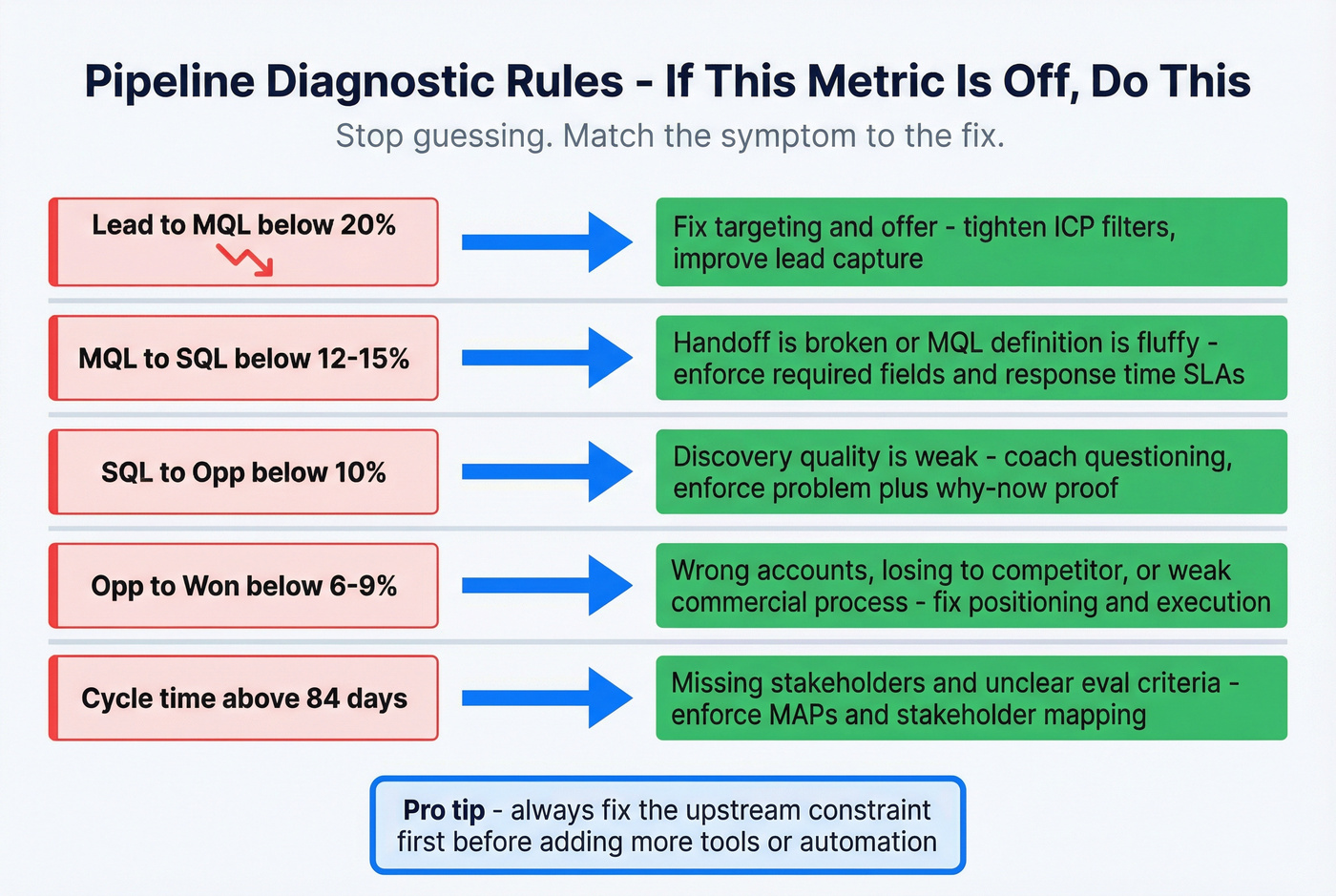
If Lead→MQL is low (below 20%) Fix targeting and offer. Tighten ICP filters and improve lead capture.
If MQL→SQL is low (below 12-15%) Your handoff's broken or your MQL definition's fluffy. Enforce required fields, response-time SLAs, and route by intent + fit.
If SQL→Opp is low (below 10%) Discovery quality is weak. Use conversation intelligence to coach questioning and enforce "problem + why now" proof.
If Opp→Won is low (below 6-9%) You're selling to the wrong accounts, losing to a consistent competitor, or failing commercially (procurement, pricing, stakeholders). Fix positioning and commercial execution.
If cycle time is high (above 84 days) Missing stakeholders and unclear evaluation criteria are the culprits. Enforce MAPs and stakeholder mapping.
KPI → target range → root cause → AI intervention (table)
| KPI | Target range | Likely root cause | AI intervention |
|---|---|---|---|
| Lead→Cust | 2-5% | ICP mismatch | Fit scoring + routing rules |
| MQL→SQL | 15-21% | Weak MQL definition | Intent-aware routing + SLA enforcement |
| Win rate | 20-30% | Positioning gap | Loss theme clustering + coaching prompts |
| Cycle | 46-84d | No MAP + missing stakeholders | Risk flags + stage-gate enforcement |
| Coverage | 3-5x | Thin pipe | Gap alerts + territory/account rebalancing |
Data foundation: enrichment, verification, and intent (so AI doesn't lie)
AI can't rescue bad inputs. It turns bad inputs into fast, confident outputs.
Data decay's the quiet killer: lists deteriorate ~20% annually, and poor data drives 12% revenue loss. On top of that, 65% of sales teams can't fully trust their org data because it's incomplete or not updated.
Intent matters because of the 95-5 rule: only about 5% of your market's in-market at any time. Treat the other 95% like they're ready to buy and you'll torch deliverability and rep time.
Common failure modes (the stuff that breaks AI quietly)
These are the problems that make scoring, routing, and forecasting lie:
- Duplicates that split reality: one account becomes three, and pipeline inspection turns into archaeology.
- Role/title chaos: "VP IT," "Head of Infrastructure," and "Director, Systems" all map to the same buyer, but your routing treats them as different personas.
- Deliverability damage: high bounce rates hurt domain reputation; your best messaging never reaches the buyer.
- Routing errors: missing region/segment fields send hot accounts to the wrong rep, then everyone blames "lead quality."
- Stale close dates and missing next steps: forecasting models learn from fiction.
Prospeo (Tier 1): the B2B data platform built for accuracy
If you want sales pipeline optimization AI to work, fix inputs first. Prospeo is "The B2B data platform built for accuracy" - and it's built for the unglamorous RevOps work that makes scoring, routing, and forecasting stop hallucinating.
Here's what matters in practice: 300M+ professional profiles, 143M+ verified emails, and 125M+ verified mobile numbers, with 98% verified email accuracy, a 30% mobile pickup rate, and a 7-day data refresh cycle (industry average: 6 weeks). That freshness is the difference between "we routed it instantly" and "we routed it to the rep who left three months ago."
For enrichment workflows, Prospeo returns 50+ data points per enrichment, hits an 83% enrichment match rate, and a 92% API match rate. And because intent's the other half of the puzzle, it includes Bombora-powered intent data across 15,000 topics, so your routing rules stop treating every account like it's hot.
Pricing's self-serve and transparent: a free tier includes 75 emails + 100 Chrome extension credits/month, then about $0.01/email and 10 credits per mobile number, with no contracts.
Useful implementation pages: CRM enrichment and intent data.

Here's what you're looking at in the enrichment/verification screen: paste a domain or upload a CSV, run enrichment, and Prospeo returns contact fields with a clear verification status per email and available mobile coverage. Filter down to Verified emails only, then export to CSV or push into your CRM.
The operational move most teams miss: write the verification result back to the record, then block sequences from pulling anything that isn't verified. That one rule saves your domain reputation and stops reps from blaming "bad leads" for what was really bad data.
Data hygiene SOP (so AI doesn't wreck your CRM)
If you only do one boring thing this quarter, do this.
Dedupe rules
- One account per domain
- One contact per email
- Merge logic for job changes (don't overwrite history)
Required fields (enforced)
- Stage + close date + next step date
- Primary contact role
- Lead source + segment
- Closed/lost reason taxonomy (mandatory)
Stage definitions
- Tie to buyer agreements
- Add proof artifacts as required fields or checklist items
Closed/lost hygiene
- No "ghosting" as a reason
- Force a primary loss driver (price, timing, competitor, no decision)
Intent + enrichment workflow (signals → score → enrich → route)
A simple workflow that works in real life:
Capture signals Website engagement, content consumption, job changes, headcount growth, tech changes, and third-party intent topics.
Score in two dimensions
- Fit (ICP match: firmographics + technographics)
- Intent (in-market likelihood: topic spikes + triggers)
Enrich + verify before outreach Fill missing fields, verify email/phone, and standardize titles/levels.
Route with rules
- High fit + high intent → AE/SDR now
- High fit + low intent → nurture + light outbound
- Low fit + high intent → qualify fast, don't over-invest
- Low fit + low intent → ignore
This is where AI helps: it speeds up scoring and routing. But the foundation is verified, fresh data and clean CRM enrichment.
What to automate vs keep human (agent guardrails that prevent pipeline chaos)
AI agents are powerful, and they're also a great way to quietly destroy your CRM.
A practitioner playbook from the n8n community is the most honest summary we've seen: when teams automate the boring stuff, they get real outcomes - CRM accuracy from ~40% to 95%+, proposals down to ~20 minutes, 2x meetings booked, and 60%+ more time selling.
The catch is guardrails.
Safe to automate
These are low-risk, high-impact automations:
- Research + enrichment (including verification before sequences)
- Meeting prep (account summary, stakeholders, open threads)
- Call summaries + action items
- CRM updates (next step, MEDDIC fields, contact roles)
- Scheduling + follow-up nudges
- Reporting (dashboards, weekly rollups)
One automation that backfires: letting an agent auto-advance stages based on "positive sentiment" in call summaries. You'll inflate pipeline, wreck forecast categories, and train the org to ignore the CRM.
Keep human
Don't hand these to an agent:
- Deal strategy (who to multi-thread, what to trade, when to walk)
- Pricing and packaging decisions
- Negotiation and procurement navigation
- Relationship moments (executive alignment, conflict resolution)
- Final qualification calls where nuance matters
Look, if your reps can't explain why a deal's in Commit without reading the CRM out loud, you don't have a forecasting problem. You've got a standards problem.
AI governance basics (lightweight, but real)
Use a simple guardrails model:
- Auto-execute: safe, reversible, auditable (log activity, enrich, verify, summarize)
- Human-approve: anything that changes pipeline state or sends external messages at scale
- Advisory only: risk scores, next-best-action, forecast adjustments
Governance checklist we push teams to adopt:
- Time-based holdouts (don't train on future info)
- Leakage checks (exclude fields created after outcomes)
- Monthly calibration (compare predicted vs actual by segment)
- Drift monitoring (ICP, channels, and messaging change; models drift)
Forecasting with AI: credibility first, accuracy second
Forecasting doesn't fail because you lack AI. It fails because your pipeline isn't credible.
Only 7% of orgs hit ≥90% forecast accuracy. Median accuracy sits at 70-79%, and 69% say forecasting's getting harder.
Why forecasts fail
- Stages are vibes, not buyer agreements.
- CRM is stale (close dates drift, next steps missing).
- Activity isn't captured consistently, so risk signals are invisible.
- Reps sandbag or inflate because comp and culture reward it.
What actually improves forecasts
Two building blocks matter more than fancy models:
- Activity intelligence: auto-capturing buyer interactions across systems so "no activity" becomes a real signal.
- Conversation intelligence: extracting risks, competitors, and next steps from calls so forecasts aren't just spreadsheet math.
Blunt opinion: if your exec team doesn't trust Commit, stop debating spreadsheets and start enforcing proof-based stages. Forecasting tools amplify discipline; they don't create it.
How to evaluate vendor accuracy claims
Ask methodology questions that force reality:
- What's the baseline accuracy without your product?
- Are you measuring by revenue-weighted accuracy or deal-count accuracy?
- Do you exclude slipped deals or re-opened opps?
- How do you handle segment differences (SMB vs enterprise)?
If a vendor can't answer cleanly, the "accuracy" number is marketing.
The 90-day rollout plan + weekly cadence (how to make it stick)
Most AI pipeline projects die from inconsistency, not capability. The goal's to improve pipeline health signals (stalls, slippage, missing next steps) without letting automation mutate your process.
Humantic's "Measure, Learn, Optimize" structure is a good operating rhythm, and it pairs well with a weekly/biweekly pipeline cadence. Clari Labs adds the uncomfortable truth: after analyzing 10M opportunities across 121 enterprises over two years, only 25% of sellers complete assigned tasks and 98% of companies don't track closed/lost reasons consistently.
Assume follow-through's your bottleneck and design for it.
Days 1-30: stage exit criteria + 2 outcome KPIs pilot
- Define buyer-agreement stages and proof artifacts.
- Pilot two outcome KPIs (Stakeholder Coverage + Message Relevance works well).
- Add required CRM fields tied to exit criteria.
- Start a weekly pipeline review with owners and deadlines.
Days 31-60: data hygiene + automation of "time thieves"
- Dedupe accounts/contacts and standardize required fields.
- Implement enrichment + verification workflow so routing and scoring improve.
- Automate call summaries, CRM updates, meeting prep, and reporting.
- Train reps on proof-based stage movement.
Days 61-90: comp/enablement alignment + win/loss + closed/lost taxonomy
- Make closed/lost reasons mandatory and usable (not a junk drawer).
- Run win/loss reviews focused on buyer experience and decision process.
- Align enablement content to the stage leaks you actually see.
- Adjust comp and coaching to reward velocity and quality, not activity.
Weekly pipeline review agenda (objective, data, actions, owners)
Keep it tight:
- Objective: unblock deals and improve forecast credibility.
- Data: stage aging, next steps, stakeholder coverage, slip risk, forecast categories (commit/best case/pipeline).
- Actions: 3-5 specific moves per rep (multi-thread, MAP, exec call).
- Owners: one owner per action, with a due date.
- Anti-patterns to kill: gut-feel updates, blame culture, no follow-up, and "we'll see next week."
Minimal AI tool stack map by pipeline stage (with cost reality)
Tool overload is why 79% of sales teams use automation but only 30% hit expected ROI. The fix isn't more tools. It's a minimal stack where each layer has a job.
| Stage | AI capability | Category | Example tools |
|---|---|---|---|
| Prospecting | Enrich/verify | Data layer | Prospeo, Clay |
| Qualification | Fit/intent score | Routing/scoring | CRM AI, workflows |
| Discovery | Summaries/coaching | Conv intel | Gong |
| Pipeline mgmt | Risk + cadence | Forecast/pipeline | Clari, Aviso |
| Execution | Orchestration | Engagement | Outreach |
| Ops | Safe automation | Automation | n8n, Zapier |
Clear positions (buy/skip calls you can actually use)
- If win rate and cycle time are ugly, buy Gong before you buy another scoring model. Conversation truth beats spreadsheet theory.
- If your forecast is untrusted at exec level, buy Clari. If you're a smaller team without RevOps bandwidth, skip it and fix stage gates + hygiene first.
- If bounces and misroutes are happening, fix your data layer before anything else. Scoring on stale records is how teams "optimize" themselves into worse deliverability.
Clari (Tier 1): forecasting + revenue cadence
Clari's the standard when you want forecasting discipline, pipeline inspection, and a real revenue cadence that managers actually run. Expect $100-120/user/month to start and $200-310+/user/month with modules; implementation commonly runs $15k-75k.
What users love: strong inspection views, forecast rollups execs trust, and cadence enforcement.
What users hate: a real learning curve and admin work if your CRM hygiene's sloppy.
Gong (Tier 1): conversation intelligence that fixes reality fast
Gong is what we reach for when the pipeline looks "healthy" on paper but deals slip, stakeholders disappear, and win rates disappoint. It surfaces competitor mentions, pricing pushback, missing stakeholders, and next steps that never got confirmed.
Expect ~$1,600/user/year plus a $5k-50k platform fee/year and $7.5k-30k+ onboarding.
Aviso (Tier 2): forecasting alternative with strong deal insights
Aviso's a strong choice when you want forecasting + deal insights without adopting Clari's full cadence model. Expect $80-150/user/month plus services depending on scope.
What users love: approachable UI and actionable deal signals.
What users hate: slower performance at times and a longer rollout if your data's messy.
Terret (formerly BoostUp) (Tier 2): forecasting that lives close to Salesforce
Terret (formerly BoostUp) fits teams living in Salesforce who want forecasting views and customization without rebuilding their whole process. Expect $60-140/user/month depending on modules and support.
What users love: Salesforce-native feel and flexible forecasting views.
What users hate: reporting complexity when teams customize heavily.
CRM-native AI (Salesforce Einstein / HubSpot Sales Hub) (Tier 2): "good enough" for many teams
CRM-native AI is underrated. If your stages and fields are standardized, it handles basic scoring, prompts, and forecasting assists without adding another system.
Expected pricing bands:
- Salesforce Einstein: $50-150/user/month equivalent depending on edition/add-ons.
- HubSpot Sales Hub: $90-150/user/month for Pro/Enterprise seats plus platform tiers.
Automation layer + engagement (Tier 3): powerful, easy to overdo
Outreach (engagement/orchestration) Great for sequencing and orchestration when you have tight ICP and clean routing. It becomes spam machinery when you don't. Expect $100-200/user/month.
Zapier / Make / n8n (automation layer)
Best for safe automations: logging, enrichment handoffs, alerts, and dashboard rollups. Keep human-approval gates for anything external-facing. Expect Zapier $30-100+/month, Make $10-100/month, n8n $20-200/month (or self-hosted).
Pipedrive (light CRM for smaller teams) Fast, simple, and easier to keep clean than heavyweight CRMs, perfect when you value speed and adoption over deep customization. Expect $20-80/user/month.
Clay (workflow enrichment + list building) Excellent for building enrichment workflows and targeted lists. Pair it with verification so you don't export junk into sequences. Expect $150-500/month for most teams, higher at scale.
Skip this entire section if you're still arguing about what "qualified" means. Fix stages and exit criteria first, then come back and shop.

FAQ
What are the best KPIs for sales pipeline optimization AI?
Pipeline velocity, stage conversion rates, win rate, sales cycle length, and pipeline coverage, plus 1-2 outcome KPIs like Stakeholder Coverage and Buyer Response Index. Most teams should review these weekly and act on the single biggest leak (one stage drop-off or one aging spike) instead of "more activity."
How long does it take to implement AI forecasting tools?
Plan 6-12 weeks for a real implementation: CRM cleanup, stage/exit criteria alignment, integrations, and manager training. If you try to ship in under 30 days, you usually just automate stale close dates and missing next steps, then wonder why accuracy doesn't improve.
Why does sales pipeline optimization AI fail even with good tools?
It fails when stages are undefined, enrichment is inconsistent, and teams automate decisions without guardrails. The result is inflated stages, misrouted leads, and "commit" deals with no dated next step. Proof-based stage gates, required fields, and a weekly inspection cadence fix the foundation.
What data do you need before using AI for lead scoring and routing?
You need clean firmographics, consistent lifecycle/stage definitions, verified contact fields (email/phone), lead source, and at least one intent/trigger signal. As a rule, keep bounce rates under 5% and require a segment + region field before routing, or reps will stop trusting "hot leads."
How does Prospeo help improve pipeline quality quickly?
Prospeo improves pipeline quality fast with 98% verified email accuracy, a 7-day refresh cycle, CRM/CSV enrichment returning 50+ data points, and Bombora-powered intent data across 15,000 topics. For most teams, the immediate win is fewer bounces and cleaner routing within the first week, so scoring and sequences stop running on junk.
Your 90-day rollout says fix the data foundation in month one. Prospeo enriches CRM contacts with 50+ data points, layers Bombora intent across 15,000 topics, and refreshes everything every 7 days - not the 6-week industry average.
Intent signals, job changes, and verified contacts - all in one platform.
Summary: make the pipeline credible, then let AI scale it
If you want sales pipeline optimization AI to produce real gains, start with buyer-agreement stages, enforce proof-based exit criteria, and run a KPI dashboard that exposes leaks.
Once your data's verified and your cadence is real, AI becomes what it should've been all along: a force multiplier for pipeline discipline, not a shortcut around it.