

Sales Presentation Skills That Actually Close Deals
You've sat through the training. "Be confident." "Know your audience." "Tell a story." Great - where are the actual frameworks? The gap between generic sales presentation skills advice and what closes deals in a live meeting is enormous. Here's what works, built from frameworks we've tested and tools that save real time.
Why Presentation Skills Are the Highest-Leverage Investment
96% of prospects research companies and products before they ever talk to a rep. By the time you're presenting, they already know your features. They've read your case studies. They've probably checked your pricing page.
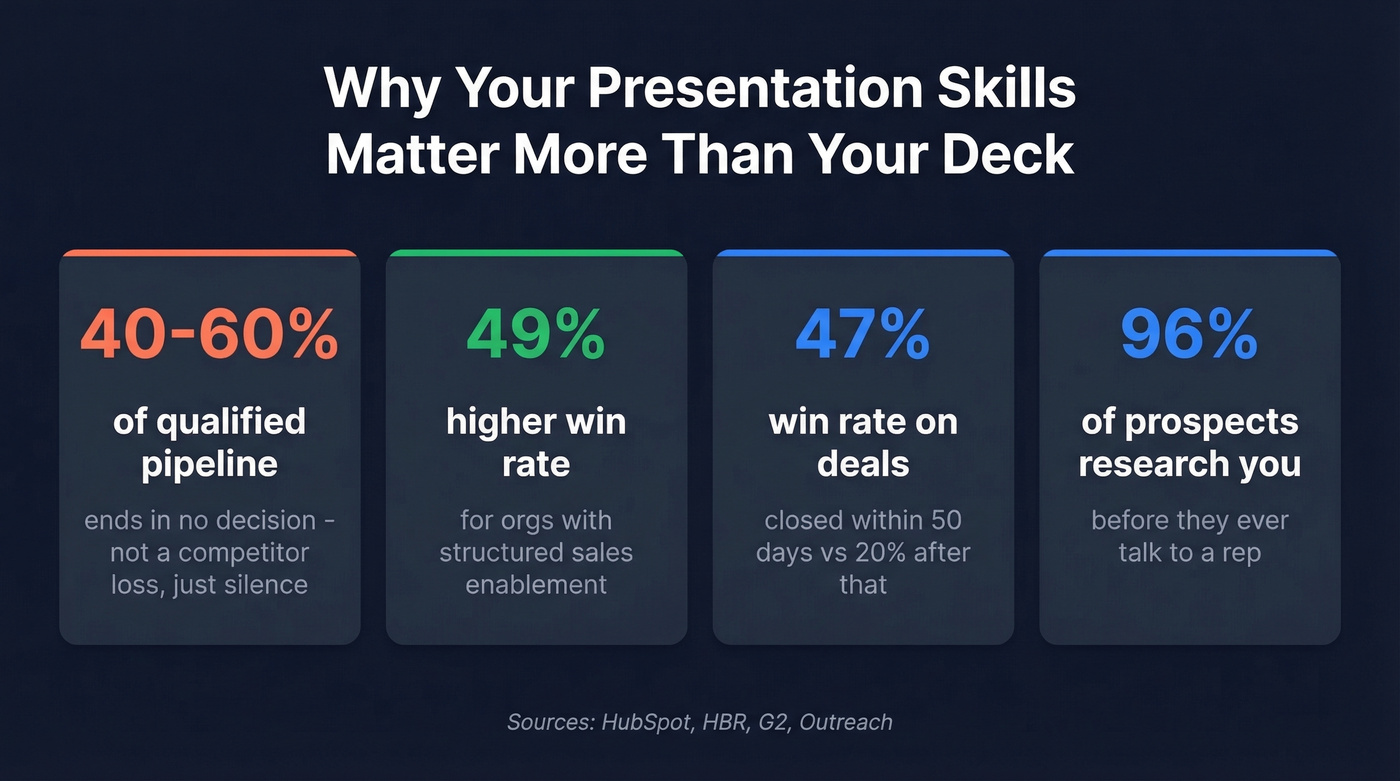
Your presentation isn't an introduction - it's a decision point.
And most reps blow it. 40-60% of qualified pipeline ends in "no decision." Not a competitor win. Not a pricing objection. Just... nothing. The buyer goes dark. That's a presentation problem disguised as a pipeline problem - the rep didn't create enough urgency or clarity to move the deal forward.
The flip side confirms it. Organizations with a structured sales enablement strategy achieve a 49% higher win rate on forecasted deals. Opportunities closed within 50 days hit a 47% win rate versus 20% or lower after that threshold. Speed matters, and a sharp presentation compresses cycles.
Here's the thing: your deck is maybe 20% of the presentation. The conversation - the Q&A, the objection handling, the way you read the room and adapt - that's the other 80%. Most reps over-invest in slides and under-invest in everything else.
What You Need (Quick Version)
- Use the Problem-Solution-Benefit 7-slide framework. It's the most versatile structure for B2B sales presentations. Details below.
- Spend 70% of prep time on slides 1-3 (problem, cost, cause). If they don't feel the pain, your fix is irrelevant.
- Stop spending 4 hours building decks. Use an AI tool like Pitch or MagicSlides for the first draft, then invest the saved time rehearsing your Q&A answers and researching your prospect. Knowing who's in the room matters more than your slide transitions.
Proven Frameworks for B2B Sales Presentations
Generic advice says "structure your presentation." Useful frameworks tell you exactly which slides go where and why. These three cover 90% of B2B selling situations.
Problem-Solution-Benefit (7 Slides)
This is the workhorse. Seven slides, each with a specific job:
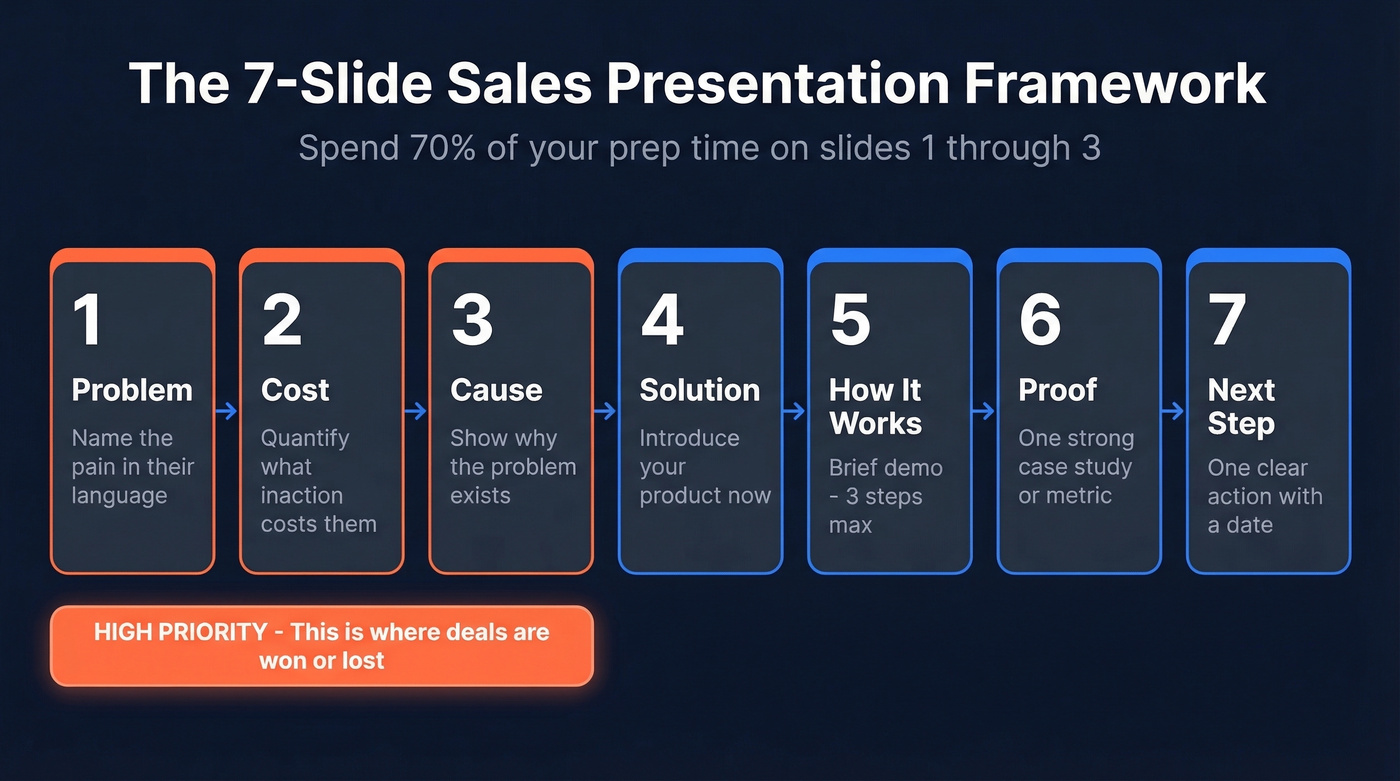
- Problem - Name the pain in their language, not yours. Use their industry terms, their metrics, their world. ProdPad's sales deck opens by calling spreadsheets "black holes where ideas enter and rarely re-emerge" - that's a problem slide done right.
- Cost - Quantify what the problem costs them. Revenue lost, time wasted, risk exposure. Make inaction expensive.
- Cause - Explain why the problem exists. This is where you demonstrate expertise. You're not just selling a fix; you understand the root cause.
- Solution - Now (and only now) introduce your product. Keep it to three steps or fewer.
- How It Works - Brief demo walkthrough. No feature dumps. (If you need a tighter demo flow, use this product demo checklist.)
- Proof - Case study, metrics, customer quote. One strong example beats five weak ones.
- Next Step - One clear action. Not "let us know what you think." A specific next meeting, a pilot timeline, a decision date.
Spend 70% of your preparation time on slides 1-3. If the audience doesn't viscerally feel the problem and its cost, nothing you say about your solution matters. We've seen reps rush through the problem in 90 seconds and spend 15 minutes on features. That's backwards.
A smart variant adds a risk-mitigation slide before Next Step - proactively addressing the top 2-3 objections before they come up in Q&A. This works especially well for deals with 6-10 stakeholders where someone in the room will raise concerns you won't hear until the deal stalls.
SCQA for Executive Briefings
When you're presenting to C-suite, you don't have 7 slides of patience. Use SCQA:
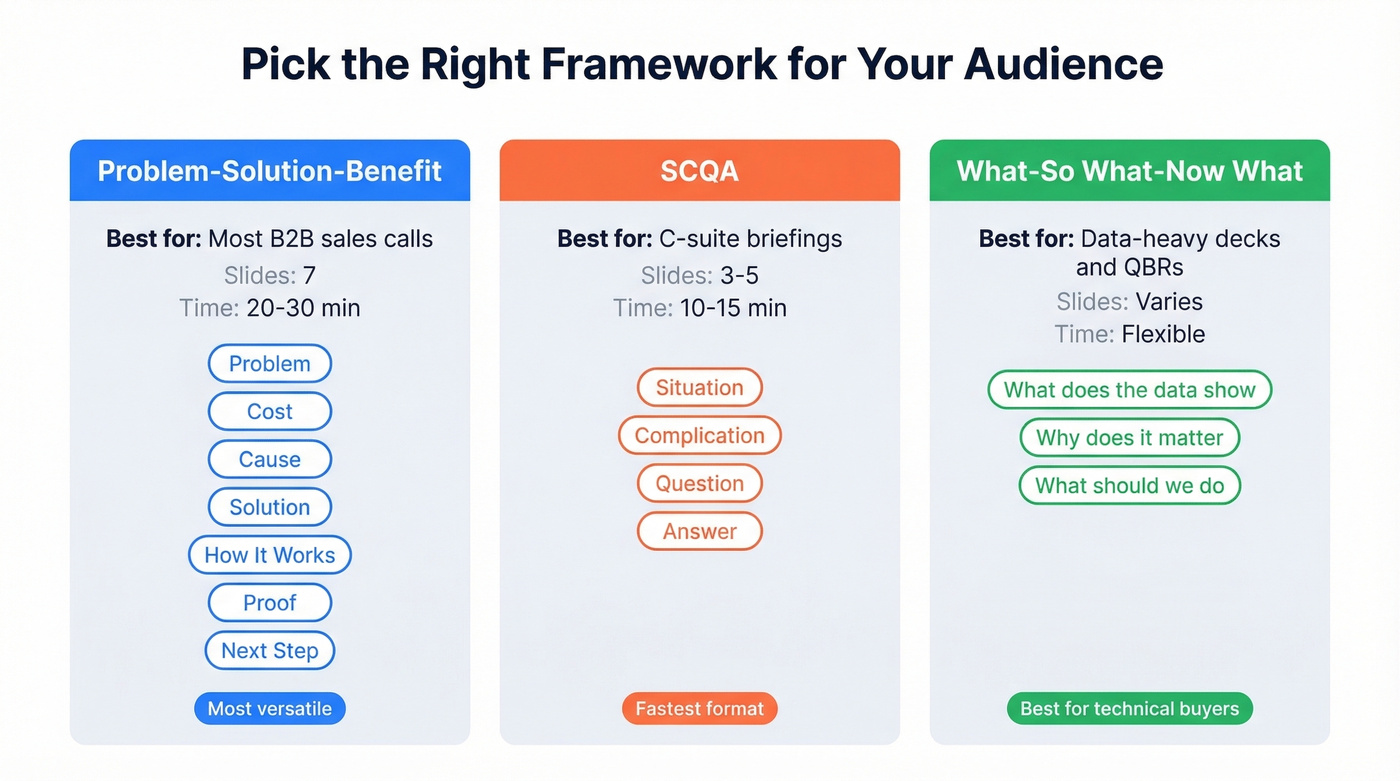
- Situation - Where they are today (one sentence).
- Complication - What's changed or what's at risk.
- Question - The strategic question this creates.
- Answer - Your recommendation (which happens to involve your product).
Executives want to know you understand their business before you pitch your solution. SCQA forces you to lead with their context, not your features. Keep it to 15 minutes max - they'll ask questions if they want more.
What-So What-Now What for Data-Heavy Decks
Technical audiences and QBRs need a different structure. For each data point or finding, answer three questions in sequence: What does the data show? Why does it matter? What should we do about it?
This prevents the most common data-presentation sin - showing 30 charts with no narrative thread. Every slide earns its place by connecting to a decision. (For a deeper breakdown, see What-So What-Now What.)
Design Your Deck for Decisions
Presentations with strong visuals are 43% more persuasive than text-heavy slides. Customized presentations improve win rates by up to 50%. And you have about three slides to hook your audience - if those first three land, 80% of the room stays engaged through the end.
That means your title slide, problem slide, and cost slide carry disproportionate weight. Don't waste your opener on a company logo and a "Thank you for your time" placeholder. Open with a number that makes the room uncomfortable - their churn rate, their competitor's growth, the cost of their current process. (If you need benchmarks and a way to frame churn credibly, start with churn analysis.)
Sales presentations span at least 10 distinct deck types - first call, demo, executive briefing, competitive displacement, QBR, and more. One deck doesn't fit all audiences. A rep who moved from selling to construction crews to presenting to engineering PhDs described the shift perfectly on r/sales: the language density, credibility signals, and pacing all change. Here's how to adapt:
| Audience | Language Density | Credibility Signals | Pacing |
|---|---|---|---|
| C-suite | Low - outcomes only | Revenue impact, market data | Fast - 15 min max |
| Technical | High - specifics welcome | Architecture, benchmarks, methodology | Moderate - allow deep dives |
| Operations | Medium - practical | Workflow demos, time savings | Steady - show the "how" |
| Procurement | Medium - ROI-focused | TCO, payback period, risk | Structured - follow their criteria |
Storytelling That Sells
Stories activate seven regions of the brain; data alone activates two. That's not a reason to skip data - it's a reason to wrap your data in a narrative.
The simplest story arc for sales: Setup (the buyer's world before) → Conflict (the problem and its stakes) → Resolution (the transformed state after your solution). The critical rule: the buyer is the hero, not your product. Your product is the tool the hero uses to win. Nobody wants to hear your origin story. They want to see themselves in the success story. (If you want more plug-and-play narrative structures, borrow from sales deck storytelling.)
The 4P framework gives you a quick structure for any customer story: People (who was involved), Place (their context and industry), Purpose (what they needed to achieve), Plot (what happened and the result). Fill in those four elements and you've got a case study that resonates more than a slide full of logos.

Your presentation is only as good as the people in the room. Prospeo gives you 30+ filters - buyer intent, job changes, technographics - so you present to decision-makers who are actively in-market. 98% email accuracy means your meeting invites actually land.
Stop perfecting decks for prospects who were never going to buy.
Delivery, Q&A, and Objection Handling
Delivery That Builds Trust
Confidence isn't volume. It's preparation made visible.
The rep who speaks at a measured pace, pauses before answering tough questions, and maintains eye contact - or camera contact, virtually - signals competence far more than the one who talks fast and loud. This is what separates a polished presentation from one that gets politely forgotten.
Nerves aren't a weakness. They're a signal you care about the outcome. The fix isn't "be more confident" - it's rehearsal. Record yourself three times, watch it back, and you'll walk in knowing exactly what to expect. One Reddit poster described watching their own recording and realizing their Q&A answers were "long and rambling," repeating the same point three different ways. That's the most common delivery failure we see. Conciseness only comes from practice.
Master the Q&A
Look, the Q&A is where deals are actually won or lost. You nail the deck, the prospect seems engaged, then someone asks a curveball question and you ramble for three minutes. We've watched it happen dozens of times.
Use this framework for every answer: Point (your direct answer in one sentence) → Evidence (one supporting fact) → Implication (why it matters to them) → Bridge (connect back to your narrative or next step). Four beats. Practice it until it's automatic. (To tighten what you ask before the deck, use these discovery questions.)
Handle Objections Without Losing Momentum
Think of objection handling as a pyramid. At the top: trust. If they don't trust you, no technique works. Below that: strategic open-ended questions that surface what's actually holding them back. Then surface objections - the stated concerns. At the bottom: real blockers - the unstated fears that kill deals silently.
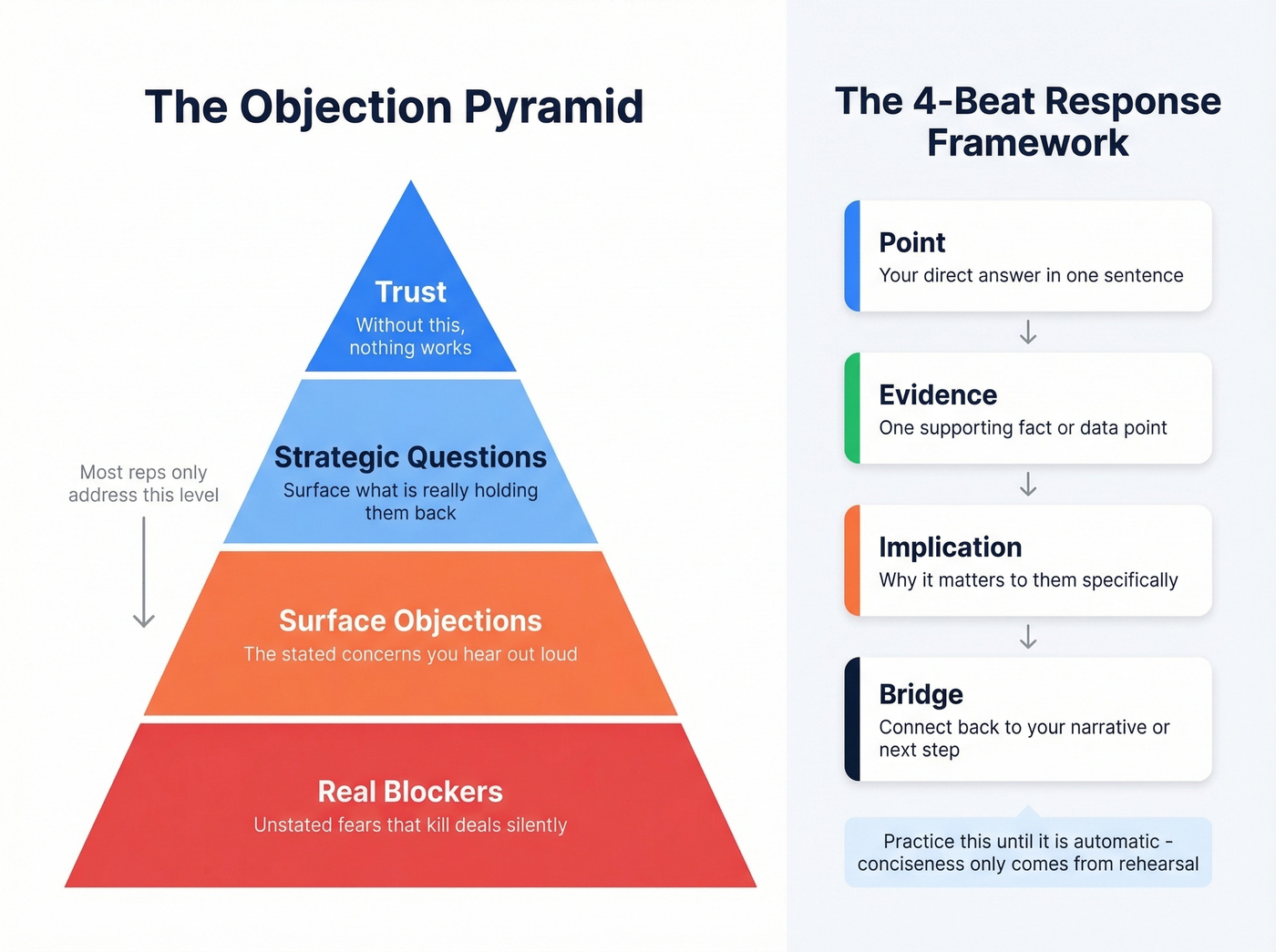
Most reps try to answer surface objections directly. Better reps paraphrase the objection first, confirm they've understood it correctly, then ask a clarifying question before responding. This buys you time, shows respect, and often reveals the real blocker underneath. (If you want a system to reduce pushback across the whole cycle, see how to reduce sales objection rate.)
The smartest move? Include a proactive objection slide in your deck. Address the top 2-3 concerns before anyone raises them. This reframes objections from confrontation to conversation.
Virtual Presentations: The New Default
92% of B2B buyers prefer virtual sales interactions, and 79% of sellers agree virtual selling is effective. Virtual isn't a temporary workaround - it's the primary stage.
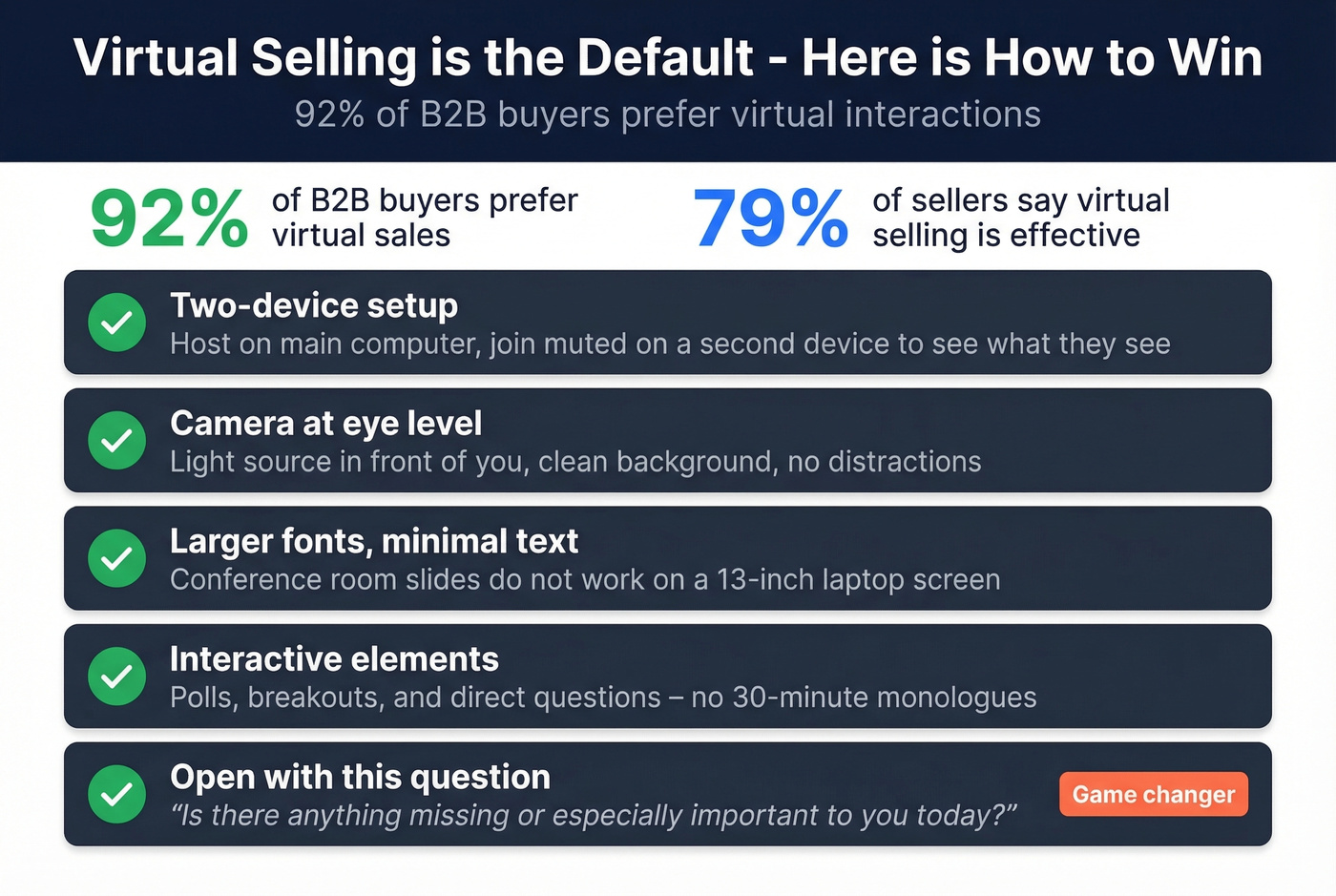
The tactical checklist that separates good virtual presenters from bad ones:
- Two-device setup for high-stakes meetings. Host on your main computer, join as a muted participant on a second device to see exactly what the audience sees.
- Camera at eye level, light source in front of you, clean background.
- Larger fonts, minimal text on slides. What works in a conference room doesn't work on a 13-inch laptop screen.
- Polls, breakouts, and direct questions to maintain engagement. A 30-minute monologue over Zoom is a guaranteed loss.
- Open with the agenda, then ask: "Is there anything missing or especially important to you today?" This single question transforms a presentation into a conversation from the first minute.
Delivering a successful pitch over video requires more deliberate energy than in person - nod visibly, use names frequently, and check in every five minutes to keep the room engaged. (More tactics here: virtual sales presentation tips.)
Preparation Starts With Better Data
The number one reason generic decks lose: reps don't know who's in the room. They don't know the prospect's tech stack, funding stage, or who the real decision-maker is. They present to a persona instead of a person.
Before you build a single slide, know who you're presenting to. Prospeo surfaces verified contact data and company intelligence on 300M+ professionals so your deck speaks to their specific situation - with 98% email accuracy and a 7-day data refresh cycle, you're working with current information, not stale records. Pull up the buying committee, identify their roles, check for recent funding or headcount changes, and tailor your problem slides to their actual context. (If you’re formalizing who you sell to, use an ideal customer profile.)

The difference between a rep who opens with "Companies like yours typically face..." and one who opens with "I noticed you just raised a Series B and are scaling your SDR team from 5 to 15 - here's the problem that creates..." is the difference between a polite meeting and a signed deal.
Hot take: If your deal size is under $10k, you probably don't need a 25-slide deck or a two-hour sales training workshop. You need five tight slides, solid prospect research, and the discipline to shut up and listen during Q&A. Most sales training over-indexes on presentation polish and under-indexes on preparation quality. The rep who knows the buyer's world cold will always beat the rep with the prettier deck. (If you want a broader system for filling top-of-funnel with the right accounts, start with sales prospecting techniques.)
Mistakes That Kill Deals
Rushing to pitch before building connection. Sending your deck two minutes into a call signals you don't care about their situation. One team reported a 20% win-rate lift over two quarters just by replacing urgency-based CTAs with data-backed proposals and tailored value maps.
Information overload. If your deck has 25 slides, you're reading, not presenting. Make every slide intentional. If it doesn't advance the decision, cut it.
Ignoring the buying committee. Mid-market and enterprise deals typically involve 6-10 stakeholders. If you're only presenting to your champion, you're leaving internal objections to fester without your input. (This is where team selling stops being a buzzword and starts being a close-rate lever.)
Urgency gimmicks in B2B. "This pricing expires Friday" works for consumer SaaS. In enterprise sales, it's a sign of desperation that erodes trust. Replace artificial urgency with data-backed business cases.
One-deck-fits-all. Using the same deck for a CTO and a CFO is lazy and obvious. The 10 minutes of customization pays for itself in close rates every time.
AI Tools That Build Your Deck in 30 Minutes
AI can turn a typical four-hour deck build into a 30-minute sprint. Use AI for the first draft, then invest the saved time in rehearsal and prospect research. Don't let AI replace your preparation - let it replace your formatting. (If you’re building a broader stack, start with these generative AI sales tools.)
| Tool | Best For | Price | CRM Integration | User Verdict |
|---|---|---|---|---|
| Pitch | Sales teams | Free | Yes | Analytics + Pitch rooms shine |
| MagicSlides | Fast PPTX output | Free tier | No | Best overall balance |
| Plus AI | Google Slides teams | $10/mo | No | Low learning curve, add-on flow |
| Gamma | Quick first drafts | $8/mo | No | Solid AI generation |
| Canva | Visual templates | Free / Pro $13/mo | No | Best template library |
| Beautiful.ai | Design-forward decks | $12/mo | No | Templates dated; value drops fast |
The Reddit consensus is that Pitch wins for sales teams because of engagement analytics and CRM integration - you can see which slides prospects spend time on. MagicSlides is the fastest path to a usable PPTX file. Beautiful.ai looks good in demos but users consistently report the AI value drops off after the first draft. Skip Prezi unless you enjoy steep learning curves and no PPTX export.
Slide 1 says name the pain in their language. That takes research. Prospeo returns 50+ data points per contact - company revenue, headcount growth, tech stack, funding - so you walk into every presentation armed with context that makes buyers lean in.
Spend less time building slides and more time knowing your buyer.
FAQ
How do I improve my sales presentation skills fast?
Record yourself presenting and watch it back - you'll spot rambling, filler words, and pacing issues immediately. Simplify your deck to three core points, rehearse Q&A answers more than slides, and use AI tools like Pitch or MagicSlides for the first draft so you can focus entirely on delivery.
What's the best framework for a B2B sales presentation?
Problem-Solution-Benefit with 7 slides works for most B2B contexts and is the most versatile starting point. Use SCQA for executive briefings (15 minutes or less) and What-So What-Now What for data-heavy QBRs where every chart needs a clear takeaway.
How many slides should a sales presentation have?
Five to seven for most deals. The best sellers use minimal slides and spend most of the meeting in conversation - the deck is a framework for discussion, not a script. If your ACV is under $15k, five slides is plenty.
How do I handle objections during a presentation?
Paraphrase the concern first, confirm you've understood it, then ask one clarifying question to surface the real blocker. Include a proactive risk-mitigation slide addressing the top 2-3 objections before anyone raises them - this reframes pushback as planned conversation.
What tools help with prospect research before a presentation?
Prospeo is the fastest path to verified contact data on the buying committee - 98% email accuracy, 125M+ mobile numbers, and 30+ search filters including intent signals and technographics. Pair it with Pitch for deck analytics so you know which slides resonated after the meeting.