

Salesflare vs Salesforce (2026): Which CRM Fits Your Team?
Most CRM comparisons obsess over features. That's backwards.
If reps don't log calls and emails, your pipeline report becomes fiction by week three.
We've seen teams buy the "most powerful" CRM on paper, then quietly run the business out of inboxes and spreadsheets because the system takes too much effort to keep current. The best CRM is the one with the highest data completeness after 90 days, and that comes down to operating model: do you have admin capacity and governance, or do you need the CRM to keep itself clean?
That's the real salesflare vs salesforce decision.
30-second verdict (and "Skip both if...")
Pick Salesflare if...
- You're under ~25 users and nobody's a dedicated admin.
- You want reps selling inside their inbox with auto-logging and minimal CRM busywork.
- You want fast setup and you're fine with a simpler customization/reporting ceiling.
Pick Salesforce Sales Cloud if...
- You need governance: complex permissions, objects, and process control across teams.
- You're willing to pay for the platform and the people to run it.
- You expect to add forecasting depth, CPQ-ish workflows, or serious RevOps automation.
Skip both (or stop blaming the CRM) if...
- Your real problem's bad emails, stale phone numbers, and duplicates. A fancy CRM just stores bad data faster.
- Outbound deliverability's slipping. Clean data in -> CRM ROI out.
Here's the thing: most "CRM failures" are data failures wearing a CRM costume.
Shortcut: Need speed + adoption -> Salesflare. Need governance + scale -> Salesforce. Need verified contact data feeding either -> add a data layer.

Salesflare vs Salesforce at a glance (comparison table)
| Criteria | Salesflare | Salesforce Sales Cloud |
|---|---|---|
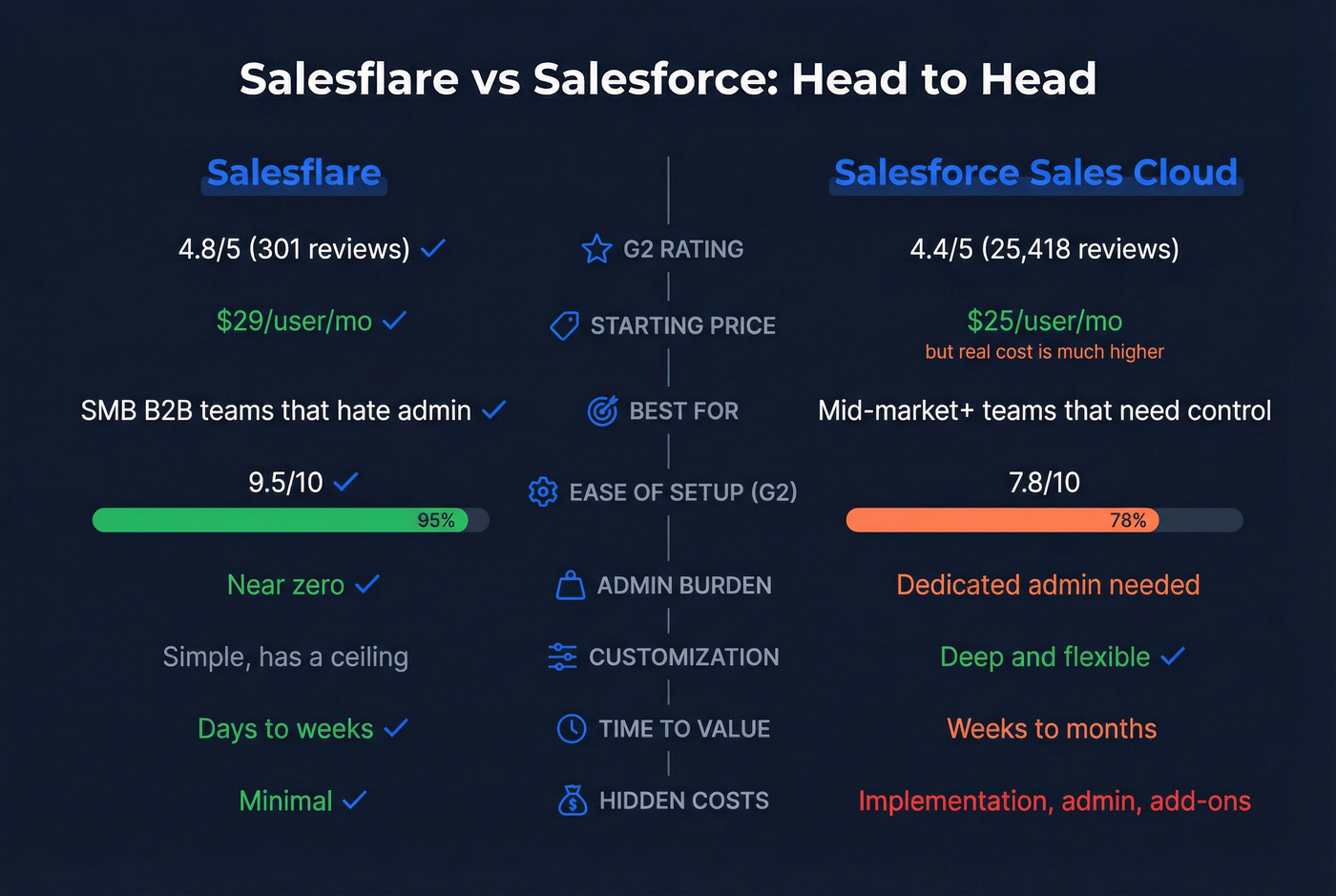
| G2 rating | 4.8/5 (301) | 4.4/5 (25,418) |
| Pricing (core CRM) | $29-$49/user/mo (annual) | $25-$350/user/mo (annual) |
| Pricing (edge cases) | $39-$64/user/mo (monthly); Enterprise ~$99/user/mo (annual, 5+ users) | Free $0 (max 2 users); Agentforce 1 Sales $550/user/mo (annual) |
| Best for | SMB B2B sales teams that hate admin | Mid-market+ teams that need control |
| Admin burden | Winner: Salesflare | Salesforce (you'll staff it) |
| Customization ceiling | Salesflare | Winner: Salesforce |
| Reporting depth | Salesflare | Winner: Salesforce |
| Integrations ecosystem | Salesflare (API + Zapier) | Winner: Salesforce (AppExchange) |
| Support (G2) | 9.6 | 8.1 |
| Time-to-value | Winner: Salesflare (days-weeks) | Salesforce (weeks-months) |
| Hidden costs | Winner: Salesflare | Salesforce (implementation + admin + add-ons) |
What matters in practice:
- Salesflare wins on adoption because it removes manual entry.
- Salesforce wins on control, and control comes with an admin/implementation tax.
- Salesforce list pricing looks reasonable until you add implementation + admin + add-ons.
- Don't get tricked by technographics pages that compare "Salesflare vs Salesforce AppExchange." AppExchange is a marketplace, not a CRM.
What changed recently (why older comparisons are wrong in 2026)
Salesforce moved from the old "Einstein add-on" era into Agentforce packaging. In 2026, AI isn't a vague "included somewhere" perk. It's a priced layer tied to higher editions and add-ons, and it changes the budget math fast.
Salesforce also raised Enterprise and Unlimited list prices by ~6% effective Aug 1, 2026 (current 2026 list pricing reflects this). If an article still uses the pre-increase numbers, its budget math's wrong.
The 2026 Salesforce pricing trap Teams budget for licenses, then discover they actually budgeted for "CRM storage," not "CRM outcomes." Outcomes require implementation, admin capacity, and clean data.
Pricing snapshot: licenses + the real "gotchas"
Salesforce has more tiers than most teams need, and that's part of the problem: it's easy to buy the wrong edition and then pay to climb out of it.
Salesforce Sales Cloud list pricing:
| Product | List price (USD) | Billing note |
|---|---|---|
| Free Suite | $0 | max 2 users |
| Starter Suite | $25/user/mo | monthly/annual |
| Pro Suite | $100/user/mo | annual |
| Enterprise | $175/user/mo | annual |
| Unlimited | $350/user/mo | annual |
| Agentforce 1 Sales | $550/user/mo | annual |
Salesflare pricing is simple:
| Product | Price anchor | Billing note |
|---|---|---|
| Salesflare Growth | $29/user/mo | annual price |
| Salesflare Pro | $49/user/mo | annual price |
Monthly anchors are higher ($39 Growth, $64 Pro). Salesflare Enterprise is commonly positioned around $99/user/mo annually with a 5-user minimum.
AI cost clarity (Salesforce): If you want Salesforce's newer Agentforce add-ons, they start at $125/user/mo on top of your base edition. That's the line item that blows up "we'll just add AI later" budgets.
Internal links (helpful when you're validating details):
- Salesflare pricing: https://salesflare.com/pricing
- Salesflare integrations: https://salesflare.com/integrations
What plan do you actually need?
Salesflare
- Growth: clean pipeline, email integration, and the "CRM that fills itself in."
- Pro: more automation headroom. Salesflare also includes lead credits by plan: Trial 5/month, Growth 5/month, Pro 100/month, Enterprise 250/month (per month, per team).
Salesforce
- Starter: fine for tiny teams; you'll hit workflow/reporting limits fast.
- Pro ($100): a common starting point for SMBs that want forecasting and broader integrations.
- Enterprise ($175): where teams land when they need flexibility, APIs, and real workflow design.
- Unlimited ($350): you're paying for the platform experience and deeper scale expectations.
- Agentforce 1 Sales ($550): you're committing to Salesforce's AI/data stack as a strategy.

You just read that most CRM failures are data failures wearing a CRM costume. Whether you pick Salesflare or Salesforce, stale emails and bad phone numbers will tank your pipeline reports. Prospeo's 7-day data refresh and 98% email accuracy mean your CRM stays clean without manual scrubbing.
Stop paying for a CRM that stores garbage. Feed it verified data.
Salesflare vs Salesforce: true year-1 TCO (implementation, admin time, support)
License price is the smallest part of the Salesforce story for a lot of teams. I've watched bake-offs where Salesforce "won" on capability, then lost six months later because nobody owned the system day-to-day, so fields went stale, dashboards got ignored, and the team started running deals out of email threads again.

These are SMB-to-midmarket benchmarks (implementation ranges from lean to "we built a monster").
Services & implementation (benchmarks)
- Partner/consultant rates: $100-$250/hr
- Small implementation projects: $10k-$25k
- Custom workflow/dev work: $10k-$85k+
- Data migration: $5k-$60k+
People costs (benchmarks)
- Training & change management: $500-$5,000 per user
- Ongoing support: $2k-$5k/mo partner retainer or $70k-$120k/yr for a Salesforce admin
Salesforce add-on costs (the quiet multipliers)
- Paid support plans (e.g., Premier Success) increase annual cost.
- Sandboxes, extra environments, and packaged apps add recurring spend and admin overhead.
A reusable TCO template (lean vs typical)
Year-1 TCO = (licenses) + (implementation project) + (migration) + (training) + (admin/support)
Scenario A - Lean rollout (10 users, Salesforce Enterprise)
- Licenses: 10 x $175 x 12 = $21,000
- Implementation: $10,000
- Migration: $5,000
- Training: 10 x $500 = $5,000
- Admin/support: $0-$24,000 (light partner support)
- Lean year-1 total: ~$41k-$65k
Scenario B - Typical SMB rollout (10 users, Salesforce Enterprise)
- Licenses: $21,000
- Implementation: $25,000
- Migration: $20,000
- Training: 10 x $2,000 = $20,000
- Admin/support: $24,000-$60,000 (partner retainer or partial admin capacity)
- Typical year-1 total: ~$110k-$146k
Salesflare year-1 reality (10 users, Pro annual)
- Licenses: 10 x $49 x 12 = $5,880
- Implementation/admin: near-zero compared to Salesforce (you configure, connect email, and go)
- Most teams land under: ~$6k-$10k year 1 unless they add major integrations.
That is why "Salesforce is $175/user" is technically true and operationally misleading.
Time-to-value timeline (weeks vs months)
Salesflare goes live fast: connect email, import accounts/contacts, define pipeline stages, set basic automation, and you're selling.
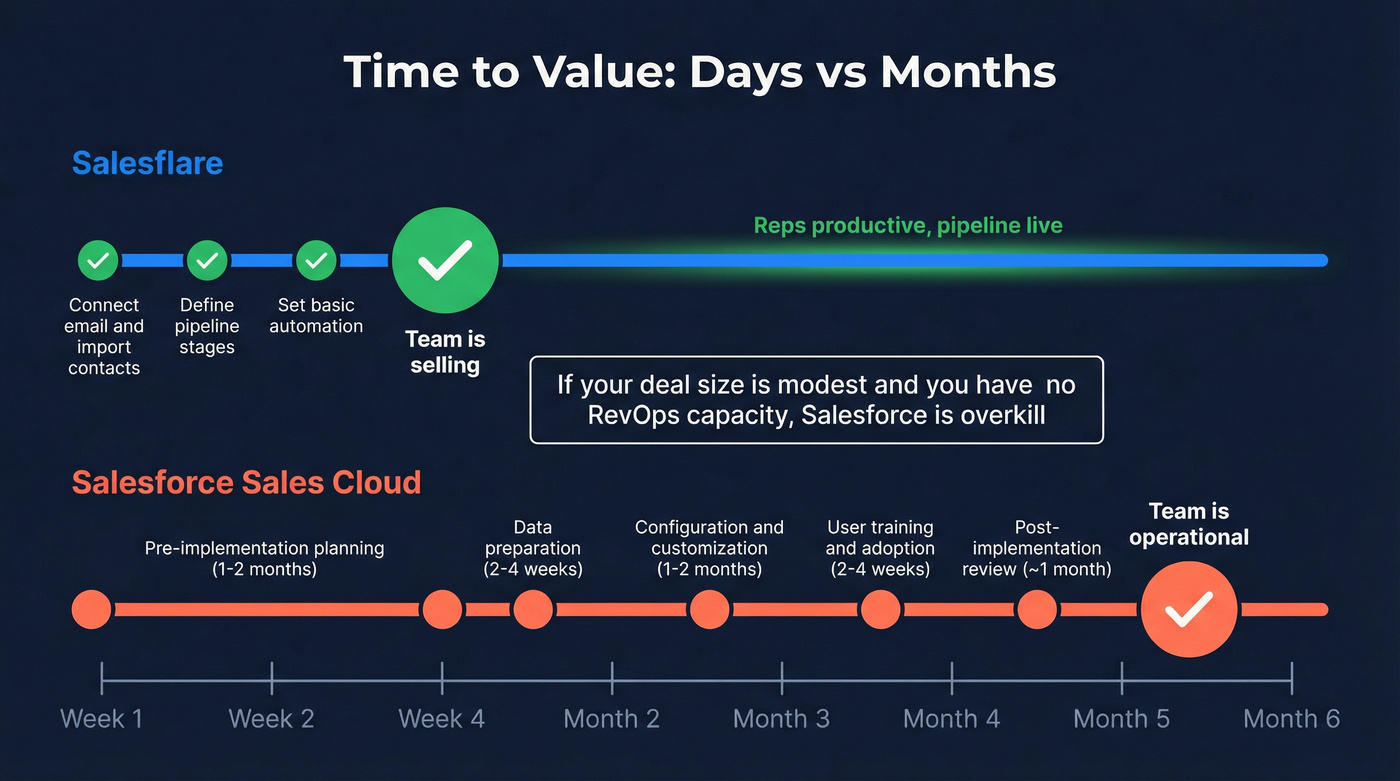
Salesforce is a rollout, even for small teams:
- Pre-implementation: 1-2 months
- Data preparation: 2-4 weeks
- Configuration/customization: 1-2 months
- User training/adoption: 2-4 weeks
- Post-implementation review: ~1 month
Real talk: if your average deal size is modest and you don't have RevOps capacity, Salesforce is overkill. You'll pay enterprise money to run a starter workflow.
Setup/admin reality check (quantified user sentiment)
G2's side-by-side scores predict adoption better than any vendor demo:
- Ease of Use: 9.3 vs 8.2
- Ease of Setup: 9.5 vs 7.8
- Ease of Admin: 9.3 vs 7.9
- Quality of Support: 9.6 vs 8.1

Salesforce's 25k+ review volume matters: it reflects a platform used in every imaginable scenario: powerful, complex, and easy to misconfigure if you don't have an owner.
Gartner Peer Insights also shows Salesflare at 4.6/5 (13 ratings), with recurring praise for automation and recurring limits around customization.
Features that actually decide it (automation, customization ceiling, reporting, integrations)
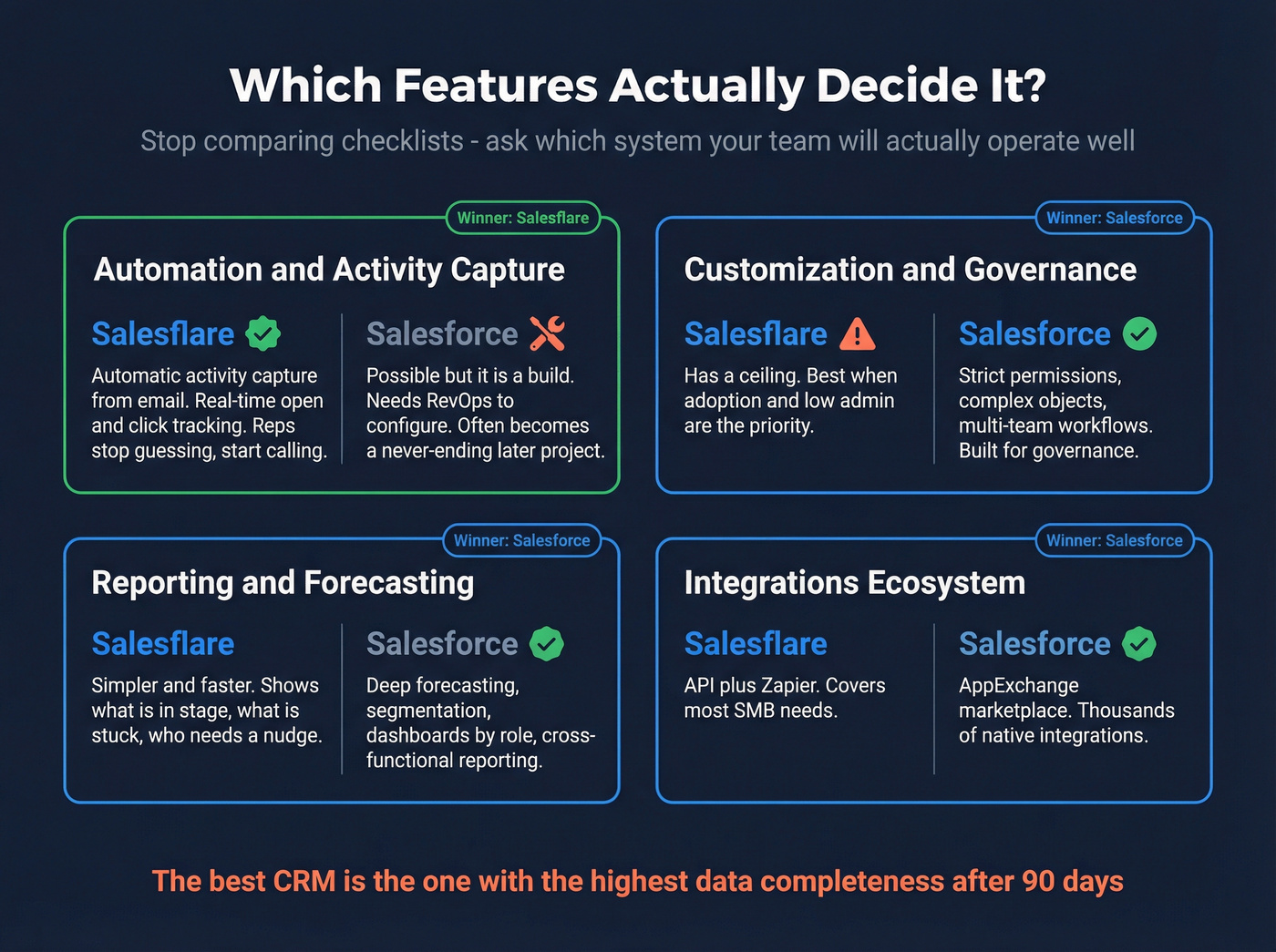
The mistake is comparing checklists. The right question is: Which system will your team actually operate well?
Automation & activity capture
Salesflare's superpower is automatic activity capture. It pulls context from email so reps don't have to log every touch, which keeps pipelines alive in small teams.
It also shines at real-time engagement signals: open/click tracking and engagement alerts change follow-up behavior. Reps stop guessing and start calling five minutes after the prospect re-opens the thread.
Salesforce can automate activity capture too, but it's a build. If you've got RevOps, that's fine. If you don't, it becomes a never-ending "we'll configure it later" project that drifts, breaks, and quietly turns into a pile of half-finished automations.
Customization & governance
Salesforce wins. Not close.
If you need strict permissions, complex objects, multi-team workflows, and governance that survives org changes, Salesforce is built for it. The tradeoff is maintenance: every custom field and workflow becomes something you own forever, and the bill shows up as admin time, partner retainers, and "why is this report wrong again?" meetings.
Salesflare has a ceiling. When you need multi-entity governance and complex permissioning, Salesforce is the safer default; Salesflare's best when adoption and low admin are the priority.
Reporting & forecasting
Salesforce reporting depth is a real advantage once you're running a serious pipeline machine: forecasting, segmentation, dashboards by role, and cross-functional reporting.
Salesflare reporting is simpler and faster. For SMBs, that's exactly right: what's in stage, what's stuck, and who needs a nudge.
Integrations & extensibility (quick take)
Salesforce wins on ecosystem breadth (AppExchange). Salesflare wins on speed and simplicity (API + Zapier). If you want operational detail, the next section's the one to read.

Integrations & extensibility (what "API + marketplace" means operationally)
Operationally, "integrations" means three things: data flow, ownership, and failure modes.
Salesflare integration reality
- Public REST API plus automation via Zapier.
- Credentials live in Settings > API key.
- Practical SMB pattern: form fill -> Zapier -> Salesflare lead -> sequencer enrollment -> Slack alert.
This is the cleanest path when you want lightweight automation without a full integration project.
Salesforce integration reality
- APIs plus the operational advantage of AppExchange: prebuilt connectors and managed packages.
- The tradeoff is governance: packages add objects/fields/permissions and create technical debt. Someone's got to own the architecture, or you end up with three overlapping tools doing the same job and nobody sure which one is "source of truth."
Real-world friction (one SMB story + how to interpret it)
One SMB Reddit post captured the Salesforce failure mode perfectly: "Months of back and forth... and we still don't have it working." They weren't complaining about features. They were describing the time sink and the constant add-on confusion, after spending about $6k on a consultant.
This is where I get opinionated: buying Salesforce without a named owner is a self-inflicted wound.
How to use that insight:
- If you can't name the internal owner of Salesforce, you're buying stress.
- If you can't enforce process and data hygiene, Salesforce becomes an expensive spreadsheet.
- If you need a CRM that stays updated without policing reps, Salesflare fits better.
When to pick Salesflare vs Salesforce (scenario decision tree)
Use stage and operating model, not ambition.
Founder-led sales (1-5 sellers) Pick Salesflare for speed, inbox-first selling, and near-zero admin.
First SDRs + repeatable outbound (5-25 users)
- Pick Salesflare if activity capture and follow-up discipline are the priority.
- Pick Salesforce if you're already building RevOps muscle and need tighter process control.
Multi-team, multi-region, real RevOps (25+ users) Pick Salesforce when governance, permissions, and cross-functional workflows matter.
Firm boundary: if you need multi-entity governance and complex permissioning, Salesforce is the safer default. If you need adoption and low admin, Salesflare's the better CRM.
Final recommendation (the non-diplomatic version)
Salesflare's the better choice for most small B2B teams because it gets used. Salesforce is the better choice for organizations that can afford governance: time, admin capacity, and implementation budget.
If you're torn, decide based on one question: Who'll own the CRM every week? If the answer's "no one," pick Salesflare. If the answer's "RevOps/admin," pick Salesforce and build it properly.
Bottom line: in the salesflare vs salesforce debate, the "best" CRM is the one your team'll actually run: clean data, consistent activity capture, and a process you can maintain.
Skip both (or pair with either): Prospeo as the data layer
If your CRM's full of stale contacts, neither Salesflare nor Salesforce is going to save you. You'll just get cleaner dashboards about bad inputs.
Prospeo is "The B2B data platform built for accuracy". It keeps either CRM clean with 98% email accuracy, a 7-day refresh (industry average: 6 weeks), 143M+ verified emails, and 125M+ verified mobiles with a 30% pickup rate, plus 300M+ professional profiles. It's self-serve with no contracts, GDPR compliant, and includes a native Salesforce integration.
Pricing's transparent and credit-based (roughly ~$0.01 per verified email, 10 credits per mobile). Enrichment performance is built for ops: 83% of leads come back with contact data, 92% API match rate, and 50+ data points per enrichment. Details: https://prospeo.io/b2b-data-enrichment
If you want the broader context on decay and why CRMs rot, start with contact data decay and a practical SOP for how to keep CRM data clean. If you’re evaluating tools, compare lead enrichment tools and run a quick email verification list workflow before importing anything.

That Year-1 TCO math gets ugly fast when reps waste hours fixing bounced emails and chasing wrong numbers. Prospeo enriches your Salesforce or Salesflare contacts with 50+ verified data points at $0.01/email - a fraction of what bad data costs you in lost deals and burned domains.
Cut your real CRM cost by fixing the data layer first.
FAQ
Is Salesflare good enough to replace Salesforce for a small B2B team?
Yes. If you're under ~25 users and don't have a dedicated admin, Salesflare's usually enough because auto-logging and low CRM busywork drive adoption in the first 90 days. You'll trade away deep customization, complex permissions, and enterprise-grade reporting depth.
What does Salesforce cost in year 1 including implementation?
For 10 users on Enterprise ($175/user/mo), licenses are about $21k/year, but year-1 total cost typically lands at ~$41k-$65k (lean) or ~$110k-$146k (typical) after implementation, migration, training, and ongoing support. If you add Agentforce add-ons, budget +$125/user/mo on top.
How long does a typical Salesforce rollout take vs Salesflare?
Salesforce commonly takes 8-20+ weeks end-to-end (planning, data prep, configuration, training, and a post-launch iteration cycle). Salesflare's usually 3-14 days for a basic go-live because setup's lighter and activity capture reduces the "please update your CRM" problem.