

How to Track Email Opens in Gmail - And What the Data Actually Tells You
You sent a proposal Monday. It's Thursday. No reply. You're refreshing your inbox like it owes you money, wondering if the email even landed. That gap between "sent" and "seen" is exactly why people track email opens in Gmail. But the data you get back is far less reliable than it was three years ago, and the tools promising certainty are overselling it.
What You Need (Quick Version)
Just want to know if one person opened your email? Gmail read receipts work if you're on Google Workspace. Otherwise, install Streak - it's free.
Want open and click tracking on every outgoing email? Mailtrack is the simplest setup. Streak bundles a free CRM if you want pipeline context alongside tracking data.
How Pixel-Based Tracking Works
Every open-tracking tool uses the same trick: a tiny, invisible 1x1 transparent image embedded in your email's HTML. When the recipient opens the email and their client loads images, that pixel pings a server. The server logs a timestamp, device type, email client, and sometimes an IP address that approximates location. This is the core mechanism behind email open tracking in Gmail, regardless of which extension you choose. For a deeper technical breakdown, see our guide to email tracking pixels.
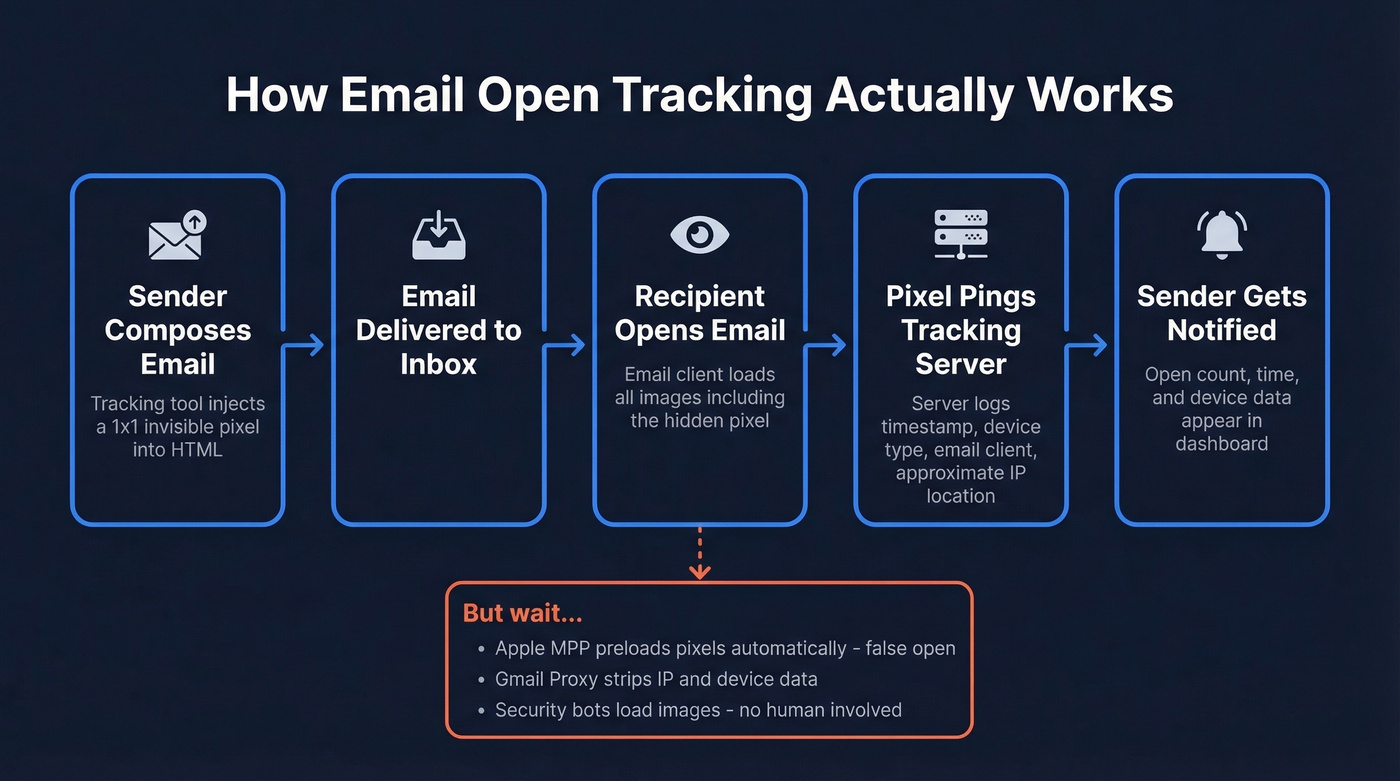
Gmail's native read receipts work differently - they send a request the recipient can accept or decline. No pixel involved, but far more limited. The distinction matters because pixels scale invisibly across every email you send, while read receipts require manual requests and recipient cooperation. Some guides suggest Google Analytics campaign URLs as an alternative, but those only track clicks to external pages, not email opens.
Gmail Read Receipts (Workspace Only)
If you're on a paid Google Workspace account, Gmail has a built-in option - but it's locked behind admin settings and comes with real constraints.
To enable it, your Workspace admin needs to:
- Navigate to
Admin console > Apps > Google Workspace > Gmail > User settings - Choose a read receipt policy: allow within your org only, allow for whitelisted external addresses (up to 100), or allow for any address
- Save and wait for propagation
To request a receipt on a specific email:
- Open a new compose window
- Click the three dots ("More options") at the bottom
- Select "Request read receipt"
Here's the thing: recipients can decline. There's no stealth here - they'll see the request and choose whether to acknowledge it. You can't use this for bulk sends, and it doesn't work on free Gmail accounts at all. The 100-address whitelist limit for external recipients makes it impractical for outbound sales. Fine for checking if your CEO read your budget proposal. Useless for tracking prospect engagement at any meaningful volume.
Chrome Extensions for Open Tracking
This is where most people land. Extensions like Streak, Mailtrack, and Mixmax inject a tracking pixel into every outgoing email automatically. You'll see a toggle in your Gmail compose window - flip it on, and every email gets tracked.
What you get back varies by tool, but the basics are consistent: a notification when someone opens your email, an open count showing if they re-opened it three times before replying, and sometimes device or location data.
One thing worth knowing: some free tiers add branding to your emails. Mailtrack's free plan appends a small "Sent with Mailtrack" signature to every message. For personal use, that's fine. For sales outreach, it signals you're tracking - which can feel invasive and undermine trust. Shared tracking domains used by free extensions can also hurt your deliverability, especially when lots of customers share the same domain. A custom tracking domain, available in tools like GMass, helps reduce this risk - here’s what a tracking domain is and why it matters. If deliverability is already shaky, start with an email deliverability guide before obsessing over opens.

Tracking pixels tell you someone opened your email - maybe. Prospeo tells you the email was real before you hit send. 98% verified accuracy, 143M+ emails refreshed every 7 days, so you stop guessing and start getting replies.
Skip the open-rate guesswork. Send to emails that actually connect.
Why Opens Are Less Reliable in 2026
Open tracking worked beautifully in 2015. Today, it's a directional signal at best. Anyone learning how to track email opens in Gmail should understand these limitations before trusting the data.
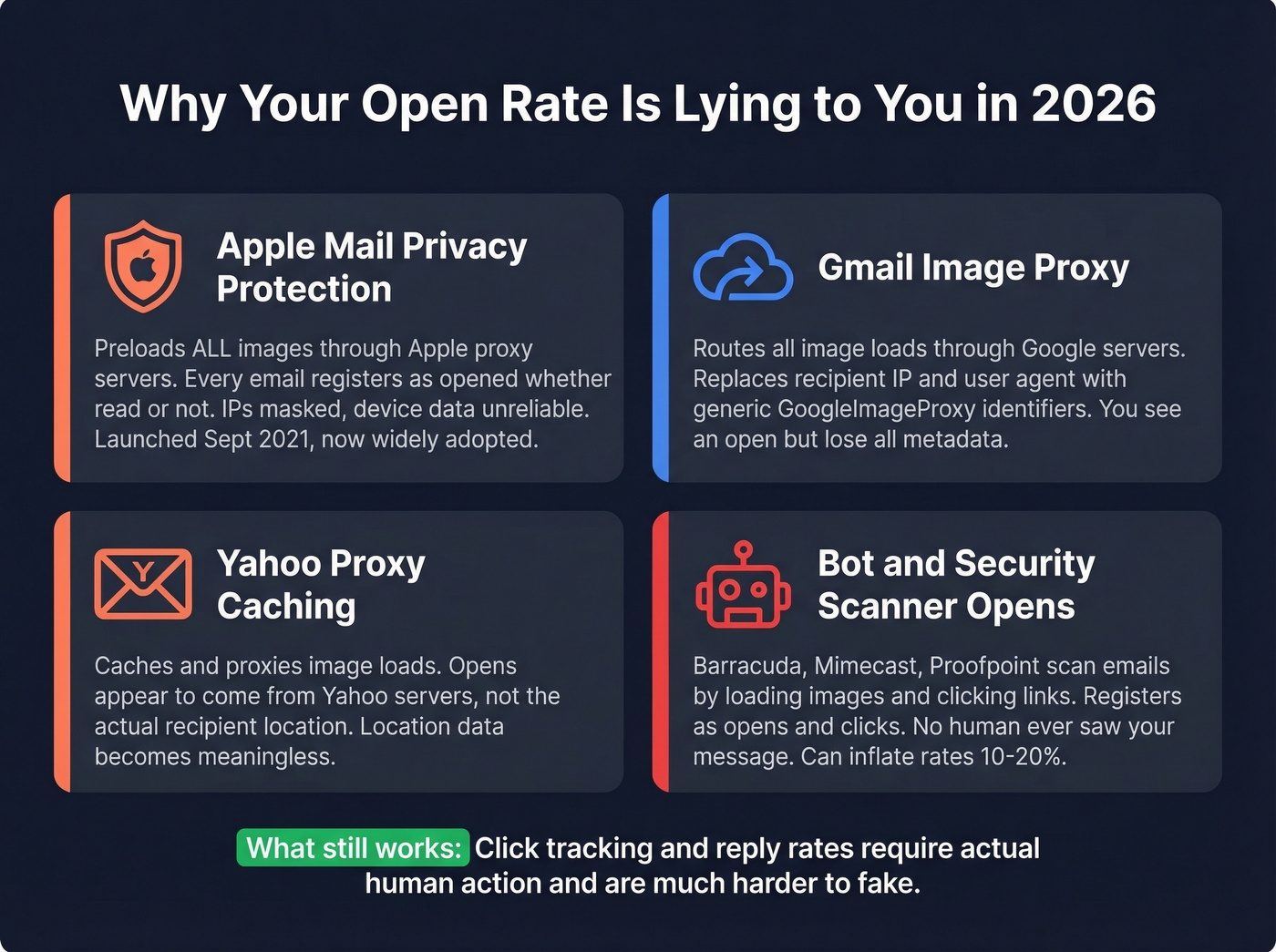
Apple Mail Privacy Protection (MPP). Launched September 20, 2021, MPP preloads all email images - including tracking pixels - through Apple's proxy servers, sometimes hours after delivery. Every email sent to an Apple Mail user with MPP enabled registers as "opened," whether they read it or not. IPs get masked, device data becomes unreliable, and open rates inflate dramatically. The kicker: 77% of marketers believe MPP is automatically activated, but it's actually opt-in. Enough users have enabled it that the distortion is significant regardless.
Gmail Image Proxy. Google routes all image loads through its own proxy servers, replacing your recipient's IP and user agent with generic identifiers like GoogleImageProxy. You'll still see an "open," but the metadata that used to tell you where and on what device is largely stripped.
Yahoo proxy behavior. Yahoo caches and proxies image loads, so opens often appear to originate from Yahoo's servers rather than the actual recipient's location.
Bot and security scanner opens. Corporate email security tools like Barracuda, Mimecast, and Proofpoint scan inbound emails by loading images and following links. These register as "opens" and "clicks" in your dashboard, but no human ever saw your message. We've seen this inflate open rates by 10-20% on lists heavy with enterprise contacts.
The verdict: if someone opened your email five times over three days, that probably means something. If your open rate jumped from 30% to 60% overnight, that's proxy inflation. Pair open data with click tracking and reply rates - those require actual human action and are far harder to fake. If you want benchmarks to sanity-check your numbers, compare against what is a good email open rate and the standard email open rate.
Best Gmail Open Tracking Tools
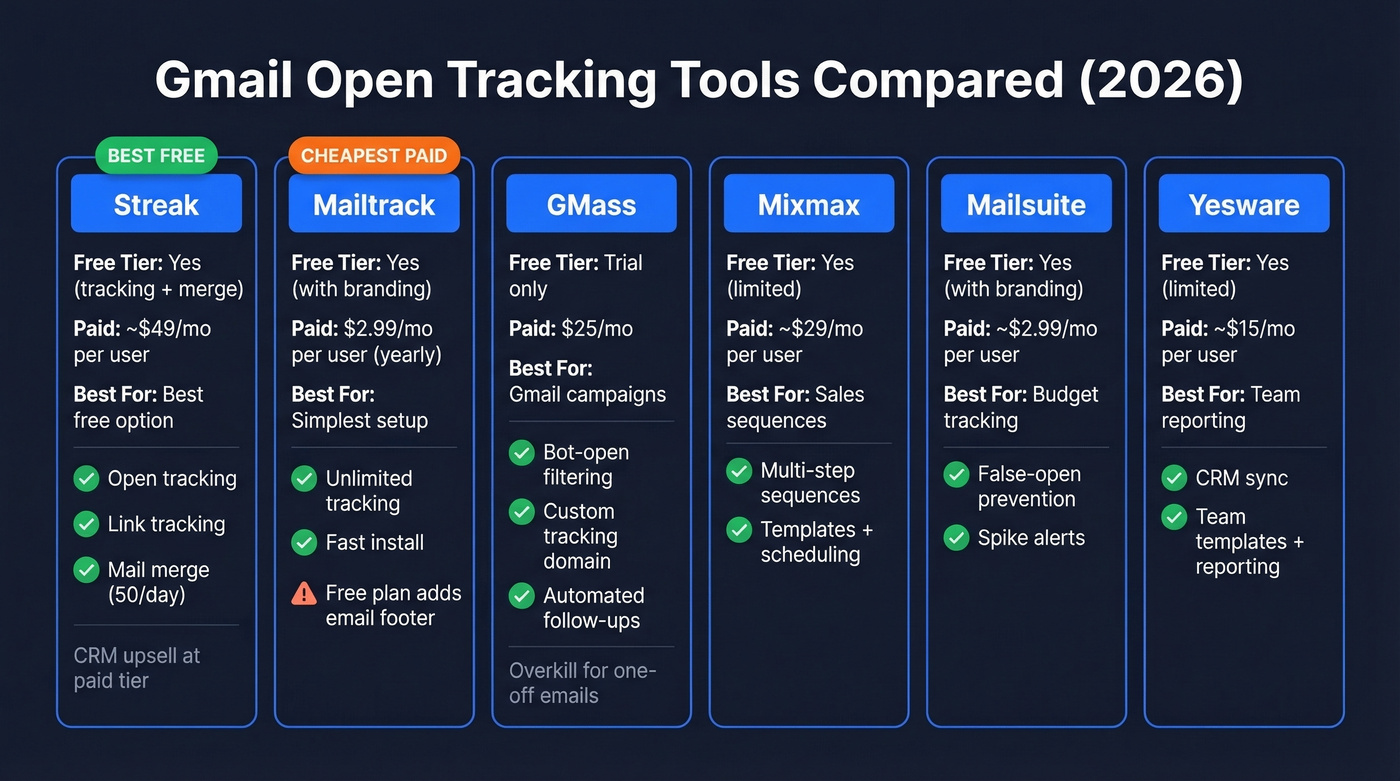
| Tool | Free Tier | Paid Price | Key Strength | Best For |
|---|---|---|---|---|
| Streak | Yes (tracking + merge) | ~$49/mo/user | Free CRM + tracking | Best free option |
| Mailtrack | Yes (with branding) | $2.99/mo/user (yearly) | Simplest setup | Cheapest paid tier |
| GMass | Trial only | $25/mo | Campaign + bot filtering | Gmail campaigns |
| Mixmax | Yes (limited) | ~$29/mo/user | Sequences + scheduling | Sales sequences |
| Mailsuite | Yes (with branding) | ~$2.99/mo/user | Cheap premium | Budget tracking |
| Yesware | Yes (limited) | ~$15/mo/user | Sales team features | Team reporting |
Streak
Streak is the best free option for most people - and the free tier is genuinely generous. You get open tracking, link tracking, and mail merge at 50 sends per day without paying anything. The extension works in Chrome, Safari, and Edge, showing tracking data right in your Gmail sidebar. Where Streak gets expensive is its built-in CRM: pipeline management and shared inboxes start at ~$49/mo per user. If you just want tracking, ignore the CRM upsell. In our experience, it's the cleanest free install-to-value path for anyone who doesn't need campaign features. If you do want pipeline context, start with these examples of a CRM to see what “real CRM” looks like.

Mailtrack
Mailtrack is the fastest path from install to tracking. Extension on, email sent, notification received. That's it. The free plan tracks unlimited emails but adds a "Sent with Mailtrack" footer - a dealbreaker for sales professionals, a non-issue for personal use. Premium runs $2.99/month per user on annual billing or $5.99/month per user monthly, removing branding and adding more tracking features.
GMass
GMass turns Gmail into a lightweight email marketing platform with mail merge, automated follow-ups, and bot-open filtering that separates real opens from security scanner noise. It also supports custom tracking domains, which helps deliverability. No permanent free tier - just a trial - then $25/mo.
Skip GMass if you only track one-off emails. It's built for campaigns and overkill for checking whether your proposal got read.
Mixmax
At ~$29/mo per user, Mixmax goes beyond tracking into full sequence territory: templates, scheduling, and multi-step follow-ups. Use this if you want tracking and a lightweight sales engagement layer. For teams that just need open notifications, it's more tool than the job requires. If you’re comparing options, see our roundup of Mixmax alternatives.
Mailsuite and Yesware
Mailsuite offers free tracking with branding, paid plans from ~$2.99/mo per user. Its false-open prevention filters out your own opens, and spike alerts flag when a recipient suddenly re-engages with an old email - a nice touch. Yesware is more sales-team oriented with templates, reporting, and CRM sync starting around ~$15/mo per user. More tool than most individuals need, but if your team is already evaluating Yesware, the tracking comes bundled.
Verify Emails Before You Track
Let's be honest about a prerequisite most people miss: tracking only works if the email reaches the inbox. A tracking pixel can't fire on an email that bounced. And if you're working from a stale or unverified contact list, a meaningful chunk of your sends are bouncing - silently destroying your sender reputation in the process. If you’re seeing bounces, start with email bounce rate benchmarks and fixes, then work on how to improve sender reputation.
Look, if your deal size is under $15k and you're agonizing over open rates, you're optimizing the wrong metric. Verify your list, write a better subject line, and track replies instead. Opens are vanity; replies are pipeline. If you need ideas, pull from these email subject line examples and use proven sales follow-up templates.

Bot opens, proxy inflation, Apple MPP - open data is noisy. The metric that actually matters is replies, and replies start with reaching a real inbox. Prospeo's 5-step verification and 7-day refresh cycle keep bounce rates under 4% for teams sending at scale.
Bounce rates under 4% beat inflated open rates every time.
Privacy and Legal Compliance
Open tracking isn't just a technical question - it's a legal one. Regulators increasingly treat tracking pixels the same way they treat cookies, and compliance rules are tightening.
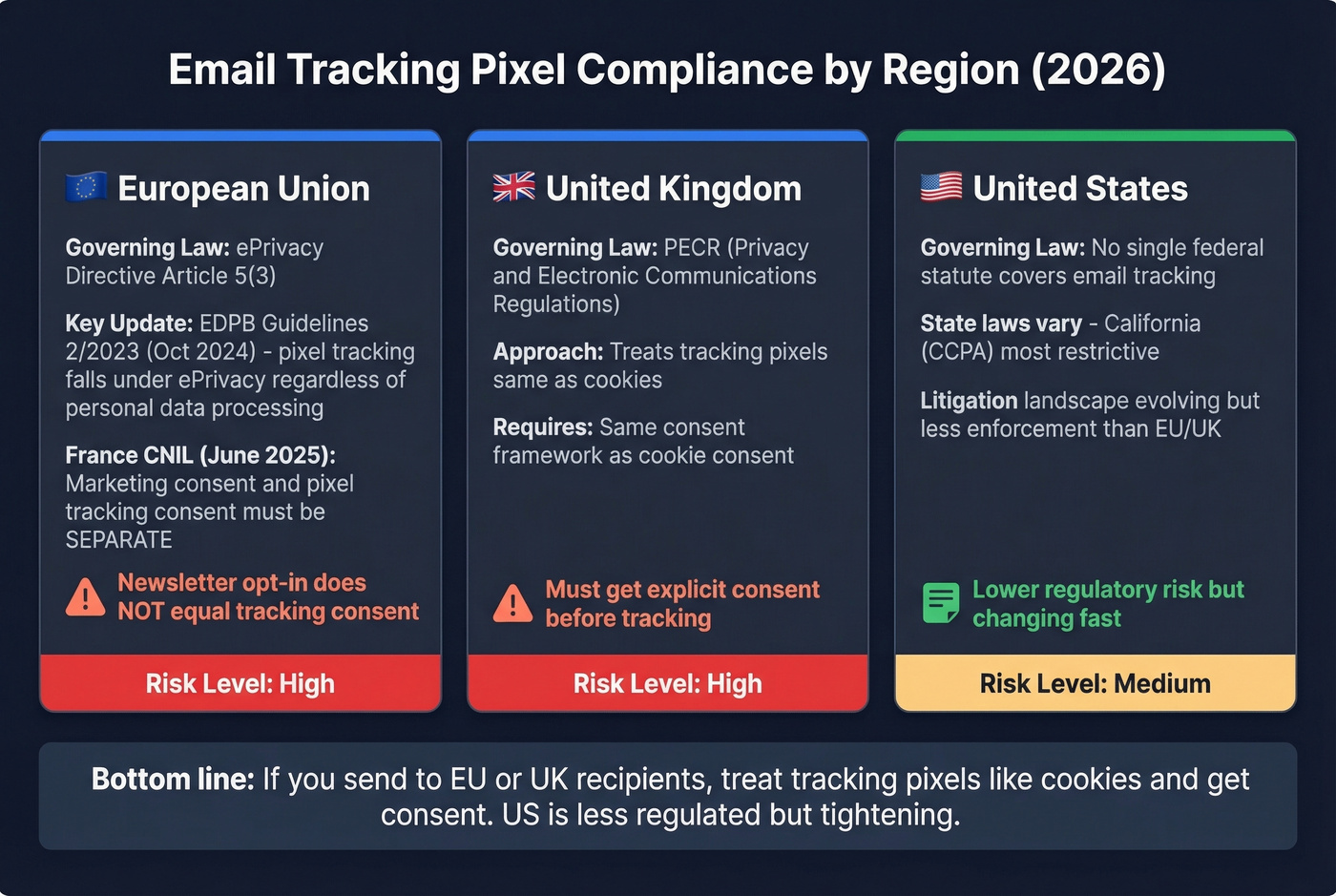
In the EU, the EDPB's Guidelines 2/2023 (adopted October 7, 2024) clarify that pixel tracking falls under ePrivacy Directive Article 5(3), regardless of whether personal data is ultimately processed. France's CNIL went further with draft recommendations in June 2025 proposing that marketing consent and pixel-tracking consent should be separate - meaning a recipient who opts into your newsletter hasn't necessarily consented to being tracked. That's a meaningful distinction for anyone running outbound in the EU.
In the UK, the ICO treats email tracking pixels under PECR, applying the same consent framework as cookies. In the US, no single federal statute covers email tracking, and litigation attempts under ECPA and Wiretap Act theories face practical hurdles - but the law is evolving. The safest practical move: disclose tracking in your email footer or privacy policy. It won't eliminate legal risk entirely, but it demonstrates good faith.
FAQ
Can you track email opens in free Gmail?
Not natively - Gmail read receipts require a paid Google Workspace account. Free Gmail users need a Chrome extension like Mailtrack or Streak. Both offer free tiers with open tracking. Mailtrack's free plan adds a small signature to outgoing emails; Streak's free tier doesn't append any branding.
Can recipients tell you're tracking them?
Usually not. Tracking pixels are invisible 1x1 images that load silently in the background. Free tools like Mailtrack add a visible "Sent with Mailtrack" footer that signals tracking. Paid plans from any extension remove this branding entirely.
How accurate are open rates in 2026?
Expect 15-30% inflation from proxy pre-fetching alone. Apple Mail Privacy Protection preloads pixels through proxy servers, registering false opens. Gmail's image proxy strips IP and device metadata. Corporate security bots trigger phantom opens and clicks. Treat open data as directional - pair it with reply and click tracking for signals that require actual human action.
What's a good free tool to verify emails before tracking?
Prospeo offers 75 free email credits per month with 98% verified accuracy - enough to clean a small outbound list. Verifying before sending prevents bounces that make open tracking impossible in the first place.