

How to Build a Trello Sales Funnel That Actually Converts
Your boss just asked you to build a Trello sales funnel instead of buying a CRM. You have until Friday. The average B2B win rate sits at 21%, and sales cycles have lengthened 32% since 2021. A sloppy funnel setup doesn't just waste time - it actively costs you deals.
Here's the thing: most Trello pipeline boards we've seen are glorified sticky-note walls. Three things separate a functional pipeline from that mess:
- An 8-stage list structure that mirrors a real B2B pipeline
- Crmble + Butler as the only Power-Ups worth installing
- Verified contacts before they enter the pipeline - run your list through Prospeo first so you're not automating follow-ups to addresses that bounce (and keep an eye on your email bounce rate)
Funnel Stages in Trello
Every Trello sales guide tells you to "add custom fields and labels" but skips what conversion rates you should actually track. Here's the stage structure synthesized from Atlassian's own guidance and real practitioner setups:
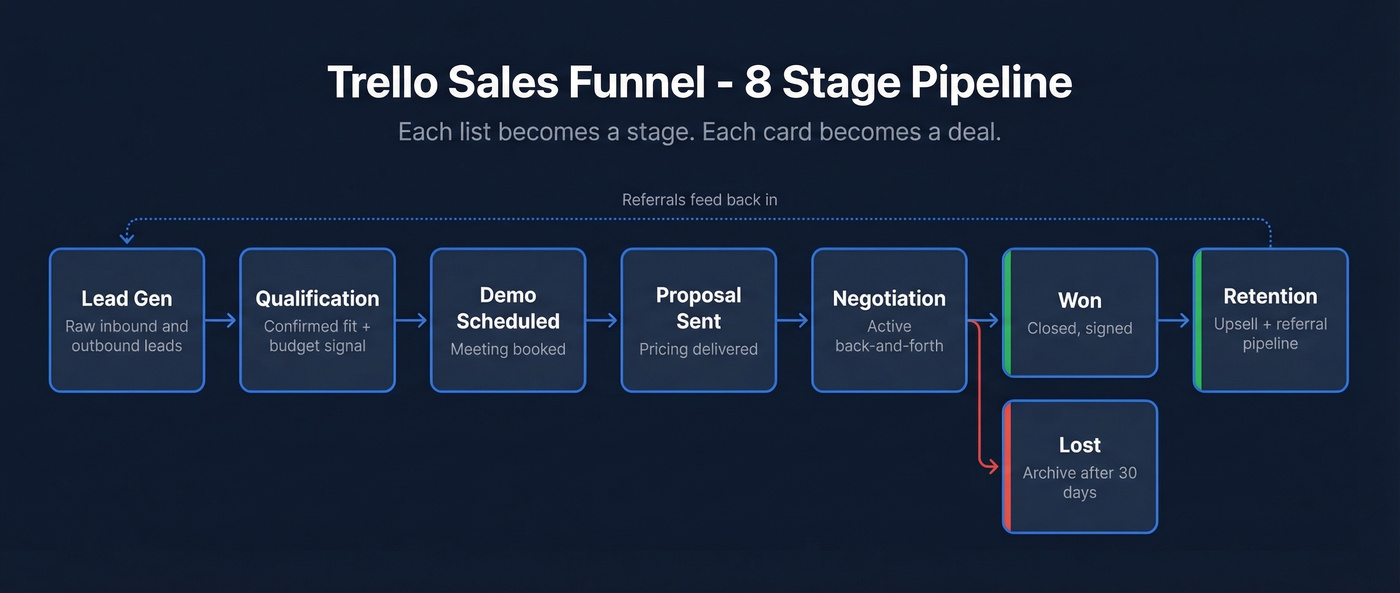
| List (Stage) | What Belongs Here |
|---|---|
| Lead Gen | Raw inbound/outbound leads |
| Qualification | Confirmed fit + budget signal |
| Demo Scheduled | Meeting booked |
| Proposal Sent | Pricing delivered |
| Negotiation | Active back-and-forth |
| Won | Closed, signed |
| Lost | Dead deals (archive after 30 days via Butler) |
| Retention | Upsell + referral pipeline |
For card structure, keep it tight. Title = prospect name + product interest. Description = contact info, deal value, close date, next step. Comments = your relationship timeline.
Track by deal or by person - pick one and stay consistent. We've seen teams that mix the two end up with an unusable board within weeks, because you can't tell whether a card represents a company relationship or a single opportunity. Use Trello's Dashboard view (Premium) to spot stage bottlenecks, or Table view to sort deals by value (and align your board to the right funnel metrics).
Power-Ups and Automation
Use Crmble. It adds CRM-style fields and real-time reporting to your board for €9.99/seat/month with a 10-day free trial - no payment method required. It's the only Power-Up that turns Trello into something resembling a pipeline tool (if you need context on what “real CRM” means, see examples of a CRM).
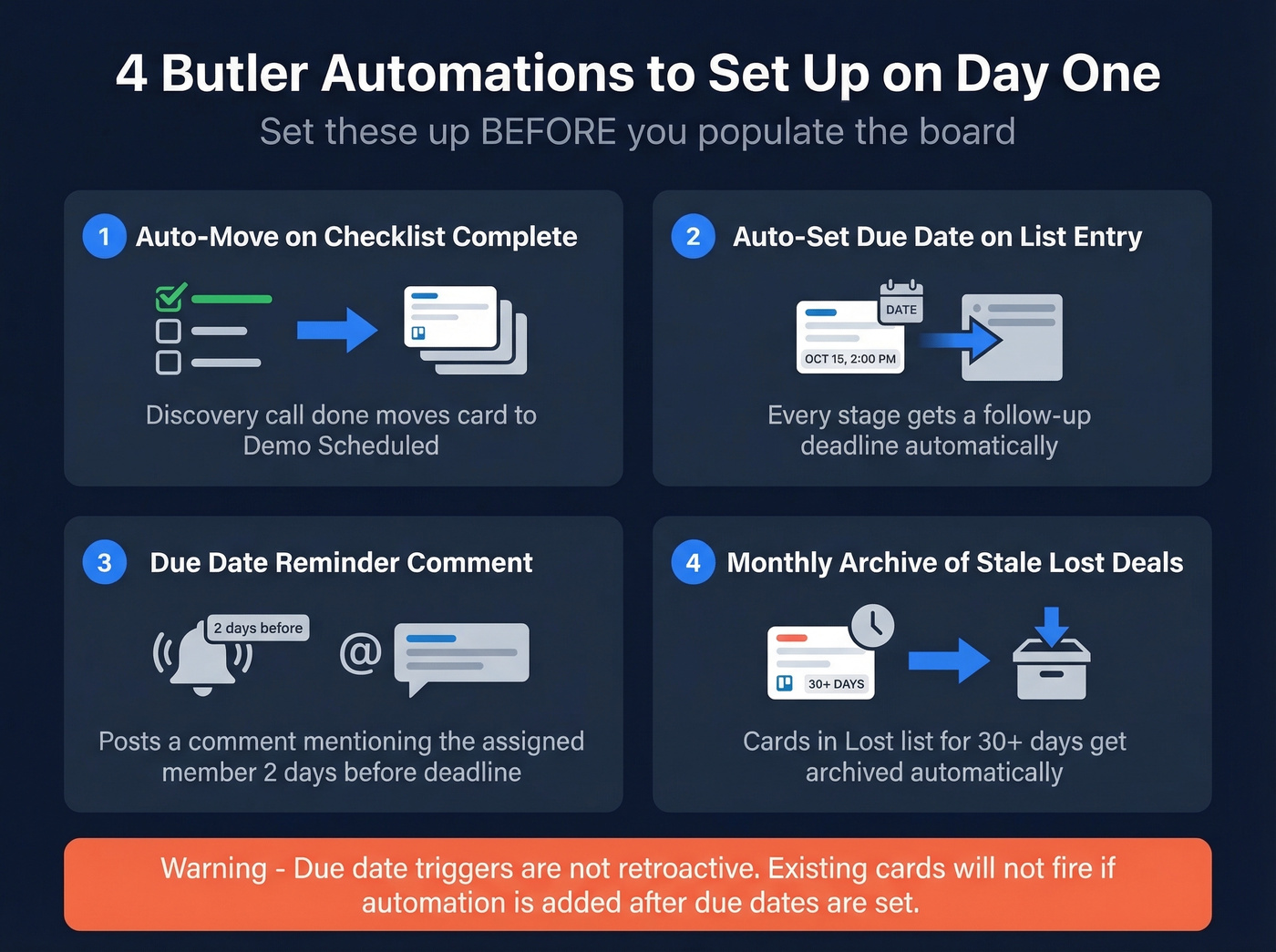
Skip everything else except Butler, which is built into Trello. Four automation recipes worth setting up on day one:
- Auto-move card when a checklist is marked complete - "Discovery call done" moves the card to Demo Scheduled (pair this with a solid discovery call script)
- Set due date automatically when a card enters a list, so every stage gets a follow-up deadline (use proven sales follow-up templates to standardize what happens next)
- Due-date trigger that posts a comment mentioning the assigned member two days before deadline
- Scheduled monthly archive of stale cards sitting in the Lost list for 30+ days
One gotcha that'll bite you: due-date triggers in Trello aren't retroactive. If you add the automation after cards already have due dates, those existing cards won't fire the trigger. Set up Butler before you populate the board.
Stage-by-Stage Benchmarks
These stage-by-stage conversion benchmarks give you something real to measure against (and you can sanity-check your targets against broader sales pipeline benchmarks):
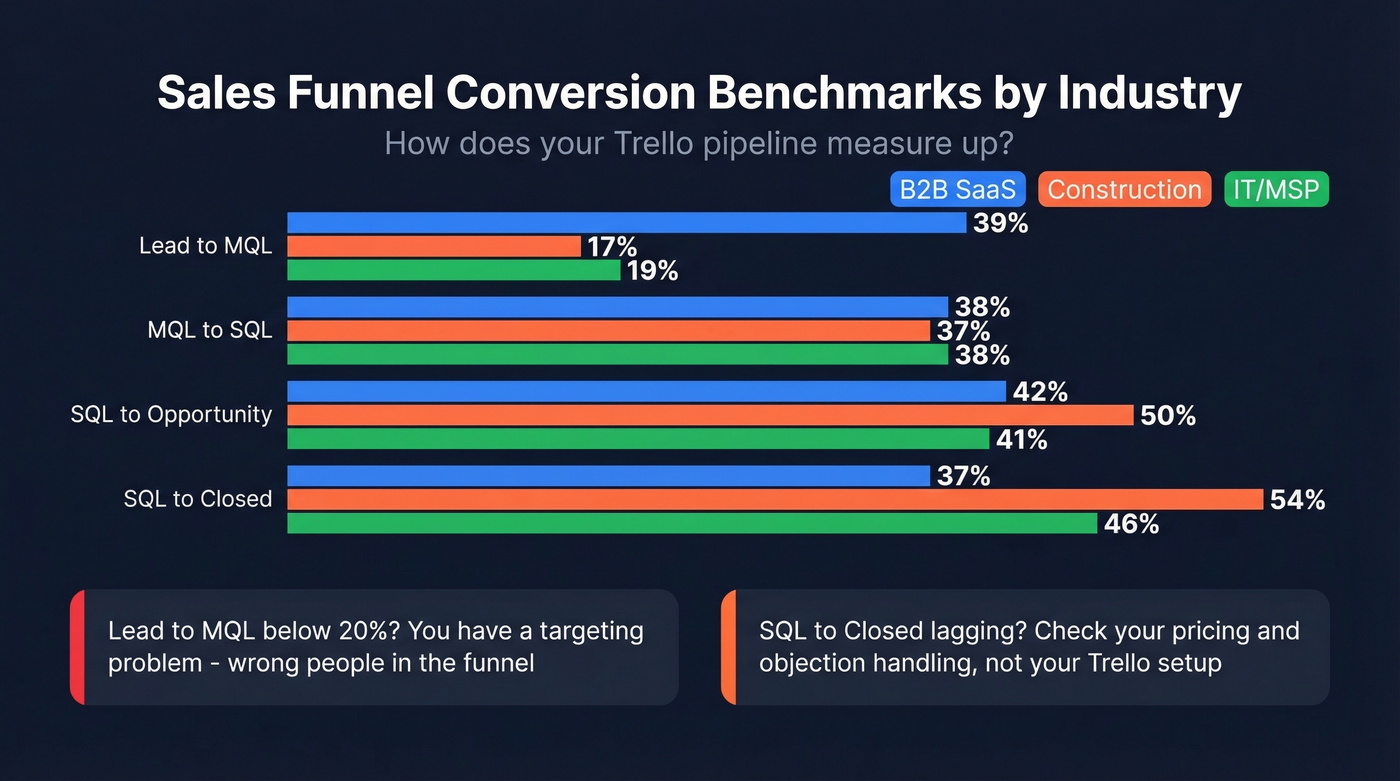
| Industry | L→MQL | MQL→SQL | SQL→Opp | SQL→Closed |
|---|---|---|---|---|
| B2B SaaS | 39% | 38% | 42% | 37% |
| Construction | 17% | 37% | 50% | 54% |
| IT / MSP | 19% | 38% | 41% | 46% |
Here's how these map to your Trello board: Lead Gen corresponds to the Lead stage, Qualification covers MQL→SQL, and Demo Scheduled through Negotiation covers SQL→Opportunity. If your Lead→MQL rate is below 20%, you've got a targeting problem - you're filling the top of the funnel with people who were never going to buy (fix this with better sales prospecting techniques). If SQL→Closed is lagging, your proposal or negotiation stage needs work, and that's usually a pricing or objection-handling issue, not a Trello configuration one (see steps to close a sale).

If your SQL→Closed rate is lagging, bad contact data is the first place to look. 20-30% of unverified leads bounce - meaning your Butler automations are firing follow-ups into dead inboxes. Prospeo's 98% email accuracy and 7-day refresh cycle keep your Trello pipeline clean from the Lead Gen list forward.
Clean your funnel before you automate it. 75 free verifications, no card required.
What It Costs
| Plan | Price (Annual) | Key Unlock |
|---|---|---|
| Free | $0 / up to 10 collaborators | Solo users, basic boards |
| Standard | $5/user/mo | Custom fields |
| Premium | $10/user/mo | Dashboard + Calendar views |
| Enterprise | $17.50/user/mo | Advanced admin controls |
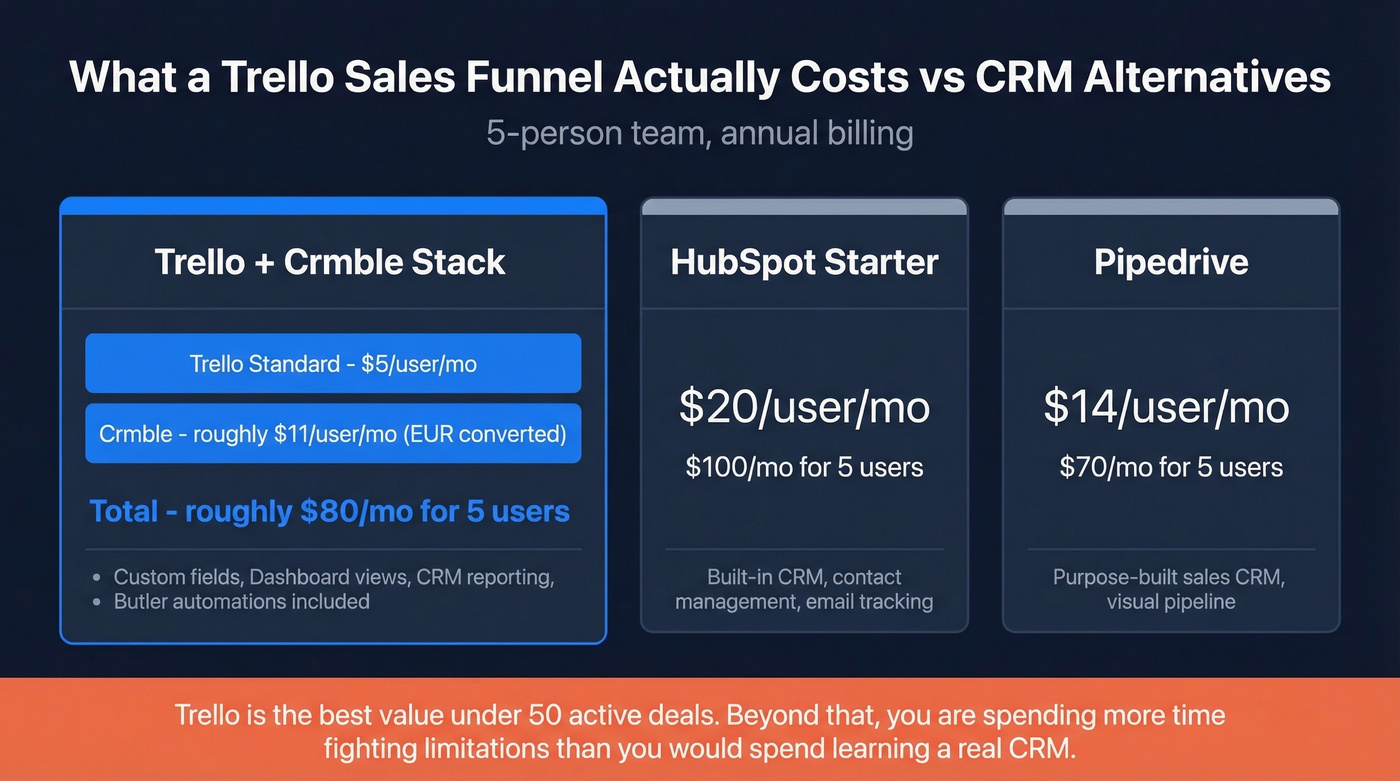
Add Crmble at €9.99/seat/month for CRM fields and reporting. For a 5-person team on Trello Standard with annual billing plus Crmble, you're looking at roughly $80/month total once you account for the EUR→USD conversion.
For comparison, HubSpot Starter typically starts around $20/user/month and Pipedrive starts at roughly $14/user/month.
Let's be honest: this is the best sales stack for teams with fewer than 50 active deals. Once you cross that threshold, you're not saving money - you're spending more time fighting Trello's limitations than you'd spend learning a real CRM (or even dedicated contact management software).
When Trello Isn't Enough
Trello works for 1-5 people managing under 50 active deals. Beyond that, you're fighting a project management tool.
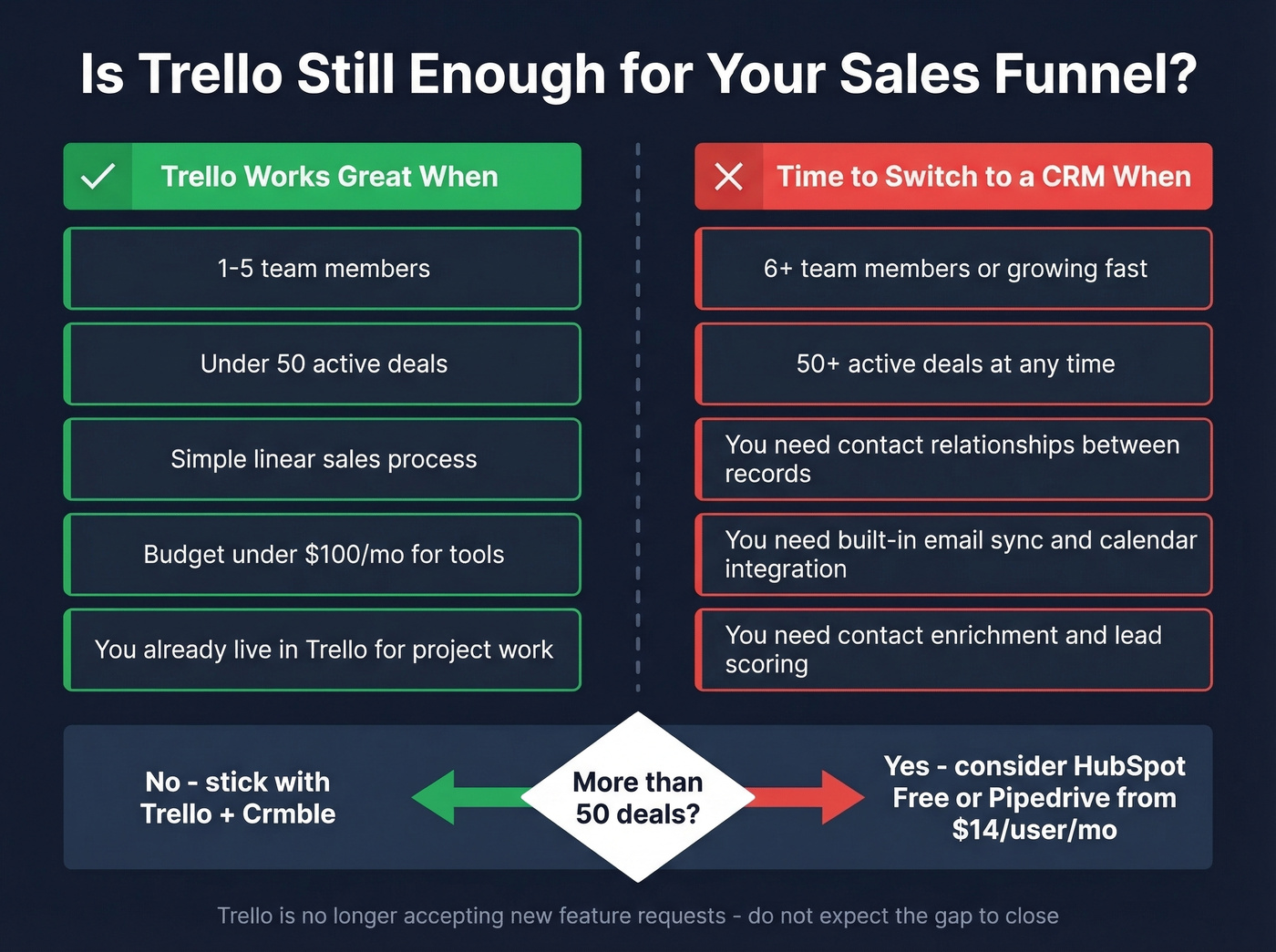
The real limitations hit fast: no CRM-style relationships between records, no contact enrichment, no calendar sync, and native automation that gets restrictive at scale. As one Reddit user put it: "Not having consistency across cards and linking things through CRM relationships is holding us back." There's also a product direction risk - Trello is no longer accepting new feature requests. Don't expect the gap to close.
If you've got 50+ active deals, get a real CRM. HubSpot Free or Pipedrive from around $14/user/month will save you headaches.
Your Funnel Is Only as Good as Its Data
Trello has zero built-in contact enrichment or email verification. In our experience, teams that skip verification end up with 20-30% bad contacts in the first month - and that's 20-30% of your Butler automations firing follow-ups into the void. Before importing contacts, verify them with Prospeo: 98% email accuracy, a 7-day data refresh cycle, and the free tier covers 75 emails per month (if you’re comparing options, start with data enrichment services).

Trello has zero built-in enrichment - so every card you create is only as useful as the data you paste in. Prospeo returns 50+ data points per contact at ~$0.01/email, giving you verified emails, direct dials, and company intel to fill those Crmble fields with data that actually converts.
Stop manually Googling contact info for every Trello card.
FAQ
Can Trello replace a CRM?
For teams under 10 reps with fewer than 50 active deals, yes - with Crmble and Butler handling fields and automation. Beyond that threshold, HubSpot Free or Pipedrive at ~$14/user/month is the smarter move for relationship tracking and reporting.
What's the best free Trello sales template?
The Sales Pipeline template for simplicity, or the Smart Fields template for custom field tracking from day one. Both give you a working 5-7 stage board in under five minutes.
How do I keep my pipeline data clean?
Verify email addresses before they become cards. Then schedule a monthly Butler automation to archive stale cards. That alone prevents your board from turning into a graveyard of dead leads nobody wants to scroll past.