

Trigger Emails: What They Are, Why They Work, and How to Set Them Up
Automated emails that fire based on behavior generate 5.58% click rates versus 1.69% for batch campaigns - a 3.3x gap that keeps widening. That's the power of a trigger email. You don't need fifteen of them to see results. You need three good ones, clean data, and the discipline to measure what matters.
Start here: Build three trigger-based emails - welcome, cart or signup abandonment, and re-engagement. These cover the highest-impact moments in any customer lifecycle: first impression, lost intent, and fading attention. Across 183,000+ brands analyzed in 2026, automated flows generated a 2.11% placed-order rate compared to 0.16% for campaigns. That's 13x more revenue events per email sent.
Before you build a single automation, verify your contact data. An automated message that bounces doesn't just fail - it damages your sender reputation for every email that follows. This is the prerequisite most guides skip entirely.
What Is a Trigger Email?
A trigger email is an automated message sent to one person in response to a specific action, behavior, or condition - not a calendar date or a marketer clicking "send." Someone signs up, abandons a cart, hits a usage milestone, or goes quiet for 60 days, and the system responds with a relevant message.
The technical flow is straightforward. An event fires (user action or data change), your email platform evaluates conditions (segment membership, timing rules, suppression lists), and if everything passes, the email sends. The entire chain happens without human intervention, which is exactly why event-triggered emails outperform - they arrive when the behavior happens, not whenever marketing schedules a blast.
The critical distinction: a triggered message responds to what someone did. A campaign email responds to what a marketer planned. That difference in timing and relevance explains every performance gap in the benchmarks below.
Trigger Emails vs. Drip Campaigns vs. Automation Workflows
These three terms get used interchangeably, and they shouldn't. The MassMailer taxonomy frames the differences cleanly:
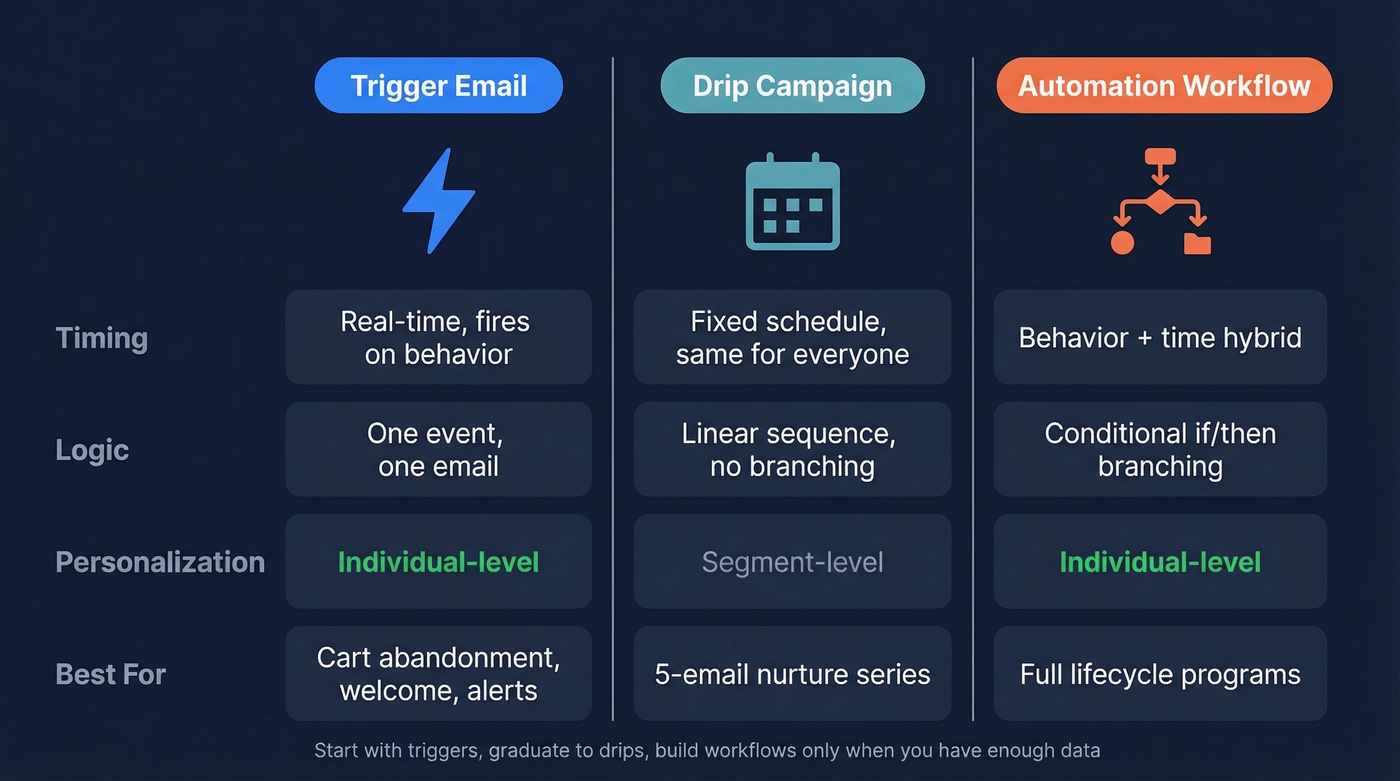
| Trigger Email | Drip Campaign | Automation Workflow | |
|---|---|---|---|
| Timing | Real-time, behavior-based | Fixed schedule | Behavior + time hybrid |
| Logic | Single event → single email | Linear sequence | Conditional branching |
| Personalization | Individual-level | Segment-level | Individual-level |
| Example | Abandoned cart reminder | 5-email welcome series | If opened → path A; if not → path B |
A triggered message is the simplest unit: one event, one response. A drip campaign is a preset sequence that unfolds on a timeline regardless of what the recipient does. An automation workflow combines both, adding conditional logic and - increasingly - AI-powered branching that adapts paths based on engagement patterns.
Start with trigger-based emails, graduate to drips, and only build full workflows once you have enough behavioral data to make the branching logic meaningful. Jumping straight to complex workflows with a small list is over-engineering.
Why Event-Triggered Emails Outperform
The 2026 benchmark study across 183,000+ brands is the most comprehensive dataset available right now. The performance gap between automated flows and campaigns isn't subtle:
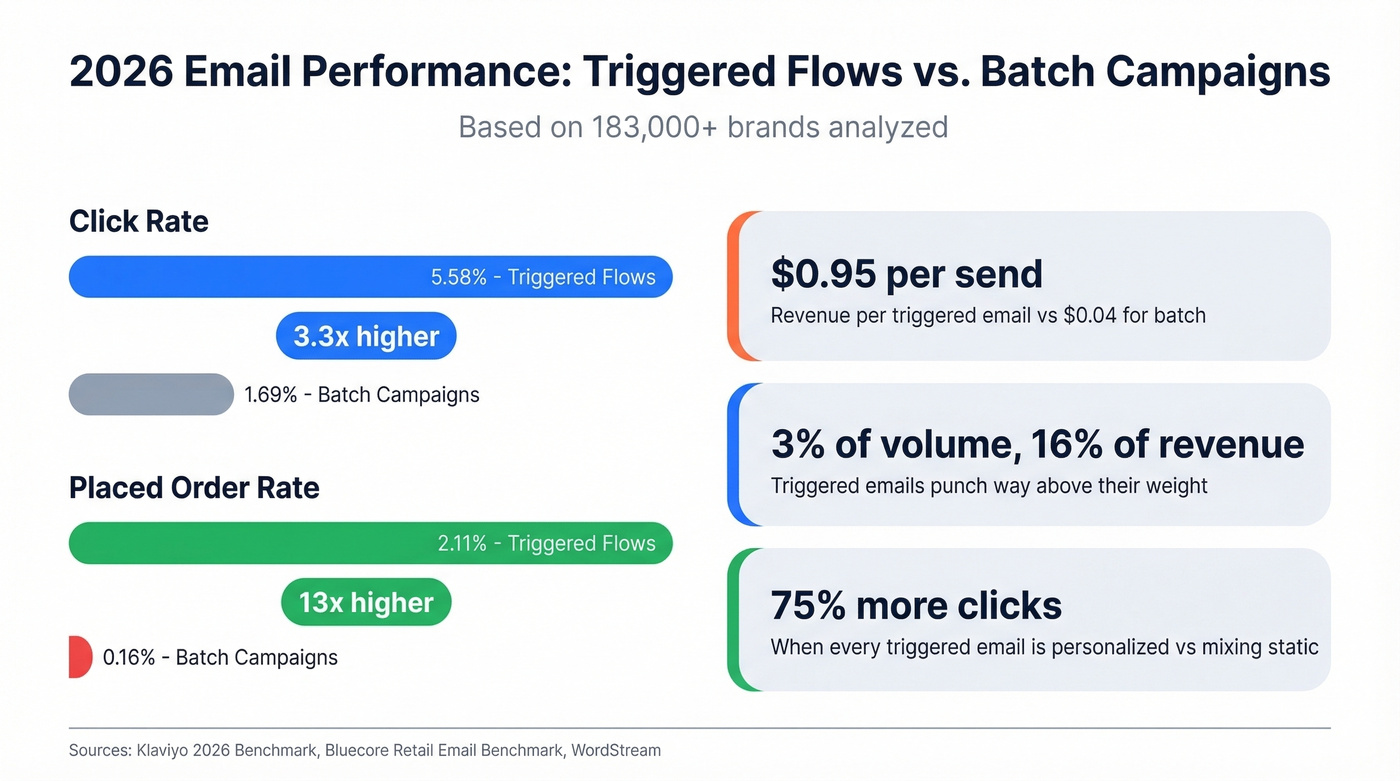
- Flow click rate: 5.58% (top 10% hit 10.48%)
- Campaign click rate: 1.69% (top 10% hit 3.38%)
- Flow placed-order rate: 2.11% (top 10% hit 4.3%)
- Campaign placed-order rate: 0.16% (top 10% hit 0.36%)
That placed-order gap - 2.11% vs 0.16% - is the one that should get your CFO's attention. Automated flows convert at roughly 13x the rate of batch campaigns per email sent. Brevo's benchmark based on 44+ billion emails uses measurement that accounts for Apple Mail Privacy Protection and calculates unique opens/clicks/unsubs/bounces against unique delivered, which makes click-focused reporting more dependable.
Triggered emails represent about 3% of total email volume but drive 16% of all email revenue. WordStream's analysis found triggered emails generate $0.95 per send versus $0.04 for batch-and-blast - a persistent industry benchmark that's held across multiple years of data. Bluecore's Retail Email Benchmark adds another dimension: brands that personalized every triggered email saw a 75% increase in click-through rates versus those mixing personalized and static messages.
A quick note on open rates: ignore them. Apple Mail Privacy Protection inflates opens across the board, making the metric unreliable. Click rate and placed-order rate are the only automation metrics worth tracking in 2026. If someone tells you their automated emails have a 70% open rate, the correct response is "what's the click rate?"
10 Types That Drive Revenue
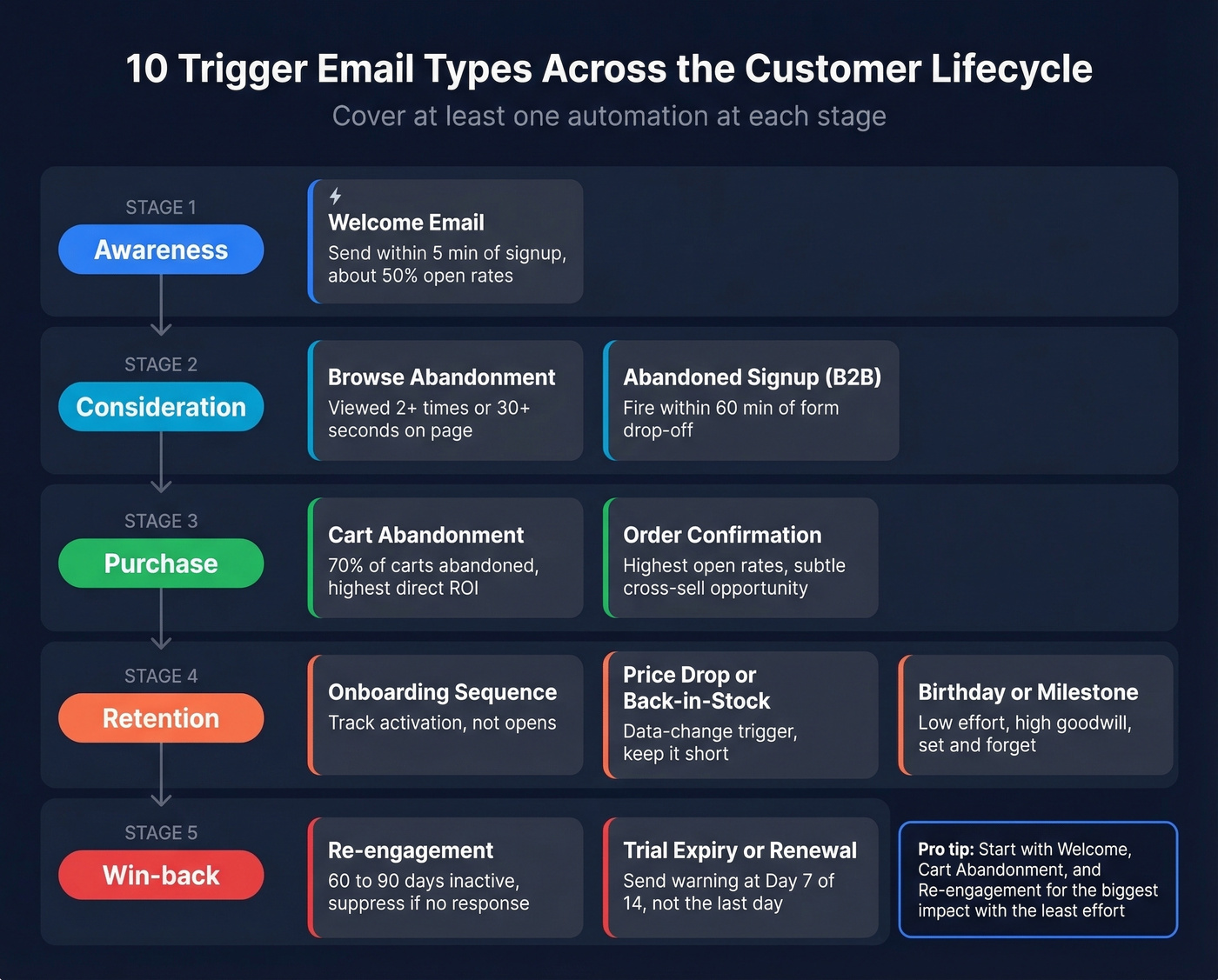
Each type maps to a specific stage of the customer lifecycle - from awareness through consideration, purchase, retention, and win-back. The best trigger-based email marketing programs cover at least one automation at each stage rather than clustering three around the same moment.
Welcome Email
The highest-performing automated message in almost every program. Send it within five minutes of signup. For ecommerce, deliver a first-purchase incentive and set frequency expectations. For SaaS, confirm the account and point to the single most important first action. Welcome emails often reach ~50% open rates - the best real estate in your entire email program.
Cart Abandonment
70% of online shopping carts are abandoned. Even after filtering out "just browsing" traffic, a massive chunk of genuine purchase intent sits in abandoned carts. A well-timed sequence recovers meaningful revenue with minimal effort, and we'll break down the exact cadence later in this article. This is the automation with the most direct, measurable ROI.
Abandoned Signup (B2B)
Someone starts your pricing calculator, demo request, or free trial signup and drops off. Fire the first reminder within 60 minutes. Acknowledge where they stopped and remove friction: "Still thinking it over? Here's a 2-minute video of what happens after you sign up." Most B2B companies don't have this automation at all, which makes it a quick win.
Browse Abandonment
Lower intent than cart abandonment, but higher volume. Set a threshold - viewed 2+ times, or spent 30+ seconds - to filter out casual traffic. Without proper segmentation, you'll train recipients to ignore you.
Order Confirmation
Transactional by nature, opened at extremely high rates. Use this real estate for a subtle cross-sell or onboarding next step, but don't overload it with promotions - that risks reclassifying the email as commercial.
Onboarding Sequence
Critical for SaaS. Track whether users complete the key activation action, and branch your sequence based on that. An onboarding sequence with 80% opens and 5% activation is failing. Measure activation rate, not open rate.
Re-engagement / Win-back
Define inactivity clearly: 60-90 days without clicks or meaningful engagement. Acknowledge the gap honestly and offer a compelling reason to return. If they don't engage, suppress them. Continuing to email inactive contacts hurts deliverability for everyone else on your list.
Price Drop / Back-in-Stock
High intent, time-sensitive. The trigger is a data change (price decreased, inventory replenished), not a user action. Keep the email short: the product, the new price or availability, and a direct link.
Trial Expiry / Renewal
Send a warning around Day 7 of a 14-day trial - not the last day. By then, the user has mentally moved on. Show what they've accomplished and what they'll lose. Loss aversion beats feature lists every time.
Birthday / Milestone
Low effort, high goodwill. A birthday discount or "you've been a customer for one year" email doesn't drive massive revenue alone, but it builds brand affinity that makes every other email perform slightly better. Set it up once and forget about it.
B2B & SaaS Playbook
Most guides on this topic are written for ecommerce. That's a blind spot, because SaaS onboarding sequences and trial-to-paid conversions are some of the highest-leverage automations you can build. Here's a sample workflow based on the SmashSend framework:
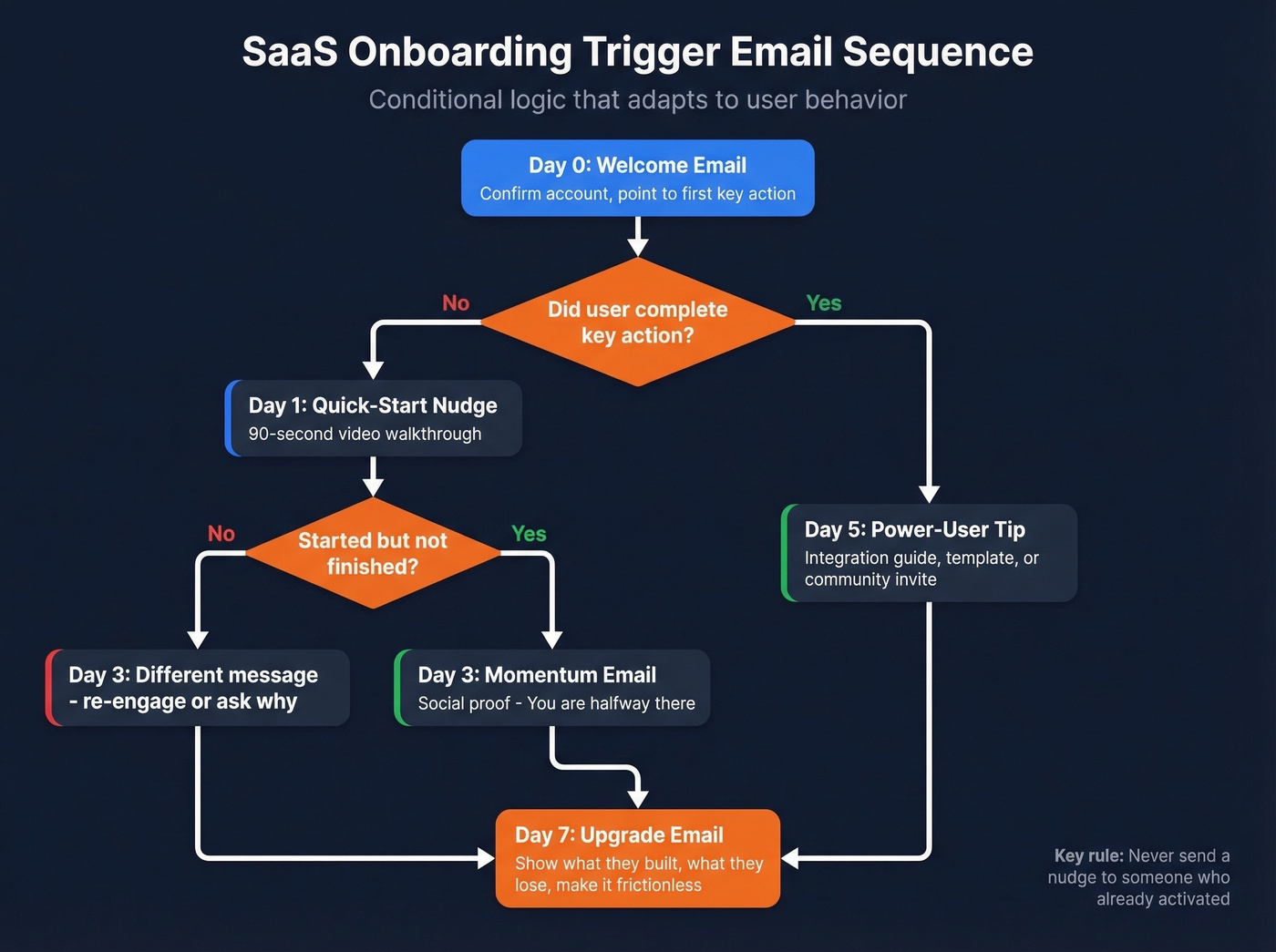
- Day 0 (within 5 minutes): Welcome email. Confirm the account and point to one specific first action.
- Day 1 (if no key action): Quick-start nudge with a 90-second video walkthrough.
- Day 3 (if started but not completed): Momentum email with social proof. "You're halfway there."
- Day 5 (if key action completed): Power-user tip - an integration guide, template, or community invite.
- Day 7 (trial ending): Upgrade email. Show what they've built, what they'll lose, and make the path frictionless.
The conditional logic matters. Someone who activated on Day 0 shouldn't get the Day 1 nudge. Someone who never logged in needs a different message than someone halfway through onboarding.
For B2B teams, automated emails only work if you're reaching the right person. We've seen plenty of programs where the automation logic was solid but half the list was junk - invalid addresses, role-based emails, spam traps. Verifying contacts before importing them into your ESP is the single fastest fix for deliverability problems. If you're troubleshooting bounces and inboxing, start with an email deliverability audit and a clear email bounce rate baseline.

Triggered emails convert 13x more than batch sends - but only if they reach the inbox. Bad data turns your best automation into a sender reputation liability. Prospeo's 98% email accuracy and 7-day refresh cycle mean every trigger fires at a verified, deliverable address.
Stop automating bounces. Start automating revenue.
Cart Abandonment Deep Dive
The standard cadence that works for most ecommerce brands:
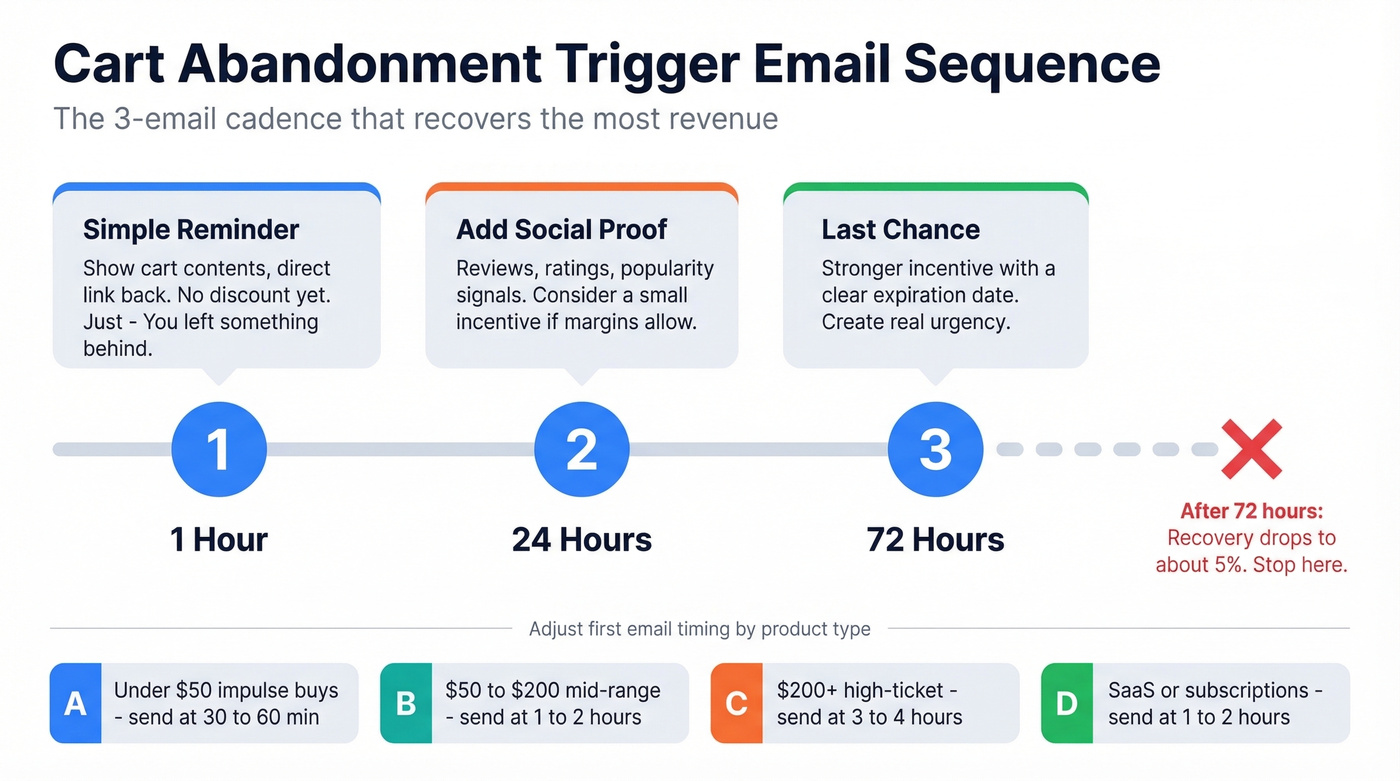
- Email 1 (1 hour): Reminder with cart contents. No discount yet. Just "You left something behind" with a direct link back.
- Email 2 (24 hours): Add social proof - reviews, ratings, "X people bought this today." Consider a small incentive if margins allow.
- Email 3 (72 hours): Last chance. Stronger incentive with a clear expiration.
After 72 hours, recovery potential drops to roughly 5%. Three emails is the right number. Stop there. A fourth email annoys more people than it converts.
| Product Type | First Email | Why |
|---|---|---|
| Impulse buy (<$50) | 30-60 minutes | Short decision window |
| Mid-range ($50-$200) | 1-2 hours | Needs slight consideration |
| High-ticket ($200+) | 3-4 hours | Longer research cycle |
| Subscription/SaaS | 1-2 hours | Decision fatigue fades fast |
Here's the thing: the biggest mistake in cart abandonment isn't timing - it's sending the same generic email to a first-time visitor and a repeat customer. I've audited dozens of programs, and the brands recovering the most revenue always segment by customer history and cart value at minimum. If your average order is under $50 and you're agonizing over 30-minute vs. 60-minute delays, you're optimizing the wrong variable.
Mistakes That Kill Performance
Bad data is mistake zero. If your bounce rate is consistently above 3%, fix your data first. Every bounced email damages sender reputation, which means your perfectly crafted automations land in spam instead of inboxes. Tools like Prospeo's 5-step verification catch invalid addresses, spam traps, and honeypots before they ever hit your ESP. If you need a remediation plan, start with spam trap removal and then work on how to improve sender reputation.
"Set it and forget it" syndrome. A major reason triggered programs decay. Flows that converted well six months ago stop working as offers change, products rotate, and audience behavior shifts. Audit every active flow quarterly at minimum.
Over-automation without relevance. The consensus on r/EmailWhisperers is clear: "personalized" recommendations that don't match actual behavior are worse than no personalization at all. If your browse abandonment email recommends products the person never viewed, you're training them to ignore you.
Frequency creep. It's easy to keep adding triggers until a single user receives five automated emails in a week. Set global frequency caps - 2-3 automated emails per contact per week is a reasonable starting point - and prioritize higher-intent automations over lower-intent ones.
Broken mobile experience. Tiny text, unresponsive layouts, and CTAs you can't tap without zooming kill conversion. Test every automated email on an actual phone before it goes live. If you're tightening performance, use a consistent click rate formula and improve your email call to action before rewriting entire flows.
Compliance - When Triggers Cross the Line
Trigger emails sit in a gray zone between transactional and commercial. A pure order confirmation is transactional. An abandoned cart email with a discount code is commercial. The primary purpose test determines which rules apply.
| GDPR | CAN-SPAM | CASL | |
|---|---|---|---|
| Consent | Opt-in required | Opt-out allowed | Express consent required |
| Unsubscribe | Required | 10 business days | 10 business days |
| Max penalty | EUR 20M or 4% revenue | $53,088 per email | $10M CAD |
| Pre-ticked boxes | Prohibited | Not addressed | Prohibited |
For teams operating across multiple jurisdictions, double opt-in is the safest approach. It reduces fake signups and spam-trap contamination while keeping you compliant with the strictest applicable regulation. Cleaner lists mean higher inbox placement for every email you send.
The practical takeaway: if your automation contains any promotional content - discount, cross-sell, upgrade pitch - treat it as commercial and include an unsubscribe link. Don't try to get clever with the transactional exemption.
Best Tools for Triggered Email Programs
| Tool | Best For | Starting Price | Free Tier? | Automation Strength |
|---|---|---|---|---|
| Prospeo | Email verification layer | ~$0.01/email | Yes (75 emails/mo) | Pre-send quality |
| Klaviyo | Ecommerce automation | $20/mo | Yes | Excellent |
| ActiveCampaign | B2B / SMB with CRM | $15/mo | No | Excellent |
| Brevo | Budget-conscious teams | $8/mo | Yes (9K emails/mo) | Good |
| Mailchimp | Getting started fast | $13/mo | Yes | Basic |
| HubSpot | Enterprise CRM + email | $20/mo/seat | Yes | Good |
| Drip | Ecommerce-focused | $39/mo | No | Strong |
| Omnisend | Ecommerce + SMS | $16/mo | Yes | Strong |
Klaviyo is the default for ecommerce. Its flow builder handles complex conditional logic, and it publishes benchmarks across 183,000+ brands that make it easy to sanity-check your performance. If you're running a Shopify store and don't know where to start, start here.
ActiveCampaign wins for B2B and SMB teams that need CRM integration alongside automation. Conditional branching, lead scoring, and deal-stage triggers all work natively. At $15/mo, it's hard to beat on value.
Brevo is the budget play at $8/mo with a generous free tier. Mailchimp is the easiest on-ramp for basic automations. HubSpot makes sense if you're already in their CRM ecosystem. Drip and Omnisend are ecommerce-focused alternatives, with Omnisend adding native SMS triggers.
Skip Drip if you're B2B - it's built for ecommerce workflows and you'll fight the platform trying to make it do something else.
Set Up Your First Trigger Email
Most people skip step one and wonder why their automations underperform.
- Verify your list. Remove invalid addresses, spam traps, and duplicates. If your bounce rate exceeds 2-3% on the first send, your sender reputation takes a hit that affects every subsequent email. Prospeo's free tier covers 75 verifications per month - enough to clean a starter list before launch. If you need a deeper process, follow a full AI email checker workflow and keep an eye on email velocity as you ramp.
- Choose your event. Pick one high-impact behavior: signup, cart abandonment, or 60-day inactivity. Start with one and get it performing before adding complexity.
- Write the email. One clear message, one CTA. Match the tone to the trigger: urgency for cart abandonment, warmth for welcome, honesty for re-engagement. If you're stuck, pull from proven email subject line examples and tighten the body with modern email copywriting rules.
- Set conditions and delays. Define the segment, suppression list, and send delay. Add a frequency cap so this automation doesn't stack with others.
- Test and launch. Send test emails on desktop and mobile. Launch to a small segment first, monitor for 48 hours, then open to full audience.
Let's be honest - the difference between a trigger email program that generates revenue and one that generates complaints almost always comes down to data quality and restraint. Clean your list, build three automations, measure click rates and conversions, and resist the urge to add a fourth until the first three are working.
The article says it plainly: verify your contact data before you build a single automation. Prospeo's 5-step verification with catch-all handling and spam-trap removal keeps bounce rates under control - at $0.01 per email. No contracts, no sales calls.
Clean data is the prerequisite. 75 free emails to prove it.
FAQ
What's the difference between a trigger email and a transactional email?
A transactional email is required by the transaction itself - order receipts, shipping confirmations, password resets - while a trigger email is any automated message fired by a behavior or condition, including marketing messages like cart abandonment. All transactional emails are triggered, but not all triggered emails are transactional. The distinction matters because commercial triggers need unsubscribe links under CAN-SPAM, GDPR, and CASL.
How many trigger emails should I start with?
Three: welcome, cart or signup abandonment, and re-engagement. These cover the highest-impact lifecycle moments with the least complexity. Get all three performing - click rates above 5%, bounce rates below 2% - before adding browse abandonment or onboarding sequences.
Do trigger emails need an unsubscribe link?
Yes for any commercial content - discounts, cross-sells, upgrade pitches. Purely transactional emails are exempt under CAN-SPAM, but GDPR and CASL generally require an opt-out mechanism regardless. Include one every time; the compliance risk of omitting it far outweighs the tiny friction it adds.
What's a good click rate for triggered emails?
The 2026 benchmark across 183,000+ brands shows an average flow click rate of 5.58%, with the top 10% hitting 10.48%. If you're below 3%, your content or targeting needs work. If you're above 7%, you're in strong territory.