

Undeliverable Email: What It Means, Why It Happens, and How to Fix It
You open your inbox to 47 bounce notifications. Half your outbound campaign just evaporated. An undeliverable email isn't just an annoyance - it's a signal that something in your sending infrastructure, data quality, or reputation needs attention. And the worst part? You don't know if it's a typo problem, a server problem, or a reputation problem, because each one demands a completely different fix.
What You Need (Quick Version)
- Find the SMTP code in your bounce message (reference table below).
- If it starts with 5 - permanent problem, fix the root cause. If it starts with 4 - temporary, retry later.
- If you're getting bounces for emails you never sent, your address was spoofed. Skip to the backscatter section.
What "Undeliverable" Actually Means
An undeliverable email is any message a receiving mail server refuses to accept or can't route to the intended inbox. The server sends back a bounce notification - technically a Non-Delivery Report (NDR) - with a numeric code explaining what went wrong.
Here's the critical distinction: a hard bounce (5xx codes) means permanent failure. The address doesn't exist, the domain is dead, or the server has explicitly rejected you. A soft bounce (4xx codes) means temporary failure - full mailbox, overloaded server, greylisting. Hard bounces require immediate action. Soft bounces usually resolve on retry, but persistent soft bounces that recur three or more times on the same address should be treated as hard.
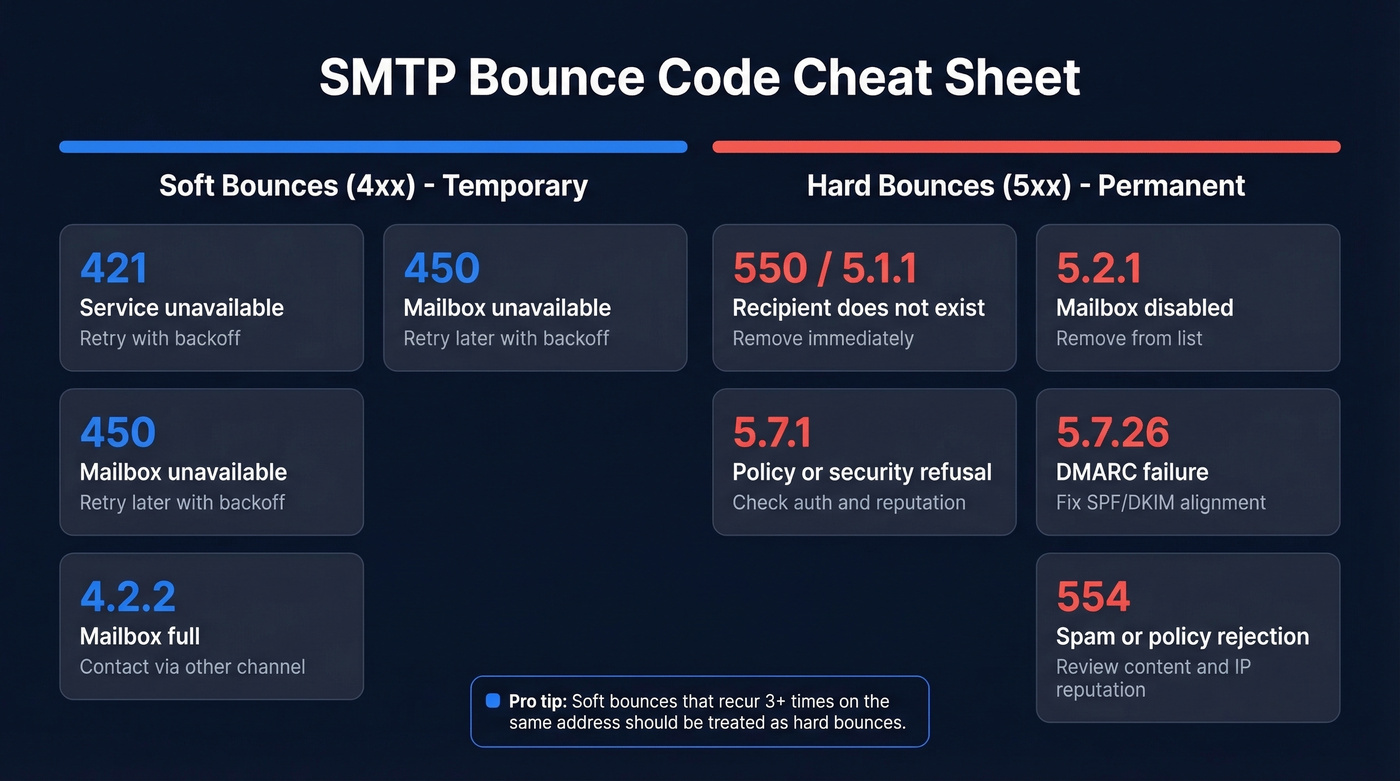
SMTP Bounce Code Cheat Sheet
The code buried in your bounce message is the only thing that matters. Find it, match it below, and you'll know exactly what to do.
| Code | Meaning | Type | What to Do |
|---|---|---|---|
| 421 | Service unavailable | Soft | Retry with backoff |
| 450 | Mailbox unavailable | Soft | Retry later with backoff |
| 4.2.2 | Mailbox full | Soft | Contact via other channel |
| 550 / 5.1.1 | Recipient doesn't exist | Hard | Remove immediately |
| 5.2.1 | Mailbox disabled | Hard | Remove from list |
| 5.3.4 | Message too large | Hard | Reduce attachments/size |
| 5.7.1 | Policy/security refusal | Hard | Check auth + reputation |
| 5.7.26 | DMARC failure | Hard | Fix SPF/DKIM alignment |
| 554 | Spam/policy rejection | Hard | Review content + IP rep |
From the wild: a Microsoft 365 user on Reddit reported all outbound mail rejected with 550 5.1.8 Access denied, bad outbound sender AS(42004) - Microsoft flagged their IP for suspected spam. That's a sender reputation problem, not a typo, and it requires a completely different fix than a simple 5.1.1.
Six Common Reasons Emails Bounce
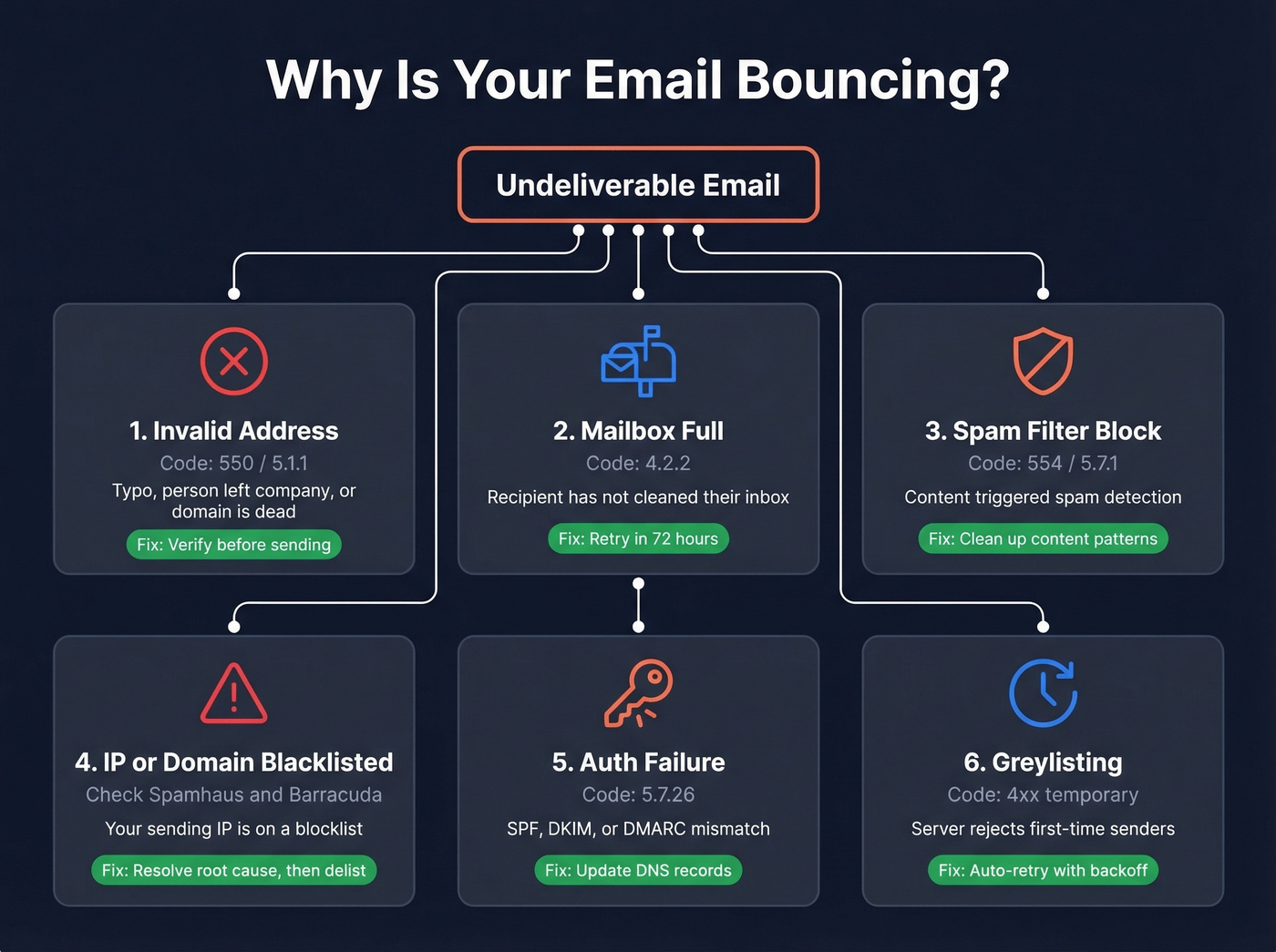
1. Invalid or Non-Existent Address
This is the #1 cause of hard bounces. The address has a typo, the person left the company, or the domain no longer exists. A single-character typo generates a hard bounce every time, and enough of those will tank your sender score fast.
Verify addresses before sending - not after. If you need a deeper workflow, see our guide on how to check if an email exists.

2. Recipient's Mailbox Is Full
A 4.2.2 code. Your message is fine - the recipient just hasn't cleaned house. This soft bounce often clears within 72 hours. If you see it repeatedly for the same contact over several weeks, reach out through another channel or suppress the address entirely.
3. Spam Filter Blocked Your Message
Content-based rejections (554 or 5.7.1) mean the receiving server didn't like something about your message. The usual suspects: subject lines with ALL CAPS or excessive punctuation, image-heavy layouts with minimal text, URL shorteners, and too many links. Before blaming the server, run your email through a deliverability test tool like Mail Tester and clean up anything that looks like classic spam patterns. For more, use our email spam checker breakdown.
4. Your IP or Domain Is Blacklisted
Not all blacklists matter equally. Spamhaus and Barracuda are the ones that actually affect B2B email deliverability - they're baked into most enterprise mail security stacks. UCEPROTECT L2/L3 listings sound alarming but have minimal real-world impact. Check your status on MXToolbox, then fix the root cause (reverse DNS mismatch, SMTP banner issues, TLS configuration warnings) before requesting delisting. If you’re specifically dealing with Spamhaus, follow our Spamhaus blacklist removal guide.
5. Authentication Failure (SPF/DKIM/DMARC)
A 5.7.26 bounce means the receiving server checked your authentication records and found a mismatch. Either your SPF record doesn't include the service sending on your behalf, your DKIM signature is broken, or your DMARC policy told the server to reject unauthenticated mail. All fixable, but you'll need DNS access. If you want the technical deep dive, start with DMARC alignment and then how to verify DKIM is working.
6. Greylisting or Server Overload
Temporary 4xx errors where the server deliberately rejects first-time senders to filter spam. These resolve on retry. If your sending platform doesn't automatically retry with backoff, switch platforms. Also make sure you’re not sending too fast - see email velocity.

Invalid addresses are the #1 cause of hard bounces - and every one chips away at your sender reputation. Prospeo's 5-step verification catches dead addresses, spam traps, and honeypots before you hit send, delivering 98% email accuracy across 143M+ verified contacts.
Fix your bounce rate at the source, not in your inbox.
Bounces for Emails You Never Sent?
You open your inbox Monday morning to 200+ "Mail Undeliverable" messages. You didn't send anything. Your password is secure. Your Sent folder is clean.
This is almost always backscatter. A spammer forged your email address in the "From" field of their campaign, and when those messages bounce, the NDRs land in your inbox. The consensus on r/email and r/sysadmin is that this happens in waves - one Reddit user reported a flood of mailer-daemon messages from kundenserver.de referencing Wells Fargo phishing lures sent to random AOL addresses.
That said, don't skip basic account checks. If you're seeing a sudden flood of delivery failures, review forwarding settings and inbox rules too, and make sure your account hasn't been compromised.
The fix that stops spoofed mail at the source is DMARC with p=reject, which tells receiving servers to drop messages that fail authentication instead of generating bounces. Only 7.7% of the world's top email domains enforce this policy. If you haven't set yours up, you're exposed.
How to Prevent Bounced Emails
Set Up SPF, DKIM, and DMARC
This isn't optional anymore. Authentication is a baseline requirement for reliable inbox placement. Here's a minimal SPF record:
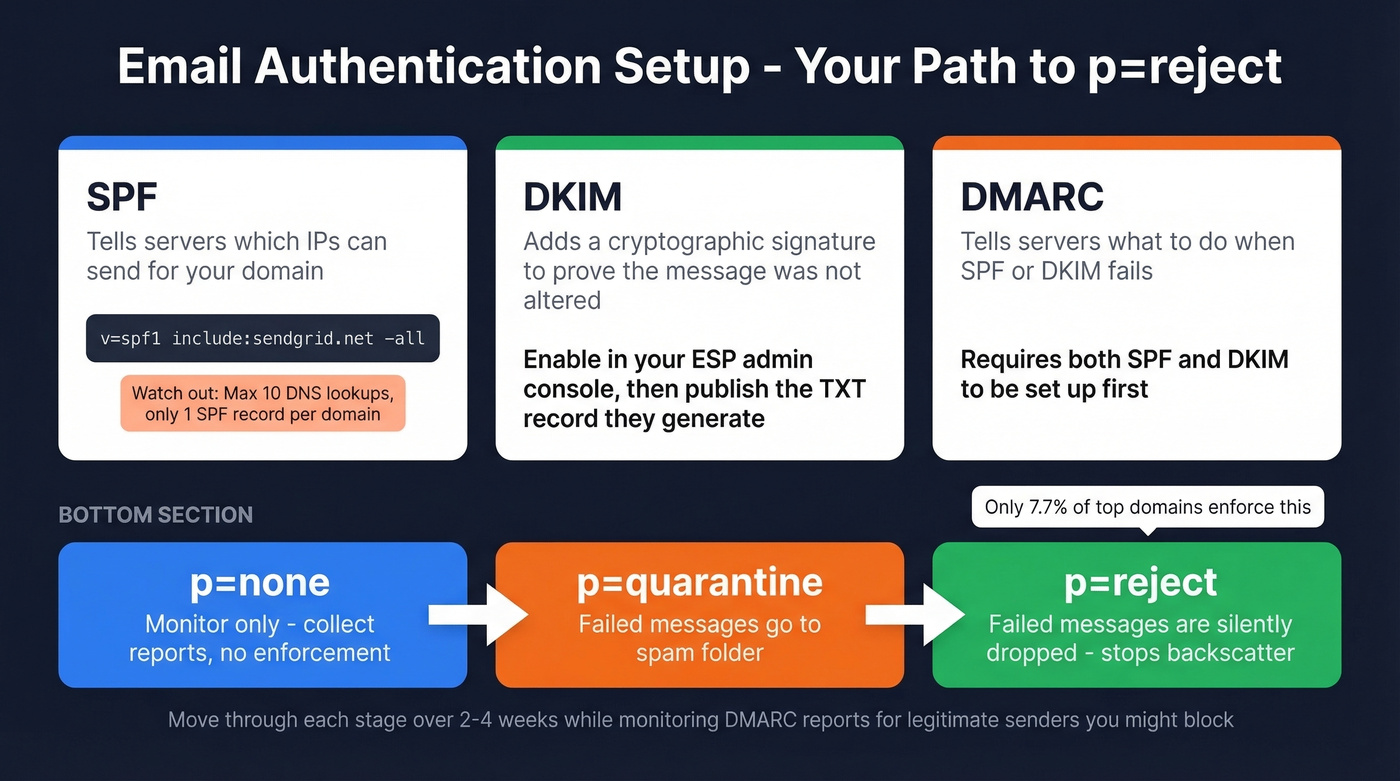
v=spf1 include:sendgrid.net -all
Two things to watch: you can only have one SPF record per domain (merge all include: statements), and SPF has a 10 DNS lookup limit - exceed it and authentication breaks silently, which is one of the most frustrating debugging experiences in email ops. For DKIM, enable it in your email provider's admin console and publish the TXT record they generate. For DMARC, start with p=none to monitor, then progress to p=quarantine, then p=reject. If you want more syntax examples, see these SPF record examples.
Verify Your List Before Every Campaign
We've seen teams import a two-year-old contact list and wonder why their bounce rate hits 35%. Published benchmarks show many verification tools land around 65-70% accuracy overall, and accuracy drops further on mid-market and enterprise domains where catch-all configurations are common.
Prospeo's 5-step verification process hits 98% accuracy across 143M+ verified emails, catching spam traps and honeypots before they wreck your sender score. Verify every 30-60 days for active sending, before major campaigns, and always after importing old contacts. If you’re building a full deliverability workflow, use our email deliverability guide.
List Hygiene Basics
Let's be blunt: purchased lists are email deliverability poison. One bad import can tank your sender score for 30-90 days. Never buy them. And suppress every hard bounce on first occurrence, no exceptions. Every 5xx you retry signals to ISPs that you don't maintain your list, and that signal compounds fast. (If you’re already in trouble, start with spam trap removal.)
Check Delivery Logs After Sending
Most ESPs provide delivery logs that show whether each message was delivered, opened, or bounced at the individual recipient level. Review these after every campaign - they're the fastest way to catch emerging deliverability problems before they snowball into domain-wide throttling that takes weeks to recover from.
Monitor Your Bounce Rate
Keep it under 2%. Above that threshold, you have a list hygiene problem, not a server problem.
Here's the thing: if your bounce rate is above 5%, your data provider is the problem, not your email platform. Switching ESPs won't fix dirty data. If you want a deeper benchmark + remediation playbook, see email bounce rate.
What's a Normal Bounce Rate?
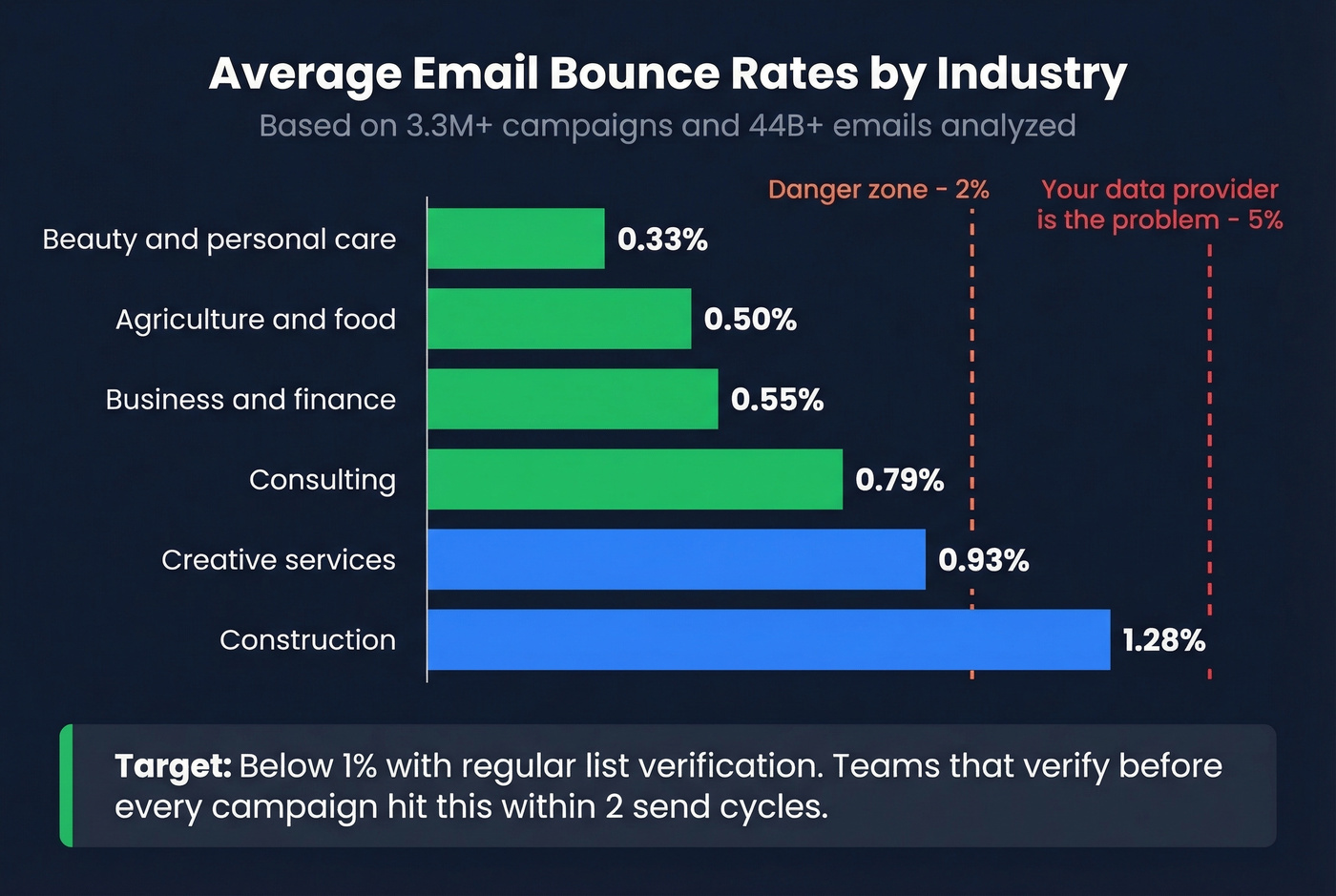
Less than 2% is acceptable. Below 1% is where well-maintained lists land. Here's what benchmarks based on 3.3M+ campaigns show, corroborated by Brevo's 44B-email dataset:
| Industry | Avg Bounce Rate |
|---|---|
| Beauty & personal care | 0.33% |
| Agriculture & food | 0.50% |
| Business & finance | 0.55% |
| Consulting | 0.79% |
| Creative services | 0.93% |
| Construction | 1.28% |
If you're consistently above 2%, start with verification and implement a regular cleaning cadence. Every undeliverable email you prevent is one fewer hit to your domain reputation - and in our experience, teams that verify before every campaign see bounce rates drop below 1% within two send cycles. To speed up recovery, follow our steps on how to improve sender reputation.
Teams importing old lists see 35%+ bounce rates because most verification tools only hit 65-70% accuracy. Prospeo refreshes its entire database every 7 days - not every 6 weeks - so the emails you pull are current, verified, and safe to send at scale.
Stop debugging NDRs. Send to emails that actually exist.
Undeliverable Email FAQ
What's the difference between a hard bounce and a soft bounce?
A hard bounce (5xx) is permanent - the address doesn't exist or the domain is invalid. Remove it immediately. A soft bounce (4xx) is temporary - mailbox full, server down, greylisting. Retry with backoff, but suppress after 3-5 consecutive soft bounces on the same address.
Can bounced emails hurt my sender reputation?
Yes. ISPs track your bounce rate in real time. Consistently high bounces above 2% signal poor list quality, which leads to throttling, spam folder placement, or outright blocking of your domain. One bad campaign can take 30-90 days to recover from.
How do I verify an email address before sending?
Upload your list to a verification tool that checks SMTP response, catches spam traps, and handles catch-all domains. Any address that returns a 5xx error during verification should be removed before you hit send.
Why am I getting bounce messages for emails I didn't send?
Almost always backscatter from email spoofing. A spammer forged your address in their "From" field, and bounced NDRs are landing in your inbox. Publish a DMARC record with p=reject to tell receiving servers to silently drop unauthenticated messages instead of bouncing them back to you.