

How to Use Video Follow-Ups to 3x Your Sales Reply Rate
Your Text Follow-Up Is Getting Ignored
You crushed the demo. The prospect was nodding, asking smart questions, practically selling themselves. You sent a text follow-up - nice recap, calendar link, polite nudge. Crickets.
Meanwhile, a competitor's rep recorded a 60-second video walking through the exact pain point the prospect mentioned and booked the next call within two hours. That's not a hypothetical - it's a pattern backed by hard numbers. First follow-ups alone boost reply rates by 49%. Layer in video and the gap widens: teams using video in sales outreach see a 16% bump in open rates and 26% more replies. One sales dev team on r/sales reported a ~20% response rate lift just from adding sub-30-second clips, and Gong's research found closed deals involve webcam usage 41% more often than lost deals.
Video follow-ups in sales work. But only when you nail the timing, the script, and the delivery.
When to Send the Video (Not First)
Here's the contrarian take nobody shares: don't lead with video. One team A/B tested placement and found video as Step 2 outperforms Step 1. Makes sense - prospects who've already seen your name are far more likely to click play.
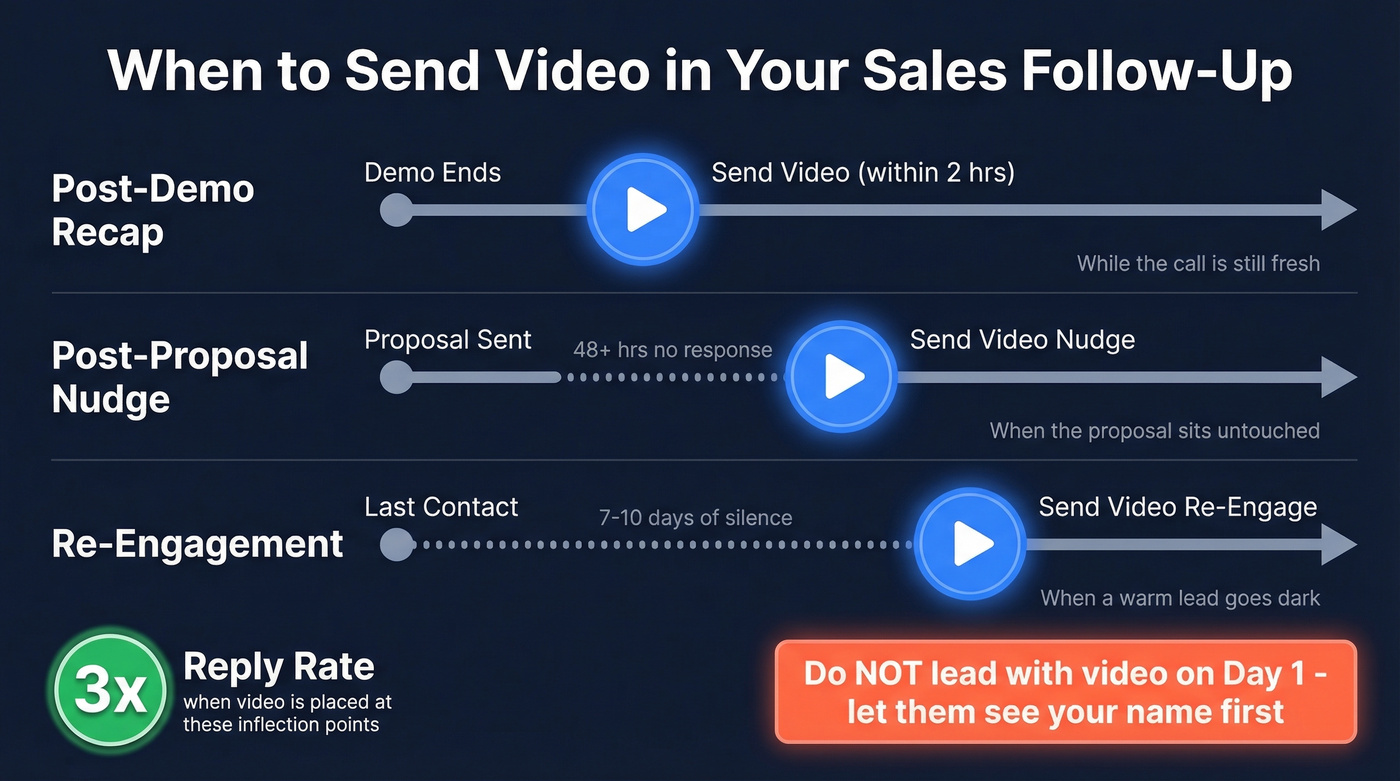
Video fits three moments best:
- Post-demo recap - send it fast while the call's still fresh
- Post-proposal nudge - when the proposal's been sitting untouched for 48+ hours
- Re-engagement - when a warm lead goes dark after 7-10 days
The 3x reply rate benchmark comes from teams who placed video at exactly these inflection points, not from blasting video into cold inboxes on Day 1.
Three Copy-Paste Video Scripts
Every script follows the same skeleton: say their name, reference a prior interaction, deliver one value point, close with a clear CTA. Keep each under 60 seconds - one team reported results "skyrocketed" after cutting below that threshold. Subject line: under 8 words.
If you want more non-video options too, pull from these sales follow-up templates and adapt the CTA to your clip.
Script 1 - Post-Demo Recap (60 sec)
"Hey [Name], quick recap from our call. You mentioned [specific pain point] - that's exactly what [Feature] solves. [One sentence showing how it works or a quick result]. I dropped a link below to book the next step - let's lock in 20 minutes this week."
Script 2 - Post-Proposal Nudge (30 sec)
"Hey [Name], I know the proposal's sitting in your inbox. The number I'd focus on: [specific ROI figure from the proposal]. What's holding you back? Hit reply - happy to jump on a quick call."
Script 3 - Re-Engagement (45 sec)
"Hey [Name], it's been a bit since we connected. [Company in their space] just [achieved specific result] using a similar approach to what we discussed. If it makes sense to pick back up, I'm here. If not, no hard feelings - just say the word."
Here's the thing: the personalization in the first five seconds matters more than anything else in the video. We've seen reps spend ten minutes polishing transitions and B-roll when a simple screen recording with the prospect's website pulled up would've landed better. Don't overthink production. Overthink relevance.
If you're using AI to speed up personalization, pair this with a system for AI sales follow-up so reps stay consistent across the sequence.

Your video cadence is only as good as the data behind it. If 7 out of 15 videos never reach a real inbox, you just burned hours of recording time. Prospeo's 98% email accuracy and 7-day data refresh ensure every personalized video you send actually lands.
Stop recording videos for dead inboxes. Verify first.
Sample 12-Day Sales Video Cadence
Before launching any sequence, verify your contact list. Clean data is the prerequisite - any tool that catches bad domains and catch-all addresses works. Everything below assumes you're sending to real inboxes. (If you need a deeper workflow, start with email deliverability basics.)
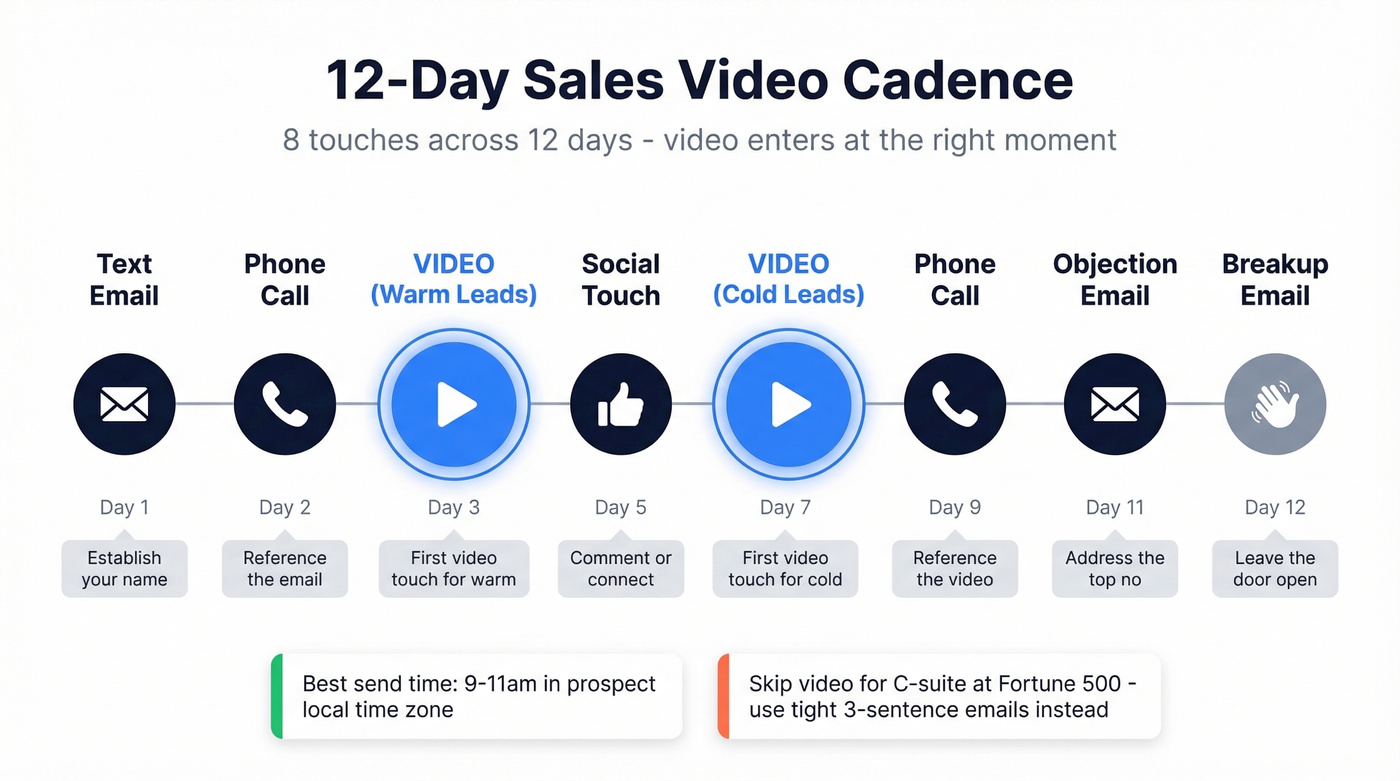
- Day 1: Personalized email (text only - establish your name)
- Day 2: Phone call (leave a voicemail referencing the email)
- Day 3: Email #2 - for warm leads, this is your video touch
- Day 5: Social touch (comment or connect request)
- Day 7: Video email - for cold leads, this is the video touch
- Day 9: Phone call (reference the video if they watched it)
- Day 11: Objection-handling email (address the most common "no")
- Day 12: Breakup email (low-pressure, leave the door open)
Research suggests 7-10 touches over 10-14 days for cold outbound. This 8-touch, 12-day structure hits the middle of that range. Send emails between 9-11am in the prospect's local time zone, and build a library of reusable video templates organized by funnel stage so reps aren't recording from scratch every time.
To keep the whole sequence organized across channels, it helps to standardize your sequence management rules (steps, timing, and exit criteria).
Skip the video touch entirely if your prospect is a C-suite exec at a Fortune 500 - they're less likely to click play and more likely to respond to a tight, three-sentence email with a single question. Video works best on mid-level buyers and champions who need to build internal consensus.
Getting Your Video Into the Inbox
Let's bust the biggest myth: you can't actually play video inside an email. Gmail, Outlook, and Yahoo don't support in-email video playback. Embedding a video file will either render broken or get flagged by spam filters.
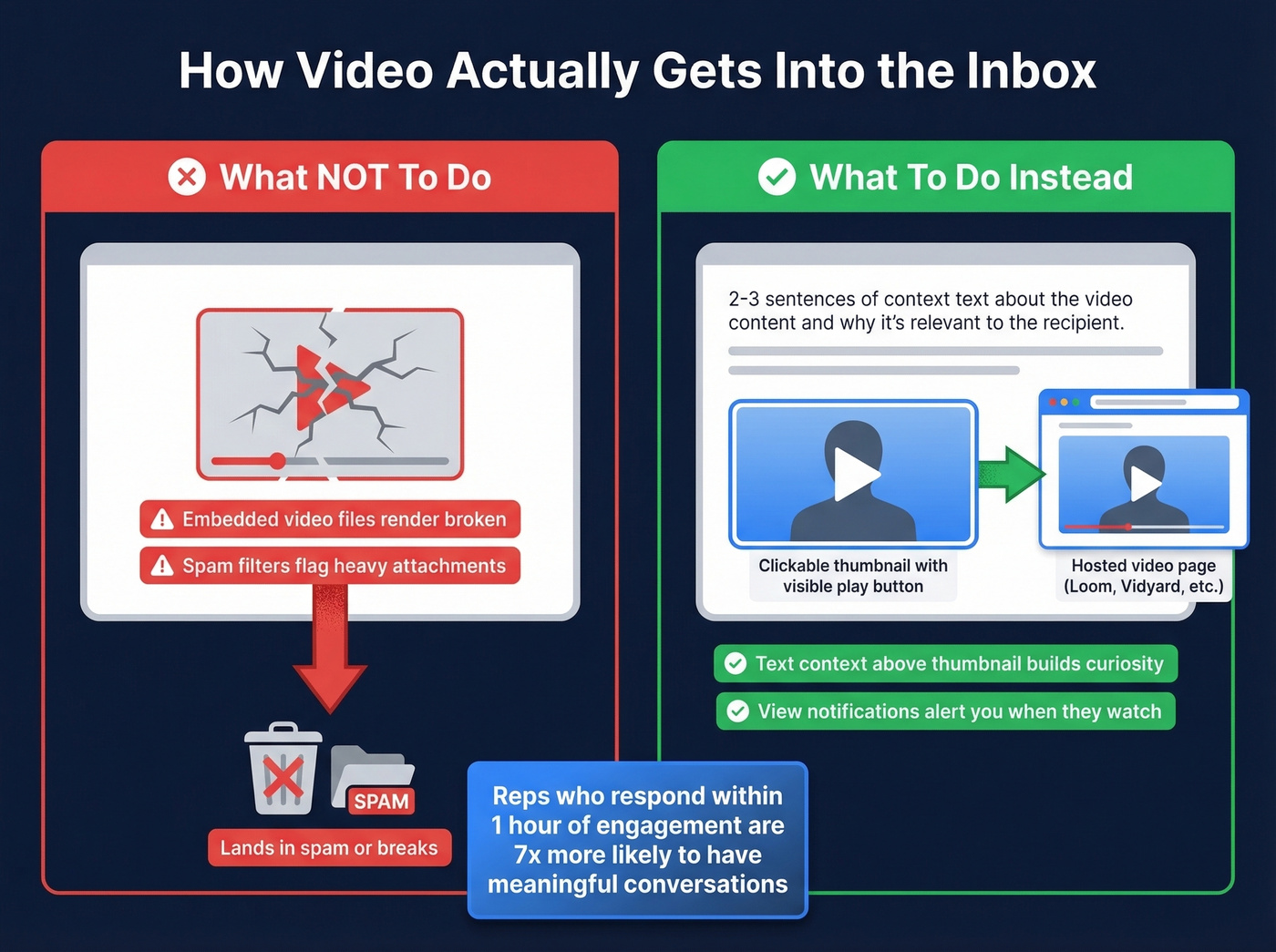
What to do instead: Use a clickable static thumbnail linking to a hosted video page. Balance it with 2-3 sentences of text, and enable view notifications. Place the thumbnail below your opening line, not at the top - recipients need text context before they'll click play. Make sure the thumbnail clearly looks clickable with a visible play button.
Reps who reach leads within one hour of engagement are 7x more likely to have meaningful conversations with decision-makers. That stat alone justifies setting up watch alerts. And don't worry about thumbnails triggering spam filters - sender behavior matters far more than the image itself.
If you're troubleshooting inbox placement, start by checking your sender reputation and then work through common email bounce rate causes.
Best Video Follow-Up Tools for Sales
| Tool | Best For | Pricing | Limitation |
|---|---|---|---|
| Loom | Quick, frictionless recording | Free (25 vids); $15/user/mo | Lighter analytics than sales-specific platforms |
| Vidyard | Analytics-heavy teams | Free (5 vids/mo); paid plans available | CRM integrations locked to Teams tier (custom pricing) |
| Sendspark | Scaling personalization | $39-$199/mo (annual) | Pricier for solo reps |
| Covideo | Dedicated sales video | $69/mo or $588/yr | Hard to justify vs free alternatives |
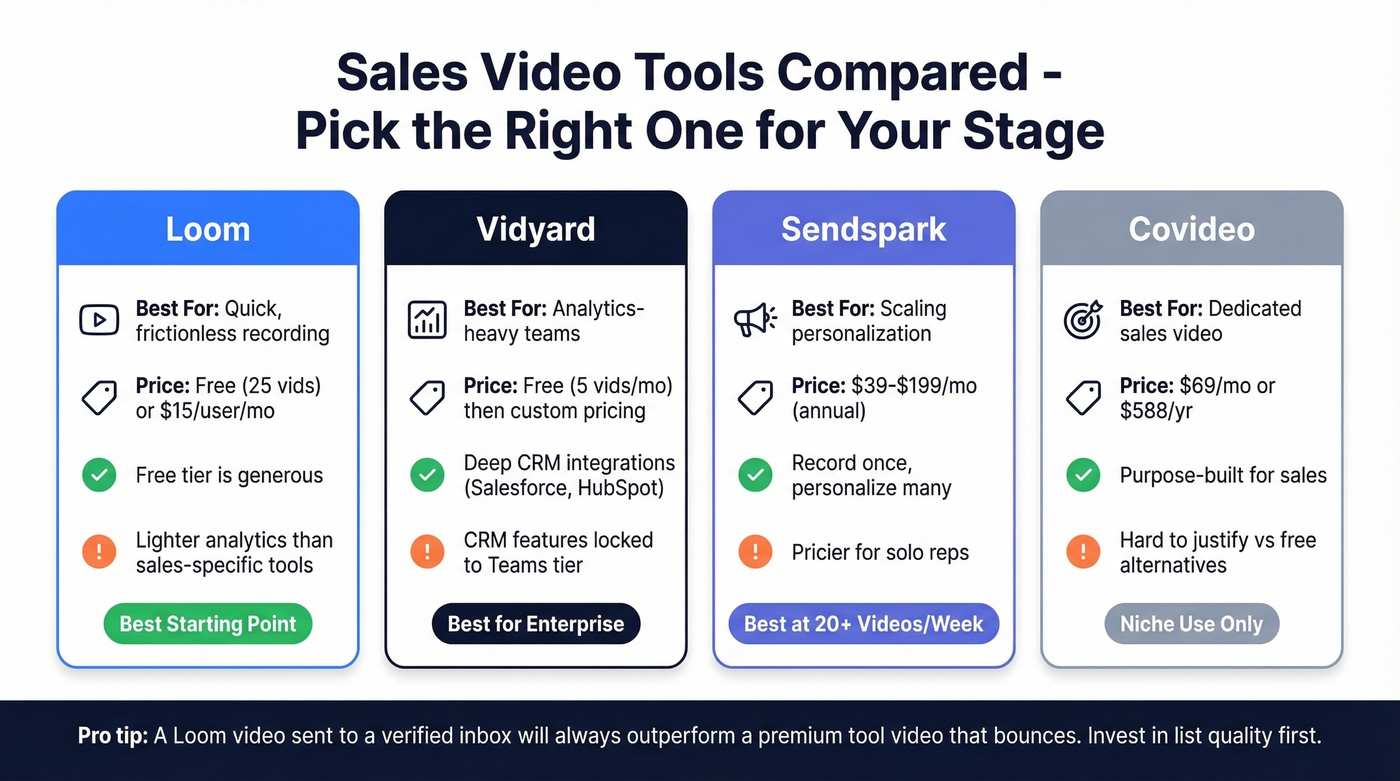
Most reps overthink tool selection and under-invest in list quality. A Loom video sent to a verified inbox will outperform a Covideo masterpiece that bounces. If you're picking one tool to start, Loom wins - it's free, fast, and your reps will actually use it. Sendspark's "record once, personalize many" approach is worth the $39/mo once you're sending more than 20 videos a week. Need CRM-integrated analytics on Salesforce or HubSpot? That's Vidyard's Teams tier.
If you're building a broader stack around follow-ups, compare options in follow up email software and the best SDR tools for sequencing + tracking.
The Data Quality Problem Nobody Mentions
You can nail the script, pick the perfect tool, and record 15 flawless videos this week. If 4 of those emails bounce and 3 land in dead inboxes, you just wasted nearly half your effort. Seven out of fifteen videos that never reached a human.

Look - learning how to use video for follow-ups is only half the equation. The other half is making sure those follow-ups actually arrive. A rep's time recording personalized videos is worth far more than the cost of verifying the list upfront.
In our experience, teams that verify before recording see dramatically better ROI on their video outreach. Prospeo runs 98% email accuracy with a 5-step verification process that catches catch-all domains, spam traps, and honeypots on a 7-day refresh cycle - so the email you verified last Monday is still accurate when you record your video on Friday. At roughly $0.01 per verified email, cleaning a 500-person list costs less than a cup of coffee. The free tier gives you 75 emails per month to test it.
If you want to go deeper on list hygiene, use an AI email checker workflow and follow a dedicated spam trap removal process for older lists.
You just built a 12-day video cadence - now make sure every touch hits a real person. Prospeo verifies emails across 300M+ profiles with catch-all handling and spam-trap removal, so your Loom thumbnails land in inboxes, not the void. At $0.01 per email, verification costs less than the minute it takes to record one clip.
One bounced video wastes more than a hundred verified emails cost.
FAQ
How long should a sales video follow-up be?
Thirty to sixty seconds. Post-demo recaps can stretch to 60; nudges and re-engagement clips should stay under 45. Teams that cut below one minute consistently report higher reply rates and watch-through completion above 70%.
Should I embed video in the email or link to it?
Always link. Gmail, Outlook, and Yahoo don't support in-email playback - embedded files render broken or trigger spam filters. Use a clickable thumbnail with a visible play button linking to a hosted page.
How do I make sure my video follow-up actually reaches the prospect?
Verify the email address before you hit record. Prospeo's 5-step verification catches dead inboxes, catch-all domains, and spam traps at $0.01 per email - the cheapest insurance in your stack. Teams like Snyk cut bounce rates from 35-40% to under 5% after switching.
Can I personalize videos at scale without recording each one individually?
Yes. Record a single base video, then swap in the prospect's name and one personalized detail at the start. Sendspark and Vidyard both support dynamic personalization tokens. Pair that with pre-verified contact lists and you can send a personalized follow-up in under two minutes per prospect.