

Virtual Selling Tips That Actually Work in 2026
Beyond "Turn On Your Camera"
Most virtual selling tips boil down to "use your webcam" and "smile more." That advice was thin in 2020. It's useless now.
67% of B2B buyers prefer a rep-free buying experience - up from 61% the prior year. 45% are using AI during purchases, doing more homework before they ever talk to you. B2B buyers now use 10.2 channels on average in their buying journey, up from 5 in 2016, and 54% will abandon a purchase or switch suppliers after a poor digital experience. The meetings you get are rarer and more consequential than ever. Here's how to stop wasting them.
What You Need (Quick Version)
Three priorities, in order:
- Fix your discovery call. Only 26% of buyers rate sellers as skilled at needs discovery. A structured framework puts you in the top quartile instantly. (If you need a tighter structure, start with a discovery framework.)
- Fix your setup. A key light and a decent mic run $150-$250 total. If you're selling a $50K deal from a dark room with laptop audio, you're telling the buyer you don't care.
- Fix your follow-up speed. Leads contacted within 5 minutes are 21x more likely to convert than those contacted after 30 minutes. Five minutes. Not five hours. (Keep a few sales follow-up templates ready before the call ends.)
Everything else is refinement.

73% of buyers avoid sellers who send irrelevant outreach. Preparation starts with knowing exactly who you're reaching - current role, verified email, direct dial. Prospeo gives you 300M+ profiles with 98% email accuracy, refreshed every 7 days, so you never walk into a virtual call unprepared.
Stop wasting rare meetings on wrong contacts. Verify before you pitch.
What Buyers Hate on Virtual Calls
RAIN Group's Virtual Selling Skills study surveyed 528 buyers and sellers and found the top mistakes buyers experience on virtual calls: tech problems (89%), poor or missing visuals (86%), unresponsive sellers (84%), and lack of preparation (83%).
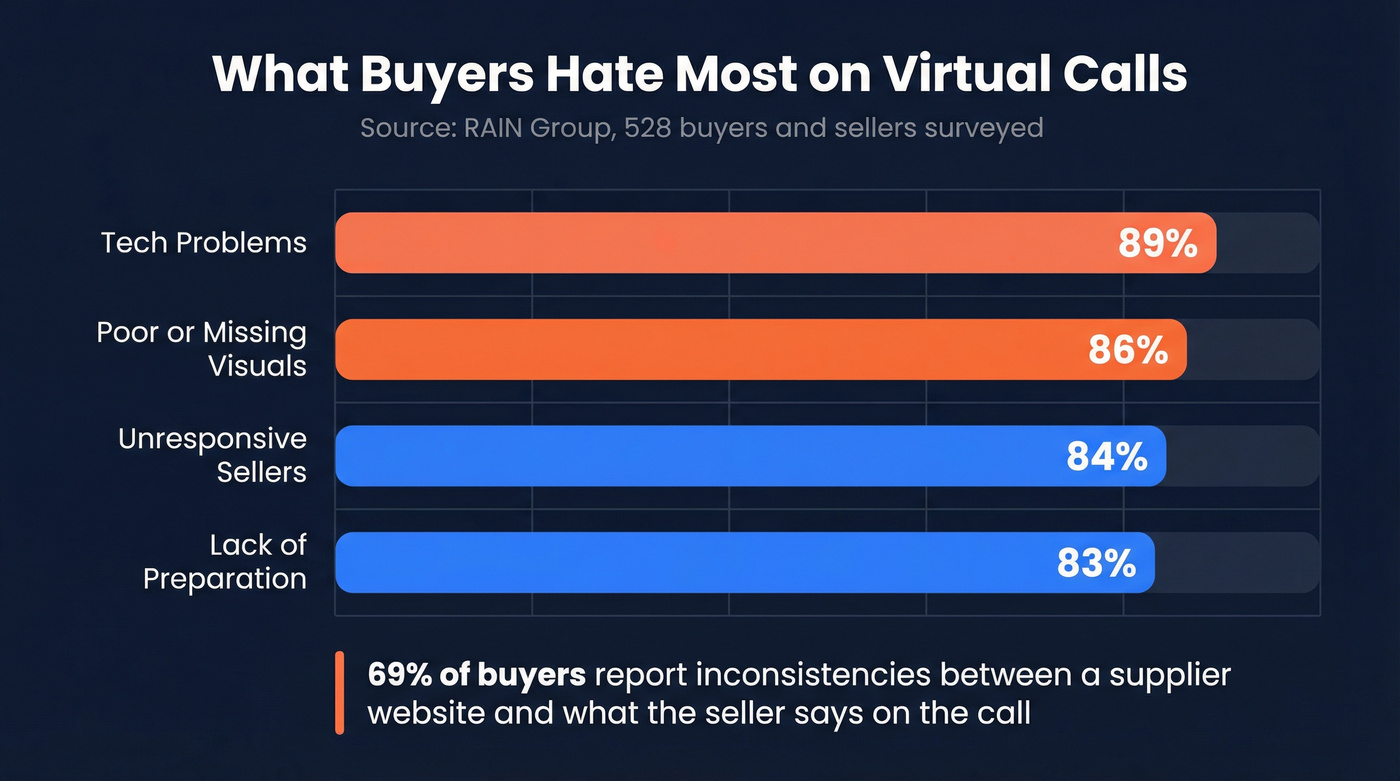
That last one - preparation - compounds everything else. An unprepared seller asks questions the buyer already answered on their website. They pitch features that don't map to the buyer's stack. They send follow-ups to the wrong person. 69% of buyers report inconsistencies between what's on a supplier's website and what the seller says on the call, and 73% actively avoid suppliers who send irrelevant outreach. Preparation isn't a soft skill. It's a filter that determines whether you get a second meeting.
McKinsey calls it the "rule of thirds" - buyers want in-person, remote, and self-serve interactions in roughly equal measure. Virtual selling isn't the whole game. It's one-third of the game. But it's the third where most reps are weakest, which means it's where the biggest gains are hiding.
7 Virtual Selling Strategies That Work
1. Start With Verified Data
Virtual selling starts before the call - with verified contact data. Every minute spent pitching the wrong person or chasing a bounced email is a minute you're not selling. Before any outreach, confirm the prospect's current role, identify other stakeholders in the buying group, and verify their contact information is live. Prospeo handles this across 300M+ professional profiles with 98% email accuracy on a 7-day refresh cycle - search by role or company, verify in bulk, and push contacts straight to your sequencer. (If you're comparing options, see data enrichment services.)

2. Use the "Menu of Pain" Framework
Most discovery calls fail because the seller asks vague open-ended questions and the buyer gives vague answers. The menu of pain framework flips this: you present three specific problems you've seen in similar companies and let the buyer pick.
Say something like: "Most teams we talk to are dealing with one of three things - [X], [Y], or [Z]. Which one resonates most?" This proves you understand their world and gives the buyer a low-effort way to open up. 71% of buyers say thorough discovery is a top purchase decision factor. In our experience, the menu approach works best when you tailor the three options to the buyer's specific industry - generic pain points get generic answers. (For a more formal qualification layer, use MEDDIC sales qualification.)
3. Run a Timed Discovery Agenda
Structure kills awkwardness. Share this agenda at the top of every discovery call:
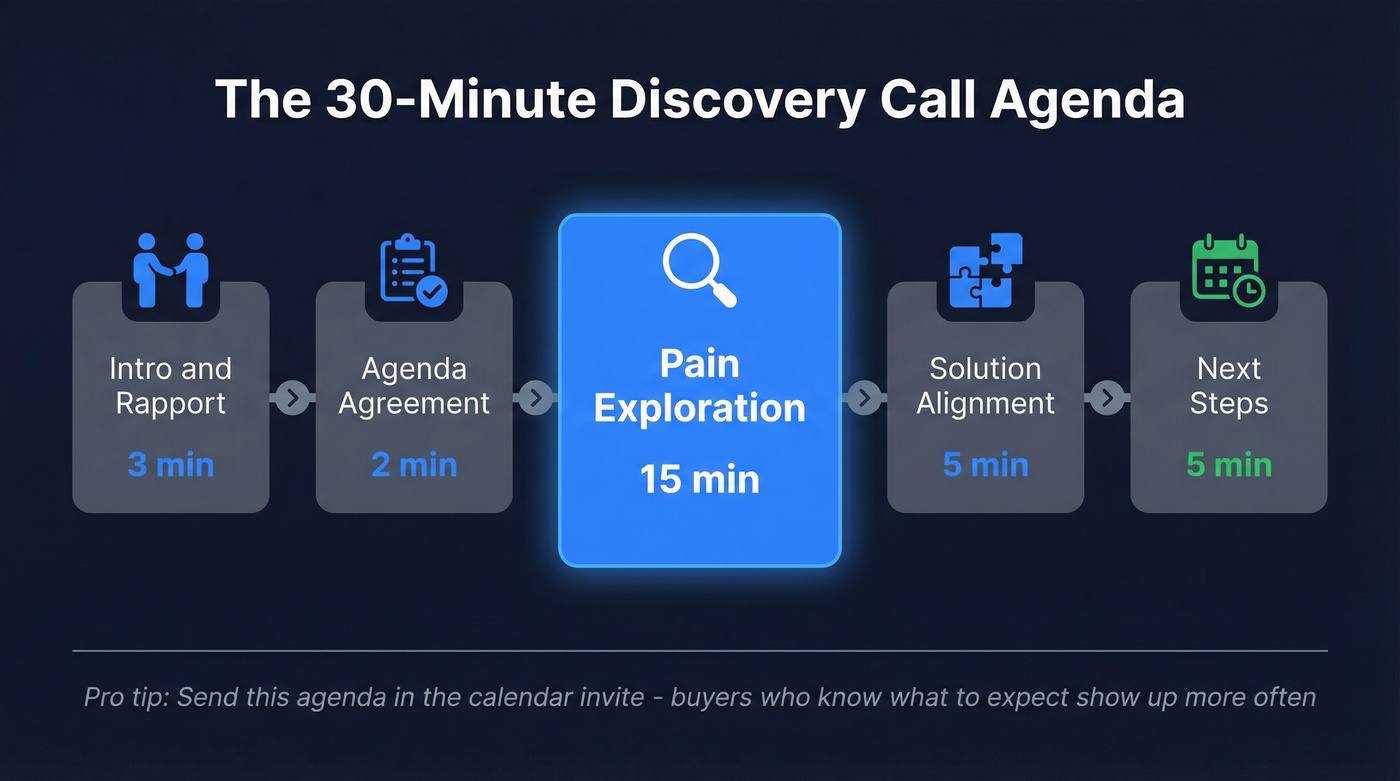
- Intro/rapport - 3 min
- Agenda agreement - 2 min
- Pain exploration - 15 min
- Solution alignment - 5 min
- Next steps - 5 min
Thirty minutes total. Stating the agenda upfront signals respect for the buyer's time and gives you permission to redirect when conversations drift. Send the timed agenda in the calendar invite, too - buyers who know exactly what they're walking into are far more likely to show up. Of all the remote selling tactics we've tested, this one has the most immediate impact on show rates. (More frameworks: remote sales meeting tips.)
4. Upgrade Your Setup
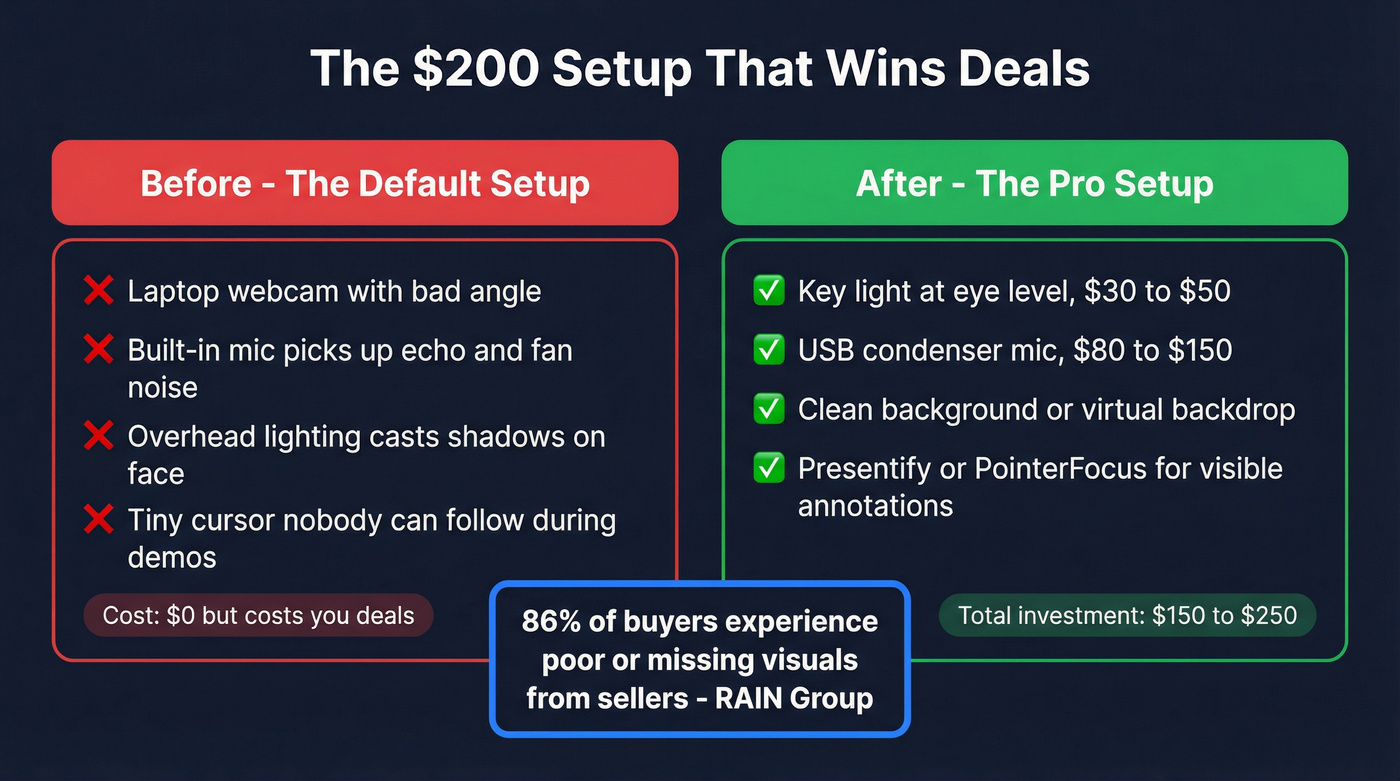
Skip this if you already own a key light and an external mic. For everyone else: a key light runs $30-50 and a condenser mic with a USB interface costs $80-150. The consensus on r/salesengineers is that lighting plus a real mic is the highest-ROI upgrade for remote calls, and we agree. For on-screen annotation during demos, Presentify on Mac or PointerFocus on PC make your cursor and highlights visible instead of forcing the buyer to guess where you're pointing. 86% of buyers report experiencing poor or missing visuals from sellers. A $200 setup investment pays for itself on the first deal. (If you're rebuilding your deck too, use these virtual sales presentation tips.)
5. Disaster-Proof Your Demos
Rehearse under realistic conditions - bad Wi-Fi, screen-share layouts, the works. Always have backups ready: screenshots of key screens, a pre-recorded walkthrough, and a plan for when the demo environment inevitably crashes. Record yourself and review. One solid piece of advice from a r/ProductManagement thread: treat demos like a live performance, because that's exactly what they are. I've watched reps lose six-figure deals because their sandbox timed out mid-demo and they had no fallback. Don't be that rep. (Use a product demo checklist to standardize this.)
6. Follow Up in 5 Minutes
The speed-to-lead data is unambiguous: contacts reached within 5 minutes convert at 21x the rate of those reached after 30 minutes. We've tested this internally, and the difference between a 5-minute and 30-minute follow-up is staggering. Have a template ready before the call ends:
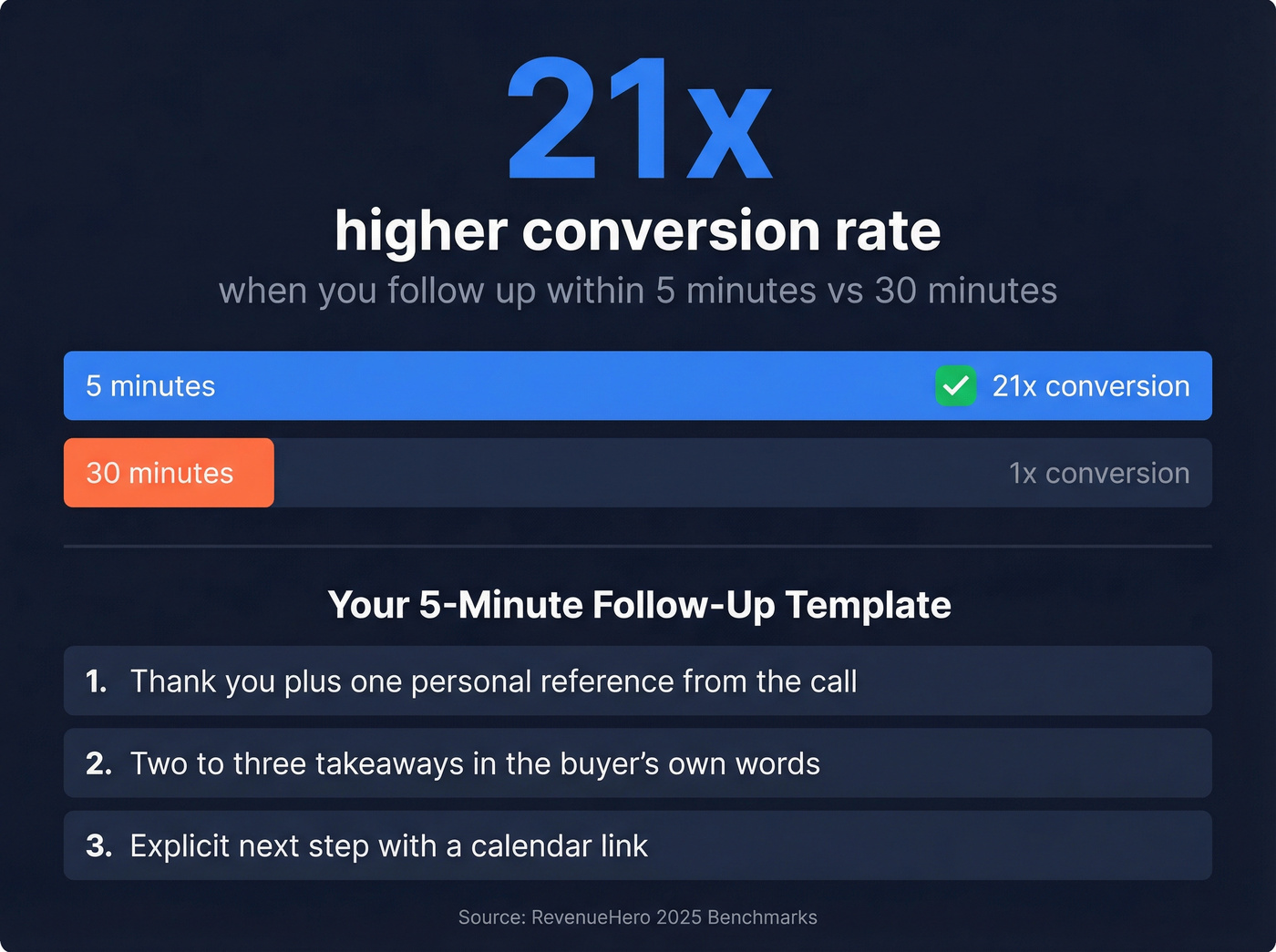
- Thank you + one personal reference from the conversation
- 2-3 key takeaways in the buyer's own words, not yours
- Explicit next step with a calendar link
No essay. No deck attachment. Just proof you listened and a frictionless path to the next meeting. Gartner found that confident buyers are 2x more likely to report a high-quality deal - your follow-up should reinforce that confidence, not bury it under a 12-slide PDF. (If you're tightening the whole motion, audit your lead generation workflow.)
7. Send Async Video Recaps
Replace text-only follow-ups with a 60-second asynchronous video recap. Loom (around $15/user/mo) or Vidyard (around $59/user/mo) both work. Walk through the key takeaways, restate the next step, and let the buyer share it internally with stakeholders who weren't on the call.
This isn't just a follow-up tactic - it's a strategic channel. Async video lets you sell to the buying committee members you'll never get on a live call, and it differentiates you from every other seller sending a wall of text. Let's be honest: nobody's forwarding your three-paragraph email to their CFO. A 60-second video with your face on it? That gets shared. (If you're using video in outbound too, see Loom video cold email.)
Metrics That Matter
| Metric | Benchmark | Source |
|---|---|---|
| Qualified-to-booked | 62% median, 78% top 10% | RevenueHero |
| Speed-to-lead | 5 min = 21x conversion | RevenueHero |
| Buyers rating seller discovery as skilled | 26% | RAIN Group |
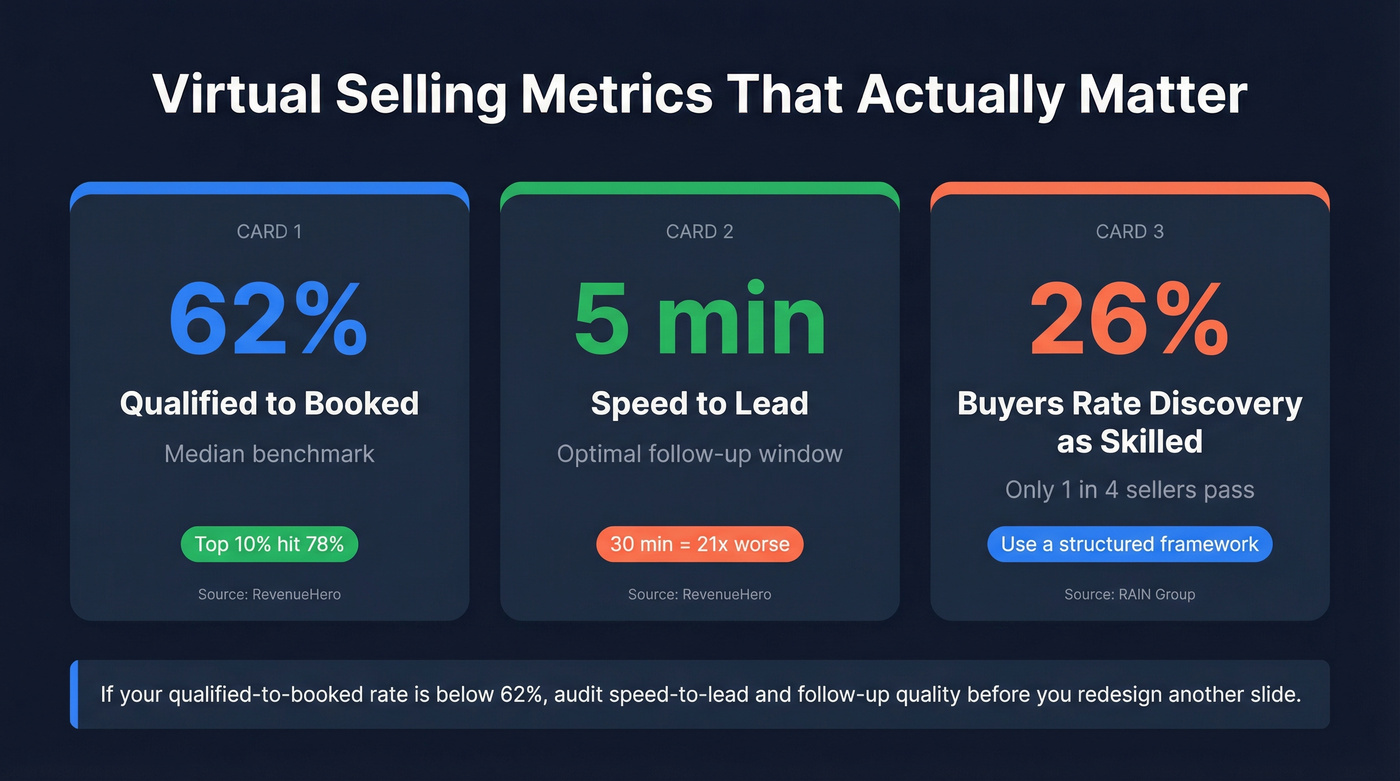
Here's the thing: if your qualified-to-booked rate is below 62%, start by auditing speed-to-lead and follow-up quality before you redesign another slide. The best virtual selling strategies in the world won't save a pipeline that leaks at the handoff. (To diagnose the leak, start with sales pipeline challenges.)
You follow up in 5 minutes - but does the email even land? A 35% bounce rate kills your speed-to-lead advantage. Prospeo's 5-step verification drops bounce rates under 4%, so your follow-up actually reaches the buyer who just showed buying intent on your call.
Fast follow-up means nothing if your emails bounce. Fix the data first.
FAQ
What's the biggest virtual selling mistake?
Poor discovery. Only 26% of buyers rate sellers as skilled at needs discovery. A structured framework like the "menu of pain" - where you present three common problems and let the buyer pick - immediately separates you from the 74% who wing it. Structure beats charisma on a video call.
How fast should I follow up after a virtual sales call?
Within 5 minutes. Leads contacted in that window convert at 21x the rate of those reached after 30 minutes. Have your follow-up template ready before the call ends - a thank-you, 2-3 takeaways in the buyer's own words, and a calendar link for the next step.
How do I keep buyers engaged on video calls?
Structure and brevity. Use a timed agenda, ask questions instead of presenting, and keep calls under 30 minutes. 91% of sellers cite engagement as their top challenge - shorter, buyer-led calls fix most of it. When the buyer's talking more than you are, you're winning.
What tools help with virtual selling preparation?
Start with verified contact data so you're reaching the right stakeholders. Prospeo gives you 75 free email lookups per month at 98% accuracy - enough to validate a target account list before outreach. Pair that with a key light, external mic, and async video tool like Loom for under $300 total.