

How to Warm Up Emails Without Burning Your Domain
A RevOps lead we know launched his first cold campaign on a fresh domain through AWS SES. SPF, DKIM, DMARC - all perfect. Verified emails, zero bounces. Then Gmail Postmaster showed a 62% spam complaint rate in a single day, and the domain's reputation cratered to "low." His mistake? He never warmed up the domain. Warmed up emails land in inboxes. Everything else lands in spam folders - or worse, gets your domain blacklisted entirely.
What You Need (Quick Version)
- New domain? Budget 4-6 weeks of warmup. Existing domain with a new mailbox? 2-3 weeks. Start at 5-10 emails/day and ramp slowly.
- Pick a warmup tool - Instantly if you want outreach bundled, Warmbox if you just need standalone warmup - but no tool fixes bad data.
- Before your first real campaign, verify every email on your list. Bounces and spam traps undo weeks of warmup overnight.
What Does Email Warmup Mean?
Email warmup is the process of gradually increasing your sending volume from a new or inactive account to build a positive reputation with inbox providers like Gmail, Microsoft, and Yahoo. You're proving to ISPs that you're a legitimate sender, not a spammer who just spun up a domain.
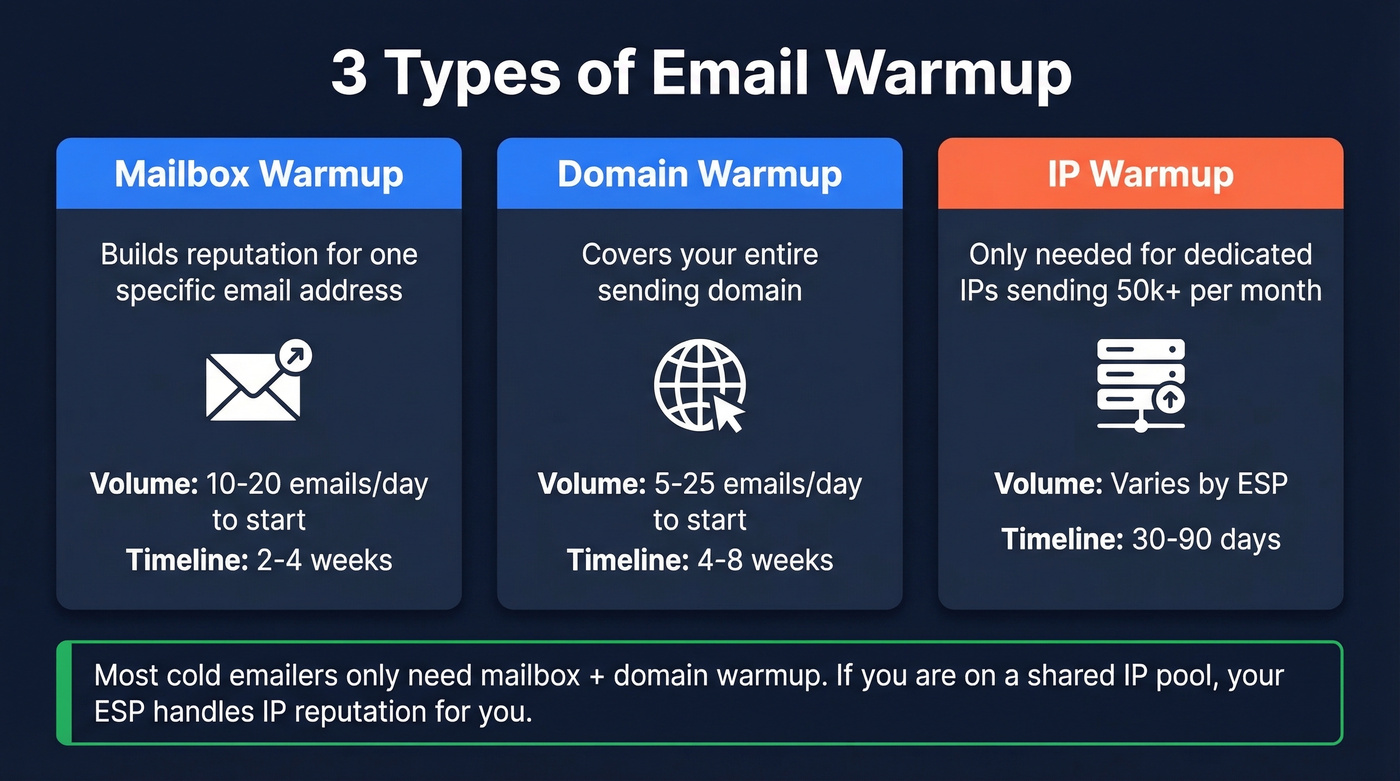
Three types apply to different situations:
Mailbox warmup builds reputation for a specific email address. Start at 10-20 emails/day and plan for 2-4 weeks.
Domain warmup covers your entire sending domain and takes longer - typically 4-8 weeks - because you're establishing trust at the domain level rather than just one address.
IP warmup only matters if you're on a dedicated IP sending 50,000+ emails per month. That's a 30-60 day process (sometimes up to 90) and irrelevant for most cold emailers.
If you're on a shared IP pool, which most cold email tools use, your ESP manages the IP reputation. You only need to worry about domain and mailbox warmup. One critical prerequisite before any warmup begins: confirm SPF, DKIM, and DMARC are configured correctly. Warmup can't fix missing authentication. (If you want a deeper checklist, see our email deliverability guide.)
Here's the tip most guides skip: send from a subdomain like outreach.yourdomain.com to isolate cold email reputation from your transactional mail. If your cold campaigns damage the subdomain's reputation, your main domain stays clean. We've seen teams lose the ability to send invoices and support emails because they ran cold outreach from their primary domain. Don't be that team. (Related: tracking domain setup.)
Why Warmup Matters for Deliverability
There's a common question on r/coldemail - "Is warmup even necessary if I'm only sending 3-5 ultra-personalized emails a day?" Fair question. Here's the framework:
Warm up if:
- You're on a brand-new domain. Zero reputation means even 5 emails can land in spam. Budget 4-6 weeks.
- You're returning from inactivity and haven't sent in 30+ days. Plan 1-3 weeks to rebuild trust.
- Your domain reputation is damaged - you blasted too hard, hit spam traps, or got flagged. This is the hardest recovery: 4-8+ weeks, and sometimes it's faster to start fresh.
Lighter warmup if:
- You're adding a new mailbox on an established domain with good reputation. A 2-3 week ramp is usually enough.
- You're genuinely sending under 5 emails/day from a domain that's been active for months. A 1-2 week light warmup still prevents early spam flags.
Skip at your own risk. Even at low volume, a brand-new domain has literally zero reputation. ISPs don't give you the benefit of the doubt. Since 2024, Gmail and Yahoo have pushed stricter bulk-sender standards: SPF + DKIM + DMARC, one-click unsubscribe, and very low spam complaint rates. Gmail specifically enforces a 0.3% complaint-rate ceiling for bulk senders, and crossing it tanks inbox placement fast. Warmup helps you stay under those thresholds from day one. (More on safe sending limits in our email velocity guide.)
The Complete Warmup Schedule
The standard warmup runs 2-4 weeks for an established domain, but a brand-new domain with aggressive volume targets can take 6 weeks.
Week-by-Week Targets
| Week | Daily Volume | What to Do |
|---|---|---|
| Week 1 | 5 → 25/day | Send to engaged contacts only. Monitor opens. |
| Week 2 | 25 → 50/day | Mix in new recipients. Watch bounce rates. |
| Week 3 | 50 → 100/day | Expand targeting. Check complaint rates. |
| Week 4 | Stabilize | Hold at 50-100/day. Keep 30-40% as warmup. |
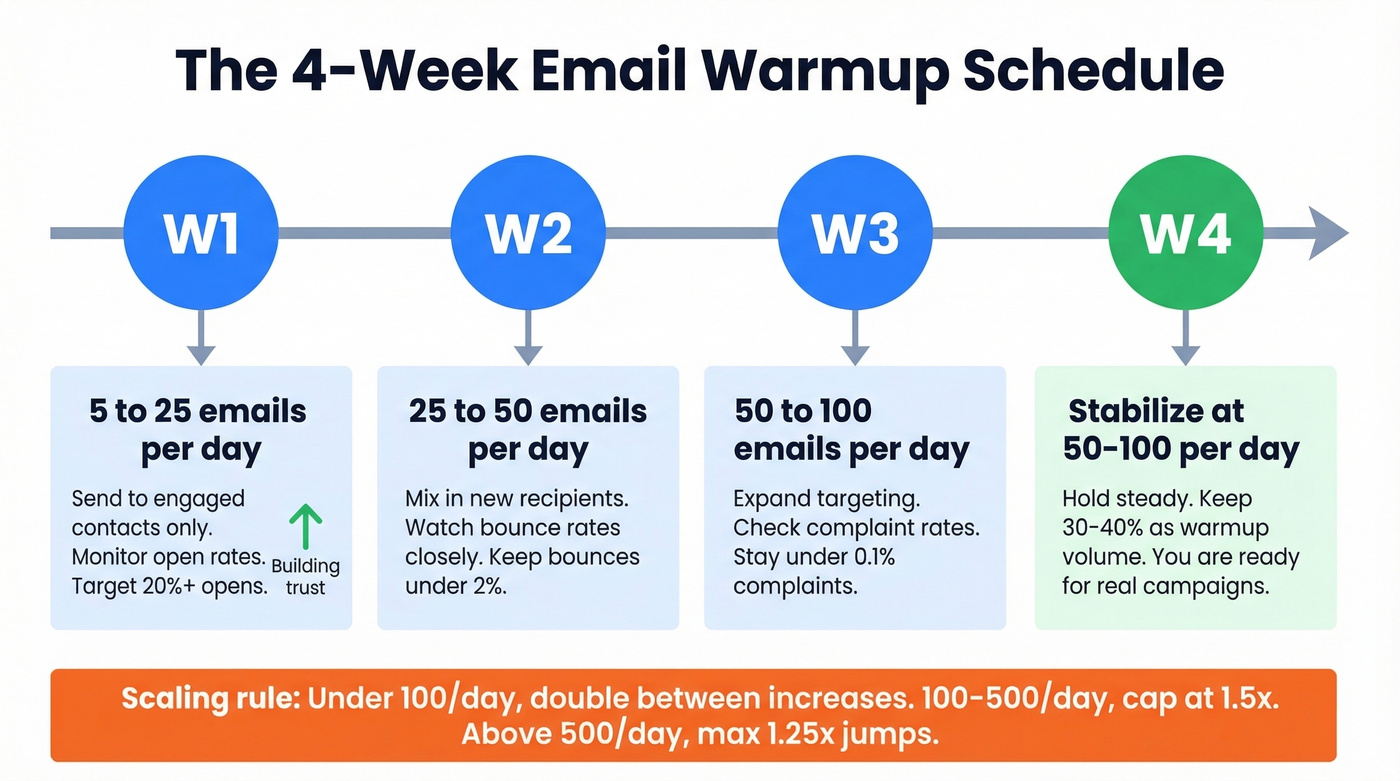
Scaling rules: under 100 emails/day, you can double your volume between increases. Between 100-500/day, cap increases at 1.5x. Above 500/day, don't jump more than 1.25x at a time.
On weekends, reduce volume by 50-70% but don't stop completely. ISPs notice gaps, and inconsistent patterns slow trust-building.
Postmark's warmup guide recommends a provider-segmented approach: start with 50-100 emails per major ISP (Gmail, Outlook, Yahoo) and double daily in the early phase, then shift to 20-50% increases as volume grows. If deliverability dips, decrease volume 25-30% until metrics normalize.
Timelines vary by scenario:
| Scenario | Minimum | Recommended | Target Volume |
|---|---|---|---|
| New domain | 3 weeks | 4-6 weeks | 50-100/day |
| New mailbox (good domain) | 2 weeks | 2-3 weeks | 50-100/day |
| Returning from inactivity | 1 week | 1-3 weeks | Previous level |
| Damaged reputation | 4 weeks | 4-8+ weeks | Start at 5/day |
Scaling Beyond 100/Day
If you need to send 1,000 emails/day, one mailbox won't cut it. A single mailbox can sustainably handle 150-400 real sends per day post-warmup. For 1,000/day, you need 4 mailboxes at 250 each or 5-6 mailboxes at 170-200 each if you want a safety margin.
One practitioner on Reddit burned all their domains by ramping too fast, then restarted with 11 domains, 33 mailboxes, and manual warmup for 2 weeks before switching to automated warmup at just 3 sends/day per inbox. Three weeks in, they still hadn't started real campaigns. That's the cost of doing it wrong the first time - you don't just lose weeks, you lose months.
How to Know It's Working
Don't guess. The global inbox placement average sits around 84% - roughly 1 in 6 emails never reach the inbox. Track these benchmarks during warmup and compare against ISP inbox placement rates:
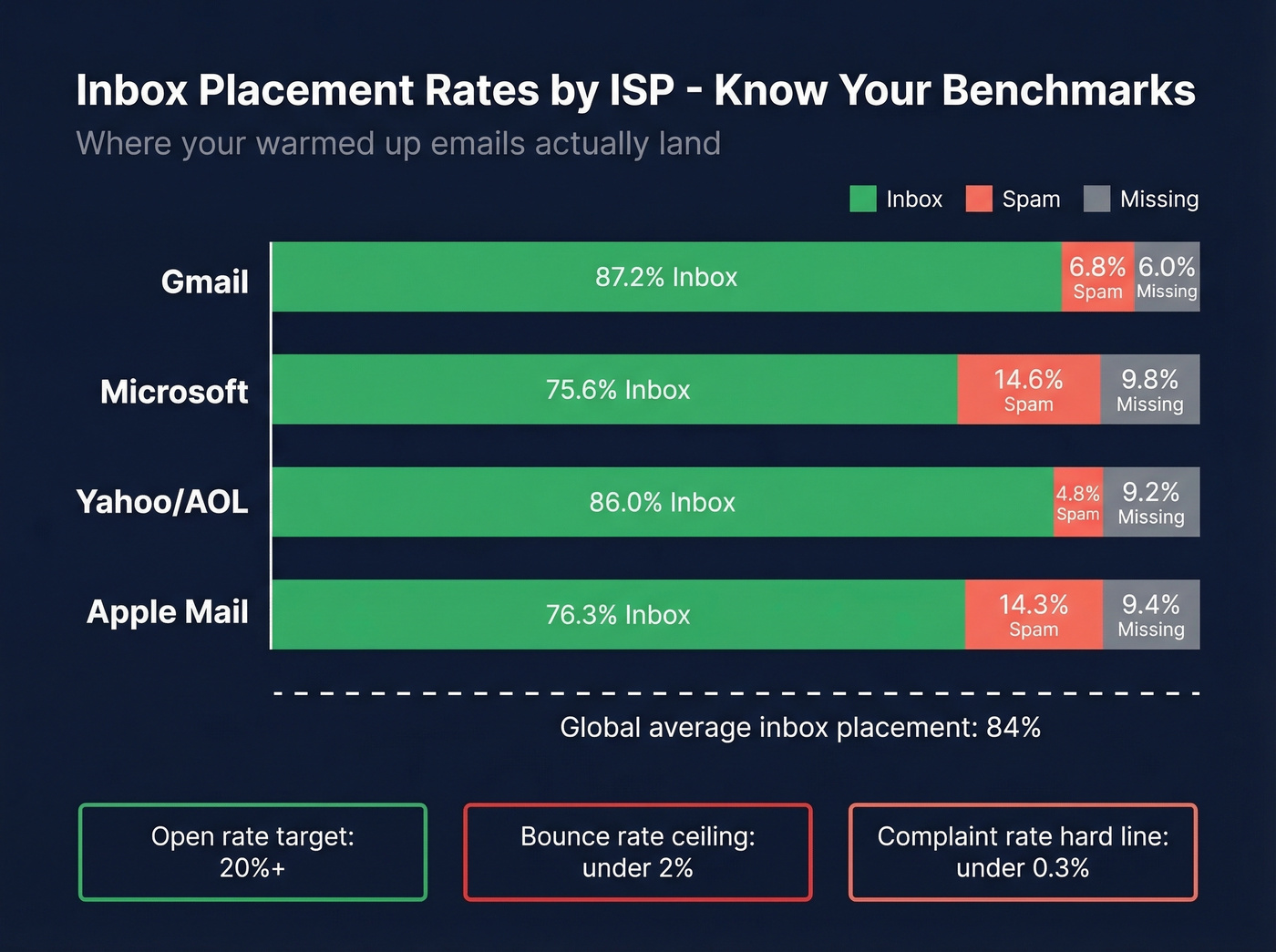
| ISP | Inbox Rate | Spam Rate | Missing |
|---|---|---|---|
| Gmail | 87.2% | 6.8% | 6.0% |
| Microsoft | 75.6% | 14.6% | 9.8% |
| Yahoo/AOL | 86.0% | 4.8% | 9.2% |
| Apple Mail | 76.3% | 14.3% | 9.4% |
During week 1, your thresholds should be: open rates above 20%, bounce rates below 2%, and spam complaints below 0.1%. Gmail's 0.3% complaint rate ceiling is the hard line - cross it and inbox placement drops fast. (If you're troubleshooting, use an email spam checker to catch obvious issues.)
One important distinction: opt-in email marketing averages a 43.46% open rate across 3.6M campaigns. Cold email is a different animal. During warmup, target 20%+ opens as your baseline. If you're hitting that with sub-2% bounces, you're on track.
Set up Google Postmaster Tools from day one. It's the only way to see how Gmail specifically views your domain reputation, and it's free.

You just spent 4-6 weeks warming up your domain. One campaign with bad data sends bounce rates past 2% and undoes all of it. Prospeo's 5-step email verification delivers 98% accuracy - so your warmed-up domain stays warmed up.
Don't let bad data burn a domain you spent weeks building.
Mistakes That Kill Your Warmup
Blasting 2,000+ emails on day one. ISPs immediately flag this as suspicious from a new or low-reputation domain. You'll trigger throttling or outright blocks before you've sent your second batch.
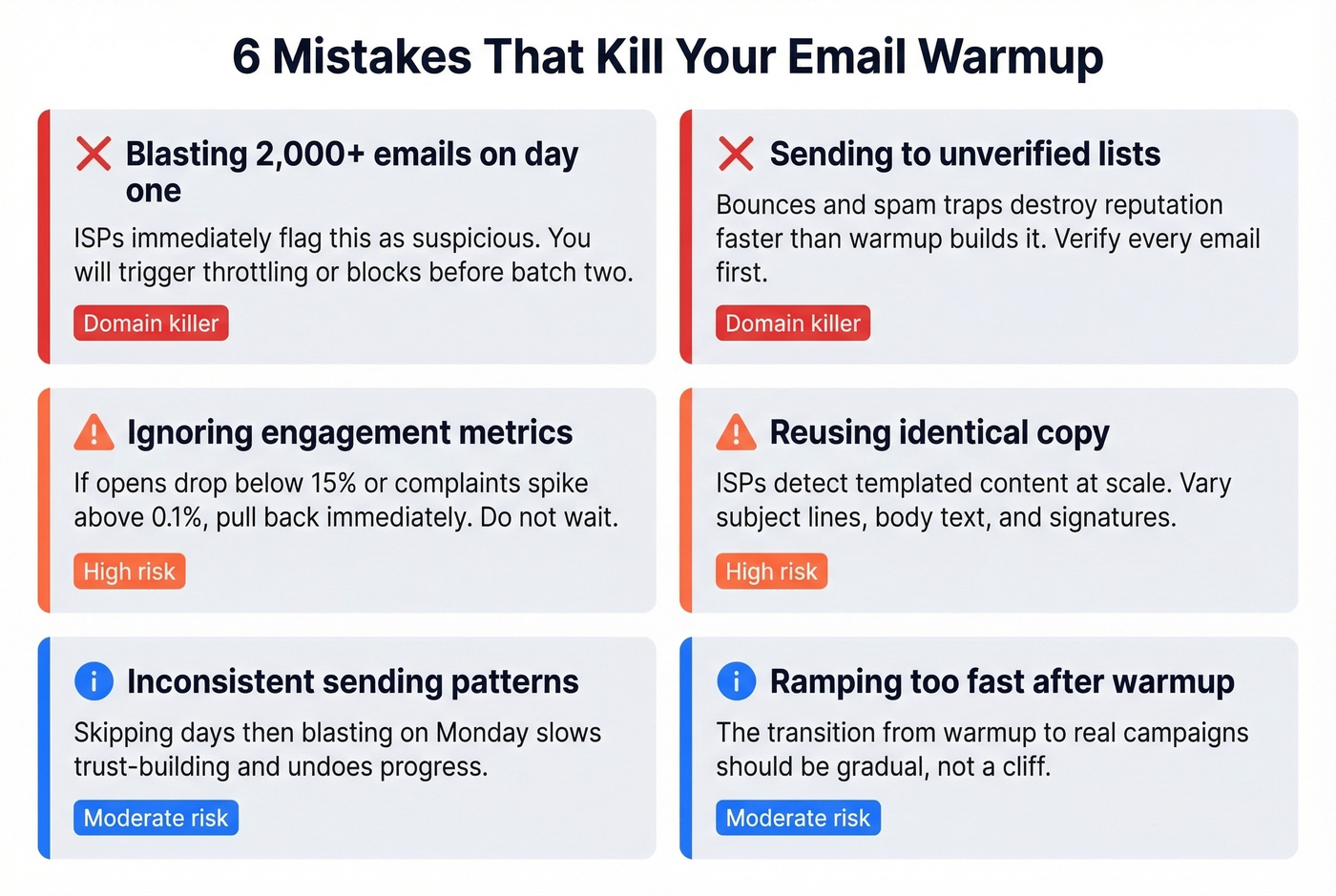
Sending to unverified lists. This is the big one. Bounces from invalid addresses and spam-trap hits destroy reputation faster than warmup builds it. Run your list through a verification tool before every campaign - the 5 minutes it takes saves weeks of recovery. (If you want the numbers, see email bounce rate benchmarks and fixes.)
Ignoring engagement metrics. If opens drop below 15% or complaints spike above 0.1%, pull back volume immediately. Waiting until things "look bad" means the damage is already done.
Reusing identical copy across every warmup email. ISPs detect templated content at scale. Vary your subject lines, body text, and signatures. (Need ideas? Pull from these email subject lines.)
Inconsistent sending patterns. Skipping days, sending nothing on weekends, then blasting on Monday - this erratic cadence slows trust-building and undoes progress.
Ramping too fast after initial warmup. Remember the 33-mailbox story? That person burned domains by going from warmup to full volume overnight. The transition from warmup to real campaigns should be gradual, not a cliff.
The Data Quality Problem
We've seen teams burn through 3-4 domains before realizing the problem was their data, not their warmup schedule. You can run a perfect 6-week warmup, nail every metric, and then destroy your domain reputation in a single campaign by sending to a dirty list.
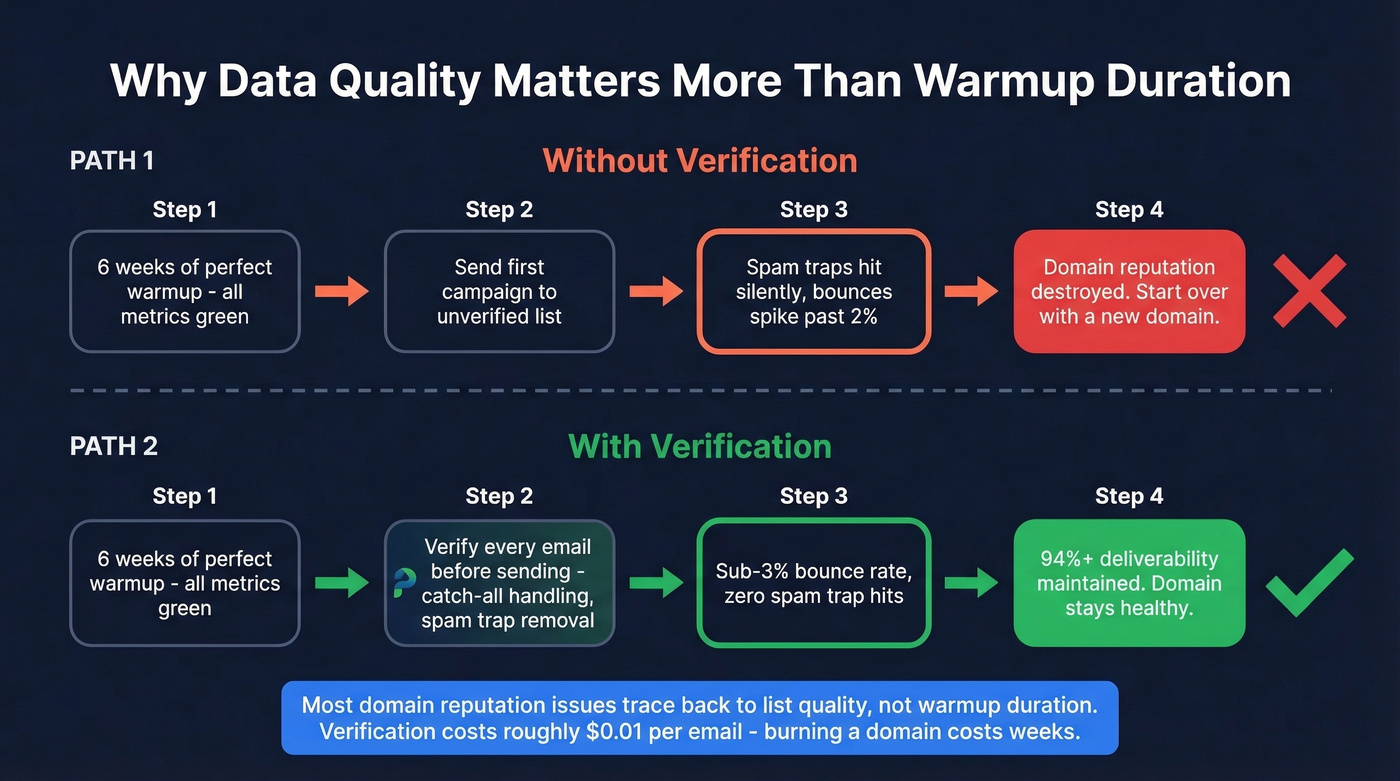
Look, this is the part that frustrates us most about warmup guides - they treat it as a standalone process and ignore the thing that actually kills domains. Spam traps don't bounce. They don't unsubscribe. They just quietly flag your domain with ISPs, and you won't know until your inbox placement craters. (If you suspect this, start with spam trap removal.)
In our experience, most domain reputation issues trace back to list quality, not warmup duration. Before your first real campaign post-warmup, verify every email. Prospeo's 5-step verification with catch-all handling and spam-trap removal catches the silent killers most tools miss - at roughly $0.01 per email, it's cheaper than burning a domain and starting the warmup cycle over. Stack Optimize, an outbound agency using Prospeo for list hygiene, maintains 94%+ deliverability and sub-3% bounce rates across all client campaigns with zero domain flags. (If you're comparing vendors, see our roundup of data enrichment services.)
Scaling to 1,000 emails/day across multiple mailboxes means every contact must be verified. Prospeo checks for catch-all domains, spam traps, and honeypots - the exact threats that crater warmed-up sender reputation. At $0.01 per email, verification costs less than a single lost domain.
Verify your entire list before you hit send. 98% accuracy, every time.
Does Synthetic Warmup Still Work?
There's a growing argument on r/SaaS that traditional warmup tools are broken. The logic: these tools send synthetic emails and generate fake opens and replies, but modern ISPs increasingly weight real engagement signals - actual human replies, conversation depth, and genuine interaction patterns.
The skeptics have a point, but they're overcorrecting. Synthetic warmup still solves the cold-start problem. A brand-new domain with zero sending history needs baseline activity, and warmup tools provide that. But synthetic engagement alone isn't sufficient proof of trust anymore.
Let's be honest: if your deal sizes are modest and you're sending fewer than 50 emails a day, you probably don't need a warmup tool at all. Just send real emails to colleagues, partners, and warm contacts for two weeks. The genuine engagement signals from 15 real replies beat 200 synthetic ones every time. Tools become essential only when you're scaling multiple mailboxes and can't manually generate enough real engagement to satisfy ISPs. (If you're building sequences, this B2B cold email sequence guide pairs well with warmup.)
Best Email Warmup Tools in 2026
Here's what's available right now. Some tools offer provider-specific diagnostics and reputation scoring - useful if you're struggling with one ISP specifically.
| Tool | Starting Price | Best For | Differentiator |
|---|---|---|---|
| Instantly | $30/mo (bundled) | All-in-one cold email | 1M+ real accounts in deliverability pool |
| Warmbox | $15/mo (1 inbox) | Budget standalone | Cheapest entry point |
| TrulyInbox | $22-29/mo (unlimited) | Scaling many mailboxes | Flat-rate unlimited |
| MailReach | $20-25/mo per inbox | Warmup + diagnostics | Placement testing built in |
| Lemwarm | $24-29/mo per inbox | Industry-specific | Customizable by vertical |
| Warmy.io | $49-429/mo per inbox | AI-driven warmup | Auto-adjusts to ISP signals |
| Folderly | $96/mo per inbox | Full deliverability suite | Premium diagnostics |
Instantly
If you're already running sequences through Instantly, don't overthink this - warmup is bundled with their plans starting at $30/mo. The 1M+ deliverability pool and unlimited warmup accounts make it the default choice for teams that want outreach and warmup in one place. You'd only skip Instantly if you specifically don't want the outreach platform and just need standalone warmup.
Warmbox vs. Instantly
The decision comes down to one question: do you need an outreach tool? Warmbox at $15/mo for a single inbox ($49 for 5, $99 for 25) is the best value for teams that already have a sequencer and just need mailboxes warmed. Instantly at $30/mo bundles warmup with outreach, which is wasted money if you're using a different sending platform. For pure warmup, Warmbox wins on price.
TrulyInbox
If you're scaling 10+ mailboxes across multiple domains - like that 33-mailbox setup from earlier - TrulyInbox is the only tool here that won't bankrupt you. Flat-rate unlimited mailboxes at $22-29/mo makes everything else look expensive per-inbox. They also offer a forever-free plan with 1 email account and 10 warmup emails/day to test before committing. For anyone managing more than 5 mailboxes, the math isn't close. Skip the per-inbox tools and go straight here.
Building Pipeline with Warmed Up Emails
Warmup isn't a deliverability exercise in isolation - it's the foundation for sustainable pipeline growth. Teams that skip or rush warmup end up in a cycle of burning domains, rebuilding reputation, and losing weeks of outbound activity. The ones that invest in proper warmup and clean data maintain consistent inbox placement, which compounds into more replies, more booked meetings, and a healthier pipeline over time. (To tighten the rest of your outbound motion, use these sales prospecting techniques.)
A domain that stays out of spam folders generates 3-5x more replies per month than one that's constantly recovering from reputation damage. That's not a guess - it's what we've seen across dozens of outbound teams.
FAQ
How long does email warmup take?
Two to six weeks depending on your situation. A new domain needs 4-6 weeks minimum. A new mailbox on an established domain takes 2-3 weeks. Damaged reputation is the longest at 4-8+ weeks - sometimes it's faster to start on a fresh domain.
Can I skip warmup if I send fewer than 10 emails a day?
Not safely. Even at low volume, a brand-new domain has zero reputation with ISPs. A light 1-2 week warmup prevents early spam flags that haunt you for months. The time investment is minimal compared to recovering a flagged domain.
Do I need a warmup tool or can I do it manually?
Manual warmup works fine for 1-3 mailboxes - just send real emails to contacts who'll engage. Beyond that, a tool saves time and prevents human errors that slow progress. Budget $15-30/mo per inbox for standalone tools like Warmbox or TrulyInbox.
Why did my emails land in spam even after warmup?
Bad list data is the most common cause. Bounces from invalid addresses and spam-trap hits destroy reputation faster than warmup builds it. Verify your list before sending - a 10% bounce rate on your first real campaign will undo everything.
What's the difference between domain and IP warmup?
Domain warmup builds your sending domain's reputation over 4-8 weeks and applies to every cold emailer. IP warmup applies only to dedicated IPs at 50,000+ emails/month, taking 30-90 days. Most cold emailers use shared IPs, so domain and mailbox warmup are all you need.
Get the warmup right, keep your data clean, and your inbox placement takes care of itself. Warmed up emails are the foundation - everything else in your outbound stack depends on them.