

Webinar Follow-Up Best Practices That Actually Convert
You spent $72 per lead to get people into that webinar. Based on the ON24 benchmark average of a 57% registration-to-attendance rate, around 43% never showed up - and the ones who did still get a generic "thanks for attending" email 36 hours later. That $72 either turns into pipeline or gets written off, and most teams treat the whole follow-up process like an afterthought.
Here's the thing: your webinar content doesn't matter if your follow-up is broken. 66% of buyers are more likely to consume additional vendor content after an effective webinar, but only if you give them a reason to. One email with a replay link isn't a reason.
You don't need 10 follow-up templates. You need three - one per segment - and the discipline to send them on time with real personalization signals, not [FIRST NAME] merge tags. If you want a starting point, borrow a few patterns from these follow-up templates.
Why Most Follow-Up Strategies Fall Flat
The registration-to-attendance rate averages 57%. Nearly half your registrants never show. Of those who do engage, 45% of total views come from on-demand viewing - people watching later, on their own schedule.
So when you blast one follow-up to your entire registrant list, you're sending the same message to someone who asked three questions live and someone who forgot they registered. That's not follow-up. That's noise.
The fix starts with segmentation and a strategy that treats each group differently from the first touch. If you want to go deeper on this, use an intent-based segmentation model instead of basic attendance-only splits.
The Quick Playbook
- Segment into three groups - attendees, no-shows, and early leavers. Not two. Three.
- Follow up within 6 hours for high-intent attendees who asked a question or clicked a CTA. Within 24 hours for everyone else.
- Track reply rate and click-to-open rate, not open rate. Apple Mail Privacy Protection inflates opens by roughly 18 points across 80,000+ accounts we've seen analyzed. (If you’re standardizing reporting, use a consistent click rate formula across campaigns.)
- Verify your list before sending - one bad batch of spam traps and invalid addresses can tank your sender reputation for months. If you need the full checklist, start with an email deliverability guide.
The Timing Matrix
Speed matters more than polish. When response time slips from 5 minutes to 30 minutes, the odds of qualifying a lead drop 21x. That research covers inbound leads specifically, but the principle holds - intent decays fast.
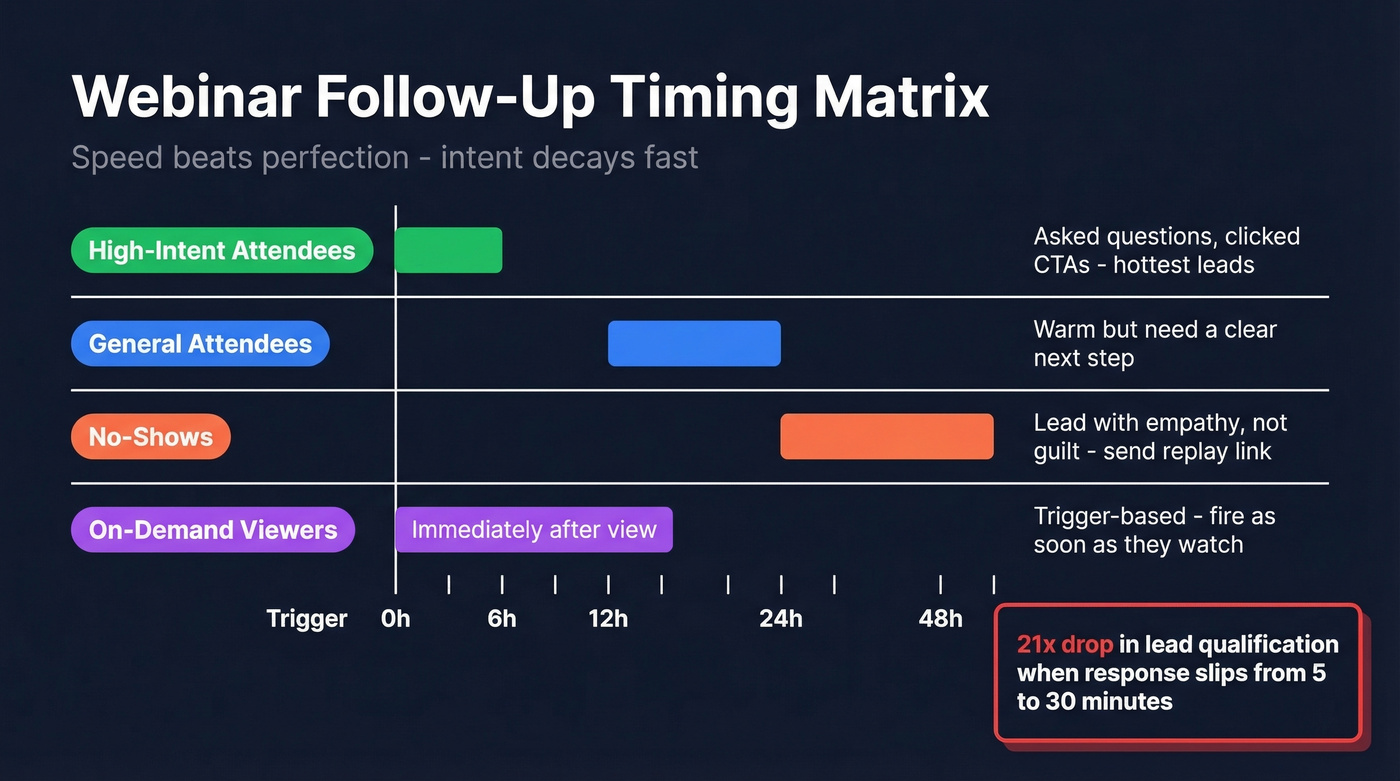
| Segment | First Touch | Why |
|---|---|---|
| High-intent attendees | 0-6 hours | Asked Qs, clicked CTAs |
| General attendees | 12-24 hours | Warm, need next step |
| No-shows | 24-48 hours | Empathetic replay link |
| On-demand viewers | Immediately after view | Trigger-based |
The 31.2-hour consumption gap - the time between when someone downloads content and when they actually consume it - means your email can't just say "here's the recording." It needs to re-anchor the value: the one insight, the one stat, the one moment that makes them click play. Same-day follow-ups consistently drive 2-3x more engagement than next-day sends.
Three Segments, Not Two
Most teams split registrants into "attended" and "didn't attend." That misses a critical group.
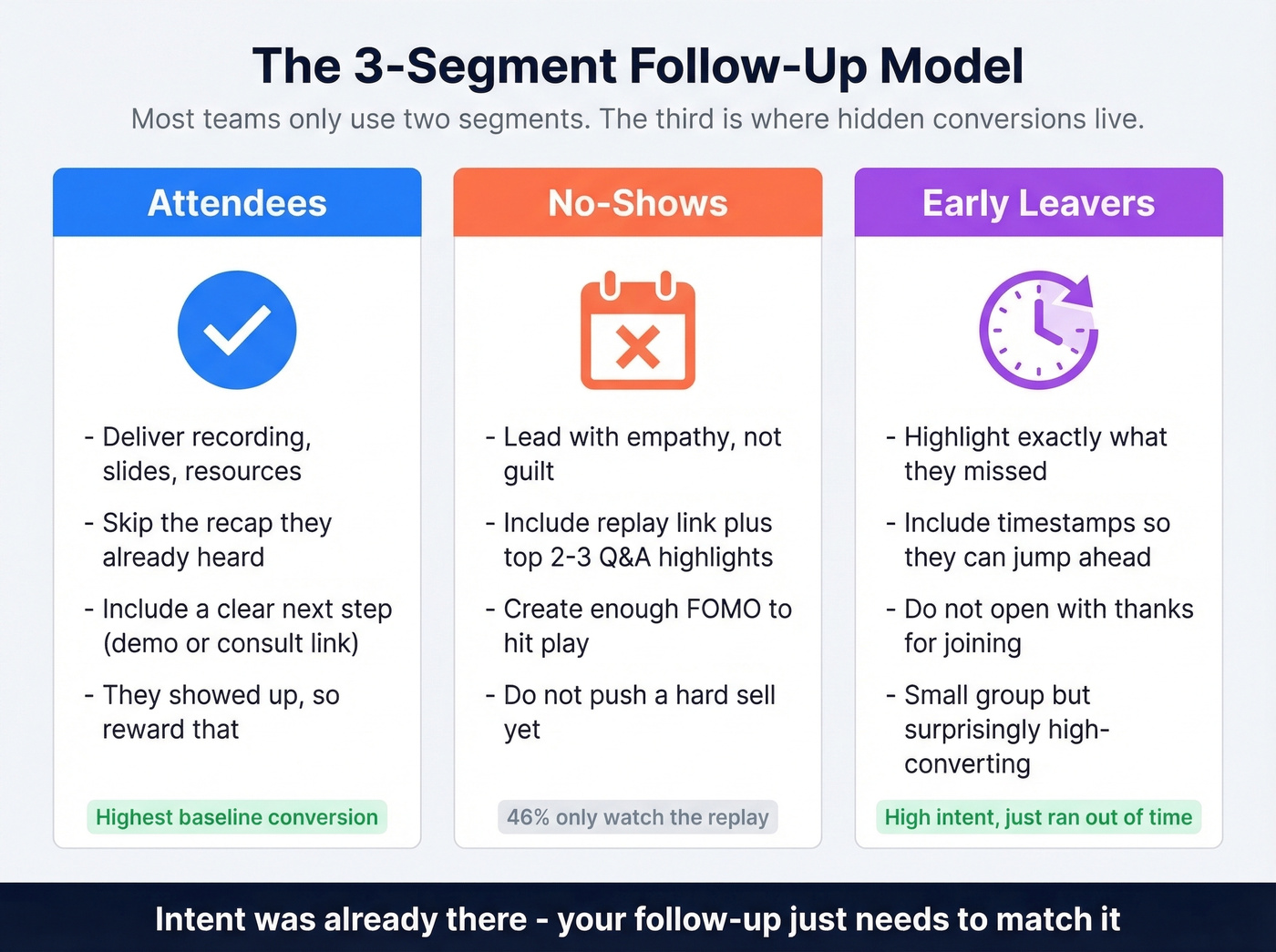
A big chunk of webinar viewers never watch live at all - 46% only watch the replay. Your post-webinar cadence has to work for both live and on-demand behavior.
Attendees: Deliver the promised assets - recording, slides, resources - plus a clear next step like a demo or consultation link. They showed up. Reward that. Skip the recap they already heard.
No-shows: Lead with empathy, not guilt. "We get it - calendars are chaos." Include the replay link plus the top 2-3 Q&A highlights to create enough FOMO to hit play. Don't push a hard sell on someone who hasn't consumed anything yet.
Early leavers: These people were interested enough to show up but left before the Q&A, the offer, or the summary. Highlight exactly what they missed - with timestamps. Don't open with "thanks for joining" when they know they bailed early. This group is small but surprisingly high-converting when you give them a reason to come back, because the intent was already there; they just ran out of time or got pulled into another meeting.

Your webinar follow-up is only as good as the data behind it. One bad batch of invalid emails tanks your sender reputation and kills deliverability for every campaign after. Prospeo's 5-step email verification catches spam traps, honeypots, and catch-all domains - delivering 98% accuracy and under 4% bounce rates.
Verify your webinar list before you hit send - starting at $0.01 per email.
Subject Lines That Drive Opens
A Belkins/Reply.io dataset of 5.5M emails found personalized subject lines hit a 46% open rate with a 7% reply rate. That data comes from cold outreach, but the pattern holds for warm follow-ups too - short, personalized subject lines outperform everything else. The sweet spot is 2-4 words. Front-load your key message into the first 33 characters, because that's all most mobile clients show. For more options, pull from these subject line examples.
Adding a replay expiration window of 7-10 days can increase watch rates 25-35% compared to "watch anytime." Urgency works because it's honest - the webinar is most relevant right now, not in three weeks.
Examples that perform: "Recording + slides inside," "You missed the best part," "[Speaker] answered your question." Keep them short, specific, and free of ALL CAPS.
The 4-Touch Cadence
One email isn't a follow-up strategy. It's a notification. If you’re building this into sequences, treat it like sequence management, not one-off sends.
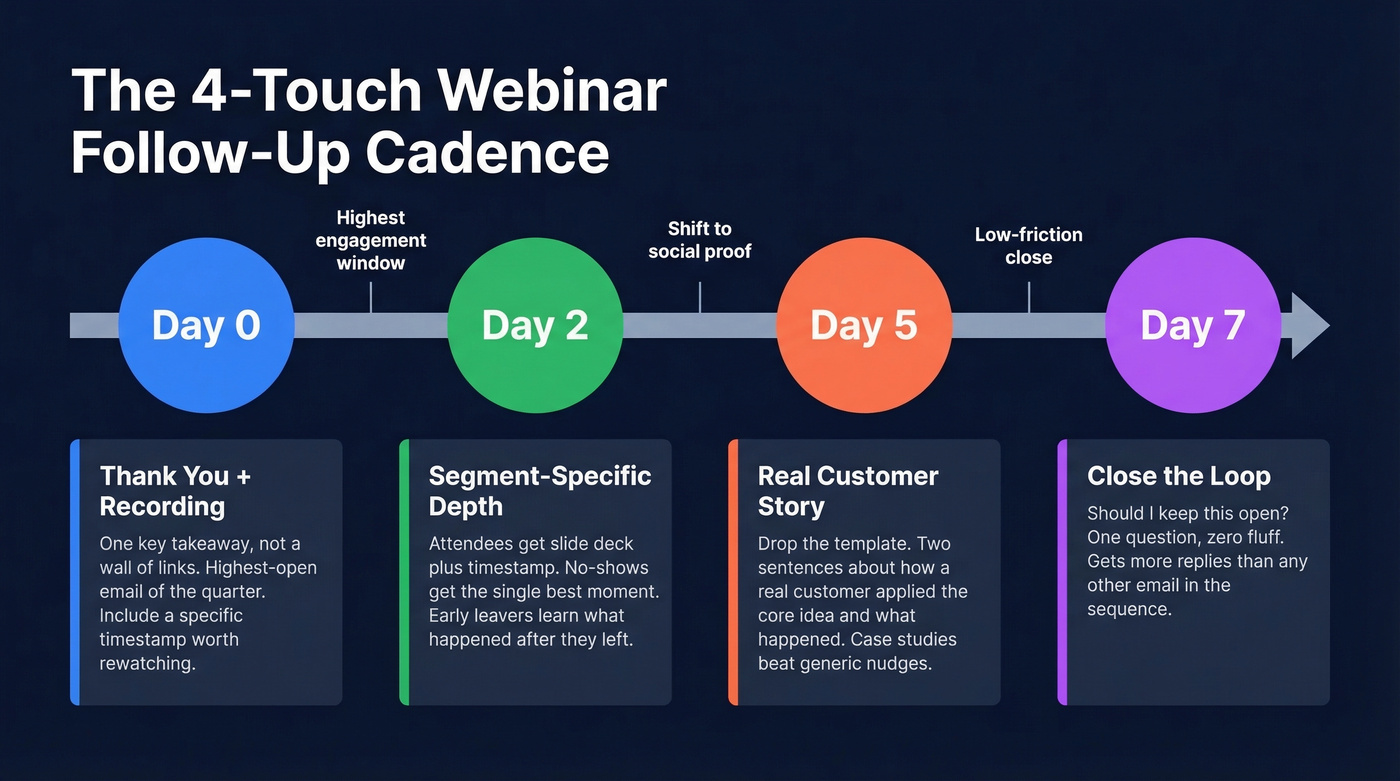
Touch 1 - same day: Thank you + recording + one key takeaway. This is the highest-open email you'll send all quarter. Don't waste it on a wall of links.
Subject: Recording + the stat that surprised everyone Hi [Name], here's the [webinar title] recording. The moment worth rewatching: [timestamp] - where [speaker] broke down [specific insight]. If that resonated, [next step CTA].
Touch 2 - 48 hours: This is where your segments diverge. For attendees, reference a specific timestamp and offer the slide deck. For no-shows, lead with the single most compelling moment. For early leavers, tell them exactly what happened after they dropped off - with the timestamp so they can jump straight there.
Touch 3 - day 5: Drop the template format entirely. Write a two-sentence email sharing how a real customer applied the webinar's core idea and what happened. Something like: "After our last webinar on [topic], [company] tried [specific action] and saw [result]. Worth 2 minutes if you're thinking about this." Case studies outperform generic nudges every time.
Touch 4 - day 7: Close the loop. "Should I keep this open?" This email has one job - get a yes or a no. We've found that this simple question, with zero additional context, pulls more replies than any other email in the sequence because it's low-friction and creates just enough social pressure to respond.
Sales Follow-Up After Webinar
Let's be honest about what usually happens: your VP of Sales Slacks you Monday morning asking why the webinar pipeline number is zero. The problem isn't bad copy - it's that you sent cold webinar leads to sales without engagement context. This is where lead scoring and a shared definition of intent actually matter.
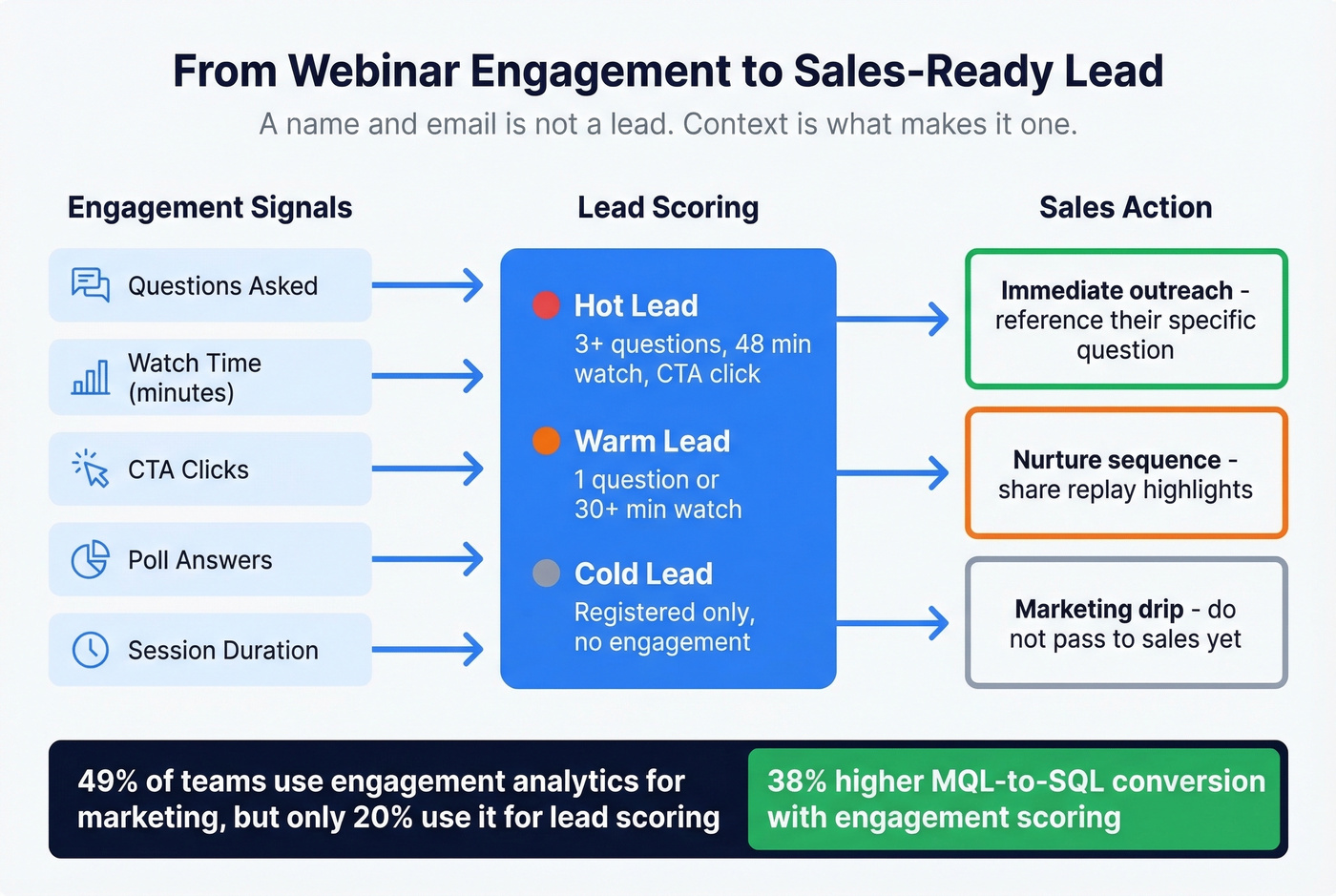
A name and email isn't a lead. A name, email, poll answers, three questions asked, and 48 minutes of watch time? That's a conversation starter.
Define what "warm" and "hot" mean with your sales team before the webinar. Share engagement signals - poll answers, questions, watch time, CTA clicks - via your CRM in near-real-time. 49% of teams use engagement analytics for marketing, but only 20% use it for lead scoring. Engagement scoring can drive 38% higher MQL-to-SQL conversion and 45% faster first response times. Webinars with active engagement tools also see 21% more CTA clicks per attendee - that's signal your sales team can act on immediately.
We've seen teams double their webinar-to-meeting conversion rate just by passing engagement context to reps alongside the lead record. No new tools required - just a shared definition of intent and a CRM field or two. The best event follow-up advice for sales teams: lead with the prospect's own engagement data, not a canned pitch. If you need a tighter handoff, use a dedicated handoff email template.
Verify Before You Send
Your follow-up strategy is only as good as your deliverability. Invalid emails, spam traps, and abandoned inboxes don't just bounce - they damage your sender reputation. That affects every email you send from that domain going forward, not just webinar follow-ups. (If you’re troubleshooting, start with email bounce rate basics and remediation.)
Run your registrant list through Prospeo's email verification before hitting send. With 98% email accuracy and spam-trap and honeypot removal built into the 5-step verification process, you're sending to real inboxes instead of burning your domain on dead addresses. The free tier covers 75 emails per month - enough for a smaller webinar list - and there's no contract to sign.
You have webinar registrants with names and emails, but sales needs direct dials and verified contacts to close. Prospeo enriches your webinar leads with 50+ data points - verified emails, direct mobile numbers, job titles, and intent signals - so your reps call the people who asked questions, not chase dead leads.
Turn webinar registrants into sales-ready leads with one enrichment step.
Measuring What Matters
Stop obsessing over open rates. Apple Mail Privacy Protection inflates them by roughly 18 points, and Apple Mail accounts for about 46% of email clients. Your "58% open rate" might really be 40%.
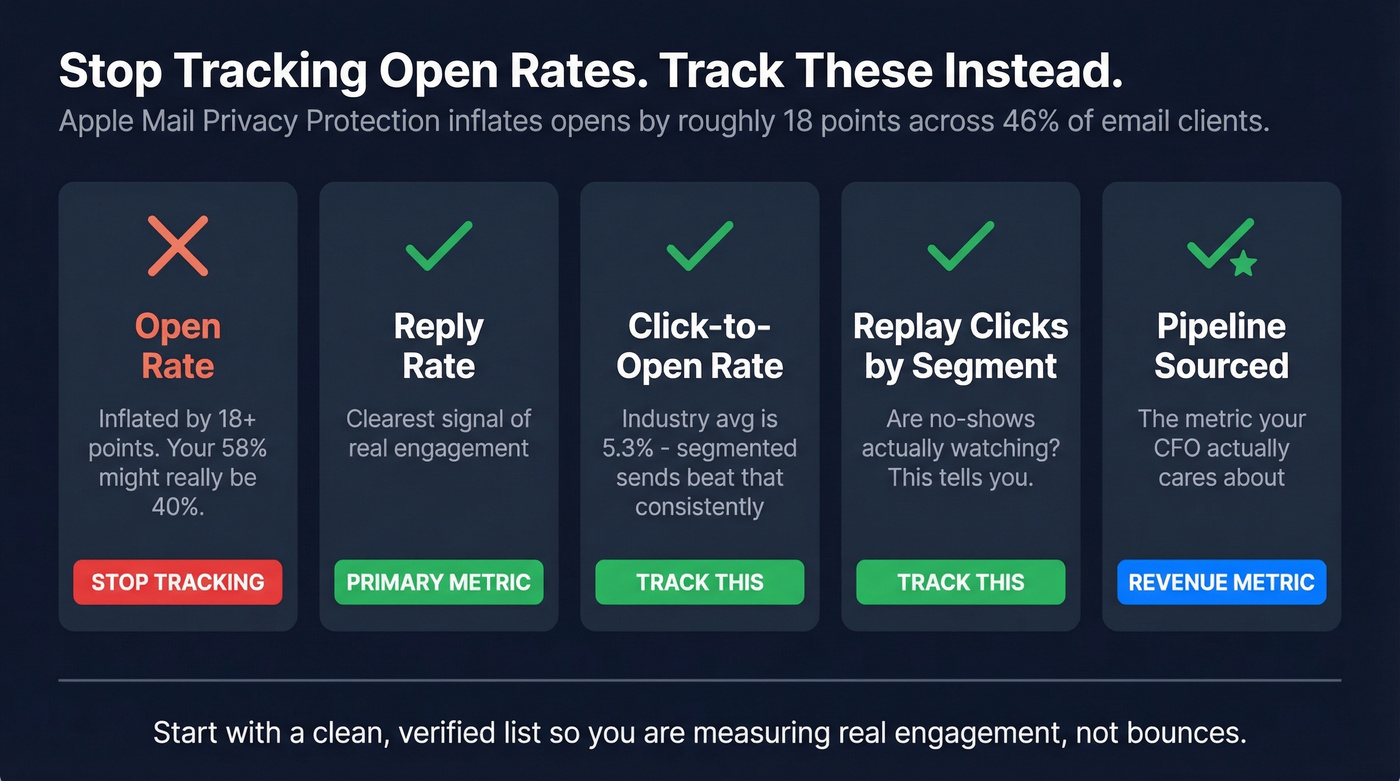
Track these instead:
- Reply rate - the clearest signal of real engagement (benchmarks: follow-up email reply rate)
- Click-to-open rate - industry average is 5.3%; segmented sends beat that consistently
- Replay clicks by segment - are no-shows actually watching?
- Meetings booked per segment - the metric that matters to revenue
- Pipeline sourced from webinar leads - the metric that matters to your CFO
Start with a clean, verified list so you're measuring real engagement, not bounces. Nailing these webinar follow-up best practices across segmentation, timing, and measurement is what separates teams that generate pipeline from teams that generate PDFs.
FAQ
How soon should I send a webinar follow-up email?
Within 6 hours for high-intent attendees who asked questions or clicked CTAs during the session. General attendees should hear from you within 24 hours; no-shows within 24-48 hours with a replay link. Lead qualification odds drop 21x when response time slips from 5 to 30 minutes - speed beats perfection every time.
Should I send the same follow-up to attendees and no-shows?
No - segment into three groups minimum. Attendees get assets plus a clear next step, no-shows get an empathetic replay link with Q&A highlights, and early leavers get timestamps of what they missed. One-size-fits-all blasts waste the behavioral data your webinar platform already captured.
How do I make sure my follow-up emails actually get delivered?
Verify your registrant list before sending. Invalid emails and spam traps damage your sender reputation across all future campaigns, not just the current one. Prospeo's 5-step verification catches spam traps and honeypots at 98% accuracy, and the free tier covers 75 verifications per month - enough for smaller events.
Can I reuse my webinar invite email for the follow-up?
No. Your invite copy is designed to sell the event and drive registrations. Your follow-up needs to deliver on the event's promise and move leads toward a next step. Repurposing invite copy signals that you didn't pay attention to what actually happened during the session - and your attendees will notice.