

How to Set Up Automated Sales Emails That Actually Get Replies
Most guides on automated sales emails are really about marketing automation - welcome sequences, abandoned carts, Mailchimp drip campaigns. That's not what you need. If you're running outbound, you need a different stack, different rules, and different benchmarks.
If the last article you read recommended Mailchimp or Klaviyo, you were reading a marketing automation guide. Marketing automation optimizes for clicks on opted-in lists. Sales automation optimizes for replies from people who've never heard of you. Conflating the two is how teams end up buying Klaviyo when they need Instantly.
What You Need (Quick Version)
Three things make or break outbound email automation:
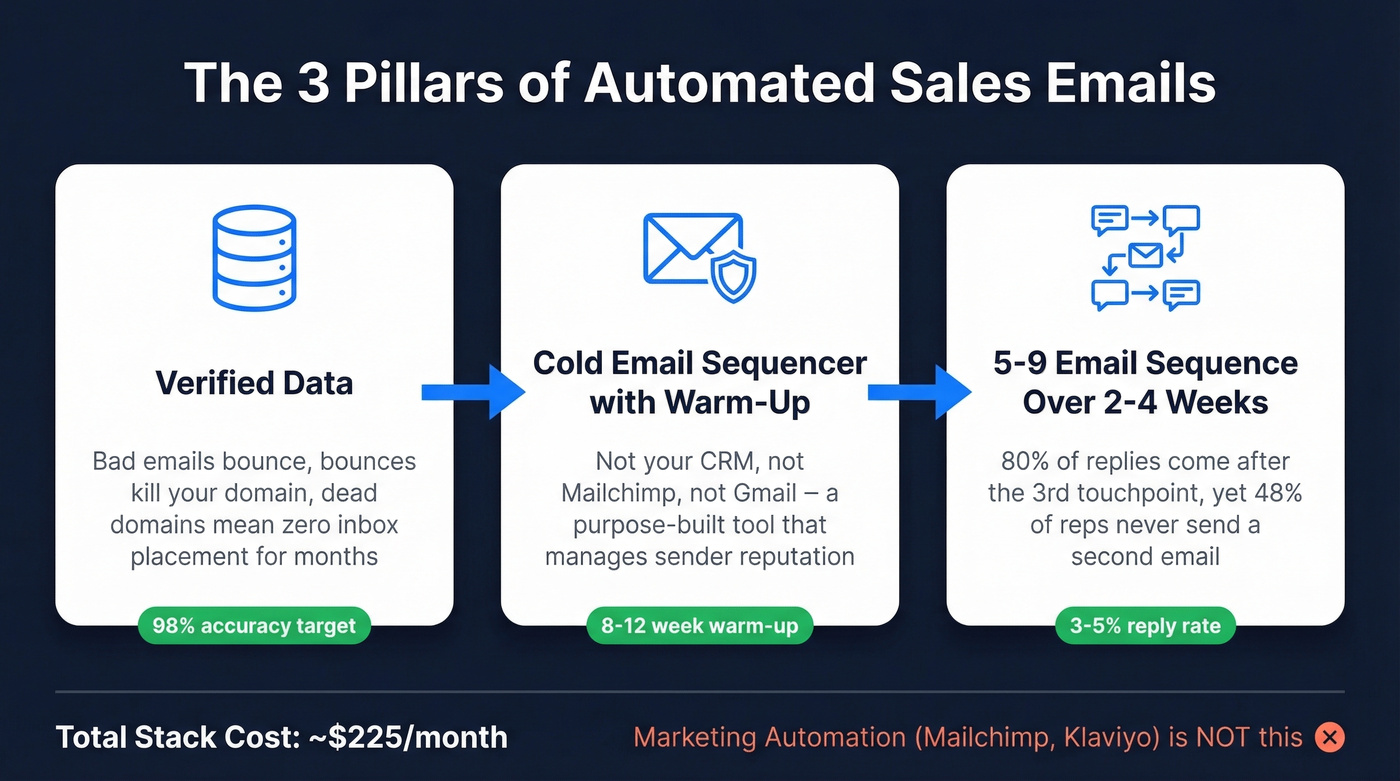
- Verified data - bad emails bounce, bounces kill your domain, and a dead domain means zero inbox placement for months. (If you need a deeper workflow, see data enrichment options.)
- A cold email sequencer with warm-up - not your CRM's built-in email, not Mailchimp, not Gmail. A purpose-built tool that manages sender reputation. (More on email deliverability if you're troubleshooting.)
- A 5-9 email sequence over 2-4 weeks - because 80% of replies come after the 3rd touchpoint and 48% of reps never send a second email. (If you want ready-to-use copy, grab sales follow-up templates.)
Expect a 3-5% reply rate with good targeting. Total stack cost: around $225/month.
2026 Outreach Benchmarks Worth Knowing
Before building anything, you need to know what "good" looks like:
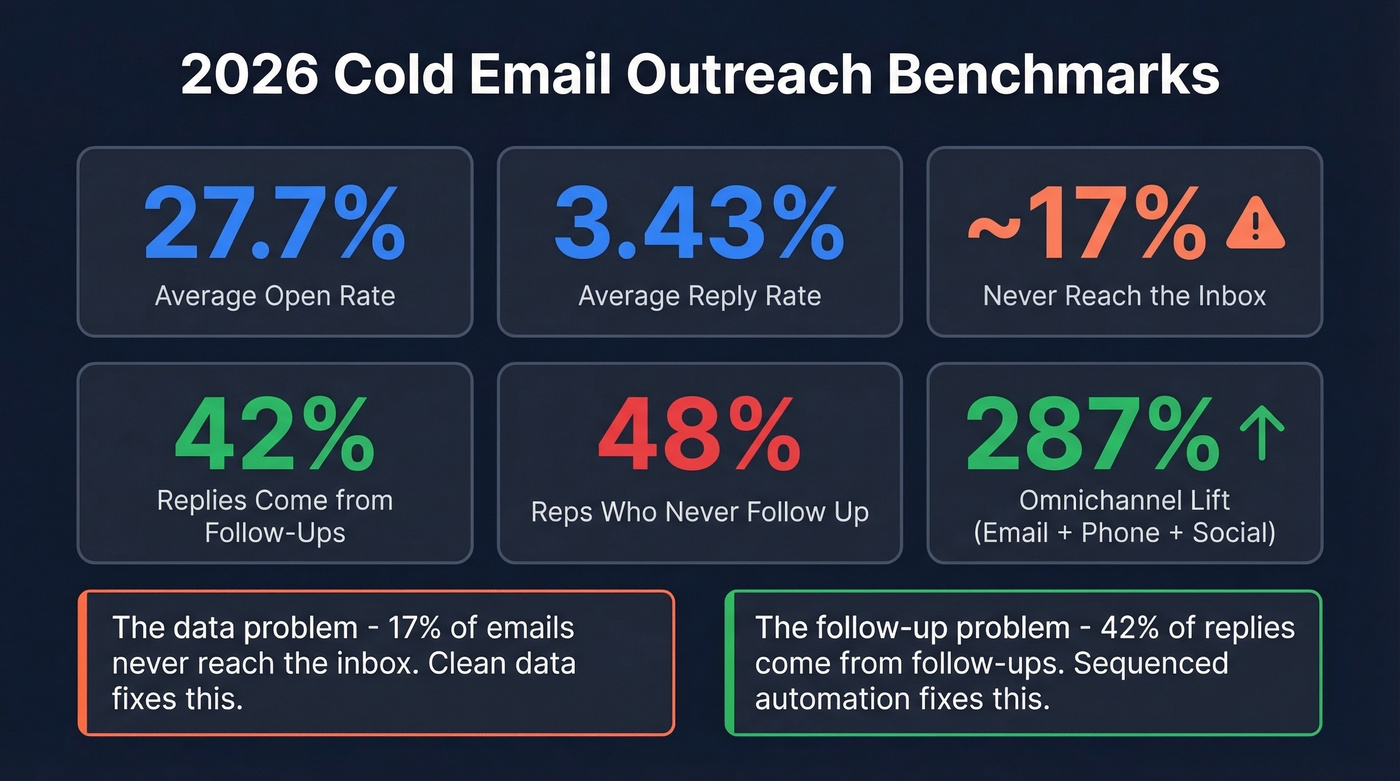
| Metric | Benchmark |
|---|---|
| Avg open rate | 27.7% |
| Avg reply rate | 3.43% |
| Never reach inbox | ~17% |
| Replies from follow-ups | 42% |
| Reps who never follow up | 48% |
| Omnichannel lift (email+phone+social) | 287% |
Two numbers jump out. First, 17% of cold emails never reach the inbox - they bounce or hit spam. That's a data quality problem, not a copy problem. Second, 42% of replies come from follow-ups, yet nearly half of reps stop after one email. Sequenced automation fixes the second problem. Clean data fixes the first.
The Foundation: Data Quality
Here's a scenario we've seen play out more times than we'd like: an SDR sends 2,000 cold emails, 340 bounce, and the domain reputation tanks overnight. Now even the good emails in tomorrow's batch land in spam.
When teams blast unverified lists, average response rates drop to around 0.7%. Bad data doesn't just waste sends - it actively poisons your sending infrastructure. Bounces trigger ISP flags, flags reduce inbox placement, reduced placement kills reply rates, and suddenly your "automation" is automating failure. This is why you verify before you send. Not after your domain is already flagged. (Related: email bounce rate benchmarks and fixes.)
Prospeo handles this prerequisite step. Its database covers 300M+ professional profiles and 143M+ verified emails at 98% accuracy, with a 7-day refresh cycle versus the 6-week industry average. Verification runs through a 5-step process with catch-all handling, spam-trap removal, and honeypot filtering. The results speak for themselves: Meritt cut their bounce rate from 35% to under 4% after switching, tripling their pipeline from $100K to $300K/week. Native integrations with Instantly, Smartlead, and Lemlist mean verified contacts flow directly into your sequences without CSV exports. (If you're comparing sources, see sales prospecting databases.)
Deliverability Setup
Clean data gets you to the starting line. Deliverability setup gets you into the inbox. Skip this and nothing else matters.
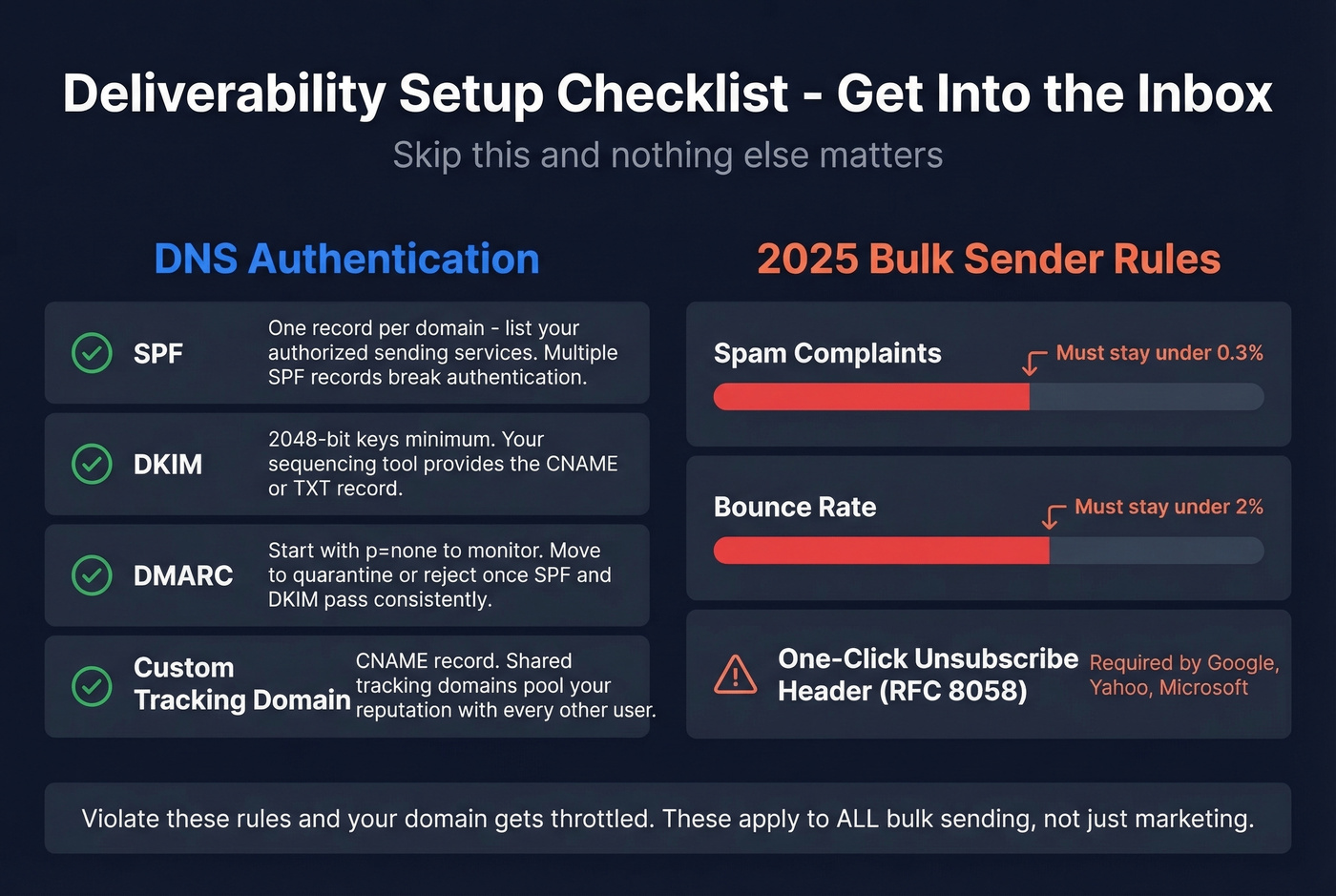
DNS Authentication Checklist
Before sending a single cold email, configure these three records on your sending domain:
- SPF - one record per domain, listing your authorized sending services. Multiple SPF records break authentication.
- DKIM - use 2048-bit keys minimum. Your sequencing tool will provide the CNAME or TXT record. (If you want a quick diagnostic, use this DKIM verification guide.)
- DMARC - start with
p=noneto monitor alignment. Move toquarantineorrejectonce SPF and DKIM pass consistently. (More detail on DMARC alignment.)
Set up a custom tracking domain via CNAME too. Shared tracking domains pool your reputation with every other user on the platform. (Here’s a full tracking domain setup guide.)
Google, Yahoo, and Microsoft enforce bulk sender rules that went into effect in 2025: spam complaints must stay under 0.3%, bounces under 2%, and every email needs a one-click unsubscribe header (RFC 8058). Violate them and your domain gets throttled. These rules apply to any bulk sending setup, not just marketing senders.
Warm-Up Ramp Schedule
New domains need 8-12 weeks of warm-up before reaching full volume:
| Week | Emails/Day/Mailbox | Notes |
|---|---|---|
| 1 | 10-20 | Simple, conversational emails |
| 2 | 20-40 | Mix of new threads and replies |
| 3 | 40-80 | Monitor bounce and spam rates |
| 4 | 80-150 | Pause if complaints spike |
| 5-8 | +50-100/week | Gradual increase only |
| 8-12 | Target volume | Maintain steady daily sends |
Distribute volume across multiple mailboxes and domains. Mailbox cost runs $2-3/month each - it's the cheapest insurance you'll buy. Stagger sends throughout the day to mimic natural behavior. (If you're dialing in safe send limits, see email velocity.)
Sequence Design That Drives Replies
The WHO-WHY-OFFER-ACTION Framework
Every cold email answers four questions: Who are you? Why are you emailing this specific person? What are you offering? What should they do next? That's the WHO-WHY-OFFER-ACTION framework, and it works because it respects the reader's time while giving them enough context to respond. (For a full build, see B2B cold email sequence guidance.)
Keep emails under 75 words. Plain text. Single CTA. Subject lines of 2-5 words. The consensus on r/SaaS is consistent: long, formatted emails with multiple links scream "mass blast" and get deleted. A/B test subject lines and opening lines across your first 200 sends before scaling. (If you need ideas, use these cold email subject line examples.)
Here's a sample opening email at 42 words:
Hey {{first_name}}, saw {{company}} just opened a second SDR role - usually means outbound is working but pipeline needs to scale faster. We helped [similar company] 3x their qualified meetings in 60 days. Worth a 15-min call this week?
Example 6-Email Cadence
The sweet spot is 5-9 emails over 2-4 weeks, spaced 3-4 days apart:
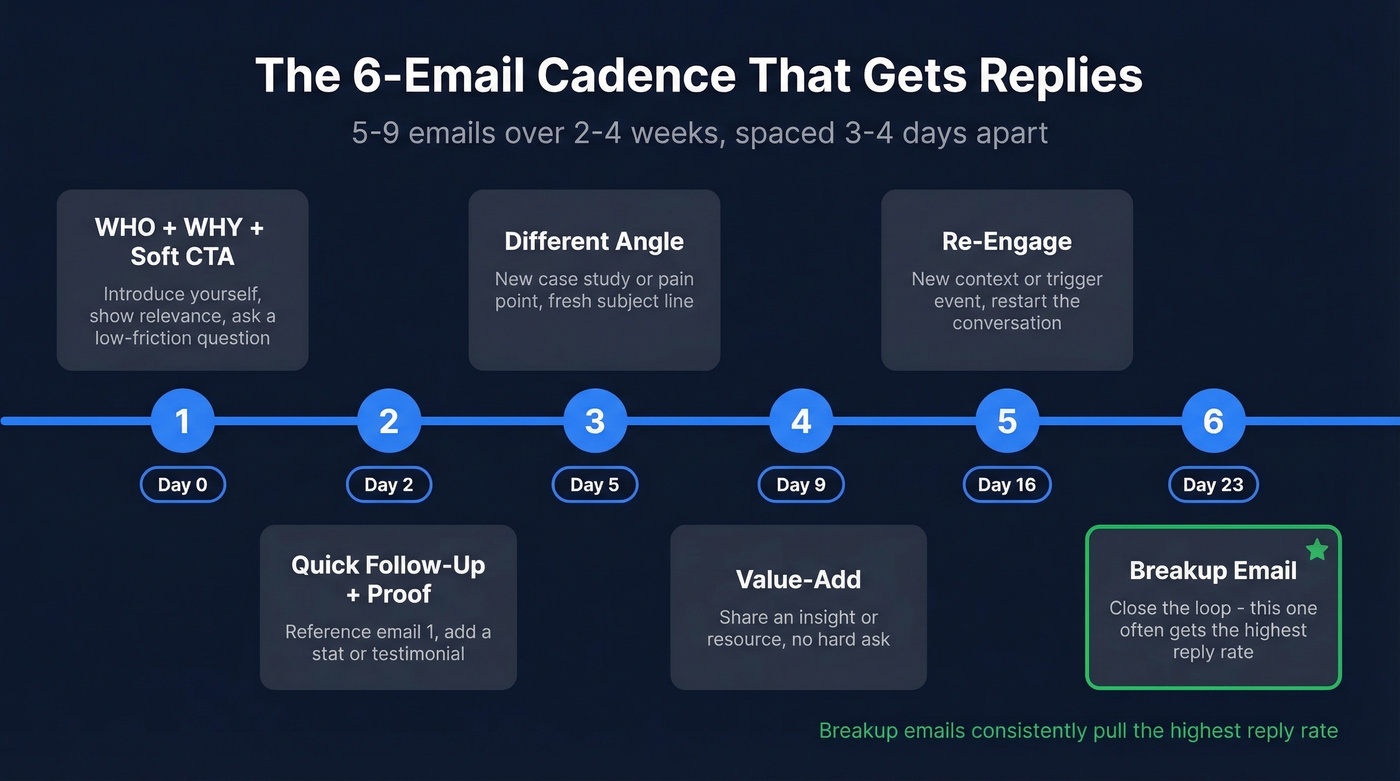
| Day | Purpose | |
|---|---|---|
| 1 | 0 | WHO + WHY + soft CTA |
| 2 | 2 | Quick follow-up, add proof |
| 3 | 5 | Different angle or case study |
| 4 | 9 | Value-add - insight or resource |
| 5 | 16 | Re-engage with new context |
| 6 | 23 | Breakup email |
The breakup email on Day 23 isn't just polite - we've tested this cadence across multiple campaigns and the breakup email consistently pulls the highest reply rate. Something about "closing the loop" triggers action.

Bounces kill automated sequences before they start. Prospeo's 143M+ verified emails at 98% accuracy and 7-day refresh cycle mean your sequences hit real inboxes - not spam traps. Meritt cut their bounce rate from 35% to under 4% and tripled pipeline to $300K/week.
Stop automating failure. Start with data that actually delivers.
Personalization That Actually Works
65% of B2B sales teams now use AI for personalization, producing 57% higher open rates and 82% more responses. But let's be honest: prospects can smell AI copy in 2026. Reddit threads consistently flag this - generic AI-written emails get deleted faster than templates did five years ago. (If you're going deeper here, see AI cold email outreach.)
Use AI for research, data enrichment, drafting first passes, and identifying personalization hooks from company news or job postings. Don't use AI for writing the final email without human editing. The personalization that works isn't {first_name} merge tags - it's one short line of specific business context that requires accurate enrichment data upstream.
A few approaches worth testing beyond basic personalization: trigger-based sequences that fire when a prospect visits your pricing page, re-engagement campaigns for stale leads who opened but never replied, and cold email video campaigns where you embed a short Loom walkthrough in Email 3 or 4 to break the text-only pattern. Each works because it adds genuine context rather than more noise.
Best Tools for Automated Sales Emails
You don't need an enterprise platform. A focused three-tool stack runs ~$225/month and outperforms bloated all-in-ones for most teams. (If you’re evaluating categories, start with this list of SDR tools.)
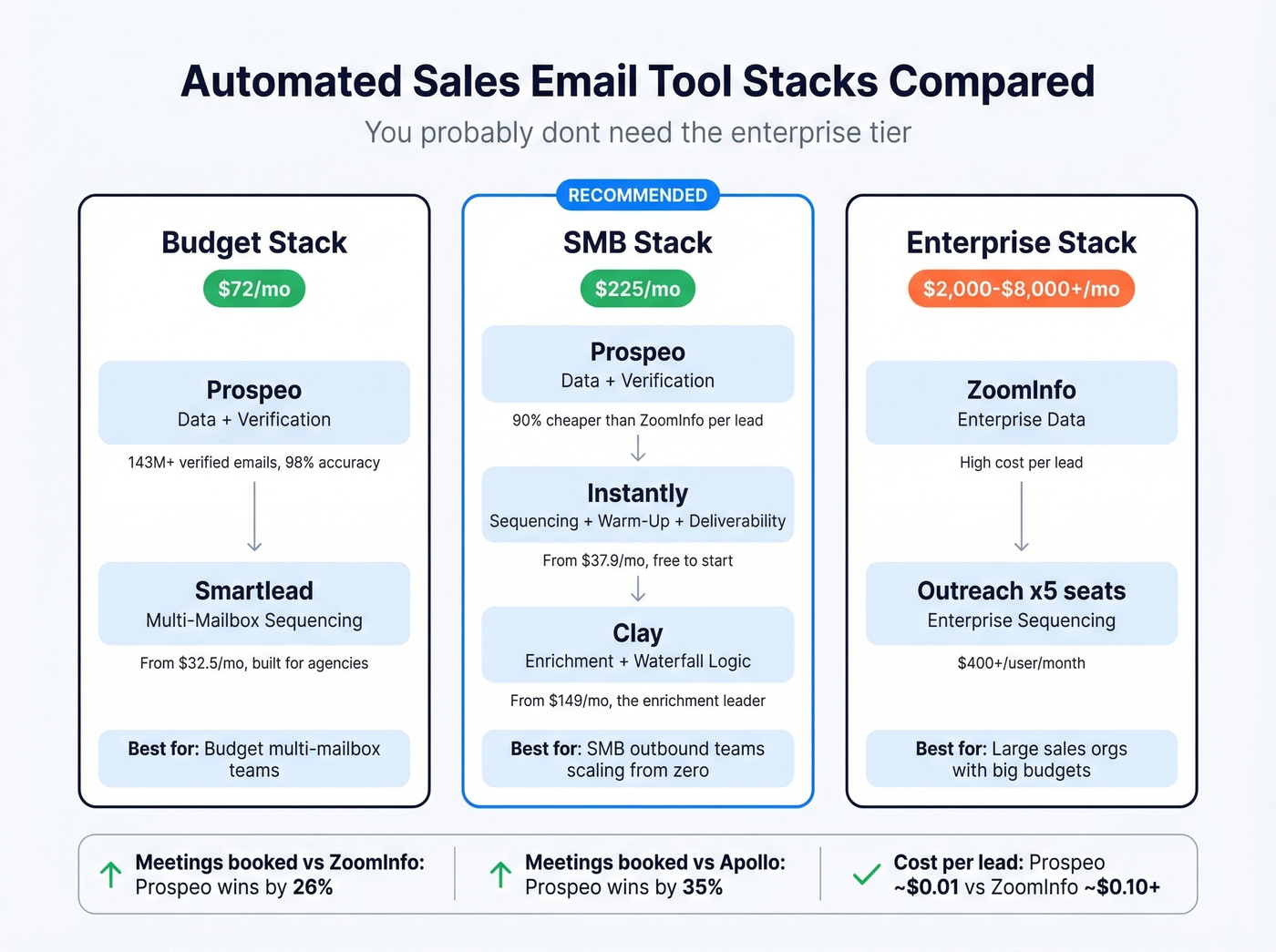
Here's the thing: if your average deal size is under five figures, you almost certainly don't need ZoomInfo-level data or Outreach-level sequencing. A $225/month stack will outperform a $750/month enterprise suite because you'll actually use all of it.
| Stack | Monthly Cost | Best For |
|---|---|---|
| Prospeo + Instantly + Clay | ~$225/mo | SMB outbound teams |
| Prospeo + Smartlead | ~$72/mo | Budget multi-mailbox |
| Enterprise (Outreach x 5) | $2,000-$8,000+/mo | Large sales orgs |
Data and Verification
Prospeo - 300M+ professional profiles, 143M+ verified emails, 98% accuracy, 7-day refresh. At ~$0.01 per email, it's 90% cheaper than ZoomInfo's per-lead cost. Teams book 26% more meetings compared to ZoomInfo and 35% more compared to Apollo. Free tier: 75 emails/month.
Apollo covers data and sequencing in one platform. Free plan gives 100 credits/month; paid starts at $59/user/month. Decent all-in-one for solo founders, but email accuracy runs lower than dedicated verification tools and the free plan caps you at one sending inbox. Skip Apollo if you need multiple sending inboxes on the lower tiers.
Sequencing and Deliverability
Instantly is the sequencer we recommend for most SMB teams. It handles warm-up, inbox rotation, and AI-assisted copy optimization in one dashboard. The deliverability infrastructure is genuinely strong - it's the tool practitioners on r/SaaS mention most often alongside Clay. Growth starts around $37.9/month paid annually, and you can start for free with no credit card required. The campaign builder makes it easy to set up multi-step sequences with conditional logic, and the analytics dashboard shows you exactly where prospects drop off. If you're scaling outbound from zero, this is the obvious starting point.
Running 10+ mailboxes across client domains? Smartlead handles that. Its architecture is built for high-volume, multi-domain sending - a setup common among agencies. From ~$32.5/month billed annually. Less polished UI than Instantly, but the sending infrastructure is rock-solid.
Lemlist goes deeper on personalization where Instantly focuses on deliverability. Custom images and highly personalized outreach flows. From ~$32/user/month. Best for creative campaigns.
Woodpecker is straightforward cold email without the bells - from $29/month for 500 prospects and 6K emails. One agency owner documented an automated list-to-sequence workflow using Woodpecker + Zapier + PhantomBuster.
Reply.io adds phone and social touches alongside email. From $49/user/month for teams wanting multichannel without stitching separate tools together.
Enrichment
Clay is built for enrichment workflows and waterfall logic - try Provider A, fall back to Provider B, then layer firmographic data on top. From ~$149/month. For sophisticated outbound operations, it's the clear leader in this category.
CRM with Built-In Sequences
Close offers a lightweight CRM with native email sequences. From $9/month for solo users - a clean option when you need a CRM and basic sequencing without managing separate tools.
Your 6-email cadence needs verified contacts flowing directly into your sequencer. Prospeo integrates natively with Instantly, Smartlead, and Lemlist - no CSV exports, no stale data. Build targeted lists with 30+ filters and push them straight into your sequences at $0.01/email.
Verified contacts in your sequencer in under 60 seconds.
Compliance Essentials
Automated email systems are legal. But the rules have teeth.
CAN-SPAM (US): Accurate headers, non-deceptive subject lines, working unsubscribe honored within 10 business days, and a physical mailing address. Penalties run up to $50,120 per violation.
GDPR (EU): Requires explicit consent or legitimate interest for B2B outreach, with penalties up to EUR 20M. If you're emailing EU contacts, you need a clear legal basis. B2B and B2C compliance differ significantly here - GDPR's legitimate interest basis applies primarily to B2B contacts, while B2C cold email is effectively prohibited in the EU.
The 2026 enforcement trend to watch: regulators are scrutinizing AI-enriched data - job titles from scraped profiles, intent signals from browsing behavior, contact details assembled by AI agents. Build your compliance posture now, not after you get a notice.
How to Save Time on Outreach
The biggest time sink in outbound isn't writing emails - it's the manual work surrounding them. Researching prospects, verifying emails one by one, copying data between tools, remembering to follow up. Automating the prospecting layer eliminates these bottlenecks so your reps spend time on conversations, not data entry. (If you’re systematizing list building, these sales prospecting techniques help.)
Here's where teams save the most hours: prospecting with a Chrome extension or bulk domain search instead of manually hunting for contacts turns an 8-hour list build into 20 minutes. Batch-verifying before import rather than dealing with bounces after the fact eliminates the cleanup work that follows a bad send. Automated sequences handle the 5-9 touches that 48% of reps forget - no calendar reminders, no manual sends. And dashboards in tools like Instantly or Smartlead surface underperforming emails automatically, so you optimize the right step instead of auditing the whole sequence.
Teams that build this pipeline properly report reclaiming 10-15 hours per rep per week. That time goes directly into live conversations and closing.
Common Mistakes
- Volume over quality. Blasting 10,000 unverified emails gets you a 0.7% response rate and a burned domain.
- Skipping warm-up. In our experience, teams that skip warm-up burn their domains within the first week. Every time.
- No follow-ups. 48% of reps never send a second email; 42% of replies come from follow-ups. Do the math.
- Ignoring compliance. $50,120 per CAN-SPAM violation. EUR 20M for GDPR.
- Unedited AI copy. Letting AI write entire emails without human review produces the "AI voice" prospects delete on sight.
FAQ
Is cold email legal?
Yes - CAN-SPAM and GDPR allow cold B2B email if you identify yourself honestly, include an unsubscribe mechanism, and honor opt-outs within 10 business days. You also need a physical address and non-deceptive subject lines.
How many emails should I send per day?
Start at 10-20 per day per mailbox during warm-up, scaling to 80-150 after 8-12 weeks. Distribute volume across multiple mailboxes and domains - concentrating all sends through a single inbox is the fastest way to trigger throttling.
What's a good reply rate for cold emails?
The cross-industry average is 3.43%. Well-targeted campaigns with business-context personalization reach 15-30%. If you're below 1%, your data or targeting needs work before you touch your copy.
How many follow-ups should I send?
Five to nine emails over 2-4 weeks. 42% of all replies come from follow-ups, and 80% come after the 3rd touchpoint. Stopping at one or two emails leaves most of your potential replies on the table.