

The Complete B2B Email Lead Generation System for 2026
Email marketing CPL averages $53. Paid B2B SaaS ads cost $310. That's a 6x gap - and it's why every outbound team with a pulse still runs cold email as their primary channel.
B2B email lead generation works when you treat it as a system, not a pile of disconnected tactics. The system has seven steps: economics, list building, verification, infrastructure, compliance, copy, and sequences. Each step has benchmarks so you know whether things are working or broken.
The average cold email reply rate sits at 3.43%. Below that, your data or copy needs work. Above 5%, you're outperforming most teams. Above 10%, you're in the top percentile. Expect 6-15 hours to set up your first campaign end-to-end, then 1-3 hours per week to optimize. Let's build the system.
Why Email Beats Every Other B2B Channel
The economics aren't close. Email CPL runs ~$53 for marketing and outbound prospecting. Organic content marketing in B2B SaaS averages $164 per lead. Paid acquisition? $310. In verticals like IT services or cybersecurity, paid CPL climbs past $400-$600.

It's not just cost. 73% of B2B decision-makers prefer sellers to contact them via email over phone, social, or direct mail. And 86% of marketers say email delivers good-to-excellent ROI - a number that's held steady for years despite every "email is dead" hot take.
Email's advantage also scales in a way paid channels can't. A paid ad stops generating leads the moment you stop spending. An outbound email system - once your domains are warm, your lists are clean, and your sequences are dialed - keeps producing pipeline at marginal cost. The upfront work is real, but the unit economics get better every month.
Benchmarks You Need to Know
Before you build anything, you need to know what success looks like. These benchmarks come from 2024-2026 cold email data:
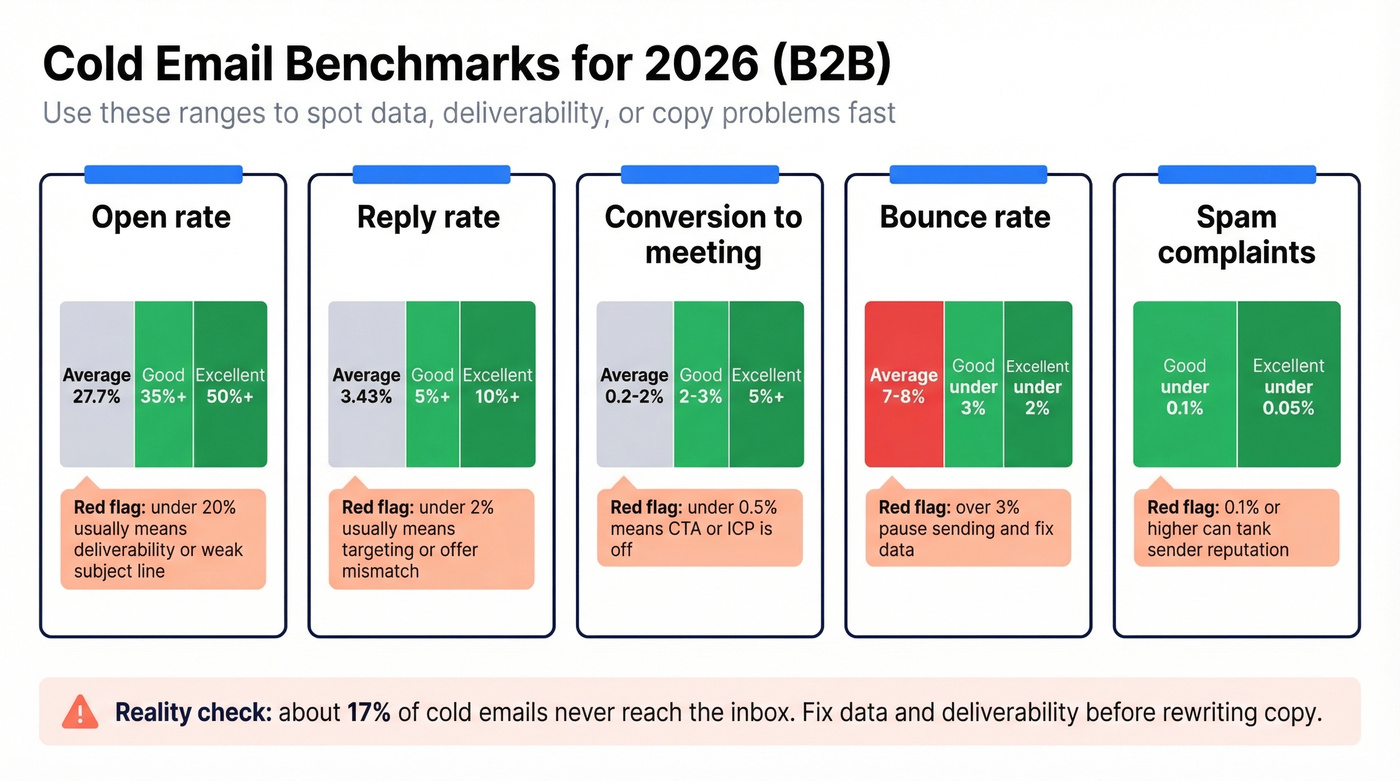
| Metric | Average | Good | Excellent |
|---|---|---|---|
| Open rate | 27.7% | 35%+ | 50%+ |
| Reply rate | 3.43% | 5%+ | 10%+ |
| Conversion | 0.2-2% | 2-3% | 5%+ |
| Bounce rate | 7-8% | <3% | <2% |
| Spam complaint | - | <0.1% | <0.05% |
Two numbers jump out. First, 17% of cold emails never reach the inbox - filtered or bounced before the recipient ever sees them. That's nearly one in five emails wasted before your copy even matters. Second, the gap between average bounce rates on unverified lists and the <3% threshold you need to maintain deliverability is enormous. Verification isn't optional. It's the foundation.

17% of cold emails never reach the inbox - mostly because of bad data. Prospeo's 5-step verification and 7-day data refresh cycle keep bounce rates under 3%, so your sequences actually land. At ~$0.01/email with 98% accuracy, it's the cheapest way to protect your domain and fill your pipeline.
Stop losing one in five emails to bad data.
The 7-Step System
Step 1: Build Your Prospect List
You have two paths: inbound capture and outbound sourcing. Most teams need both.
On the inbound side, gated content and webinars remain the highest-converting lead magnets - 73% of marketers rank webinars as their top converter. Exit-intent popups add 2-4% conversion lift on existing traffic. These are worth setting up even if outbound is your primary motion.
For outbound, you need a B2B data platform with verified contacts. This is where most teams either get it right or destroy their domain reputation on day one. Never buy random email lists. They violate GDPR, generate catastrophic bounce rates, and will get your sending domains blacklisted within weeks.
We've tested a lot of data providers over the years, and Prospeo is the strongest option we've found for outbound list building. The database covers 300M+ professional profiles with 30+ search filters - buyer intent powered by Bombora, technographics, job changes, headcount growth, funding signals, and department-level headcount. Every email runs through a 5-step verification process with catch-all handling and spam-trap removal, delivering 98% accuracy. The data refreshes on a 7-day cycle, which matters because the industry average is six weeks. Stale data means bounces, and bounces mean blacklisting.

Meritt tripled pipeline from $100K to $300K/week after switching to verified data. Stack Optimize hit $1M ARR with zero domain flags across all clients. The difference? 300M+ profiles filtered by buyer intent, technographics, and job changes - refreshed every 7 days, not every 6 weeks.
Build outbound lists that actually convert to pipeline.
Step 2: Verify Before You Send
Bad data doesn't just waste sends - it cascades. High bounce rates trigger spam filters. Spam filters tank your sender reputation. A tanked reputation means even your good emails stop reaching inboxes. The damage spirals fast and takes weeks to recover from.
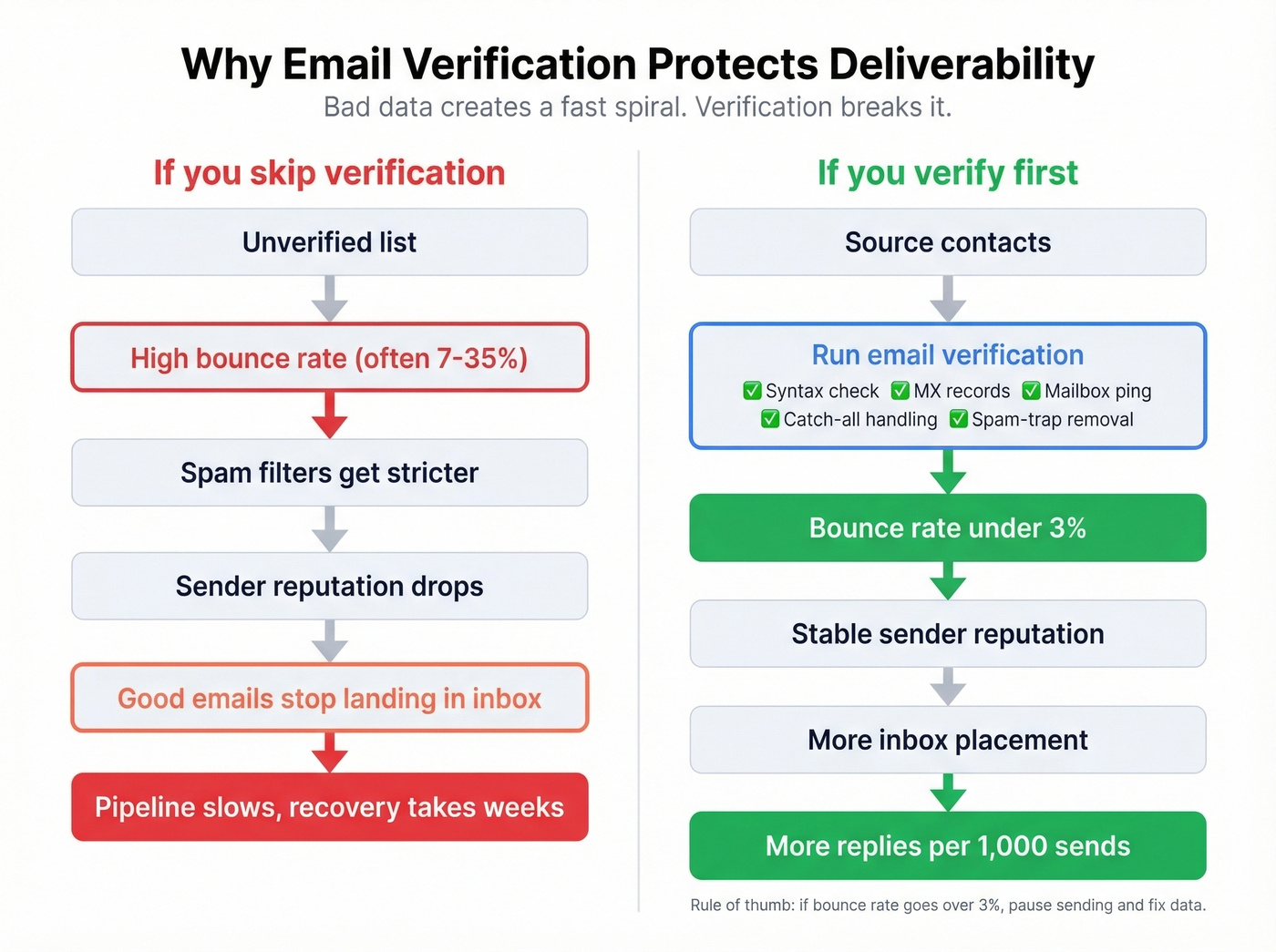
Here's the thing: we've seen this pattern play out with our own customers. Meritt went from a 35% bounce rate to under 4%, and their pipeline tripled from $100K to $300K per week. Stack Optimize built to $1M ARR while maintaining 94%+ deliverability and under 3% bounce across every client - zero domain flags. Plandek, after switching to a verified data provider, hit 95% deliverability with a 52% increase in conversion rates.
If you're sourcing contacts from any platform, run them through an email verifier before loading them into your sequencer. At ~$0.01 per email, verification is the cheapest insurance policy in your stack. Skip this step and you're gambling your domain reputation on data quality you haven't confirmed. (If you want deeper bounce thresholds and fixes, see bounce rate benchmarks.)
Step 3: Set Up Sending Infrastructure
Never send cold email from your primary business domain. If your outbound gets flagged, you don't want that reputation bleeding into your transactional email, customer communications, or marketing newsletters.
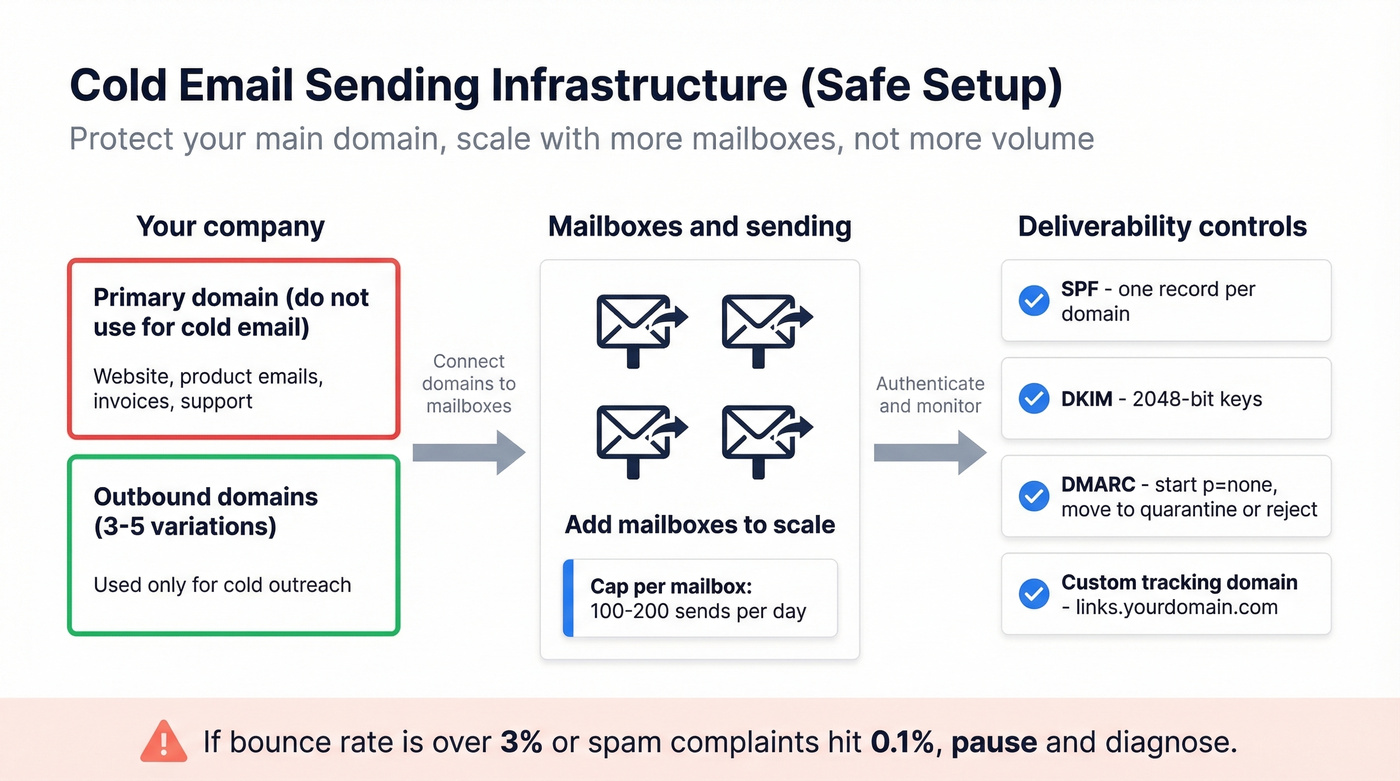
Set up 3-5 secondary domains - variations of your brand name - dedicated to outbound. Configure each with proper authentication:
- SPF: one record per domain, listing your sending service (use these SPF record examples to avoid syntax mistakes)
- DKIM: 2048-bit keys minimum (quick checks: verify DKIM is working)
- DMARC: start at p=none with reporting, then move to quarantine/reject once alignment is clean (more on DMARC alignment)
- Custom tracking domains: use links.yourdomain.com instead of generic tracking URLs - this alone can improve deliverability by 15-20% (setup details: tracking domain)
Then warm up each mailbox gradually:
| Week | Daily volume | Rules |
|---|---|---|
| 1 | 30-50 | Plain text, <80 words, no links |
| 2 | 50-80 | Still plain text, minimal links |
| 3 | 80-120 | Introduce light formatting |
| 4 | 120-150 | Only if bounce <3%, complaints <0.1% |
Once fully warmed, cap each mailbox at 100-200 sends per day. Scale by adding mailboxes, not by pushing volume on a single one. Monitor sender reputation with Gmail Postmaster Tools and Microsoft SNDS - both are free and will catch problems before they become crises. (More guardrails: email velocity.)
If your bounce rate exceeds 3% or spam complaints cross 0.1% at any point, pause and diagnose. Don't push through bad metrics hoping they'll improve. They won't.
Step 4: Stay Legal
Cold email is legal in every major B2B market. But the rules differ, and the penalties for getting them wrong are severe.
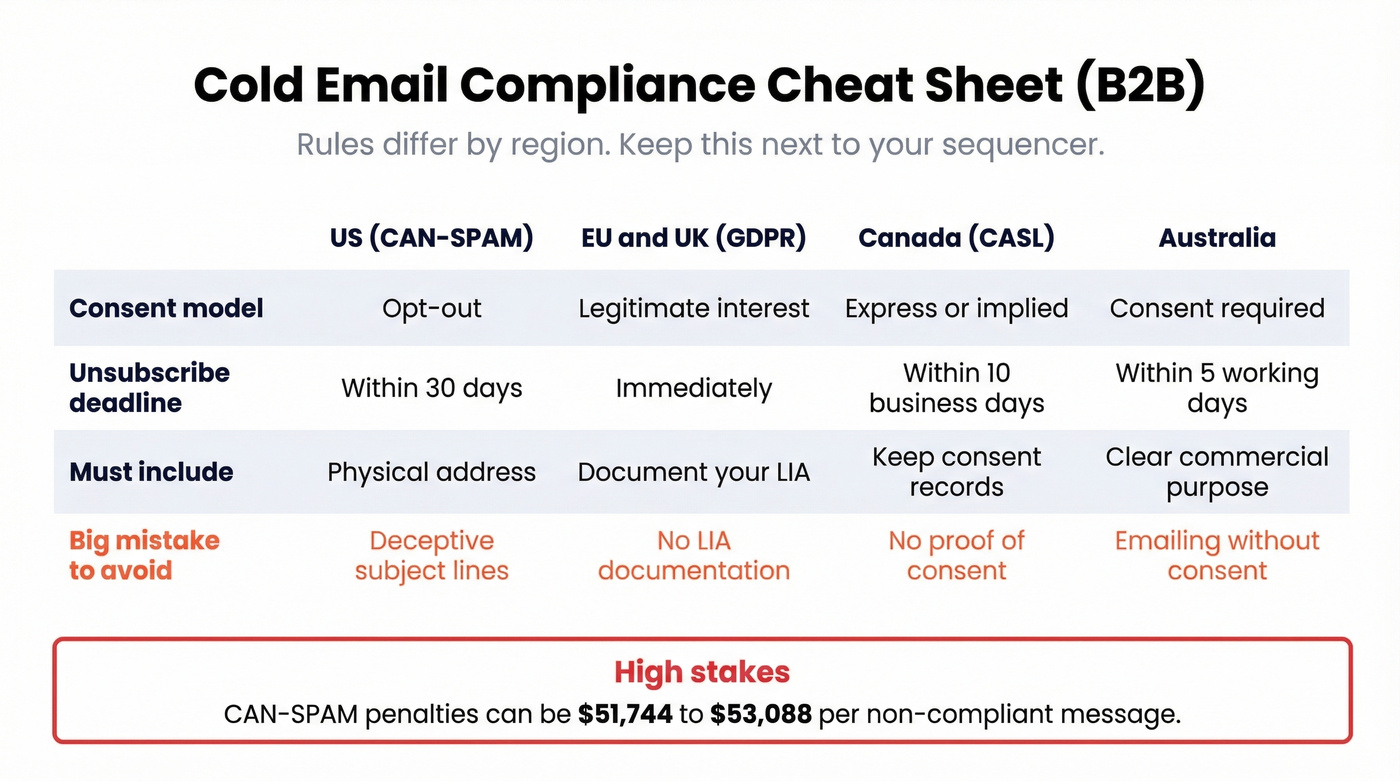
| Region | Consent model | Unsubscribe deadline | Key rule |
|---|---|---|---|
| US (CAN-SPAM) | Opt-out | 30 days | Physical address required |
| EU/UK (GDPR) | Legitimate interest | Immediately | Document your LIA |
| Canada (CASL) | Express/implied | 10 business days | Retain records 3 years |
| Australia | Consent required | 5 working days | Commercial purpose only |
CAN-SPAM penalties run $51,744-$53,088 per non-compliant message. Per email, not per campaign. For GDPR, you need a documented Legitimate Interest Assessment covering purpose, necessity, and balancing tests. Don't skip this - it's your legal shield if anyone challenges your outreach.
Never use deceptive "Re:" subject lines. It's a CAN-SPAM compliance risk and it tanks trust even when it doesn't get flagged. And purchased lists violate both GDPR and CASL. There's no workaround. (If your team still asks about list buying, point them to Is it illegal to buy email lists.)
Step 5: Write Emails That Get Replies
Body length matters more than most teams realize. The sweet spot is 50-125 words. Shorter than 50 feels like spam. Longer than 125 and you've lost them. Subject lines should run 6-10 words - the 21-40 character range hits a 49.1% average open rate.
The biggest lever is signal-based personalization. Generic templates average a 3.4% response rate. Templates personalized around a specific signal - a job change, a funding round, a tech stack shift - average 18% response. That's a 5x difference from the same effort.
I'll be blunt: most teams spend 80% of their time optimizing email copy and 20% on targeting. Flip that ratio. A mediocre email sent to the right person at the right moment will outperform a beautifully crafted email sent to someone who doesn't have the problem you solve. Signal-based targeting - intent data, job changes, funding events - is the real multiplier. (If you want a tighter framework, use this email copywriting guide.)
Use the 4C framework for every cold email. Context - why you're reaching out now. Credibility - why you're worth listening to. Curiosity - what they'd learn or gain. CTA - one low-friction ask. "Worth 15 minutes this week?" outperforms aggressive calendar-link pushes every time. Keep the CTA singular: one question, one action.
Step 6: Build Your Sequence
70% of reps stop after one email. That's a massive mistake, because 60% of replies arrive after the 2nd through 4th email.
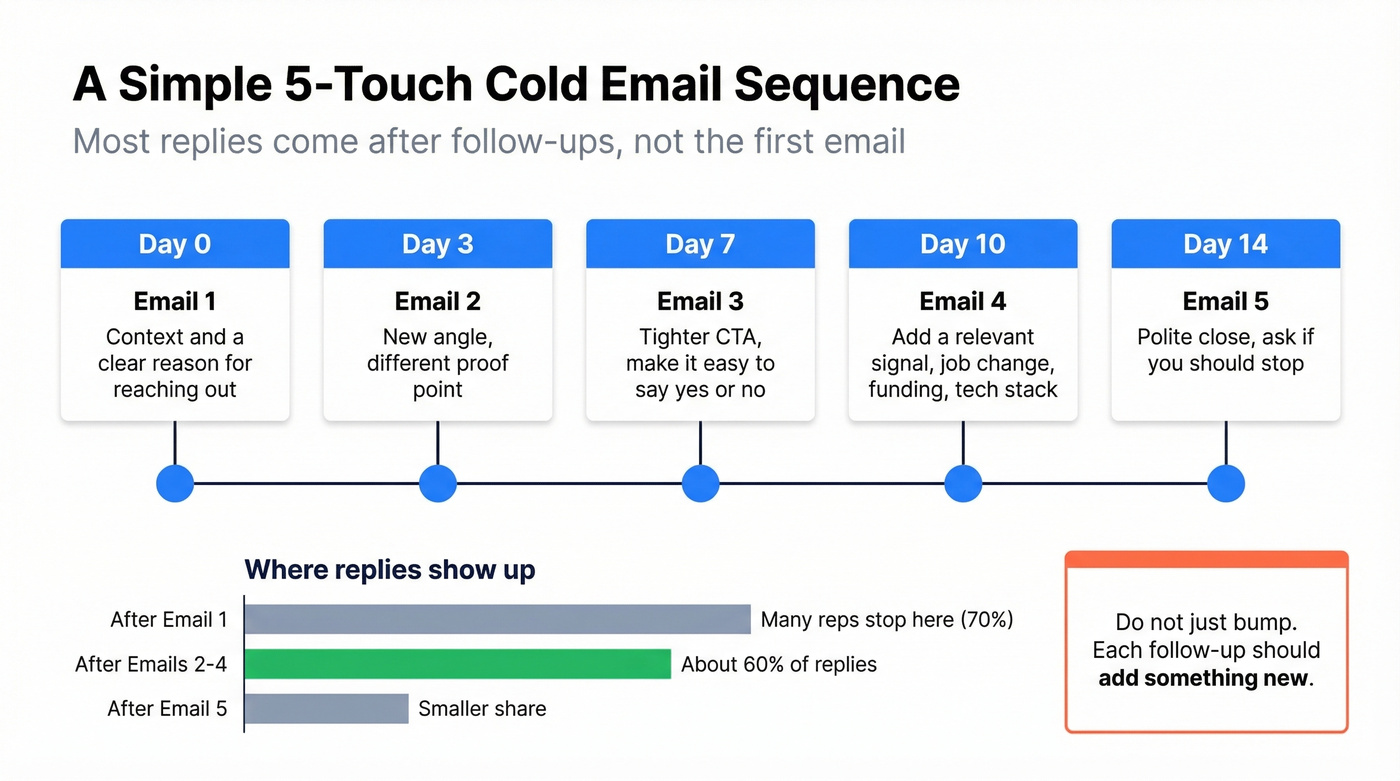
Build a 3-5 email sequence with follow-ups on day 3 and day 7. Each follow-up should vary the angle - don't just "bump" the original email. Introduce a new proof point, a different value prop, or a lighter ask. Thoughtful sequencing is one of the most overlooked parts of any B2B email lead generation strategy, yet it's where the majority of conversions actually happen. (For a full build, see cold email sequence.)
One tactic from r/coldemail worth testing: record an evergreen webinar and use it as a value-first asset in your sequence. Frame it as asking for feedback before a wider rollout, with a YES/NO reply CTA. The poster reported landing sales up to $3K. Even "reply NO and I'll remove you" generates engagement signals that help sender reputation.
Don't stop at email. Email combined with social touches boosts conversions 35-50% versus email alone. McKinsey's research shows top-performing B2B teams use 10+ channels. You don't need all ten, but pairing email with a well-timed connection request or a comment on their content turns a cold sequence into a warm one.
Step 7: Measure and Optimize
Track these KPIs weekly - but more importantly, know what to fix when a number is off.
Open rate below 27%? Your subject lines or deliverability are the problem. Test subject lines first since they're highest leverage. If open rates don't budge after 3-4 tests, check your sender reputation in Gmail Postmaster Tools - you may have an infrastructure issue, not a copy issue. (More diagnostics: email deliverability.)
Opens fine, but reply rate below 3.4%? Your targeting or personalization needs work. Audit whether you're reaching the right personas. Then test CTA phrasing - switching from "Can I send you a case study?" to "Worth 15 minutes this week?" can double reply rates.
Reply rate above 5% but conversion below 1%? The problem is downstream. Your replies are coming in, but you're either slow to respond, qualifying poorly, or the handoff to sales is broken. Aim to respond to every positive reply within 2 hours during business hours.
Bounce rate above 3%? Stop sending immediately. Clean your list, re-verify every contact, and check whether your data source has gone stale. Resume only after bounce drops below 2%.
Spam complaints above 0.1%? Throttle volume by 50% and audit your targeting. You're either hitting the wrong people or sending too aggressively. Even well-written outbound will underperform if it's reaching people who have no reason to care.
A/B test in this order: subject lines first, then CTA phrasing, then body copy. Don't test everything at once - you need clean signal.
Recommended Tool Stack
You don't need a $40K/year platform to run effective outbound. Here's what a complete stack looks like:
| Category | Tool | Starting price | Why it wins |
|---|---|---|---|
| Data + verification | Prospeo | Free / ~$0.01/email | 98% accuracy, 7-day refresh, 300M+ profiles |
| Sending | Instantly | ~$30-$97/mo | Built-in warm-up, multi-inbox rotation |
| Sending (alt) | Smartlead | ~$39-$94/mo | Strong warm-up, clean UX |
| Multi-channel | Lemlist | ~$59-$99/mo/user | Email + social sequences in one tool |
| CRM | HubSpot | Free tier | Sufficient for most SMBs |
Total stack cost: $200-$800/month depending on volume and seats. Compare that to a single ZoomInfo seat at $15K-$40K+/year with email accuracy around 87%. The math isn't complicated.
Skip the enterprise platforms if you're a team under 20 reps. The tools above integrate natively with each other, and you'll spend your budget on sends and data instead of seat licenses.
FAQ
Is cold email legal in 2026?
Yes. In the US, CAN-SPAM allows cold email under an opt-out model - include a physical address, honest subject lines, and a working unsubscribe link. Under GDPR, B2B cold email is lawful via legitimate interest (Article 6(1)(f)) with a documented assessment. Penalties reach $53K per non-compliant message under CAN-SPAM.
Should I buy a B2B email list?
No. Purchased lists violate GDPR and CASL, generate bounce rates above 20%, and will get your domain blacklisted. Use a verified data platform with built-in compliance instead. You'll get accurate contacts without the legal risk.
How long before I see results?
Allow 2-3 weeks for domain warm-up, then 2-4 weeks of active sending to gather statistically meaningful data. Expect first qualified replies within 4-6 weeks of launching. The system compounds - month three is always better than month one.
What's a good reply rate for cold email?
The average is 3.43%. Above 5% is solid performance. Above 10% is excellent and typically indicates strong targeting combined with signal-based personalization. If you're below 2%, check your data quality and email copy before anything else.
How much does a full outbound stack cost?
A complete setup - data provider, sending tool, warm-up, and CRM - runs $200-$800/month for a small team. Email CPL averages ~$53, making it roughly 6x cheaper than paid B2B SaaS acquisition at $310 per lead.