

Call Tracking and Lead Scoring: 2026 Guide
Your team took 200 inbound calls last month. Fifteen got scored. The rest sit in your CRM as "Unknown Caller" records with no context, no disposition, and no score - invisible to every workflow you've built. That's the gap between call tracking and lead scoring, and it's where your hottest leads go to die.
Most teams treat these as separate worlds. Marketing owns the tracking numbers; sales ops owns the scoring model. The result is a CRM full of phone-sourced contacts that never get graded and never surface to reps at the right time.
Quick Recommendations
- SMB on HubSpot: CallRail (~$45-$145+/mo depending on numbers and usage) - native integration, scoring happens in HubSpot
- Agencies needing automation: CTM Marketing Pro ($149/mo yearly) - built-in AskAI + if/then triggers
- AI-powered call intelligence: WhatConverts Pro ($100/mo) - Lead Intelligence IF/THEN rules on transcripts for automated scoring
Before any of this matters, your contact data needs to be clean. Scoring garbage records is a waste of automation.
How Call Tracking Works
Call tracking starts with Dynamic Number Insertion (DNI). A JavaScript snippet on your site swaps your business phone number for a unique tracking number based on the visitor's source - Google Ads, organic, a specific landing page. When that visitor calls, the platform captures the source, keyword (if paid), landing page URL, and session data, then routes the call to your actual sales line.
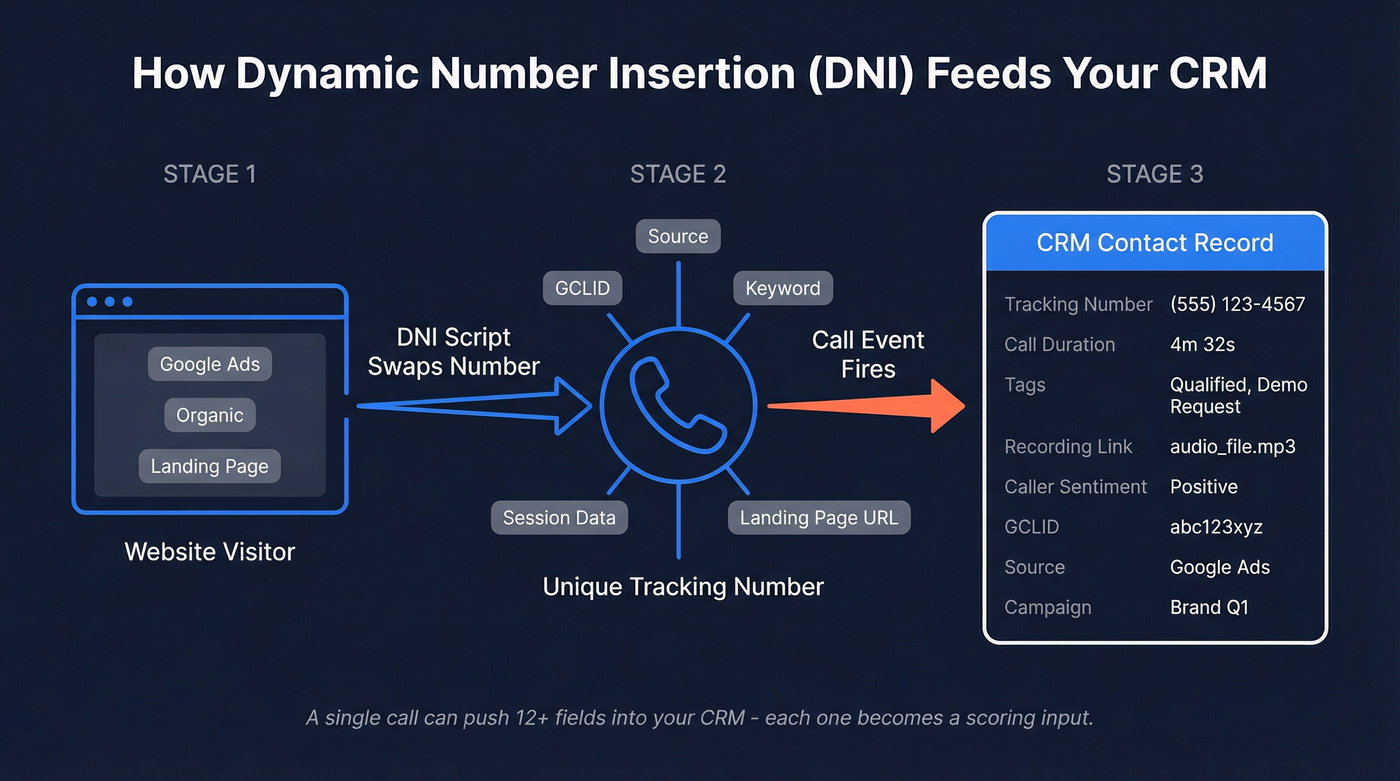
A single call event can push a dozen fields into your CRM: tracking number, call duration, tags, recording link, caller sentiment, call summary, gclid, and qualified lead status. Each of those fields becomes a scoring input.
How Lead Scoring Works
Lead scoring assigns point values to contacts based on two dimensions: fit (who they are) and engagement (what they've done). Rule-based models use static thresholds - "VP title = +15 points, visited pricing page = +10." Predictive models use machine learning to weight signals automatically based on historical conversion patterns. Most CRMs also support score decay, subtracting points over time if a contact goes quiet.
Here's the thing about HubSpot's scoring tool specifically: separate rules update independently, even within the same group - they're effectively OR'd. If you need AND logic ("called AND visited pricing page"), you have to use the "+ Add criteria" button within a single rule. We've seen teams build elaborate scoring models that don't work because they missed this constraint. (If you want a full build process, see our guide on lead scoring.)
Why Phone Calls and Scores Belong Together
Contact A visited your pricing page three times, downloaded a whitepaper, and opened four emails. Contact B made one phone call and said, "We need this implemented by end of quarter - I'm the decision-maker and I have budget approval."
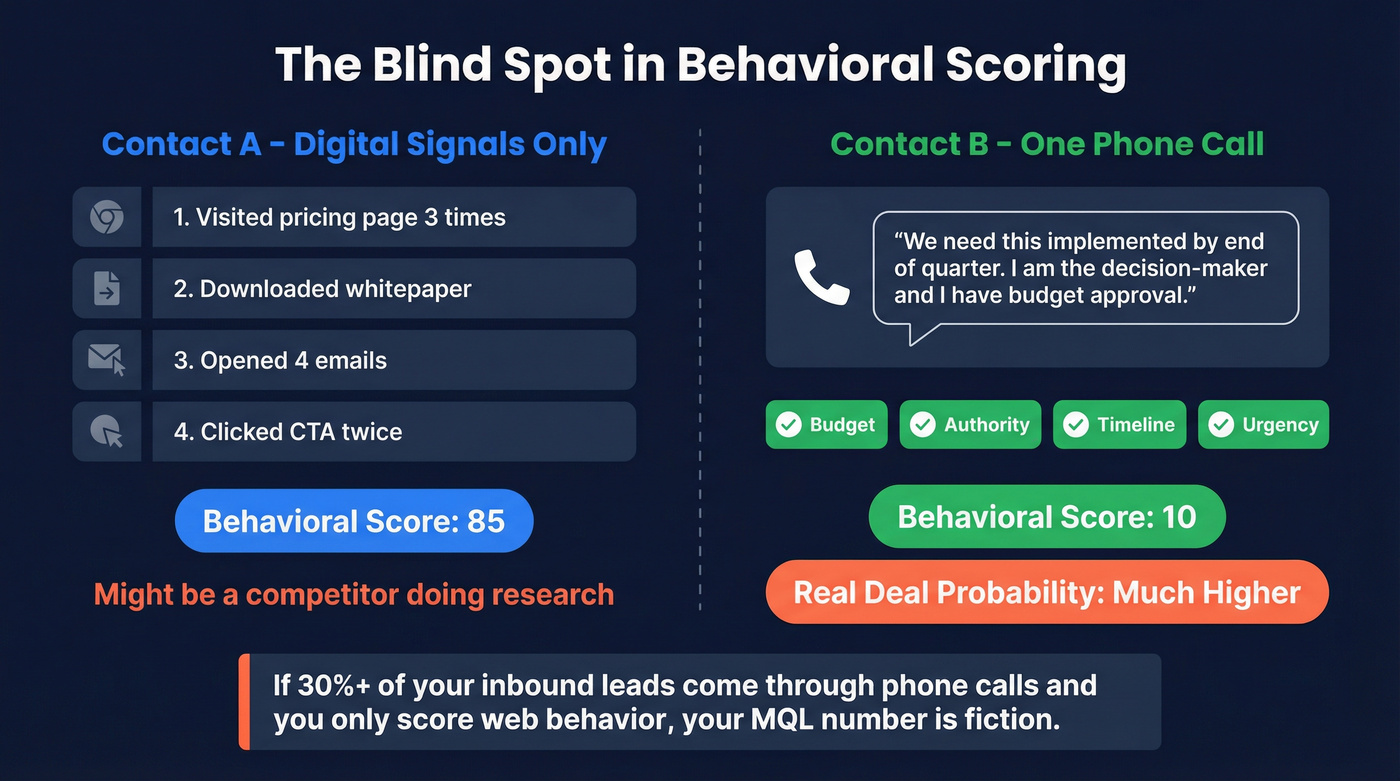
Behavioral scoring alone ranks Contact A higher. But Contact B is the deal.
That's the blind spot. Behavioral scoring captures digital body language but misses verbal buying signals - budget confirmation, timeline urgency, competitive context. An Outreach analysis found that opportunities closed within 50 days had a 47% win rate, compared to 20% or lower after that window. Phone calls are where you hear the urgency that predicts which deals close fast. Your pricing page visitor, meanwhile, might be a competitor doing research.
If more than 30% of your inbound leads come through phone calls and you're only scoring web behavior, your "MQL" number is fiction. You're grading half the test and calling it a final score.

Your call scoring model is only as good as the contact records behind it. If caller IDs resolve to incomplete CRM records with no title, no company, and a @call.com placeholder email, your scores mean nothing. Prospeo enriches every contact with 50+ data points - verified emails, direct dials, job titles, and company intel - so your scoring rules actually have something to work with.
Stop scoring empty records. Enrich first, then score.
What to Score from Phone Calls
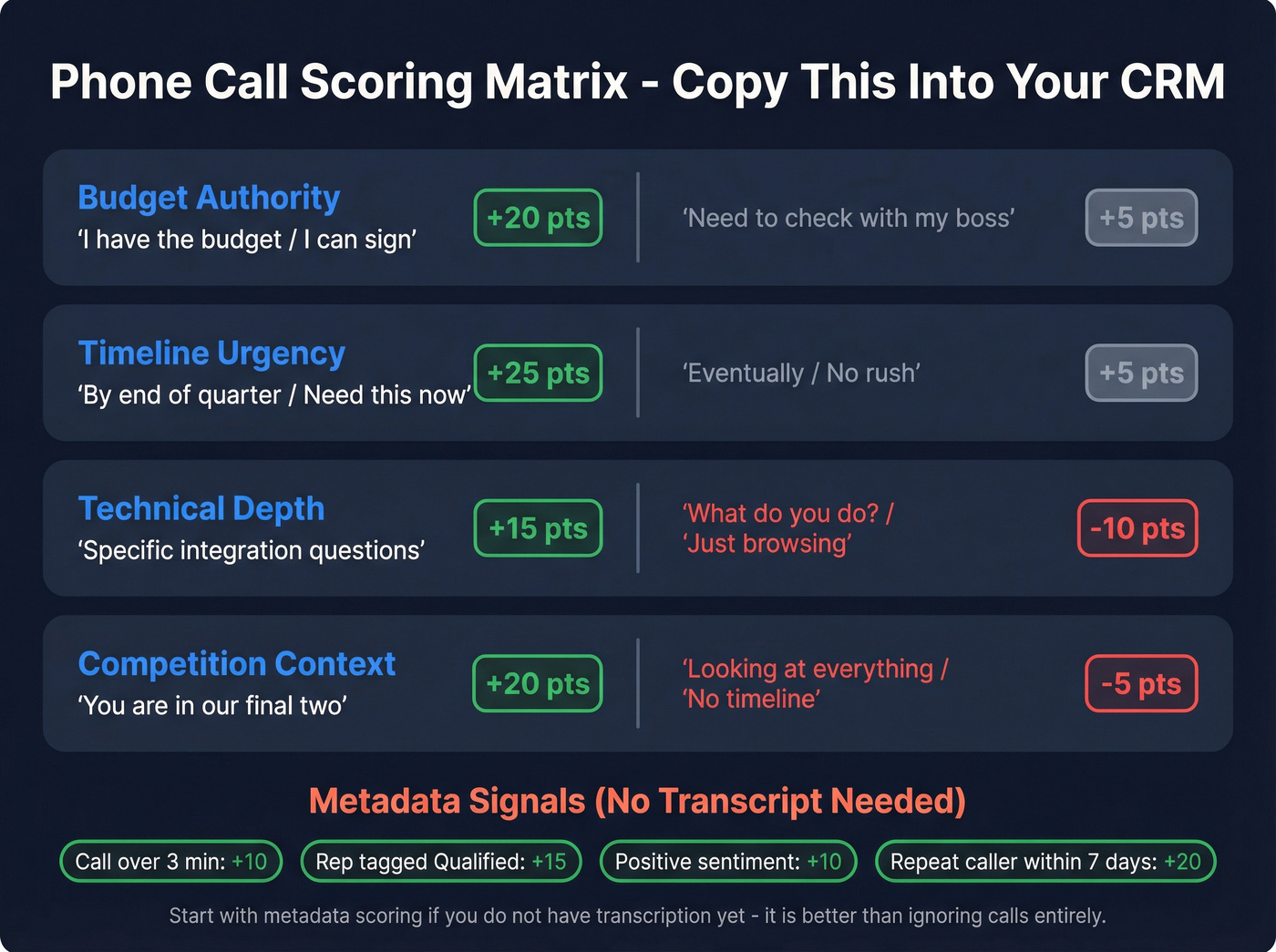
The WhatConverts call intelligence framework breaks conversation signals into four categories. Here's a scoring matrix you can copy directly into your CRM:
| Signal Category | High-Intent Phrase | Points | Low-Intent / Negative Phrase | Points |
|---|---|---|---|---|
| Budget Authority | "I have the budget" / "I can sign" | +20 | "Need to check with my boss" | +5 |
| Timeline Urgency | "By end of quarter" / "Need this now" | +25 | "Eventually" / "No rush" | +5 |
| Technical Depth | Specific integration questions | +15 | "What do you do?" / "Just browsing" | -10 |
| Competition Context | "You're in our final two" | +20 | "Looking at everything" / "No timeline" | -5 |
Don't overlook negative scoring. A caller who says "just browsing" or "no budget this year" should lose points, not sit at zero. Most teams only score upward and wonder why unqualified leads keep surfacing. (More examples: negative scoring.)
Beyond transcript signals, score on metadata alone: call duration over 3 minutes (+10), rep-applied "qualified" tag (+15), positive caller sentiment (+10), repeat caller within 7 days (+20). Start with metadata scoring if you don't have transcription yet - it's better than ignoring calls entirely. A single "by end of quarter" on a phone call should outweigh three pricing page visits. Calibrate accordingly.
Connecting Call Data to Your CRM
CallRail's HubSpot integration pushes calls, texts, and forms as activities on the contact timeline. Matching works via HubSpot cookie (HUTK) or phone number. If no match exists, CallRail creates a new contact - and here's the gotcha: it can generate @call.com placeholder emails when HubSpot requires an email for contact creation. (If this is already happening, start with CRM hygiene.)
Key fields that sync and become scoreable:
- Tracking number, call duration, tags, recording link
- Qualified Lead status ("Good lead" / "Not a lead" / "Not scored")
- First/last-touch medium, campaign, gclid, destination number
- Caller sentiment and call summary (with Premium Conversation Intelligence)
Two things to watch. First, enable E.164 phone formatting so HubSpot's validation doesn't reject numbers. Second, know that CallRail can override HubSpot's "Original Source" field - which will mess up your attribution reports if you aren't expecting it. (Related setup: lead source tracking.)
For scoring rules, use engagement criteria - they're additive per event occurrence, meaning each qualifying call adds points. Set group limits to prevent call frequency from dominating the total score. And remember the AND/OR constraint: "called AND tagged as qualified" must live inside a single rule using "+ Add criteria." Two separate rules fire independently.
Best Tools for Scoring Inbound Calls
| Feature | CallRail | CTM Marketing Pro | WhatConverts Pro |
|---|---|---|---|
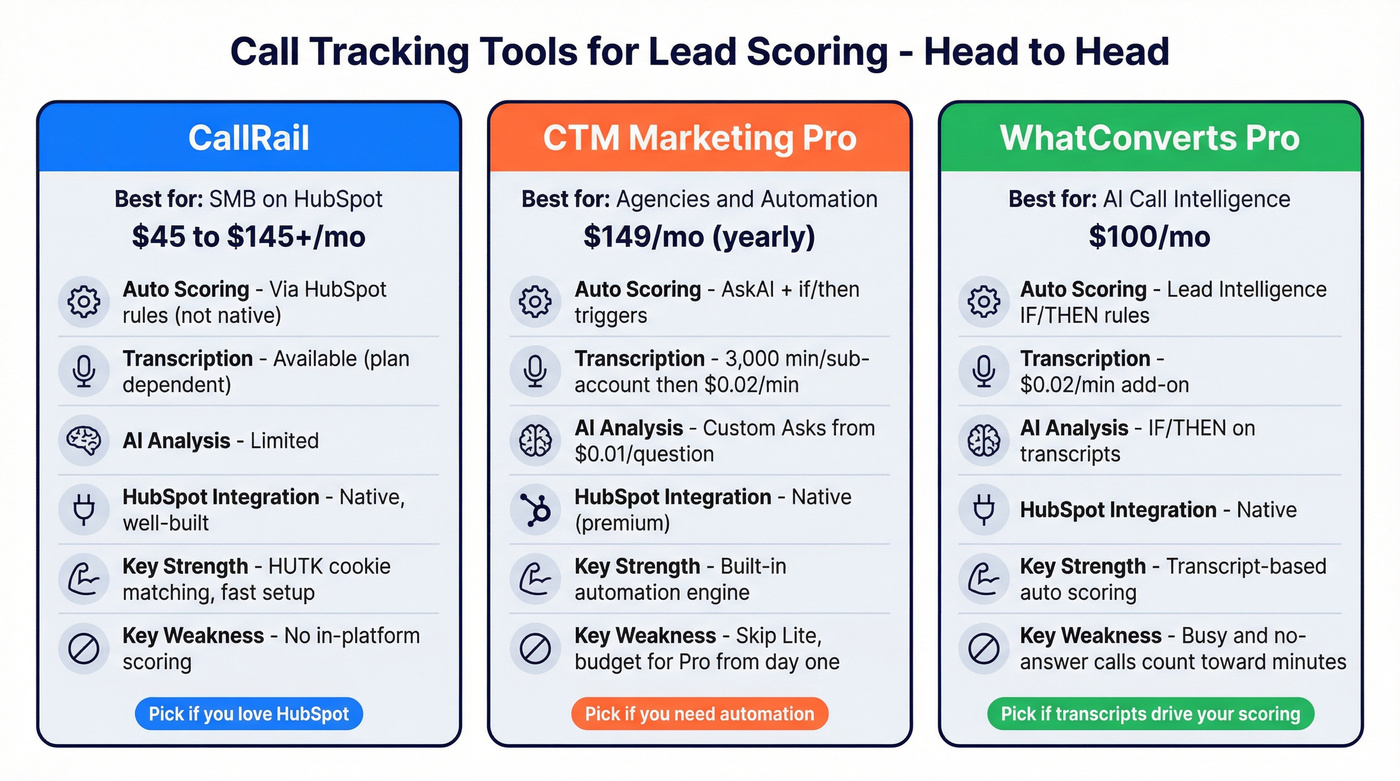
| Base price | ~$45-145+/mo | $149/mo (yearly) | $100/mo |
| Auto scoring | Via CRM rules | AskAI + triggers | Lead Intelligence |
| Transcription | Available (plan dependent) | 3,000 min/sub-account, then $0.02/min | $0.02/min add-on |
| AI analysis | Limited | Custom Asks from $0.01/question | Lead Intelligence IF/THEN rules |
| HubSpot | Native | Native (premium integrations) | Native |
| Best for | SMB / HubSpot | Agencies / Automation | AI call intelligence |
CallRail
The default for SMB teams already on HubSpot. The integration is genuinely well-built - detailed field mapping, HUTK cookie matching, automatic source attribution. We've set this up for multiple teams and the time-to-value is hard to beat. The tradeoff: scoring doesn't happen inside CallRail. You build all scoring logic in HubSpot using the fields CallRail pushes over. For teams comfortable in HubSpot's scoring tool, that's fine. For teams wanting native scoring in the call platform itself, look at CTM or WhatConverts.
Skip CTM Marketing Lite
Marketing Lite ($65/mo yearly) supports manual scoring - 1-5 stars, dollar values, text labels. Automated scoring with if/then triggers and AskAI requires Marketing Pro at $149/mo yearly. Custom AskAI questions start at $0.01/question. Lite is a trap for growing teams. Budget for Pro from the start and save yourself the migration headache later.
WhatConverts: Best for AI-Powered Scoring
WhatConverts Pro ($100/mo) is where transcript-based scoring gets interesting. The Lead Intelligence rules engine uses IF/THEN logic directly on transcripts - if a caller mentions "budget approved," it automatically marks the lead as quotable and assigns a score. Two gotchas worth knowing: busy, no-answer, and failed calls all count toward your minute usage, and minutes round up (an 85-second call bills as 2 minutes). For high-volume PPC campaigns with spam traffic, that adds up fast. Monitor your usage closely.
Call Recording Compliance
Recording calls without proper consent can cost you. Here's the checklist:
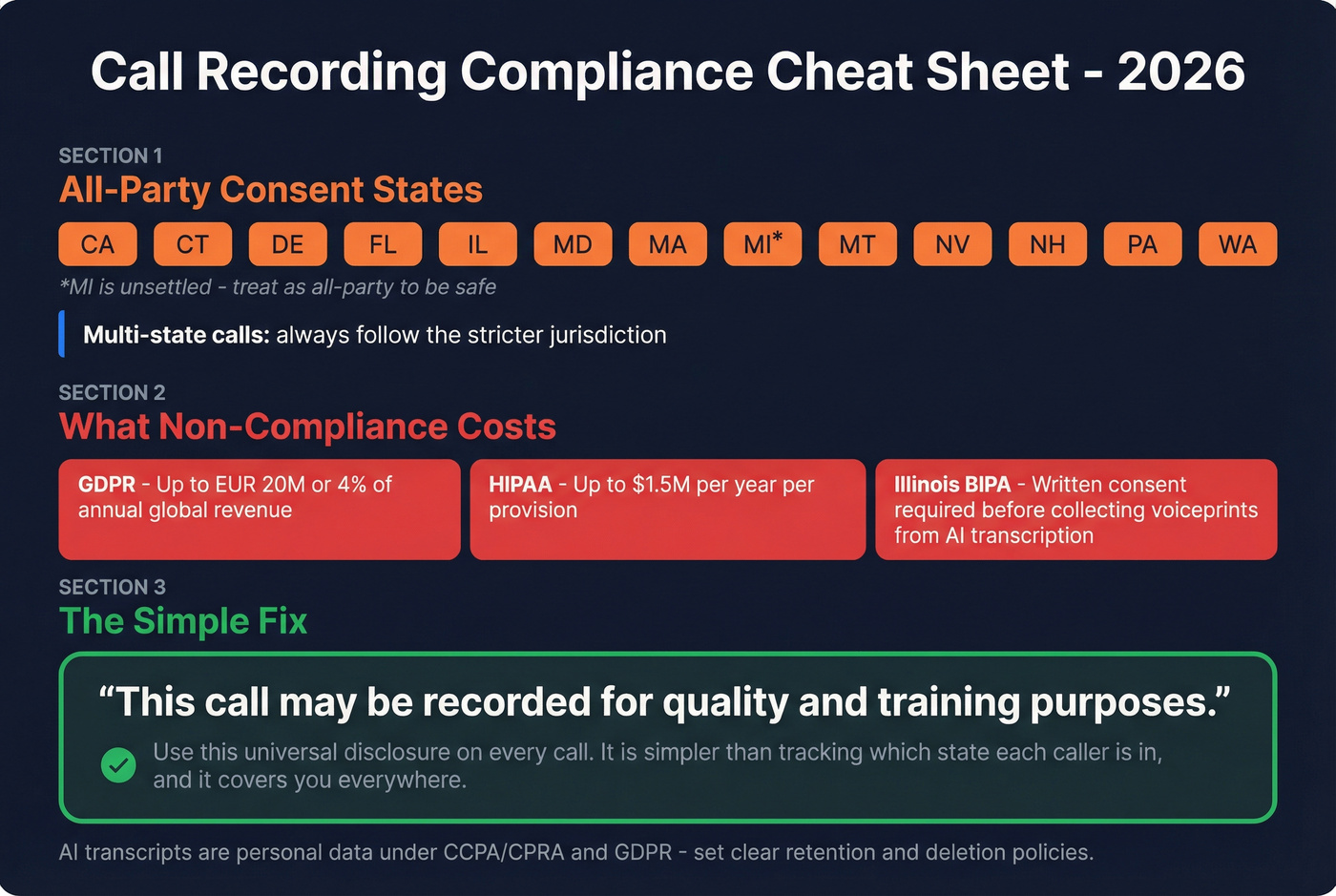
- All-party consent states (2026): CA, CT, DE, FL, IL, MD, MA, MI (unsettled - treat as all-party), MT, NV, NH, PA, WA
- Multi-state calls: follow the stricter jurisdiction
- GDPR fines: up to EUR 20M or 4% of annual global revenue
- HIPAA violations: up to $1.5M/year per provision
- Illinois BIPA: if your transcription tool creates voiceprints, you need written consent before collecting biometric data
- AI transcription: recordings and transcripts are personal data under CCPA/CPRA and GDPR - have clear retention and deletion policies
Just use a universal disclosure on every call: "This call may be recorded for quality and training purposes." It's simpler than tracking which state each caller is in, and it covers you everywhere.
The Data Quality Problem Nobody Talks About
None of this works if your CRM is full of garbage. We've watched SDRs spend entire mornings calling disconnected numbers pulled from "verified" databases, scoring contacts who left their company six months ago. Your scoring model is only as good as the records it grades. (If you want the benchmarks behind this, see B2B contact data decay.)

Call tracking compounds the problem. Every unmatched inbound call creates a new CRM record - often with a placeholder @call.com email, no company, no title. Those records accumulate fast. Within a few months, you've got hundreds of phantom contacts polluting your scoring distribution and skewing your reports.
This is where clean data infrastructure matters. Tools like Prospeo can turn those placeholder records into scoreable contacts through CRM enrichment - returning verified emails, job titles, and direct dials so your scores actually attach to people your reps can reach. A score on a record you can't contact is worthless. (Related: CRM verify and data quality.)
You just read that phone calls reveal budget, timeline, and decision-maker authority - signals no scoring model should miss. But scoring a caller as "VP with budget" means nothing if your CRM shows them as "Unknown Caller" with zero firmographic data. Prospeo's 92% enrichment match rate fills those gaps at $0.01 per email, turning anonymous callers into fully scored, fully qualified leads.
Turn every inbound caller into a complete, scoreable CRM record.
FAQ
Can I score calls without transcription?
Yes. Score on call duration, rep-applied tags, and disposition (qualified/not qualified). Metadata-only scoring is better than ignoring calls entirely. But transcript-based scoring using conversation signals like budget mentions and timeline urgency is far more accurate. CTM and WhatConverts transcription runs $0.02/minute.
What's the cheapest way to start?
WhatConverts Call Tracking at $30/month plus HubSpot's scoring tool. You get source attribution, basic call data in HubSpot, and manual scoring rules. Upgrade to WhatConverts Pro ($100/mo) or CTM Marketing Pro ($149/mo) when you need automated transcript scoring.
How do I stop call tracking from polluting my CRM?
Set your call platform to match existing contacts by phone number before creating new ones. For unmatched callers, enrich placeholder records with verified contact data before scoring them. Otherwise you'll grade @call.com records with no job titles, surfacing contacts you can never actually reach.