

How to Check Your Domain for Email Blacklist Issues (and Actually Fix Them)
Your sales team says cold emails aren't landing. You check your domain for email blacklist issues using every scanner you can find. All clean. Now what?
That's the scenario that trips up most teams. A sysadmin on r/sysadmin shared exactly this story - a compromised WordPress site was tanking their email delivery, but every blacklist checker came back green. The actual problem was URL reputation filtering triggered by a link in their email signature, not a traditional DNSBL listing. They removed the link, and emails started landing again.
Running a domain blacklist check takes 20-40 seconds. Knowing what to do with the results - and recognizing when blacklists aren't your real problem - is where most guides fall short.
What You Need (Quick Version)
- Run MXToolbox or Spamhaus Lookup. If Spamhaus says you're clean, you're probably fine.
- Listed on Spamhaus or Barracuda? Follow the delisting steps below - 24-48 hours is typical. De-prioritize obscure lists like UCEPROTECT L2/L3.
- Scanners show clean but emails still aren't landing? Your problem isn't a blacklist. Skip to the "clean but still blocked" section.
Domain vs. IP vs. URI Blacklists
There are over 300 publicly available spam blacklists. They fall into three categories:
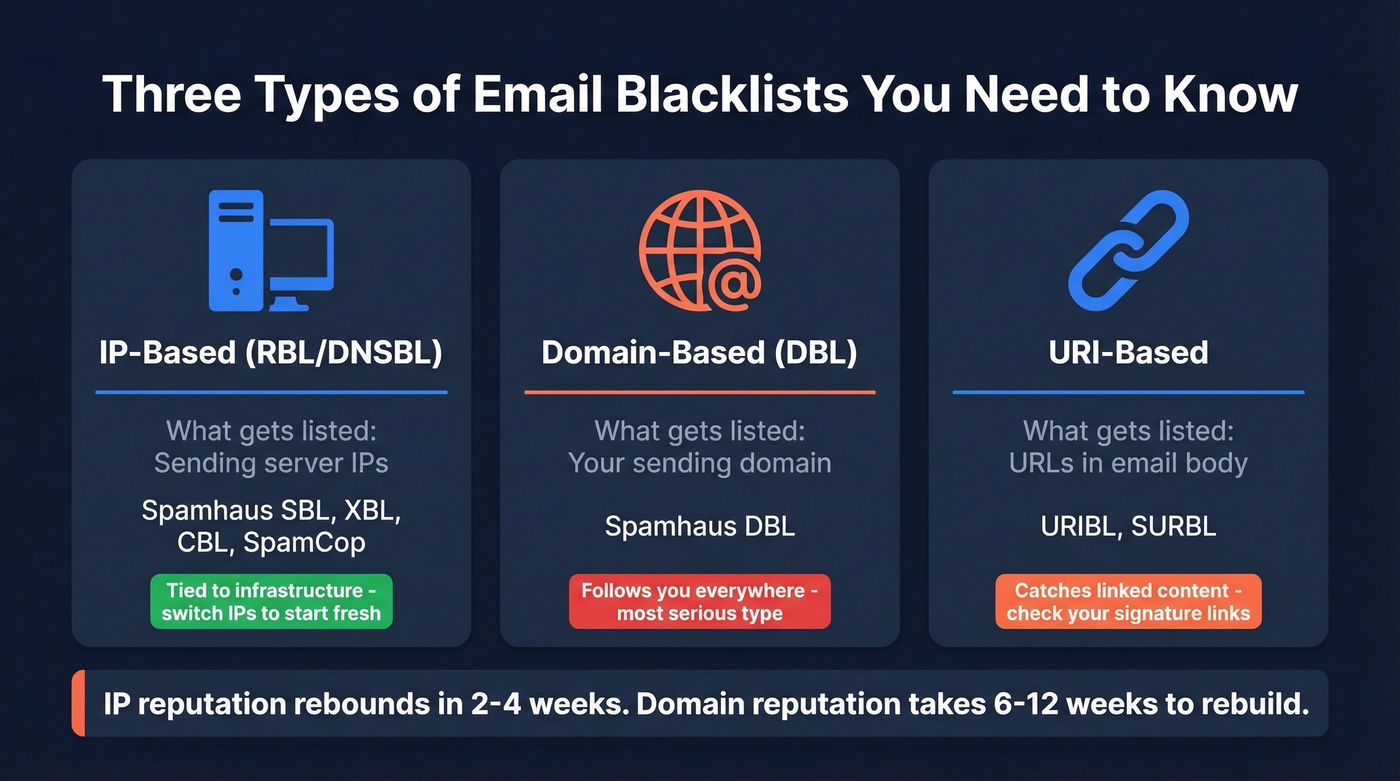
| Type | What's Listed | Examples | Key Trait |
|---|---|---|---|
| IP-based (RBL/DNSBL) | Sending server IPs | Spamhaus SBL, XBL, CBL, SpamCop | Tied to infrastructure |
| Domain-based (DBL) | Sending domains | Spamhaus DBL | Follows you everywhere |
| URI-based | URLs in email body | URIBL, SURBL | Catches linked content |
Here's the thing: IP reputation is tied to your sending infrastructure. Switch ESPs, get a new IP, and you start fresh. Domain reputation is portable - it follows your domain across IP changes and ESP migrations. A domain-level listing is the more serious problem because IP reputation typically rebounds in 2-4 weeks of clean sending, while domain reputation takes 6-12 weeks to rebuild.
Which Blacklists Actually Matter
Most blacklists don't matter. Spamhaus is the third-party blacklist with the most consistent material impact across major mailbox providers. Microsoft 365/Outlook, Yahoo, and AOL can reject mail at the SMTP level when the sending IP appears on Spamhaus.
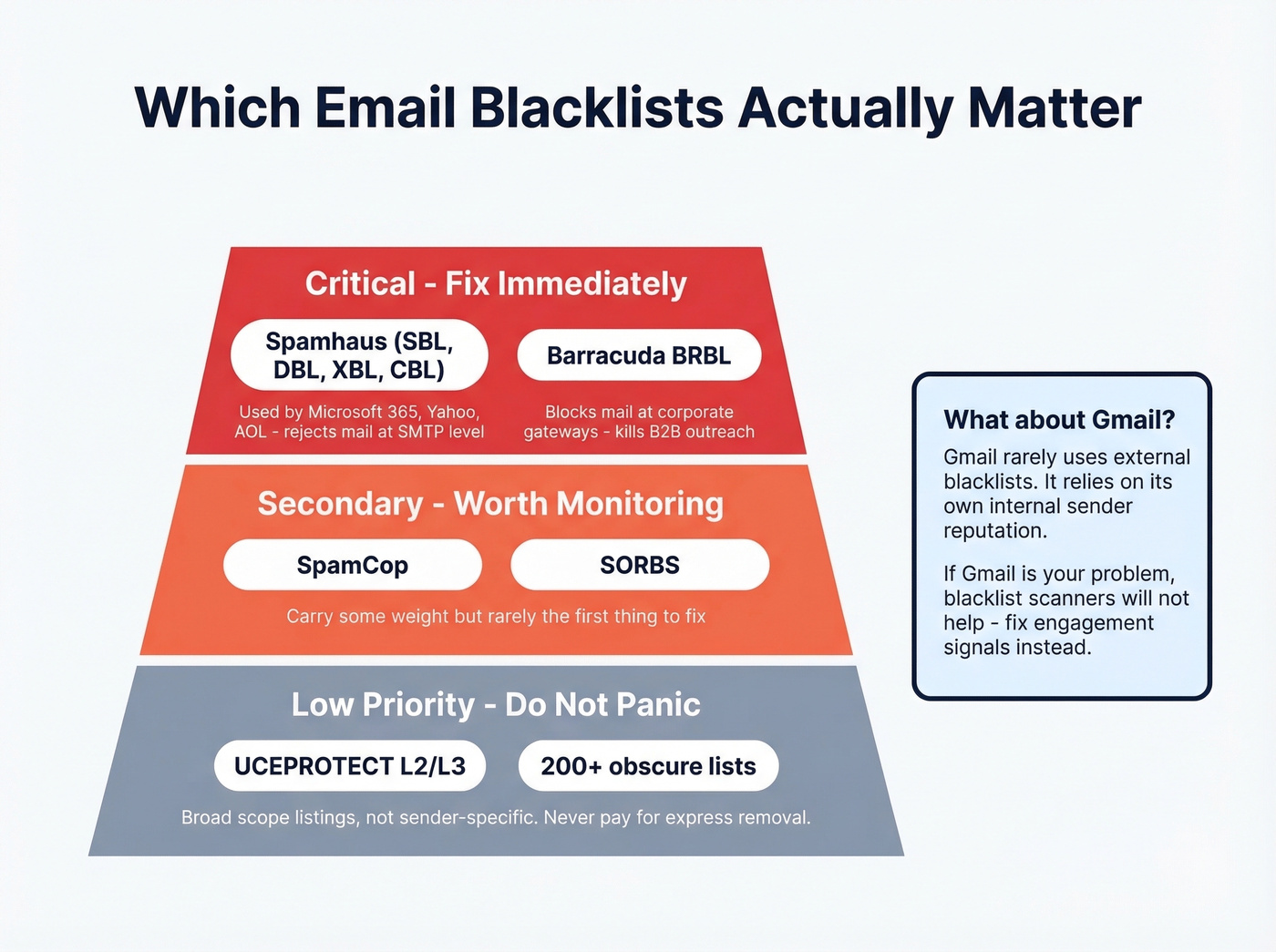
Barracuda matters if you're emailing into corporate environments. A listing there can block mail at many corporate gateways and kill B2B outreach.
SpamCop and SORBS are secondary priorities. They carry some weight, but they're rarely the first thing to fix if you're already clean on the major lists.
If you're listed on UCEPROTECT L2/L3, don't lose sleep over it. Those are broader-scope listings at the ISP/provider level, not just a single sender. They also offer paid "express removal," which is a red flag. Don't pay for delisting - paid removal lists are almost always low-impact.
Our take on Gmail: Gmail is the platform most likely to spam-folder your emails, and it rarely relies on external blacklists. The main exception is Spamhaus PBL for unauthorized or dynamic IP direct-to-MX sending. Gmail relies on its own internal sender reputation scoring, which means you can be clean on every DNSBL and still land in spam. If Gmail is your problem, blacklist scanners won't help - you need to fix engagement signals.
Best Free Tools to Check Your Domain
Most email blacklist checker tools query the same underlying DNSBLs. The differences come down to coverage breadth, domain lookup support, and how results are presented. Pick one and move on - spending hours comparing checkers is time you could spend fixing the actual problem.
| Tool | Lists Checked | Domain Support | IP Support | Free Tier |
|---|---|---|---|---|
| MXToolbox | 100+ | Yes | Yes | Free (manual checks) |
| ZeroBounce | 300+ | Yes | Yes | Free |
| DNSChecker | 50+ | Via MX lookup | Yes | Unlimited |
| MultiRBL | Hundreds | Yes | Yes | Unlimited |
| Mailmeteor | 100+ | Yes | Yes | Unlimited |
| Spamhaus Lookup | Spamhaus only | Yes | Yes | Unlimited |

Our picks: MXToolbox for a quick daily check - it's fast, covers 100+ lists, and the interface is clean. ZeroBounce if you want the broadest coverage at 300+ lists. Spamhaus Lookup directly if you just want the authoritative answer from the one list that matters most.
Free tools are manual and on-demand. If you want automated monitoring with alerts, MXToolbox monitoring runs around $129/mo. For most teams, a weekly manual check is plenty.

Most blacklist issues start with bad email data - bounces spike, spam traps get hit, and your domain lands on Spamhaus. Prospeo's 5-step verification with spam-trap removal and honeypot filtering keeps bounce rates under 4%. That's 98% email accuracy across 143M+ verified addresses.
Fix the root cause of blacklisting before it starts.
How to Read Your Results
Listed on Spamhaus or Barracuda? Act immediately. Listed on two obscure lists out of 100? You're fine.
The key is distinguishing between auto-expiring listings and manual-review-required ones. SpamCop listings auto-expire within about 24 hours if spam reports stop. URIBL and Spamhaus DBL listings can clear automatically once your domain no longer meets their criteria. Spamhaus SBL requires you to submit a removal form with evidence of corrective actions.
Common SMTP errors that indicate blacklisting:
550 5.7.511- Microsoft rejecting based on sender reputation554 IP blacklisted- generic DNSBL rejection550 Rejected due to sender reputation- blacklist or internal scoring
Skip the panic if you're listed on a handful of minor lists but your major-provider delivery looks normal. Not every listing translates to delivery problems.
Clean but Still Blocked
This is the scenario that drives people crazy - and it's more common than actual blacklisting.
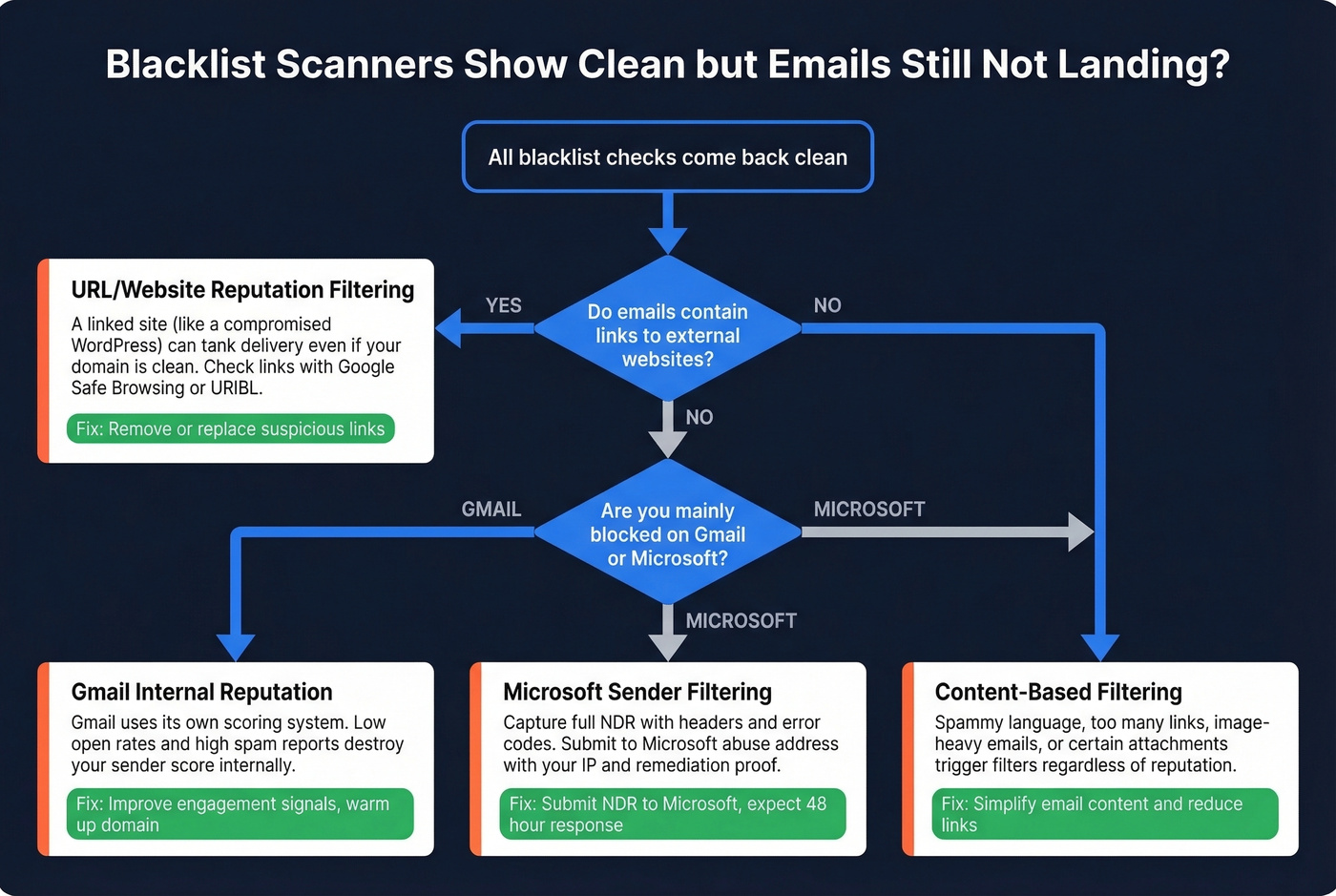
URL/website reputation filtering is what happened in that r/sysadmin thread. The sender's domain wasn't on any blacklist, but a compromised WordPress site linked in their signature had a bad URL reputation. Link-scanning tools flagged the URL, causing delivery failures that looked like blacklisting but weren't. If you link to external sites in your emails, check those URLs separately with Google Safe Browsing or URIBL.
Mailbox provider internal filters operate independently of public DNSBLs. Gmail, Microsoft, and Yahoo all maintain their own sender reputation systems. We've seen teams waste weeks chasing phantom blacklist issues when the real problem was low engagement rates tanking their internal sender score. (If you need a full playbook, start with our email deliverability guide and then improve sender reputation.)
Content-based filtering catches spammy language, excessive links, image-heavy emails, and certain attachment types regardless of your domain's reputation. If you're troubleshooting copy issues, run a quick email spam checker and tighten your email copywriting.
For Microsoft-specific blocks, capture the full NDR including headers and error codes. Submit it to Microsoft's abuse address with your affected IP, the specific error code, and proof of remediation steps like SPF/DKIM/DMARC configuration and compromised accounts secured. Expect a response within about 48 hours.
How to Get Delisted
Before you submit a single removal request, fix the root cause. Every blacklist operator will tell you the same thing: if you delist without fixing the underlying problem, you'll be relisted within days.
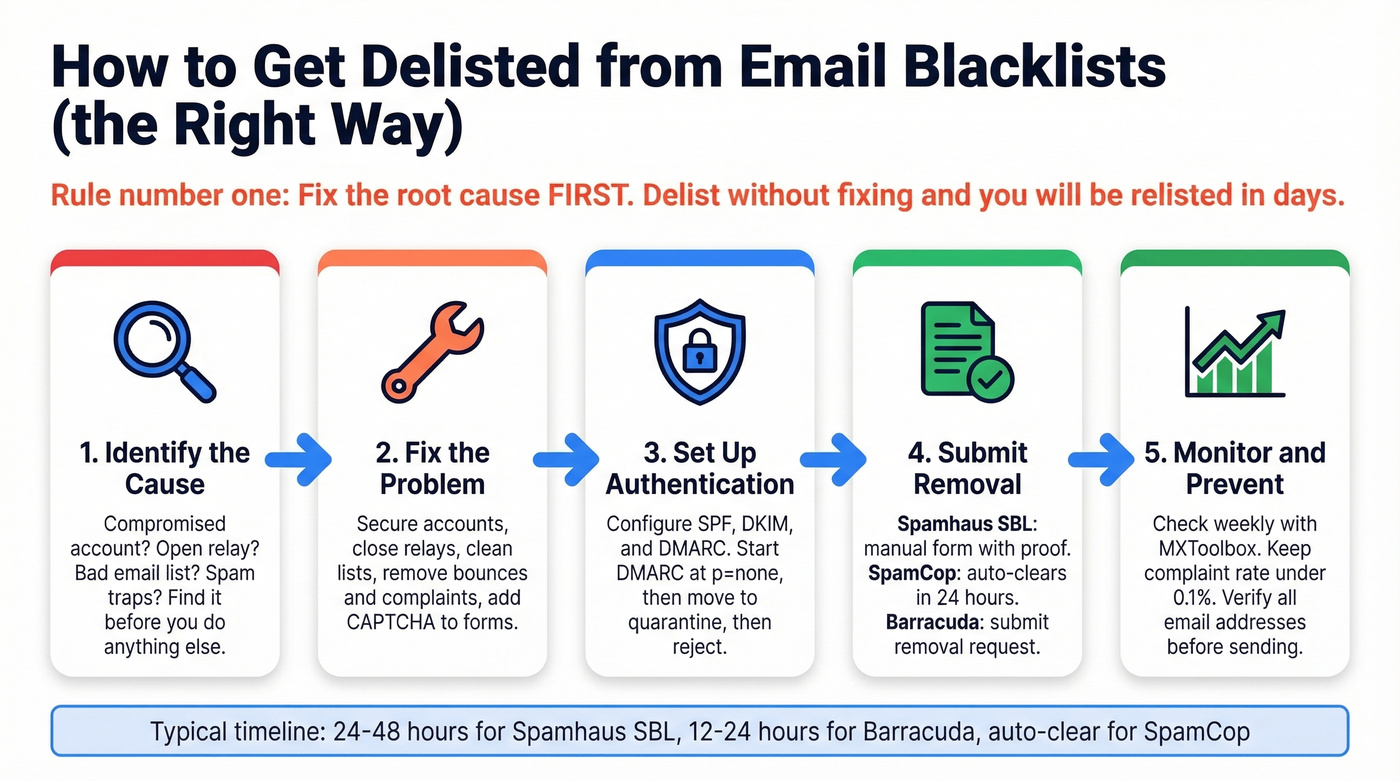
Fix first, delist second. Secure compromised accounts and servers. Close any open relays. Clean your email lists by removing bounces, complaints, and inactive addresses. Configure SPF, DKIM, and DMARC. Add CAPTCHA and rate limiting to web forms. (For deeper remediation, see our Spamhaus blacklist removal guide and spam trap removal.)
Once the root cause is addressed:
| Blacklist | Method | Typical Timeline |
|---|---|---|
| Spamhaus SBL | Manual form + corrective proof | 24-48 hours |
| Spamhaus XBL/CBL | Fix root cause, auto-clears | Hours to 24 hours |
| Spamhaus PBL | Justify legitimate mail server | Varies |
| Spamhaus DBL | Auto-expires after remediation | 24-72 hours |
| SpamCop | Automatic if reports stop | 24-48 hours |
| Barracuda BRBL | Submit removal request | 12-24 hours |
| UCEPROTECT L1 | Auto-expires | ~7 days |
A cold emailer on r/coldemail shared a useful data point: after finding an older sending domain listed on Spamhaus and Barracuda, they followed the removal instructions, cleaned their list, and saw results improve within 48 hours. The combination of delisting plus list cleanup is what moves the needle - delisting alone isn't enough if you're still sending to bad addresses.
Prevention: Stay Off Blacklists
Getting delisted is a fix. Prevention is the strategy.
Authentication: SPF, DKIM, and DMARC
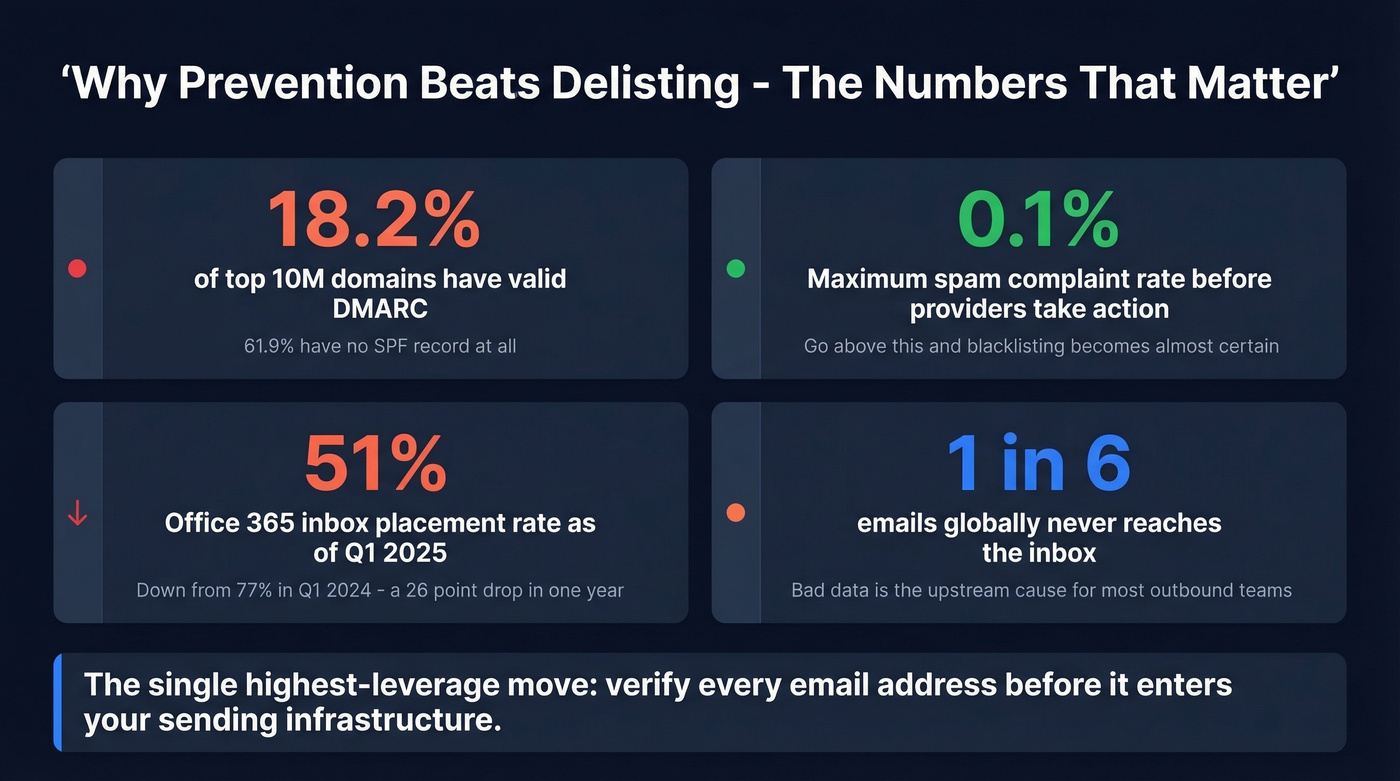
Only 18.2% of the top 10M domains have valid DMARC, and 61.9% have no SPF record at all. If you haven't set these up, you're leaving the door wide open.
Roll out DMARC in phases: start with p=none to monitor for 30-60 days, move to p=quarantine, then p=reject once you've confirmed all legitimate sending sources are aligned. Microsoft requires DMARC with at least p=none for bulk senders pushing 5,000+ emails per day. Google and Yahoo enforce similar requirements. (If you want to validate your setup, use our SPF record examples and how to verify DKIM is working guides.)
List Hygiene
Bounces and spam traps are two of the biggest causes of blacklisting. Keep your spam complaint rate under 0.1% - that's the threshold where major providers start taking action. Between Q1 2024 and Q1 2025, Office 365 inbox rates dropped from 77% to 51%, and the trend hasn't reversed. Roughly one in six emails never reaches the inbox globally. (Track the basics like email bounce rate and keep an eye on email velocity.)
Data Quality: Verify Before You Send
Bad prospect data is the upstream cause of most blacklisting for outbound teams. Invalid emails cause hard bounces. Outdated contacts generate spam complaints. Purchased lists are riddled with spam traps and honeypots.
Every one of these triggers blacklist algorithms, and they're entirely preventable. Prospeo's 5-step email verification catches invalid addresses, spam traps, and honeypots before they reach your sending infrastructure - delivering 98% email accuracy across 143M+ verified addresses. For outbound teams, verifying your list before loading it into your sequencer is the single highest-leverage thing you can do to protect your domain. (If you're building lists from scratch, see how to generate an email list.)

Clean scanners but emails still not landing? Your sender reputation may be wrecked from months of bad data. Teams switching to Prospeo cut bounce rates from 35%+ to under 4% - and every record refreshes every 7 days so stale contacts never poison your domain again.
Stop guessing at deliverability. Start with data you can trust.
FAQ
How often should I run a domain blacklist check?
Weekly if you're running outbound campaigns, monthly for regular business email. MXToolbox offers paid monitoring for automated alerts, but a manual weekly check with a free tool is sufficient for most teams sending under 5,000 emails per day.
Can a blacklisted domain affect my entire company's email?
Yes. Domain reputation follows you across IP changes and ESP migrations, takes 6-12 weeks to rebuild, and affects marketing, sales, and transactional messages equally. That's what makes domain-level listings worse than IP-based ones.
Does Gmail use email blacklists?
Barely. Gmail relies primarily on its own internal sender reputation scoring based on engagement signals, complaint rates, and sending patterns. You can be clean on every public DNSBL and still land in Gmail spam. Focus on open rates and reply rates instead.
What's the fastest way to get off Spamhaus?
Fix the root cause first, then submit the Spamhaus removal form with evidence of corrective actions. Turnaround is 24-48 hours. Submitting without fixing the cause gets you relisted within days.
Can bad prospect data get my domain blacklisted?
Absolutely. Invalid emails cause hard bounces, outdated contacts generate spam complaints, and purchased lists contain spam traps. Verifying every address through a multi-step process with spam-trap and honeypot removal catches these risks before they damage your sending reputation.