

The Cold Email Checklist That Keeps Your Domain Alive
You launched a 500-person campaign on Monday. By Wednesday, your bounce rate hit 12%, your domain reputation tanked, and your sequences are landing in spam. The campaign's dead - and it wasn't your copy that killed it.
Infrastructure failures destroy more cold email campaigns than bad subject lines ever will. Here's the cold email checklist that prevents that, starting where it actually matters: your DNS records.
Quick-Reference Checklist
Five things that matter more than anything else:
- Never send from your primary domain. Buy secondary domains. Protect the asset that handles your inbound.
- Set up SPF, DKIM, and DMARC before you write a single email.
- Verify every email within 72 hours of sending. Stale data kills domains.
- Keep first emails under 75 words. One CTA. No links. Plain text.
- Warm up for 2-4 weeks minimum before launching any campaign.
Phase 1 - Infrastructure Setup
Buy Secondary Domains
Your primary domain handles inbound leads, client communication, and SEO authority. Cold email puts all of that at risk. Buy 2-3 close variants (yourcompanyhq.com, tryyourcompany.com) and forward them to your main site. This is non-negotiable.
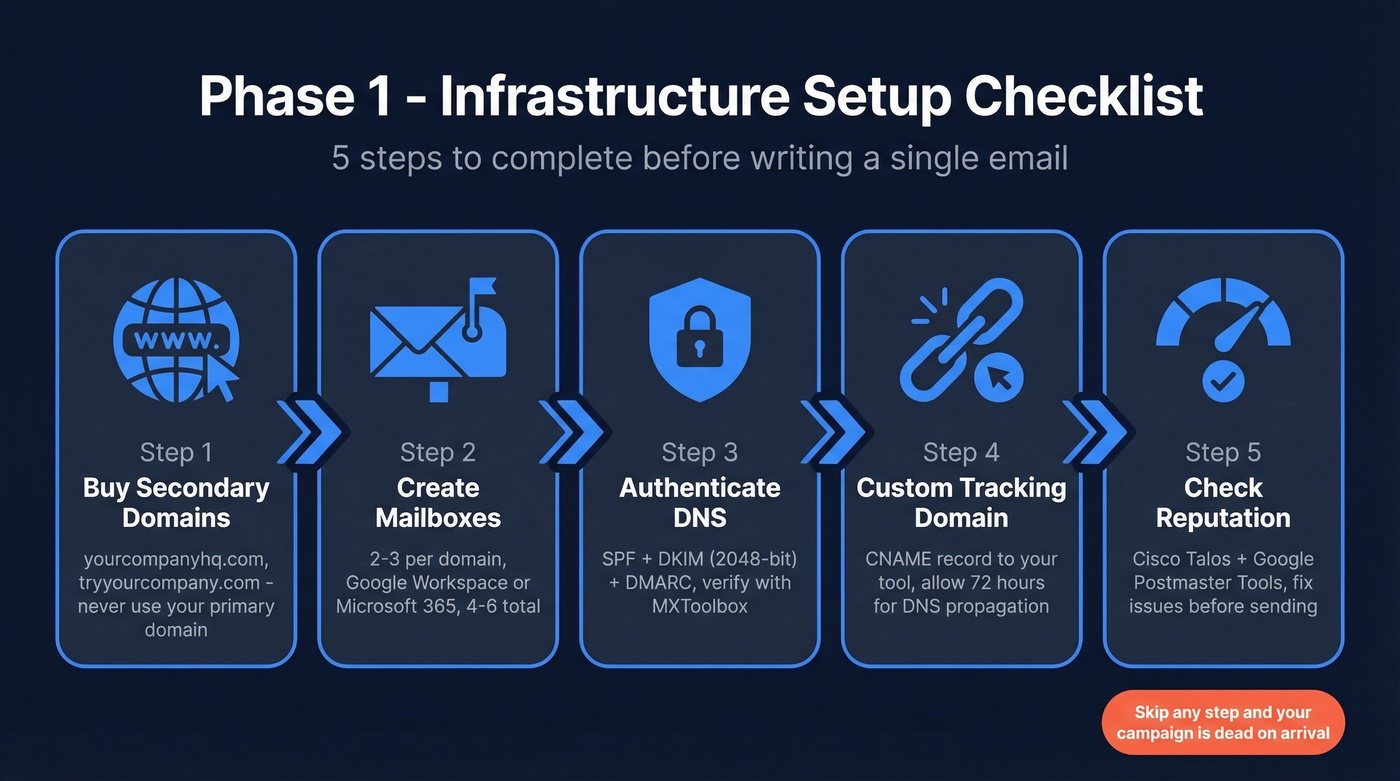
Create Mailboxes
Set up 2-3 mailboxes per secondary domain. Google Workspace starts around $6-$7/user/month, Microsoft 365 around $6/user/month. Both are more trusted than budget hosts for cold outreach deliverability. For a campaign targeting 200-400 prospects over 2-3 weeks, you'll want 4-6 total mailboxes across 2 domains.
Authenticate Everything
Three DNS records. Get any of them wrong and you're sending into a wall.
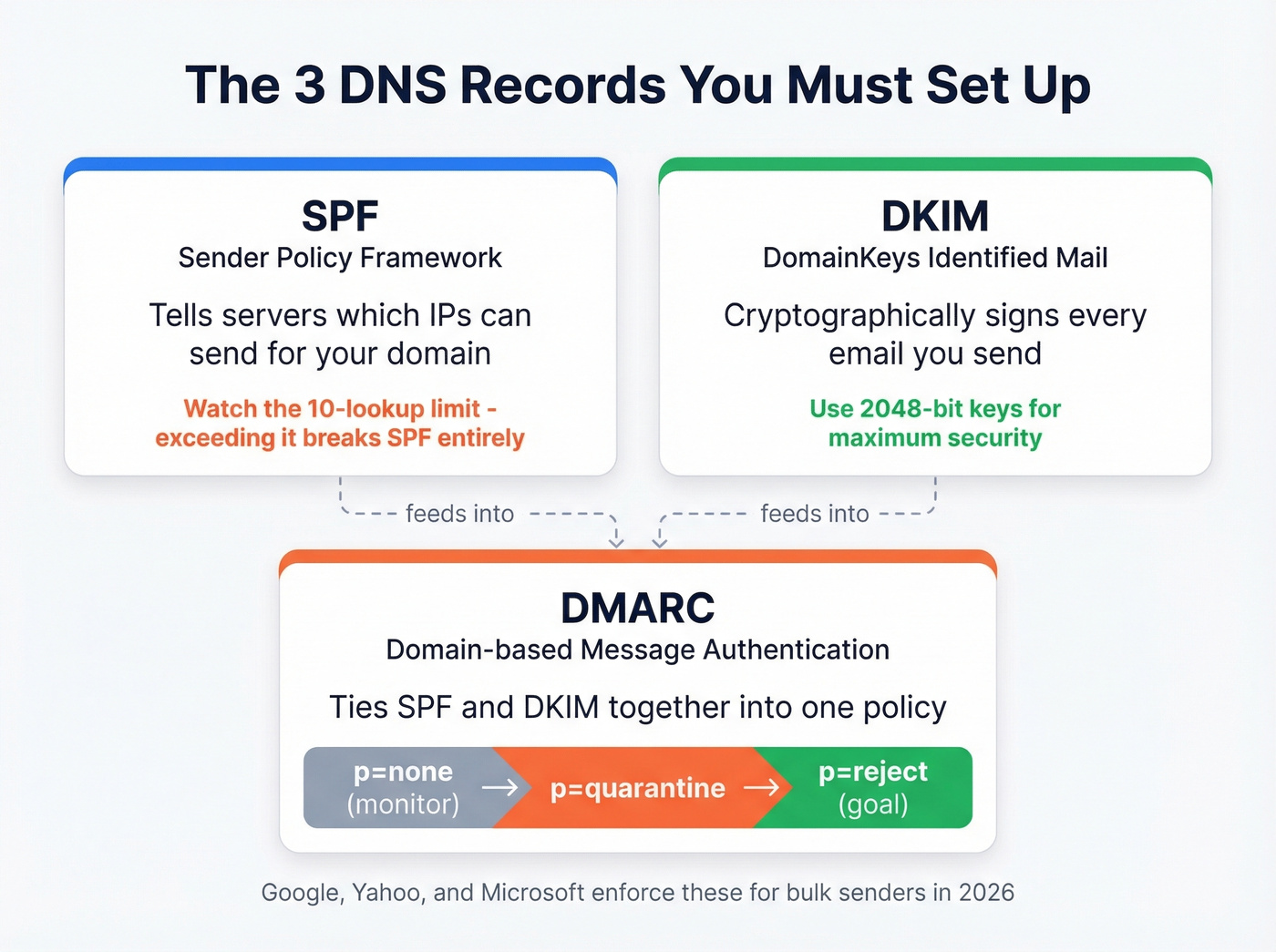
- SPF tells receiving servers which IPs can send on your behalf. Watch the 10-lookup limit; exceeding it breaks SPF entirely. See an SPF syntax breakdown if you’re unsure.
- DKIM cryptographically signs your emails. Use 2048-bit keys. If you’re troubleshooting, follow a quick verify flow.
- DMARC ties SPF and DKIM together. Start with
p=noneto monitor, then progress top=rejectover several weeks. If you’re stuck on alignment, read DMARC specifics.
Verify your records with MXToolbox before proceeding. Google and Yahoo enforce these for bulk senders, and Microsoft is aligning with similar requirements. For the bigger picture, keep an email deliverability checklist handy.
Set Up a Custom Tracking Domain
Don't use your sending tool's shared tracking domain - that pools your reputation with every other user on the platform. Create a CNAME record pointing to your tool's tracking server. DNS propagation takes up to 72 hours, so do this early. If you need the technical setup, use this tracking domain guide.
Check Your Reputation
Run your domain and IP through Cisco Talos and Google Postmaster Tools before you send anything. If Talos shows Bad reputation or incorrect categorization, fix the issue first. Completing this pre-send audit saves you from launching into a wall of spam filters. If you’re actively repairing deliverability, start with sender reputation fundamentals.
Phase 2 - List Building and Verification
Build a Targeted List
ICP-first sourcing beats spray-and-pray every time. Apollo works for self-serve list building. Prospeo adds a verification-first workflow with 300M+ professional profiles, 30+ filters, and a 7-day refresh cycle, so you're starting with cleaner data before verification even begins. If you want a broader sourcing stack, compare outbound lead generation tools.
Verify Every Email
We've seen teams torch three domains in a single month because they skipped this step. It's shockingly common to see 35-40% bounce rates on unverified lists. Snyk started at 35-40% bounces before switching to a verification-first approach - bounces dropped to under 5%. Verify within 72 hours of your send date, because email addresses decay fast. If you’re diagnosing issues, use this email bounce rate guide.


Snyk went from 35-40% bounces to under 5% by switching to verification-first data. Prospeo's 300M+ profiles are refreshed every 7 days - not every 6 weeks - so your list is already clean before you verify. At $0.01/email, protecting your domain costs less than a single burned mailbox.
Stop torching domains. Start with data that's already verified.
Phase 3 - Write the Email
Subject Lines That Earn Opens
A Belkins study of 5.5M emails found 2-4 word subject lines hit 46% open rates. Personalized subjects pulled 46% versus 35% without. Questions outperformed statements. Once you cross 7 words, opens drop toward 39%. If you need options, pull from these subject lines.
Write a Tight Body
First email: under 75 words, plain text, one CTA, zero links. HTML formatting and tracking pixels trigger spam filters. Save the pitch deck for email three. For more structure, use a proven B2B cold email sequence.
Personalize With Specifics
Here's the thing - generic personalization ("I noticed your company is growing") doesn't move the needle. A Woodpecker test cited by GTMnow showed advanced personalization earned a 17% reply rate versus 7% without. One B2B SaaS founder generated $100k in revenue by referencing specific missing features at each prospect's organization. That level of research takes time, but the math works out when your reply rates double. If you want a system for this, follow a personalized outreach playbook.
Build a Follow-Up Sequence
Three to five follow-ups, spaced 3-5 days apart. The first follow-up alone adds 40-50% more replies according to Backlinko's outreach research. Most of your pipeline lives in emails two through four. Don't write them off. If you need copy, grab these cold email follow-up templates.
Phase 4 - Warm Up and Launch
Warm Up Your Mailboxes
New domains need 2-4 weeks minimum before you send a single cold email. In our experience, the warmup phase is the most skipped step - and the most expensive to skip. The consensus on r/coldemail is the same: rushing warmup is the fastest way to burn a domain. Keep warmup running continuously, even after campaigns start. If you’re choosing tooling, compare email warmup tools.
Follow the Ramp Schedule
| Week | Emails/Day/Mailbox |
|---|---|
| 1 | 10-20 |
| 2 | 20-40 |
| 3 | 40-60 |
| 4 | 60-80 |
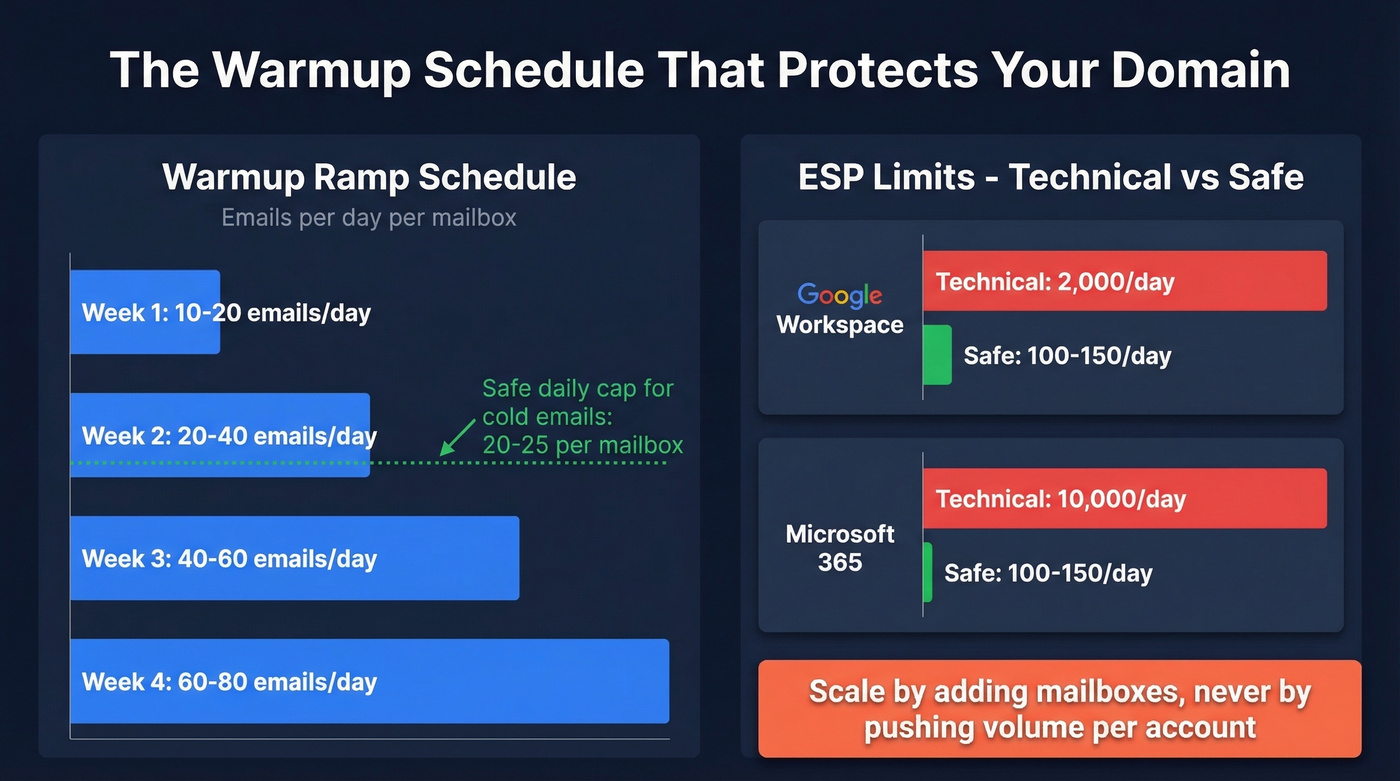
Respect your ESP's safe limits, not the technical ones:
| Provider | Technical Limit | Safe Limit |
|---|---|---|
| Google Workspace | 2,000/day | 100-150/day |
| Microsoft 365 | 10,000/day | 100-150/day |
Scale by adding mailboxes, never by pushing volume per account. Cap at 20-25 cold emails per mailbox per day. For deeper guidance, track email velocity as you scale.
Run Seed Tests Before Launch
Send to seed inboxes across Gmail, Outlook, and Yahoo before your campaign goes live. If seeds land in spam or your bounce rate exceeds 2%, don't launch. This is your go/no-go gate.
2026 Compliance Requirements
Bulk sender rules are enforced across Google and Yahoo, with Microsoft aligning to similar requirements. You must have SPF + DKIM + DMARC with domain alignment, one-click unsubscribe via RFC 8058 headers, spam complaints under 0.3%, and bounces under 2%.
CAN-SPAM (US) requires a physical address and opt-out honored within 30 days, with penalties of $51,744-$53,088 per message. GDPR (EU) allows legitimate interest for B2B - document a Legitimate Interest Assessment. CASL (Canada) gives implied consent for 24 months with unsubscribe honored within 10 business days.
Let's be honest about open tracking: stop doing it. Apple Mail Privacy Protection makes open data meaningless, and open tracking typically adds a pixel that hurts deliverability. Measure replies and booked meetings. Those are the only numbers that matter.
Benchmarks - What Good Looks Like
Backlinko's outreach study across millions of emails found an ~8.5% average response rate. Frame your results like this:
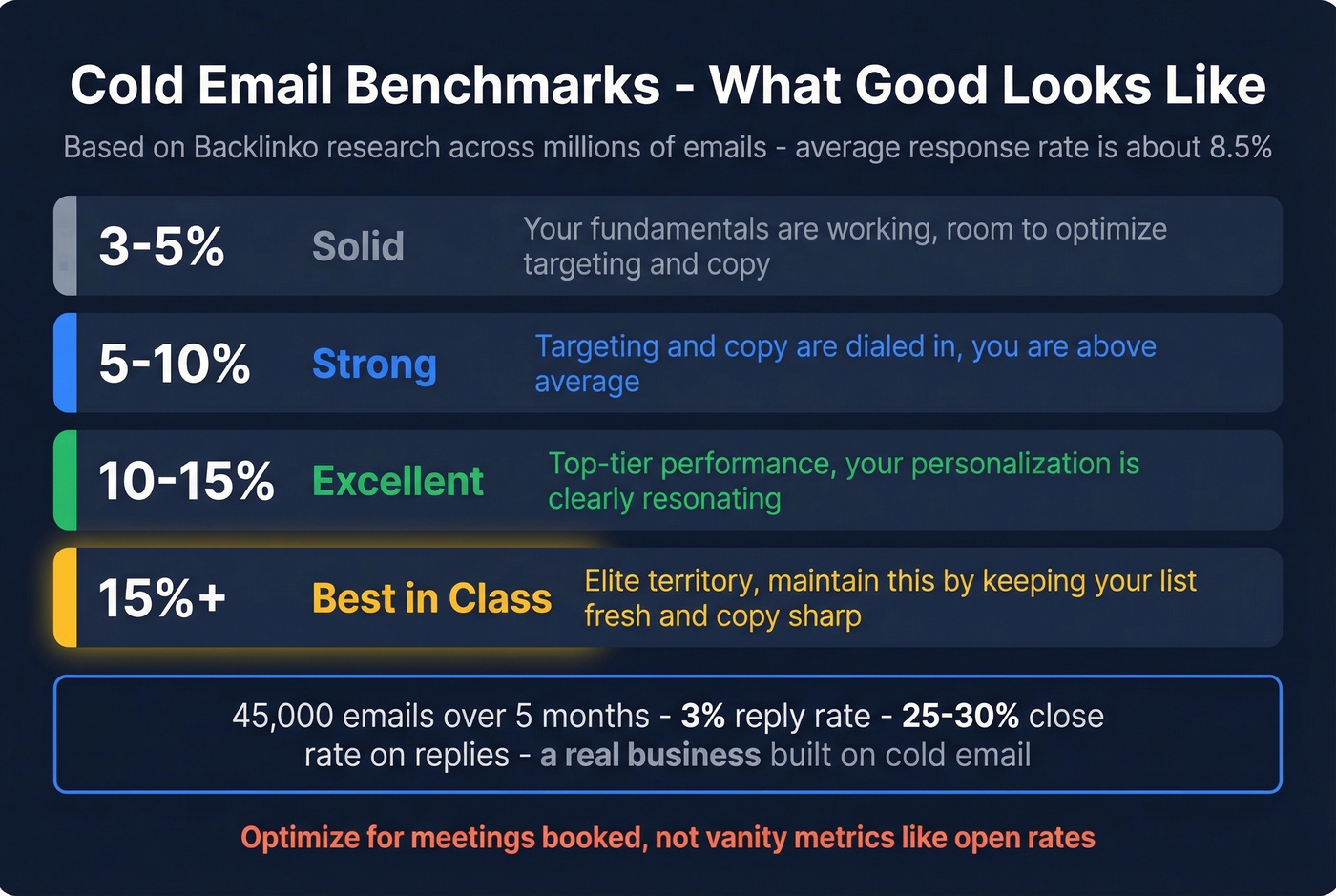
- 3-5% reply rate is solid
- 5-10% means your targeting and copy are working
- 10-15% is excellent
- 15%+ is best-in-class
One practitioner reported ~45,000 emails over five months with a 3% reply rate and 25-30% close rate on replies - a real business built on cold email. Optimize for meetings booked, not vanity metrics.
Use this cold email checklist as a living document. Revisit it every quarter - sender policies tighten, data decays, and what worked six months ago will land in spam today. The teams that treat deliverability as an ongoing discipline are the ones still booking meetings next quarter.
You just built the infrastructure, warmed up your mailboxes, and wrote tight copy. Don't waste it on stale contact data. Prospeo's 7-day refresh cycle and 98% email accuracy keep your bounce rate under the 2% threshold that Google and Yahoo enforce in 2026.
Every item on your checklist fails if the email address is wrong.
FAQ
How many cold emails should I send per day?
Cap at 20-25 per mailbox per day across secondary domains. Scale by adding mailboxes, not volume. Most practitioners run 4-6 mailboxes across 2 domains to reach 200-400 prospects weekly without triggering ESP rate limits.
How do I know if my emails are landing in spam?
Run seed tests across Gmail, Outlook, and Yahoo before every campaign launch. Monitor Google Postmaster Tools for complaint rates and check Cisco Talos for domain reputation. If seeds hit spam or bounces exceed 2%, pause and diagnose before sending.
Do I really need to verify my email list?
Absolutely. Unverified lists commonly produce 35-40% bounce rates, which destroy sender reputation in days. Verify within 72 hours of sending, since addresses decay faster than most teams expect. Skip this step and you're gambling with your domain.
What's the best free tool for email verification?
Prospeo offers 75 free email credits per month with full verification, including catch-all detection and honeypot filtering. Hunter provides 25 free searches monthly but caps enrichment features. For teams running real campaigns, Prospeo's free tier covers more ground.