

Cold Email Follow-Up Templates That Actually Get Replies in 2026
Average cold email reply rates dropped from 6.8% to 5.8% in a single year. Most campaigns land somewhere between 1% and 5%. The inbox is more hostile than it's ever been - and no cold email follow up template will save you if your infrastructure is broken.
Templates are the last 20% of follow-up success. List quality and deliverability are the first 80%. Let's fix the foundation, then hand you templates worth sending.
What You Need Before Anything Else
Three things determine whether your follow-ups get replies or get flagged:
- Fix your infrastructure first - authentication, warm-up, verified lists. This is why most follow-ups fail silently. (If you need the full baseline, start with an email deliverability guide.)
- Use 2 follow-ups max with graduated spacing (2/4/7 days). By email four, spam complaints more than triple from 0.5% to 1.6%.
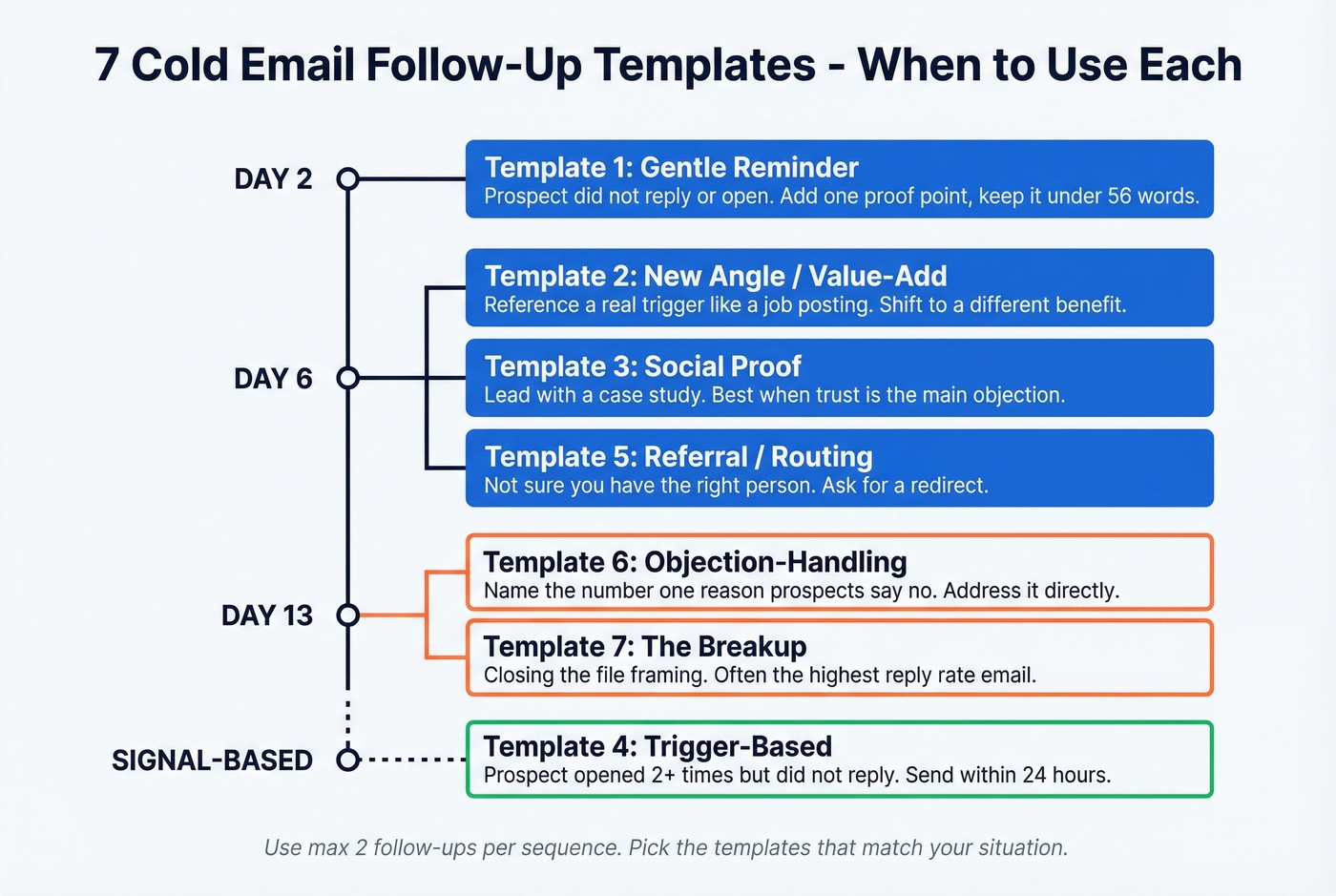
- Grab the 7 templates below, organized by scenario and cadence position - including a first follow up email template you can send on day two.
Verify every email before it enters your sequence. Prospeo's free tier handles 75 verifications per month - enough to test whether your list is the real bottleneck. (More on email bounce rate benchmarks if you want targets.)
The Deliverability Checklist
If your emails aren't reaching the inbox, the world's best follow-up copy is irrelevant. Here's the non-negotiable baseline.
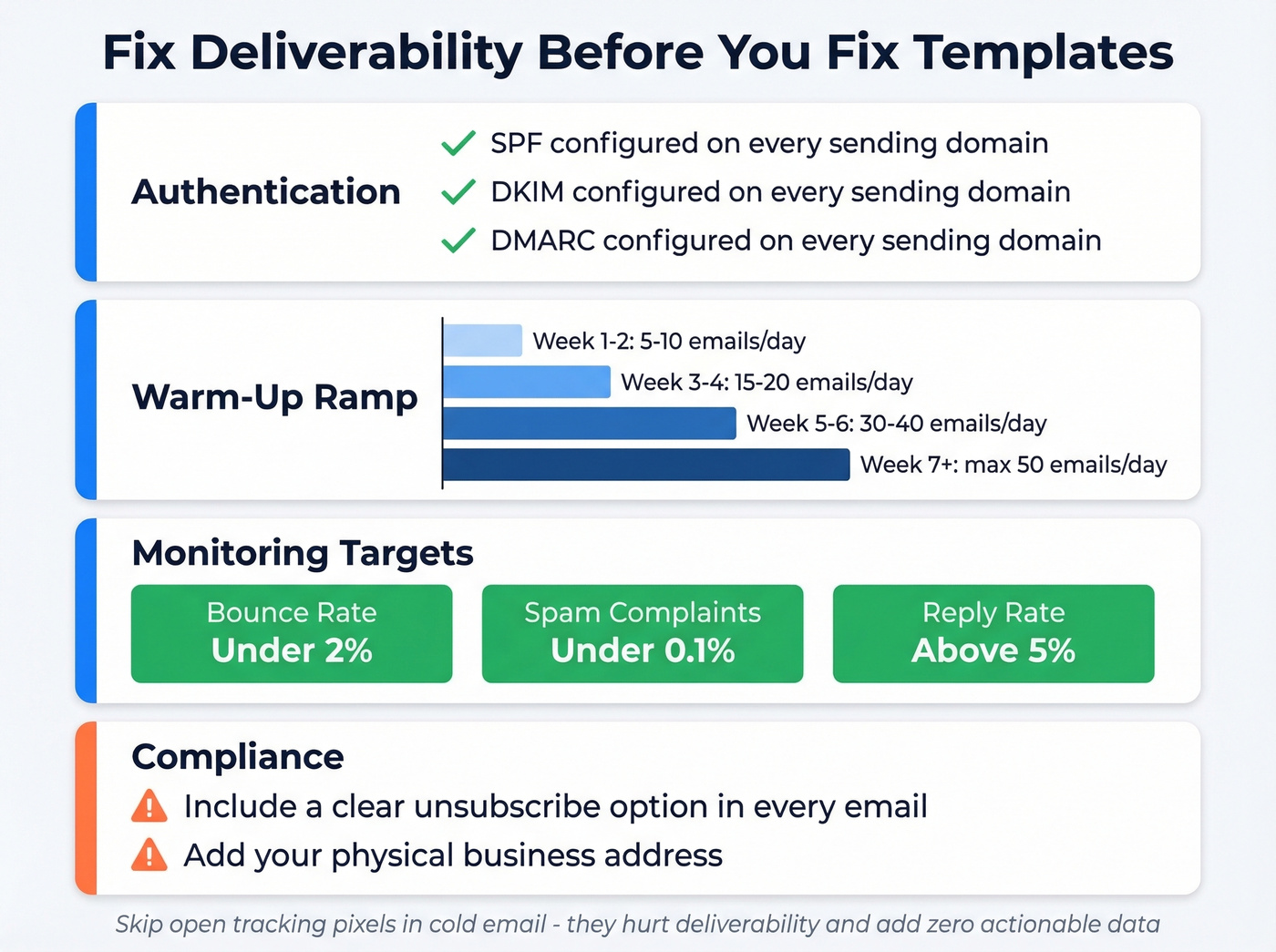
Authentication. SPF, DKIM, and DMARC configured on every sending domain. No exceptions. If you don't know what these are, stop reading and go set them up - your domain registrar can walk you through it in 20 minutes. (If you're troubleshooting alignment, see DMARC alignment.)
Warm-up ramp. Don't blast 50 emails from a fresh inbox on day one. (Related: safe email velocity limits.)
| Week | Emails/Day per Inbox |
|---|---|
| 1-2 | 5-10 |
| 3-4 | 15-20 |
| 5-6 | 30-40 |
| 7+ | Max 50 |
Conservative operators cap even lower - 10-15 per inbox - to maximize reputation protection.
Monitoring targets. Keep bounce rate under 2%, spam complaints under 0.1%, and aim for 5%+ reply rate. If any of these slip, pause and diagnose before sending more. (Tools help here - see email reputation tools.)
Compliance. Include a clear way to unsubscribe in every email. Add your physical business address too. (If you're unsure where the line is, read Is It Illegal to Buy Email Lists?.)
A practitioner on r/coldemail shared their scaling math: 7 domains, 2-3 inboxes per domain, max 26 emails per day per domain - roughly 180 emails/day total with headroom to protect reputation. They run warm-up continuously, not just during ramp. Also skip open tracking pixels in cold email. They hurt deliverability and add zero actionable data. Track replies instead. (If you want the technical why, see email tracking pixels.)
Your List Is the Problem
Here's the pattern we see over and over: a team blames their templates when the real issue is a 10%+ bounce rate quietly destroying their sender reputation.
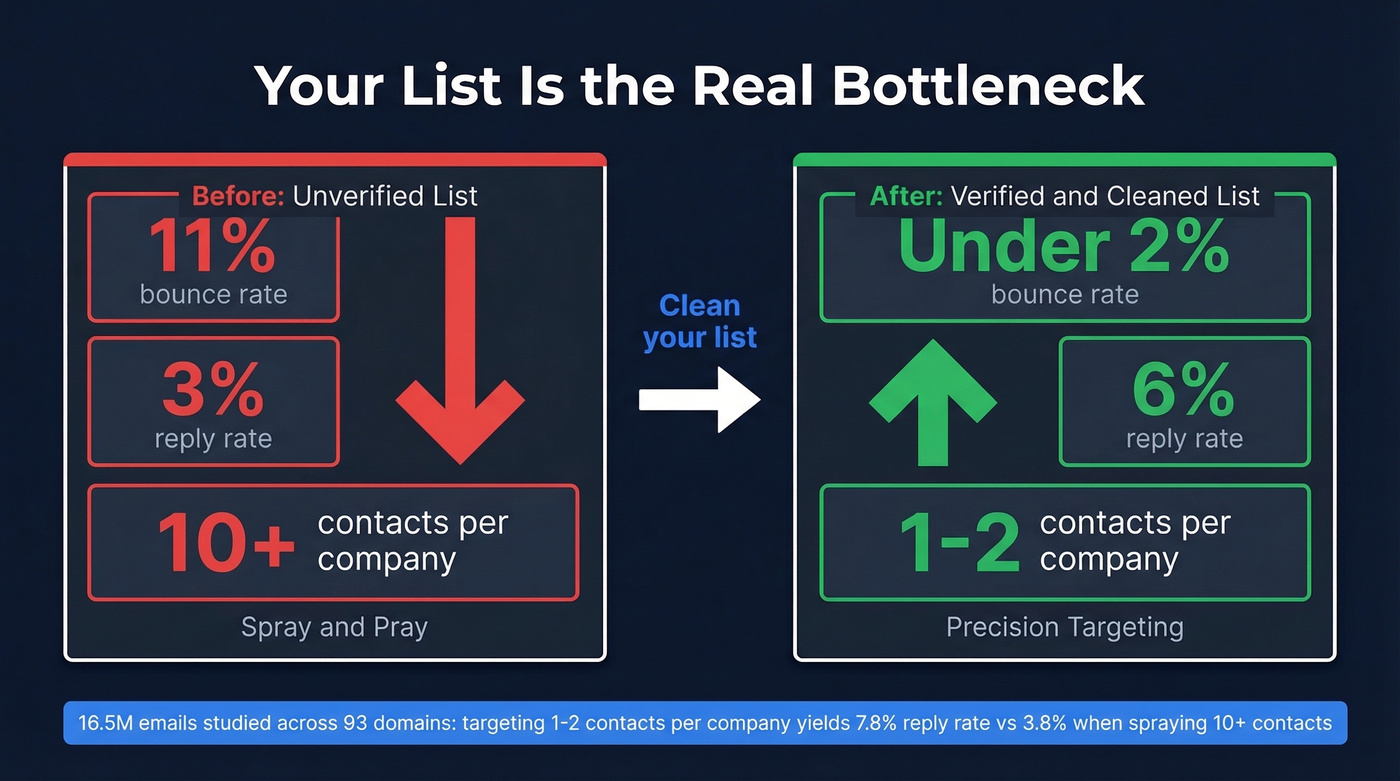
One Reddit practitioner documented their rebuild from 3% to 6% reply rate. They'd watched replies fall from 8% to 3% over 18 months. After switching to manually verified contacts and cleaning their list, bounce rate dropped from 11% to under 2% - and replies climbed back.
A 16.5M-email study across 93 domains confirmed this at scale: emailing 1-2 contacts per company yielded a 7.8% reply rate, while spraying 10+ contacts at the same company dropped replies to 3.8%. Precision beats volume every time.
Before a single follow-up fires, run your list through a verification tool that catches invalid addresses, spam traps, and catch-all domains. Prospeo's 5-step verification delivers 98% email accuracy, and the free tier gives you 75 verifications per month to test the difference yourself. (If you're still building lists, start with how to generate an email list.)

Your follow-up cadence is only as good as your list. Prospeo's 5-step verification catches invalid addresses, spam traps, and catch-all domains before they tank your sender reputation - delivering 98% email accuracy on every send.
Fix your bounce rate before you fix your templates.
Follow-Up Timing and Cadence
Stop sending 7-step sequences. Three emails total is the sweet spot in 2026: one initial email plus two follow-ups.
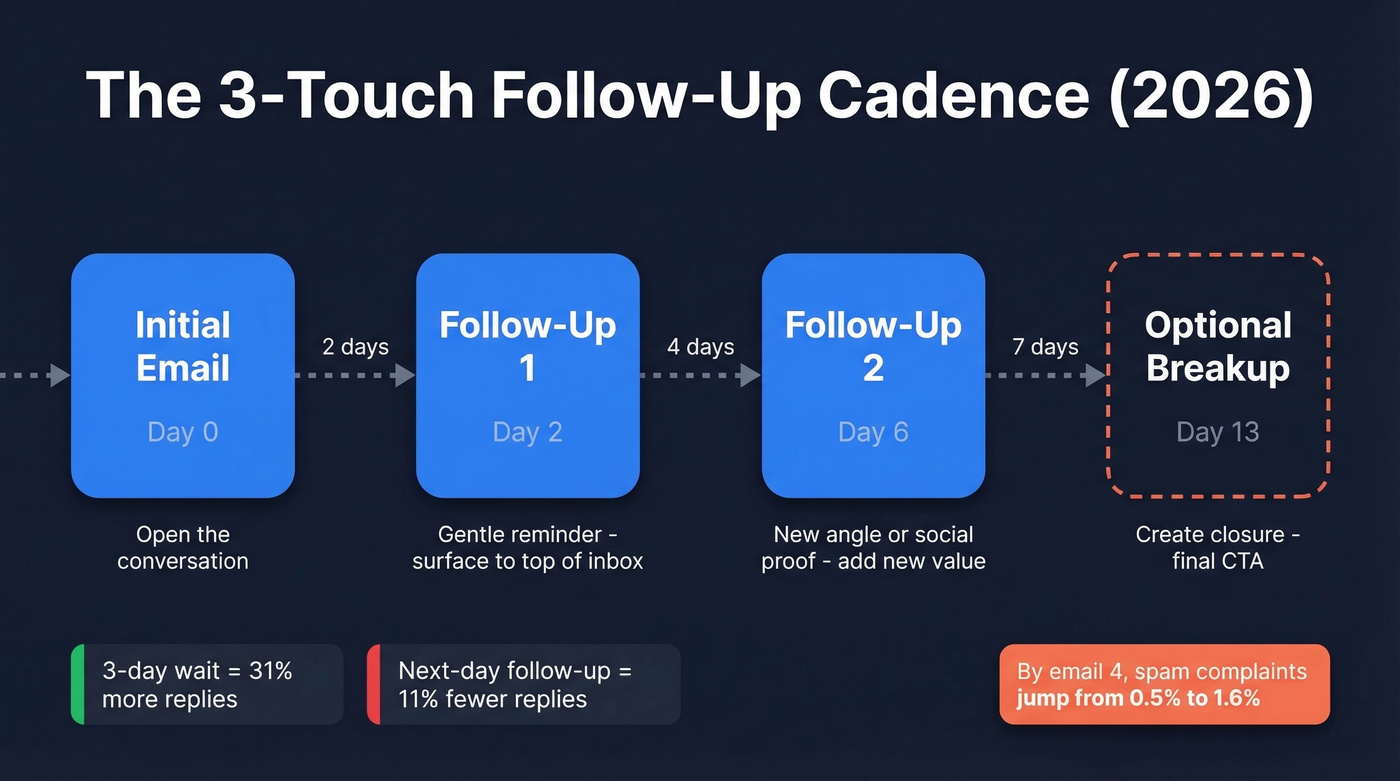
The 16.5M-email dataset is clear on this - adding a third email can drop replies by up to 20%, and by email four, spam complaints jump from 0.5% to 1.6%. One practitioner tested a 4-step cadence on 300 leads and pulled an 8% reply rate with a 2.33% meeting conversion, but they had pristine lists and conservative volume. For most teams, three touches is the ceiling before diminishing returns hit hard.
| Touch | Day | Template Type | Goal |
|---|---|---|---|
| Initial email | Day 0 | - | Open the conversation |
| Follow-up 1 | Day 2 | Gentle reminder | Surface to top of inbox |
| Follow-up 2 | Day 6 | New angle / social proof | Add new value |
| Optional breakup | Day 13 | Breakup | Create closure, final CTA |
The spacing matters. Instantly's research shows next-day follow-ups reduce replies by 11%, while waiting three days produces a 31% increase. Graduated spacing - 2, 4, 7 days between touches - looks human. Static every-two-day spacing looks automated, because it is. (More data in when should I follow up on an email.)
For send timing, stick to Tuesday through Thursday, 8-11 AM in the recipient's local timezone. Thursday pulls the highest reply rate at 6.87%. Evenings (8-11 PM) also perform well at 6.52% if your audience checks email after hours. (See best time to send cold emails.)
Graduated spacing and tight copy won't save a follow-up sent to a dead inbox. Prospeo refreshes 300M+ contacts every 7 days - not every 6 weeks - so the emails in your sequence actually reach real people at ~$0.01 each.
Send follow-ups to verified contacts or don't send them at all.
How to Write Follow-Ups That Earn Replies
The best-performing cold emails run 6-8 sentences and stay under 200 words, producing a 6.9% reply rate. That Reddit practitioner who doubled their replies cut email length from 141 words to under 56. Reply in the same thread for context, but modify the subject line slightly - personalized subject lines increase response rates by 30.5%, and the sweet spot is 36-50 characters. (If you want options, pull from these email subject line examples.)
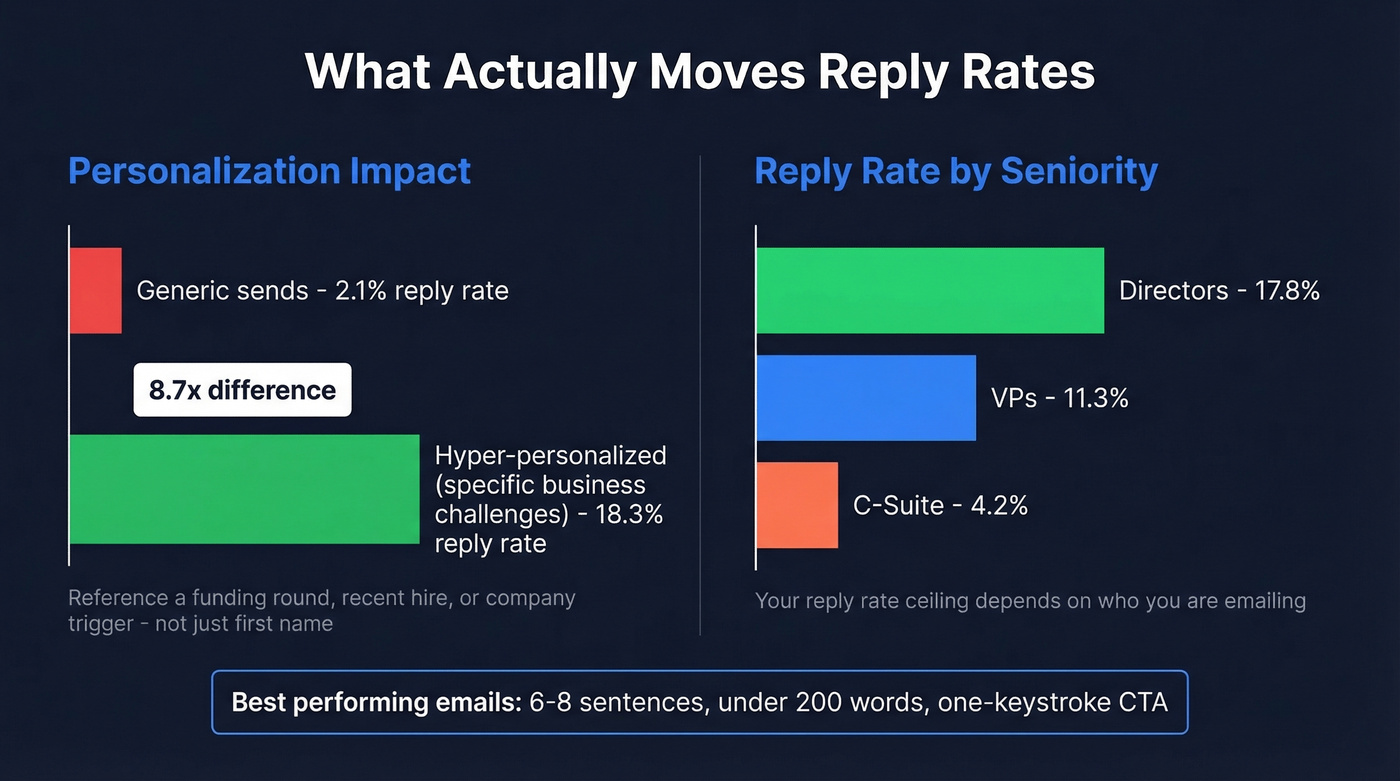
Personalize beyond {{FirstName}}. Reference a company trigger, a recent hire, a funding round. Hyper-personalized emails mentioning specific business challenges pull 18.3% reply rates versus 2.1% for generic sends - an 8.7x difference. (More frameworks in personalized outreach.)
Here's the thing: if your average deal size is under five figures, you probably don't need hyper-personalization on every email. Batch your top 20% of prospects for deep personalization and run lighter templates for the rest. Perfectionism kills pipeline velocity.
Your reply rate ceiling also depends on who you're emailing. Directors respond at 17.8%, VPs at 11.3%, but C-suite drops to 4.2%. If you're burning follow-ups on CEOs at enterprise companies, your reply rate will look terrible regardless of copy quality.
One thing most templates get wrong: the CTA. Don't ask for a 30-minute call. Ask for a one-keystroke reply. "Worth a look?" converts better than "Would you be available for a brief call next Tuesday or Wednesday?" (More patterns in email call to action.)
7 Templates You Can Copy Today
Template 1: The Gentle Reminder (Day 2)
First follow-up. Prospect hasn't opened or opened but didn't reply. This is the first follow up email template most teams need.
Subject: Re: [original subject - slightly modified]
Hi {{FirstName}},
Wanted to make sure this didn't get buried. We helped {{similar_company}} cut their {{pain_point}} by {{specific_metric}} last quarter.
If that's relevant to what {{company}} is working on, happy to share how. If not, no worries at all.
{{Your name}}
This adds one new proof point instead of just "bumping." Under 56 words. Low-pressure CTA. For a one-keystroke variant, swap the last line for: "Relevant? (1 = yes, 2 = bad timing)"
Template 2: New Angle / Value-Add (Day 6)
Second follow-up. Shifts the conversation to a different benefit by referencing a real trigger like a job posting.
Subject: Re: [modified subject]
Hi {{FirstName}},
Different angle - {{company}}'s {{department}} is growing (saw you posted {{role}} recently). Teams scaling that fast usually hit {{specific_problem}}.
We built {{feature/solution}} specifically for that. Takes about 10 minutes to see if it fits.
Want me to send a 2-minute walkthrough?
{{Your name}}
Pull the job posting URL and paste it into your CRM's trigger field. When the prospect sees you referenced something specific and current, you immediately separate yourself from the "just checking in" crowd.
Template 3: Social Proof (Day 6 Alternate)
Swap with the New Angle template when your strongest asset is a case study. This one addresses the "don't trust you" objection head-on.
Subject: Re: [modified subject]
Hi {{FirstName}},
{{Similar_company}} was dealing with {{same_pain_point}} - their team was spending {{X hours/week}} on it. After switching to {{your solution}}, they {{specific_result}} in {{timeframe}}.
Figured it might be relevant since {{company}} is in a similar spot with {{trigger}}.
Worth a quick look?
{{Your name}}
Template 4: Trigger-Based (Engagement Signal)
Prospect opened your email 2+ times but didn't reply. Send within 24 hours of the engagement signal. Skip this template if you don't have reliable engagement tracking - guessing wrong feels invasive.
Subject: Re: [modified subject]
Hi {{FirstName}},
Looks like {{topic_of_original_email}} is on your radar. Totally get that timing matters more than interest sometimes.
If it'd help, I can send over a one-page breakdown of how {{similar_company}} handled {{specific_challenge}}. No call needed.
{{Your name}}
Template 5: Referral / Routing (Day 6 Alternate)
Use when you're unsure you've reached the right person. People are more willing to redirect than to engage - and the redirect often lands you a warm intro.
Subject: Quick question about {{company}}
Hi {{FirstName}},
I might be reaching the wrong person on this. We help {{type_of_team}} at companies like {{similar_company}} with {{outcome}}.
If that's not your area, could you point me to whoever handles {{function}}? Appreciate it either way.
{{Your name}}
Template 6: Objection-Handling (Day 13)
Before sending this one, ask yourself: what's the #1 reason prospects say no? Name that objection in the first line. Here's what it looks like when the objection is "we already have a tool":
Subject: Re: [modified subject]
Hi {{FirstName}},
Most {{role}}s I talk to say the same thing: "We've already got something for that." Fair.
The difference is {{specific_differentiator}}. {{Similar_company}} switched from {{competitor/status_quo}} and saw {{metric}} in {{timeframe}}.
If you're locked in, totally understand. But if there's even a 10% chance you're evaluating options this quarter, this is worth 5 minutes.
{{Your name}}
Template 7: The Breakup (Day 13 Alternate)
Often the email with the highest reply rate. The "closing the file" framing triggers loss aversion - people respond to things being taken away more than things being offered.
Subject: Should I close your file?
Hi {{FirstName}},
I've reached out a couple times about {{topic}} and haven't heard back - totally fine, I know you're busy.
I'll assume the timing isn't right and close this out. If anything changes, just reply to this thread and I'll pick it right back up.
All the best, {{Your name}}
5 Mistakes Killing Your Replies
"Just bumping this" with no new value. Every follow-up needs to earn its place in the inbox with new information.
Bad: "Hi Sarah, just wanted to bump this to the top of your inbox." Good: "Hi Sarah, since I last reached out, we published a case study on how {{similar_company}} reduced churn by 18%. Thought it might be relevant."
Ignoring objections. If your prospect hasn't replied, they have a reason. Your follow-up should address one objection category per email: no need, too expensive, no urgency, don't want it, or don't trust you.
Over-designed HTML emails. Plain text looks real. HTML templates with headers, images, and styled buttons scream "marketing email" and trigger spam filters. We've tested this across dozens of campaigns - plain text wins every time for cold outreach.
Static spacing. Sending every two days looks automated because it is. Graduated spacing (2, 4, 7 days) mimics how a real person follows up.
Generic personalization. {{FirstName}} isn't personalization anymore. Reference a specific trigger - a funding round, a job posting, a conference talk. That's what separates a 2% reply rate from an 18% one.
AI Personalization at Scale
The gap between generic and hyper-personalized cold email is massive: 18.3% vs 2.1% reply rates. Here's how to close it without spending 10 minutes per prospect.
Create two custom CRM fields: prospect_trigger and custom_first_line. Scrape recent content from professional profiles - posts, articles, company announcements. Feed the trigger into GPT-4o mini with a prompt that generates a personalized first line referencing their specific situation, then export the CSV with {{custom_first_line}} as a merge field into your sequence tool.
In our experience, teams running this workflow see roughly 3x the response rates of their old approach. To fuel it, enrich your prospect list with 50+ data points per contact using an enrichment API - company triggers, tech stack, headcount growth, and funding data give the AI something real to work with. (If you're shopping options, compare data enrichment services.)
Your Follow-Up Stack (What It Costs)
You don't need a $40k/year platform to run effective follow-ups.
| Component | Tool | Monthly Cost |
|---|---|---|
| List verification | Prospeo | Free or ~$0.01/email |
| Sequencing | Instantly ($30) / Smartlead (~$39) / Lemlist ($55) | $30-$55/mo |
| Domains + inboxes | Google Workspace / M365 | ~$6-$12/inbox/mo |
| Total | ~$100-$150/mo for a small setup |
That Reddit practitioner spending $420/month on their full stack generates 16 qualified leads per month. Compare that to the cost of burning a domain and rebuilding sender reputation from scratch.
Every cold email follow up template in this guide assumes your data is clean and your infrastructure is solid. Nail those two things first, then let the templates do their job.
FAQ
How many follow-up emails should I send?
Three total - one initial email plus two follow-ups. The 16.5M-email study shows a third follow-up can drop replies by up to 20%, and spam complaints jump from 0.5% to 1.6% by email four. Push to a fourth touch only with fully verified lists and exceptional deliverability.
What's the best day and time to send a follow-up?
Tuesday through Thursday, 8-11 AM in the recipient's local timezone. Thursday pulls the highest reply rate at 6.87%. Evenings (8-11 PM) also perform well at 6.52%. Avoid Mondays (inbox overload) and Fridays (mentally checked out).
Should I change the subject line in follow-ups?
Reply in the same thread but modify the subject line slightly. Personalized subject lines boost response rates by 30.5%, with 36-50 characters producing a 24.6% lift over shorter alternatives. Never use "Following up" - it signals a mass sequence.
How do I verify emails before sending follow-ups?
Run your list through a verification tool that checks for invalid addresses, spam traps, and catch-all domains. The free tier on most verification platforms is enough to test whether bad data is tanking your replies - start there before committing to a paid plan.