

Cold Email Templates That Actually Get Executives to Reply
A RevOps lead we work with ran a 10,000-email campaign targeting VPs and C-suite last quarter. Beautiful copy. Tight sequences. The bounce rate hit 38%, and their domain got flagged before a single executive read a word.
Stop optimizing your email copy. Start optimizing your data.
Here's the reality: only 8% of cold emails to executives generate a meaningful response. Executives decide to read, forward, or delete within 3 seconds - and 73% of those decisions happen on a phone screen. A 16.5-million-email study puts the overall cold email reply rate at 5.8%, down 15% year-over-year. For executive-specific outreach, expect worse.
Most cold email templates for executives hand you a generic swipe file and call it a day. That's useless when a CFO and a CTO have completely different priorities, different triggers, and different reasons to hit reply. What follows is role-specific, data-backed, and built around the math that actually drives replies.
The Short Version
- 50-90 words, one idea, one ask. Executives decide in 3 seconds on a phone screen. Anything longer gets skimmed or deleted.
- Personalized subject lines double your reply rate. A 5.5-million-email study shows 7% reply with personalization vs. 3% without. Keep subject lines to 2-4 words.
- None of this matters if your emails bounce. A 35% bounce rate will destroy your sender reputation before any executive reads your subject line. Verify every address before you send.
The Pre-Send Checklist
Data quality is the #1 cold email problem nobody talks about. You can write the perfect 70-word email to a CFO, nail the subject line, time it for Thursday evening - and none of it matters if the address is dead. We've seen this kill campaigns over and over.
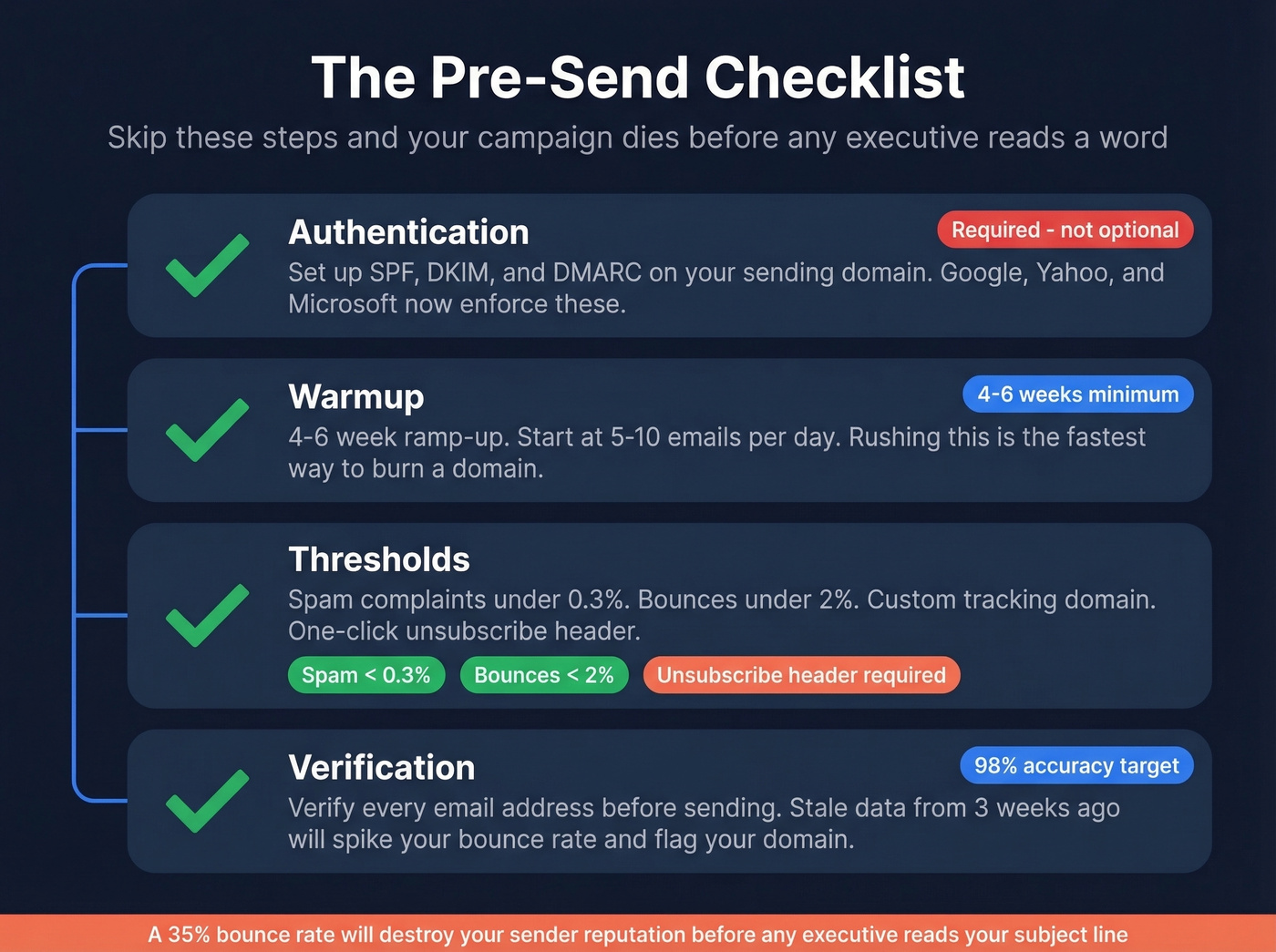
Authentication. Set up SPF, DKIM, and DMARC on your sending domain. Google and Yahoo now enforce these for bulk senders, with Microsoft joining these requirements. Without them, you're going straight to spam.
Warmup. Plan for a 4-6 week ramp-up. Start at 5-10 emails per day and increase gradually. Rushing this is the fastest way to burn a domain. (If you need options, compare email warmup tools.)
Thresholds. Keep spam complaints under 0.3% and bounces under 2%. Set up a custom tracking domain (CNAME) for your tracking links. Include a one-click unsubscribe header (RFC 8058) - it's not optional anymore. If you're troubleshooting, use an email deliverability guide and monitor email velocity.
Verification. This is the step most teams skip, and it's the one that costs them the most. Snyk had 50 AEs prospecting 4-6 hours per week with bounce rates running 35-40%. After switching to Prospeo for email verification, bounces dropped under 5% and AE-sourced pipeline jumped 180%. A 98% email accuracy rate and 7-day data refresh cycle mean you're not sending to addresses that went stale three weeks ago. The free tier gives you 75 verified emails per month - enough to test before committing. (More benchmarks and fixes: email bounce rate.)

Anatomy of an Executive Email
Every high-performing executive email follows the same six-part structure. Think of it as a framework, not a formula.
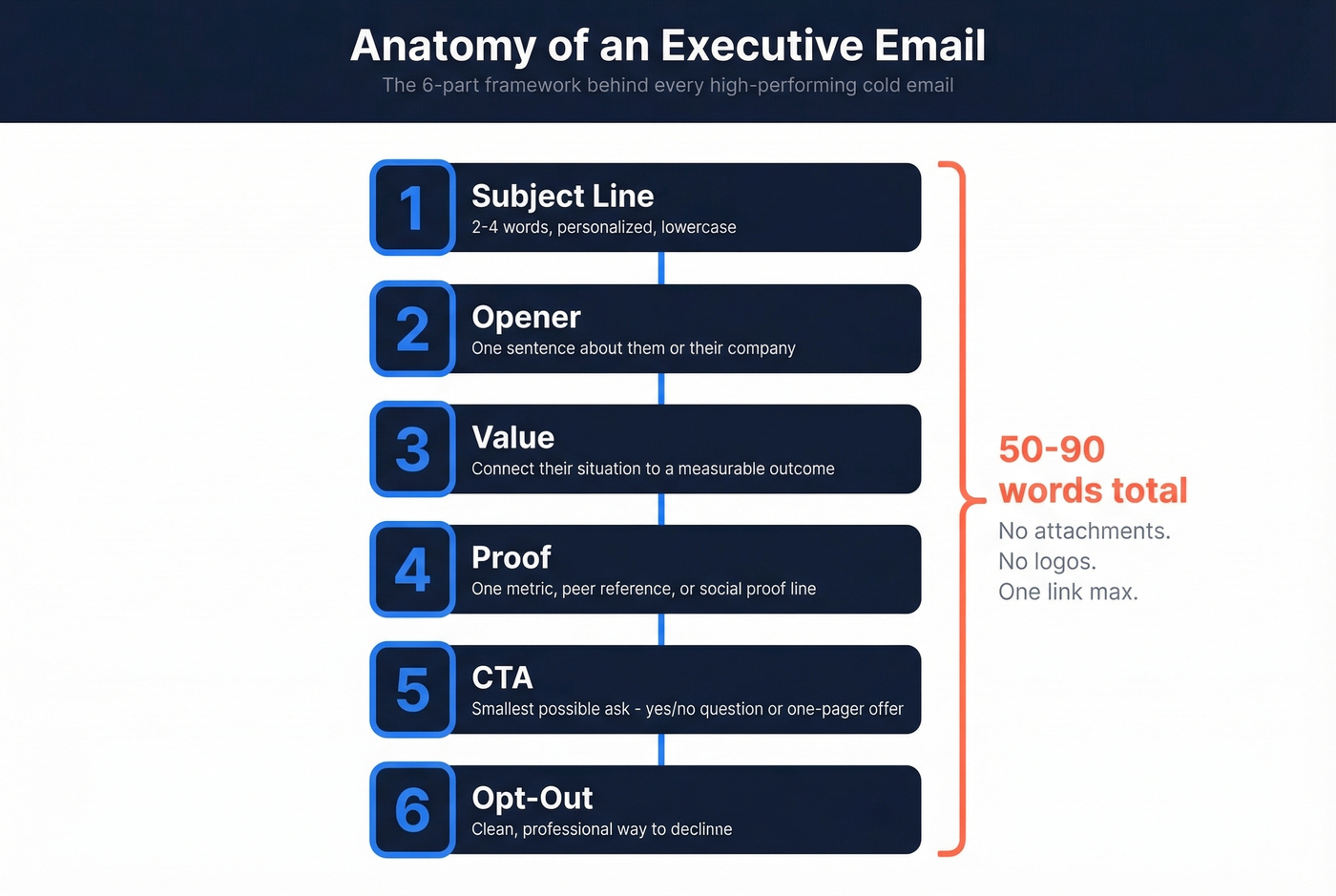
Subject line - 2-4 words, personalized, lowercase. Opener - one sentence referencing something specific about them or their company. Value - one sentence connecting their situation to a measurable outcome. Proof - one line of social proof, a metric, or a peer reference. CTA - the smallest possible commitment ask, like a yes/no question, a one-pager offer, or a referral request. Opt-out - a clean, professional way to decline.
The whole thing should land between 50 and 90 words. No attachments. No logos. One link maximum. CEOs receive 200-300+ emails daily and triage on mobile - your email needs to be scannable in a single thumb-scroll.
The "smallest commitment ask" is the piece most people get wrong. Don't ask for 30 minutes. Ask if it's worth sending a two-paragraph summary. Ask who owns this internally. The lower the friction, the higher the reply rate. (More on structuring asks: email call to action.)
Subject Lines That Get Executives to Open
The 5.5-million-email study makes this clear: 2-4 word subject lines hit a 46% open rate. Performance drops steadily after 7 words, bottoming out at 34% for 10-word subject lines. Separately - and this is a coincidence worth noting - personalized subject lines also hit 46% open rates vs. 35% without. Two different variables, same peak number. Both matter.
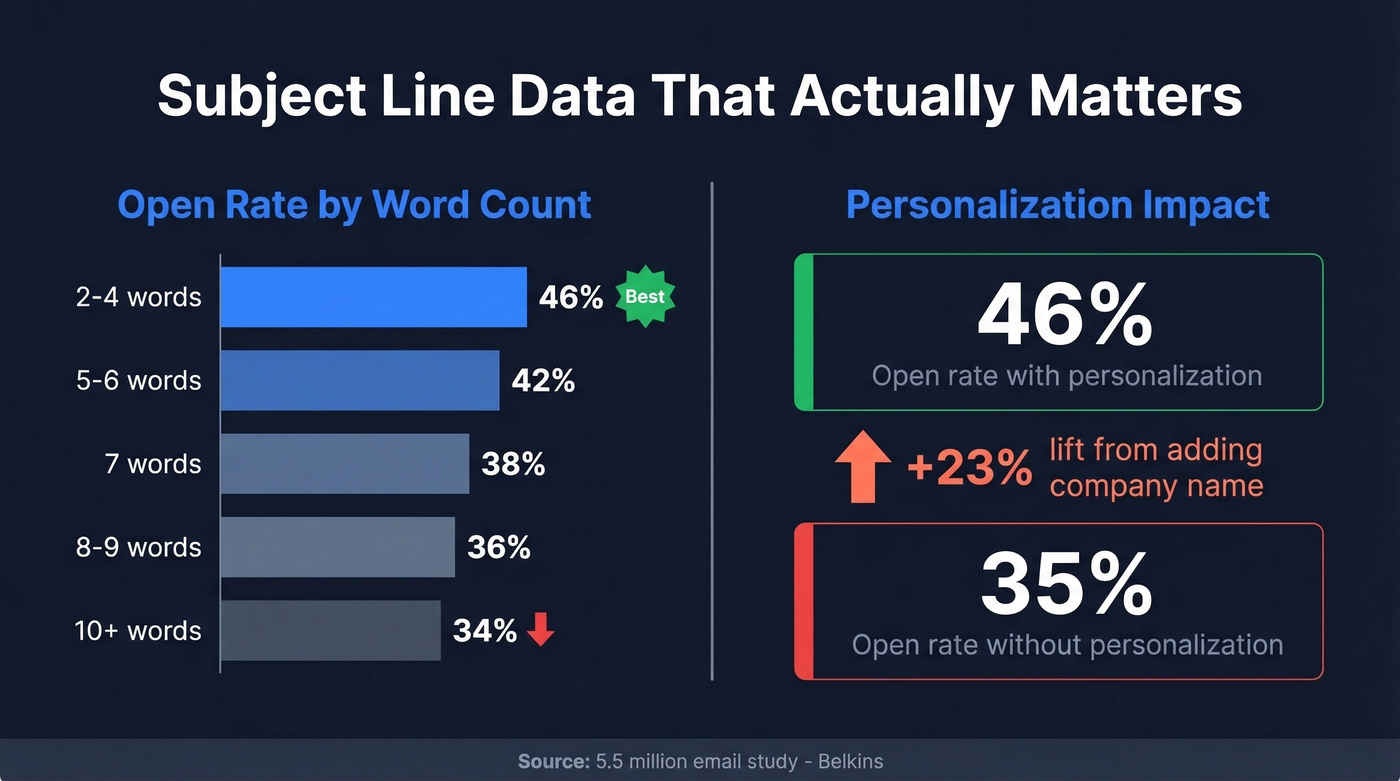
The single most actionable change? Drop {{company_name}} into your subject line. That one variable increases open rates by 23%. If you want more options, pull from subject line examples or a dedicated set of cold email subject line examples.
A subject line like "{{company_name}} pipeline gap" beats "Quick question" by a mile. Questions outperform statements as a format, also hitting 46% open rates. Jason Bay's 30MPC breakdown of 85M+ cold emails reinforces the short-is-better thesis and found that lowercase outperforms - though other datasets show ALL CAPS performing comparably. For executive outreach, go lowercase. Salesy formatting triggers the delete reflex.
Words that kill your open rate: "ASAP," "Hello, friend," and anything that smells like marketing hype push opens below 36%. Specificity signals that you did the work.

You just saw the data: a 38% bounce rate kills your domain before any executive reads your subject line. Prospeo's 98% email accuracy and 7-day data refresh mean every address you send to is current - not stale data from six weeks ago. Snyk cut bounces from 35% to under 5% and grew AE-sourced pipeline 180%.
Start with 75 free verified emails and protect your sender reputation.
7 Role-Specific Executive Templates
A template that works on a CTO will fall flat with a CFO. These are segmented by role because executives don't think in generic terms, and neither should your outreach.
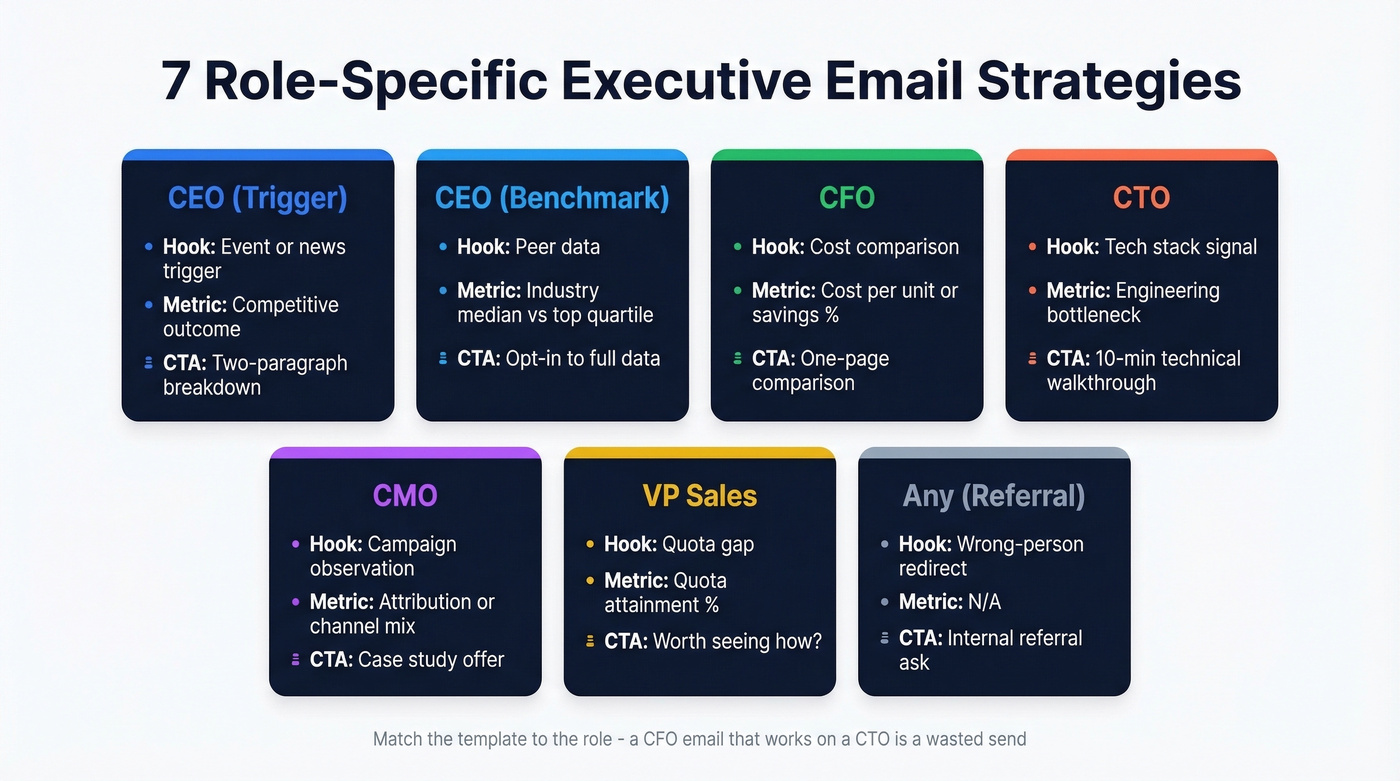
| Role | Hook Type | Key Metric to Reference | CTA Style |
|---|---|---|---|
| CEO (Trigger) | Event / news hook | Competitive outcome | Two-paragraph breakdown |
| CEO (Benchmark) | Peer data | Industry median vs. top quartile | Opt-in to full data |
| CFO | Cost comparison | Cost per unit / savings % | One-page comparison |
| CTO | Tech stack signal | Engineering bottleneck metric | 10-min technical walkthrough |
| CMO | Campaign observation | Attribution / channel mix | Case study offer |
| VP Sales | Quota gap | Quota attainment % | "Worth seeing how?" |
| Any (Referral) | Wrong-person redirect | N/A | Internal referral ask |
Cold Email to CEO Samples
Variant 1: Event/Trigger Hook
Use when: They just announced a funding round, product launch, or market expansion.
Subject: {{company_name}} expansion
{{first_name}}, saw the {{trigger - new market, product launch, funding round}} announcement. When {{competitor}} made a similar move, they ran into {{specific challenge your product solves}} within the first quarter.
We helped them {{quantified outcome}}. Worth a two-paragraph breakdown?
Variant 2: Peer Benchmark
Use when: You have industry data that creates competitive urgency.
Subject: {{industry}} benchmark data
{{first_name}}, we just published data on how {{industry}} companies are handling {{relevant challenge}}. {{competitor_or_peer}} is outperforming the median by {{X%}} on {{metric}}.
Happy to share the full breakdown if it's useful. No follow-up unless you reply.
CEOs care about strategic direction and competitive positioning. Referencing a peer or a market move signals you understand their world, not just your product. Each template follows the same anatomy - short opener, proof, low-friction CTA - but the trigger determines which variant you choose.
CFO Template
CFOs respond to one thing: quantified financial impact. Lead with a number, not a narrative. If you can't put a dollar figure in the first sentence, you don't have a CFO email - you have a generic pitch.
Use when: You can benchmark their cost per unit against industry data.
Subject: {{company_name}} cost per {{metric}}
{{first_name}}, companies your size in {{industry}} typically spend {{$X}} per {{unit - lead, hire, transaction}}. Our clients are running {{Y% lower}} after {{specific change}}.
Would a one-page cost comparison be useful, or is this the wrong priority right now?
CTO Template
Use when: Job postings or tech signals reveal their stack, and you solve a known scaling pain.
Subject: {{specific_tech}} at {{company_name}}
{{first_name}}, noticed your team's running {{technology/stack detail from job postings or tech signals}}. Most engineering orgs at your stage hit {{specific technical bottleneck}} around this point.
We solved this for {{similar company}} - cut {{metric}} by {{X%}}. Worth a 10-minute technical walkthrough?
CTOs respond to engineering-specific language, not marketing speak. Mentioning their actual stack proves you're not blasting a generic list. Skip this template entirely if you can't reference a real technology they use - guessing will get you deleted faster than a blank email.
CMO Template
Use when: You can observe their demand-gen channels from ads, content, or events.
Subject: {{company_name}} pipeline attribution
{{first_name}}, your demand-gen team is running {{channel or campaign type - visible from ads, content, events}}. Teams using a similar mix typically see {{X%}} of pipeline from {{underperforming channel}}.
We helped {{similar company}} shift that to {{improved metric}}. Want the case study?
Attribution is the word that gets CMOs to lean in. If you can tie your value to a pipeline number, you're speaking their language. CMO outreach works best when you reference observable campaign data rather than assumptions - it proves you did the homework before hitting send.
VP Sales Template
This one works because it calls out the quota gap without sounding like a motivational poster.
Use when: You solve a pipeline or productivity bottleneck for sales teams.
Subject: {{company_name}} quota attainment
{{first_name}}, most sales teams your size are hitting {{X%}} of quota this quarter. The gap usually comes from {{specific bottleneck - ramp time, data quality, connect rates}}.
{{Similar company}} closed that gap by {{X%}} in one quarter. Worth seeing how?
"Wrong Person" Referral Template
This template often gets forwarded - because you're asking for help, not selling. In our experience, it outperforms direct pitches about 40% of the time when you genuinely don't know the org chart.
Use when: You're unsure who owns the function internally, or you want a warm introduction.
Subject: quick question
{{first_name}}, I'm trying to reach whoever owns {{function - outbound data, infrastructure spend, demand gen}} at {{company_name}}. Not sure if that's you.
If it's someone else, would you mind pointing me in the right direction? Appreciate it either way.
Role-specific templates only work when they reach the right inbox. Prospeo gives you 143M+ verified executive emails with 30+ filters - search by job title, company size, funding stage, or buyer intent across 15,000 topics. Find the exact CFO, CTO, or VP of Sales your template was written for.
Stop writing perfect emails to dead addresses. Find verified executive contacts now.
Phrases That Get Your Email Deleted
These phrases signal generic outreach and low confidence. Delete them from every draft.
- "I know you're busy, but..." - They know they're busy. You're wasting their time acknowledging it.
- "Hope you're doing well!" - Filler. An executive has never replied because you hoped they were doing well.
- "Can I get 15 minutes of your time?" - Too big an ask from a stranger. Ask for a yes/no instead.
- "I just wanted to..." - "Just" minimizes your own message. If it's worth sending, own it.
- "Pick your brain" - Signals you want to take, not give.
- "Not sure if you saw my previous email..." - Passive-aggressive. They saw it. They chose not to reply.
- "Reaching out because..." - They can see you're reaching out. Skip the narration.
- "Would love to connect" - Vague. Connect about what? For what outcome?
- "Quick question" (in the body) - It's never quick, and they know it. Works fine as a subject line, though.
- "Thought leadership" - Nobody describes their own content this way in conversation.
Every one of these signals low confidence or generic outreach. Executives prefer direct, assertive language. Say what you want and why it matters to them.
Follow-Up Timing and Limits
The data on follow-ups is counterintuitive, and most sales teams get it wrong by sending too many. If you need copy, use these cold email follow-up templates and keep an eye on follow-up email reply rate.
The first follow-up can lift replies up to 49% - that's massive. But the returns decay fast. The third email produces 20% fewer responses than earlier touches. By the fifth email, response rates drop 55% and spam complaints triple from 0.5% to 1.6%. The consensus on r/sales echoes this: past four touches, you're just annoying people and burning your domain.
Some platforms recommend 7-9 touches for executives. The data doesn't support this. Three to four total touches is the sweet spot. If they haven't replied by then, switch channels.
Here's the thing: if your deal size is under $15k, you probably don't need more than three touches. The math doesn't work - the domain risk outweighs the marginal reply. Save the aggressive sequences for enterprise deals where one meeting justifies the sender reputation cost.
Thursday pulls the highest reply rate at 6.87%, while Monday is the worst at 5.29%. Evening sends between 8-11 PM hit a 6.52% reply rate - executives clear their inbox after the day winds down. Early morning windows of 6:30-8:30 AM local time and Sunday evenings also perform well. (More data: best time to send cold emails.)
One more number worth internalizing: emailing 1-2 contacts per company produces a 7.8% reply rate. Blast 10+ contacts at the same company and that drops to 3.8%. Precision beats volume every time.
How to Personalize at Scale
The best template in the world falls flat without personalization, and personalization doesn't scale if you're doing it manually. Here's a workflow that can drive ~3x response lift without spending hours per email.
First, build your list with tight targeting. Narrow by title, company size, tech stack, and buyer intent signals before you write a single word. Starting with a precise list means your personalization has a foundation - Prospeo's 30+ search filters handle this well, including intent data across 15,000 topics so you're reaching executives actively evaluating solutions in your category. (Related: firmographic filters and intent based segmentation.)
Next, set up two custom CRM fields: prospect_post and custom_message. Scrape a recent post or company announcement for each prospect and drop it into prospect_post. Use GPT-4o mini to generate a personalized first line referencing that post - store it in custom_message. Export as CSV, import to your cold email tool, and inject {{custom_message}} as your opening variable.
Personalization happens at the list-building stage, not the writing stage. Get the targeting and data right, and the copy almost writes itself.
The Templates Are the Easy Part
Let's be honest - every template above is a starting point. The real differentiator is the data underneath: verified addresses, accurate titles, fresh company signals. A 3% reply rate and an 8% reply rate usually come down to the same cold email templates for executives sent to a clean list vs. a stale one. We've tested this across dozens of campaigns, and the pattern holds every time.
FAQ
What reply rate should I expect from executive cold emails?
Expect a 3-5% reply rate with genuine interest signals from C-suite outreach. The 16.5M-email study puts overall cold email replies at 5.8%, and 8% meaningful responses is roughly the ceiling for executive-level campaigns. Anything above 5% means your targeting and messaging are working well.
How many follow-ups should I send to a C-suite prospect?
Three to four total touches maximum. The first follow-up lifts replies by 49%, but by the fifth email, responses drop 55% and spam complaints triple. If they haven't replied after four emails, switch to a different channel like a direct dial or social touch.
What's the best day and time to email executives?
Thursday pulls the highest reply rate at 6.87%, and Monday is the worst at 5.29%. Evening sends between 8-11 PM hit 6.52% because executives clear their inbox after hours. Early morning (6:30-8:30 AM local time) and Sunday evenings also perform well.
How long should a cold email to an executive be?
Between 50 and 90 words. Executives receive 200-300+ emails daily and triage on mobile. Your entire message needs to fit in a single thumb-scroll: one idea, one proof point, one ask.
What's the best free tool to verify executive email addresses?
Prospeo's free tier includes 75 verified emails per month with 98% accuracy and a 7-day data refresh cycle. That's enough to validate an executive list before launching a campaign. Most bounce-rate problems stem from skipping verification entirely, not from choosing the wrong paid plan.