

Cold Emails Going to Spam? How to Fix Every Cause
You're sending 50 emails a day from a warmed-up inbox, and your reply rate just cratered from 2% to nothing. You check Gmail - every message landed in spam. If your cold emails are going to spam, the frustrating part is that it's almost never the copy. It's the infrastructure underneath it.
Across 15 ESPs tested by EmailTooltester, the average deliverability rate sits at 83.1%. Roughly 1 in 6 emails never reaches the inbox - 10.5% hit spam, and 6.4% vanish entirely.
One practitioner on r/b2bmarketing documented reply rates dropping from 2.1% to 0.7% after scaling past 150K sends, burning through domains faster than they could warm new ones. In the same write-up, they described spending more time managing SPF records, inbox rotation, and warmup sequences than actually talking to prospects. That's deliverability fatigue, and it's the most common failure mode in outbound.
If your average deal size is under $10K, you probably don't need 500 emails a day. You need 30 good ones that actually land.
Fix in This Order
Most guides start with "avoid spam trigger words." That's the last thing you should worry about. Here's the priority stack that actually moves the needle:
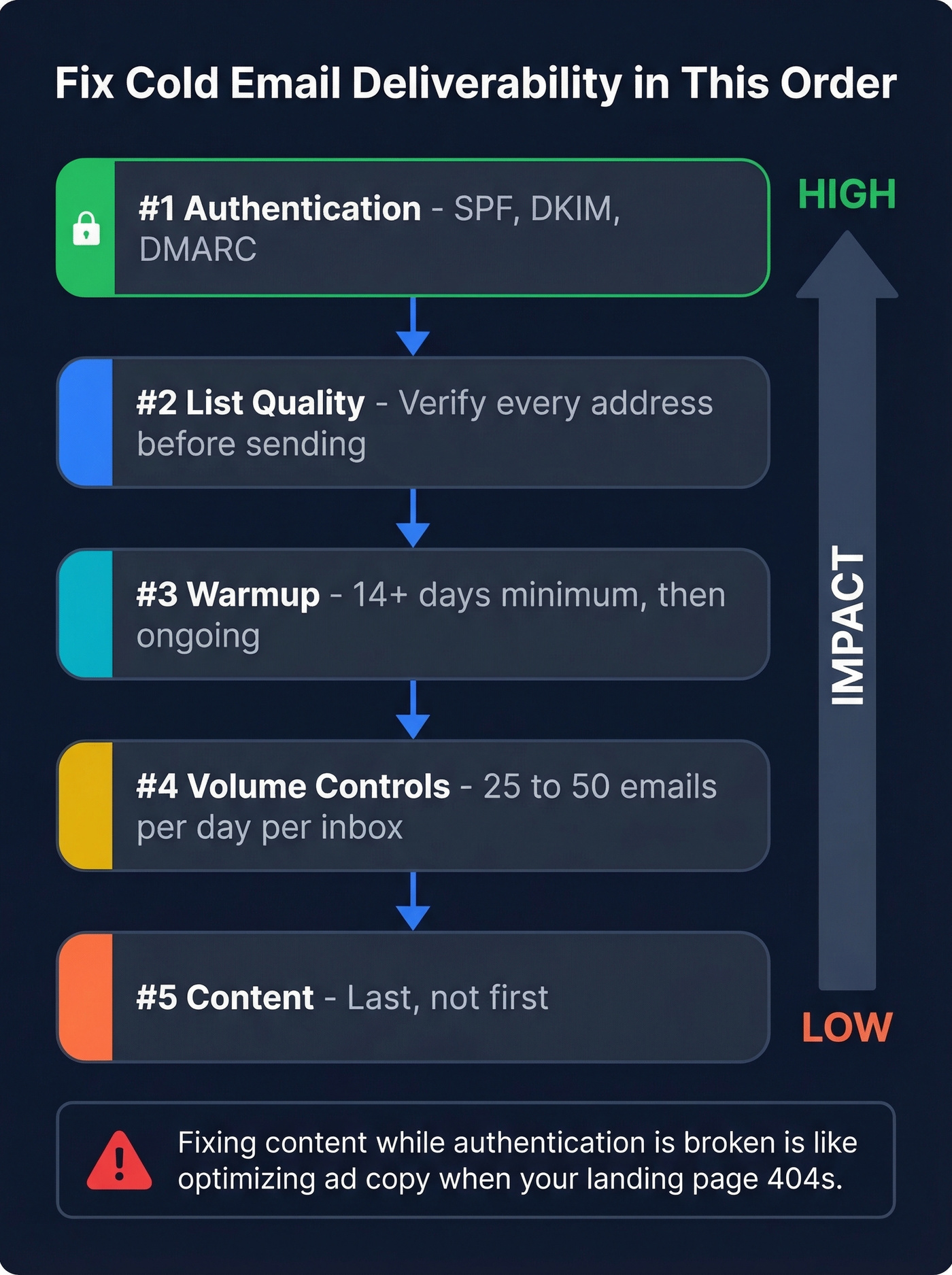
- Authentication - SPF, DKIM, DMARC
- List quality - verify every address before sending
- Warmup - 14+ days minimum, then ongoing
- Volume controls - 25-50 emails/day/inbox
- Content - last, not first
Work top to bottom. Fixing #5 while #1 is broken is like optimizing ad copy when your landing page 404s.
Inbox Placement Benchmarks
Not every inbox provider treats your email the same way.
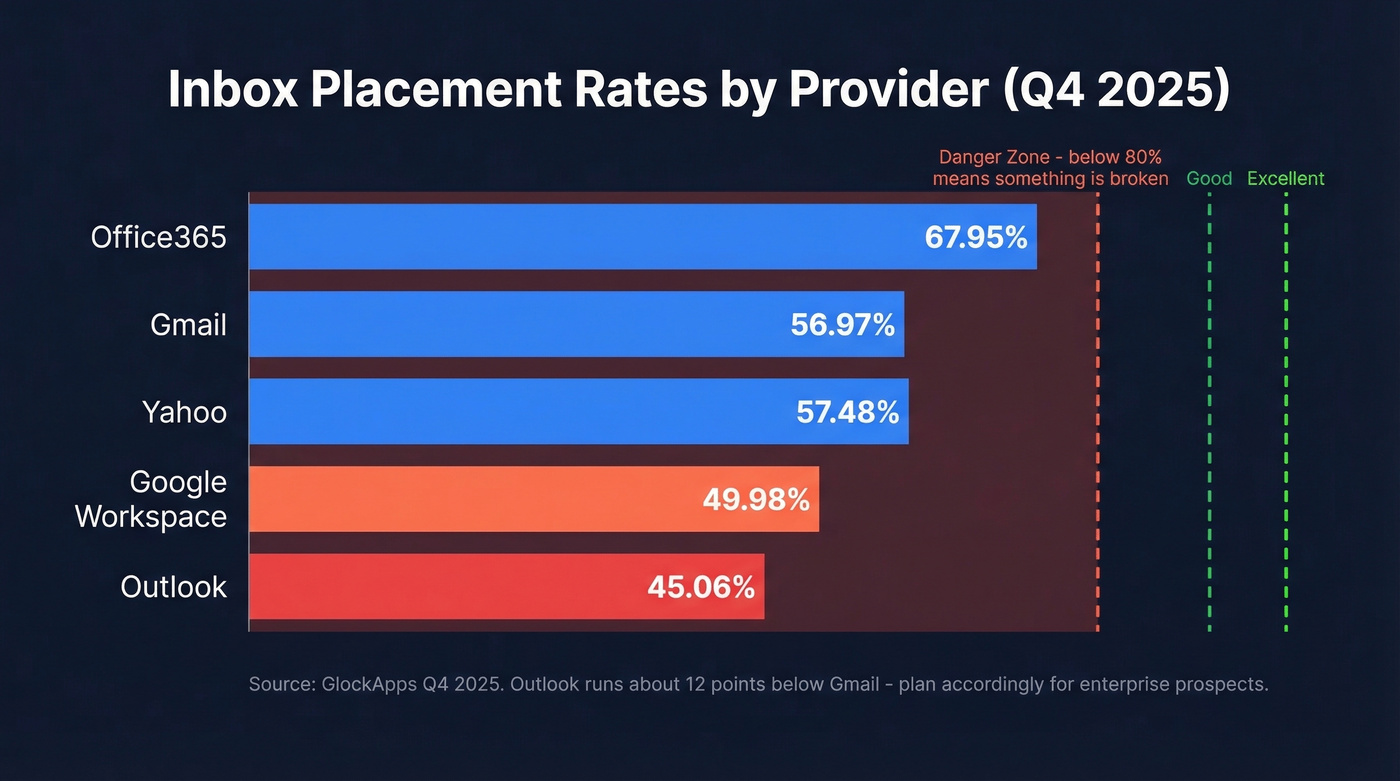
Provider-level inbox rates (GlockApps Q4 2025):
| Provider | Inbox Rate |
|---|---|
| Office365 | 67.95% |
| Gmail | 56.97% |
| Yahoo | 57.48% |
| Outlook | 45.06% |
| Google Workspace | 49.98% |
ISP-level deliverability (Validity, via EmailTooltester):
| ISP | Inbox | Spam | Missing |
|---|---|---|---|
| 89.8% | 6.4% | 3.8% | |
| Microsoft | 77.4% | 15.1% | 7.5% |
| Yahoo | 87.3% | 6.4% | 6.3% |
| Apple | 82.0% | 10.8% | 7.2% |
Above 89% is good, above 95% is excellent, and below 80% means something's broken. If you're prospecting into enterprise accounts heavy on Microsoft, expect tougher filtering - Outlook's inbox rate runs about 12 points below Gmail's in the GlockApps dataset.
Authentication: SPF, DKIM, DMARC
Without proper authentication, nothing else matters. ISPs treat unauthenticated mail as suspicious by default, and it's the top reason messages land in spam before a human ever sees them.
SPF tells receiving servers which IPs can send on behalf of your domain. The critical pitfall: SPF has a 10 DNS lookup limit. Every include: statement counts. If you're using multiple sending tools, you can blow past 10 lookups without realizing it - and SPF breaks entirely, treated as if you have no record at all. For cold email domains, use -all (hard fail). For examples and common pitfalls, see SPF records.
DKIM cryptographically signs your messages. Use 2048-bit keys, not 1024. Each sending service should have its own DKIM setup. If you need a quick checklist, use this guide on verify DKIM.
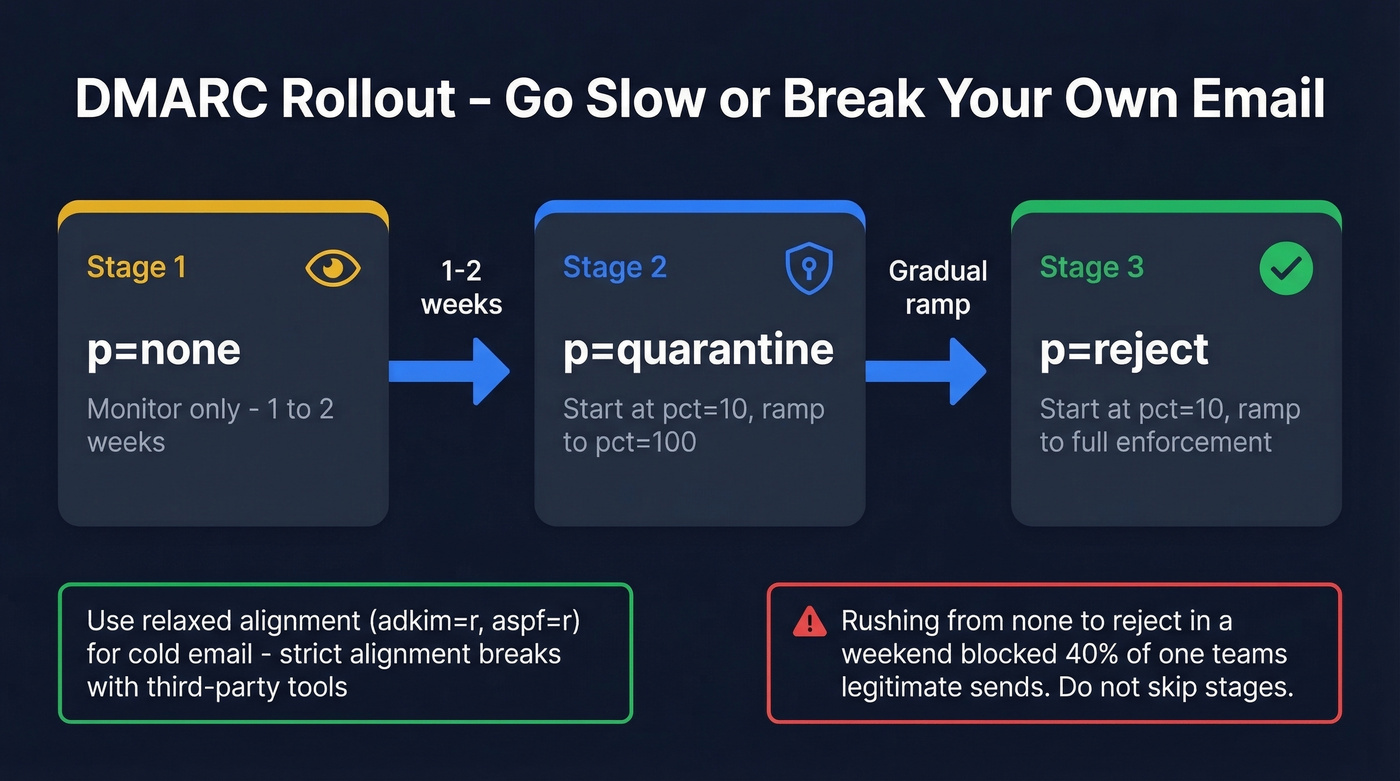
DMARC ties SPF and DKIM together. Roll it out in stages:
- Start with
p=nonefor 1-2 weeks of monitoring. - Move to
p=quarantinewithpct=10, ramping topct=100. - Graduate to
p=rejectwithpct=10, then ramp to full enforcement.
Use relaxed alignment (adkim=r; aspf=r) for cold email - strict alignment breaks when you're sending through third-party tools that use subdomains. For a deeper breakdown, read DMARC alignment. A thread on r/email_marketing documented a team that rushed from none to reject in a weekend and blocked 40% of their own legitimate sends. Don't be that team.
Gmail and Yahoo Bulk Sender Rules
Once you cross 5,000+ messages per day to personal Gmail accounts, Gmail treats you as a bulk sender going forward. The requirements:
- SPF + DKIM + DMARC alignment at minimum
p=none - One-click unsubscribe per RFC 8058, processed within 48 hours
- TLS encryption for all connections
- Spam complaint rate below 0.1% - hitting 0.3% triggers SMTP rejection codes:
4.7.xfor temporary rate limiting,5.7.xfor permanent blocks
These overlap with legal compliance requirements under CAN-SPAM, GDPR/PECR, and CASL on identification and opt-out rules.
Here's the thing: one spam complaint per 1,000 emails sounds like a lot of room. It isn't. If you're sending 50 emails/day from one inbox and a single recipient marks you as spam, you've already hit 2% for that day. The math gets unforgiving fast at low volumes. If you're unsure where you stand, use this bulk email threshold guide to interpret limits correctly.

Every bounced email chips away at your sender reputation. Prospeo's 5-step verification - with spam-trap removal, honeypot filtering, and catch-all handling - delivers 98% email accuracy. That's how teams keep hard bounces under 2% without manual list scrubbing.
Stop fixing deliverability problems your data provider caused.
List Hygiene: The Lever Most People Skip
Bad data is the silent deliverability killer. You can nail authentication, warm up for three weeks, and write perfect copy - then torch your sender reputation by emailing 200 addresses that bounce. Keep hard bounces under 2%. (Benchmarks and fixes: email bounce rate.)

Email verification works in three stages. Syntax validation confirms the address is formatted correctly. DNS lookup checks whether the domain accepts mail. SMTP handshake tests whether the specific mailbox exists. The best tools add layers on top of that, catching spam traps, honeypots, and catch-all domains that silently inflate your bounce risk.
| Tool | Accuracy | Per 1,000 | Free Tier | Best For |
|---|---|---|---|---|
| Prospeo | 98% | ~$10 | 75 emails/mo | Cold email teams needing spam-trap removal |
| Bouncer | 99.5% | $7 | 1,000 credits | Quick one-off list checks |
| NeverBounce | 99.9% | $8 | 1,000 credits | Highest claimed accuracy |
| ZeroBounce | 96-98% | $15 (2K min) | None | AI-powered scoring at scale |
| BriteVerify | 97% | $10 | None | Enterprise CRM integrations |
Verify every list before it touches your sequencer. Every time. No exceptions. If you're comparing vendors, start with these data enrichment services and email list providers.
Bad data is the #1 reason cold emails land in spam - not your subject line, not your copy. Prospeo refreshes every record on a 7-day cycle and verifies addresses through proprietary infrastructure, so you're never sending to dead mailboxes or spam traps.
Clean data at $0.01 per email beats rebuilding burned domains.
Domain Reputation and Warmup
Your domain has a reputation score with every major ISP, and it moves slowly in both directions. Building it takes weeks. Destroying it takes one bad campaign. For a full framework, see our guide on improve sender reputation.
Monitor with these tools:
- Google Postmaster Tools - domain reputation, spam rate, and authentication status with Gmail
- Microsoft SNDS - similar data for Outlook/Hotmail
- MXToolbox - check Spamhaus, Barracuda, SpamCop, and SURBL blacklists in one scan
- Spamhaus - the most consequential blacklist, and their official position is blunt: cold email at scale is unsolicited bulk email, period. If your sends hit their spam traps, you're a listing candidate. If that happens, follow a dedicated Spamhaus blacklist removal process.
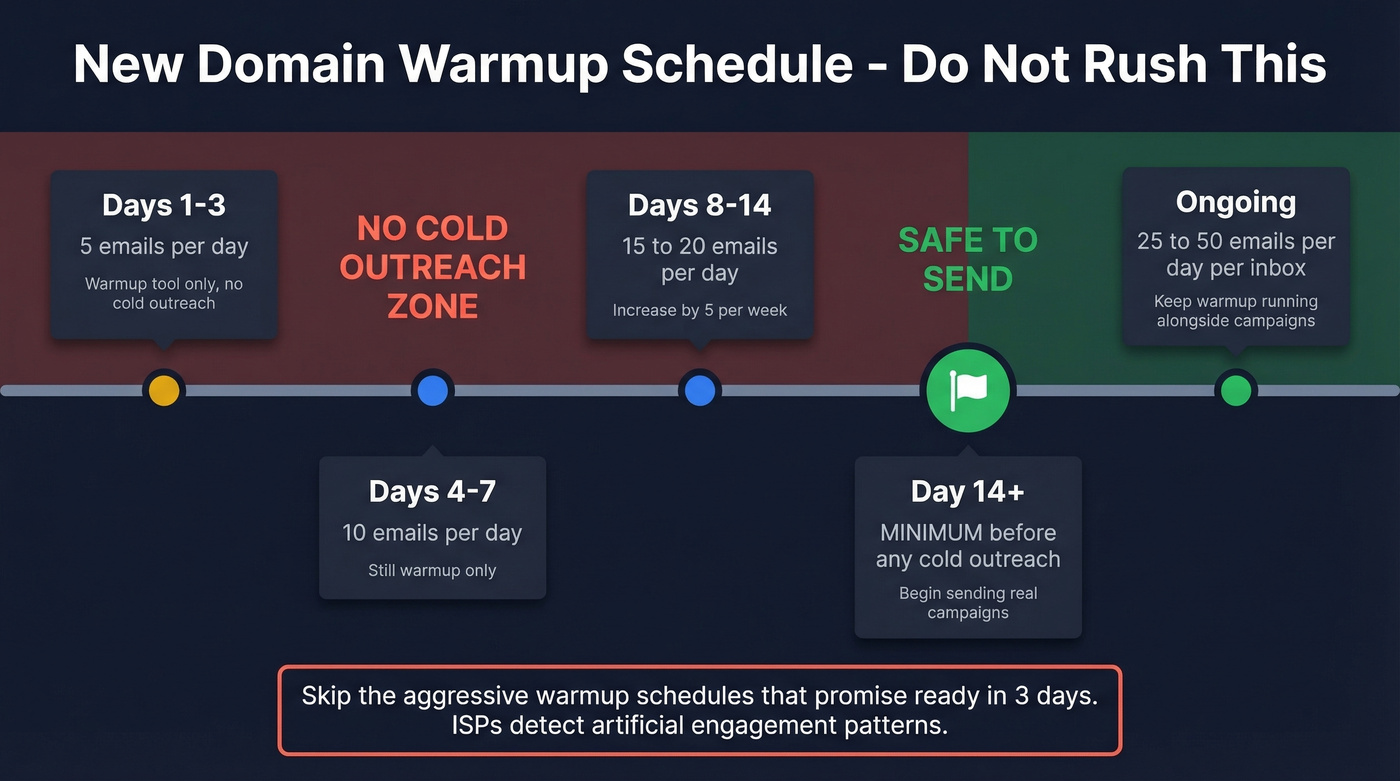
Warmup schedule for a new domain: Start with 5-10 emails per day. Increase by 5 per week. Don't rush - 14 days is the minimum before you send any cold outreach. After warmup, cap at 25-50 emails per day per inbox and keep warmup running continuously alongside your campaigns. Engagement signals like opens, replies, and messages moved to inbox are what build reputation. The moment you stop generating positive signals, reputation starts decaying. For sending-limit math and safe ramping, use this email velocity guide.
Skip the aggressive warmup schedules that promise "ready in 3 days." They don't work, and ISPs detect artificial engagement patterns. In our experience, some of the best-performing outbound teams cap at 3 total touches per prospect to protect domain health long-term. It's a contrarian approach, but it forces you to make every email count.
Content Mistakes That Trigger Spam Filters
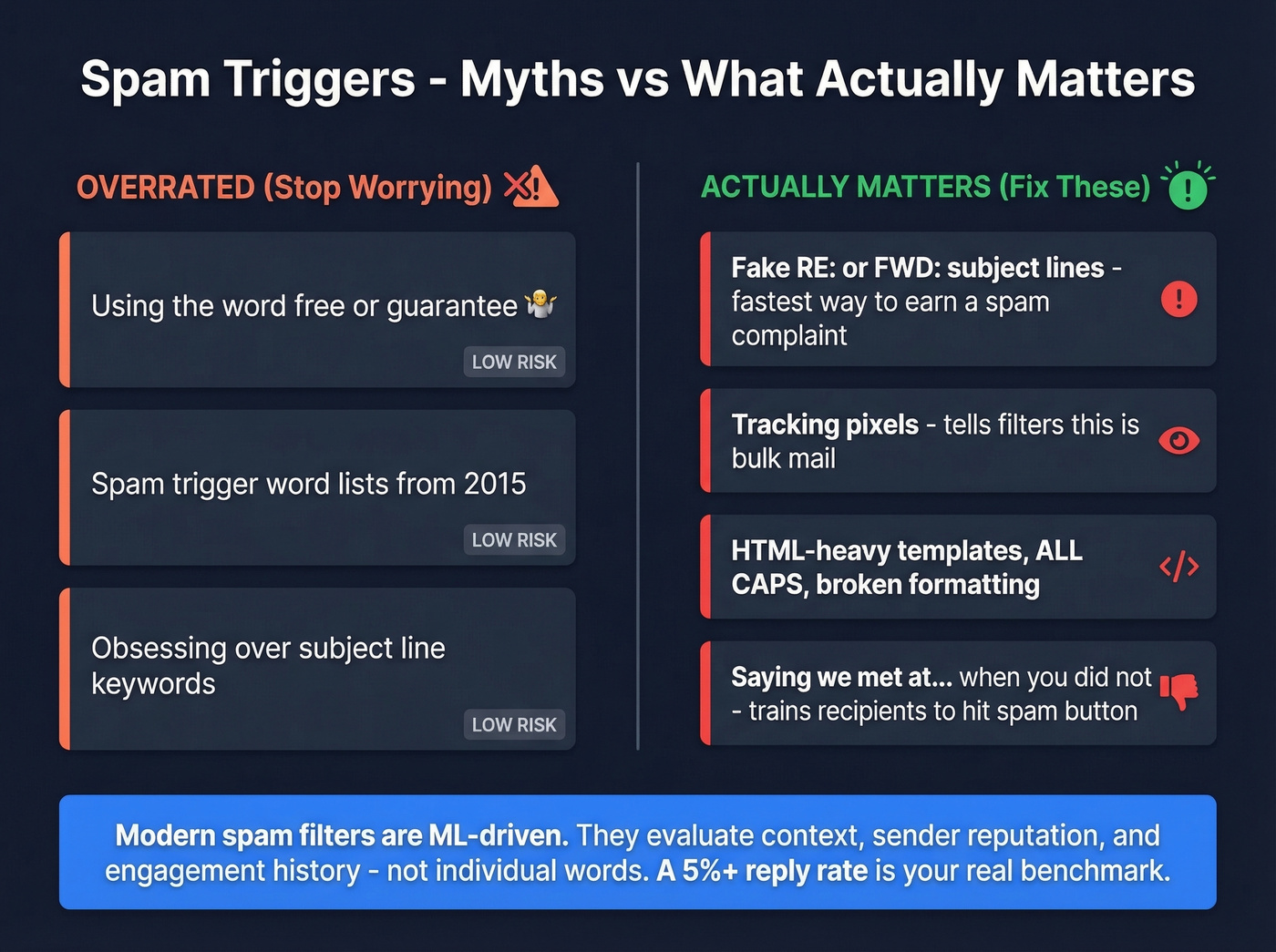
Real talk: spam trigger words are the most overrated deliverability concern in cold email. Modern spam filters are ML-driven. They evaluate context, sender reputation, engagement history, and behavioral patterns - a word like "free" or "guarantee" isn't going to tank your inbox placement on its own. It's a risk multiplier that matters when combined with poor authentication or low engagement.
What actually triggers spam reports and filters:
Fake familiarity and deceptive threading. Subject lines starting with "RE:" or "FWD:" when there's no prior conversation are the fastest way to earn a spam complaint. Same goes for "circling back" in a first touch, or openers like "We met at..." when you didn't. These tactics feel clever but they train recipients to hit the spam button, and every complaint counts against your domain. If you want safer patterns, borrow from these cold email follow-up templates.
Tracking pixels. Open-rate tracking embeds a tiny image that loads when someone opens your email. Spam filters detect these, and they add weight to the "this is bulk mail" signal. If your deliverability is fragile, turn off open tracking and measure replies instead. For the technical details, see email tracking pixels.
HTML-heavy templates. ALL CAPS subject lines, broken HTML, and image-heavy emails all trigger filters. Plain text wins for deliverability almost every time.
The goal is to make your outreach indistinguishable from a message a colleague would send internally - plain text, short, no tracking pixels, no HTML templates. Stop obsessing over spam words. Start obsessing over bounce rate and reply rate. A 5%+ reply rate is a strong benchmark to aim for.
Recovering a Damaged Domain
If your domain reputation is already damaged and outreach is landing in junk folders, here's the playbook:
- Pause all outbound immediately. Every email you send from a damaged domain makes it worse.
- Diagnose. Check Google Postmaster Tools for reputation status. Run MXToolbox for blacklist entries. Review bounce logs.
- Reduce to warmup-level volume - 5-10 emails/day when you resume.
- Re-warm for 14+ days. No shortcuts.
- Monitor for 2+ weeks before scaling. Watch complaint and bounce rates daily.
One rep's bad list can tank deliverability for the entire domain. Use separate cousin domains for outbound so damage stays contained. Some practitioners who hit deliverability fatigue shift to signal-based outreach entirely - one reported 12% reply rates after abandoning high-volume sends for social listening on professional networks.
Recovery takes weeks, not days. And before you send a single email from the recovering domain, verify every address. Spam traps and dead mailboxes are what warmup alone can't fix.
FAQ
How do I check if my emails land in spam?
Send test emails to your own Gmail, Outlook, and Yahoo accounts and check each folder. Use Google Postmaster Tools for domain reputation data and Mail-Tester.com for a quick deliverability score. MXToolbox flags blacklist entries across Spamhaus, Barracuda, and SpamCop in one scan.
Does email warmup actually work?
Yes, but only with clean data underneath. Warmup builds sender reputation through simulated engagement - opens, replies, inbox moves. Sending to unverified lists destroys reputation faster than warmup can rebuild it. Always verify before you send.
How many cold emails can I send per day?
Cap at 25-50 per inbox after a 14-day warmup period. Exceeding this consistently degrades sender reputation, especially on domains under six months old. Smaller, targeted batches consistently outperform high-volume blasts on both reply rate and deliverability.
Can spam trigger words cause inbox issues?
Rarely on their own. Modern filters evaluate context, reputation, and behavioral patterns together. Trigger words are risk multipliers - they matter when combined with poor authentication, high bounce rates, or low engagement. Fix infrastructure first.
What's the best free tool to verify emails before sending?
Prospeo offers 75 free email verifications per month plus 100 Chrome extension credits - enough for small teams running real campaigns. Its 5-step process catches spam traps, honeypots, and catch-all domains. Bouncer and NeverBounce also offer free tiers of 1,000 credits for one-off list checks.