

Cold Outreach Automation in 2026: The Complete Stack, Tools, and Playbook
A team we worked with pushed 217,000 cold emails in a year and watched deliverability fatigue destroy them: reply rates slid from 2.1% to 0.7% as domains burned faster than they could warm new ones. They didn't forget how to write copy. They ran out of sender reputation. The fix wasn't "better subject lines." They pivoted to buying-signal monitoring on professional networks and hit a 12% reply rate with 34 meetings in 90 days - up from 8-12 per month.
A SaaS founder on r/SaaS shared the opposite lesson: 2,000+ cold emails, zero customers, and a conclusion that "cold outreach is dead." It's not dead. His targeting was.
Cold outreach automation in 2026 is boring on purpose: clean data, verified contacts, controlled sending, tight sequences, fast reply handling, and a CRM that stays sane.
Our Picks (TL;DR)
| Use Case | Tool | Starting Price |
|---|---|---|
| Data + verification | Prospeo | Free (75 emails/mo) |
| High-volume sending | Instantly | $37.9/mo (annual) |
| Multichannel outreach | Lemlist | Free (100 emails/mo) |
| Agency-scale sending | Smartlead | $39/mo |
| All-in-one (with tradeoffs) | Apollo | Free (100 credits/mo) |
| Budget email-first | Saleshandy | $25/mo (annual) |
If you only remember one thing: you need 3 tools, not 10 - a data provider, a sender, and a CRM.
Here's the thing: most teams spending $20K+/year on an all-in-one platform would get better results from a $200/month stack of specialized tools. The data layer is the only part worth overpaying for, because everything downstream inherits your list quality.
2026 Benchmarks - What Good Looks Like
Most people still quote the vague "1-5% reply rate" range. Not wrong, just useless.
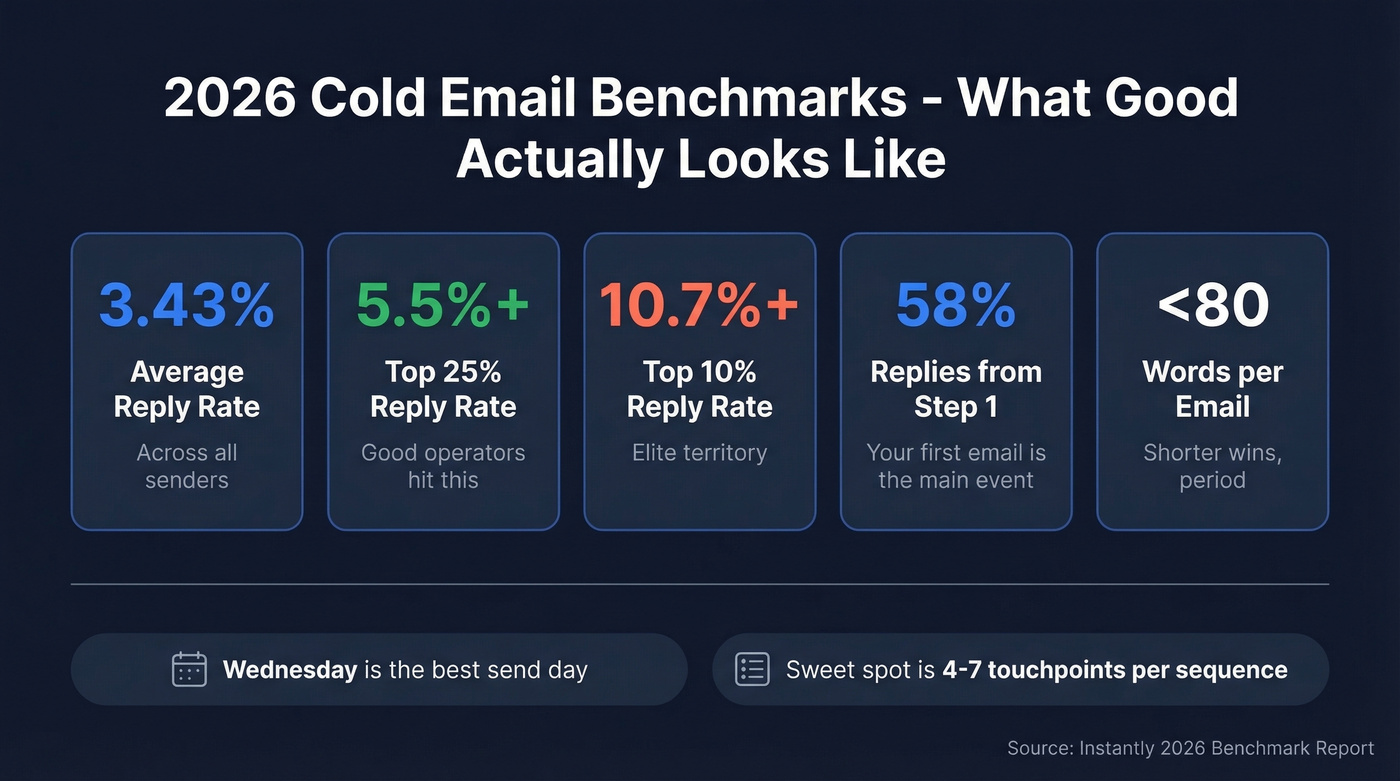
Instantly's 2026 benchmark report, built from billions of cold email interactions across thousands of active workspaces, puts the distribution on the table: 3.43% average reply, 5.5%+ top quartile, and 10.7%+ for the elite top 10%. That's the gap between "cold email is dead" and "cold email prints meetings."
A few numbers from that dataset change how you build your automated outreach:
- 58% of replies come from step 1. Your first email isn't "just the opener" - it's the main event.
- The best-performing emails are under 80 words. Automation doesn't mean longer sequences; it means tighter ones. (If you need examples, start with subject lines and keep the body lean.)
- Instantly's benchmark guidance puts the sequence sweet spot at 4-7 touchpoints. If you're running 7-step sequences, every touch needs new value - not "just checking in." (More on sequence management if your ops are messy.)
- Wednesday is the highest-performing send day, with Tuesday close behind. Timing isn't magic, but it's a real edge when everything else is equal.
We've seen this in bake-offs: two teams with the same ICP and offer can be 3-5x apart on replies purely because one team protects deliverability and the other "scales" into spam.
The Automated Outreach Stack
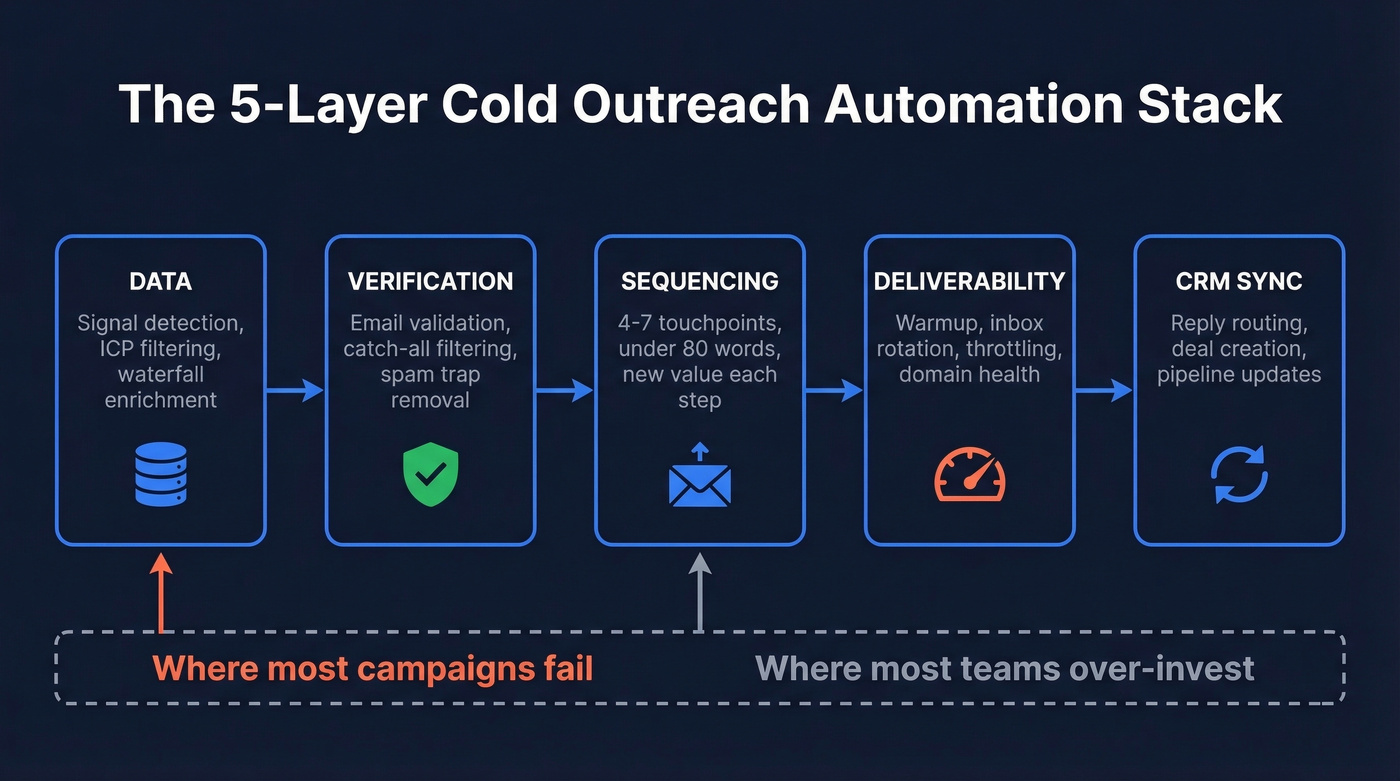
This system works when you treat it like infrastructure, not a single tool. Your stack needs five layers: Data, Verification, Sequencing, Deliverability, and CRM sync. The data layer is where most campaigns succeed or fail. (If you want a deeper breakdown of the data layer, see data enrichment services.)
Automate Delivery, Not Thinking
| Automate this | Keep human judgment |
|---|---|
| Data pulls & enrichment | First-line personalization |
| Verification & dedupe | Sequence kill decisions |
| Follow-up timing & inbox rotation | Reply handling & objection work |
| Warmup, throttling, CRM sync | Angle selection & meeting conversion |
Automation should remove mechanical work, not remove taste.
Signal-Based Targeting Beats Big Lists
Trigger-based targeting - funding rounds, exec hires, tech stack changes - drives 2.76x higher reply rates than generic outreach in multi-client testing. That matches what Reddit operators keep circling back to: volume dies, signals win. (If you need a system for this, use a buying signals scorecard.)
Trigger-based targeting also pairs naturally with account-based selling when you’re going after a defined list of accounts.
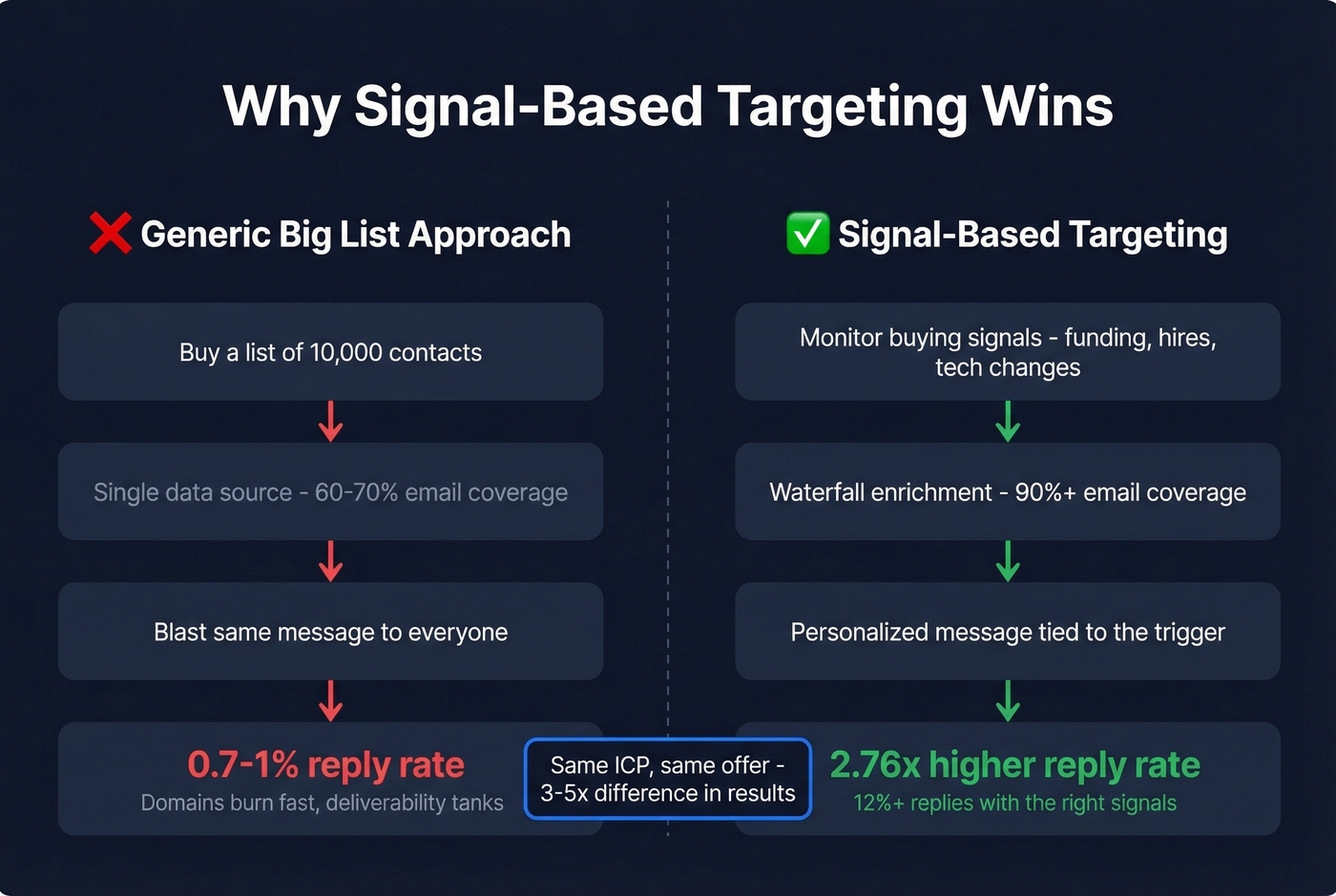
The data strategy that makes this work is waterfall enrichment: run your target list through multiple data sources sequentially, filling gaps each provider misses. A single provider finds 60-70% of emails; a waterfall approach pushes that above 90%. If you're going to automate anything "strategic," automate signal detection and list refresh, not the message itself.
Best Tools for Cold Outreach Automation
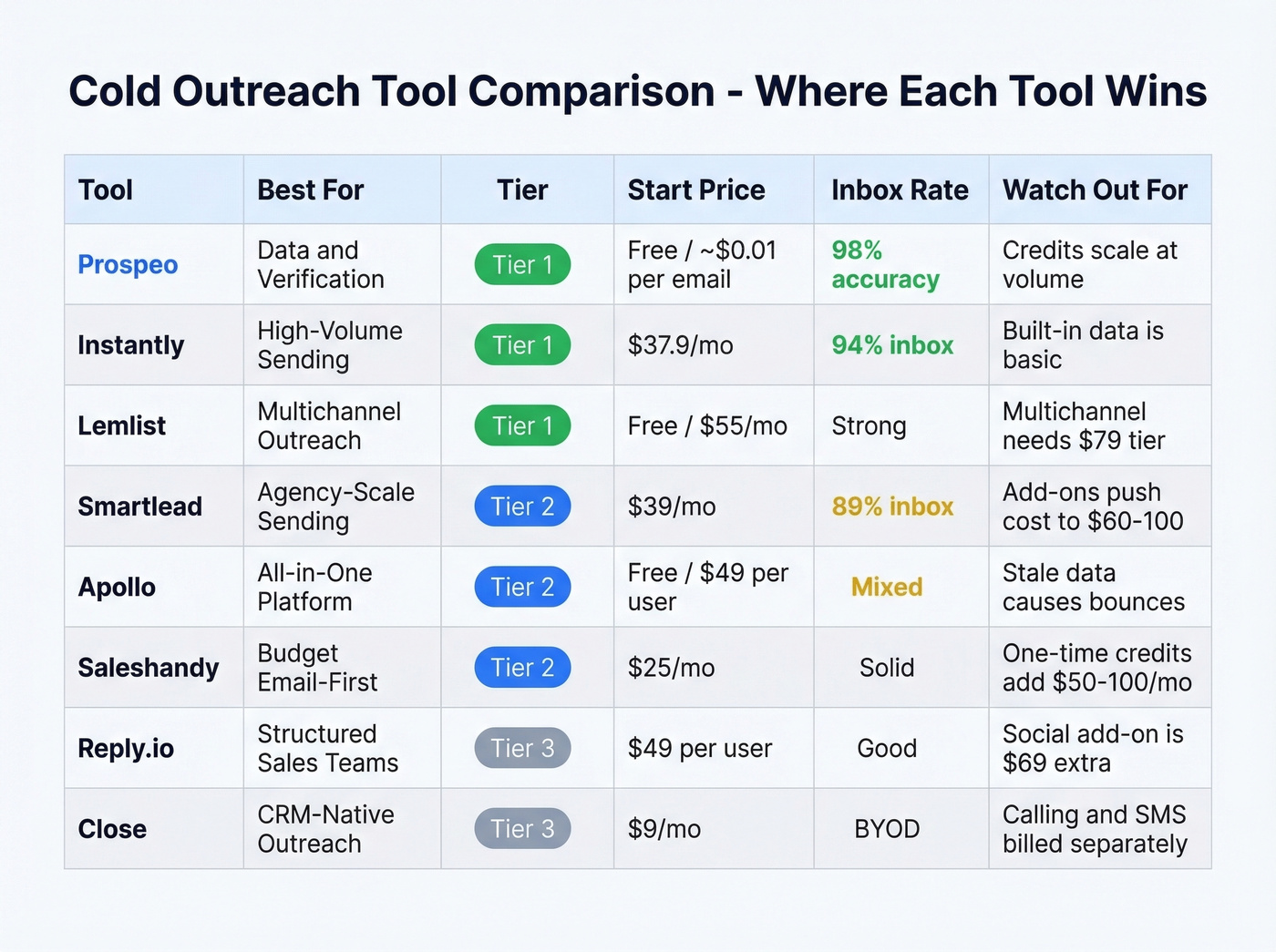
Choosing the right tool depends on where your bottleneck sits - data quality, sending infrastructure, or multichannel orchestration. Here's how the top options break down.
Prospeo - Data & Verification (Tier 1)
The gap between "verified" and actually verified is where most outbound campaigns die. Stale titles, catch-all domains that silently bounce, spam traps hiding in purchased lists - these problems compound with every send.
Prospeo closes that gap with 300M+ professional profiles, 98% email accuracy, and a 7-day refresh cycle when the industry norm is closer to six weeks. The 5-step verification handles catch-all domains and filters spam traps and honeypots, so you're not learning deliverability lessons the expensive way. Search is built for operators too - 30+ filters including intent data across 15,000 topics, technographics, job changes, and growth signals.

Pair it with your sender and CRM. This is the data foundation, not a full GTM suite - and that's by design. You get accuracy without platform bloat, with native integrations into Instantly, Smartlead, Lemlist, and Clay. (If you’re building lists in Clay, this Clay list building workflow helps.)
Stack Optimize went $0 to $1M ARR while holding 94%+ deliverability and under 3% bounces using verified data from this platform.
Pricing: Free tier includes 75 verified emails/month. Paid plans run about $0.01 per verified email, no contracts.
Instantly - High-Volume Sending (Tier 1)
$37.9/mo on annual billing gets you unlimited email accounts. That's the headline, and it's why Instantly became the default "pure sending" layer for outbound teams. The deliverability tooling is mature: warmup pool, inbox rotation, and the operational knobs you actually need once you're past one mailbox. In agency testing, Instantly hit 94% inbox placement.
Use this if you're running multi-inbox outbound and want a sender built for scale. Skip this if you expect it to be your data provider - Instantly's built-in lead data is basic, and teams that rely on it pay in bounces and wasted sends.
Pricing: Growth $37/mo, Hypergrowth $97/mo, Light Speed $358/mo. Contact upload caps run 1K to 25K to 500K depending on plan.
Lemlist - When to Add Multichannel (Tier 1)
Here's the decision framework: if your email-only campaigns already hit 3%+ reply rates and your ICP is active on multiple channels, Lemlist earns its spot. If email isn't working yet, multichannel just adds complexity.
Lemlist is the tool we reach for when a team has earned the right to add channels. The multichannel flow is clean - email, calls, and social touches in one sequence - and it's easier to operationalize than most "sales engagement platforms" that try to be everything. (If you’re still tightening the email layer, start with a B2B cold email sequence before adding channels.)
Pricing: Free-forever plan includes 100 emails/month plus 25 phone numbers exported/month. Email Pro is $55/mo (annual). Multichannel is $79/mo (annual), and that tier gate is the right call - it keeps teams from overcomplicating too early.
Smartlead - Agency-Scale Sending (Tier 2)
The $39/mo sticker price looks cheap until you add the modules you actually need. That's the honest tradeoff: the base sending engine is solid for agencies and multi-client setups, landing around 89% inbox placement in agency testing, but add-ons push real costs to $60-100/mo for most agency workflows. Advanced agency setups run 35+ subdomains and 70+ email accounts per client campaign - Smartlead handles that scale without breaking a sweat, and for agencies evaluating an outbound sending platform, the multi-client architecture is hard to beat at this price point.
Pricing: Basic $39/mo (15 accounts, 6K emails), Pro $94/mo.
Apollo - The All-in-One (Tier 2)
Apollo is the "one login" option: database plus sequences plus basic enrichment. For early-stage teams, it's the fastest way to get reps sending. But it's good at many things and best at none. The 270M+ contact database covers breadth, but outdated records and ghost profiles are a recurring theme on Reddit, and per-user pricing adds up once you have a real team.
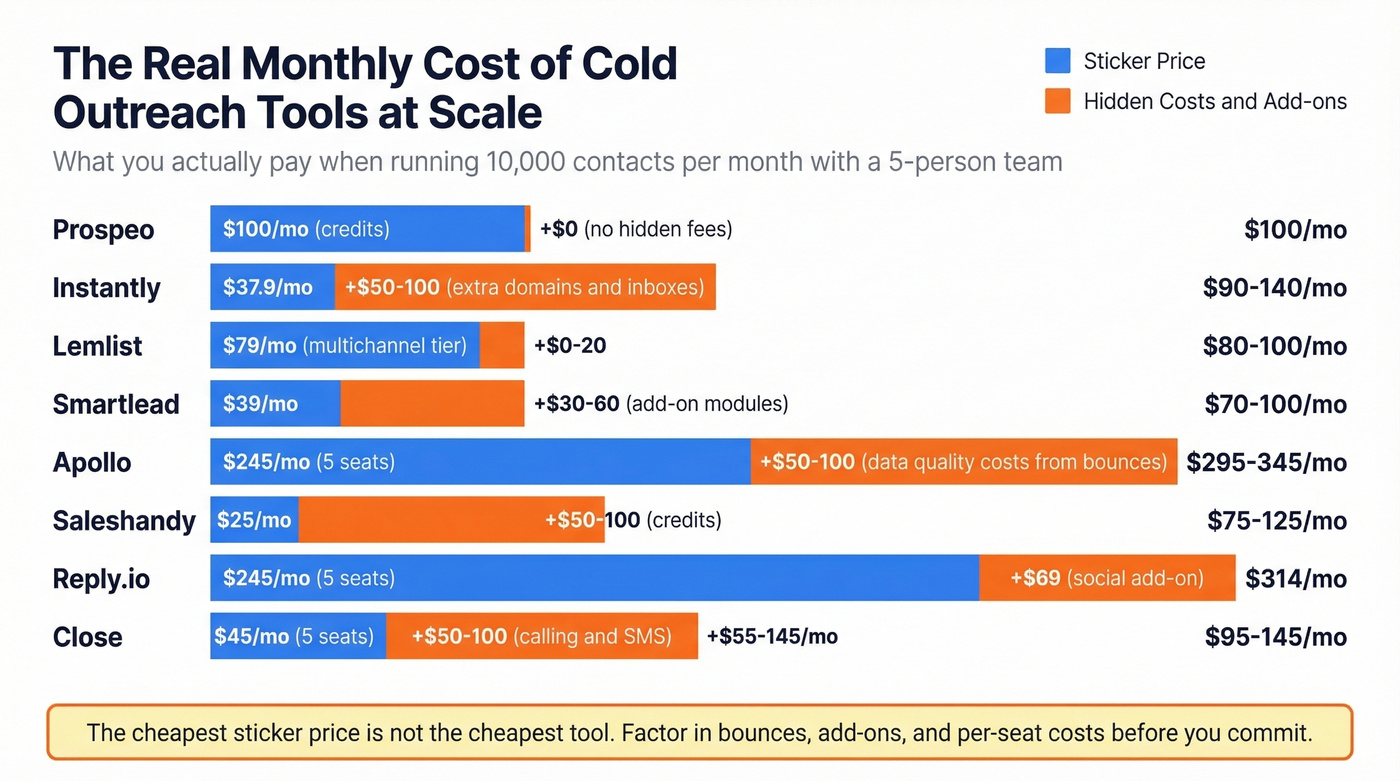
Pricing: Free plan includes 100 credits/mo. Basic is $49/user/mo with 30K credits. A 5-rep team pays $245/month before you count the bounces from stale data.
Saleshandy - Budget Email-First (Tier 2)
If your average deal size is modest and you need email volume on a budget, Saleshandy is straightforward value. Starter at $25/mo (annual) gets you 6K emails and 2K prospects. Pro at $69/mo (annual) scales to 150K emails. The hidden cost is credits: lead finder and verification credits are one-time purchases, not monthly renewals, so budget $50-100/mo extra for credits once you're past the starter phase.
Reply.io (Tier 3)
Reply.io is built for structured sales teams that want playbooks, governance, and multi-step sequences. Outreach starts at $49/user/mo (annual), Multichannel at $89/user/mo (annual), plus a $69/account add-on for social touches. It's more process-heavy than Instantly or Lemlist - pick it when you need manager-level visibility into rep activity.
Close (Tier 3)
Close is the CRM-native angle: outreach is a feature, not a separate platform. Solo starts at $9/mo (annual), and you get built-in email plus calls/SMS workflows. You bring your own data, but if you already have a clean list and want reps living in one system, Close removes a tool from the stack. (If you’re evaluating options, these examples of a CRM can help you shortlist faster.)

This article makes the case that data quality is the layer where campaigns succeed or fail. Prospeo's 7-day refresh cycle, 98% email accuracy, and 30+ search filters - including intent data across 15,000 topics - give your automation stack a foundation that doesn't decay between sends.
Stop automating on top of stale data. Fix the foundation first.
Pricing Comparison
Sticker price is rarely the real price in outbound. The real cost is cost per verified contact that actually lands in inboxes.
| Tool | Start price | Model | Key limit | Real cost trap |
|---|---|---|---|---|
| Prospeo | Free / ~$0.01 | Credits | 75 emails/mo free | Credits scale linearly - $100+/mo at 10K contacts |
| Instantly | $37.9/mo | Flat | 1K upload cap on Growth | More inboxes = more domains to buy |
| Lemlist | Free | Per-user | 100 emails/mo free | Multichannel requires $79/mo tier |
| Smartlead | $39/mo | Flat+add-ons | 15 accounts, 6K emails | Add-ons push real cost up |
| Apollo | Free / $49/u | Per-user | 30K credits on Basic | 5 seats = $245/mo before data costs |
| Saleshandy | $25/mo | Flat | 6K emails, 2K prospects | One-time credits run $50-100/mo extra |
| Reply.io | $49/u/mo | Per-user | Seat-based | Social add-on is $69/account |
| Close | $9/mo | Per-user | CRM features gated | Calling/SMS usage billed separately |
Apollo at $49/user/mo looks fine until you eat 30% bounces on a stale segment - now you're paying to damage your domain. A data layer with 98% accuracy at ~$0.01 per verified email usually ends up the lowest effective cost per usable contact, even before you count the deliverability savings.
Deliverability Checklist
Deliverability is infrastructure, not vibes. Google, Yahoo, and Microsoft bulk-sender enforcement made the basics non-negotiable: SPF, DKIM, DMARC, RFC 8058 one-click unsubscribe, complaints under 0.3%, and bounces under 2%. (If you need the full system, use this email deliverability guide as your baseline.)
Warmup isn't optional either. The consensus on r/coldemail is blunt: skipping warmup means you're choosing spam placement on purpose. (If you’re shopping, compare unlimited email warmup tools.)
The warmup ramp that actually works starts at 5-10 emails/day per mailbox for the first week, then scales to 40-50/day over weeks 2-6. Warm for 2-4 weeks before production sends, then scale only if placement holds. Buy 2-3 lookalike domains and never send cold email from your primary domain. One bad week can poison every employee's inbox. Set up a custom tracking subdomain via CNAME - DNS propagation can take up to 72 hours, so don't do this the morning you launch. (More detail on setting up a tracking domain.)
Verify your list before you send. A 5-step verification process that catches bounces, spam traps, and honeypots is the difference between 94% inbox placement and a burned domain. (If you’re debugging, start with email bounce rate.)
Monitoring Thresholds (Daily)
| Metric | Healthy | If it's bad | Usually means |
|---|---|---|---|
| Bounce rate | <2% | >3% | List/verification issue |
| Open rate | 40%+ | <40% | Spam placement or weak subject |
| Reply rate | 2%+ | <2% | Copy/offer mismatch |
| Unsub rate | <1% | >1% | Targeting problem |
One pattern we see repeatedly: teams obsess over copy while their bounce rate quietly sits at 4-6%. That's not a copy problem. That's a data problem.
AI Personalization That Works
Look, "Hi {{first_name}}, saw you're a VP of Sales at {{company}}" is worse than nothing. It screams automation. AI personalization only works when it's fed a real signal. (If you want the full workflow, see AI cold email outreach.)
A workflow that actually performs:
- Scrape a prospect signal - a recent post, product launch, hiring page change, or tech stack shift.
- Feed the signal plus a tight prompt into GPT-4o mini to generate a custom first line.
- Export as a CSV column like
custom_message. - Merge it into step 1 as
{{custom_message}}.
Teams running this pipeline see roughly 3x response lift versus generic templates, because the first line earns attention before the pitch lands. Automate research briefs, enrichment, and draft variants. Keep human: angle selection and reply handling. The fastest way to tank replies is to let AI write "personalization" that isn't personal.
Compliance - The Section Nobody Else Wrote
Automated outreach without compliance is just automated liability.
Penalty reality check:
- CAN-SPAM: $50,120 per violation
- GDPR: up to EUR 20M or 4% of global revenue
- CCPA: up to $7,500 per violation
- TCPA: $500-$1,500 per incident (calls/SMS especially)
Regulators are scrutinizing AI-enriched data under GDPR more aggressively, especially when teams can't explain where attributes came from.
Practical Compliance Checklist
- Include a physical address
- Use truthful subject lines and sender identity
- Add one-click unsubscribe (not "reply STOP")
- Process opt-outs within 10 business days
- Keep suppression lists clean across tools
Let's be honest about the risk math: send 1,000 emails without CAN-SPAM compliance and you're staring at $50M+ theoretical exposure. That tells you how regulators think about scale.
Stack Optimize scaled to $1M ARR with under 3% bounces. Snyk's 50 AEs drove 200+ opportunities per month. The difference wasn't their sending tool - it was verified contacts refreshed every 7 days at $0.01 per email. Your cold outreach automation deserves the same data layer.
Send 4x the volume without burning a single domain.
FAQ
Is cold outreach automation still effective in 2026?
Yes - the top 10% of campaigns hit 10.7%+ reply rates in Instantly's 2026 dataset. Spray-and-pray is dead. Signal-based targeting, clean data, and deliverability discipline separate winners from spam folders.
How many emails should I send per day per mailbox?
Start at 5-10/day on new domains, then ramp to 40-50/day over 4-6 weeks. Treat 50/day per mailbox as a practical ceiling unless you're actively monitoring inbox placement and complaint rates.
Do I need separate domains for cold email?
Yes. Buy 2-3 lookalike domains and never send cold email from your primary domain. One spam flag on your main domain affects every employee's email deliverability.
What's the best setup for small teams?
Three layers: a data/verification provider, a sending platform, and a CRM. Most teams overcomplicate tools and underinvest in data quality - flip that ratio and results follow. For teams under five reps, pairing a high-accuracy data provider with Instantly or Lemlist covers everything without per-seat pricing eating your budget.
How does data quality affect cold outreach results?
Bounce rates above 5% damage domain reputation and tank inbox placement. A 98% email accuracy standard with a 7-day refresh cycle keeps bounce rates under 3% so your sender reputation stays healthy from day one. Every tool in your stack is only as good as the contact data feeding it.