CRM Automated Follow-Ups: Data-Backed Guide (2026)
Your SDR just ran a 500-contact sequence. 47 emails bounced. Open rates cratered. Your domain reputation dropped, and now even your good emails land in spam. The CRM automated follow-ups worked perfectly. The data underneath them didn't.
Here's the thing: 48% of reps never send a second message, yet 60% of replies come after that first follow-up. The math is obvious, but the execution is where teams blow it. Most automation guides walk you through triggers and templates, then skip the part where bad contact data turns your carefully built sequences into a domain reputation wrecking ball.
What You Need (Quick Version)
Before you touch a single workflow builder, nail three things:
- Clean your data first. If your bounce rate is above 2%, automation will damage your domain before it helps your pipeline. Verify your list before launching any sequence - one bad batch can tank deliverability for weeks. (If you need a system for this, start with CRM hygiene.)
- Build a 17-21 day cadence with 8-12 touchpoints across email, phone, and social. Not an -email blast. Multi-channel sequences outperform single-channel by 287%. (Use a proven sales cadence example as your baseline.)
- Pick a CRM that matches your team size. HubSpot for all-in-one, Pipedrive for fast setup, ActiveCampaign for email-heavy workflows. (If you're deciding between the big two, see HubSpot vs Salesforce.)
What Are Automated Follow-Ups in a CRM?
CRM automated follow-ups are sequences of actions - emails, tasks, reminders, calls - that your CRM triggers without manual intervention. HubSpot breaks this into two primitives: sequences (automated emails tied to a contact) and workflows (broader automation that updates records, routes leads, changes deal stages, and fires notifications).
Triggers fall into three buckets. Time-based triggers fire after a set delay. Behavior-based triggers respond to prospect actions like an email open, a link click, or a page visit. Event-based triggers react to CRM changes - a deal moving stages, a form submission, a new record being created. The best follow-up sequences combine all three, creating multi-channel cadences that adapt based on what the prospect actually does.
Why Follow-Ups Fail
Most follow-up sequences don't fail because of bad copy or wrong timing. They fail because the contact data is garbage. (If you want the benchmarks and why it happens, read B2B contact data decay.)
A Belkins study of 16.5M cold emails found the highest reply rate - 8.4% - comes from the first email. Every subsequent follow-up performs worse, and sending 4+ emails in a sequence more than triples unsubscribe and spam complaint rates. You're already working with thin margins. Now add bad data to the mix and those margins evaporate.
About 17% of cold emails never reach the inbox. A bounce rate above 5% puts your domain reputation at serious risk, and even a "healthy" threshold sits below 2%. When your CRM fires a 7-email sequence at 500 contacts and 47 addresses are invalid, you're not just wasting sends - you're training Gmail and Outlook to filter everything you send. (If you're diagnosing the root cause, start with invalid emails.)

We've seen teams recover from brutal bounce rates in under a week by switching data sources. Meritt, a Prospeo customer, dropped their bounce rate from 35% to under 4%, and their pipeline tripled from $100K to $300K per week. The mechanism: 98% email accuracy on 300M+ profiles, refreshed every 7 days instead of the industry-average 6 weeks, with native HubSpot and Salesforce integrations that keep your CRM clean automatically.
Your follow-up automation is only as good as your contact data. Full stop.
How Follow-Up Automation Works
Every CRM handles automation slightly differently, but the underlying mechanics are consistent. You're building a decision tree: if a prospect does X, the system does Y after Z amount of time. (If you're mapping this end-to-end, use a drip campaign flowchart.)
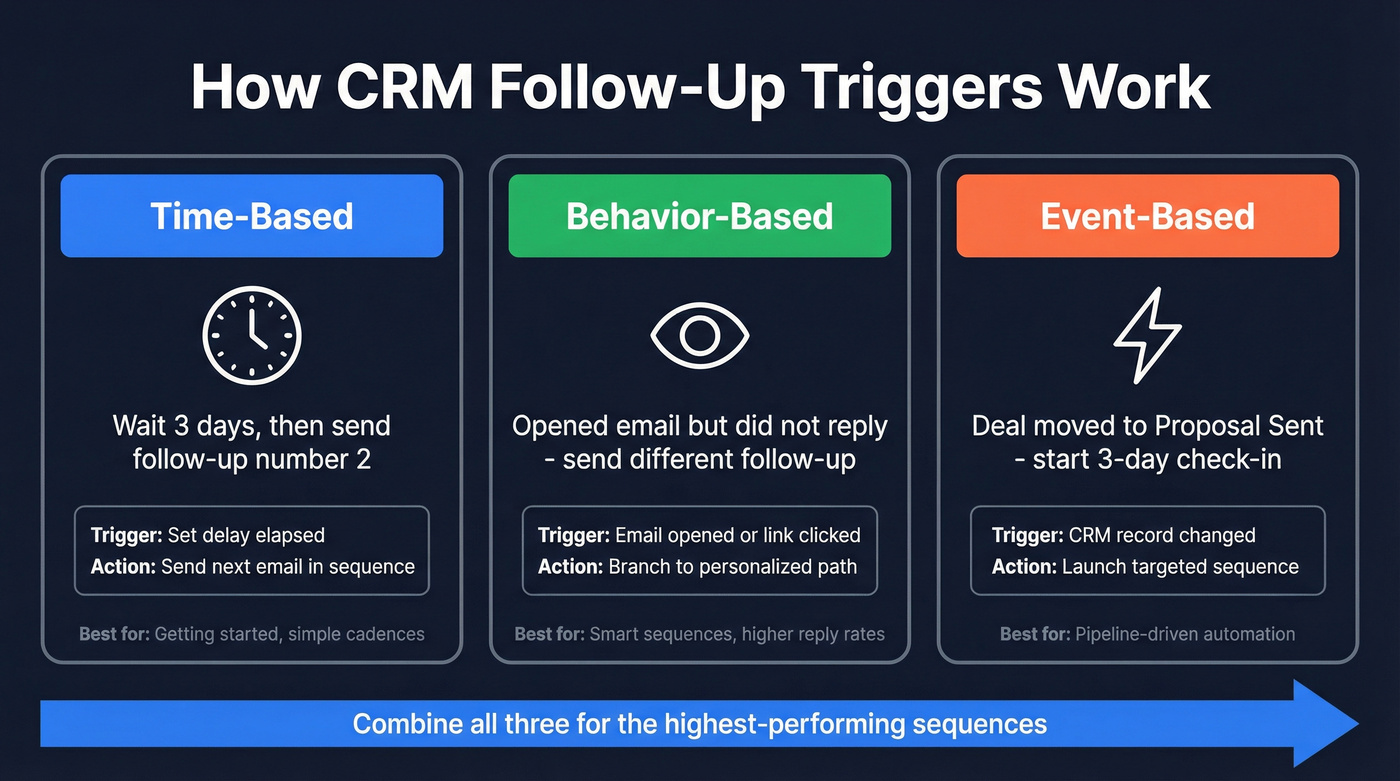
Time-based triggers are the backbone. "Wait 3 days, send follow-up #2." Simple, reliable, and where most teams start. Behavior-based triggers add intelligence - if they opened email #1 but didn't reply, send a different follow-up; if they clicked the case study link, create a call task. Event-based triggers tie to CRM record changes: when a deal moves to "proposal sent," trigger a 3-day sequence. These require cleaner CRM hygiene but deliver the highest-quality touchpoints.
The best sequences layer all three across channels. A single-channel email sequence is the most common setup, but it's also the weakest. (For templates that match modern deliverability constraints, see best sales sequences.)

Bad data turns automated follow-ups into domain reputation killers. Prospeo delivers 98% email accuracy across 300M+ profiles, refreshed every 7 days - not the 6-week industry average. Native HubSpot and Salesforce integrations keep your CRM clean automatically.
Stop feeding your CRM sequences with data that bounces.
Build Your Follow-Up Cadence
Most teams don't need longer email-only sequences. The data favors structured, multi-channel cadences with clear spacing and a clean stop condition.
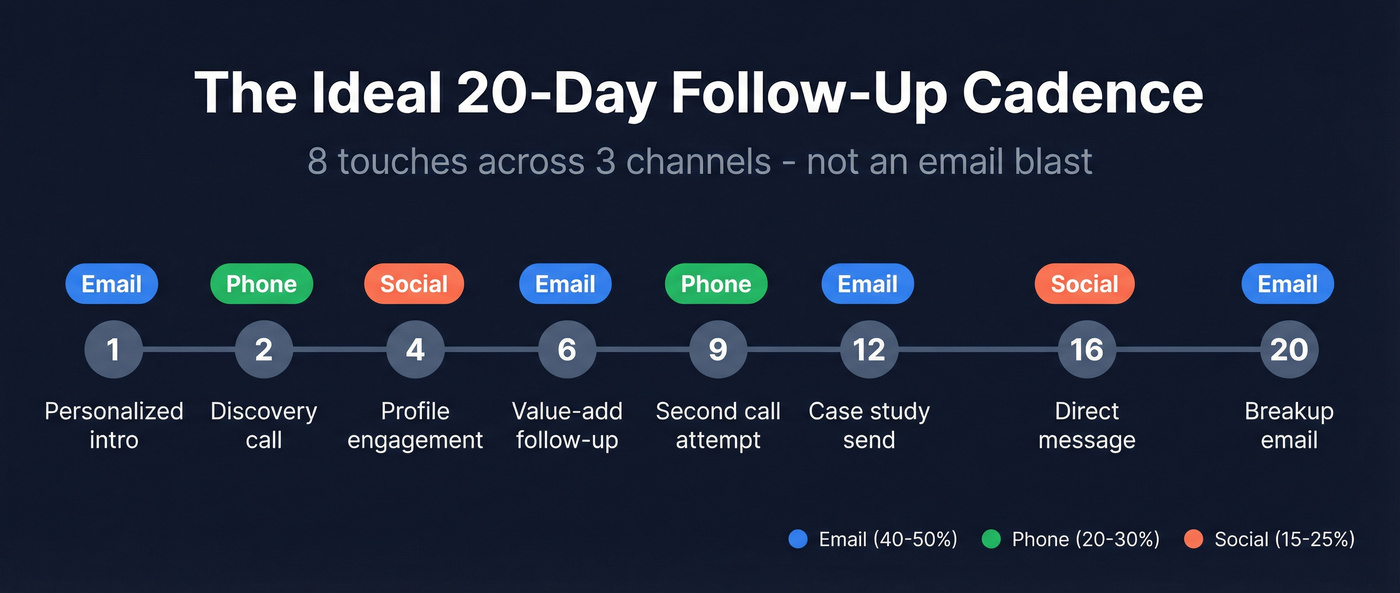
RAIN Group research shows meetings require an average of 8 touches. Outreach recommends 17-21 days with 8-12 touchpoints. The channel mix that performs best: email 40-50%, phone 20-30%, social 15-25%, video 5-10%. (If you're pressure-testing touchpoint count, compare against how many touchpoints before a sale.)
| Day | Channel | Action |
|---|---|---|
| 1 | Personalized intro | |
| 2 | Phone | Discovery call attempt |
| 4 | Social | Profile engagement |
| 6 | Value-add follow-up | |
| 9 | Phone | Second call attempt |
| 12 | Case study / social proof | |
| 16 | Social | Direct message |
| 20 | Final breakup email |
Start with 1-2 days between early touches when you're top of mind, then expand to 3+ days as the sequence progresses. For email timing, mid-morning windows (9:30-11am) and post-lunch (1:30-3pm) perform best, with Tuesday and Thursday as the strongest days. (For a deeper timing breakdown, see best time to send prospecting emails.)
Sending 8 follow-up emails isn't persistence - it's spam with a schedule.
Keep individual emails under 125 words. Two scrolls or fewer on mobile. Use merge fields beyond {first_name}: reference company news, tech stack, or recent job changes. Generic templates are the fastest way to get ignored.
Best CRMs for Automated Follow-Ups
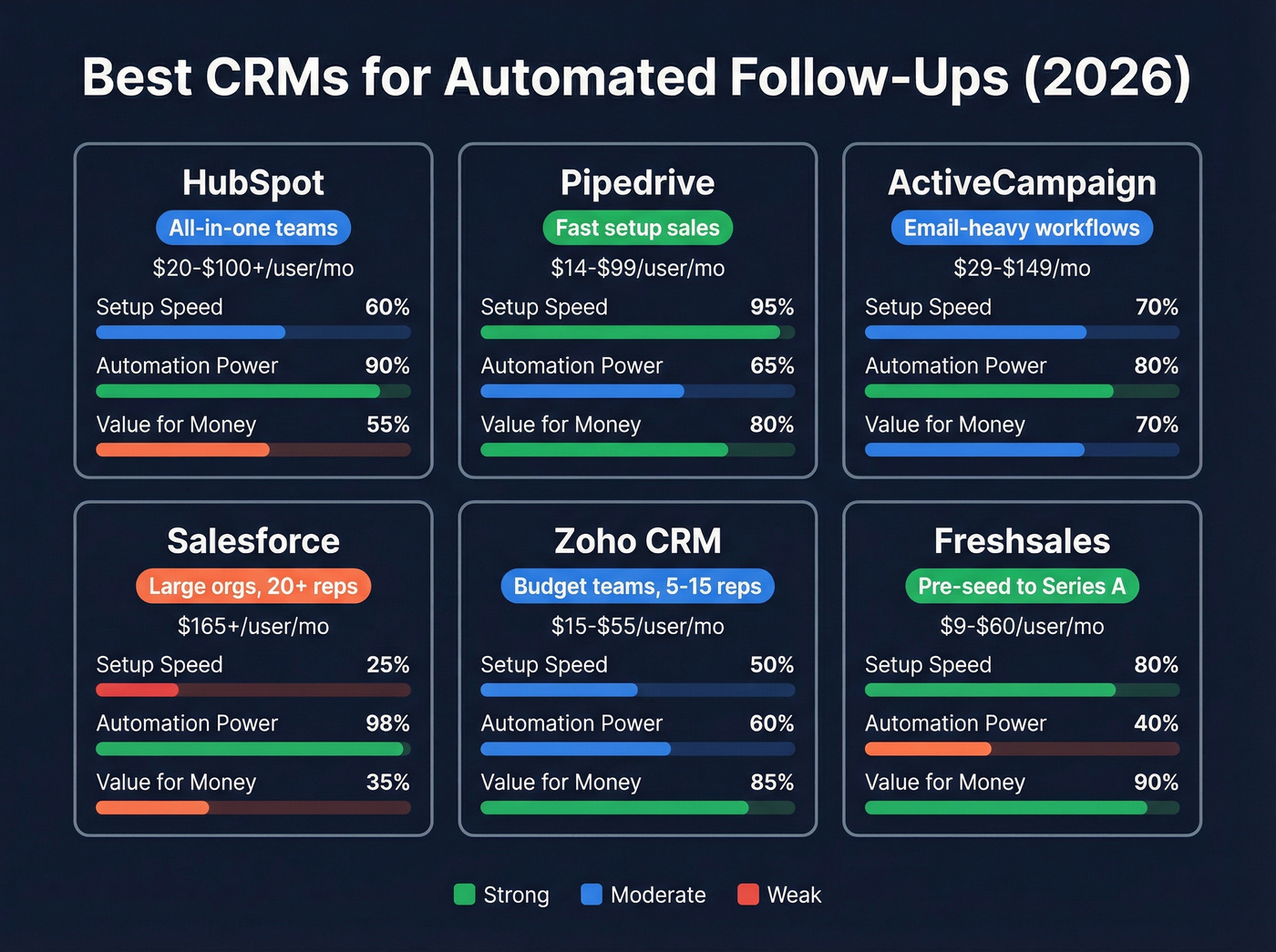
Not every CRM treats automation equally. Some gate it behind expensive tiers. Others make it available but need a developer to configure. Here's how they compare, sorted by what actually matters for follow-up sequences.
| CRM | Automation Starts At | Price Range | Best For |
|---|---|---|---|
| HubSpot | Sales Hub paid tiers | ~$20-$100+/user/mo | All-in-one teams |
| Pipedrive | Advanced plan | $14-99/user/mo | Fast-setup sales |
| ActiveCampaign | Starter | $29-149/mo | Email-heavy workflows |
| Salesforce | Enterprise | ~$165+/user/mo | Large orgs, 20+ reps |
| Zoho CRM | Standard plan | ~$15-$55/user/mo | Budget teams, 5-15 reps |
| Freshsales | Growth plan | ~$9-$60/user/mo | Pre-seed to Series A |
HubSpot
HubSpot has the best upgrade path from free to enterprise, and its sequences + workflows combo is genuinely powerful. But full automation isn't on the free plan - you get basic reminders and limited automation, not real automated sequences. Budget for paid Sales Hub tiers if you want behavior-based branching and multi-step follow-ups. The ecosystem is unmatched for SMBs who want marketing, sales, and service in one platform, and the CRM-native automation means fewer brittle Zapier connections. In our experience, teams that start on HubSpot Free and graduate to Sales Hub Professional see the smoothest transition because the data model stays the same.
Pipedrive
The fastest path to working follow-up automation. Most teams onboard in under 2 days, and the Advanced plan on annual billing is typically the tier you need for workflow automation and email integration. The UI is clean, purely sales-focused, and doesn't try to be a marketing platform. CRM adoption can boost sales productivity by 20-30%, and Pipedrive's low friction means your reps actually use it. The tradeoff: lighter on marketing automation and reporting depth compared to HubSpot.
ActiveCampaign
Skip this if your team needs a full CRM with pipeline management. ActiveCampaign's visual automation builder supports email-heavy sequences with sophisticated branching logic, starting at $29/mo. It blurs the line between marketing automation and CRM, which works beautifully for email-first teams and creates headaches for everyone else. The CRM features take a backseat to the email engine - and that's by design.
Salesforce
The most powerful automation engine on this list, and also the most painful to set up. We've watched teams budget 2 weeks for Salesforce configuration and still be tweaking workflows 3 months later. Overkill for teams under 20 reps. Enterprise sales deployments typically start around $165/user/mo before you add Sales Engagement or Einstein AI.
Zoho CRM
Capable automation at a budget-friendly price, but expect to spend the setup time that Pipedrive doesn't require. Good for budget-conscious teams of 5-15 reps willing to invest in configuration. The automation builder is solid once you learn it - it's the learning curve that trips people up.
Freshsales
One of the cheapest ways to get real automation on a modern CRM. For teams under 5 reps who don't need marketing features, start here. The feature set is lighter, but it's enough for early-stage teams running basic follow-up sequences.
AI-Powered Follow-Ups
There's a meaningful difference between template sequences and AI-driven follow-ups. Template sequences fire the same emails on the same schedule regardless of context. AI agents analyze prospect behavior, adjust timing, rewrite messaging, and coordinate across channels. (If you're evaluating tools, start with best AI tools for automating sales follow-ups.)
Outreach's AI agents - Deal Agent, Research Agent, Revenue Agent - represent the leading edge, with early adopters reporting 15-20% reply rate increases. Salesforce Einstein brings predictive scoring and next-best-action recommendations. HubSpot's AI-assisted email drafting is the most accessible option for SMBs.
Let's be honest: most CRM-native AI is still glorified A/B testing with better marketing copy. Outreach's agents are the closest thing to genuinely autonomous follow-up, but they cost accordingly. And none of it matters if the data feeding the AI is stale. An AI agent optimizing send times against unverified contacts is just a more sophisticated way to burn your domain. The consensus on r/sales backs this up - threads about AI follow-up tools consistently circle back to "garbage in, garbage out." Clean data first, AI second.
Five Mistakes That Kill Follow-Up Sequences
1. Neglecting data hygiene. Duplicates, stale contacts, and invalid emails don't just waste sends - they actively damage your sender reputation. Verify every email before it enters a sequence. Target a bounce rate under 2%. (If you need a step-by-step, use CRM verify.)
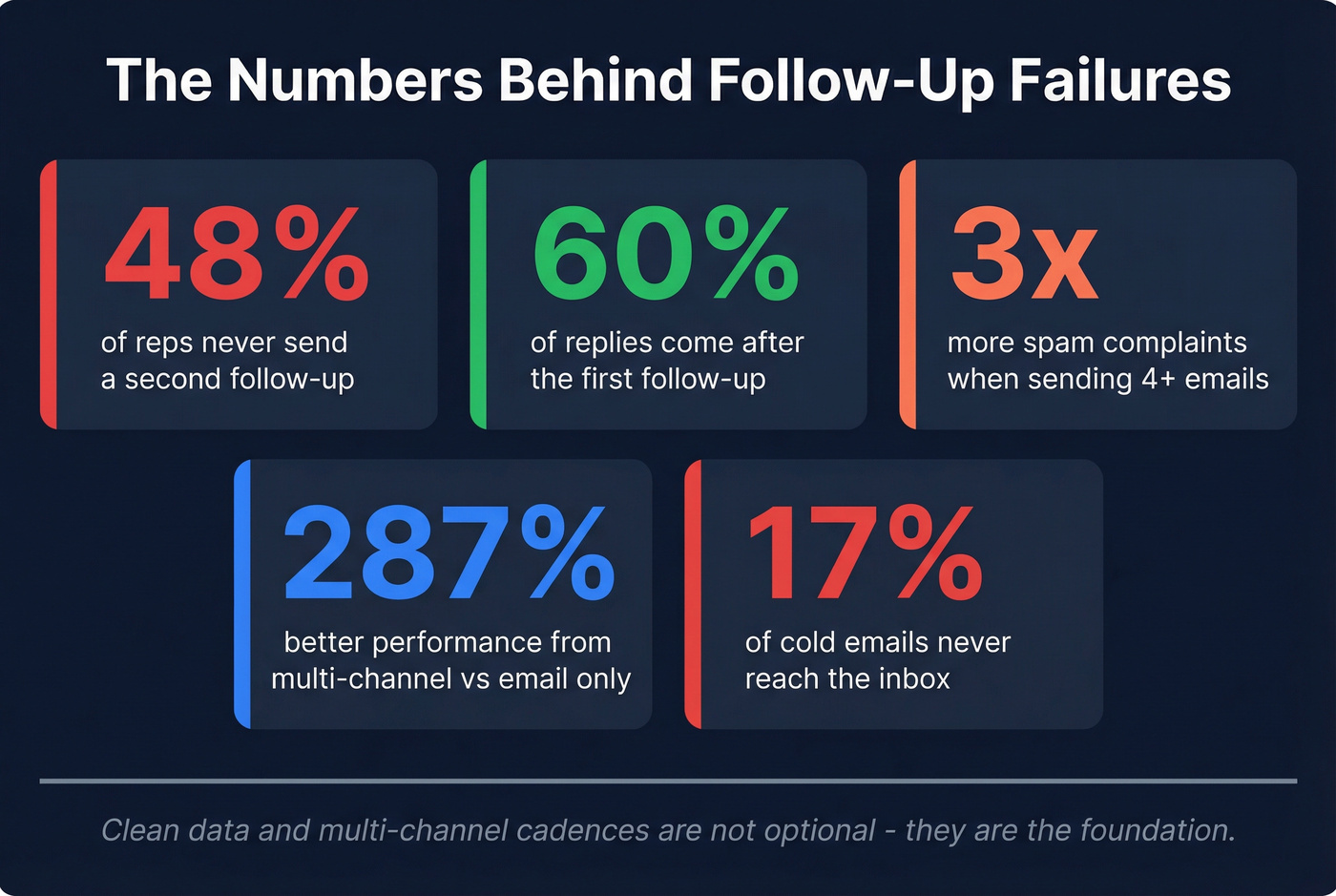
2. Over-emailing. That 16.5M-email dataset is unambiguous: 4+ emails in a sequence more than triples unsubscribe and spam complaint rates. More touches don't mean more replies. They mean more unsubscribes.
3. Single-channel reliance. Multi-channel sequences outperform email-only by 287%. Your prospects live across channels. Your sequences should too.
4. Poor segmentation. Sending the same sequence to a VP of Engineering and a Head of Marketing is lazy and it shows. Segment by persona, pain point, and buying stage - even if it means building 3x more sequences. (A practical framework: behavioral segmentation.)
5. Skipping compliance. CAN-SPAM, GDPR, TCPA - these aren't suggestions. Include opt-out links, respect quiet hours, honor unsubscribes immediately. One compliance violation can cost more than your entire CRM contract.
Multi-channel cadences only work when every email, phone number, and contact record is verified. Prospeo's 5-step verification process keeps bounce rates under 2% - the threshold your follow-up automation needs to protect domain reputation. At $0.01 per email, cleaning your list costs less than a single bounced sequence.
Fix your data before you automate another sequence.
FAQ
Do CRMs automatically follow up?
Most CRMs offer automated sequences, but real follow-up automation usually requires paid tiers. HubSpot's free plan only provides limited reminders. Expect ~$9-$29/user/mo minimum - Freshsales and Pipedrive are two of the cheapest paths to working sequences.
How many follow-ups should I send?
Reply rates peak at the first email and decline with each subsequent touch. A 4-7 email sequence over 14-21 days is the sweet spot. Beyond 4 emails, unsubscribe and spam complaint rates more than triple based on the Belkins 16.5M-email study.
What's the best free CRM for follow-ups?
HubSpot and Freshsales offer free tiers, but automation is limited on both. For data quality underneath your sequences, Prospeo's free plan includes 75 verified emails/month - pair it with Pipedrive Advanced for the fastest path to working automated follow-ups.
How do I avoid robotic follow-ups?
Use merge fields beyond {first_name} - reference company news, tech stack, or recent job changes. Segment by persona so each sequence speaks to a specific problem. Keep emails under 125 words and vary your channel mix across email, phone, and social.
How do I prevent bounces from ruining sequences?
Verify every email before it enters a sequence and target a bounce rate under 2%. Use a verification tool with a weekly refresh cycle rather than static databases that go stale in weeks. Teams switching to verified data routinely cut bounce rates from 30%+ to under 5%.
For deals under $15k, you probably don't need a $165/user/mo CRM to run automated follow-ups. Start with clean data and a $29/mo tool. The sequences will do the rest.