

Your Dead Leads Aren't Dead - They're a Data Problem
One RevOps team pulled 2,400 contacts out of CRM purgatory last quarter - dead leads untouched for 6 to 18 months. The email campaign hit a 21% open rate. Reply rate? 1.8%. Then they layered in ringless voicemail and the salvageable rate jumped from 4% to 11%.
The leads weren't gone. The data was.
Most "dead lead" problems are actually data decay problems wrapped in a process failure. Before you write off thousands of contacts you already paid to acquire, fix what's actually broken. We've watched teams burn through five-figure reacquisition budgets when a $20 enrichment run would've recovered a third of their pipeline.
The Short Version
Verify your contact data before sending a single email. Most reactivation campaigns fail here - bounced emails tank your sender reputation and kill the campaign before it starts.
Segment by ICP fit and intent signals. Not all dormant contacts deserve your time. Prioritize the ones whose companies are actively researching your category.
Run a multi-channel sequence over months, not days. Email alone won't cut it. Layer in voicemail and retargeting across a 3-to-6-month window.
Why Most Aren't Actually Dead
A "dead lead" is any contact in your CRM that stopped engaging - no replies, no opens, no meetings. Most sales teams slap this label on after about 90 days of silence and move on.
Here's the thing: B2B buying cycles run 6 to 18 months. A lead that went quiet four months ago might be mid-budget-cycle, waiting for Q3 planning, or stuck in a procurement review. HockeyStack's 2024 analysis found that closing a B2B SaaS deal takes an average of 266 touchpoints - up 20% year over year. For deals above $100k, that number climbs to 417 touchpoints, which means most teams are giving up when they're barely a quarter of the way through the journey.
And yet 70% of salespeople stop after one email, even though 42% of replies arrive on follow-ups. Your "dead" contacts aren't gone. They're undertouched and sitting on decaying data.
The Business Case for Reactivation
New leads are getting more expensive every quarter. CPC increased for 87% of industries in WordStream's analysis of 16,000+ campaigns:
| Industry | Blended CPL |
|---|---|
| B2B SaaS | $237 |
| Cybersecurity | $406 |
| IT & Managed Services | $503 |
| Financial Services | $653 |
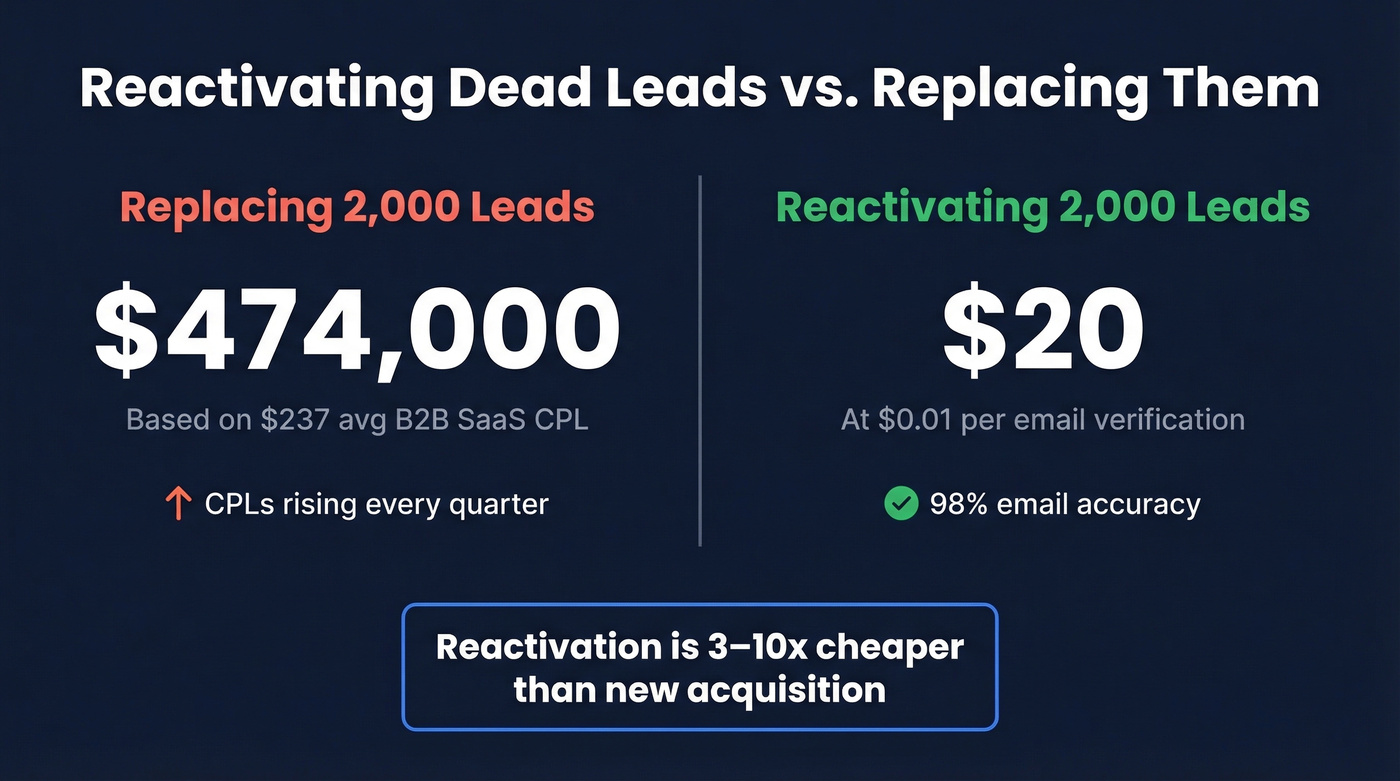
If you've got 2,000 stale contacts in your CRM and you're in B2B SaaS, you've already spent roughly $474,000 acquiring them. Replacing them costs the same - or more, since CPLs keep climbing. Email marketing CPL sits at $30-$45, a fraction of what you'd pay through paid channels. Industry estimates put reactivation at 3 to 10 times cheaper than new acquisition.

Let's be honest: if your average deal size is above $5k, you probably have six figures of buried pipeline rotting in your CRM right now. A modest 5% conversion on reactivated contacts turns that list into real revenue without touching your acquisition budget. That's why cold lead re-engagement deserves a permanent spot in your revenue playbook.

You've already spent thousands acquiring those dormant contacts. Prospeo's enrichment returns 83% of leads with fresh contact data - verified emails, direct dials, 50+ data points - at $0.01 per email. Stop replacing leads you already own.
Recover buried pipeline for less than the cost of one new lead.
Why Your Leads Went Cold
Before you build a reactivation sequence, understand why leads went silent. Five causes cover 90% of cases:
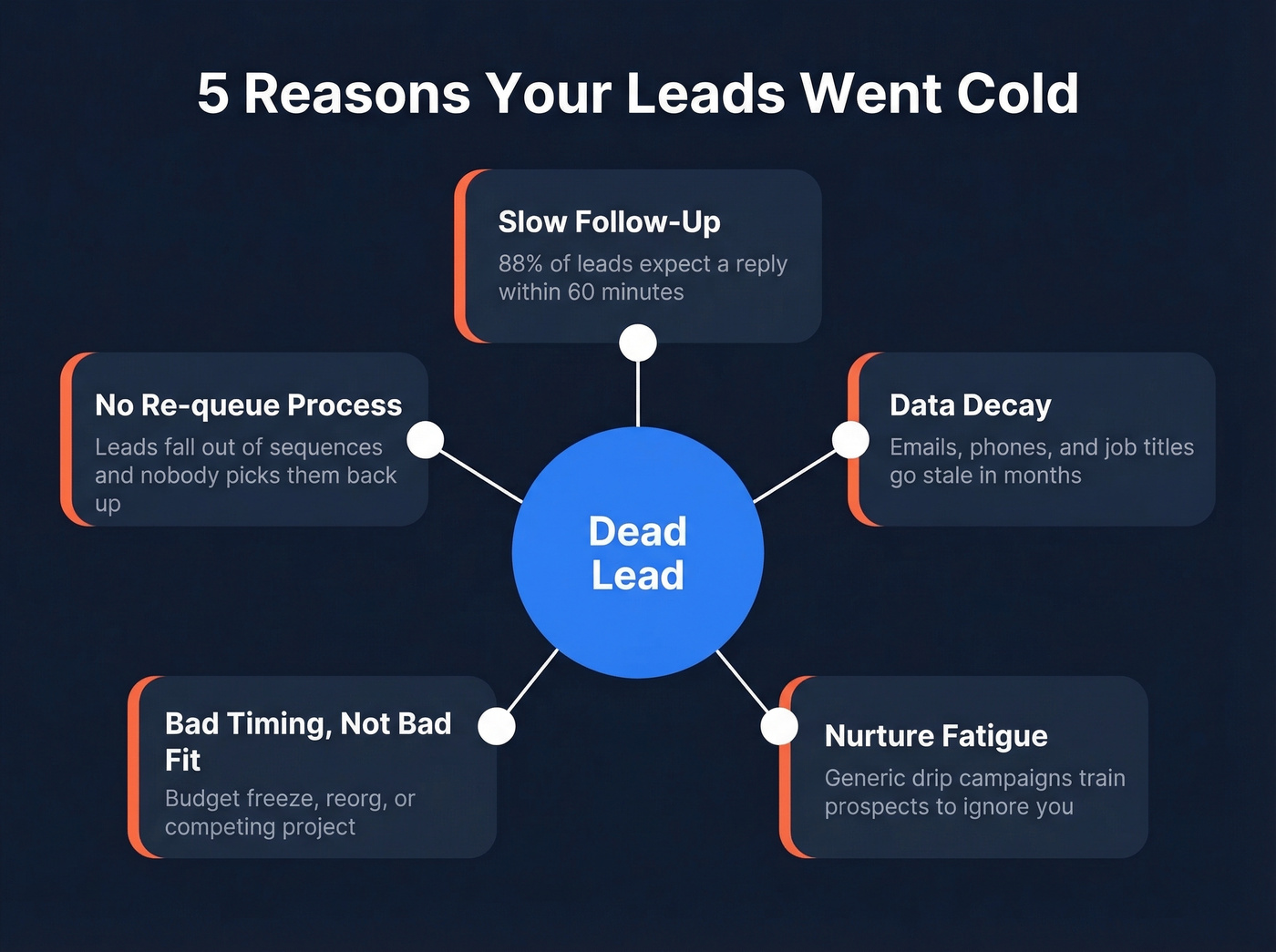
Slow or inconsistent follow-up. 88% of leads expect a reply within 60 minutes. If your reps took days, the window closed before it opened.
Data decay. B2B contact info goes stale fast - people change jobs, inboxes get retired, phone numbers rotate. You might be emailing an address that hasn't existed for six months. (If you want the deeper mechanics, see email bounce rate.)
Nurture fatigue. Generic drip campaigns with no personalization train prospects to ignore you. After the third "just checking in" email, you're spam.
Bad timing, not bad fit. The prospect had budget constraints, a competing project, or a reorg. The need didn't disappear - the timing was wrong.
No re-queue process. Leads that don't convert fall out of sequences and sit in CRM limbo. Nobody owns them. No automation picks them back up. They stay buried forever.
The 5-Step Reactivation Framework
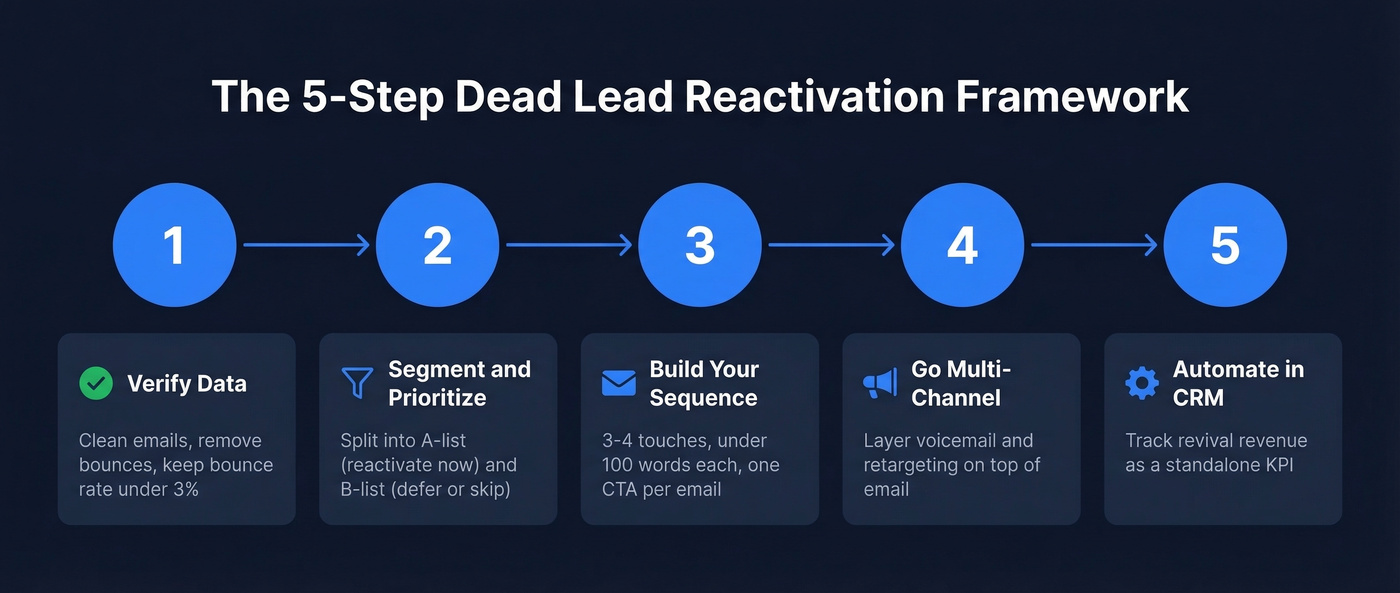
Step 1 - Verify Your Data First
This is where most reactivation campaigns die.
You pull a list of 2,000 dormant contacts, load them into a sequence, and 15% bounce on the first send. Your domain reputation takes a hit. Deliverability drops. The campaign is over before it started. We've seen this exact pattern kill reactivation programs at companies that should've known better - the fix takes 20 minutes and costs almost nothing, but skipping it is catastrophic.
Keep your bounce rate under 3%. That means verifying every email address before it enters a sequence. SPF, DKIM, and DMARC authentication are non-negotiable - but authentication doesn't help if the email addresses themselves are bad. (If you need a checklist, use this email deliverability guide.)
JPMorgan learned this the hard way when they acquired a startup expecting 4 million users and found 300,000 - a $175 million lesson in data quality. On a smaller scale, Iveco built a real-time validator that rejected 20% of incoming leads to keep their CRM clean.
If your list has been dormant long enough that recipients don't remember opting in, start with a re-permission email before launching a full sequence - it protects your sender reputation and keeps you on the right side of CAN-SPAM and GDPR.
Export your list and run it through Prospeo's data enrichment. At 98% email accuracy and an 83% match rate, enriching and verifying 2,000 contacts costs about $20 at roughly $0.01 per email. Compare that to $474,000 to replace them. The 5-step verification process - including catch-all handling, spam-trap removal, and honeypot filtering - catches the bad addresses that simpler tools miss. (For a broader vendor landscape, see data enrichment services.)

Most reactivation campaigns die at Step 1 because 15% of emails bounce and tank your domain. Prospeo's 5-step verification - catch-all handling, spam-trap removal, honeypot filtering - delivers 98% email accuracy and keeps bounce rates under 3%.
Fix the data first. The pipeline follows.
Step 2 - Segment and Prioritize
Not every dormant lead deserves a second chance. Split your verified list into two buckets.
Reactivate now (A-list): Contacts that still match your ICP, showed meaningful engagement before going dark - opened emails, attended a demo, visited pricing - and work at companies with active buying signals. These are the leads you can realistically win back. (If you need a scoring rubric, start with an Ideal Customer Profile Template.)
Skip or defer (B-list): Contacts outside your ICP, with zero historical engagement, or at companies showing no intent signals. Archive them or re-queue for 6 months. Don't waste rep time here.
Layer intent data to surface contacts whose companies are actively researching your category. Combine buyer intent signals with job role and company growth data to find the contacts most likely to re-engage. A lead that went cold 8 months ago but whose company is now evaluating your space is a completely different conversation than one with no buying signals at all. (More on this in Identifying Buying Signals.)
Step 3 - Build Your Sequence
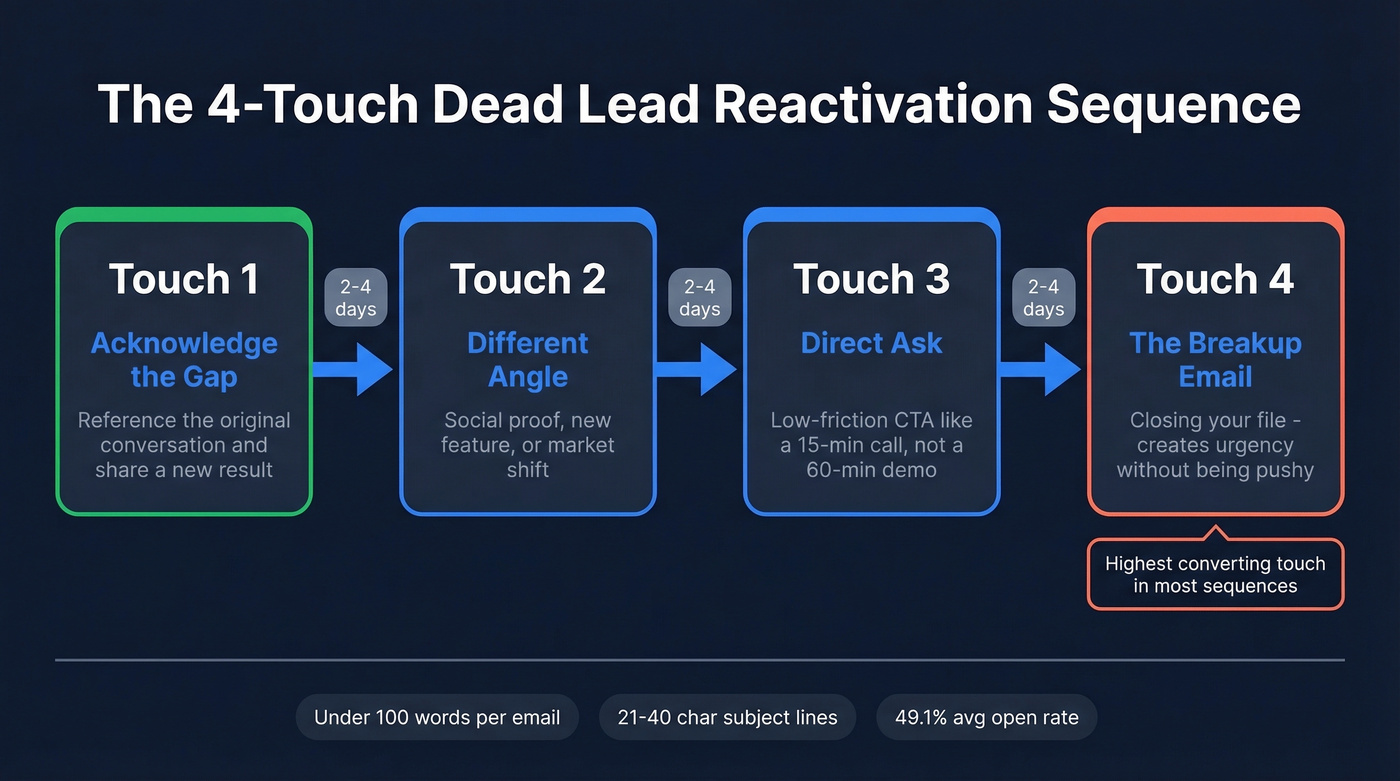
Keep it tight: 3 to 4 touchpoints, spaced 2 to 4 business days apart. Every email under 100 words. One clear CTA per message. Subject lines between 21 and 40 characters hit a 49.1% average open rate. Trigger-event subject lines - referencing a job change, funding round, or product launch - push even higher. (If you want a swipe file, use these email subject line examples.)
The difference between a 3.4% response rate and an 18% response rate is personalization. Reference something specific: a recent company announcement, a mutual connection, or the exact problem they were evaluating when they first engaged. This is how you re-engage cold leads without sounding like every other automated follow-up in their inbox. (For plug-and-play copy, see sales follow-up templates.)
Touch 1 - Acknowledge the gap:
Subject: still exploring [problem]?
Hi {{firstName}}, we spoke back in {{month}} about {{specific problem}}. Since then we've helped [similar company] cut {{metric}} by {{result}}. Worth a 15-minute look at what changed?
Touch 2 - Different angle. Social proof, a new feature, or a market shift that changes the calculus.
Touch 3 - Direct ask with a low-friction CTA (15-minute call, not a 60-minute demo).
Touch 4 - The breakup email:
Subject: closing your file
Hi {{firstName}}, I haven't heard back so I'm going to close out your file on our end. If timing changes, reply anytime and I'll pick it right back up. Either way - no hard feelings.
This breakup email consistently outperforms standard follow-ups. It creates urgency without being pushy, and the consensus on r/sales is that breakup emails are the single highest-converting touch in most sequences.
For no-shows and long-horizon leads, extend the cadence beyond these four touches: follow up immediately, then at 1 week, 2 weeks, 1 month, and 3 months. We've seen leads resurface 2-3 months later when the timing finally aligns.
Step 4 - Go Multi-Channel
In that 2,400-contact reactivation run, email alone produced a 21% open rate and a 1.8% reply rate. Not nothing, but not enough.
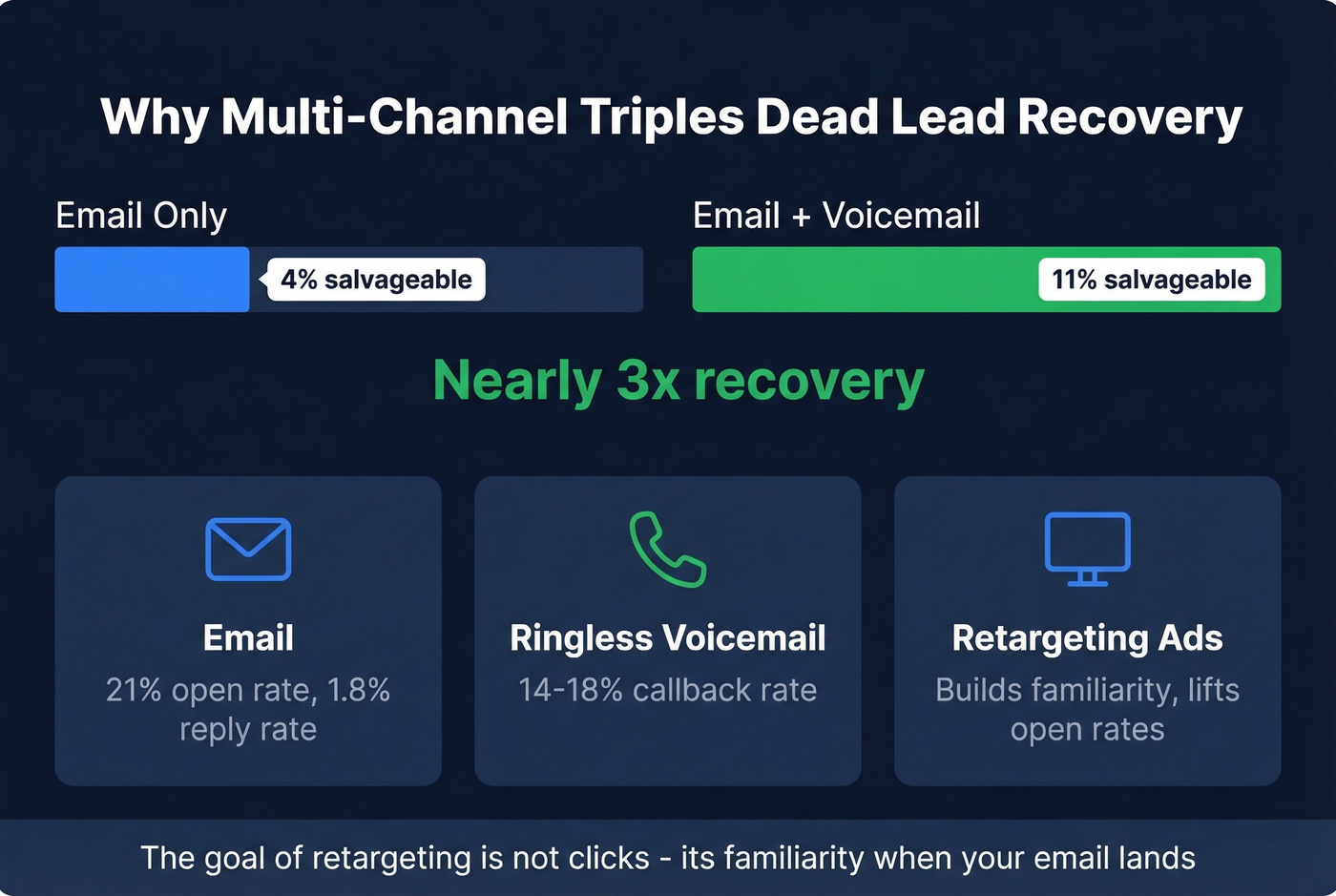
Adding ringless voicemail - tools like Drop Cowboy handle this - produced a 14-18% callback rate in the same test. The combined email-plus-voicemail approach pushed the salvageable rate from roughly 4% to 11%. Nearly triple the recovery from adding a single channel.
Layer retargeting on top. Upload your reactivation list as a custom audience and run low-budget display or social ads. The goal isn't clicks - it's familiarity. When your email lands in their inbox and they've already seen your brand twice that week, open rates climb. This multi-channel approach is the most reliable way to awaken stale contacts that email alone can't reach.
Step 5 - Automate in Your CRM
Don't run reactivation manually. In HubSpot, use Workflows for one-to-many automation and Sequences for one-to-one sales outreach that stops automatically when a prospect replies. Set up lead pipeline automation to move contacts through stages as they engage. (If you're standardizing stages, start with lead status.)
For cross-platform setups - enrichment feeding into HubSpot for sequencing and Slack for notifications - Prospeo integrates natively with Salesforce, HubSpot, Smartlead, Instantly, Lemlist, Clay, Zapier, and Make, bridging the gaps without custom code.
Track "revival revenue" - pipeline and closed-won attributed to reactivated leads - as a standalone KPI. This is the number that justifies the program to leadership and keeps it funded. (To pressure-test your reporting, see pipeline health.)
Know when to stop. If a contact has been through a full multi-channel reactivation sequence and hasn't engaged, permanently archive them. Re-queuing the same unresponsive contacts every quarter pollutes your pipeline metrics and wastes rep time. There's a line between persistence and denial - learn where it is.
Reactivation Benchmarks
| Metric | Benchmark |
|---|---|
| Cold email reply rate | 3.43% |
| Cold email open rate | 27.7% (top performers: 45%+) |
| Reactivation reply (generic) | 1-5% |
| Reactivation reply (segmented + multi-channel) | 5-15% |
| Avg. conversion rate | 2.9% |
| Email marketing CPL | $30-$45 |
| Re-engagement cadence | 3-6 months |
| Max bounce rate | Under 3% |
FAQ
How long before calling a lead dead?
Most B2B teams use 90 days of no engagement, but buying cycles run 6-18 months. A lead silent for four months might be mid-budget-cycle. Re-queue at 90 days into a reactivation sequence. Permanently archive only after a full multi-channel attempt fails.
What reply rate should you expect from re-engagement?
Generic email-only reactivation typically produces 1-5% reply rates. Well-segmented, multi-channel campaigns combining email, voicemail, and retargeting reach 5-15%. The average cold email reply rate is 3.43% - re-engaging contacts that already know your name should beat that baseline.
How do you re-engage leads dormant over a year?
Start by verifying and enriching contact data - after 12+ months, a significant portion of emails will be invalid due to job changes alone. Segment by ICP fit and current intent signals, then reference a trigger event rather than the old conversation. Nobody wants to hear "we spoke 14 months ago" - give them a reason that's relevant now.
Can you reactivate leads that previously bounced?
Yes, but not by resending to the same address. Export bounced contacts and run them through a data enrichment tool to find updated emails. Job changes are the most common cause of bounces, and enrichment catches new work addresses. Verify before sending - one more bounce compounds domain reputation damage.
Are stalled late-stage deals worth reactivating?
Absolutely - stalled deals that reached demo or proposal stage are your highest-value reactivation targets. Reach out with a specific change: a new feature addressing their objection, an industry case study, or updated pricing. Late-stage reactivation converts at 2-3x the rate of top-of-funnel dormant contacts, and in our experience, these are the leads that close fastest once timing aligns.