

Direct Marketing Emails: The 2026 Playbook for Benchmarks, Compliance, and Real Results
The average office worker receives 120+ emails a day. Your direct marketing email lands in that pile alongside meeting invites, Slack notifications, and three newsletters nobody asked for. Most get archived unread. The ones that drive revenue share three things: clean data, solid deliverability infrastructure, and sharp segmentation. Not better copywriting - better plumbing.
Here's the stat that should reshape how you spend your time: automated email flows generate 13x the conversion rate of one-off campaigns. We'll unpack that shortly, along with the compliance rules that can cost you $53,088 per email if you ignore them.
What Is Direct Email Marketing?
Direct email marketing is the practice of sending commercial messages designed to drive a specific action - a purchase, a signup, a demo request, a download. These emails are distinct from transactional messages like order confirmations and password resets, and from newsletters that deliver recurring content updates. The goal isn't to inform or nurture in the abstract. It's to get someone to do something measurable, right now.
The term sometimes gets confused with direct mail - postcards, catalogs, letters. They share the word "direct" and the intent to prompt action, but the channels, economics, and compliance rules are completely different. For the rest of this piece, we're talking about email.
Direct email campaigns include promotional offers, product launches, event invitations, re-engagement sequences, and any email where the primary purpose is commercial. CAN-SPAM treats them all the same way, regardless of whether you're B2C or B2B.
What Actually Matters
Three things determine whether your campaigns succeed or fail. Everything else is optimization at the margins.
Verified data. Bad email addresses destroy your sender reputation before your copy gets a chance. A 5% bounce rate on a 10,000-person send doesn't just waste credits - it tells Gmail you're sloppy. We've seen teams cut bounce rates from 35% to under 5% simply by verifying every address before hitting send. (If you want the exact thresholds and fixes, see bounce rate benchmarks.)
Deliverability infrastructure. SPF, DKIM, DMARC, one-click unsubscribe headers, complaint monitoring. Skip this and you're building on sand. (If you're troubleshooting setup, start with sender reputation and DMARC alignment.)
Segmentation. The same email to everyone is spam with a nicer template. Segmented campaigns drive 30% more opens and 50% more clicks than unsegmented blasts. If you want a practical framework, use intent based segmentation instead of guessing.
Here's the thing most marketers resist: data quality matters more than copy. A perfectly written email that bounces or lands in spam generates exactly zero revenue. If you're running deals above $5k, a single bounced email to the right prospect costs more than a year of list verification.
Email vs. Direct Mail
Both channels work. They solve different problems at different price points.
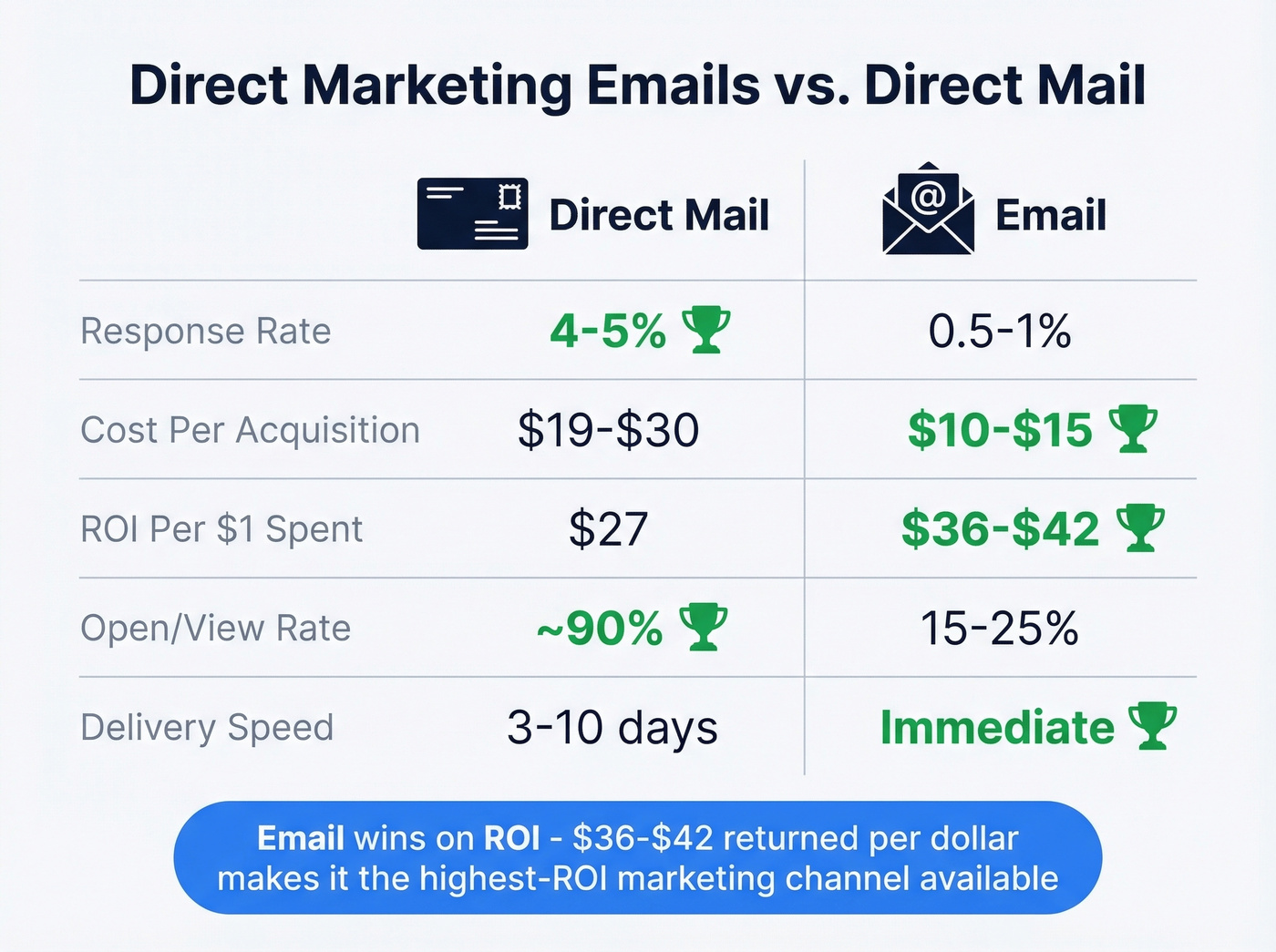
| Metric | Direct Mail | Winner | |
|---|---|---|---|
| Avg. response rate | 4-5% | 0.5-1% | Direct Mail |
| Cost per acquisition | $19-$30 | $10-$15 | |
| Avg. ROI | $27 per $1 | $36-$42 per $1 | |
| Open/view rate | ~90% (estimated) | 15-25% | Direct Mail |
| Delivery time | 3-10 business days | Immediate |
Direct mail wins on response rate and open rate - people still open physical mail. But email crushes it on ROI and speed. At $36-$42 returned per dollar spent, email remains the highest-ROI marketing channel available. For most teams, email is the foundation and direct mail is the supplement, not the other way around. (If you're comparing channels for pipeline, see direct mail for lead generation.)
2026 Benchmarks Worth Knowing
Numbers without context are useless. Here's what "good" actually looks like right now - and why the gap between campaigns and automated flows should change how you allocate effort.
Industry Averages
Mailchimp's benchmark data covers billions of emails across campaigns sent to 1,000+ subscribers:
| Industry | Open Rate | Click Rate | Unsub Rate |
|---|---|---|---|
| All users | 35.63% | 2.62% | 0.22% |
| Business & Finance | 31.35% | 2.78% | 0.15% |
| Ecommerce | 29.81% | 1.74% | 0.19% |
| Education & Training | 35.64% | 3.02% | 0.18% |
| Non-Profits | 40.04% | 3.27% | 0.18% |
One caveat: Apple Mail Privacy Protection inflates open rates by pre-loading tracking pixels. If a large chunk of your list uses Apple Mail, your real open rate is lower than reported. Click rate and conversion rate are more honest indicators of engagement. (For deeper context, compare against a standard email open rate.)
Campaigns vs. Automated Flows
This is where it gets interesting. Klaviyo's 2026 benchmarks across 183,000+ brands reveal a massive performance gap between one-off campaigns and automated flows - welcome sequences, abandoned cart reminders, post-purchase follow-ups:
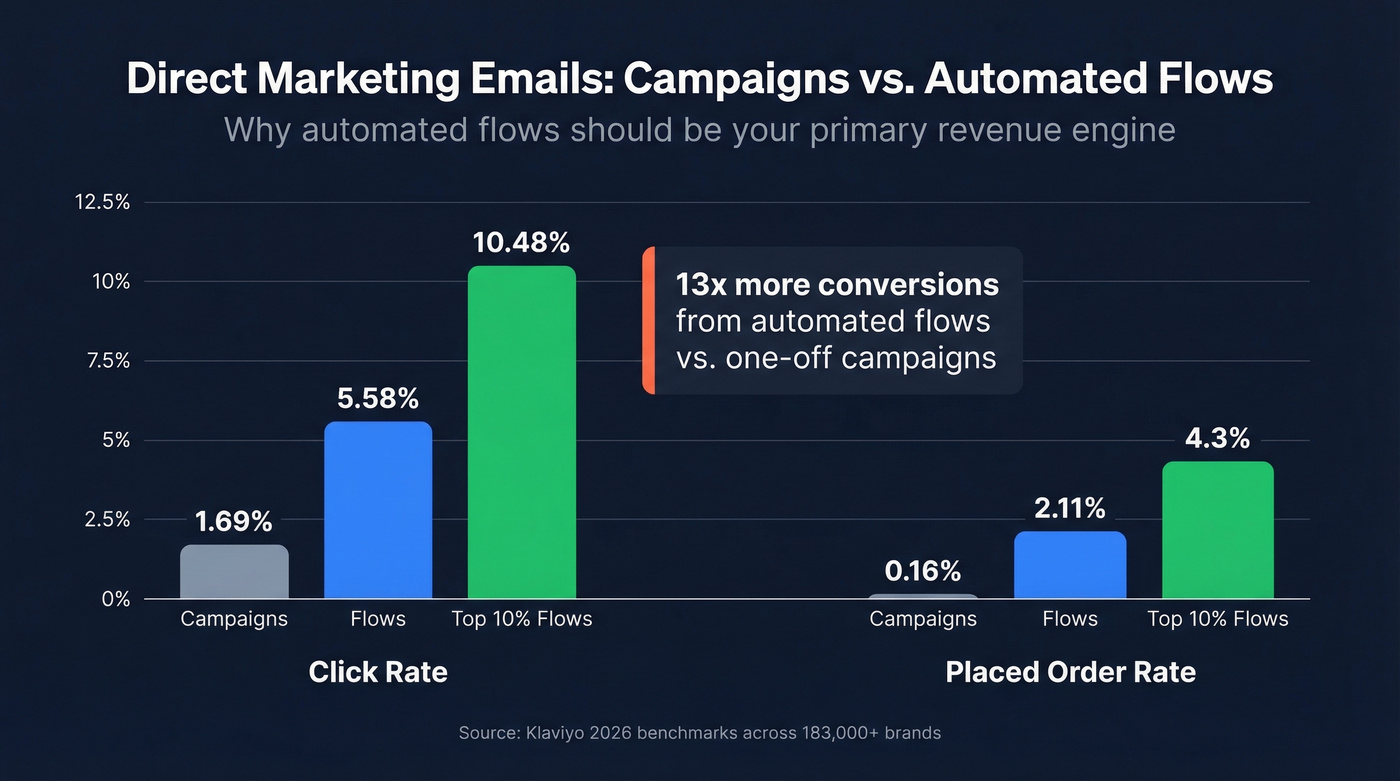
| Metric | Campaigns | Flows | Top 10% Flows |
|---|---|---|---|
| Click rate | 1.69% | 5.58% | 10.48% |
| Placed order rate | 0.16% | 2.11% | 4.3% |
Automated flows generate 3.3x the click rate and 13x the conversion rate of campaigns. The "placed order rate" is Klaviyo-specific to ecommerce, but the pattern holds across B2B - triggered, behavior-based emails outperform batch sends by a wide margin. If you're spending 80% of your time on campaigns and 20% on flows, flip that ratio.
Building a Strategy That Scales
The best email programs in 2026 aren't built around campaigns. They're built as systems that run continuously - welcome sequences, behavior-triggered nurtures, re-engagement automations, and sequences that teach, upsell, or re-engage without someone manually hitting "send" every Tuesday.
That doesn't mean campaigns are dead. Product launches, seasonal promotions, and event invitations still need one-off sends. But the backbone of your email revenue should be automated. In our experience, teams running three or more automated flows generate 40-60% of their email-attributed revenue without touching a single manual send each week.
Segmentation That Moves the Needle
Personalization beyond first name is what separates mediocre programs from great ones. The consensus on r/coldemail is clear: behavior-based segmentation - what someone clicked, downloaded, or which page they visited - drives results that demographic segmentation alone can't match.
The numbers back this up. Segmented emails drive 30% more opens and 50% more clickthroughs than unsegmented blasts. For B2B, where the average email conversion rate sits at 2.4%, that lift is the difference between a pipeline that grows and one that flatlines. (If you're building your targeting from scratch, start with an ideal customer profile.)
Automation Over One-Off Blasts
Start with three automated flows: a welcome sequence triggered on signup, a nurture sequence triggered by engagement signals, and a re-engagement sequence triggered by inactivity. These three cover the full lifecycle and run without daily intervention. Layer in campaign sends for timely content, but let the system do the heavy lifting.
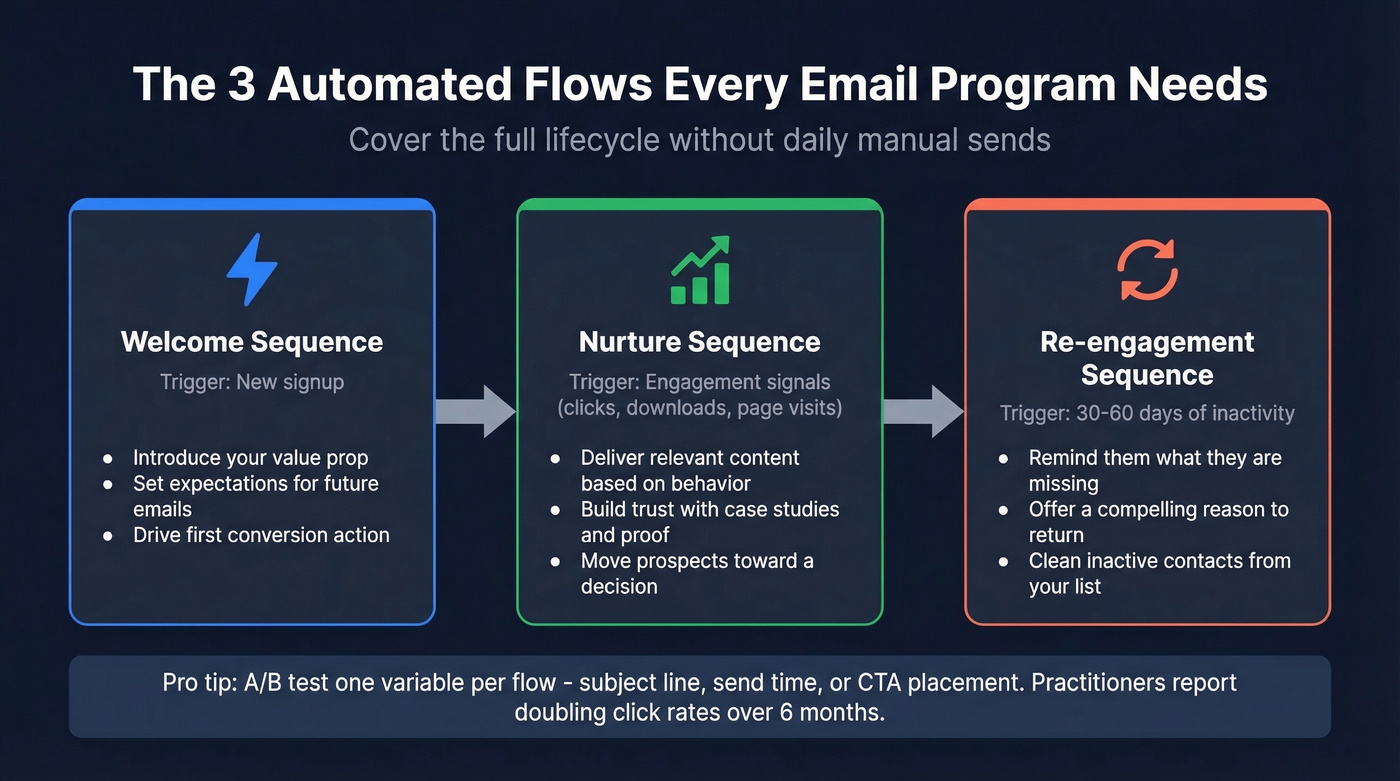
One lever that compounds over time: A/B test one variable per flow - subject line, send time, CTA placement. Practitioners on r/coldemail consistently cite systematic testing as the difference between 2% and 5% click rates over six months. (For CTA mechanics, see email call to action.)

You just read that cutting bounce rates from 35% to under 5% transforms campaign ROI. Prospeo's 5-step email verification does exactly that - 98% accuracy, 7-day data refresh, and spam-trap removal built in. Stop sending direct marketing emails into the void.
Fix your data before you fix your copy. Start with 75 free verified emails.
Writing Emails That Convert
Four Elements That Earn Attention
The average reader spends a few seconds scanning an email. That's not enough time to appreciate clever wordplay. It's enough time to decide whether to read, click, or delete.
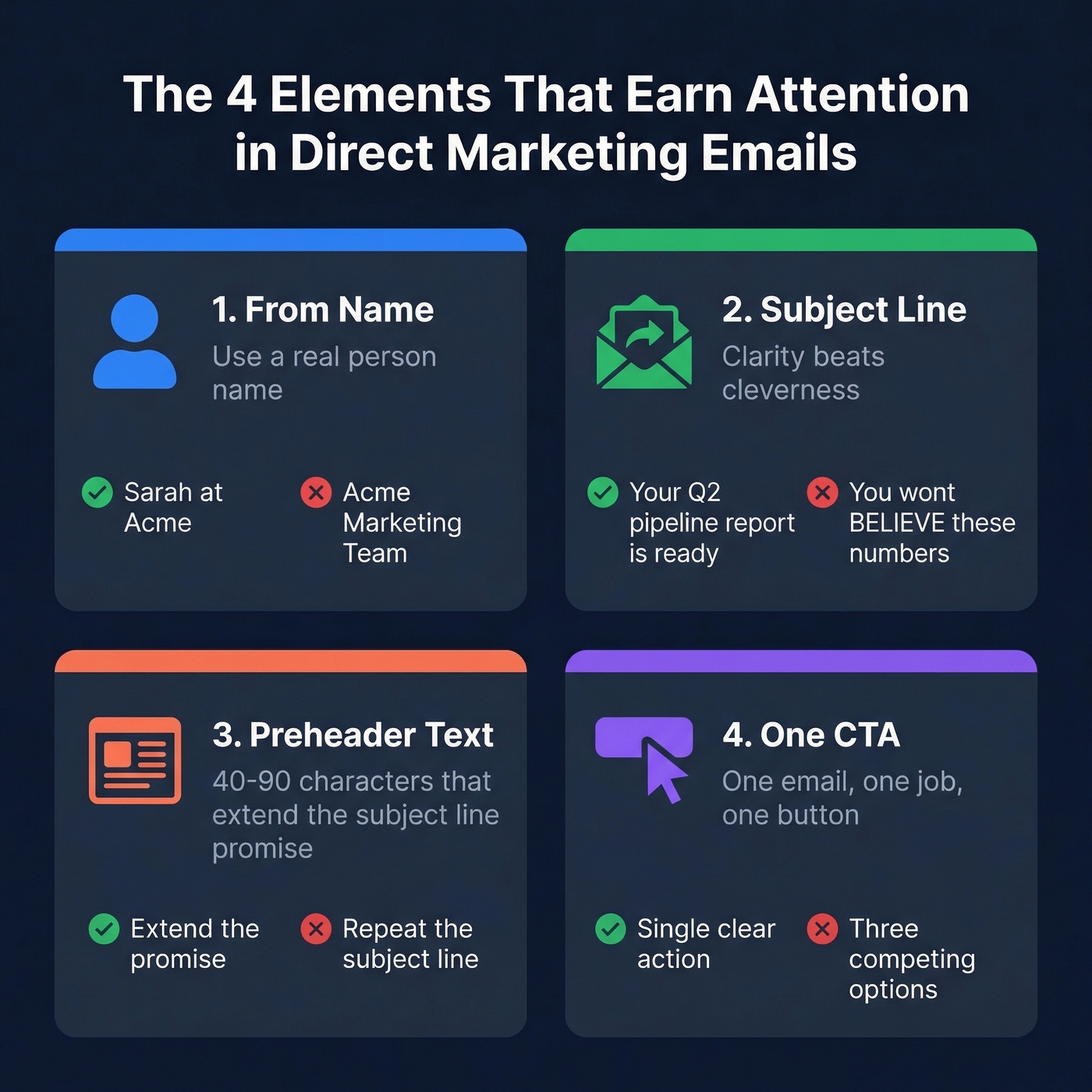
From name. Emails from a real person's name outperform emails from a company name. "Sarah at Acme" beats "Acme Marketing Team." It's a small change with an outsized impact on open rates.
Subject line. Clarity beats cleverness every time. "Your Q2 pipeline report is ready" outperforms "You won't BELIEVE these numbers." Tell people what's inside. If the content is valuable, a clear subject line is all you need. (If you need a swipe file, use these email subject line examples.)
Preheader text. That's the snippet appearing after the subject line in most inboxes - often around 40-90 characters. Use it to extend the subject line's promise, not repeat it.
One CTA. Each email gets one job. One button. One action. When you give people three options, they pick none.
Subject Line Formulas
A few structures that consistently perform:
- Question + relevance: "Still using spreadsheets for pipeline tracking?"
- Specificity + benefit: "3 templates that cut our proposal time by 40%"
- Urgency without hype: "Webinar seats filling - Thursday at 2pm ET"
Avoid spam-trigger language. "FREE!!!", excessive caps, and stacked exclamation points don't just annoy readers - they trigger spam filters. Write like a human, not a late-night infomercial.
Deliverability Infrastructure
You can write the best email in the world and it won't matter if it lands in spam. Deliverability is the unsexy foundation that makes everything else possible.
Authentication Protocols
Three protocols are non-negotiable for any sender in 2026:
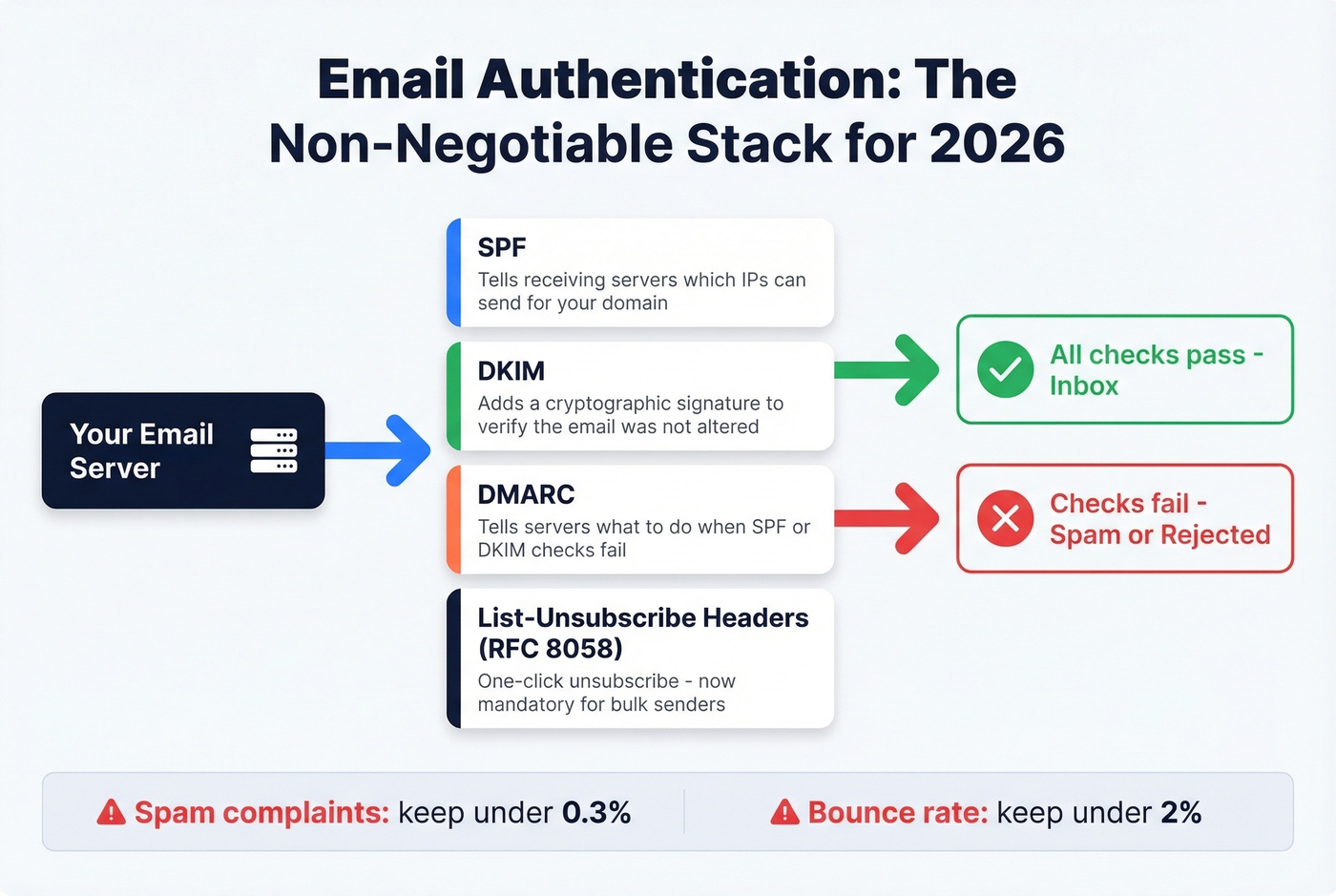
SPF tells receiving servers which IPs are authorized to send on behalf of your domain. DKIM adds a cryptographic signature to verify the email wasn't altered in transit. DMARC tells receiving servers what to do with emails that fail SPF or DKIM checks.
Major mailbox providers now enforce these for bulk senders. If you're sending more than a few hundred emails a day without all three configured, you're gambling with your inbox placement. You also need RFC 8058 one-click unsubscribe via List-Unsubscribe and List-Unsubscribe-Post headers - another requirement that's moved from "nice to have" to mandatory. (If you're auditing your stack, add email reputation tools to your checklist.)
Operational Thresholds
Two numbers to tattoo on your forearm:
Spam complaints: under 0.3%. Gmail's Postmaster Tools enforces this. Cross it consistently and your domain reputation tanks.
Bounce rate: under 2%. Higher than that signals to ISPs that you're not maintaining your list.
Litmus draws a clear distinction between delivery and deliverability that's worth understanding. Delivery means the server accepted your email. Deliverability means it actually reached the inbox. You can have 98% delivery and 60% inbox placement - meaning 40% of your "delivered" emails went to spam or promotions. If inbox placement drops below 90%, investigate immediately. Litmus's research found that marketers who actively monitor deliverability are 22% more likely to rate their programs successful.
For new domains or IPs, warm up gradually. Start at 5-10 emails per day and ramp over 4-6 weeks. Jumping straight to high volume on a fresh domain is the fastest way to get flagged. (For safe sending limits, see email velocity.)
List Verification Before You Send
Bounces and spam-trap hits are the two fastest ways to destroy sender reputation. They're also entirely preventable. (If you're cleaning a damaged list, start with spam trap removal.)
Snyk's team of 50 AEs saw bounce rates drop from 35-40% to under 5% after switching to verified contact data through Prospeo, and AE-sourced pipeline jumped 180%. That kind of improvement shows up in every campaign's inbox placement - not because the copy changed, but because the data got clean.
Segmented campaigns drive 50% more clicks - but only if your contact data is real. Prospeo gives you 30+ filters including buyer intent, job changes, and technographics so every direct marketing email reaches the right person with a verified address.
Better segmentation starts with better data. 300M+ profiles, $0.01 per email.
Legal Compliance Checklist
Ignoring compliance isn't just risky - it's expensive. CAN-SPAM penalties run up to $53,088 per email in violation. Per email, not per campaign.
CAN-SPAM Requirements
Every commercial email you send - including B2B - must meet these requirements:
- Accurate header information: From, To, Reply-To, and routing info must be truthful
- Non-deceptive subject lines that reflect the email's content
- Clear identification that the message is an advertisement
- A valid physical postal address
- A clear, conspicuous opt-out mechanism
- Opt-out requests honored within 10 business days
- No fee or additional information required to opt out beyond the email address
- You can't sell or transfer the email addresses of people who've opted out
- You're responsible for compliance even when third parties send on your behalf
The FTC's CAN-SPAM compliance guide is the definitive reference. Bookmark it.
GDPR and CASL
If you're sending to EU recipients, GDPR applies. Penalties reach up to EUR 20 million or 4% of global annual revenue, whichever is higher. The key difference from CAN-SPAM: GDPR requires explicit consent before you send, not just an opt-out mechanism after.
Canada's CASL follows a similar consent-first model with penalties up to $10 million CAD per violation. If your list includes international contacts, build your compliance around the strictest applicable regulation - that way you're covered everywhere.
Common Mistakes to Avoid
Do this: Verify your list before every major send. Clean quarterly at minimum. If bounces cross 2% or complaints cross 0.3%, clean immediately.
Not that: Send to a purchased list. Look, Reddit practitioners are unanimous on this - buying lists tanks sender reputation. The addresses are stale, unverified, and full of spam traps. We've never seen a purchased list that didn't damage the sender's domain. (If you need the legal angle, read is it illegal to buy email lists.)
Do this: Segment by behavior, engagement level, and purchase history. Send different messages to different people.
Not that: Blast the same email to your entire list and call it "personalization" because you used a first-name merge tag.
Do this: Design mobile-first. Over 60% of emails are opened on mobile devices. Test rendering on at least three screen sizes before sending.
Not that: Build for desktop and hope it renders on a phone. Broken layouts on mobile are the fastest way to earn a delete.
Do this: Monitor deliverability metrics weekly. Check inbox placement, not just open rates.
Not that: Ignore deliverability until your open rates crater and you're scrambling to figure out why half your emails are landing in spam.
Templates You Can Steal
These four templates cover the most common direct marketing email scenarios. Each includes annotations on why specific elements work.
Promotional Offer
Subject: 20% off [Product] - this week only Preheader: Expires Friday. No code needed.
Hi [First Name],
We're running 20% off [Product/Service] through [Date]. If you've been considering [specific benefit], this is the best price we'll offer this quarter.
[CTA Button: Claim Your Discount]
No code required - the discount applies automatically at checkout.
[Company Name] | [Physical Address] [Unsubscribe link]
Why this works: The subject line combines specificity with urgency. The body is three sentences - enough to convey the offer, not enough to lose attention. "No code required" removes friction at the moment of decision.
Welcome Sequence (Day 0 - Day 1 - Day 3)
Rather than a single welcome email, map the first week as a three-touch sequence:
Day 0 (immediate): Subject: "Welcome to [Company] - here's what happens next." Deliver the promised resource, set expectations for email frequency, and ask them to add your sending address to their contacts. This safelist request improves inbox placement for every future email.
Day 1: Subject: "Most new users start here." Link to the single highest-value action in your product. Two sentences. One button.
Day 3: Subject: "Quick question." Ask one question about their goals or use case. This reply triggers engagement signals that boost your sender reputation with their mailbox provider - and it gives you segmentation data you can actually use.
Follow-Up / Nurture
Subject: Re: [Previous email subject] Preheader: Quick resource on [topic].
Hi [First Name],
Following up on [previous interaction]. I put together [resource/guide/case study] that covers [specific problem they're likely facing].
[CTA Button: Read the Guide]
If the timing isn't right, no worries - I'll check back in a few weeks.
[Company Name] | [Physical Address] [Unsubscribe link]
Why "Re:" works: The prefix signals an ongoing conversation, not a cold outreach. Open rates on follow-ups using this format consistently run 15-25% higher than fresh subject lines. Don't abuse it - use it only when there's a genuine prior touchpoint.
Re-Engagement (Before / After)
Most re-engagement emails are polite and forgettable. Let's be honest about what the typical version looks like versus what actually drives reactivation:
Before (generic): "We miss you! Come back and check out what's new."
After (specific): Subject: "Still interested in [topic/product]?" - Hi [First Name], it's been [timeframe] since you last opened one of our emails. We've got [specific upcoming content/offer] dropping next week. Click below to stay on the list, or we'll remove you in [timeframe]. No hard feelings.
The "after" version works because it's specific about what they'll miss and creates a real deadline. Vague "we miss you" language gets ignored because it gives the reader no reason to act.
FAQ
What is direct email marketing and how does it differ from newsletters?
Direct email marketing sends commercial messages designed to drive a specific action - a purchase, signup, or demo booking. Newsletters inform and nurture over time without a hard conversion goal. The metrics differ too: direct campaigns are measured on click-through and conversion rates, while newsletters track engagement and retention.
How often should I clean my email list?
Verify before every major campaign and clean quarterly at minimum. If your bounce rate exceeds 2% or spam complaints cross 0.3%, clean immediately - those thresholds trigger reputation damage fast.
What's a good open rate in 2026?
Mailchimp's all-industry average sits at 35.63%, while Klaviyo reports 31% for campaigns with the top 10% hitting 45.1%. But open rates are increasingly unreliable because Apple Mail Privacy Protection inflates them by pre-loading tracking pixels. Aim for 2.5%+ click rate as your baseline; it's a more honest indicator of whether people actually care about what you're sending.
Are direct marketing emails legal without opt-in consent?
In the US, CAN-SPAM allows commercial emails without prior opt-in as long as you include accurate headers, a physical address, clear opt-out mechanisms, and honest subject lines. Penalties reach $53,088 per violating email. In the EU and Canada, GDPR and CASL require explicit consent before sending. Build compliance around the strictest regulation that applies to your audience.
What's the best time to send?
Tuesday through Thursday between 9-11 AM in the recipient's local time zone is the most commonly cited window, but this varies by audience. B2B emails to executives often perform better early morning or late evening when inboxes are quieter. A/B test three time slots over two weeks with your specific list and let the data decide.