

Email Address Lookup by Name: What Actually Works (2026)
You type a name into an email finder, hit search, get a "verified" result - and it bounces. Not once. Twenty percent of the time. That's the reality a cold email sender posted on r/coldemail after cycling through multiple tools: "verified" emails still producing 20%+ bounce rates in live campaigns.
Here's the expectation mismatch nobody warns you about: every email address lookup by name tool actually requires a name plus a company name or domain. There's no magic "type a name, get an email" button. Even Apollo, which lets you search by name in the web UI, requires a company or domain for API lookups. Once you accept that constraint, the game becomes about which tools find the most emails - and which ones return addresses that actually land in inboxes.
We've tested dozens of email finders over the past two years. The gap between "verified" and "deliverable" is the single biggest frustration in the category.
What You Need (Quick Version)
- Every email finder needs a name + a company or domain. Name alone won't cut it for B2B.
- No single tool finds every email. Run 2-3 tools in a waterfall, then verify the merged list separately.
How Name-to-Email Lookup Works
When you enter a name and domain into an email finder, one of two things happens. Either the tool checks a pre-crawled database of known email addresses, or it generates likely patterns algorithmically and tests them against the mail server. Most tools do both, in that order - database first, pattern guessing as fallback.
If you want the deeper workflow, see our guide on name-to-email.
Pattern Guessing vs. Database Matching
Database matching is straightforward: the tool already has the email on file from web scraping, data partnerships, or user contributions. It's fast and usually accurate, but coverage depends entirely on how large and fresh the database is. (Related: email crawlers and how they source addresses.)
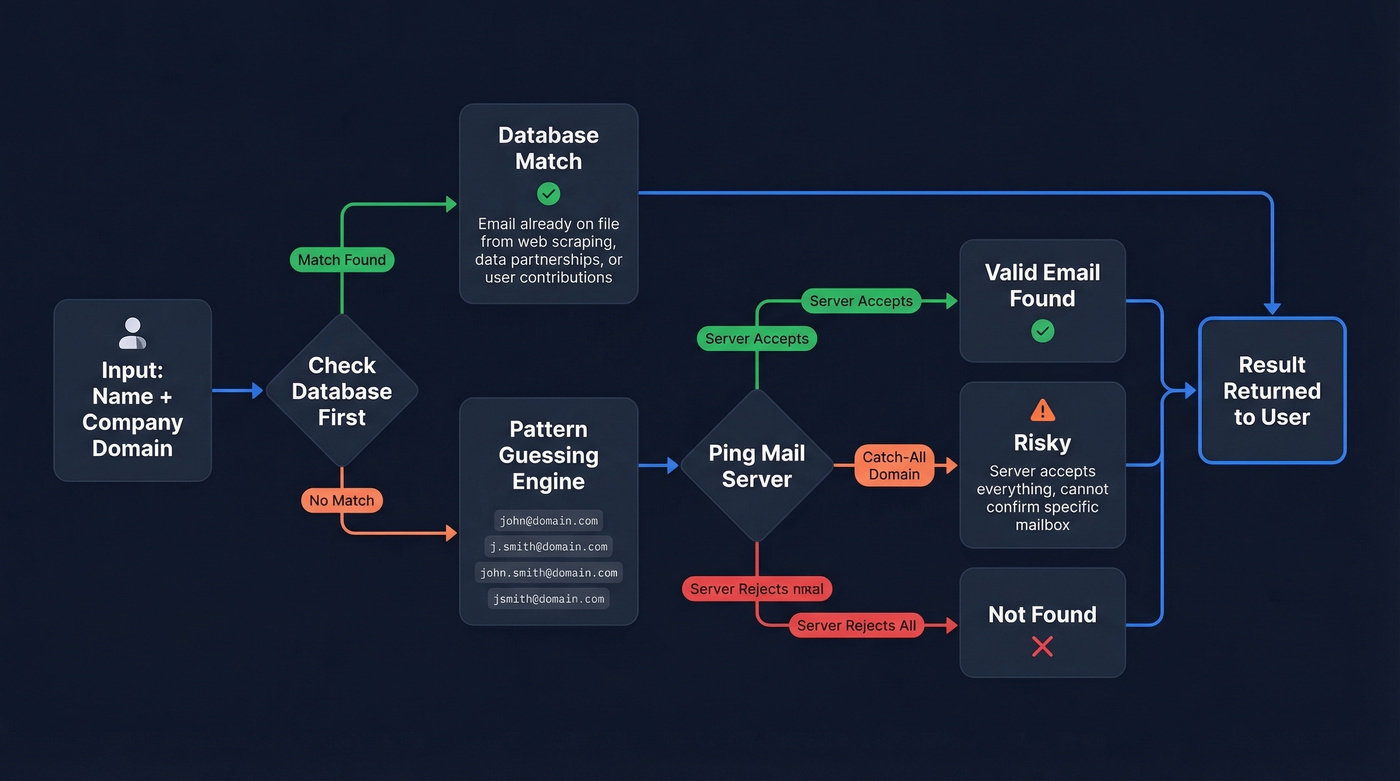
Pattern guessing is more interesting. The tool takes the person's name, generates permutations like john@, j.smith@, john.smith@, and jsmith@, then pings the mail server to see which one accepts delivery. This works well for domains with standard patterns but fails on catch-all domains, where the server accepts everything - including completely fake addresses.
When a tool returns "not found," it means no email was identified at all. That's different from "invalid," where an email was found but the mailbox doesn't exist. The distinction matters when you're evaluating tool performance (more on that in Email Not Found?).
Email Patterns by Company Size
Pattern conventions aren't random. An analysis of 5M+ companies shows clear trends based on headcount:
| Company Size | Most Common Pattern | Frequency |
|---|---|---|
| 1-10 employees | {first} |
71.48% |
| 11-50 employees | {first} |
41.91% |
| 51-200 employees | {f}{last} |
41.76% |
| 10,001+ employees | {first}.{last} |
56.31% |
Small companies keep it simple - just a first name. Enterprise companies default to firstname.lastname. If you're guessing manually, the right pattern depends on who you're targeting. A Hunter analysis of 12M+ email addresses found that 49.9% of companies use the {first}@domain format overall.
If you're building a repeatable outbound motion around this, pair pattern logic with sales prospecting techniques that keep list quality high.
Why "Verified" Doesn't Mean Deliverable
Email verification tools return a status, not a guarantee (see: email bounce rate benchmarks and what actually triggers reputation damage):
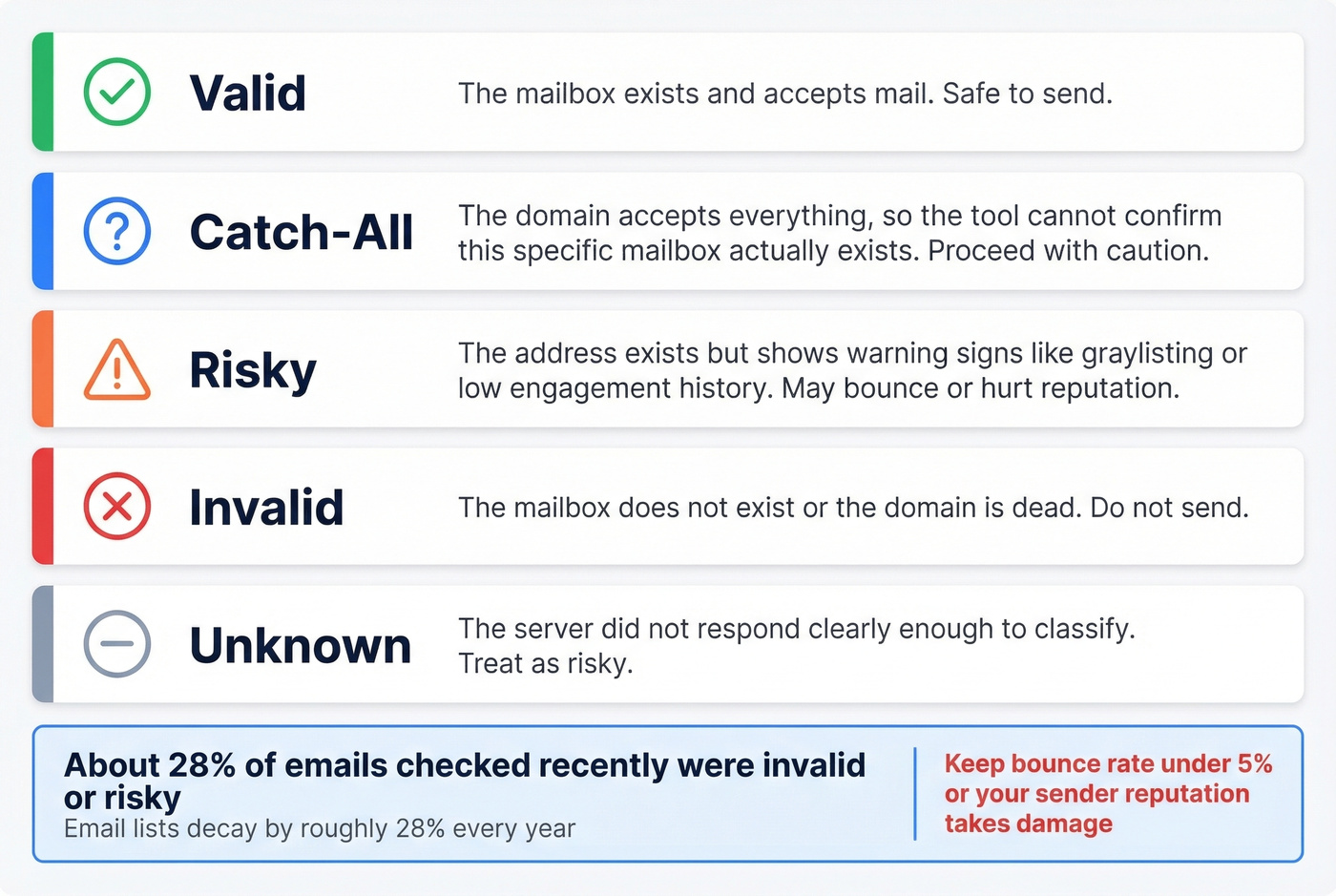
- Valid - the mailbox exists and accepts mail.
- Catch-all - the domain accepts everything, so the tool can't confirm the specific mailbox.
- Risky - the address exists but shows warning signs like graylisting or low engagement history.
- Invalid - the mailbox doesn't exist or the domain is dead.
- Unknown - the server didn't respond clearly enough to classify.
About 28% of emails checked in recent years were invalid or risky, up from roughly 22% two years prior. Email lists decay by roughly 28% every year as people change jobs, companies rebrand, and domains go offline. The threshold that matters: keep your bounce rate under 5%. Cross that line and your sender reputation starts taking damage, which means even your valid emails stop reaching inboxes (see how to improve sender reputation).
Some tools verify during the finding step itself, running multi-step checks before returning a result. Others find first and verify separately. The integrated approach is better - it means fewer "verified" emails that bounce later because the verification happened in real time, not against a stale database.
Best Tools to Find Email by Name
Prospeo
Prospeo's 143M+ verified email database runs on a 5-step verification process with catch-all handling, spam-trap removal, and honeypot filtering. The 98% email accuracy rate holds up in production - Meritt went from 35% bounce to under 4% after switching, and Snyk's 50-person AE team dropped from 35-40% bounce to under 5%.
If you're comparing options, start with our roundups of email search tools and email ID finder platforms.
Data refreshes every 7 days, compared to the 6-week industry average. That gap matters because an email that was valid last month can bounce today.
The free tier gives you 75 emails plus 100 Chrome extension credits monthly, and paid plans run about $0.01 per email with no contracts required. The actual name-to-email process takes seconds: enter a first name, last name, and company domain, hit search, and you get the email with a confidence score and verification status - already validated through all five verification steps before you see it.

Hunter.io
Hunter has become the default first tool most people try when they need to find someone's email. The verification layer is genuinely solid. Free tier gives you 50 searches per month, and one successful Email Finder search costs 1 credit (failed searches are free).
Paid plans start at $49/month for 2,000 credits. Credit math works like this: 1 credit per email found, 0.5 credits per verification, and 1 credit covers up to 10 emails in Bulk Domain Search.
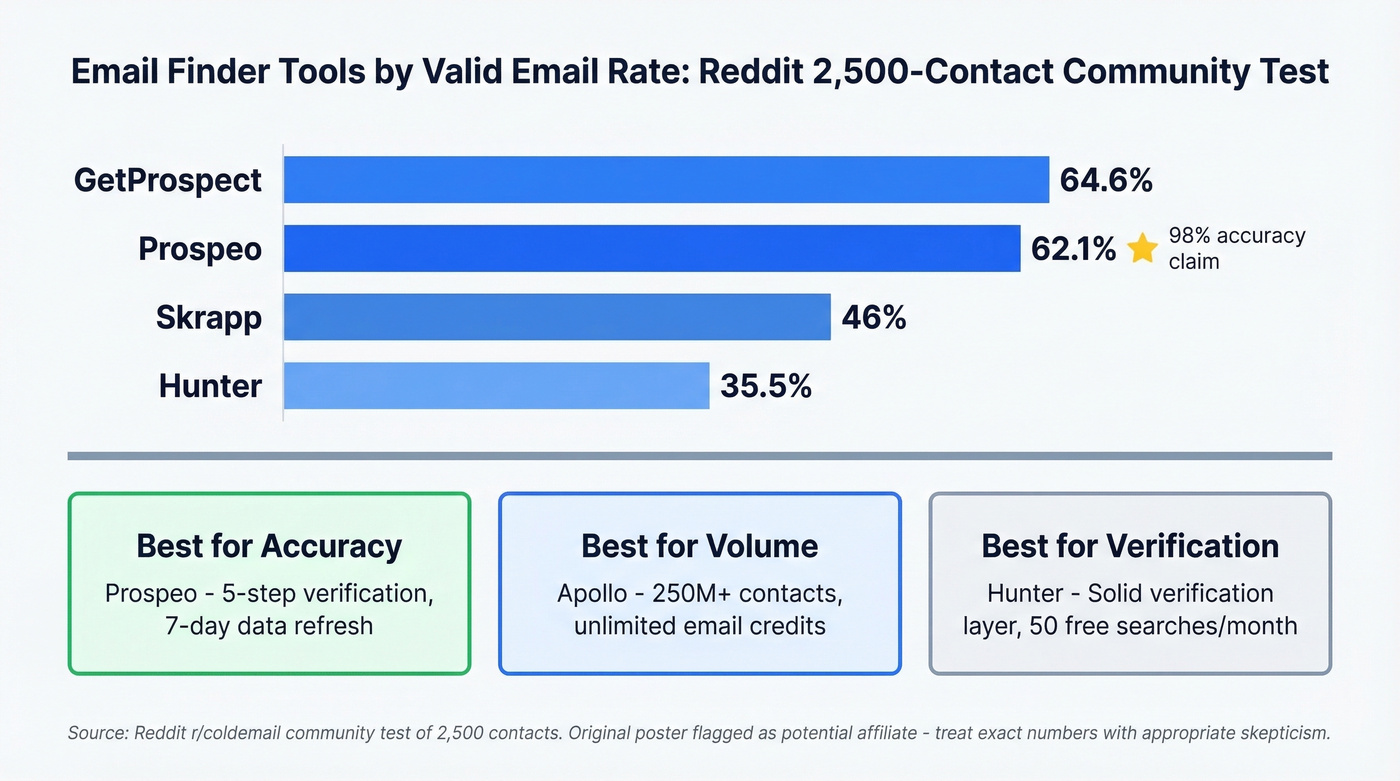
Hunter's database is smaller than you'd expect for a tool this well-known, though. The consensus on Reddit is that it works better as a verification layer than a primary source. In a community test of 2,500 contacts, Hunter found valid emails for just 35.5% of the list. Use it as your second pass or your verification step, not your only finder. (If you're shopping around, see Hunter alternatives.)
Apollo.io
Use this if: You need the widest possible net. Apollo has a 250M+ contact database, and plans start at $59/user/month with "unlimited email credits."
Skip this if: You care about accuracy more than volume. Reddit users consistently flag Apollo's data quality - "big database but data feels bad sometimes," especially on older contacts that haven't been refreshed. The free tier with 75 credits/month is worth testing, but verify every email Apollo gives you through a separate tool before you send.
RocketReach
RocketReach doesn't get the hype that Apollo or Hunter do, but it quietly delivers. One r/coldemail poster reported their bounce rate "dropped a lot" after switching, specifically praising its accuracy with limited input - useful when you've got a name and company but not much else. Plans start around $49-99/month with a limited free tier. For mid-size SaaS targeting where accuracy matters more than volume, it's worth a trial.
Skrapp, GetProspect, Anymail Finder, Snov.io
Skrapp offers 100 free credits monthly, paid from around $39/month. Mid-range performance - 46% valid in the Reddit 2,500-contact test. Decent for supplementing your primary tool.
GetProspect hit 64.6% valid in that same community test, making it one of the stronger performers for finding professional emails at scale. 50 free emails/month, $49/month for 1,000 on paid plans.
Anymail Finder runs a pay-only-for-valid model starting at $0.01/email - you don't pay for misses. 100 free credits to start, plans from $14/month.
Snov.io starts at $39/month for 1,000 credits. Good for international leads and has built-in email automation if you want finding and sending in one platform.
Pricing Comparison
| Tool | Free Tier | Starting Price | Credit Model |
|---|---|---|---|
| Prospeo | 75 emails + 100 Chrome/mo | ~$0.01/email | Pay for valid |
| Hunter | 50 searches/mo | $49/mo (2K credits) | 1 credit/find |
| Apollo | 75 credits/mo | $59/user/mo | "Unlimited" emails |
| RocketReach | Limited | ~$49-99/mo | Tiered plans |
| Skrapp | 100 credits/mo | ~$39/mo | Credit-based |
| GetProspect | 50 emails/mo | $49/mo | Credit-based |
| Anymail Finder | 100 credits | $14/mo | Pay for valid |
| Snov.io | Trial credits | $39/mo (1K credits) | Credit-based |
A note on that Reddit 2,500-contact test: the poster was flagged as a potential brand affiliate, so take the exact percentages with appropriate skepticism. Most tools landed between 35-65% valid, and the relative rankings still reflect what we've seen in our own testing. "Found" rates don't tell the full story either - a tool with strict verification returns fewer results but higher deliverability, while a tool that returns everything including risky catch-all addresses looks better on "found" rate but worse in your actual campaign.

Every email Prospeo returns has already passed 5-step verification - catch-all handling, spam-trap removal, and honeypot filtering - before you see it. That's why teams like Snyk dropped from 35-40% bounce to under 5%. At $0.01 per email with a 7-day data refresh, you're not paying for stale pattern guesses.
Enter a name and domain. Get a verified email in seconds.
The Waterfall Strategy
No single tool finds every email. The math is simple: if Tool A finds 40% and Tool B finds 45% with partial overlap, running both gets you to 60-70%. In our testing, two tools typically reach 65-75% coverage.
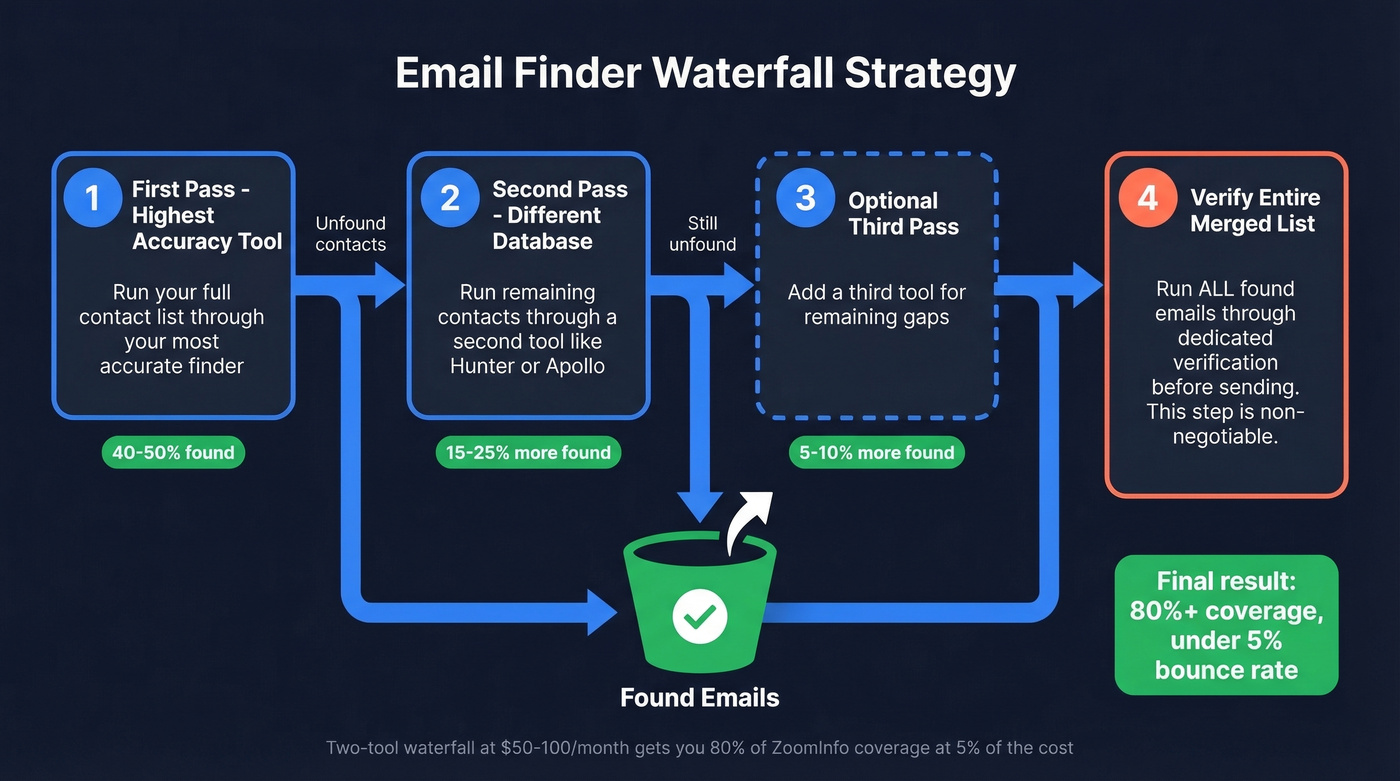
Here's how to set it up:
- Start with your highest-accuracy tool for the first pass.
- Run unfound contacts through a second tool like Hunter or Apollo.
- Optionally add a third tool for remaining gaps.
- Verify the entire merged list through a dedicated verification step before sending.
Realistic expectations: 30-70% match rate per individual tool, 80%+ when you combine two or three. The verification step at the end is non-negotiable - it's what keeps your bounce rate under that critical 5% line. (If you need a dedicated verifier shortlist, see Bouncer alternatives.)
Let's be honest about cost. If your average deal size is under $15k, you probably don't need a $14,995/year ZoomInfo subscription. A two-tool waterfall at $50-100/month total will get you 80% of the coverage at 5% of the cost. The marginal emails you miss aren't worth the budget hit.
Manual Methods (No Tool Required)
Sometimes you don't need a tool at all. These free approaches work when you're searching for someone's email - they're just slower.
Check the company website. Look at About, Contact, and Team pages. Only 18.7% of company websites publicly list an email address, but when they do, it's usually accurate.
Guess the pattern and verify. Use the company-size table from earlier. For a 5,000-person company, try firstname.lastname@domain.com first. Run your guess through a free verification tool before sending (or follow this guide on how to check if an email exists).
Google dorking. Search site:company.com "@company.com" to surface any publicly indexed email addresses on their domain. This works surprisingly well for companies with active blogs or press pages.
Social media bios and author pages. Blog posts, conference speaker pages, and professional bios sometimes include direct email addresses. These methods don't scale, but they're free and effective for one-off lookups when you need to reach a specific person without paying for a subscription.
When You Don't Have a Company
Every B2B email finder requires a domain. That's by design - the entire pattern-guessing and database-matching approach depends on knowing which mail server to check. A pure name-only search with zero company context simply doesn't work in B2B tools.
If you've got a name and nothing else, people-search tools like BeenVerified are the fallback. They're clunky, expensive - one Reddit user called BeenVerified "grossly expensive" - and designed for background checks rather than prospecting.
The better move: if you have any company signal - a job title, an industry, even a city - use a B2B database with filters to narrow down the person first, then pull verified emails once you've identified the right match (see sales prospecting databases).
Legal Compliance in 30 Seconds
| US (CAN-SPAM) | EU (GDPR) | |
|---|---|---|
| Core rule | Regulates how you email | Regulates why you have the data |
| Penalty | Up to $46,517 per email | Up to EUR 20M or 4% of turnover |
| Opt-out | Honor within 10 days | Honor immediately |
| Key requirement | Physical address + unsubscribe link | Lawful basis + source disclosure |
The tools themselves are legal. It's how you use the data that matters. In the US, you can email someone you've never met as long as you include an unsubscribe link and your physical address. In the EU, you need a lawful basis for processing their data and must tell them where you got their email if they ask. (Related: is it illegal to buy email lists.)
This article proves no single tool finds every email. But your waterfall should start with the most accurate source. Prospeo's 143M+ verified emails deliver 98% accuracy - and the free tier gives you 75 lookups per month to test it against your current stack.
Start your waterfall with data that doesn't bounce.
FAQ
Can I find someone's email with just their name?
Not reliably. Every major B2B email finder requires a company name or domain alongside the person's name. Without a company, you'd need a consumer people-search database like BeenVerified, which isn't built for sales prospecting. Find any company signal first - even a job title or industry - then use a B2B tool.
Are email lookup tools legal?
Yes. In the US, CAN-SPAM regulates how you send emails, not where you sourced the address. In the EU, GDPR requires a lawful basis for processing personal data. The tools are legal; your sending practices determine compliance.
What's the most accurate email finder in 2026?
Prospeo leads with 98% verified email accuracy backed by a 5-step verification process and 7-day data refresh cycle. That said, running a waterfall of 2-3 tools and verifying the final list consistently outperforms relying on any single finder alone. Accuracy depends on freshness as much as the initial match.
What's a catch-all domain?
A catch-all domain accepts email sent to any address at that domain - including fake ones. Verification tools can't confirm whether a specific mailbox exists, so these emails get classified as "risky." They might deliver perfectly or bounce silently, with no way to know in advance.
What free tools work for email address lookup by name?
Hunter offers 50 free searches/month, Prospeo gives 75 verified emails plus 100 Chrome extension credits, Apollo provides 75 credits, and Anymail Finder includes 100 free lookups. For best results on a free budget, stack two free tiers in a waterfall and verify the merged list before sending.