

How to Arrange a Meeting by Email: Templates, Timing, and the Step Everyone Skips
Professionals spend 28% of their workweek reading and responding to email - more than a full day, every week, buried in the inbox. Yet most meeting request emails still get ignored. Not because the ask is bad, but because the execution is sloppy. 60% of professionals say email volume adds stress, and 88% have regretted an email right after hitting send. If you need to arrange a meeting by email with a prospect, client, or colleague, there's a specific workflow that works - and the first step is the one most guides skip entirely.
What You Need (Quick Version)
Before you write a single word, nail these three things:
- Keep the email under 100 words. Subject line under 5 words. Propose 2-3 specific times with time zones.
- Follow up on Day 3, then again 5-7 days later if no reply. 80% of leads need at least five touchpoints to convert. One email isn't a strategy. (If you want ready-to-send sequences, use these follow up templates.)
Find the Right Email First
You've crafted the perfect meeting request to a VP of Product at your target account. Compelling subject line, tight body copy, two clean time slots. You hit send. It bounces.
Now your domain reputation takes a hit, your sending tools flag the send, and you've wasted 15 minutes on a message that never existed. Before you write anything, verify you're sending to a real, active inbox. Paste a name and company domain into Prospeo's email finder, and you'll get a verified address in seconds. The free tier gives you 75 email lookups per month - more than enough to test the workflow on an entire target account list. (If you're troubleshooting bad data, start with email not found.)

Anatomy of a Meeting Request Email
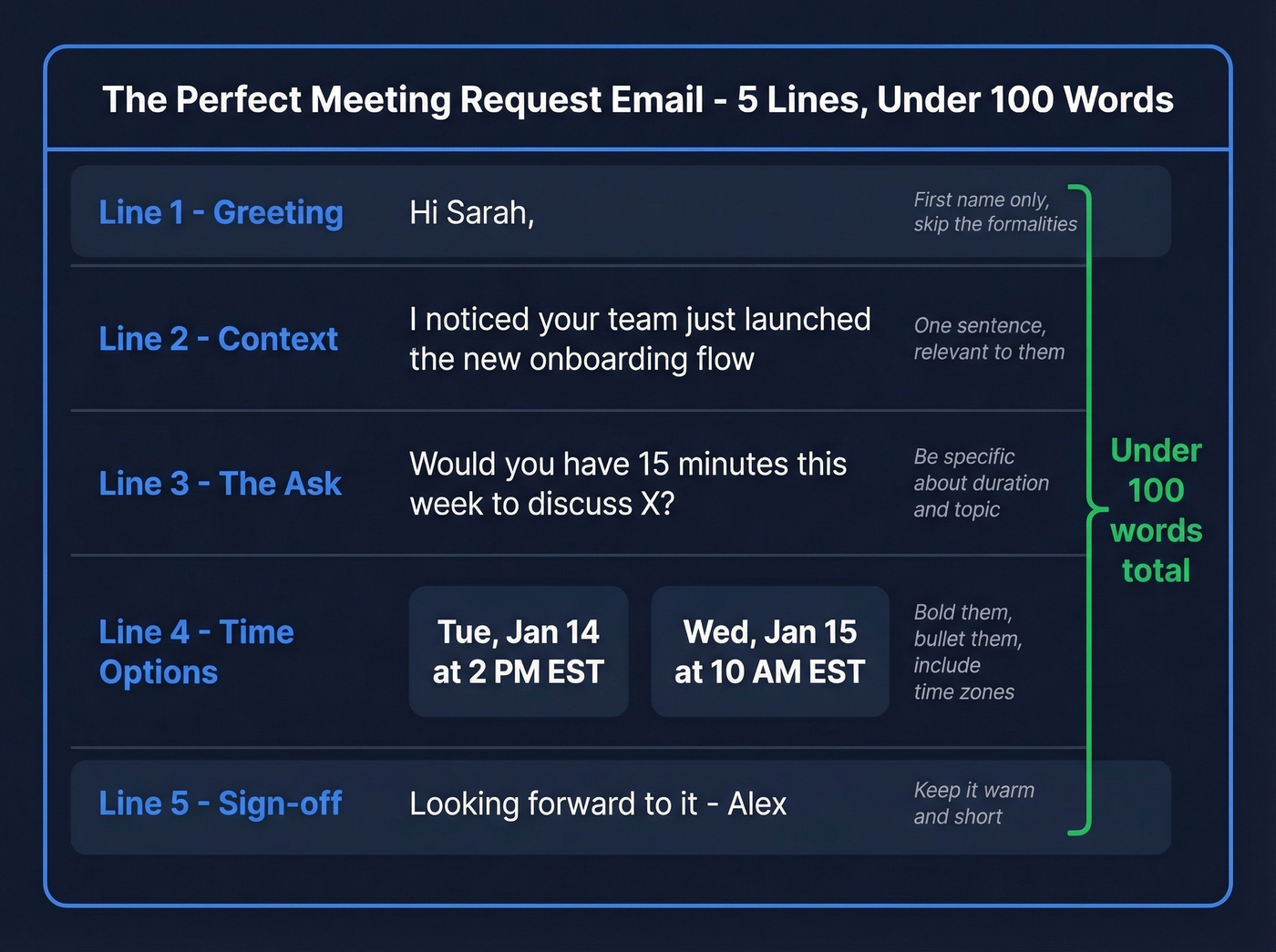
The gold standard is five lines, 80-100 words total. Every sentence has a job. If a sentence doesn't move the reader toward saying yes, cut it. (For more structure, see our guide to email copywriting.)
Subject Lines That Get Opened
Personalized subject lines hit a 46% open rate versus 35% without personalization, based on an analysis of 5.5M emails. The sweet spot for length is two to four words - that range topped the open rate charts. Longer subject lines of 9-10 words dropped to 34-35%.
Here's the practical constraint most people miss: mobile devices truncate subject lines around 33 characters. Put your hook in the first 30 characters or it disappears on half your recipients' screens. We've tested both approaches extensively, and short always wins. Skip numbers in subject lines too - they actually performed slightly worse in the data. (Need more options? Steal from these email subject line examples.)
Subject lines that work, organized by context:
- Direct ask: "Quick sync Thursday?" / "15 min this week?"
- Personalized: "{{First name}} - coffee Tuesday?" / "Saw your Q2 launch"
- Value-led: "Idea for {{company}}" / "Cut your onboarding time"
- Warm intro: "{{Mutual contact}} suggested we chat"
- Re-engagement: "Still interested?" / "Circling back"
Body Structure in 5 Lines
- Greeting. First name only. "Hi Sarah" - not "Dear Ms. Thompson."
- Context sentence. Why you're reaching out, in one line. Tie it to something relevant to them.
- The ask. "Would you have 15 minutes this week to discuss X?"
- Two to three time options. Bold them or bullet them with time zones. Don't bury proposed times in a paragraph - this is a common complaint in scheduling threads on r/sales and r/coldoutreach. People list specific times and recipients still suggest conflicting slots because the times were hidden in a wall of text. Make yours impossible to miss:
- Tuesday, Jan 14 at 2:00 PM EST / 11:00 AM PST
- Wednesday, Jan 15 at 10:00 AM EST / 7:00 AM PST
- Sign-off. "Looking forward to it" or "Let me know what works" - then your name.
(If you're building a full outbound motion, pair this with a B2B cold email sequence.)
Copy-Paste Templates for Every Scenario
Each template follows the five-line structure. Swap the bracketed fields and send.
Standard meeting request:
Subject: Quick sync this week?
Hi {{First name}},
I'd love to connect on {{topic}} - I think there's a strong overlap with what your team's working on. Would any of these work for a 15-minute call?
- Tue, Jan 14 at 2 PM EST
- Wed, Jan 15 at 10 AM EST
- Thu, Jan 16 at 3 PM EST
Best, {{Your name}}
Cold outreach to a stranger:
Subject: Idea for {{Company}}
Hi {{First name}},
I noticed {{specific observation - recent hire, product launch, funding round}}. We've helped similar teams {{specific result}}, and I think it'd be worth a quick conversation. Would 15 minutes work this week?
- Tue at 11 AM PST / 2 PM EST
- Thu at 9 AM PST / 12 PM EST
{{Your name}}
Client check-in:
Subject: {{Client name}} - quarterly check-in
Hi {{First name}},
It's been a few months since we last connected. I'd like to review how things are tracking and discuss adjustments for next quarter. Do any of these work?
- Mon, Jan 20 at 1 PM EST
- Wed, Jan 22 at 3 PM EST
Talk soon, {{Your name}}
Internal / team meeting:
Subject: Team sync - {{project name}}
Hi team,
Let's align on {{project/topic}} before end of week. Reply with your preference or suggest an alternative:
- Thu at 2 PM
- Fri at 10 AM
{{Your name}}
Formal / executive:
Subject: Meeting request - {{topic}}
Dear {{First name}},
I'm reaching out regarding {{specific business context}}. I believe a brief conversation would be mutually valuable. Would either of the following times suit your schedule?
- Tuesday, January 14 at 10:00 AM EST
- Thursday, January 16 at 2:00 PM EST
Thank you for your time. {{Your name}}, {{Title}}
Rescheduling:
Subject: Rescheduling our {{day}} call
Hi {{First name}},
Something's come up and I need to move our {{original day/time}} meeting. Apologies for the shuffle. Would either of these work instead?
- Wed at 11 AM EST
- Thu at 3 PM EST
Thanks for your flexibility. {{Your name}}
Follow-up after no reply:
Subject: Re: Quick sync this week?
Hi {{First name}},
Just bumping this up - I know inboxes get buried. Still happy to find 15 minutes if the timing works:
- Mon, Jan 20 at 10 AM EST
- Tue, Jan 21 at 2 PM EST
If now's not the right time, no worries. {{Your name}}

Every meeting request template above is useless if it hits a dead inbox. Prospeo's email finder verifies addresses in real time with 98% accuracy - so your carefully crafted ask actually lands. 75 free lookups per month, no credit card required.
Verify the email before you write the meeting request.
Best Day and Time to Send
Timing matters more than most people think. An analysis of 85,000+ personalized outreach emails found the best send window is Monday between 6-9 AM PST / 9 AM-12 PM EST. Monday delivered an open rate just over 20% and a reply rate of 2.8% - the highest in the dataset. Wednesday is a strong backup at 2.6%.
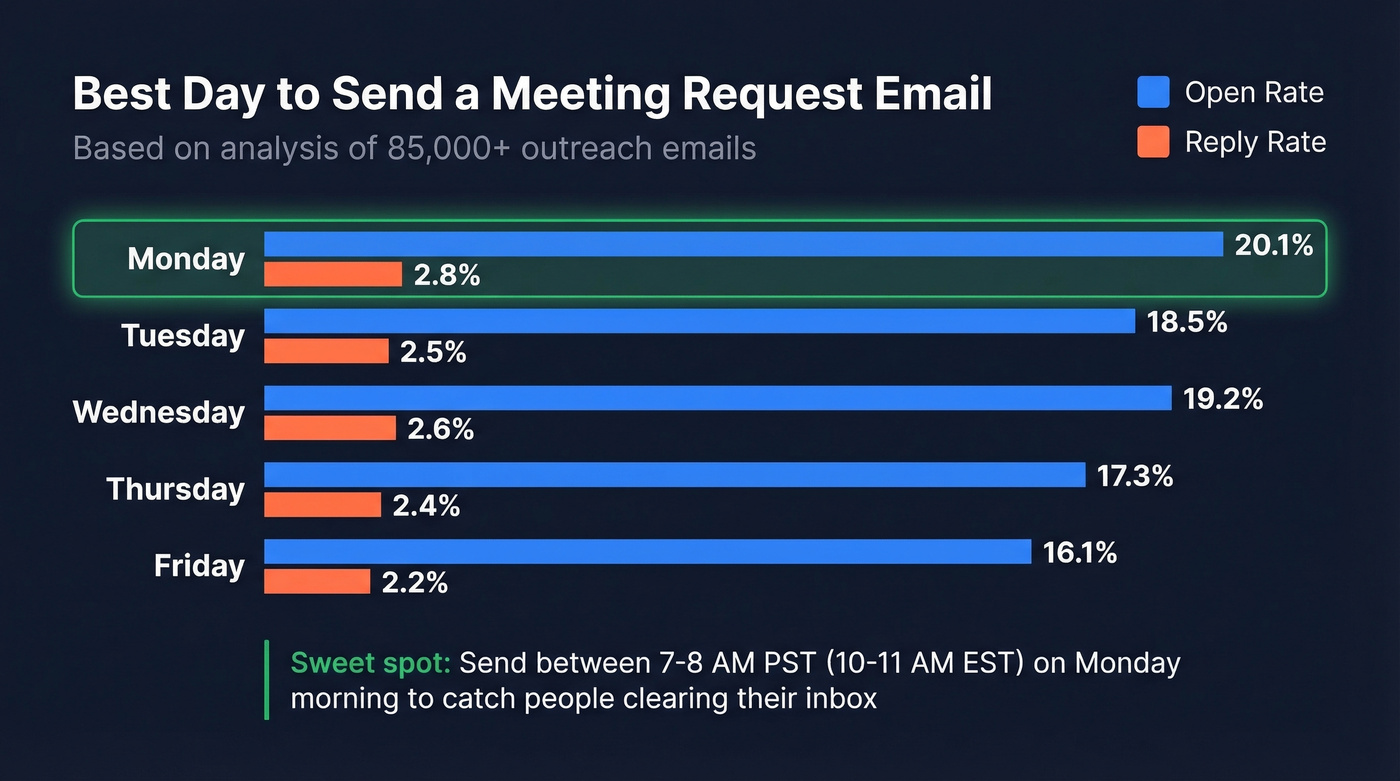
Schedule your sends for 7-8 AM PST to catch the observed spike when recipients are clearing their inboxes at the start of the day. (More data here: best time to send cold emails.)
Scheduling Across Time Zones
Nearly a third of meetings now span multiple time zones - a 35% increase since 2021. Knowledge workers already receive 117 emails and 153 chat messages daily. Don't make them do timezone math on top of that.
Instead of "Tuesday at 2 PM," write "Tuesday at 2 PM EST / 11 AM PST." It takes five extra seconds and eliminates an entire category of scheduling confusion. For international meetings, add a "that's X PM your time" note. Small effort, big payoff.
What to Do When They Don't Reply
Not replying doesn't mean no. 60% of B2B prospects say no four times before saying yes, and most people give up after one attempt. The consensus on Reddit outreach threads is frustratingly consistent: people wonder why high-volume sends don't convert to meetings, and the answer is almost always that they stopped after one email. Following up isn't pushy. It's professional. (If you're building a system, read importance of follow-up in sales.)
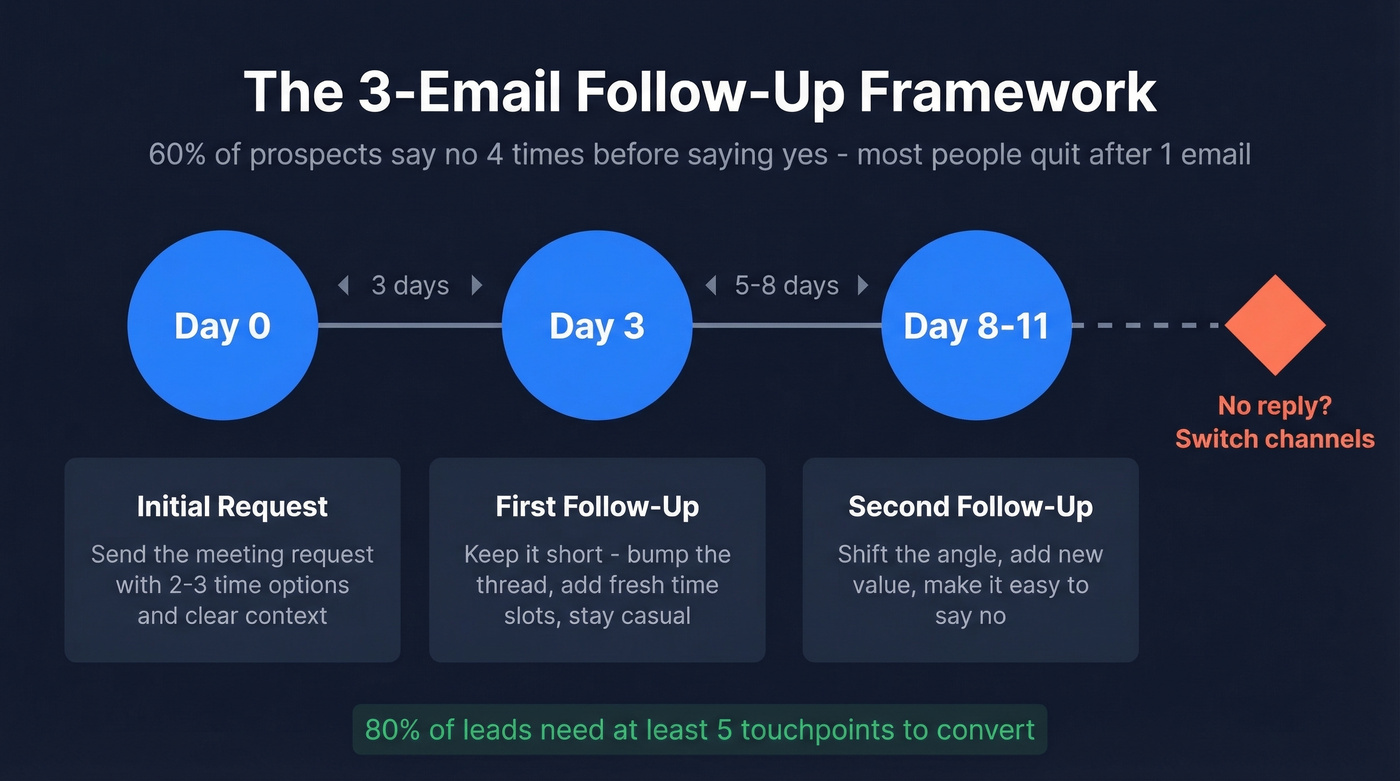
Use a three-email minimum framework:
- Day 0: Send the initial meeting request.
- Day 3: First follow-up. Keep it short - "Bumping this up, still happy to find time this week." Add fresh time options.
- Day 8-11: Second follow-up. Shift the angle slightly. Add a new piece of value or context. Make it easy to say no - "If timing's off, totally understand."
We've seen teams materially improve their meeting booking rate just by adding a second and third touch. If three emails don't land, pivot to a different channel - but don't skip the follow-ups. (For exact wording, use these cold email follow-up templates.)
Mistakes That Kill Your Response Rate
These five things silently destroy your reply rate, and I've watched smart people make every single one of them:
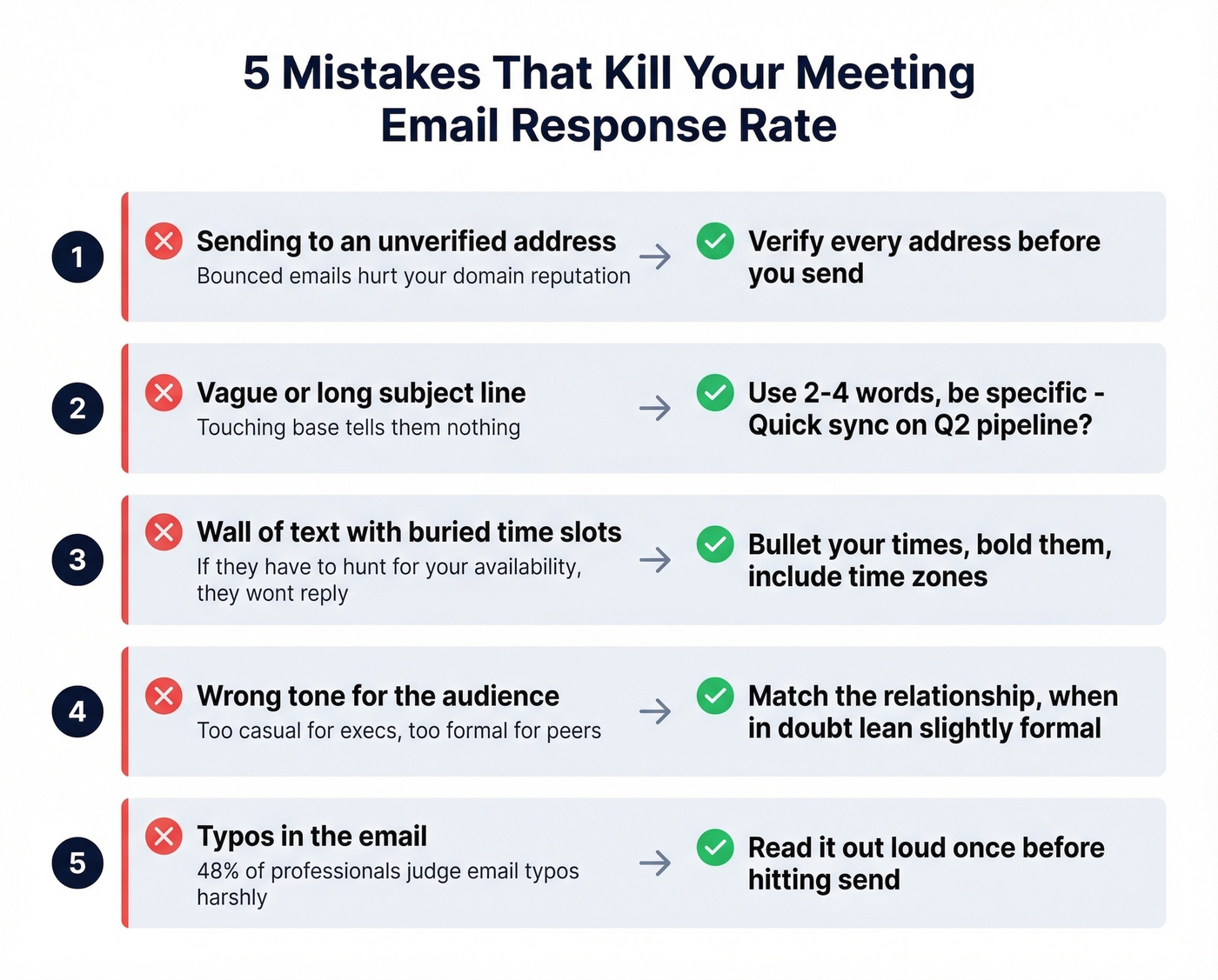
- Sending to an unverified address. A bounced email hurts your domain reputation and wastes your effort. Verify every address before you send. (If you're diagnosing issues, start with email bounce rate.)
- Vague or long subject line. "Touching base" tells the recipient nothing. "Quick sync on Q2 pipeline?" tells them exactly what you want. (More patterns: subject lines that get opened.)
- Wall of text with no proposed times. If the recipient has to parse three paragraphs to find your availability, they won't. Bullet your times. Bold them.
- Wrong tone. Too casual for an executive, too formal for a peer. Match the relationship. When in doubt, lean slightly formal - you can always loosen up.
- Typos. 48% of professionals judge typos in work emails more harshly than typos on Slack or Teams. Read your email once before sending - out loud, if you can.
Tools That Kill the Back-and-Forth
Once you've gotten a "yes," a scheduling tool handles the rest.
| Tool | Best For | Starting Price | Free Tier? |
|---|---|---|---|
| Calendly | Reliability, integrations (Editor's Pick) | $12/mo/user | Yes |
| Cal.com | Open-source, customization | $15/mo/user | Yes |
| SavvyCal | Overlay scheduling | $12/mo/user | No |
| zcal | Clean, simple booking | $9.50/mo/user | Yes |
| Sidekick | Budget-conscious teams | $5/mo/user | Yes |
| Reclaim | AI-powered time blocking | $10/mo/user | Yes |
Let's be honest: if your average deal is under $15k, you don't need a $15/month scheduling tool. Sidekick at $5/month or zcal's free tier will handle everything you throw at them. In our experience, Calendly handles edge cases - complex routing, round-robin, multi-person scheduling - better than any alternative, which is why it earns the top spot. But most individuals and small teams are paying for features they'll never touch. Cal.com is the right call if you want free and open-source.
Skip the scheduling link for formal or first-time contacts. Propose specific times in the email itself and save the link for recurring contacts where the relationship is already warm. (If you're scaling outreach, consider sequence management.)
You just spent 10 minutes personalizing a meeting request with the perfect subject line and two clean time slots. A bounce turns that into wasted effort and a hit to your domain reputation. Prospeo checks 300M+ profiles on a 7-day refresh cycle so you're always sending to active inboxes - at $0.01 per email.
Stop losing meetings to bad email data.
FAQ
How do you politely ask to schedule a meeting?
Lead with context - mention why the meeting benefits them, not just you - then propose two or three specific times with time zones. Phrases like "Would any of these work for a quick call?" balance directness with respect. Avoid demanding language and always give the recipient an easy out ("If now's not the right time, no worries").
How long should a meeting request email be?
Aim for 80-100 words across five lines: greeting, context, the ask, time options, and sign-off. Shorter emails reduce misinterpretation and respect the recipient's time. If you're writing more than 100 words, you're probably including information that belongs in the meeting itself.
How many follow-ups should I send?
At least two, for a total of three emails. Send follow-up one on Day 3 and follow-up two 5-7 days later. 80% of leads need five or more touchpoints to convert, so two follow-ups is the bare minimum - not overkill.
What's the best day and time to send a meeting request?
Monday between 6-9 AM PST / 9 AM-12 PM EST, based on an 85,000-email dataset. That window delivered the highest open rate (20%+) and reply rate (2.8%). Wednesday is a strong secondary option at 2.6% reply rate.
How do I find someone's email before requesting a meeting?
Use an email finder tool like Prospeo - paste a name and company domain to get a verified address in seconds. The free tier includes 75 lookups per month at 98% accuracy, which is enough to validate an entire target account list before you start sending.