

Email Marketing List: How to Build One That Works in 2026
Email marketing returns $36-$40 for every $1 spent. But only when the list behind it is clean, segmented, and built with intent. A 50,000-contact list full of unverified addresses and disengaged subscribers will underperform a 2,000-person list where every contact opted in and actually wants to hear from you.
Most teams obsess over list size when they should obsess over list quality. If your average deal size sits below five figures, a tight list of 3,000 engaged contacts will outperform a bloated database of 30,000 strangers every single time - on opens, clicks, replies, and revenue per send.
Here's how to build the kind of list that moves revenue, not vanity metrics.
What Is an Email Marketing List?
An email marketing list is a collection of email addresses - plus whatever data you've attached to them - belonging to people who've given you permission to contact them. More practically, it's the single most valuable owned asset in your marketing stack.
There are 4.6 billion email users worldwide, sending and receiving 376 billion emails per day. Social platforms change algorithms overnight. Paid channels get more expensive every quarter. Your email list is the one audience you control completely.
For context, typical list sizes vary widely: solo creators and consultants usually work with 1K-50K contacts, SMB ecommerce brands maintain 5K-200K, and B2B newsletter operators sit around 2K-100K. Wherever you fall, the hierarchy that matters is quality, then relevance, then volume - in that order.
What You Need (Quick Version)
- Build organically for long-term ROI - lead magnets, content, partnerships
- Buy verified B2B data when you need to accelerate outbound - verify every address before sending (see email verification)
- Verify everything - average bounce rate across industries is 2.48%, and you want to stay well under that (use bounce rate benchmarks)
- Segment immediately - segmented campaigns see +14.31% higher opens and +101% more clicks
- Benchmark against reality - 19.21% average open rate, 2.44% CTR across all industries (compare to a good email open rate)
Email Benchmarks for 2026
Before you build or buy anything, you need to know what "good" looks like:
| Metric | Cross-Industry Average |
|---|---|
| Open Rate | 19.21% |
| Click-Through Rate | 2.44% |
| Click-to-Open Rate | ~6.8% |
| Bounce Rate | 2.48% |
| Unsubscribe Rate | 0.89% |

Here's the thing: open rates are increasingly unreliable. Apple Mail Privacy Protection pre-fetches email content, artificially inflating open rates for roughly 50-60% of email clients. If your open rates jumped 15% overnight and you didn't change anything, that's MPP noise, not a breakthrough in subject line writing.
The metric that actually tells you something is click-to-open rate. CTOR sits around 6.8% as a realistic benchmark, and it strips out the MPP distortion to reveal whether people who opened your email found it worth clicking (use the click rate formula to track it cleanly).
One more number worth knowing: EmailToolTester found ~83% average deliverability across major providers. That means roughly 1 in 6 emails never reaches the inbox. List quality is the biggest lever you have to beat that average (see the full email deliverability guide).
Build vs. Buy - The Honest Answer
Let's be direct about this. A 5,000-person organic list with a 28% open rate will outperform a 20,000-person purchased list with a 12% open rate on every metric that matters - clicks, replies, conversions, and revenue per send.
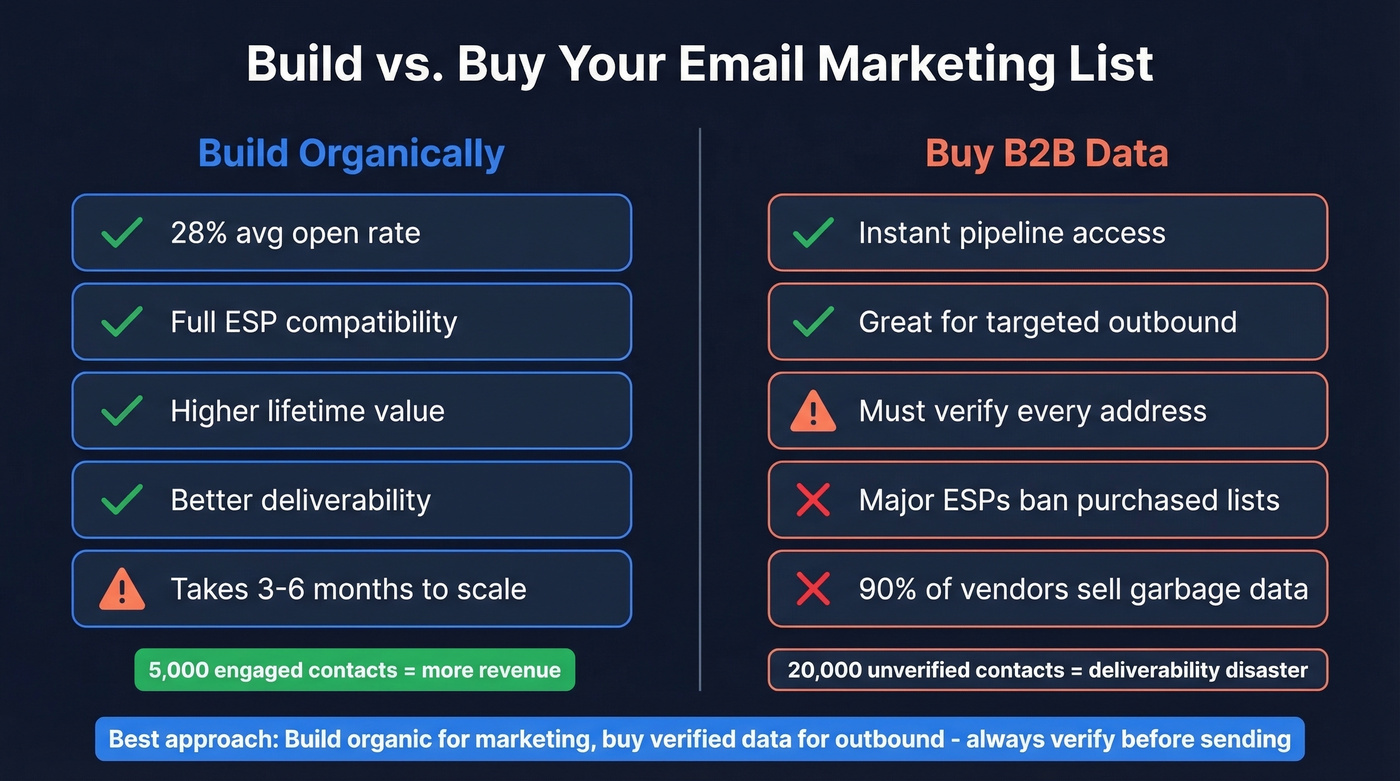
That said, buying isn't inherently evil. The problem is that 90% of list vendors sell garbage: scraped addresses, outdated records, and contacts who never consented to anything. The remaining 10% sell verified B2B data that's genuinely useful for outbound prospecting (start with email list providers).
The risk is concrete and we've watched it happen to teams firsthand. One bad import can poison deliverability for months, tanking your sender score so badly that even your engaged subscribers start landing in spam (here’s how to improve sender reputation).
A critical detail most guides skip: major ESPs like Mailchimp and Constant Contact don't allow sending to purchased lists. If you're using purchased data, you need a dedicated outbound tool (Instantly, Smartlead, Lemlist) rather than your marketing ESP.
Use purchased data if: you're running targeted B2B outbound, you verify every address before sending, and you're using a separate sending domain.
Skip purchased data if: you're doing B2C marketing, you don't have a verification workflow, or you're sending from your primary domain without warmup.
How to Build an Email List From Scratch
Lead Magnets That Convert
A good lead magnet converts 5-15% of visitors into subscribers. The difference between magnets that work and magnets that collect dust usually comes down to specificity - generic "Ultimate Guide" PDFs don't cut it anymore.
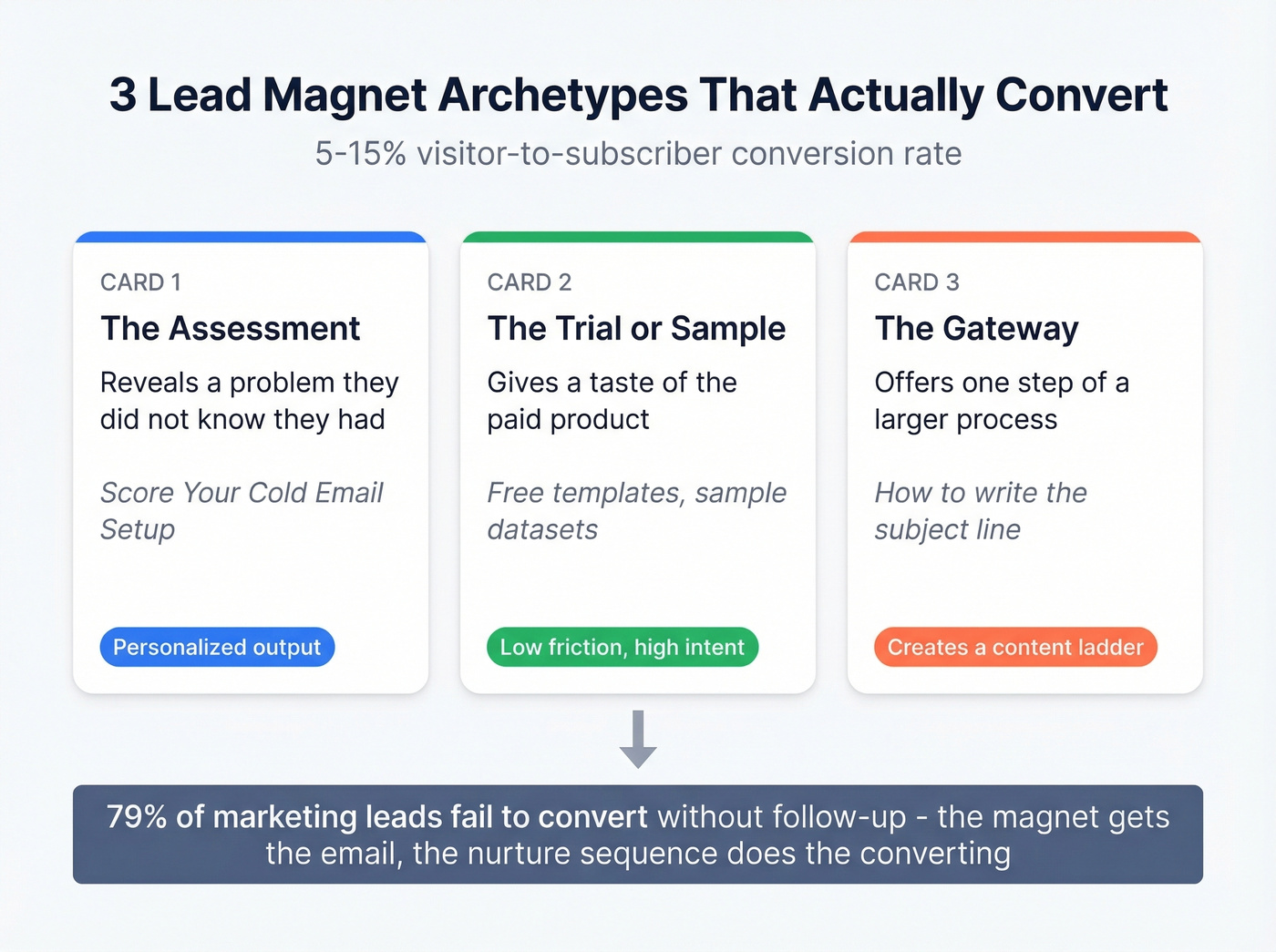
Three archetypes that consistently perform:
The Assessment reveals a problem the prospect didn't know they had. "Score Your Cold Email Setup" or "Is Your Tech Stack Costing You Pipeline?" These work because the output changes based on the input - personalized by definition.
The Trial or Sample gives a taste of the paid product. Free templates, sample datasets, limited-access tools. Low friction, high intent.
The Gateway offers one step of a larger process. "Here's how to write the subject line" leads naturally into "now let me show you the full sequence framework." It creates a content ladder that pulls people deeper (pair this with subject lines that get opened).
The stat that should reshape your thinking: 79% of marketing leads fail to convert without proper follow-up. The magnet gets the email address. The automated nurture sequence - triggered immediately after opt-in - does the actual converting.
Sign-Up Forms and Timing
Pop-up timing matters more than pop-up design. Trigger after 30-60 seconds or 50% scroll depth, not on page load. We've tested this extensively, and pop-ups that appear on page load consistently hurt both conversion rates and brand perception - people close them reflexively before reading a word.
Double opt-in is worth the friction. You'll lose 10-20% of signups, but the contacts who confirm are dramatically more engaged and your list stays cleaner. In our experience, double opt-in lists outperform single opt-in by 2-3x on long-term engagement metrics.
Mailchimp's research shows users increased list growth rate by an average of 50.8% after adding a pop-up form to their site. One page, one offer, one CTA. And add signup links to every social profile bio - social followers are rented, email subscribers are owned.
Content, Video, and Partnerships
94% of B2B marketers say trust is the key driver of marketing success. You can't shortcut trust. You build it by consistently publishing content that's genuinely useful (see what is B2B content marketing).
Video builds trust faster than any other format right now. Brands combining video with expert partnerships are 2.2x more likely to be trusted and 1.8x more likely to be recognized. A founder recording a 5-minute Loom walkthrough of their process builds more trust than a polished brand video with stock footage.
Co-marketing partnerships - newsletter swaps, joint webinars, guest posts - remain underused for list building. Find someone with a complementary audience, create something together, and split the leads. Best send days? Tuesday and Wednesday consistently show the highest engagement.

The article says 83% of emails reach the inbox on average. Bad data is the #1 reason. Prospeo's 5-step verification and 7-day refresh cycle deliver 98% email accuracy - so your list stays clean and your sender reputation stays intact.
Build an email marketing list that actually lands in the inbox.
How to Buy a B2B Email List Safely
What Vendors Actually Cost
Pricing varies wildly. One Reddit user on r/selfpublish estimated the cost of rented email names at roughly $0.15 per contact - and that's before factoring in bounce rates and wasted sends. Here's what you'll actually pay:
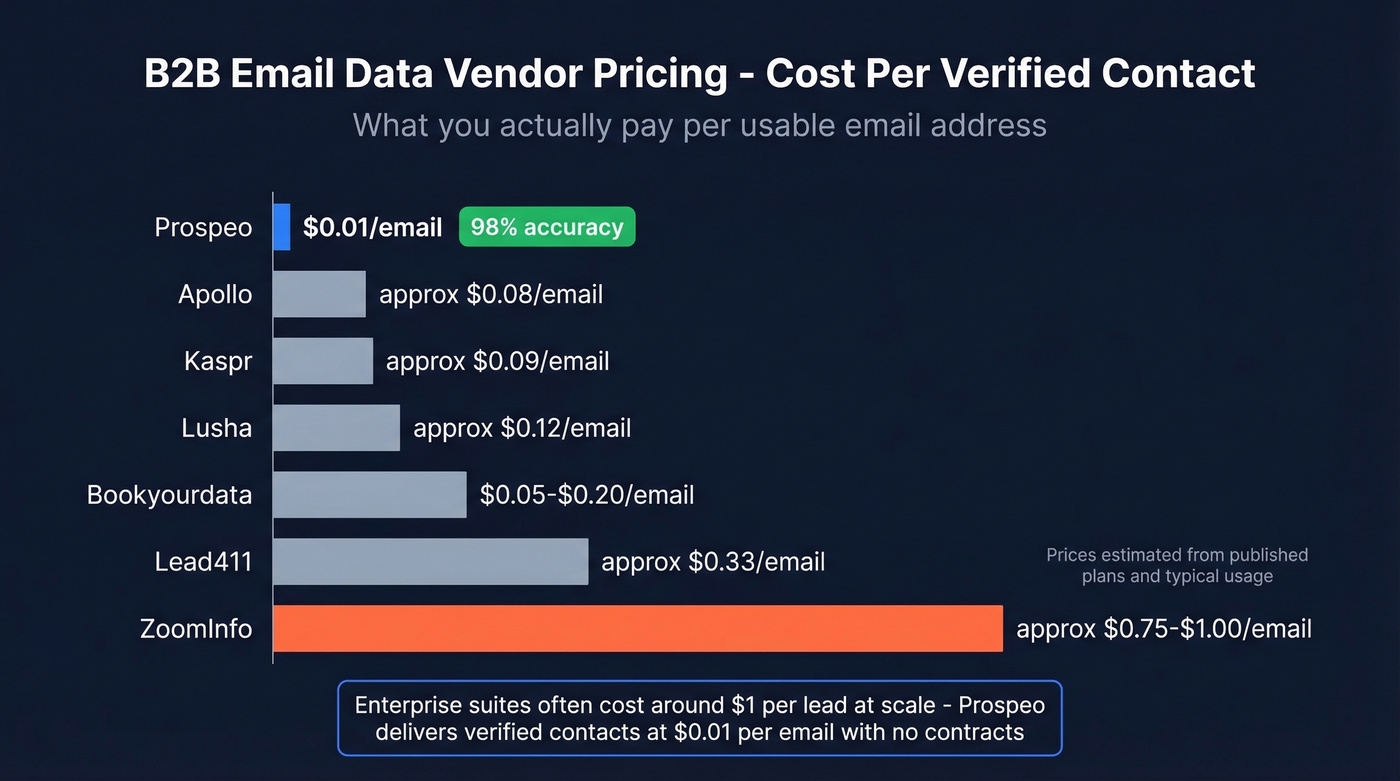
| Vendor | Starting Price | Notes |
|---|---|---|
| Prospeo | Free tier; ~$0.01/email | 98% accuracy, no contract |
| Lusha | $37/mo per user | Free plan available |
| Kaspr | EUR 45/mo per user | Unlimited B2B email credits on paid plans |
| Apollo | ~$49/mo per user | Large free tier |
| Lead411 | $99/mo per user | 7-day free trial |
| ZoomInfo | $15K-$40K/yr | Enterprise contracts |
| Cognism | ~$1K-$3K/mo | Custom pricing |
| Bookyourdata | $0.05-$0.20/contact | Pay-per-lead model |
| LeadsPlease | $195/1,000 emails | One-time purchase |

The cost gap is enormous. Enterprise suites often land around ~$1/lead at scale. Prospeo delivers verified contacts at $0.01/email with 98% accuracy - for teams that need enterprise-grade data without enterprise pricing, the math isn't close.
Warmup and Sending Rules
Treat your sending infrastructure like a new credit score. It takes time to build and seconds to destroy.
Warm up new domains for at least two weeks before any campaign volume. Start with 20-30 sends/day and scale gradually. Progress your DMARC policy from p=none to p=quarantine to p=reject once SPF and DKIM are verified. Watch your SPF record - DNS has a 10-lookup limit, and too many includes will break authentication silently (use these SPF record examples).
Target 90%+ deliverability. Keep spam complaints under 0.3% - that's the threshold Gmail and Yahoo enforce for bulk senders.
Email Verification - The Step Everyone Skips
We've seen this pattern play out dozens of times: a team imports 10,000 contacts from a new data source, skips verification, and watches their bounce rate hit 15% on the first send. Within a week, their sender score tanks and even their engaged subscribers start landing in promotions or spam. The damage takes months to undo.
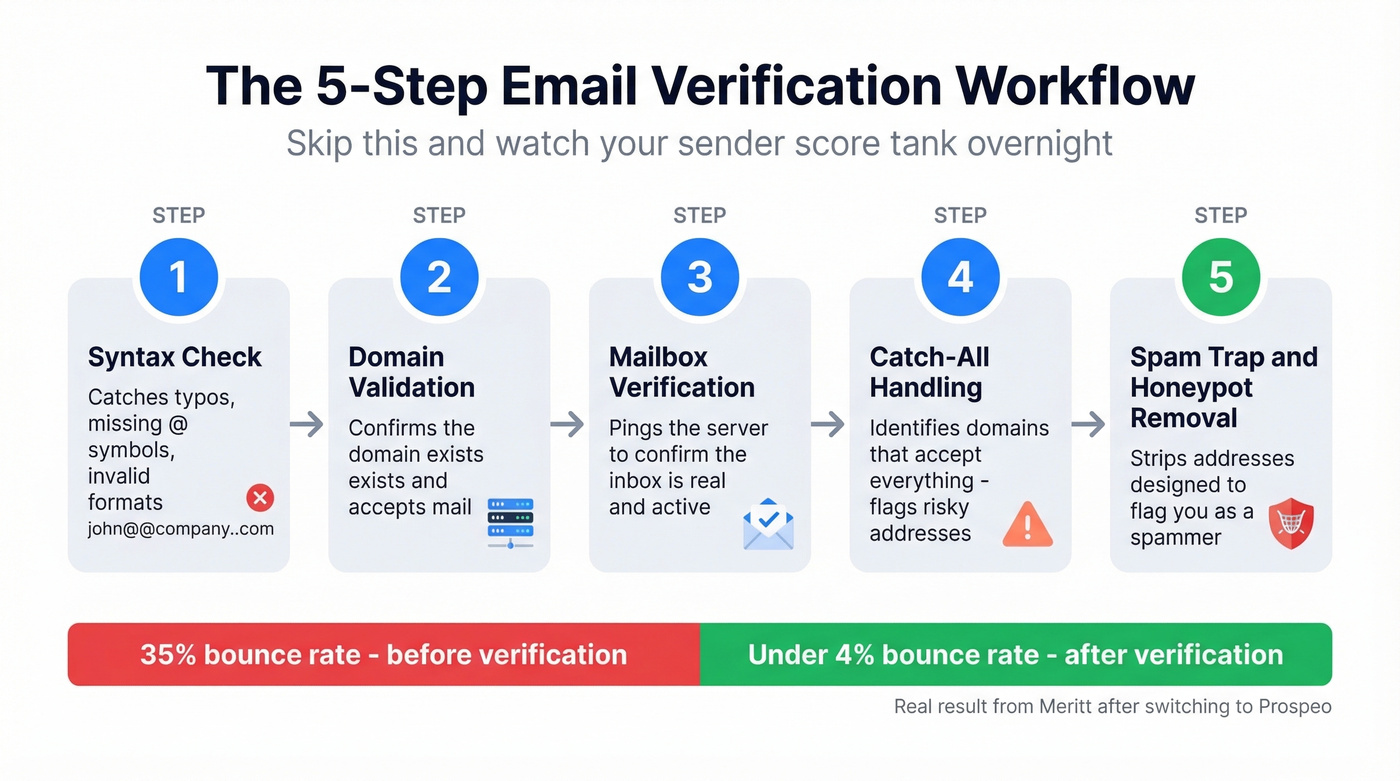
Verification isn't optional. It's the difference between a productive campaign and a domain reputation crisis.
A proper verification workflow checks syntax, domain validity, mailbox existence, catch-all handling, and spam-trap/honeypot removal. Prospeo runs all five steps and delivers 98% email accuracy - Meritt dropped their bounce rate from 35% to under 4% after switching, and Stack Optimize built to $1M ARR while maintaining 94%+ deliverability and zero domain flags (more on spam trap removal).
Run every imported list through verification before it touches your sending infrastructure. No exceptions.
Buying B2B data only works when every address is verified before you hit send. Prospeo gives you 143M+ verified emails with catch-all handling, spam-trap removal, and honeypot filtering - at $0.01 per email. No contracts, no bloated lists full of dead addresses.
Skip the garbage lists. Start with data you can trust.
Segmentation That Moves Revenue
Segmented campaigns see +14.31% higher opens and +101% more clicks than batch-and-blast sends. That's not a marginal improvement - it's a fundamentally different performance tier.
Understanding the different types of lists you maintain - promotional, transactional, nurture, re-engagement - is the first step toward sending the right message to the right segment. Start with a practical definition of "engaged": a contact who's clicked at least one email in the last 2-4 weeks. That's your active segment. Everyone else needs a different cadence, different content, or a re-engagement sequence before you keep mailing them.
The RFM framework - Recency, Frequency, Monetary - works for both B2B and B2C, though the inputs differ. For ecommerce, "monetary" is purchase value. For B2B, substitute deal stage or engagement depth: webinar attendance, content downloads, reply rates.
Behavioral triggers are where segmentation gets powerful. "Viewed pricing page 3+ times in a week" is a high-intent signal that should trigger a sales touch, not another nurture email. "Downloaded two case studies in the same vertical" tells you exactly which use case to pitch. B2C segmentation leans heavily on purchase behavior and browse history, while B2B segmentation should layer in firmographic data - company size, industry, tech stack, funding stage - alongside engagement signals (see firmographic and technographic data).
Lifecycle stage segmentation prevents the embarrassing mistake of sending a "book a demo" email to someone who's already a customer. But don't over-segment: if a segment has fewer than 200 contacts, you won't get statistically meaningful results from any test you run.
Deliverability Checklist
Your list quality doesn't matter if emails never reach the inbox. Here's the technical stack that keeps you out of spam:
- SPF, DKIM, DMARC - non-negotiable. Gmail and Yahoo's bulk sender requirements made these mandatory. Add BIMI for brand logo display in supported clients (see DMARC alignment).
- Gmail clips emails at 100KB. If your email is heavier than that, the bottom gets cut - including your CTA and unsubscribe link. Keep emails lean.
- After 3-5 non-engaged sends, suppress or trigger a winback. Continuing to mail inactive contacts signals to ISPs that you don't care about engagement, and they'll throttle you accordingly.
- Monitor via Google Postmaster Tools. It's free and shows you exactly how Gmail views your domain reputation, spam rate, and authentication status.
- Keep spam complaints under 0.3%. This is the hard line. Exceed it consistently and you'll face deliverability penalties that are difficult to reverse.
- Use a dedicated IP if you're sending more than 50,000 emails/month. Shared IPs mean your reputation is tied to other senders' behavior.
Compliance - GDPR, CAN-SPAM, and TCPA
The core distinction: GDPR is opt-in (you need consent before emailing), CAN-SPAM is opt-out (you can email, but must honor unsubscribes). If you're emailing EU contacts, GDPR applies regardless of where your company is based.
| Regulation | Model | Max Penalty |
|---|---|---|
| GDPR | Opt-in | EUR 20M or 4% global revenue |
| CAN-SPAM | Opt-out | $53,088 per violation |
| TCPA (SMS) | Opt-in | $500-$1,500 per infraction |
These aren't theoretical. Cumulative GDPR enforcement has reached ~EUR 5.88 billion across 2,245 actions. CAN-SPAM fines stack per email - a 10,000-email blast to a non-compliant list could trigger $530 million in penalties. The FTC actively pursues cases.
Process opt-outs within 10 business days. Include a visible unsubscribe link in every email. If you're collecting phone numbers alongside emails, TCPA consent requirements apply separately - don't assume email consent covers SMS.
Email Marketing List FAQ
Is it legal to buy an email list?
Yes, in most jurisdictions. CAN-SPAM doesn't prohibit purchased lists - it requires an unsubscribe mechanism and honest headers. GDPR is stricter: you need prior consent from EU contacts, and buying a list doesn't guarantee that consent exists. Verify the vendor's data sourcing before sending.
How fast should my list grow?
Early-stage lists should target 2-10% monthly growth. Mature lists with 50,000+ contacts typically grow at 1-3% per month. Faster growth usually means lower quality - if you're adding thousands of contacts monthly but engagement is dropping, slow down and audit your sources.
What are the main types of email marketing lists?
Most teams work with four core types: promotional lists for campaigns and offers, transactional lists triggered by user actions like purchases or password resets, nurture lists for drip sequences, and re-engagement lists targeting subscribers who've gone cold. Each type requires different content, cadence, and success metrics.
What's a good bounce rate?
Under 2% is excellent and signals a clean, well-maintained list. Above 3% indicates a data quality problem needing immediate attention. Prospeo's 5-step verification keeps bounce rates under 4% - both Meritt and GreyScout dropped from 35%+ to under 4% after switching.
How often should I clean my list?
Every 3-6 months at minimum, and immediately after any bulk import. Suppress contacts who haven't engaged in 3-5 consecutive sends. Re-verify any data older than 90 days - email addresses decay at roughly 2-3% per month as people change jobs and companies shut down domains.