

Email Undeliverable but the Address Is Correct - Here's What's Actually Wrong
You triple-checked the address. You copied it straight from the contact card. The bounce notification landed in your inbox anyway.
When an email is undeliverable but the address is correct, the problem isn't the address. It's almost always something between your mail server and theirs that nobody bothered to explain clearly. Let's fix that.
The Short Answer
Why a Correct Address Still Bounces
Most people know two bounce categories: hard bounces (address doesn't exist) and soft bounces (temporary issue, try again). There's a third category that explains nearly every "address is correct but it bounced" scenario: the block bounce.
A block bounce means the recipient's mail server actively rejected your message - not because the address is wrong, but because something about you or your domain triggered a policy rule. Failed authentication (SPF, DKIM, DMARC), poor sender reputation, IP blacklisting, recipient-side security policies - any of these can cause it. The address is fine. The mailbox is fine. Your message just isn't welcome.
Once you understand this distinction, stop staring at the address and start reading the bounce code.
How to Read Your Bounce Message
Every bounce notification contains an SMTP code. Learning to read it takes two minutes and saves hours of guessing.
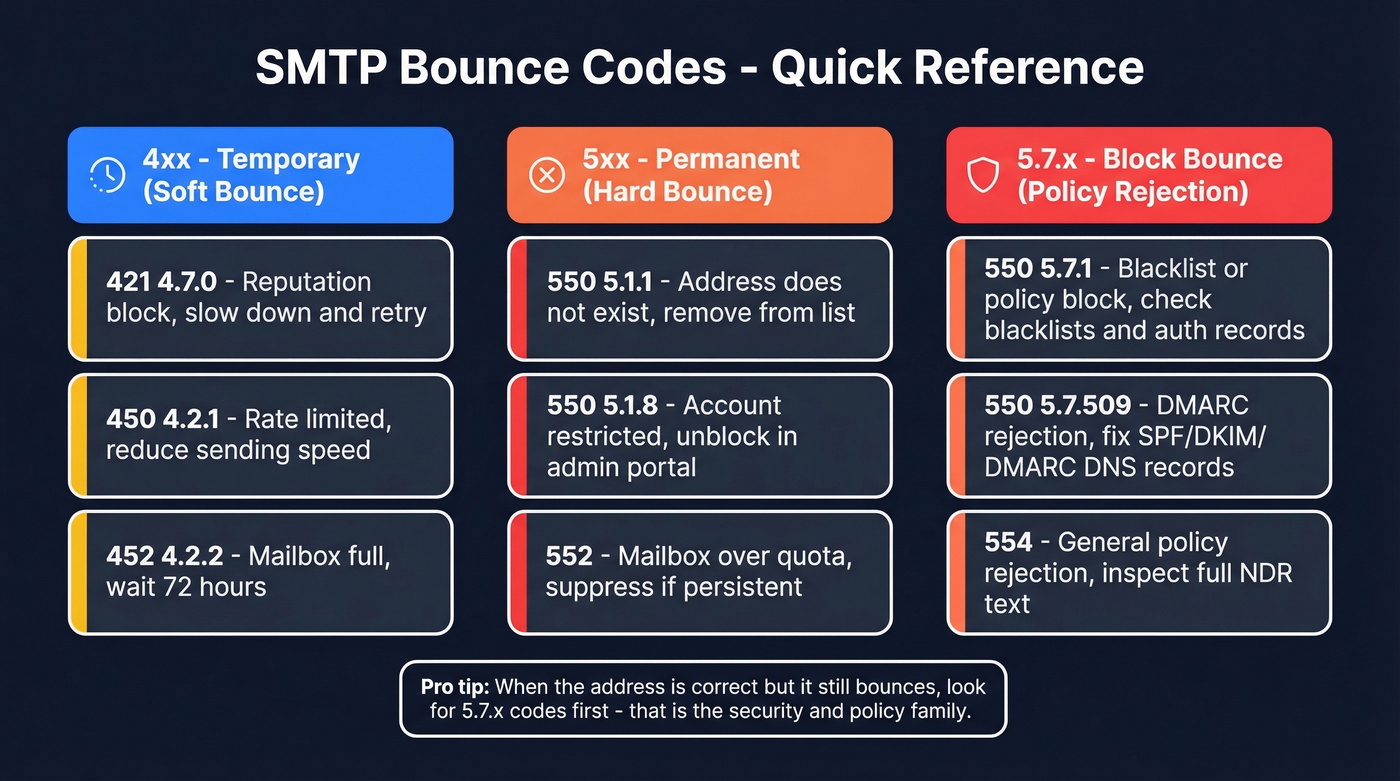
Traditional SMTP codes are three digits. The first digit tells you severity: 4xx means temporary (your server retries automatically), and 5xx means permanent (something needs to change before you resend). Enhanced status codes follow an X.X.X format - like 5.1.1 or 5.7.509 - where the second digit tells you the category. X.1.X is addressing, X.2.X is mailbox, and X.7.X is security or policy.
When you're dealing with a bounce on a valid address, you're almost always looking at a 5.7.X code. That's the security/policy family. For a deeper reference, see our email bounce codes guide.
| Code | What It Means | Likely Cause | What to Do |
|---|---|---|---|
| 550 5.1.1 | Bad mailbox address | Address truly invalid | Confirm spelling, remove |
| 550 5.1.8 | Not recognized as valid sender | Your account restricted | Unblock in admin portal |
| 550 5.7.1 | Permission denied | Blacklist or policy block | Check blacklists, auth |
| 550 5.7.509 | DMARC rejection | Domain fails DMARC | Fix DNS records |
| 421 4.7.0 | Temp reputation block | Unusual sending pattern | Slow down, wait, retry |
| 450 4.2.1 | Rate limited | Too many emails too fast | Reduce sending speed |
| 554 | Transaction failed | General policy rejection | Inspect full NDR text |
The full NDR (non-delivery report) text matters more than the code alone. Providers like Microsoft and Yahoo embed specific diagnostic strings - like AS(42004) - that point you to exact fix paths.

Most "undeliverable" bounces start with bad data, not bad infrastructure. Prospeo's 5-step email verification - with catch-all handling, spam-trap removal, and honeypot filtering - delivers 98% accuracy. That's why teams using Prospeo see bounce rates drop from 35%+ to under 4%.
Fix the data and the bounces fix themselves.
The Real Reasons It's Bouncing
This is one of the most common frustrations on r/sysadmin and email admin forums: the address is right, the bounce makes no sense, and the NDR reads like gibberish. Here's every cause we've seen, ranked from most overlooked to most common. Each assumes the email address itself is correct.
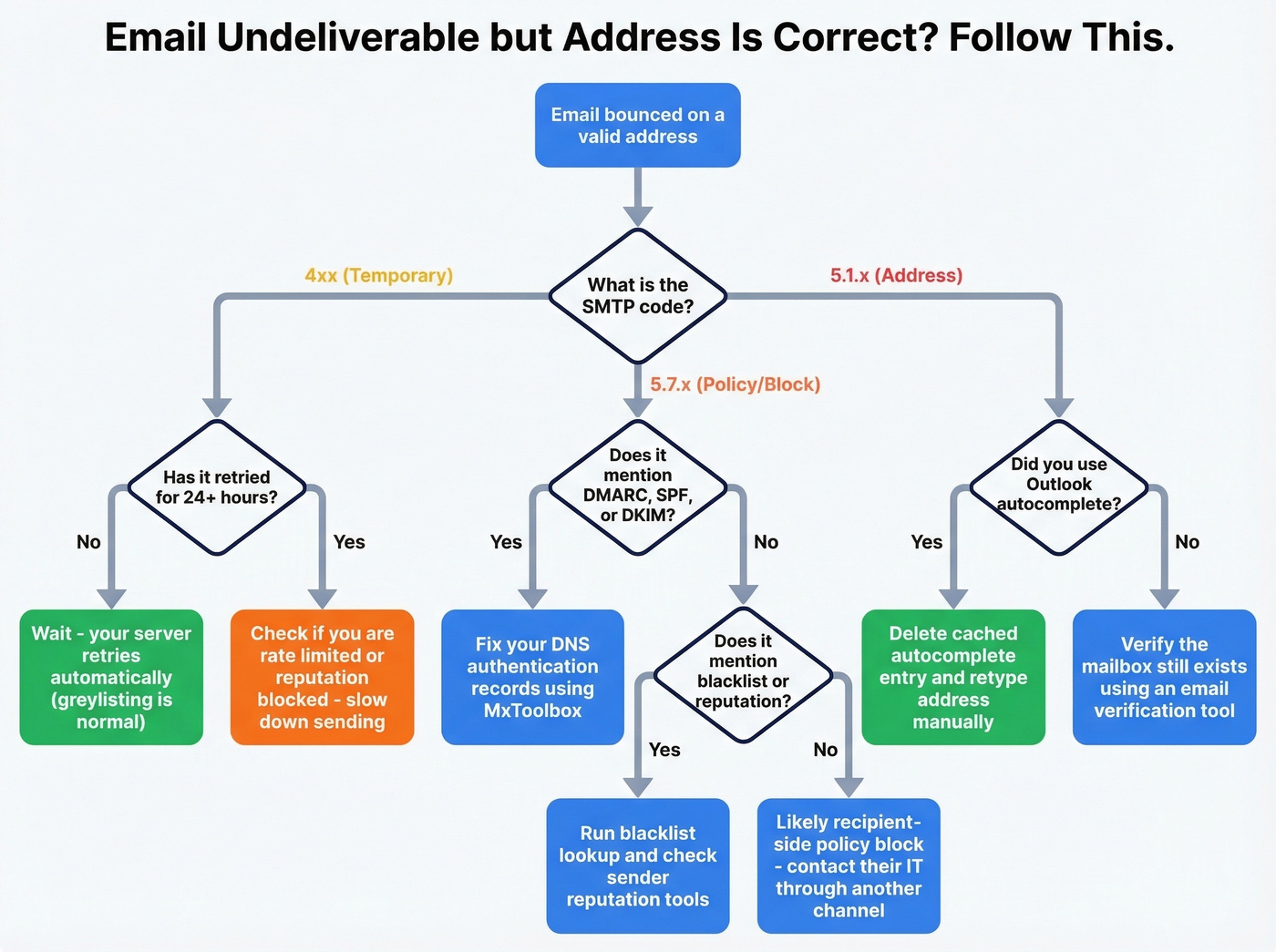
Autocomplete Cache (Stale Address)
A sysadmin on r/sysadmin described this exact scenario: only one user in the org couldn't email a shared mailbox. The error said the mailbox "was not found" - but it existed. The culprit was Outlook's autocomplete cache, which had stored an old, invalid version of the address.
Fix: Start a new email, hover over the autocomplete suggestion, and click the X to delete it. Then type the full correct address manually. You can also nuke the entire cache under File -> Options -> Mail -> Send Messages -> Empty Auto-Complete List.
Your Account Is Restricted
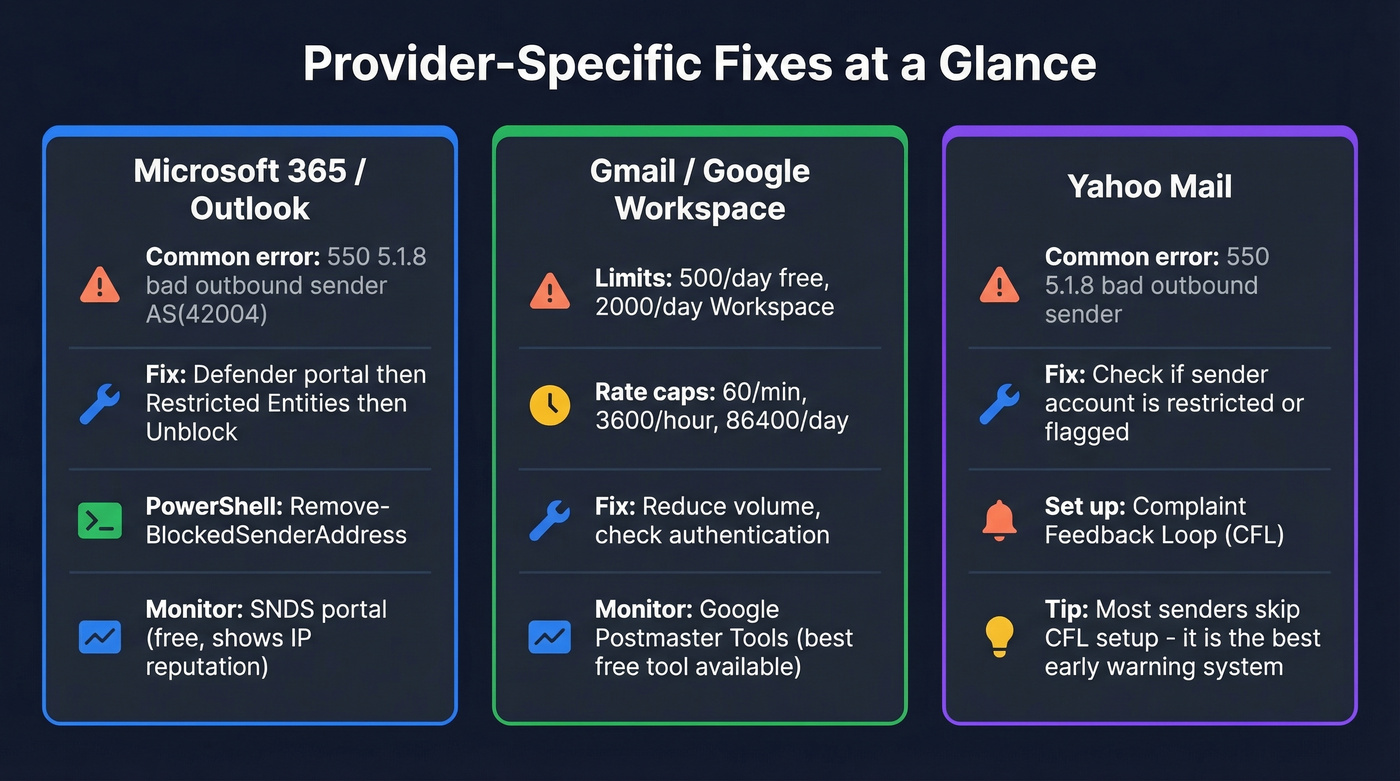
If you're on Microsoft 365 and see 550 5.1.8 Access denied, bad outbound sender AS(42004), your account has been flagged as a spam risk. Inbound mail works fine - only outbound is blocked. This is exactly what one Outlook user reported when all their emails started bouncing to Yahoo recipients.
To unblock: Open Microsoft Defender portal -> Email & Collaboration -> Review -> Restricted Entities -> select the blocked user -> Unblock. Or run Remove-BlockedSenderAddress -SenderAddress user@yourdomain.com in PowerShell. Restrictions typically clear within an hour, though Microsoft says up to 24 hours.
SPF, DKIM, or DMARC Failure
Your address is correct. Your domain's DNS records aren't. When a receiving server checks your domain's DMARC policy and finds p=reject, any authentication failure means instant rejection:
550 5.7.509 Access denied, sending domain contoso.com does not pass DMARC verification and has a DMARC policy of reject.
This is the most common block bounce for organizations that recently changed email providers or added a new sending service without updating DNS. Verify your SPF, DKIM, and DMARC records using free tools like MxToolbox - your IT team can fix this in minutes. If you need a step-by-step, use our SPF DKIM DMARC check walkthrough.
Sender Reputation or IP Blacklist
Run three checks. First, a blacklist lookup - MxToolbox scans 100+ blacklists in one query. Second, an inbox placement test - send to a seed list across Gmail, Outlook, and Yahoo to see where you land. Third, SMTP code inspection - look for 5.7.1 or 5.7.26 patterns in your bounce messages.
Here's the thing: Gmail and Outlook largely ignore external blacklists and rely on their own engagement signals instead. Being listed on UCEPROTECT doesn't necessarily mean Gmail is blocking you. Focus on your domain's engagement metrics - opens, replies, spam complaints - over third-party blacklist results. If you suspect listing, follow our domain blacklisting playbook.
Recipient-Side Policy Block
Sometimes there's genuinely nothing wrong on your end. Corporate email gateways like Proofpoint, Mimecast, and Barracuda can block messages based on content scanning, attachment policies, or directory-based edge blocking. If you're only bouncing to one specific company, this is almost certainly the cause. Reach out through another channel and ask their IT team to whitelist your domain.
Greylisting
Greylisting is a spam-fighting technique where the recipient's server temporarily rejects your first delivery attempt with a 4xx code. Legitimate mail servers retry automatically; spammers don't bother. Retries typically succeed within minutes to hours. If a soft bounce persists for 1-3 days, your mail server is still retrying - this is normal and your ESP handles it invisibly.
Mailbox Full or Disabled
A 552 code means the recipient's mailbox has hit its storage quota. Wait 72 hours and retry. If the bounce persists for 2-4 weeks, the mailbox is likely abandoned - suppress the address.
Recipient Domain DNS Issue
If the recipient's domain has expired or their MX records are misconfigured, no email from anyone will reach them. Run nslookup -type=MX theirdomain.com to check. On Mac or Linux, use dig MX theirdomain.com instead. No MX records? The problem is entirely on their end. (If you want a quick checklist, see our MX Records Checker guide.)
Content or Attachment Filters
Large attachments over 10-25MB, executable file types (.exe, .bat, .js), and certain spam-trigger phrases can cause rejections even when the address is valid. Strip attachments and resend as a test. If the plain-text version goes through, you've found your culprit.
Provider-Specific Fixes
Microsoft 365 / Outlook
For 550 5.1.8 bad outbound sender, follow the Restricted Entities unblock path above. For ongoing monitoring, check Microsoft's Smart Network Data Services (SNDS) portal - it shows how Microsoft views your IP's sending behavior and complaint rates. SNDS is free and underused. We've seen teams troubleshoot for weeks when five minutes on SNDS would have shown them the problem immediately.
Gmail / Google Workspace
Gmail's limits can cause soft bounces that look like permanent failures: 60 emails per minute, 3,600 per hour, 86,400 per day. Free Gmail accounts cap at 500 emails/day; Workspace allows 2,000. Use Google Postmaster Tools to monitor domain reputation, spam rate, and authentication pass rates - it's the single most useful free deliverability tool available. If you're hitting caps, review Gmail rate limits.
Yahoo Mail
Yahoo bounces like 550 5.1.8 ... bad outbound sender AS(42004) often show up when the sender is restricted or flagged as a spam risk. Sign up for Yahoo's Complaint Feedback Loop (CFL) to receive notifications when Yahoo users mark your emails as spam. It's the best early-warning system for Yahoo deliverability, and most senders don't bother setting it up.
Verify Addresses Without Sending
Sending a test email to check if an address works is one of the worst things you can do for your sender reputation. A bounce from a test email might be a reputation issue, not an address issue - and now you've added another bounce to your record.
DIY SMTP callback verification - connecting to the MX server and issuing a RCPT TO command without actually sending - sounds clever but is unreliable. Greylisting servers accept everything. Catch-all domains accept everything. Some blacklists will flag you just for probing.
Dedicated verification tools handle this properly. Prospeo's Email Finder checks whether the mailbox actually exists, flags catch-all domains, and strips spam traps and honeypots - all without sending a single email. At 98% accuracy on verified addresses, you stop burning sender reputation on addresses that look correct but aren't deliverable. If a verification tool returns "address not found," you know the mailbox has been decommissioned even if it was valid last month. If you're comparing options, start with our email check API benchmarks.
Keep Your Bounce Rate Under 2%
The industry benchmark is an overall bounce rate under 2% and hard bounces below 0.5%. Cross either threshold and your sender reputation starts compounding damage with every send. (More context: average email bounce rate.)
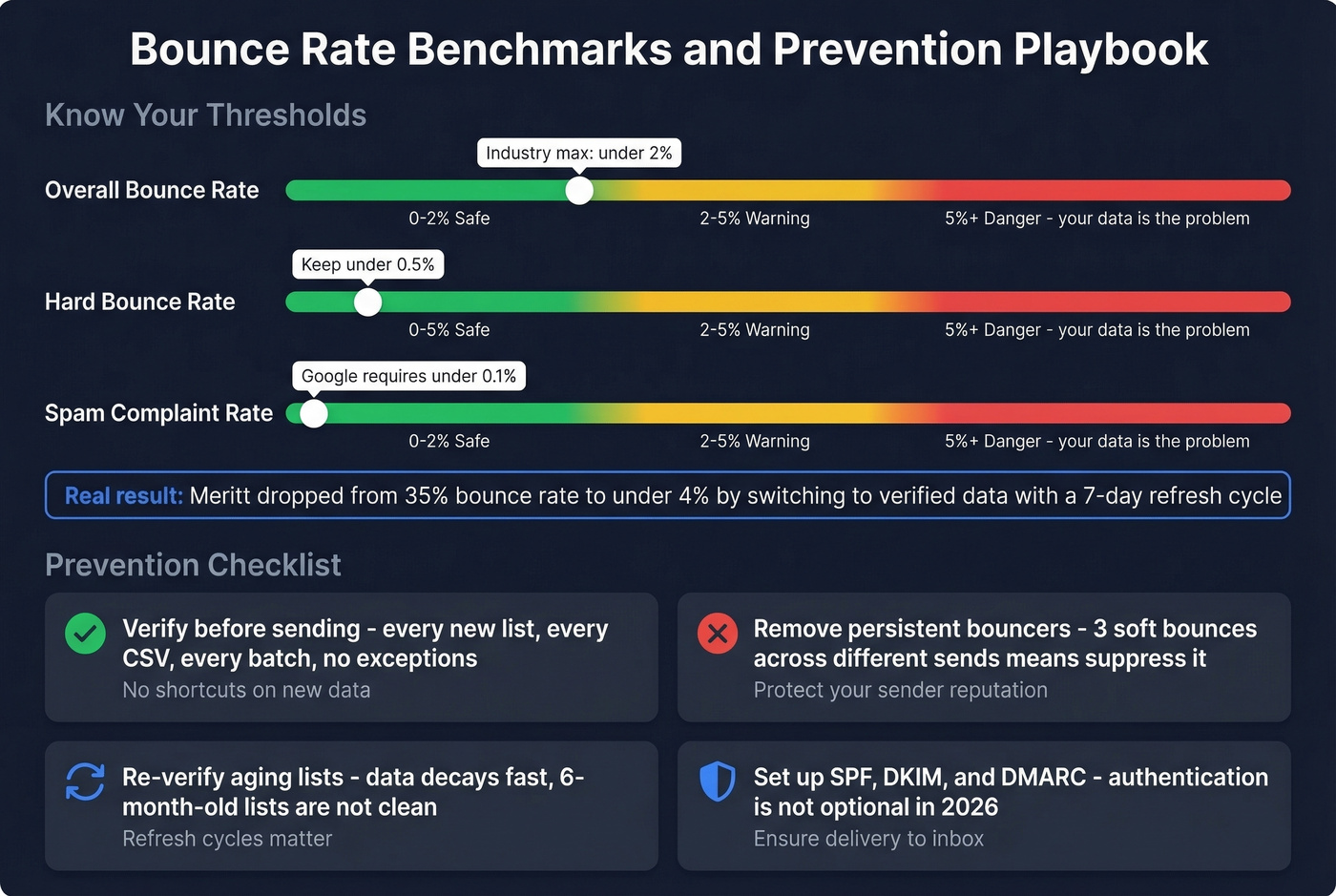
Let's be honest: if your bounce rate is above 5%, your data is the problem, not your email infrastructure. We've seen teams spend months tweaking sending patterns and warming domains when the real fix was switching to verified data. Meritt saw their bounce rate drop from 35% to under 4% after switching to a verified data source with a 7-day refresh cycle - the kind of improvement that compounds across every campaign.
The prevention playbook is short:
- Verify before sending. Every new list, every imported CSV, every batch of enriched contacts. No exceptions. (See: bulk email address verification.)
- Remove persistent bouncers. If an address soft-bounces three times across different sends, suppress it.
- Re-verify aging lists. Contact data decays fast - people change jobs, companies rebrand, domains expire. A list that was clean six months ago isn't clean today. (Related: database hygiene.)
- Set up SPF, DKIM, and DMARC. Authentication isn't optional in 2026. Gmail and Yahoo both enforce DMARC alignment for bulk senders.
- Monitor engagement metrics. Opens, replies, and spam complaints matter more than blacklist status. If your reply rate is dropping, your reputation is dropping with it.

You're reading bounce codes because someone gave you a "valid" address that wasn't. Prospeo refreshes every record on a 7-day cycle - not the 6-week industry average - so you're never emailing stale, disabled, or full mailboxes. At $0.01 per verified email, bad data costs more than good data.
Stop diagnosing NDRs and start with emails that actually land.
FAQ
What's the difference between a hard bounce and a block bounce?
A hard bounce means the address doesn't exist - the mailbox was deleted or never created. A block bounce means the address is valid but your message was rejected due to sender reputation, authentication failure, or recipient-side policy. Block bounces are the most common cause when the address is confirmed correct.
Why are my emails coming back as undeliverable if the address exists?
The receiving mail server is rejecting your message based on sender reputation, failed SPF/DKIM/DMARC authentication, or a security policy - not the address itself. Read the SMTP bounce code in the NDR: a 5.7.X code points to policy or authentication, while 5.1.X points to addressing. Match the code to the fix table above.
How long should I wait before resending a bounced email?
For soft bounces (4xx codes), your mail server retries automatically over 1-3 days - no action needed. For block bounces (5xx), don't resend until you've fixed the underlying cause. Resending into a block reinforces the negative reputation signal and makes recovery harder.
Can I check if my IP is blacklisted for free?
Yes. MxToolbox scans 100+ blacklists in one query at no cost. That said, Gmail and Outlook largely ignore external blacklists and rely on proprietary engagement signals. A blacklist hit matters more for smaller receiving servers than for major providers.
How do I verify an email address without sending one?
Use a dedicated verification tool like Prospeo's Email Finder, which checks syntax, domain MX records, mailbox existence, catch-all status, and spam traps - all without sending. DIY SMTP probing is unreliable because greylisting and catch-all servers accept everything indiscriminately.