

How to Find Someone's Email Free - 7 Methods That Actually Work
You need someone's email address, and every tool you try wants a credit card before showing you a single result. Frustrating. Here's the thing: half the time, you don't need a tool at all. And when you do, the best ones hand you enough free credits to get the job done without spending a dollar.
What You Need (Quick Version)
Three approaches cover 90% of situations:
Guess the pattern and verify it. 49.9% of companies use
{first}@domain.com. Guess the likely patterns, run them through a free verifier, and you're done in under a minute.Prospeo. 75 free verified emails per month, 98% accuracy, no credit card required.
Hunter.io. 50 free credits per month, solid verification, and a Chrome extension for quick lookups.
Most teams paying $200+/month for email data could get by with pattern guessing and a free tier. Start manual, then reach for software.
How to Find an Email Address Without Tools
Before you sign up for anything, try these five approaches. They cost nothing and work more often than you'd expect.
Guess the Pattern
An analysis of 12 million email addresses found that nearly half of all companies use {first}@domain.com. Other common formats include {first}.{last}@domain.com and {first}{last}@domain.com.
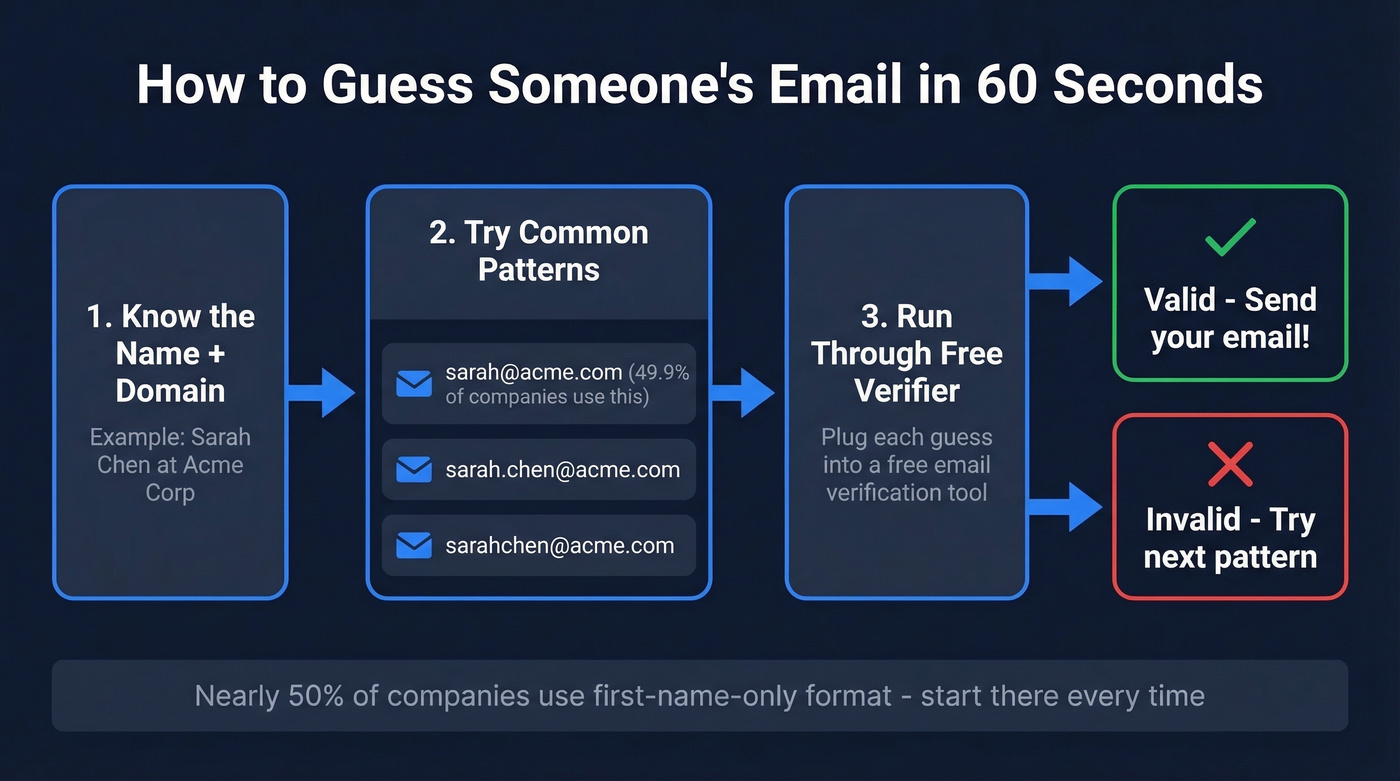
Let's say you're trying to reach Sarah Chen at Acme Corp. Try sarah@acme.com first, then sarah.chen@acme.com, then sarahchen@acme.com. Plug each into a free email verifier and see which comes back valid. Sixty seconds, no signup required. We use this method constantly, and on non-catch-all domains it works far more often than people expect. On catch-all domains, every tool gets less reliable, so pattern guessing plus verification is often just as effective as paid "found" results.
Google Search Operators
Google is an underrated email finder. These queries do the heavy lifting when you need a free email lookup by name:
"Sarah Chen" "email" acme.com"Sarah Chen" "@acme.com"site:acme.com "Sarah Chen"
Email addresses surface in conference speaker bios, press releases, PDF documents, and old blog posts more often than you'd think. Exact-match quotes around the person's name combined with the company domain narrow results fast. If you want more query ideas, see Google Dorks specifically for email discovery.
Check the Company Website
Across roughly 905,000 company websites analyzed, 18.7% displayed at least one email address publicly - nearly one in five. Check the About, Team, Contact, and Press pages. Even if the specific person's email isn't listed, finding any employee's email reveals the company's format. Spot jsmith@acme.com on the team page? Now you know the pattern is {first initial}{last}@domain.com and can construct anyone's address (more examples: business email address examples).
Subscribe to Their Newsletter
Sign up for the company's newsletter or blog updates. The confirmation email often comes from a real person's address - or at least reveals the email format in the sender field or signature. Takes a few minutes but gives you a verified, active pattern for free.
Just Ask
Send a quick message through the company's contact form or reach out on social media. "Hey, I'm trying to reach Sarah Chen on your product team - what's the best email to use?" Direct, honest, and surprisingly effective. If you want scripts, here’s a guide on how to ask someone for their email.
How Email Finders Actually Work
When you type a name and company into an email finder, the tool generates candidate addresses by combining the person's name with the company domain in every common pattern - sarah@, sarah.chen@, s.chen@, and so on. Then it runs each candidate through SMTP verification, pinging the company's mail server to ask: "Does this mailbox exist?"
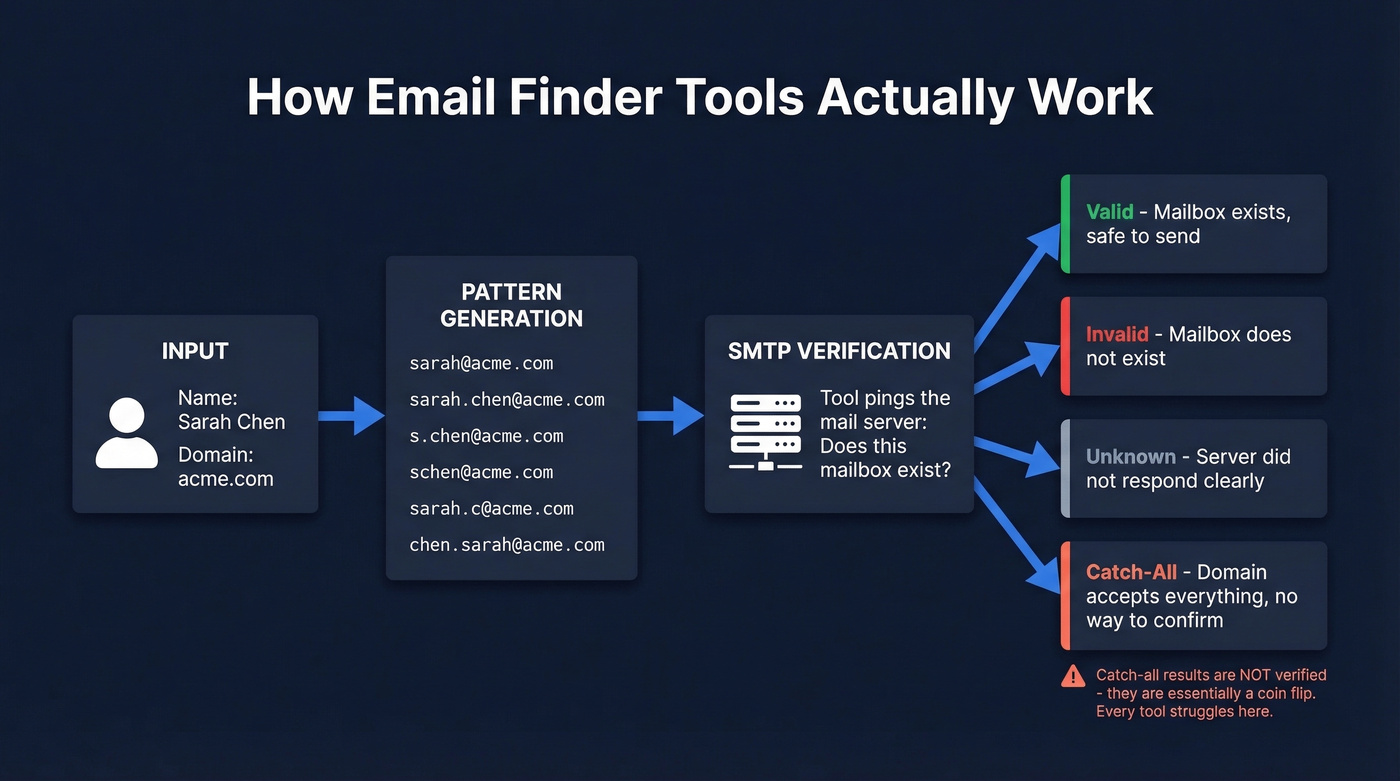
The server responds with one of four statuses. Valid means the mailbox exists and can receive mail. Invalid means it doesn't. Unknown means the server didn't respond clearly, usually due to configuration issues. And then there's Catch-All - the tricky one.
A catch-all domain accepts every email sent to it, regardless of whether the specific mailbox exists. So sarah@acme.com, xyz123@acme.com, and literally.anything@acme.com all get accepted. The tool can't tell which ones are real. A catch-all result isn't verified - it's a coin flip. Keep that in mind when you see "found" results from any tool.
Best Free Email Finder Tools in 2026
If you've ever asked "how do I find someone's email address for free?" these tools are the answer. Here's how the free tiers stack up:
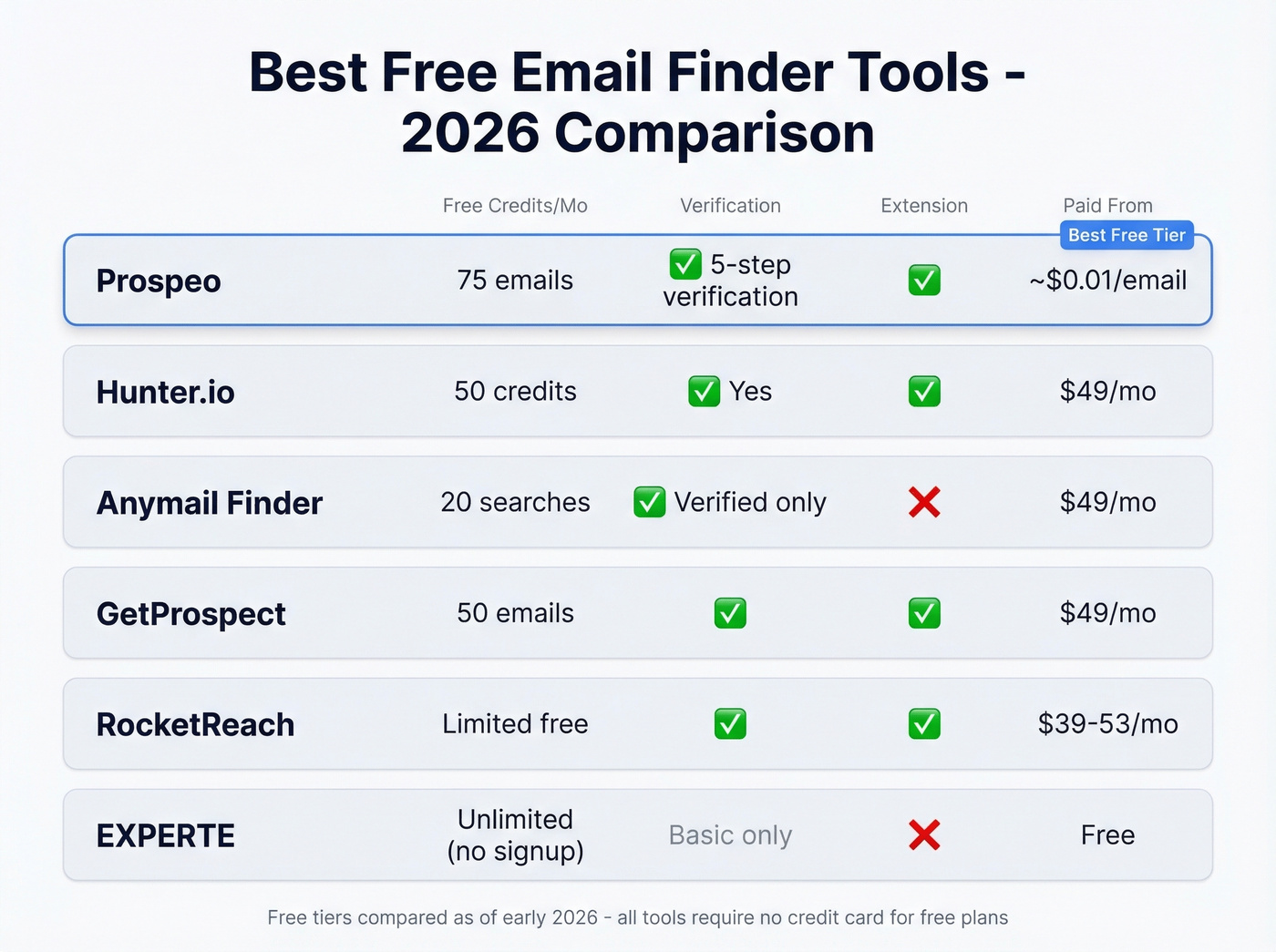
| Tool | Free Credits/Mo | Verification | Extension | Paid From |
|---|---|---|---|---|
| Prospeo | 75 emails | Yes (5-step) | Yes | ~$0.01/email |
| Hunter.io | 50 credits | Yes | Yes | $49/mo |
| Anymail Finder | 20 searches | Verified only | No | $49/mo |
| GetProspect | 50 emails | Yes | Yes | $49/mo |
| VoilaNorbert | 50 searches | Partial | Yes | $49/mo |
| Skrapp.io | Free plan | Yes | Yes | Paid plans available |
| RocketReach | Free plan | Yes | Yes | ~$39-53/mo |
| EXPERTE | Free (no signup) | Basic | No | Free |

Prospeo
Prospeo gives you 75 free verified emails per month - no credit card, no contract. Every result goes through a 5-step verification process including catch-all detection, spam-trap removal, and honeypot filtering. That 98% email accuracy holds up in real campaigns: agencies using Prospeo report bounce rates dropping from 35-40% to under 5%.
The Chrome extension (40,000+ users) finds verified emails from any website or professional profile in one click. The platform's 7-day data refresh cycle matters because the industry average is six weeks - stale data is the number one reason "verified" emails bounce. We've tested dozens of tools over the years, and the combination of generous free tier plus verification depth is hard to beat. (If you’re comparing options, see our full email finder comparison.)
If you outgrow the free tier, paid plans run about $0.01 per email with no annual commitment.

Pattern guessing works - until it doesn't. Prospeo gives you 75 free verified emails per month with 98% accuracy and catch-all detection built in. No credit card, no contracts, no bounced emails wrecking your sender reputation.
Find someone's email free and know it's real before you hit send.

Hunter.io
Hunter is one of the most recognized names in email finding. The free plan gives you 50 credits per month across finding, verification, and cold email sequences, plus API access, a Chrome extension, and Zapier/Make integrations - all at $0. One useful detail: unsuccessful lookups don't consume credits, so you only pay for results. For more context on when it’s a fit, see Hunter.io use cases.
Where Hunter falls short for some teams is database size. A practitioner in r/coldemail flagged it as having a smaller database than competitors like Apollo. For verifying emails you've already found through other methods, though, it's excellent. Paid plans start at $49/mo for 2,000 credits.
Anymail Finder
Anymail Finder only charges credits for verified results. If the tool can't verify an email, you don't burn a credit - a meaningful distinction when you're working with catch-all domains.
The free tier gives you 20 verified searches. In a September 2025 benchmark testing 5,000 contacts across the US, UK, France, Germany, and Saudi Arabia, Anymail Finder hit a 77.5% verified rate. Worth noting: that benchmark was run by Anymail Finder themselves, and "verified rate" measures coverage (how many emails the tool can find), not accuracy (whether found emails are correct). Every vendor-run benchmark favors the vendor.
Use this if you're doing international prospecting and want to avoid paying for unverifiable results. Skip this if you need a Chrome extension or high-volume free lookups.
RocketReach
RocketReach's free tier is limited. But one practitioner on r/coldemail tested multiple tools and called RocketReach "most accurate so far," noting their bounce rate "dropped a lot." It works well even with limited info - you don't always need a domain, just a name. Paid plans start around $39-53/mo. Worth burning your free lookups on high-value prospects where you want a second opinion.
The Rest of the Field
GetProspect offers 50 free emails per month with a decent Chrome extension. Solid for basic lookups. Paid from $49/mo.
VoilaNorbert gives you 50 free searches but doesn't check for catch-all addresses. You'll get results that look verified but bounce on catch-all domains. Risky for deliverability. Paid from $49/mo.
Skrapp.io is often positioned as generous on free usage and includes an email verifier with role-based and disposable detection. Paid plans are available.
EXPERTE is completely free with no signup required. Basic verification only, no extension, no bulk features. Good for checking a single address in a pinch.
Snov.io and Instantly both come up frequently in Reddit discussions. Snov.io is affordable and strong for international contacts. Instantly gets praise for accuracy but has a smaller database. Neither offers a particularly generous free tier, but both are solid paid options in the $30-39/mo range.
Every free tool on this list caps you eventually. Prospeo's free tier gives you 75 verified emails monthly - and if you scale past it, you're paying ~$0.01 per email with data refreshed every 7 days, not the 6-week industry average that causes bounces.
Stop guessing. Start verifying. Your domain reputation depends on it.
Why "Verified" Doesn't Mean Deliverable
Here's a pattern we see constantly: someone finds 500 emails with a tool that says "95% accuracy," loads them into a sequence, and watches 20% bounce. The tool wasn't lying - it verified those emails at the time of lookup. But email data decays fast. People change jobs, companies switch domains, and catch-all servers mask the truth.

One cold email practitioner on Reddit reported 20%+ bounce rates on emails their tool labeled as "verified." Apollo contacts are frequently flagged as out of date in community discussions. Running found emails through a second, independent verifier can remove up to 20% of the list - emails that the first tool called "good." (More on why this matters: benefits of email verification.)
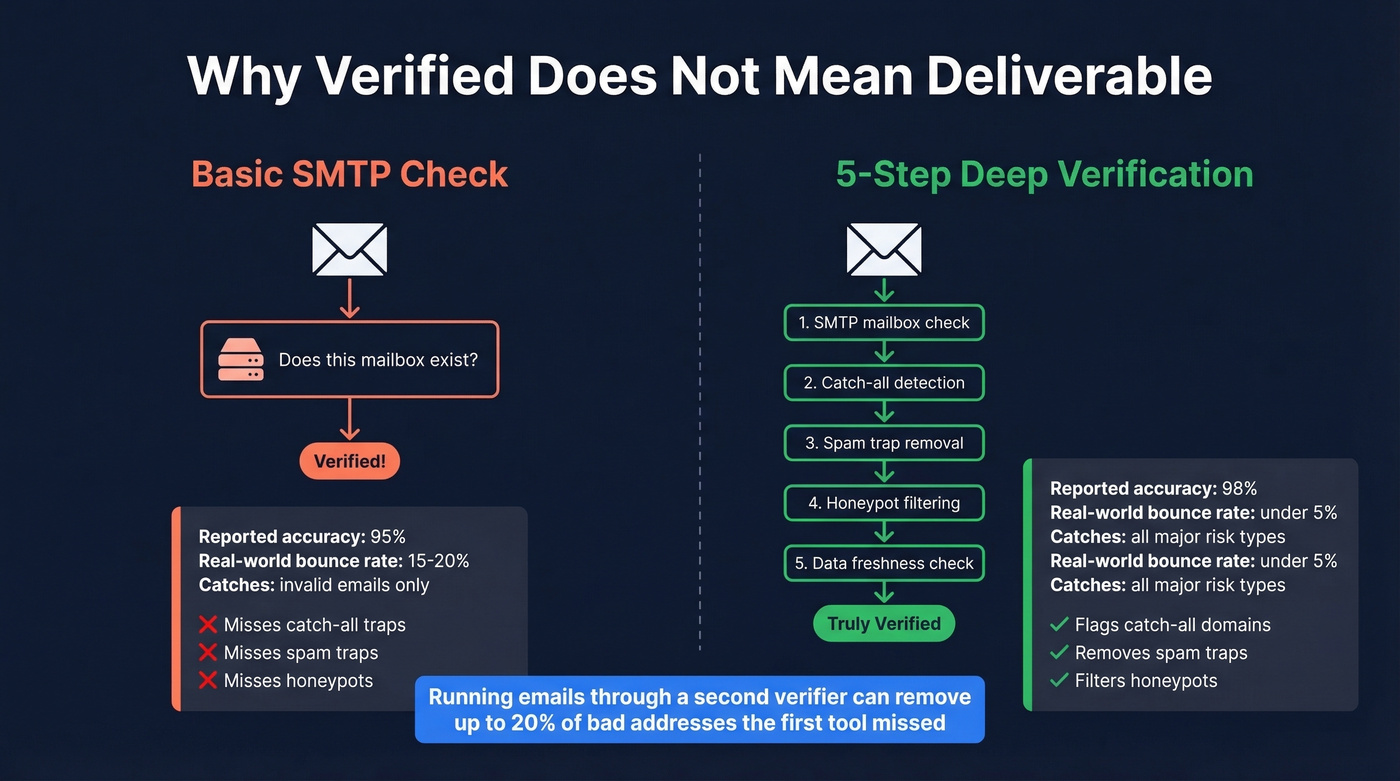
The gap between marketing claims and real-world results comes down to verification depth. A basic SMTP check asks "does this mailbox exist?" and calls it a day. A 5-step process that includes catch-all detection, spam-trap removal, and honeypot filtering catches problems that basic checks miss entirely.
Verify Before You Send
Even with the best email finder, follow these rules:
- Verify within 30 days of sending. An email valid two months ago might not be valid today. Job changes alone invalidate business emails constantly.
- Run a second verification pass. Use one tool to find, another to verify. The overlap between "found" and "truly deliverable" is smaller than you'd think. (See: email verification best practices.)
- Isolate risky sends. Catch-all and unknown-status emails should go through a secondary domain, not your primary one. Protect your main sender reputation at all costs.
- Only send to Valid results. Not catch-all. Not unknown. Valid. Everything else is a gamble with your domain reputation.
What Bad Email Data Actually Costs You
Picture this: 30 of your 100 emails bounce. Your domain gets flagged. Your next 70 emails land in spam. That's not a hypothetical - it's what happens when you skip verification.
An agency sending 500-1,000 emails per day needs to stay under 5% bounce rate. At 5%, that's 25-50 bounces daily. At 2%, it drops to 10-20. The difference compounds fast, and bounce spikes can tank sender reputation in days, not weeks.
A $0 tool that gives you 90% accuracy is more expensive than a $39/mo tool that gives you 98%. The cost isn't the bounced messages - it's the months of sender reputation you burn through rebuilding. If you’re scaling, consider pairing finders with email list cleaning to keep bounce rates down.
Stay Legal
Finding someone's email is legal. Spamming them isn't. Under GDPR, fines run up to EUR 20 million or 4% of global annual turnover. CAN-SPAM penalties hit $46,517 per email. Under UK GDPR/PECR, generating name-based email addresses from public names for unsolicited marketing can violate data protection law - those generated addresses still constitute personal data.
The practical minimum: include a physical mailing address, add a clear unsubscribe link, honor opt-outs within 10 business days, and don't use deceptive subject lines. For EU or UK contacts, you need a legitimate basis for processing. Personalize, be relevant, and make it easy to opt out.
FAQ
How do you find someone's email address for free?
Start with pattern guessing - try {first}@domain.com and verify with a free tool. If that fails, use Google search operators, check the company website, or use a free email finder like Prospeo (75 credits/month) or Hunter (50 credits/month). These methods handle the vast majority of lookups at zero cost.
What's the most common email format?
{first}@domain.com is used by 49.9% of companies. Try that first, then {first}.{last}@domain.com. Those two patterns alone cover the majority of businesses, making pattern guessing the fastest free method.
How do I know if the email I found is real?
Run it through a verification tool and look for a Valid status - not catch-all, not unknown. For high-stakes outreach, verify with two separate tools. Re-verify within 30 days of sending, since job changes and domain switches invalidate addresses constantly.
Why do "verified" emails still bounce?
Data decays fast - someone verified last month may have changed jobs this week. Catch-all domains accept every address, including fake ones, so tools mark them as "found" when they're not truly deliverable. Tools with 5-step verification (including catch-all detection) reduce this problem significantly.
Is it legal to email someone whose address I found online?
Finding a public email is legal. Sending unsolicited marketing may not be, especially under GDPR (fines up to EUR 20M) or CAN-SPAM ($46,517 per violation). Always include an unsubscribe link and make sure your outreach has a legitimate business purpose.